
Wireless Keyboard and Mouse Combo
4.4Editor score
Affordable wireless combo option
Retro round keycap design
Long battery life support
Discover the top colorful keyboards for every setup. We compare design, typing feel, and connectivity to help you find the perfect vibrant input device.
Finding the right colorful keyboards can transform your workspace into a vibrant and inspiring environment. Whether you prefer retro typewriter styles or modern RGB lighting, there is a wide range of options available to suit your personal taste and productivity needs.
This guide compares ten standout models based on their design aesthetics, typing experience, and connectivity features. We evaluated wireless versus wired options, keycap materials, and compatibility across different operating systems to ensure you get the most reliable and stylish choice for your desk.
Each product review highlights specific strengths and potential trade-offs to help you make an informed decision. Keep in mind that availability and details can change over time, so checking the latest information before purchasing is always recommended for the best experience.
4.4Editor score
4.6Editor score

4.7Editor score
The following table provides a side-by-side comparison of all ten models featured in this guide. It highlights key specifications and design elements to help you quickly identify which colorful keyboard aligns best with your specific workflow and aesthetic preferences.


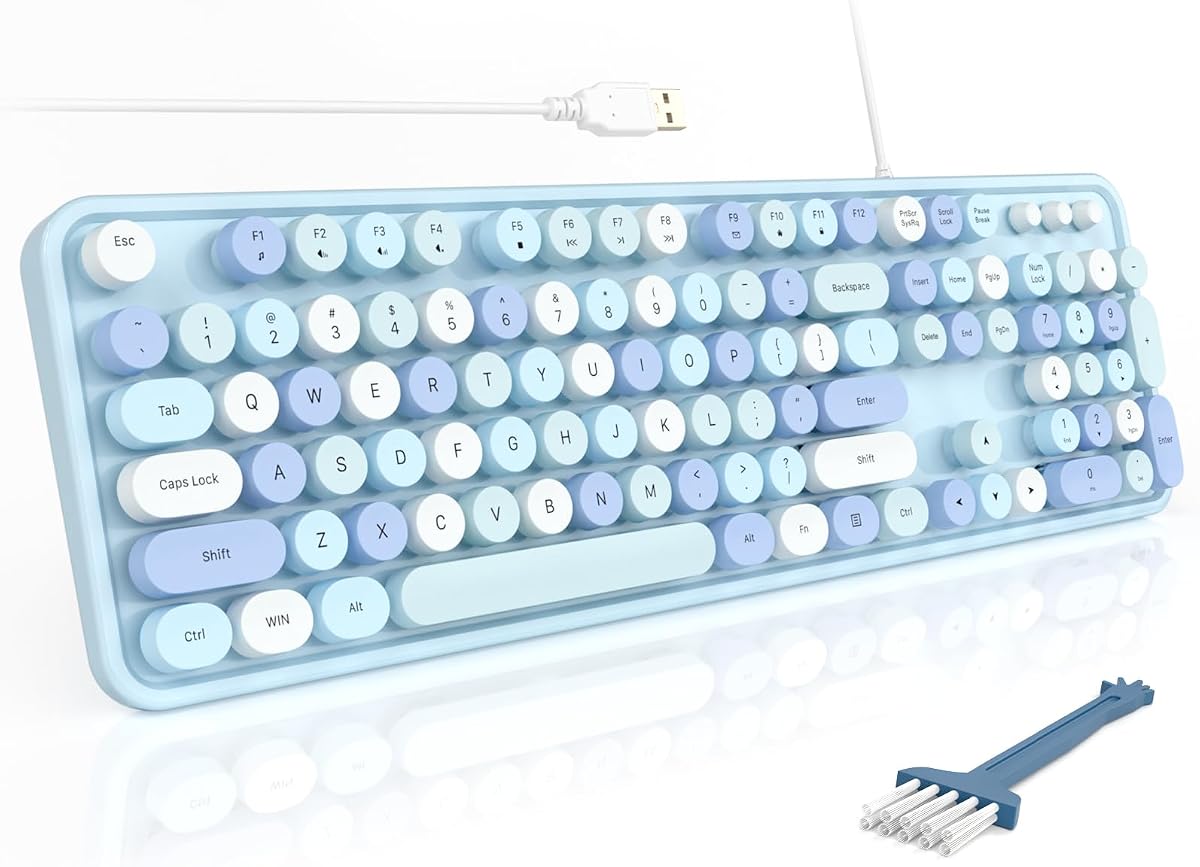
The MOFII Computer Keyboards Wired stands out as a top choice for those seeking a blend of nostalgia and functionality. With its vibrant blue aesthetic and retro round keycaps, it adds a playful yet professional touch to any desk setup. The keyboard delivers a reliable typing experience that suits both work and leisure activities.
We may earn a commission when you buy through this link, at no additional cost to you.
Its design focuses on comfort during extended sessions through an ergonomic foldable stand and anti-slip pads. The keycaps mimic the look of vintage typewriters, offering a satisfying tactile response without excessive noise. This model also includes multimedia shortcuts and a full number pad to enhance productivity across various tasks.
While the wired connection limits placement flexibility compared to wireless models, it ensures a stable link without battery concerns. The included dust brush helps maintain cleanliness easily. Although customization is minimal, the straightforward interface makes it accessible for users who prioritize ease of use.
This keyboard is ideal for professionals and students who want a stylish input device that supports long typing sessions. Its durable construction and quality control ensure longevity. Choosing this model means opting for a balanced combination of retro charm and modern practicality for your daily computing needs.
The foldable stand adjusts the typing angle to reduce wrist strain during long work hours.
Included cleaning tools make it simple to keep the keyboard surface free of dust and debris.
We may earn a commission when you buy through this link, at no additional cost to you.
The KNOWSQT Wireless Keyboard and Mouse Combo offers a complete solution for users wanting a colorful desktop setup without cable clutter. Its MilkTea color theme and round keycaps create a distinct visual appeal that stands out in any environment. The combo includes a 2.4GHz wireless receiver for reliable connectivity.
We may earn a commission when you buy through this link, at no additional cost to you.
Key features include detachable keycaps that allow for deep cleaning, which is rare in this price category. The floating button design provides a soft and quiet typing experience reminiscent of classic typewriters. Automatic power saving modes help extend battery life significantly when the device is not in active use.
While the connection is stable within a thirty-five-foot range, it requires a USB port on the host device. Some users might need adapters for type-C connectors. The low battery indicator ensures you are never caught off guard. However, performance may vary slightly based on environmental interference.
This set is perfect for home offices and corporate businesses needing an affordable upgrade. The separate use of keyboard and mouse adds flexibility. Overall, it balances style and function well for those seeking a tidy and colorful workspace without breaking the budget.
The wireless design eliminates messy cables, keeping your workspace neat and organized.
Detachable keycaps allow you to wash and clean the keyboard thoroughly for better hygiene.
We may earn a commission when you buy through this link, at no additional cost to you.
This retro-style wireless combo presents one of the most accessible entry points for colorful keyboards on the market. With its black and colorful design, it fits various decor styles while maintaining a playful vibe. The shared USB receiver simplifies the setup process significantly for most users.
We may earn a commission when you buy through this link, at no additional cost to you.
Typing feel is improved through concave keycaps that match finger tips comfortably. The square mechanism under each key offers stability and quick rebound. Auto power-saving functions ensure the battery lasts up to thirty-six months with standard usage patterns. Multimedia hotkeys provide quick access to essential functions like volume control.
One limitation is the requirement for AA and AAA batteries which are not included in the box. The wireless range is generous but may face issues in crowded wireless environments. The construction is adequate for daily tasks but may lack the durability of premium models over time.
Ideal for students or home users on a tight budget, this set delivers essential functionality without unnecessary bells and whistles. It is a practical choice for those who want to refresh their setup economically. Ensure you have the right batteries ready to get started immediately.
Long sleep timers help maximize battery life so you replace cells less frequently.
Dedicated hotkeys make it easy to manage music and emails without opening apps.
We may earn a commission when you buy through this link, at no additional cost to you.
The UBOTIE Wireless Keyboards and Mouse Combo brings a striking Purple Rainbow theme to your desk. It is designed with fade-resistant materials to maintain its vibrant look over time. The keycaps offer a classic typewriter clicky feel that many users find satisfying for both writing and coding.
We may earn a commission when you buy through this link, at no additional cost to you.
Stable 2.4GHz wireless technology ensures smooth performance with zero lag up to thirty-three feet. Independent power switches allow you to manage energy usage for the keyboard and mouse separately. This feature extends battery life and offers control over when each component is active.
Compatibility covers Windows and macOS though an adapter might be needed for certain tablets or phones. While the aesthetic is strong, some users may find the key switches too loud for quiet libraries. The build quality is solid but typical for wireless combos in this segment.
This combo is best suited for users who prioritize visual impact alongside reliable wireless performance. It works well in office dorm or home settings. The dedicated support team adds confidence to the purchase. Consider noise levels if you work in shared spaces.
Upgraded materials prevent fading so the keyboard looks fresh even after daily use.
Independent switches let you turn off just the mouse when typing to save power.
We may earn a commission when you buy through this link, at no additional cost to you.
The MOFII Wireless Keyboard in Green Colorful stands out with its unique hue and full-size layout. It includes a numeric keypad which is essential for data entry and accounting tasks. The ergonomic design features a folding holder to maintain an optimal typing angle for wrist health.
We may earn a commission when you buy through this link, at no additional cost to you.
Wireless stability is ensured through a reliable 2.4G connection that reaches up to ten meters. Auto-sleep features help reduce battery consumption significantly. The keyboard and mouse both offer long battery life estimates when used with standard AA cells. Removable keycaps simplify cleaning efforts.
Users should note that batteries are not included so purchasing them separately is necessary. The wireless nature means there is a slight chance of interference in environments with many devices. However, the stable transmission usually mitigates this issue for most standard home office setups.
This keyboard is a great gift choice for friends who appreciate vibrant accessories. It balances utility and style well for general computing tasks. The warranty coverage adds a layer of security to the purchase. It is a solid pick for those wanting a green-themed input device.
The full size layout with number pad boosts efficiency for spreadsheet and data work.
Folding holders prevent wrist strain by keeping the keyboard at a comfortable slope.
We may earn a commission when you buy through this link, at no additional cost to you.
The FOPETT 2.4GHz Wireless Keyboard and Mouse Set prioritizes quiet operation with its silent micro-motion technology. This is ideal for shared offices or late-night work sessions where noise could be disruptive. The laser-engraved characters ensure key labels remain visible and crisp over time.
We may earn a commission when you buy through this link, at no additional cost to you.
A splash-resistant conductive film offers protection against accidental spills. The keyboard includes a power-saving switch to manually control battery drain. The shared nano receiver stores inside the mouse for convenient transport. This makes it easy to take your setup to different locations.
While the compatibility is broad across Windows versions, some Mac users may find limited functionality with hotkeys. The warranty is extensive covering three years of worry-free use. The blue colorful design adds a touch of vibrancy without overwhelming the desk aesthetic.
This set is suitable for families or office environments where noise reduction is a priority. The waterproof design adds durability against daily accidents. If you value a clean workspace and long-term support, this model provides excellent value. Ensure you have the correct batteries for both devices.
Silent clicks prevent disturbing others while you type or browse the web quietly.
Splash resistance helps the keyboard survive accidental spills without short circuits.
We may earn a commission when you buy through this link, at no additional cost to you.
The Atelus Computer Wired Keyboard combines a retro typewriter look with practical wired reliability. Its purple colorful finish gives it a unique appeal for those who want to avoid wireless complications. The detachable keycaps make it easy to clean dust from between the keys effectively.
We may earn a commission when you buy through this link, at no additional cost to you.
Plug and play functionality ensures you can start using it immediately upon connecting the USB cable. The ergonomic ABS keycaps provide a comfortable feel and a crisp sound when pressed. It includes indicators for caps lock to prevent typing errors during focused work.
While the cable limits mobility to the desk area, it guarantees constant power without battery replacements. The large number pad is useful for quick data entry. Some users may find the cable management necessary for a tidy desk but the stability is worth the trade-off.
This keyboard is a perfect gift choice due to its packaging and aesthetic. It is best for stationary workstations where mobility is not a priority. The reliability of a wired connection makes it great for uninterrupted tasks. Consider your desk layout before making this purchase.
A wired connection means you never have to recharge or replace batteries for power.
Detachable caps allow for simple cleaning to keep the keyboard looking fresh and new.
We may earn a commission when you buy through this link, at no additional cost to you.
The Womier SK80 75% Keyboard is a standout model for enthusiasts seeking advanced features and multimedia integration. Its color display screen allows you to visualize system stats and custom gifs making it highly interactive. The gasket mount design enhances stability and reduces typing noise for immersive sessions.
We may earn a commission when you buy through this link, at no additional cost to you.
It comes with hot-swappable sockets allowing you to change mechanical switches without soldering. This provides incredible flexibility for tuning the acoustic performance to your preference. The RGB backlighting includes numerous effects that can be adjusted through dedicated software on Windows systems.
Users on macOS may find limited software customization compared to Windows but the hardware remains functional. The frog green aesthetic adds a cohesive and charming look. It requires a bit more setup and driver installation than plug and play options. However the payoff is a highly personalized experience.
This keyboard is best for gamers and typists who love tinkering with their setup. It offers the ultimate combination of style and technical capability. If you want a desk centerpiece that reacts to your system state this is the top choice. It is definitely a premium option worth the investment.
The built-in screen shows volume levels and connection modes without needing extra tools.
Hot-swap sockets allow you to swap switches easily without any soldering tools needed.
We may earn a commission when you buy through this link, at no additional cost to you.
The UBOTIE Colorful Wireless Keyboard and Mouse Combo features a distinctive mirror surface that reflects subtly on the panel. This gives it a premium elegant look that stands out from standard colorful keyboards. The updated color coating resists fading even with daily usage ensuring long-lasting beauty.
We may earn a commission when you buy through this link, at no additional cost to you.
It uses a reliable wireless chip for fast response times and durable performance. The shared nano receiver helps keep your workspace organized and clutter-free. Compatible with both Windows and macOS it offers a versatile setup for most users though some shortcuts may not work on newer macOS versions.
Cleaning is simple but the mirror finish may show fingerprints more than matte surfaces. The vintage typewriter inspired keys provide a smooth and clicking typing experience. This makes it a thoughtful gift choice for friends and coworkers who appreciate stylish accessories.
Ideal for home office and school use this set balances style and functionality well. It is perfect for those who want a unique aesthetic without sacrificing wireless convenience. Consider your willingness to clean the surface regularly. It remains a strong contender for design-conscious buyers.
The mirror-finish panel creates a modern desktop look that enhances any room setting.
Shared receivers keep your workspace clean by eliminating the need for multiple dongles.
We may earn a commission when you buy through this link, at no additional cost to you.
The HUO JI Wired Gaming Keyboard brings gaming functionality to colorful keyboards with its rainbow LED backlit modes. It is designed to look striking in low light conditions with adjustable brightness settings. The double shot injection keycaps ensure the characters never fade even with heavy use.
We may earn a commission when you buy through this link, at no additional cost to you.
Its ergonomic arc keycap design prevents fatigue during long gaming or work sessions. The keyboard features a triple protection design that prevents damage from spilled drinks. This makes it durable for casual use where accidents might happen. The base plate is thick to provide stability.
While it lacks advanced software customization, it offers essential non-conflict keys and multimedia shortcuts. Compatibility is wide across various Windows versions and even includes some Mac support. The cable length is sufficient for most desks but restricts movement. It is a solid entry-level choice for gamers.
This model is perfect for students or gamers who want a vibrant and functional keyboard without high costs. The waterproof design adds peace of mind. If you prioritize durability and colorful lighting on a budget this is an excellent pick. Ensure your system supports the USB connection.
Rainbow lighting modes enhance visibility in dark rooms for better focus during play.
Water-resistant design prevents liquid damage from spilled drinks or coffee.
We may earn a commission when you buy through this link, at no additional cost to you.
Selecting the right colorful keyboard involves considering several key factors beyond just aesthetics. This section explains what features to prioritize to ensure you find a model that meets your functional needs while adding style to your desk.
Decide between wired and wireless options based on your setup needs. Wireless keyboards offer flexibility and a cleaner desk but require batteries or charging. Wired models ensure a stable connection without power concerns but can limit movement around your workspace.
Choose wireless for clutter-free aesthetics or wired for constant power and reliability.
Keycaps come in various shapes like round retro caps or standard square ones. Round caps offer a vintage look while square caps are standard for most users. Material quality affects durability and the ability to print vibrant colors that resist fading over time.
Look for double-shot or laser engraved keycaps to ensure the colors remain clear and crisp.
For wireless models check the advertised range to ensure it covers your desk distance. A stable 2.4GHz connection is often more reliable than Bluetooth for preventing lag. Consider interference from other devices and ensure the receiver is easily accessible on your computer.
Prioritize models with long range claims and proven stability reviews for best results.
Battery life varies significantly between models so check how long a charge lasts or how often batteries are replaced. Auto-sleep features help conserve power when the keyboard is idle. Some models use rechargeable batteries while others rely on standard AA or AAA cells.
Choose a battery system that matches your willingness to manage power replacements or charging.
Comfort is crucial if you type for long hours. Look for keyboards with foldable stands or adjustable height settings to maintain a neutral wrist position. Anti-slip pads ensure the keyboard stays in place during intense typing or gaming sessions.
Opt for ergonomic stands and soft-touch surfaces to reduce fatigue during daily use.
Ensure the keyboard works seamlessly with your operating system such as Windows or macOS. Some multimedia keys may not function on all systems so check the manual for specifics. Also consider if you plan to switch between devices and if the keyboard supports that feature.
Verify system compatibility before buying to avoid issues with function keys or shortcuts.
Colorful keyboards may require more maintenance to keep the look fresh. Detachable keycaps make cleaning easier than sealed designs. Check for features like splash resistance if you often drink near your desk to prevent accidental damage.
Look for durable coatings and waterproof features to extend the lifespan of your keyboard.
Price varies from basic budget options to premium mechanical models. Determine how much you are willing to spend for the color and extra features. Higher priced models often offer better build quality and customization but basic ones still provide vibrant styles.
Set a budget limit and compare features to find the best value for your specific needs.
Start by connecting your keyboard to your computer via USB or pairing it wirelessly through the included receiver. Ensure the switch is on and the device is powered. Install any necessary drivers or software to enable full functionality like multimedia keys or lighting effects.
Keep your keyboard clean by using the included dust brush to remove crumbs and debris from between the keys. For deeper cleaning removable keycaps can be washed with water and dried completely before reinserting. Wipe the surface regularly with a soft dry cloth to maintain the vibrant color.
Manage your power by enabling sleep modes or turning off the device when not in use to save battery life. Check battery levels regularly if your model has indicators to prevent unexpected shutdowns. Store batteries separately for long periods if you do not plan to use the keyboard often.
Most colorful keyboards are compatible with Mac systems as they use standard USB or wireless protocols. However, some multimedia keys may not function without specific drivers. Check the product specifications to ensure full compatibility with macOS before purchasing.
Use a soft brush to remove loose dust and debris gently. For surface cleaning wipe with a dry or slightly damp cloth avoiding harsh chemicals. If keycaps are removable wash them separately and dry them completely before putting them back to protect the design.
Typing speed depends more on key switch type and personal preference than color. Retro round caps offer a unique feel that some users prefer while standard caps support traditional layouts. Practice and comfort are the main factors in maintaining your typing speed.
Some models like mechanical keyboards with RGB allow extensive color customization through software. However most colorful keyboards have fixed pre-set color schemes determined by the manufacturer. Check if the product has programmable software before buying if you want to change colors.
A wireless colorful keyboard generally lasts several years with proper care. The battery life depends on usage patterns and quality of components. Replacing batteries regularly and avoiding spills can help extend the operational life of the device significantly.
Many colorful keyboards include gaming features like non-conflict keys and backlit modes suitable for gaming. However mechanical models offer faster response times. If you game frequently look for models with dedicated gaming optimizations to ensure the best experience.
Choosing the right colorful keyboard enhances your workspace with style and personality. Whether you prefer the quiet comfort of the MOFII wired model or the advanced customization of the Womier SK80, there is a model to fit every taste and need.
Prioritize features like connectivity type and keycap material to ensure long-term satisfaction. A colorful keyboard should not only look good but also perform reliably for your daily tasks. Balancing aesthetics with ergonomics is key to finding the perfect match.
Remember that availability and features may vary over time so check the latest product details before purchasing. We hope this guide helps you find a vibrant input device that brings joy to your computing routine.