
ARCTIC Case Fan Hub
4.7Editor score
Ten PWM fan ports available
SATA power input included
Compact dimensions for small cases
Compare the top ten Fan Control Hub for PC options for managing airflow and RGB lighting in your custom build with expert insights on performance and cable
Managing airflow and lighting in a modern PC build requires efficient tools. A Fan Control Hub for PC consolidates multiple fan connections into a single motherboard header. This simplifies wiring and ensures consistent power delivery across all cooling components for optimal system stability.
We evaluated ten leading hubs based on port count, power handling, and mounting options. Our analysis covers PWM compatibility, ARGB support, and installation ease. Each model offers distinct advantages for different chassis sizes and cooling demands found in today's enthusiast systems.
Each pick highlights key features like magnetic mounting or SATA power inputs. Prices fluctuate frequently so always check current listings before buying. Our guide helps you select the right hub to keep your PC running cool and looking stylish without cluttering your build with extra cables.
4.7Editor score

4.7Editor score
4.6Editor score
This side-by-side comparison reviews every selected hub across key technical specifications. You will see differences in port counts, power inputs, and mounting styles to help you decide which unit fits your specific case and cooling requirements best.


The ARCTIC Fan Controller stands out as a top choice for users needing precise control over multiple fans. With a high rating and robust build quality, it delivers reliable performance for complex cooling setups. Its ability to handle ten ports individually sets it apart from standard hubs.
We may earn a commission when you buy through this link, at no additional cost to you.
Each port offers independent PWM control allowing you to fine-tune speeds based on specific thermal needs. The unit supports up to four point five amperes total ensuring sufficient power for high-performance fans. Native driver support means you can monitor and adjust settings seamlessly on Windows or Linux systems.
While it excels in performance, you might need to install specific drivers for full functionality on Linux. The adhesive mounting is strong but could degrade if exposed to high heat over years. These are minor trade-offs given the superior control it offers.
Buy this if you need maximum customization and have a large case with many fans. It is ideal for enthusiasts who want to optimize airflow without cluttering their motherboard headers. The investment pays off in quieter and cooler system operation.
You can set different speeds for intake and exhaust fans independently. This ensures optimal airflow balance without relying on a single motherboard signal.
Support for Windows and Linux makes it versatile for diverse user needs. You do not have to switch operating systems to get better fan management.
We may earn a commission when you buy through this link, at no additional cost to you.
The ARCTIC Case Fan Hub is an excellent budget option for expanding your fan connectivity. It supports up to ten fans and maintains a low profile inside your chassis. High ratings reflect its reliability and ease of use for basic cooling needs.
We may earn a commission when you buy through this link, at no additional cost to you.
This hub distributes a single PWM signal to all connected fans synchronously. It draws power directly from the SATA interface ensuring stable operation without overloading your motherboard. The compact design fits easily in most cases without blocking other components.
You cannot control individual fan speeds separately since they all follow the same signal. Only the first port reports RPM to the system which limits monitoring options. For most builds this is acceptable and simplifies management significantly.
Choose this if you want a simple and cheap way to add more fans. It is perfect for standard gaming PCs where uniform cooling is sufficient. You get professional cable management without spending much money.
Adding multiple fans becomes very affordable with this unit. You save money compared to buying individual headers or expensive controllers.
SATA power ensures fans run smoothly without voltage drops. This protects your hardware from potential power issues during high loads.
We may earn a commission when you buy through this link, at no additional cost to you.
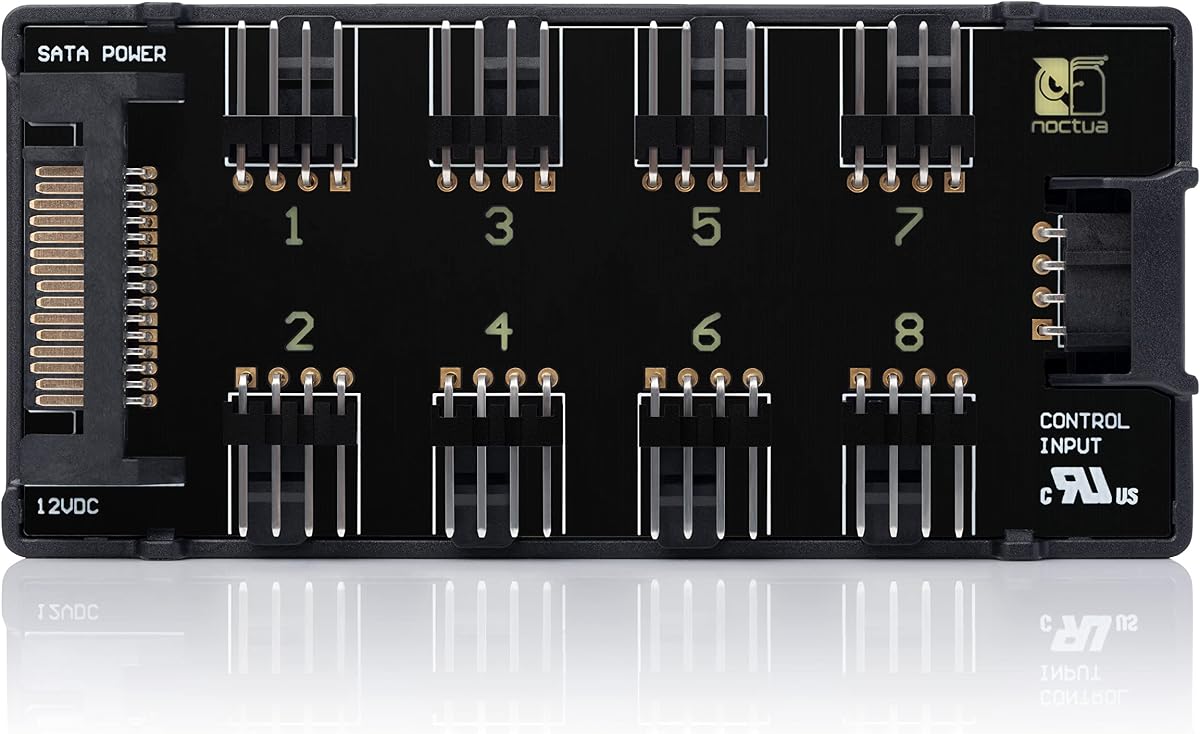
The Noctua NA-FH1 offers premium quality and safety features for serious builders. It comes with a six year warranty reflecting confidence in its durability. The magnetic mounting makes installation flexible and secure in most steel cases.
We may earn a commission when you buy through this link, at no additional cost to you.
Safety fuses protect against short circuits and overcurrents ensuring your hardware stays safe. It supports simultaneous SATA and four-pin inputs for versatile power setups. The unit meets international safety standards which adds peace of mind.
It is more expensive than many other options which might not fit every budget. The eight port limit means you might need multiple units for very large arrays. However the build quality justifies the cost for long term use.
Buy this if you value reliability and safety above all else. It is ideal for systems where downtime is not an option. You get a trusted name brand that delivers consistent performance.
Integrated fuses prevent electrical damage during spikes or faults. This protection is crucial for expensive components in custom builds.
Strong magnets hold the hub firmly in place without screws. You can reposition it easily during cable management phases.
We may earn a commission when you buy through this link, at no additional cost to you.
This Thermalright hub focuses on both cooling and lighting for modern builds. It supports eight groups of ARGB fans ensuring your system looks great while staying cool. The high rating indicates users appreciate its reliable performance and features.
We may earn a commission when you buy through this link, at no additional cost to you.
It connects directly to SATA power maintaining stability even under heavy loads. The design supports 5V ARGB interfaces which are common in new RGB fans. Clear markings help prevent incorrect plugging that could damage equipment.
It does not support older 12V RGB fans which limits compatibility with some legacy parts. It also lacks speed control so you rely on your motherboard for RPM management. These limits are expected for a hub at this price point.
Choose this if you want a balanced hub for lighting and cooling. It works well with newer ARGB components. You get a tidy setup without complex wiring issues.
All connected lights sync perfectly for a unified look. This enhances the visual appeal of your PC case significantly.
Strong adhesive keeps the hub fixed in place. You do not need to worry about it moving during transport.
We may earn a commission when you buy through this link, at no additional cost to you.
The Thermalright X12 hub offers exceptional capacity for large cooling setups. It supports twelve groups of fans which is rare at this price point. The white housing matches many modern PC cases perfectly for a clean look.
We may earn a commission when you buy through this link, at no additional cost to you.
Direct SATA input ensures stable power delivery even when all fans are running. A red interface helps identify the correct port for speed reading. This simplifies connections for users who might get confused by multiple ports.
Note that the SATA cable is not included so you must buy one separately. It also does not adjust speeds itself so you depend on motherboard settings. These are minor details that do not impact core functionality.
Buy this if you need maximum fan support in one unit. It fits large cases with many radiators or exhaust fans. You get high capacity without breaking the bank.
Twelve ports handle complex cooling needs easily. You avoid the hassle of stacking multiple hubs.
White housing blends well with light themed builds. It looks professional inside your PC case.
We may earn a commission when you buy through this link, at no additional cost to you.
This upHere hub combines PWM control with ARGB lighting management. It comes with a remote control which adds convenience for changing colors. The magnetic mounting makes installation quick and flexible inside your chassis.
We may earn a commission when you buy through this link, at no additional cost to you.
You can connect up to nine fans or lights using this compact unit. The front facing panel allows direct sync with connected RGB devices. It includes all necessary cables for plug and play setup.
The remote needs batteries which is a small maintenance task. Sync functionality might vary depending on fan brands used. These are manageable issues for a hub with this feature set.
Choose this if you want easy RGB control without software. It is great for users who prefer physical controls. You get a complete solution right out of the box.
Change lighting effects without restarting your PC. This saves time during customization sessions.
Mount the hub anywhere with a metal surface. This flexibility helps in cramped cases.
We may earn a commission when you buy through this link, at no additional cost to you.
This Thermalright hub provides solid support for up to ten fans in one unit. It uses SATA direct output to maintain consistent power under heavy loads. The compact design helps keep internal wiring tidy and organized.
We may earn a commission when you buy through this link, at no additional cost to you.
You can read speed on one red port which simplifies monitoring. The adhesive mounting is strong enough to hold it securely. It works well for standard cases needing extra fan headers.
Note that the SATA cable is not included in the package. You need to purchase one separately to connect power. Also only one port reports speed which is common for hubs.
Buy this if you need a reliable ten port solution. It is ideal for standard cooling upgrades. You get stable performance without complex setup.
SATA input ensures fans run smoothly without fluctuations. This prevents stuttering or shutdowns during operation.
Compact design reduces cable clutter inside the case. Your build looks cleaner and more professional.
We may earn a commission when you buy through this link, at no additional cost to you.
The Thermalright X8 hub balances cooling and lighting support well. It supports eight ARGB fans allowing for a vibrant system look. The black housing blends into most cases without standing out.
We may earn a commission when you buy through this link, at no additional cost to you.
Connectors on both sides make routing cables easier. Stable output via SATA power ensures consistent performance during loads. The compact size helps fit into smaller chassis designs.
You must buy the SATA cable separately to connect power. It lacks speed adjustment so you rely on motherboard settings. These are standard limitations for passive hubs.
Choose this if you want a compact RGB solution. It works well for smaller builds. You get good performance in a small package.
Both sides offer connectors for flexible routing. This reduces strain on your internal cables.
Small size ensures it fits in tight spaces. You avoid blocking other components inside the case.
We may earn a commission when you buy through this link, at no additional cost to you.
The J-10 Pro hub offers flexibility with nine or ten port options. It includes RF remote and chassis key control for easy access. Magnetic suction makes installation simple and secure in any steel case.
We may earn a commission when you buy through this link, at no additional cost to you.
SATA power input ensures stable operation even with many fans connected. It supports temperature control so fans adjust automatically. This helps maintain quiet operation when the system is idle.
The remote needs batteries which is a minor upkeep task. Only one port reports RPM which limits detailed monitoring. These are common features for hubs in this category.
Buy this if you want multiple control options. It suits users who like physical switches. You get a reliable hub with extra features.
Control lights without opening your case. This adds convenience for frequent adjustments.
Fans adjust speed based on system heat. This optimizes cooling without manual input.
We may earn a commission when you buy through this link, at no additional cost to you.
This Thermalright hub delivers reliable performance for a great price. It supports eight fan groups and ARGB lighting for a balanced setup. The black color ensures it stays hidden in most cases.
We may earn a commission when you buy through this link, at no additional cost to you.
Direct SATA power input maintains stable output even under high loads. It supports synchronized lighting through motherboard interfaces easily. You get clear markings to prevent incorrect connection issues.
Note the SATA cable is not included in the box. You must buy one separately to get power. It also does not adjust speeds itself which limits flexibility.
Choose this if you want value without sacrificing stability. It works well for standard gaming builds. You get a solid hub for the money.
SATA input reduces voltage loss for fans. This ensures consistent operation under stress.
Black housing blends with most PC interiors. You avoid a messy look inside your case.
We may earn a commission when you buy through this link, at no additional cost to you.
Selecting the right fan hub depends on your specific cooling and lighting needs. Consider factors like port count, power input, and mounting options before making a decision.
Determine how many fans you need to connect. Standard cases often have fewer motherboard headers than fans installed. A hub with sufficient ports eliminates the need for Y-splitters.
Choose a hub with more ports than your current fans. This allows room for future expansion without buying new hardware.
Check if the hub uses SATA or Molex power inputs. SATA is more common in modern supplies and offers cleaner connections. Ensure your PSU has available cables for the hub.
SATA inputs provide stable power for high RPM fans. Always verify you have a free SATA cable before buying.
Ensure the hub supports PWM signals for speed control. Most modern fans use 4-pin PWM connectors. Some hubs only pass signals without reading RPM data.
Look for hubs that read speed from at least one port. This helps your system monitor fan health effectively.
Verify 5V ARGB compatibility if you have RGB fans. Many hubs do not support 12V RGB connectors. Mismatched plugs can damage hardware so check specifications.
Select a hub that matches your lighting standards. This prevents costly errors during installation.
Consider how the hub will attach inside your case. Magnetic mounting offers flexibility while adhesive is permanent. Ensure the chosen method fits your case materials.
Magnetic hubs are easier to move during builds. Adhesive ones stay fixed but might leave residue later.
Look for units with safety features like short circuit protection. Higher quality materials prevent overheating under load. Trusted brands often include better warranties.
Quality ensures the hub lasts as long as your build. Do not compromise on safety for a lower price.
Check the length of included cables for reach. Long cases may need extension cables for connectivity. Poor cable management can block airflow inside.
Opt for hubs with longer cables if your case is large. This keeps wiring tidy and avoids bends.
Some hubs include remote controls for RGB adjustments. This adds convenience without opening the PC. Ensure the remote is easy to use and compatible.
Remote controls simplify changes for lighting zones. They are great for users who adjust aesthetics often.
Connect the SATA power cable from your PSU to the hub. Ensure it is firmly plugged to avoid intermittent power issues. Route the cable away from fans to prevent contact.
Plug each fan into the correct port based on color. Match the arrow on the plug to the hub markings. This prevents damage to your lighting and fans.
Secure the hub inside your case using adhesive or magnets. Place it where cables can reach easily. Clean dust off the hub annually to maintain performance.
A Fan Control Hub for PC is a device that connects multiple fans to a single motherboard header. It distributes power and control signals to fans. This simplifies wiring and expands fan capacity.
Most hubs work with standard 4-pin PWM headers. Always check compatibility with your specific motherboard. Some older boards may not support certain features.
Hubs typically support between eight and ten fans. Some specialized models offer more ports. Check the power rating to ensure it handles the load.
Basic hubs pass speed signals but do not adjust them. Some premium models include software or remote control. You still need motherboard BIOS settings for full control.
Yes most hubs require a SATA or Molex power cable. This supplies power to all connected fans. It prevents overloading your motherboard headers.
Many hubs use magnets or strong adhesive stickers. Ensure the surface is clean and dry before attaching. Some cases allow screw mounting for better stability.
We reviewed ten top hubs offering diverse features for every budget. From budget friendly models to premium units with warranties there is a pick for you. Each option simplifies cable management and cooling control.
Prioritize power input and port count to match your build. Ensure ARGB compatibility if lighting is important to you. Safety features and mounting styles also matter for long term use.
Prices change often so check current listings before buying. Verify all details on the product page to ensure compatibility. With the right hub your PC build will run cooler and look cleaner.