
TobenONE 18-in-1 DisplayLink Docking Station
4.5Editor score
Four HDMI ports for quad displays
120W power adapter included
Extensive port selection
This expert guide compares the top docking stations with quad monitor support for Mac and Windows, evaluating display capabilities, port selection, and
Modern professionals often need multiple screens to boost productivity and manage complex workflows efficiently. A docking station with quad monitor support allows you to connect four high-resolution displays through a single cable, transforming your laptop into a powerful desktop workstation.
We compared ten top-rated docking stations based on display resolution, port variety, power delivery, and compatibility with major operating systems. Our analysis focuses on models that reliably support four external monitors while offering robust connectivity for peripherals like keyboards, mice, and storage devices.
Each product in this list showcases key specifications, real-world performance notes, and pros and cons to help you make an informed decision. Please note that prices and availability can change frequently, so verify the latest details before purchasing your ideal docking solution.
4.5Editor score

4.7Editor score
4.6Editor score
This side-by-side comparison highlights the key specifications of each docking station to help you quickly identify the best fit for your workflow and device ecosystem.

This entry currently lacks specific product details in the source data, making it difficult to provide a detailed review. We recommend visiting the Amazon listing directly to confirm current specifications before purchasing.
We may earn a commission when you buy through this link, at no additional cost to you.
Without verified information on ports, power delivery, or display capabilities, we cannot accurately assess its performance or value compared to other options in this roundup.
The main trade-off here is uncertainty. Buyers may find competitive options with clearer specifications and better-documented features at similar price points.
Proceed with caution and prioritize products with complete technical documentation to ensure your workstation needs are fully met.
Always check the product details on the retailer site to confirm display and port capabilities before purchase.
Products with complete data allow you to make better-informed decisions and avoid compatibility issues.
We may earn a commission when you buy through this link, at no additional cost to you.
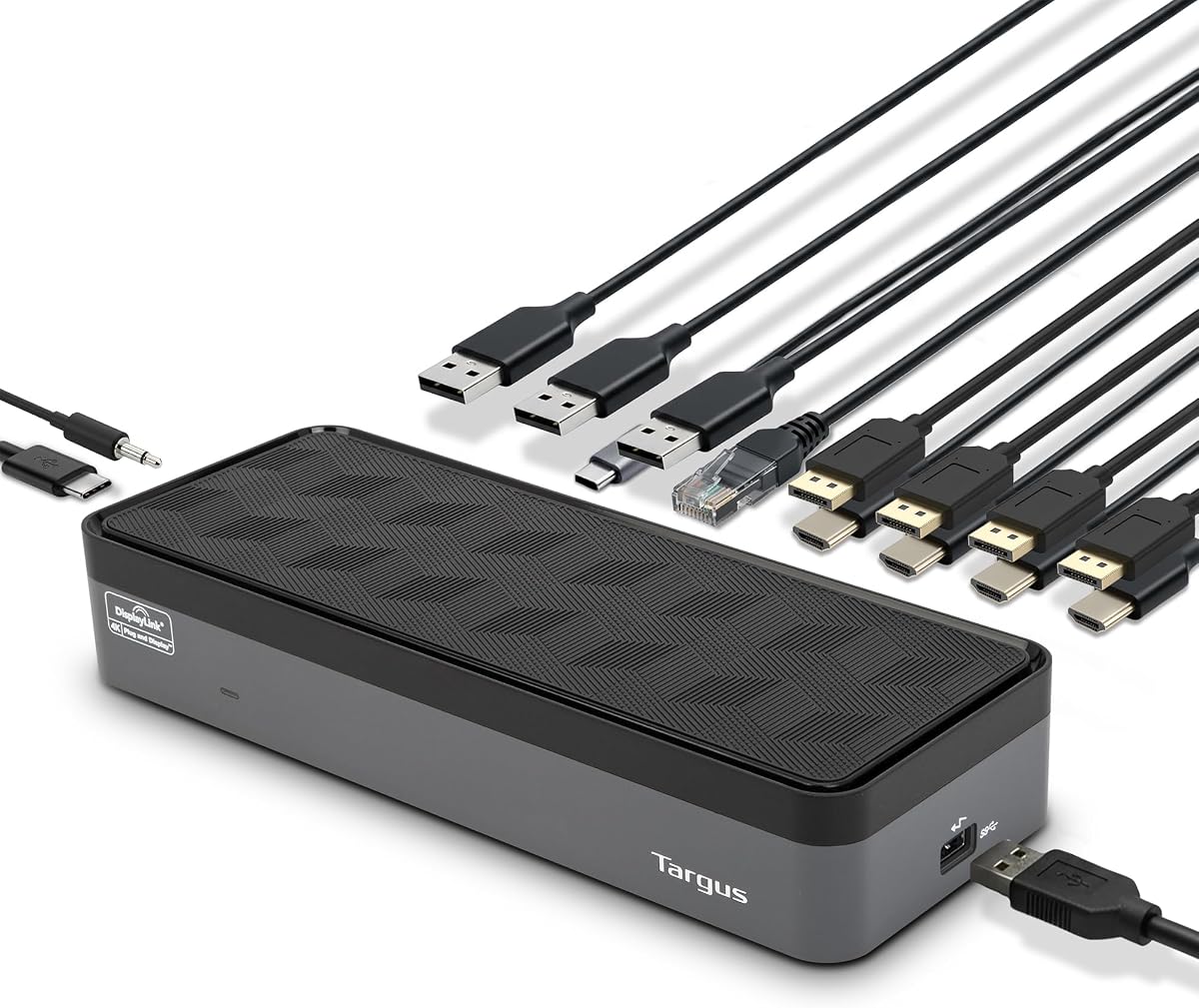
The Targus USB-C Universal Quad 4K Docking Station is a versatile solution designed to expand your laptop into a full workstation with up to four external monitors. It holds a solid 4.4-star rating from users who appreciate its flexibility and broad compatibility with legacy devices.
We may earn a commission when you buy through this link, at no additional cost to you.
This dock supports single 5K or four 4K UHD displays through a mix of HDMI and DisplayPort connections, giving you significant flexibility in monitor arrangement. Its Alt Mode compatibility, along with included power tips and adapters, makes it suitable for older or non-USB-C laptops from brands like Dell, HP, and Lenovo.
The primary trade-off is its reliance on host laptop Alt Mode capabilities, which can limit performance on some modern USB-C-only devices. Additionally, it does not include its own power supply, so you must use an external charger for stable operation.
Buy this dock if you need a universal solution that supports both modern and legacy laptops while offering extensive display options. It is an excellent choice for professionals who value flexibility and compatibility over the latest Thunderbolt features.
Thanks to Alt Mode support and included adapters, this dock works with a wide range of laptops including older USB-A models.
Choose from HDMI or DisplayPort connections to match your existing monitors, with support for resolutions up to 4K at 60Hz.
We may earn a commission when you buy through this link, at no additional cost to you.
The TobenONE DisplayLink Docking Station is a powerful triple or quad monitor dock that offers extensive port selection and strong power delivery. With a 4.4-star rating, it is praised for its ability to run multiple 4K displays from a single USB-C connection, making it ideal for multitaskers.
We may earn a commission when you buy through this link, at no additional cost to you.
This dock features 18 ports including HDMI and DisplayPort outputs that can support up to four 4K@60Hz displays on Windows systems. It also includes a robust 120W power adapter, reducing cable clutter by charging your laptop and the dock with one connection.
One limitation is macOS compatibility, which supports only three external monitors instead of four. Additionally, drivers are required for full functionality, which may be a hurdle for users who prefer plug-and-play setups without software installation.
Consider this dock if you need extensive port options and strong charging capabilities while working on Windows. Its comprehensive connectivity and included power supply make it a strong contender for power users needing a versatile workstation setup.
With 18 ports including USB, HDMI, DP, and Ethernet, you can connect nearly all your peripherals without additional hubs.
The 120W adapter ensures stable power for both your dock and laptop, reducing the need for multiple chargers.
We may earn a commission when you buy through this link, at no additional cost to you.
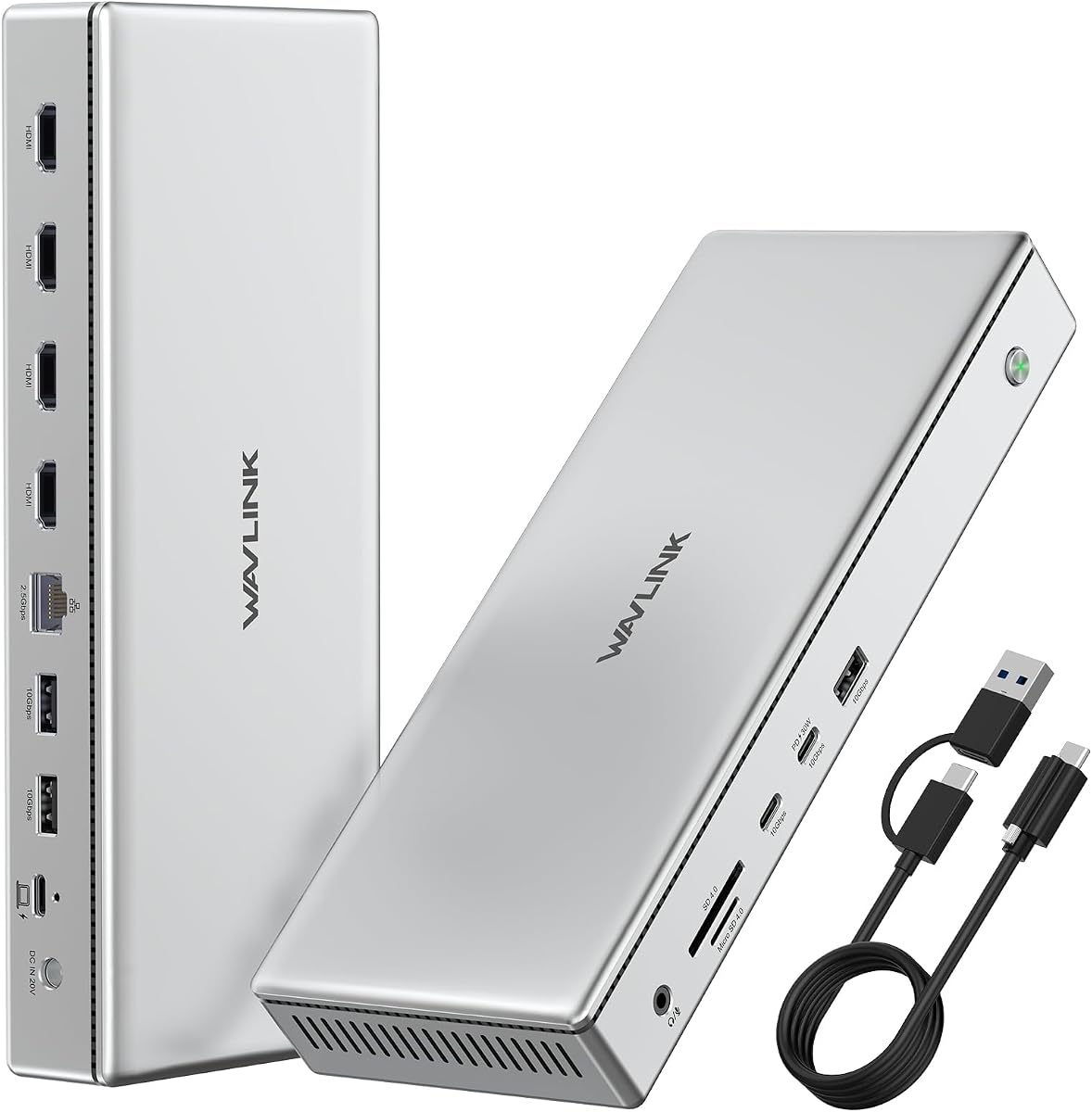
The WAVLINK Pro Docking Station is specifically designed to help Mac users overcome display limitations by supporting up to four 4K@60Hz HDMI outputs via DisplayLink technology. With a 4.0-star rating, it is appreciated for its robust port selection and premium build quality.
We may earn a commission when you buy through this link, at no additional cost to you.
Featuring 15 ports including four HDMI outputs, 2.5G Ethernet, and SD card readers, this dock is a strong choice for creative professionals needing quick access to storage and fast networking. Its 160W power adapter provides ample power for both the dock and connected laptop.
Some users report that driver installation is necessary, and the rating suggests occasional performance or compatibility issues may occur. The aluminum body helps with heat dissipation, but proper ventilation is still recommended during extended use.
If you are a Mac user needing four external displays and value build quality, this dock is a viable option. Just ensure you are comfortable installing drivers and checking compatibility before purchase.
This dock uses DisplayLink to enable four 4K displays on macOS, overcoming Apple's native port limitations.
The aluminum housing and 15 ports provide durability and extensive connectivity for creative and professional workflows.
We may earn a commission when you buy through this link, at no additional cost to you.
The StarTech Thunderbolt 5 Universal Docking Station stands out as a premium option for professionals requiring top-tier performance and reliability. With a 4.7-star rating, it is highly regarded for its driverless operation and impressive display capabilities across both Windows and macOS systems.
We may earn a commission when you buy through this link, at no additional cost to you.
This dock supports up to four 4K@60Hz displays on Windows and dual 6K on Apple Silicon Macs, delivering exceptional visual fidelity. The 140W Power Delivery ensures your laptop stays charged even under heavy multitasking loads, and its Thunderbolt 5 connectivity provides blazing-fast data speeds.
The trade-off is its higher price and the requirement for a Thunderbolt 5 host, which may not be available on all laptops. However, the secure K-slot lock and rigorous testing add value for enterprise deployments and shared workspaces.
Invest in this dock if you want the fastest connectivity, robust security features, and excellent display performance without driver headaches. It is ideal for IT professionals and power users who need a reliable, high-end solution.
No software installation is required for full functionality on macOS or Windows, simplifying deployment and troubleshooting.
MacBook Pro users with M-series chips can take full advantage of dual 6K display support for maximum productivity.
We may earn a commission when you buy through this link, at no additional cost to you.
The TobenONE 18-in-1 DisplayLink Docking Station delivers strong quad monitor support at a budget-friendly price. With a 4.5-star rating, it is a top pick for users seeking extensive connectivity without spending a premium on Thunderbolt features.
We may earn a commission when you buy through this link, at no additional cost to you.
Featuring four HDMI ports that support up to four 4K@60Hz displays on Windows, this dock allows for versatile screen arrangements. Its 18 ports include multiple USB, Ethernet, and audio options, and the included 120W adapter simplifies your desk setup by reducing cable count.
macOS users should note that only three external displays are supported. Additionally, DisplayLink drivers must be installed for full functionality, which may add setup time compared to driverless alternatives.
This dock is ideal for Windows users on a budget who want maximum screen real estate and connectivity options. Its value and feature set make it a strong contender for remote work and multi-monitor productivity setups.
Get four 4K displays without breaking the bank thanks to DisplayLink technology and HDMI outputs.
With 18 ports including HDMI, USB, and Ethernet, you can connect all your peripherals in one place.
We may earn a commission when you buy through this link, at no additional cost to you.
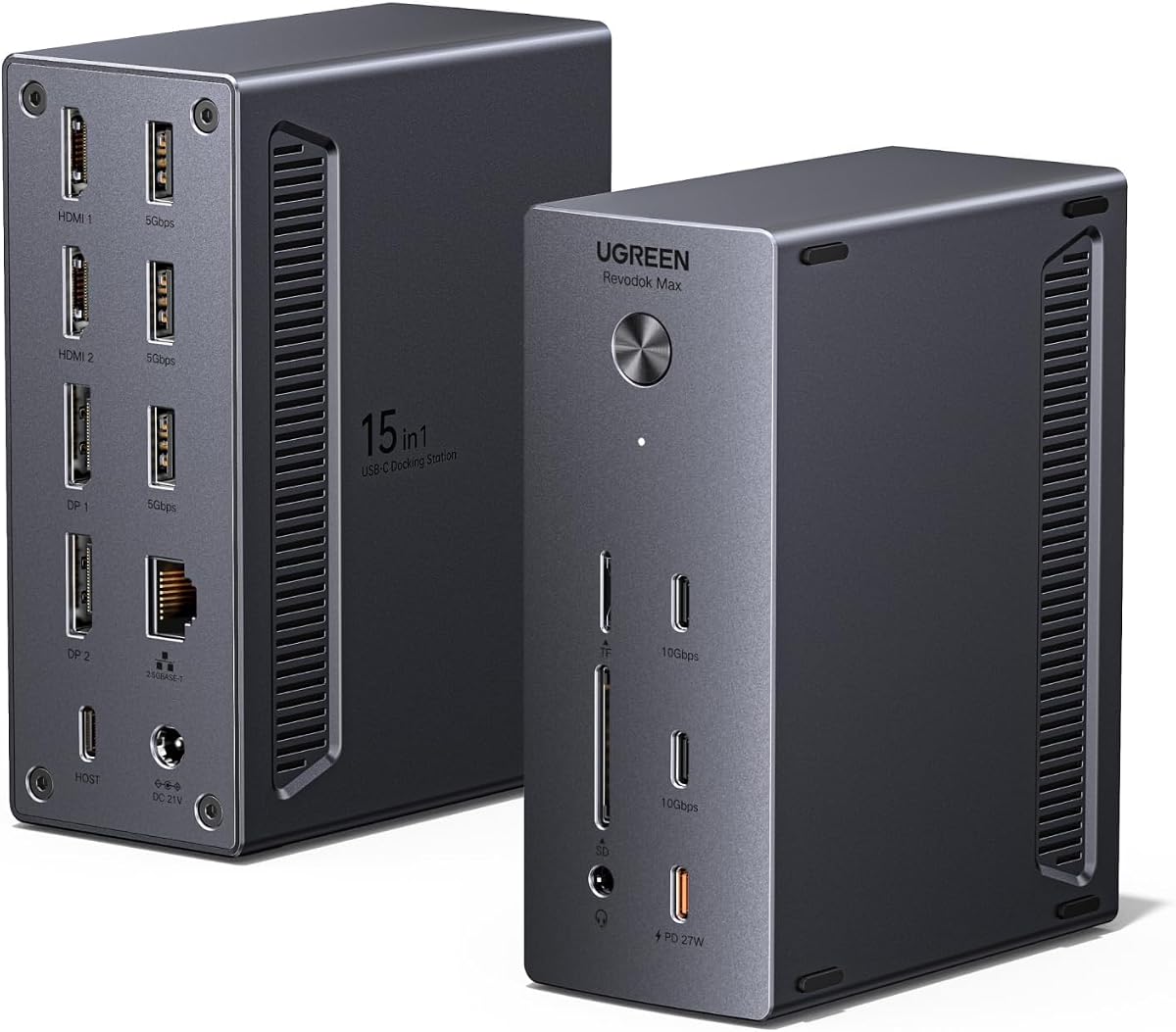
The UGREEN USB-C DisplayLink Docking Station is a premium option with impressive high-resolution capabilities and strong connectivity. With a 4.6-star rating, it is highly praised for its ability to handle up to 8K displays and robust 150W power delivery.
We may earn a commission when you buy through this link, at no additional cost to you.
This 15-in-1 dock supports a variety of display configurations including single 8K or multiple 4K setups depending on your needs. Its 2.5G Ethernet, SD card readers, and multiple high-speed USB ports make it ideal for professionals dealing with large data transfers and external storage.
The main drawback is the requirement for driver installation and compatibility with data-capable USB-C hosts only. Without proper driver support, some display and networking features may not function correctly.
Buy this dock if you need maximum resolution flexibility and fast networking in a well-built package. It is an excellent choice for users who value performance and connectivity over plug-and-play simplicity.
Capable of supporting single 8K displays or multiple 4K monitors, this dock offers unparalleled resolution flexibility.
With 2.5G Ethernet and multiple USB-C and USB-A ports, you can achieve high-speed data transfer and networking.
We may earn a commission when you buy through this link, at no additional cost to you.
Selecting the right quad monitor docking station requires understanding your laptop's capabilities and the specific display and connectivity needs of your workflow.
Check how many external monitors the dock supports and at what resolution. Most quad docks use DisplayLink technology to achieve four 4K displays, but macOS often limits external displays to three due to system constraints.
Prioritize docks that support your target resolution and refresh rate to ensure smooth visuals for productivity or creative work.
Look for enough USB-A and USB-C ports to connect all your peripherals like keyboards, mice, and storage without needing additional hubs. Also consider HDMI, DisplayPort, and Ethernet ports based on your monitor and network needs.
A higher port count provides flexibility and reduces clutter, making your workspace more organized and efficient.
Ensure the dock provides sufficient wattage to charge your laptop while in use. Most docking stations support up to 100W delivery, but models with 120W to 160W adapters can power the dock and your laptop simultaneously more reliably.
Strong power delivery helps reduce desk clutter by eliminating the need for a separate laptop charger.
Verify that the dock is compatible with your operating system, especially if using macOS which has stricter external display limits. Windows generally allows four external displays with DisplayLink support, but macOS typically caps at three without specialized setups.
Check manufacturer support pages to confirm OS compatibility before purchasing to avoid compatibility issues.
Some docks require DisplayLink or proprietary drivers to function, while others offer plug-and-play performance. Driver-based solutions provide more display flexibility but add setup steps and require periodic updates.
Choose plug-and-play models if you prefer simplicity and minimal software management for your workstation.
Look for docks made with durable materials like aluminum that help dissipate heat during prolonged use. Proper cooling prevents thermal throttling and extends the lifespan of your docking station.
A well-built dock will handle heavy workloads and maintain performance over time without overheating.
Ethernet ports provide stable wired internet connections that are critical for professional use. Look for 1Gbps or 2.5Gbps ports depending on your network speed requirements.
Fast Ethernet ensures reliable connectivity for video calls and large file transfers without Wi-Fi interference.
Docks range widely in price from budget-friendly options to premium Thunderbolt solutions. Balance your budget against the features you truly need such as high-resolution support, port count, and build quality.
Higher-priced models often offer better support, durability, and performance, making them worth the investment for professional workflows.
To maximize performance, connect your docking station to your laptop before plugging in displays and peripherals. Ensure the host laptop is powered off during initial setup to avoid connection glitches.
Keep your docking station and all connected cables clean and dust-free. Use a soft cloth to wipe surfaces regularly and avoid placing the dock in areas with high temperatures or direct sunlight.
Update drivers and firmware periodically for the best compatibility and performance. Always use high-quality cables rated for the data and video speeds your dock supports to prevent signal loss or instability.
Not every laptop supports four external monitors natively. While docking stations can extend this capability using technologies like DisplayLink, your laptop must have a compatible USB-C or Thunderbolt port that supports video output. macOS typically limits to three external displays even with docking stations.
Most quad monitor docking stations require DisplayLink or other drivers to enable multi-monitor support across operating systems. These drivers allow the dock to compress and transmit multiple display streams efficiently through a single USB connection. Always check the product manual for installation steps.
Quad monitor docks typically support up to four 4K displays at 60Hz. Some advanced models can support single 8K displays or combinations of 4K and 8K depending on port configuration and bandwidth. Verify the specs to ensure it matches your monitor requirements.
Apple restricts external display support on many MacBook models for performance and licensing reasons. macOS typically allows up to two external displays for most models and three for higher-end Macs. Additional displays require DisplayLink software with overhead but still limited by OS policy.
A 100W power delivery is standard for most docking stations and laptops, but if your laptop requires more wattage or you want extra power for peripherals, look for docks with 120W or higher adapters. Adequate power ensures stable operation and prevents laptop draining while docked.
Docks with Thunderbolt 5 or USB4 support are more future-proof due to higher bandwidth for multi-monitor setups. Standard USB-C docks using DisplayLink remain relevant but may not support higher resolutions or refresh rates without driver or CPU overhead. Choose based on your expected upgrade timeline.
Selecting the ideal docking station with quad monitor support depends on your laptop type, OS, and need for display resolution and connectivity. Top picks like the StarTech Thunderbolt 5 and TobenONE DisplayLink models offer strong performance across different budgets and workflows.
Prioritize features like power delivery, port variety, and driver compatibility to ensure smooth operation. Consider macOS limitations if you are a Mac user and opt for solutions explicitly designed for Apple devices when possible.
Remember that prices and specifications may change over time, so check the latest product details and customer reviews before purchasing. Investing in a reliable dock will enhance your productivity and streamline your workstation setup for years to come.