
Qanba N3 Drone 2
4.5Editor score
Affordable licensed option
Authentic Qanba components
Mic input with mute button
This guide compares the top 10 arcade sticks for PS5 including official licensed options and budget picks to help you choose the right fight stick for gaming.
Finding the right arcade stick for PS5 can transform your fighting game experience significantly. A quality controller offers precision inputs and durability that standard gamepads simply cannot match for competitive play sessions.
We analyzed ten top rated options ranging from officially licensed tournament gear to versatile budget friendly models. Our comparison covers build quality, compatibility, customization options, and overall value for different player needs.
Each pick highlights key strengths and weaknesses to help you decide based on your specific requirements. Note that product availability and pricing may change over time so verify details before purchasing.
4.5Editor score

4.6Editor score

4.6Editor score
Below is a detailed side-by-side comparison of all ten arcade sticks featured in this guide. Each entry lists key specifications to help you quickly identify which model fits your budget and gaming needs.




The HORI PlayStation 5 Fighting Stick Alpha stands out as a top contender for serious fighting game enthusiasts. With a high rating and official Sony licensing, it delivers tournament-grade performance right out of the box.
We may earn a commission when you buy through this link, at no additional cost to you.
Its standout quality lies in the proprietary Hayabusa components which offer superior durability and responsiveness. The openable design allows for easy maintenance and customization without voiding warranties.
While the price is higher than budget options, the build quality justifies the investment for competitive players. The limited color options might be a drawback for those seeking specific aesthetics.
This stick is ideal for players who value official licensing and premium components. It represents a solid investment for anyone serious about improving their fighting game performance on PS5.
The Hayabusa joystick and buttons are designed to withstand intense usage while maintaining precision.
The top panel opens easily allowing users to swap parts or clean internal components quickly.
We may earn a commission when you buy through this link, at no additional cost to you.
The Nacon Daija Arcade Fight Stick is officially licensed and designed in collaboration with pro gamers. It features SANWA components and offers robust customization options including button mapping via software.
We may earn a commission when you buy through this link, at no additional cost to you.
Its premium features include a textured palm rest for comfort during long sessions and a lock function to prevent accidental presses. The audio jack allows direct headset connection for better communication.
The software mapping system might be a learning curve for some users. The weight ensures stability but makes it less portable for travel to local tournaments.
This stick suits players who want pro-grade features without the absolute top price tag. It balances performance and customization well for dedicated fighting game fans.
Designed with input from professional players to ensure it meets competitive standards and needs.
Three faceplate options plus template support let you create a unique look for your setup.
We may earn a commission when you buy through this link, at no additional cost to you.
The MAYFLASH F700 offers impressive versatility with Bluetooth 2.4G and wired connection options. It supports a wide range of systems including PS5 Switch and PC making it a flexible choice.
We may earn a commission when you buy through this link, at no additional cost to you.
Key strengths include compatibility with Sanwa parts for easy upgrades and a hidden compartment for the wireless receiver. Firmware updates ensure continued support for new console generations.
It is limited to fighting games on PS5 which might be restrictive for casual users. Some functionality requires firmware updates which can be inconvenient for non-tech savvy players.
This is an excellent value pick for gamers with multiple systems or those wanting wireless freedom. It delivers solid performance at a price point accessible to most players.
Works across PlayStation Switch and PC allowing seamless switching between different gaming platforms.
Bluetooth and 2.4G options reduce cable clutter while maintaining responsive input latency.
We may earn a commission when you buy through this link, at no additional cost to you.
The Qanba N3 Drone 2 is an officially licensed option that delivers authentic Qanba components at a competitive price. It is a solid choice for players seeking quality without overspending.
We may earn a commission when you buy through this link, at no additional cost to you.
Its strengths include a responsive OV7 OMRON switch joystick and a dedicated mic input with mute control. The design is clean and functional fitting well on most desks.
It lacks customization access and is wired only which limits flexibility. The build is good but not as open to modding as higher tier options.
This stick is perfect for newcomers or budget conscious players wanting official quality. It provides a reliable entry point into serious fighting game controls.
Sony licensing ensures compatibility and quality standards are met for PS5 and PS4 systems.
Genuine Qanba buttons and levers provide the feel expected by fighting game veterans.
We may earn a commission when you buy through this link, at no additional cost to you.
The MAYFLASH F700 Elite upgrades the standard model with premium Sanwa parts and wireless options. It retains wide compatibility while offering enhanced durability and performance for competitive play.
We may earn a commission when you buy through this link, at no additional cost to you.
Its key strengths include eight responsive buttons and a precision joystick backed by an anti-slip mat. The inclusion of Sanwa parts means you start with high quality components out of the box.
It is still limited to fighting games on PS5 which might not suit all users. Firmware updates are sometimes needed for full functionality across all supported devices.
This model bridges the gap between budget and premium options effectively. It is highly recommended for those wanting high-end parts without the highest price tag.
Pre-installed Sanwa components ensure top-tier performance without immediate need for upgrades.
The anti-slip mat keeps the unit firmly in place during intense gameplay sessions.
We may earn a commission when you buy through this link, at no additional cost to you.
The MAYFLASH F500 is an affordable option that includes Magic Boots for easy PS5 compatibility. It supports a massive range of systems including Xbox which makes it versatile for multi-console households.
We may earn a commission when you buy through this link, at no additional cost to you.
Its main strengths are price and compatibility. The Magic Boots eliminate the need for a second controller on PS5 which simplifies setup significantly.
Build quality is basic compared to higher tier options and parts may wear faster. It is more suitable for casual play than serious tournament use.
This is a great entry level pick for budget constrained buyers. It proves you can access fighting stick functionality without spending a lot.
The included boots allow direct connection to PS5 without needing a standard controller.
Support for Xbox and Switch makes it a great all-in-one solution for mixed setups.
We may earn a commission when you buy through this link, at no additional cost to you.
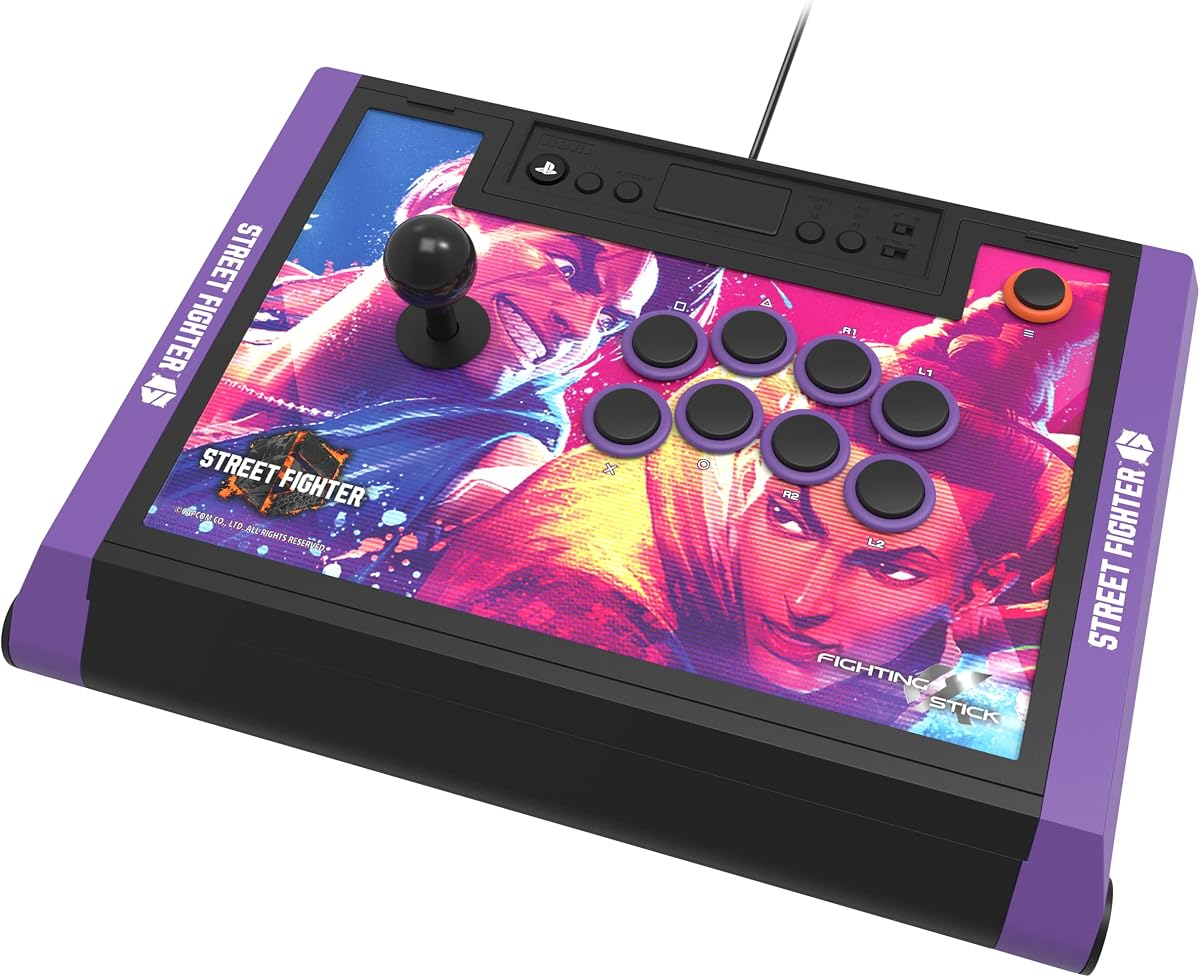
The HORI Fighting Stick Alpha Street Fighter 6 Edition brings official Capcom licensing and themed artwork to a proven tournament ready platform. It maintains all the premium features of the standard Alpha version.
We may earn a commission when you buy through this link, at no additional cost to you.
Its standout features include downloadable high-res images for customization and the reliable Hayabusa joystick and buttons. The openable design ensures long term serviceability.
The price is high and the theme may not appeal to all players. However the quality remains top tier and it honors the game with dedicated design elements.
This is the perfect choice for Street Fighter 6 enthusiasts. It combines performance with fan service in a way few other sticks do.
Licensed by both Sony and Capcom ensuring authenticity and quality for the specific title.
Top panel can be swapped or printed with new art to match personal preferences.
We may earn a commission when you buy through this link, at no additional cost to you.
The Qanba Q7 Obsidian 2 is an officially licensed peripheral with a convenient platform switch button. It offers OBSF buttons and swappable Sanwa JLF joystick tops for customization flexibility.
We may earn a commission when you buy through this link, at no additional cost to you.
Its strengths include official licensing for compatibility and a robust build. The platform switch simplifies switching between PS5 PS4 and PC without manual toggles.
It lacks wireless connectivity and carries a higher price tag. The customization is limited to swapping joystick tops rather than a fully open panel.
This model is a reliable choice for players wanting official quality with some customization. It balances convenience and performance well for home setups.
A dedicated switch allows seamless switching between supported platforms without cable changes.
Joystick tops can be swapped easily to change stick tension and feel.
We may earn a commission when you buy through this link, at no additional cost to you.
The HORI Fighting Stick Alpha Tekken 8 Edition brings official Bandai Namco branding to a tournament proven platform. It retains the high quality Hayabusa components and openable design of the standard model.
We may earn a commission when you buy through this link, at no additional cost to you.
Its key features include Tekken 8 top panel artwork and downloadable alternate designs. The build quality ensures durability while supporting competitive play standards.
The premium price may be hard to justify if not playing Tekken 8. However the core performance remains excellent regardless of the theme.
This stick is the ideal choice for Tekken fans. It delivers top performance while celebrating the game with dedicated artistic elements.
Official license ensures authenticity and alignment with the game aesthetic standards.
Tournament grade build ensures it can withstand the demands of competitive play.
We may earn a commission when you buy through this link, at no additional cost to you.
The GuileKeys GK-18 offers a unique leverless design with 18 keys for precise control. It features RGB lighting and an OLED screen making it visually distinctive and highly customizable.
We may earn a commission when you buy through this link, at no additional cost to you.
Its strengths include ultra-low latency and hot-swappable switches for easy modifications. The web configurator offers deep customization for button layouts and macros.
It requires an additional converter for PS5 which adds complexity. The leverless layout has a steep learning curve compared to traditional sticks.
This is a niche choice for players wanting maximum customization and low cost. It appeals to those willing to learn a new control scheme.
Using buttons for movement reduces errors and allows for unique movement techniques.
Hot swapping and web configurator allow extensive changes without soldering.
We may earn a commission when you buy through this link, at no additional cost to you.
Selecting the right arcade stick depends on your budget, preferred games, and need for customization. This guide breaks down the key factors to consider before making a purchase.
Officially licensed peripherals guarantee compatibility with the PS5 system. They often come with warranties and support from manufacturers.
Look for logos indicating Sony licensing to avoid compatibility issues.
The joystick and buttons determine the feel and durability of the stick. High-quality components like Hayabusa or Sanwa resist wear over time.
Premium sticks often allow swapping these parts for different feels.
Consider whether you prefer wired or wireless connections. Wireless provides convenience while wired ensures stable signal without latency.
Most sticks support both but check the included cables and receiver options.
Openable designs allow maintenance and part swaps which extend the device life. Some sticks come with tools for easy access.
Decide if you want to modify the look or internals.
Many sticks work across multiple systems like Switch or Xbox which adds value. Check specific requirements for each console.
Some may require adapters for full functionality on older systems.
A comfortable palm rest and manageable size improve long session comfort. Weight helps prevent slipping during intense play.
Test the layout if possible to ensure it suits your hand size.
Arcade sticks range from budget options to expensive tournament gear. Set a budget and prioritize features that matter most to your play style.
Higher price does not always mean better for casual use.
Some sticks include mic jacks allowing direct headset connection for chat. This reduces cable clutter and improves voice clarity.
Check if the stick supports audio passthrough on your console.
Connect the stick via USB directly to your PS5 console or use the wireless receiver for Bluetooth models. Ensure your PS5 system is updated to the latest firmware for best compatibility.
If your stick allows customization open the top panel to replace worn parts or clean dust. Use compressed air for internal cleaning and store screws safely during maintenance.
For wireless use charge the internal battery or replace AA batteries as needed. Regularly check for firmware updates from the manufacturer to maintain optimal performance.
Yes several manufacturers produce officially licensed arcade sticks that guarantee compatibility with PS5. Look for the PlayStation licensed logo on the packaging or product page to ensure authenticity.
Most PS4 arcade sticks work on PS5 but may require the original controller connected via USB for some games. Newer models support direct connection without needing the original controller.
Many modern arcade sticks support wireless via Bluetooth or a 2.4G receiver. Wired options remain popular for their consistent signal and lack of latency during competitive play.
High-quality components like Sanwa or Hayabusa buttons and joysticks are industry standards for durability. They provide a tactile feel that many competitive players prefer over generic parts.
Yes many models allow customization of artwork buttons and joysticks. Some include tools for opening the case which makes swapping parts easier without professional help.
Most arcade sticks are optimized for fighting games but some support navigation in other titles. Check the product details for specific game compatibility before purchasing.
Download the latest firmware from the manufacturer website and follow their instructions. Some require PC connection while others can be updated via the console interface.
A mic jack allows direct headset connection which reduces cables on your desk. It is useful for voice chat during online matches without needing extra hardware.
The HORI Fighting Stick Alpha stands out as the best overall choice due to its official licensing and premium components. For budget buyers the Qanba N3 Drone 2 offers excellent value with solid build quality.
Prioritize compatibility and component quality based on your gaming habits. If you play multiple systems look for versatile options like MAYFLASH models that support various consoles.
Prices and availability change so verify current offers before buying. Investing in the right stick can significantly enhance your fighting game experience on PS5.