
Harvopu Keyboard Case
4.4Editor score
Seven color backlight options
Detachable magnetic keyboard design
Built-in rechargeable battery
Finding the right keyboard case for your iPad Pro 13 M4 transforms your tablet into a powerful workstation. A good case offers a great typing experience, reliable protection, and flexible viewing angles for any task.
We compared ten top models based on build quality, trackpad performance, battery life, and compatibility with the latest M4 and M5 chips. Each option brings unique features to suit different workflows and budgets.
Each pick shows key specs, pros, and cons to help you decide quickly. Keep in mind that availability and pricing can change frequently so verify details before you purchase your ideal accessory today.
4.4Editor score

4.3Editor score

3.7Editor score
As an Amazon Associate we earn from qualifying purchases.
The following table provides a side-by-side overview of all ten models we reviewed to highlight their distinct strengths and compatibility details.



The Apple iPad Magic Keyboard Case stands out as the top pick for users seeking a premium typing experience. With a rating of 4.3 it delivers a reliable and high-quality accessory for your iPad Pro 13 M4.
We may earn a commission when you buy through this link, at no additional cost to you.
Its glass trackpad features haptic feedback that mimics a laptop cursor experience while the two-cantilever hinge allows smooth adjustments for comfortable viewing angles. The built-in function row adds versatility that other cases often lack.
While the price is higher than third-party options the quality and seamless integration justify the investment for professionals. The lack of extra features like backlight color customization might appeal to minimalists focused on function.
Choose this case if you want the most refined typing and navigation experience. It transforms your iPad into a true workstation with minimal setup or maintenance effort required daily.
The scissor mechanism keys provide consistent travel and tactile feedback that feels natural during long writing sessions.
Magnetic attachability ensures a secure connection without needing Bluetooth pairing or separate charging for the keyboard itself.
We may earn a commission when you buy through this link, at no additional cost to you.
The ESR Multi-Mode Magnetic Stand offers exceptional flexibility for users who switch between typing and drawing frequently. Rated 4.2 it balances utility and cost effectively for the iPad Pro 13 M4 ecosystem.
We may earn a commission when you buy through this link, at no additional cost to you.
Its magnetic stand design lets you open the cantilever to various angles while the back case detaches for instant hands-on access. The extended trackpad supports multi-touch gestures for smoother navigation across apps.
Some users might find the magnetic alignment requires precision during setup. However the ability to remove the keyboard for a lightweight tablet experience is a significant advantage for media consumption.
This case is ideal for hybrid users who need a laptop feel but also want a pure tablet mode. Its adaptive design supports a wide range of activities from work to entertainment.
The stand allows you to switch from a typing angle to a portrait view for FaceTime without extra accessories.
Removing the keyboard instantly gives you a slim case for reading or sketching with the Apple Pencil.
We may earn a commission when you buy through this link, at no additional cost to you.
The ESR Multi-Angle Stand earns high praise for its large trackpad that enhances navigation precision. With a 4.4 rating it is a strong contender for those who rely heavily on cursor control and gestures.
We may earn a commission when you buy through this link, at no additional cost to you.
The 112 by 70 mm trackpad surface is significantly larger than many competitors allowing for smoother multi-touch gestures. The magnetic detachable design lets you quickly switch between typing and drawing modes as needed.
While the case adds a bit of weight due to the reinforced corners it offers robust protection against drops. The included pencil holder prevents your stylus from getting lost or scratched during transport.
Buy this if you prioritize navigation comfort and durability. It delivers a robust laptop feel while maintaining the versatility of a detachable keyboard for creative tasks.
The spacious trackpad supports standard iOS gestures making app switching and scrolling feel like a desktop experience.
Removing the keyboard for a low-angle stand makes it easier to draw or write with the Apple Pencil.
We may earn a commission when you buy through this link, at no additional cost to you.
The typecase Edge Magic-Style stands out for its customizable lighting options that let you match your environment or mood. Rated 4.2 it offers a stylish alternative for users who value aesthetics alongside function.
We may earn a commission when you buy through this link, at no additional cost to you.
The eleven color backlight levels and three brightness settings ensure visibility in any lighting condition. The floating cantilever design is intuitive and lightweight making it easy to adjust angles quickly during work.
This case does require charging for the keyboard unlike some magnetic options but the instant wake and sleep function helps conserve power efficiently. The sleek profile adds minimal bulk to your iPad.
Choose this if you want a personalized touch to your workspace. It combines practical features with a modern look that appeals to creative professionals and students.
The backlight colors can help you stay focused or relax depending on the time of day and task.
The slim design ensures you can carry your iPad everywhere without feeling weighed down by extra bulk.
We may earn a commission when you buy through this link, at no additional cost to you.
The Logitech Combo Touch is known for its massive trackpad that rivals desktop laptops in size and responsiveness. While its rating is 3.7 it remains a trusted name among professionals seeking reliable productivity tools.
We may earn a commission when you buy through this link, at no additional cost to you.
It uses the Smart Connector for instant and secure connectivity without Bluetooth or batteries. The flexible kickstand allows you to switch between typing and watching modes seamlessly while keeping the device stable.
Some users report mixed feelings on the price and build weight but the durability is unmatched in many scenarios. The detached keyboard mode is excellent for sketching or reading without a heavy backrest.
Invest in this if you need a robust workstation experience. It offers the tools required for serious work sessions with a focus on long-term reliability.
The trackpad size makes multi-touch gestures incredibly smooth and intuitive for complex document editing tasks.
Power comes directly from your iPad so you never need to worry about charging a separate keyboard battery.
We may earn a commission when you buy through this link, at no additional cost to you.
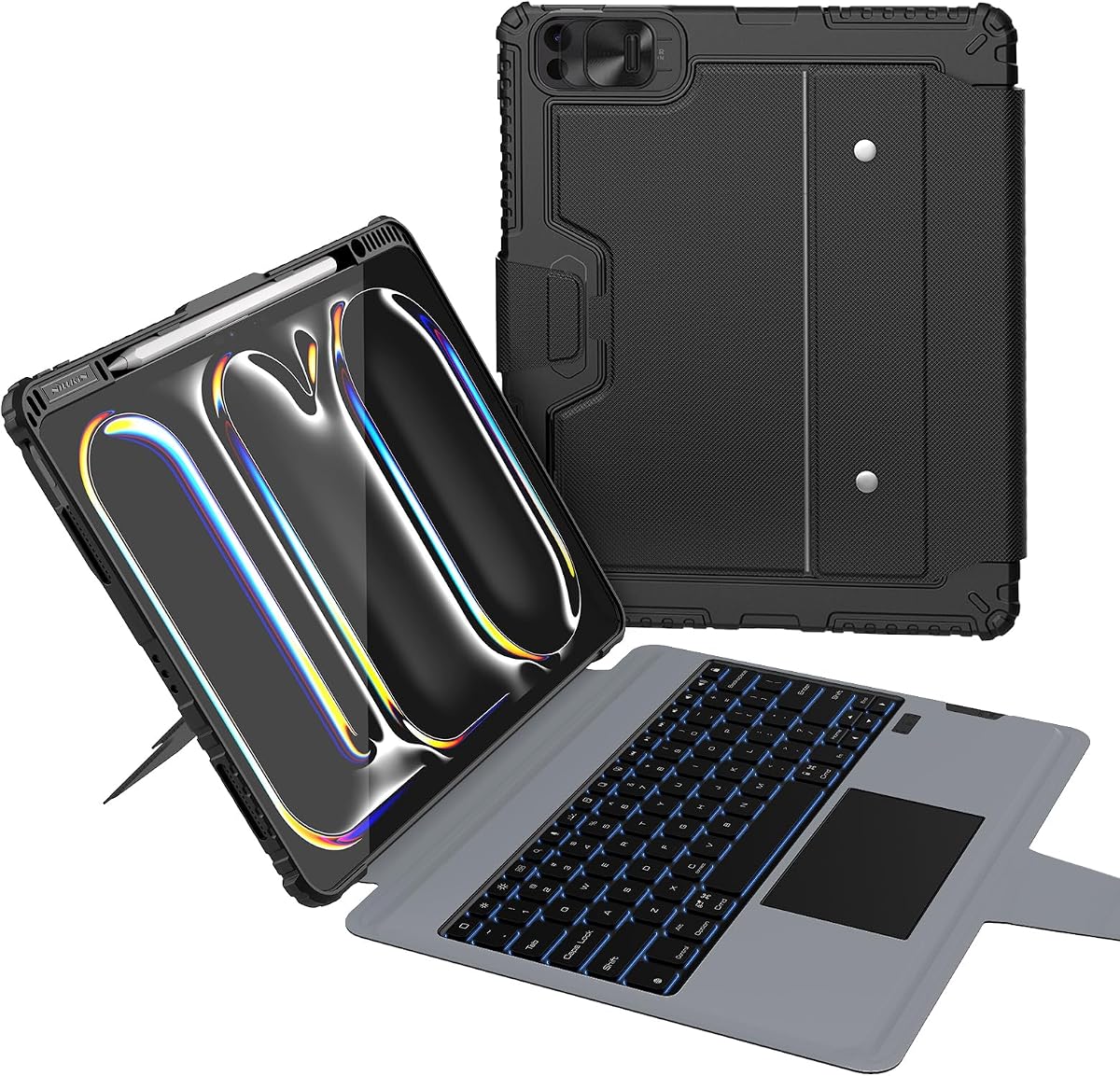
The Harvopu Keyboard Case delivers impressive features for a budget-friendly price. With a 4.4 rating it is an excellent entry point for users wanting a full keyboard experience without a high cost.
We may earn a commission when you buy through this link, at no additional cost to you.
It includes a built-in 500mAh battery that lasts for weeks of active typing. The seven-color backlight allows you to personalize your setup while the stain-resistant PU material keeps it looking clean.
The need to charge via USB-C is a minor trade-off but the battery life makes it manageable. The three viewing angles are stable and provide good ergonomic support for long sessions.
This is the top pick for students or casual users. It offers essential productivity tools and protection at a price that fits almost any budget.
You get a rechargeable keyboard and case combination that competes with much more expensive models in performance.
The honeycomb mesh inner shell helps dissipate heat while protecting your iPad from accidental drops and scratches.
We may earn a commission when you buy through this link, at no additional cost to you.
The typecase Edge+ Keyboard Case improves on previous designs with a wider hinge for better stability. Rated 4.2 it is a solid choice for users who need robust support for typing and reading.
We may earn a commission when you buy through this link, at no additional cost to you.
Its detachable back case weighs only 110g which is significantly lighter than standard covers. The larger touchpad and shortcut row streamline your workflow by giving you direct access to essential functions.
The N54H magnets ensure a strong connection that does not slip during use. However the assembly of all parts can take a bit of time compared to simpler snap-on designs.
Buy this if you need a balance of stability and portability. The lightweight back case makes it easy to carry while the keyboard adds power when you need it.
The wider hinge design prevents wobbling on uneven surfaces during long writing or data entry tasks.
Dedicated keys for volume and brightness mean you do not have to leave your document to make changes.
We may earn a commission when you buy through this link, at no additional cost to you.
The Wireless Keyboard Case stands out for its unique 360 rotating kickstand that offers unmatched flexibility. With a 4.6 rating it is one of the highest-rated options in this roundup.
We may earn a commission when you buy through this link, at no additional cost to you.
You can rotate the iPad into any orientation including portrait or landscape with equal stability. The transparent back highlights your device design while the colorful backlight adds a modern touch to your setup.
Because it is wireless it requires charging for the keyboard module. However the long battery life and precise trackpad make the trade-off worthwhile for many users seeking style and function.
This case is perfect for those who want to showcase their device. It combines durability with a sleek look that stands out in any workspace.
Rotating the screen allows for easy sharing of content during meetings without removing the case entirely.
The clear back shows off your iPad color while protecting it from scratches and dust accumulation.
We may earn a commission when you buy through this link, at no additional cost to you.
The Nillkin Rugged Detachable is built for users who work in demanding environments where protection is paramount. With a 4.3 rating it offers a strong balance of toughness and typing comfort.
We may earn a commission when you buy through this link, at no additional cost to you.
Its corner air-cushion bumpers and reinforced back protect against significant drops while the faux leather exterior resists stains from spills. The scissor-switch keys provide a real laptop feel with 1.4mm travel.
The kickstand rotates fully from zero to 180 degrees for any viewing angle. This flexibility is rare in rugged cases and adds versatility for both typing and presentation modes.
Choose this if you work on sites or travel often. It ensures your iPad stays safe while providing the tools needed for work anywhere you go.
The drop tested design gives peace of mind that accidental falls will not damage your sensitive device.
The keyboard keys offer feedback similar to a laptop so typing reports is easy on your fingers.
We may earn a commission when you buy through this link, at no additional cost to you.
The TSQQST Clear Wireless Case offers a futuristic aesthetic with its transparent panel that reveals circuitry details. Rated 4.3 it is a stylish option for users who want their iPad design to stand out.
We may earn a commission when you buy through this link, at no additional cost to you.
It combines a wireless keyboard with a rotating stand for flexible positioning. The seven-color glow keyboard adds a touch of sophistication that fits modern workspaces well.
While the clear case may show fingerprints more easily it offers excellent visibility for your device. The wireless connection is stable and makes it a good choice for light productivity tasks.
Pick this if you prioritize style and modern design. It blends functionality with a unique look that turns your iPad into a standout piece.
The acrylic panel adds a unique visual element that differentiates your setup from standard black or white cases.
The stand allows for smooth angle changes helping you maintain a healthy posture while typing for long periods.
We may earn a commission when you buy through this link, at no additional cost to you.
Selecting the right case requires considering compatibility build quality and specific features that match your workflow needs.
Ensure the case specifically lists support for the 13-inch M4 or M5 models. Using an older generation case can lead to poor alignment and potential damage to your device.
Check the model number on the back of your iPad to confirm it matches the case description before buying to avoid fit issues.
A high-quality trackpad is essential for efficient navigation. Look for larger surfaces that support multi-touch gestures like scrolling and swiping to reduce screen interaction.
Prioritize models with responsive haptic feedback or precise control to mimic a laptop experience more closely during daily use.
Decide between Smart Connector models that draw power from the iPad and Bluetooth models that need their own charging. Smart connectors are more convenient but often cost more.
Bluetooth options offer more flexibility if you want to move the keyboard away from the tablet but require remembering to charge them separately.
A sturdy hinge allows you to adjust the screen to comfortable viewing angles. Look for cases that support multiple stable positions for typing and reading.
Flexible kickstands that rotate or fold provide the most versatility for different environments like coffee shops or home desks.
Consider how much protection you need based on your environment. Some cases offer rugged military-grade drop protection while others provide thin front and back covers.
Reinforced corners and slip-resistant materials ensure your device stays safe from scratches and accidental drops during daily transport.
Backlit keys are useful for working in low light conditions. Some models offer color customization and brightness levels to suit your personal preferences.
Prioritize models with adjustable brightness to avoid glare while ensuring your text remains readable at night or in dark rooms.
Carrying a heavy case can become burdensome if you commute often. Weigh the protection against the bulk to ensure it fits your lifestyle.
Detachable keyboards allow you to use a lighter tablet for travel while still attaching the full keyboard when you return to your desk.
If you use an Apple Pencil check for integrated slots or storage in the case. This keeps your stylus safe and within reach.
Avoid designs that block the charging area of the pencil so you can keep it powered up while it is stored in the case.
Align the magnetic connectors carefully to attach the keyboard securely to your iPad. A firm click ensures a stable connection for typing without gaps or looseness.
Clean the keyboard and trackpad regularly with a soft dry cloth to remove dust and oils. Avoid harsh chemicals that could damage the surface texture or keys.
Store the case flat and avoid excessive pressure on the keys to maintain their responsiveness. For wireless models charge the battery periodically even during inactivity to ensure it stays ready for use.
Yes many of the recommended cases in this guide explicitly support both M4 and M5 iPad Pro 13-inch models. Always verify the product compatibility section before purchasing to confirm fit for your specific device generation.
Bluetooth keyboards offer flexibility to move the keyboard away from the screen but require separate charging. Magnetic ones provide instant connectivity and draw power from the iPad but limit separation options.
Most cases with integrated keyboard sections leave enough room to use the Apple Pencil or include a dedicated slot for storage. Check the specific design to ensure the keyboard does not block your drawing workflow.
Use a microfiber cloth lightly dampened with water to wipe the trackpad surface gently. Avoid harsh liquids and abrasive cleaners that might scratch the glass or plastic coating of the touchpad.
Yes all listed cases with trackpads support standard iPadOS gestures like swiping and pinching. These features allow for smooth navigation between apps and full screen management.
Battery life varies by model but many last several weeks of active typing on a single charge. Features like automatic sleep modes help extend the duration between charges.
The Apple Magic Keyboard remains the top overall choice for its premium build and seamless integration. It offers the most refined typing experience for users who want a laptop-like feel without compromise.
For those seeking value the Harvopu and ESR models provide excellent features at lower prices. Consider your need for customization and durability when selecting the right model for your daily tasks.
Remember that prices and availability can change quickly so verify the details on the product pages before finalizing your purchase. Investing in the right case ensures your iPad stays protected and productive for years to come.