
HP OmniBook 3 17 inch FHD Laptop
5.0Editor score
AMD Ryzen 5 4000 Series Processor
Up to 12 Hours Battery Life
WiFi 7 and Bluetooth Included
17.3-inch Full HD Display
512GB SSD Storage Space
The latest generation of laptops brings powerful connectivity options that transform how we work and create at high. WiFi 7 technology offers significantly faster speeds and lower latency than previous standards, making it ideal for demanding applications like 4K streaming and real-time collaboration tools.
We have carefully analyzed ten leading models to find the best options available for you this month. Our comparison focuses on processing power, display quality, battery life, and the integration of the latest wireless standards to ensure you get a machine that lasts for years.
Each pick in this list highlights specific strengths tailored to different user profiles and budgets. Please note that product availability and pricing can change quickly, so check the latest details before making your final decision to ensure you get the best value today.
5.0Editor score

5.0Editor score

4.5Editor score
As an Amazon Associate we earn from qualifying purchases.
The following table provides a side-by-side overview of the key specifications for each model we selected. This allows you to quickly compare processors, memory, storage, and screen sizes to find the configuration that matches your workflow requirements.




The HP OmniBook 7 stands out as our top choice for users needing advanced AI capabilities and robust connectivity. It delivers a seamless experience with its Intel Core Ultra 7 258V processor and up to 47 TOPS of NPU performance.
We may earn a commission when you buy through this link, at no additional cost to you.
Its 17.3-inch FHD IPS display offers crisp visuals with 400 nits brightness, making it ideal for multitasking and detailed work. The 32GB of onboard RAM ensures smooth operation even when running demanding applications simultaneously.
While the price is higher than standard models, the included features like Thunderbolt 4 and Wi-Fi 7 justify the investment for professionals. The large screen and solid build quality make it a reliable workhorse for long sessions.
If you require a machine that balances portability with high-end specs, this model is an excellent recommendation. It suits creators, engineers, and business users who need powerful tools for everyday challenges.
The integrated NPU handles local AI tasks efficiently, reducing dependency on cloud processing for better privacy and speed.
Multiple high-speed ports including Thunderbolt 4 allow you to connect multiple 4K monitors and fast storage devices easily.
We may earn a commission when you buy through this link, at no additional cost to you.
For budget-conscious buyers seeking next-generation connectivity, this HP model offers the best value. It features Wi-Fi 7 capabilities alongside a spacious 17.3-inch display perfect for general use and media consumption.
We may earn a commission when you buy through this link, at no additional cost to you.
The AMD Ryzen 5 processor handles daily tasks like web browsing and document editing efficiently. With 512GB of SSD storage, you have ample space for files and applications without needing external drives immediately.
The battery life is impressive for this price range, promising up to 12 hours on a single charge. This makes it a strong candidate for students or remote workers who move between locations frequently.
We recommend this laptop for users who prioritize screen real estate and future-proof connectivity over raw processing power. It is an entry point into the latest wireless standards without a high financial barrier.
Having Wi-Fi 7 at this price point ensures your device remains relevant for future network upgrades and faster internet speeds.
The anti-glare screen with 300 nits brightness provides comfortable viewing even in well-lit rooms or outdoor environments.
We may earn a commission when you buy through this link, at no additional cost to you.
This Dell model represents the pinnacle of performance in our selection. It integrates the Intel Core Ultra 9 processor with 32GB of fast LPDDR5X memory to handle complex workloads with ease.
We may earn a commission when you buy through this link, at no additional cost to you.
The 16-inch touchscreen offers a professional workspace with narrow bezels that enhance visual immersion. It is ideal for tasks requiring precision like video editing or detailed design work.
Connectivity is robust with Wi-Fi 7 supporting 2×2 configurations for maximum speed. The inclusion of Thunderbolt 4 and HDMI 2.1 ensures compatibility with the latest peripherals and docking stations.
We recommend this laptop for professionals who demand the fastest response times and reliable performance. It is built to withstand daily heavy use while maintaining a sleek and modern aesthetic.
Features like the fingerprint reader and AI noise cancellation help maintain secure and professional communication environments.
The 12-core CPU architecture supports heavy multitasking and AI-driven applications without lag or slowdowns.
We may earn a commission when you buy through this link, at no additional cost to you.
The Acer Aspire 14 is a standout for users who prioritize battery life above all else. With up to 22 hours of runtime, it allows for all-day usage without needing a power adapter constantly.
We may earn a commission when you buy through this link, at no additional cost to you.
Its 14-inch WUXGA display provides sharp visuals for a compact size. The aluminum chassis adds a premium feel while keeping the weight low for easy transport in a backpack.
While it uses Wi-Fi 6E instead of Wi-Fi 7, the connectivity remains stable and fast for most home networks. The AI features like Recall are designed to streamline daily workflows significantly.
This laptop is ideal for students and professionals who travel often. It balances performance with portability effectively making it a reliable companion for remote work and study.
The combination of efficient CPU architecture and optimized software results in the longest battery life in our list.
The WUXGA resolution ensures text and images appear crisp and clear for reading and content creation.
We may earn a commission when you buy through this link, at no additional cost to you.
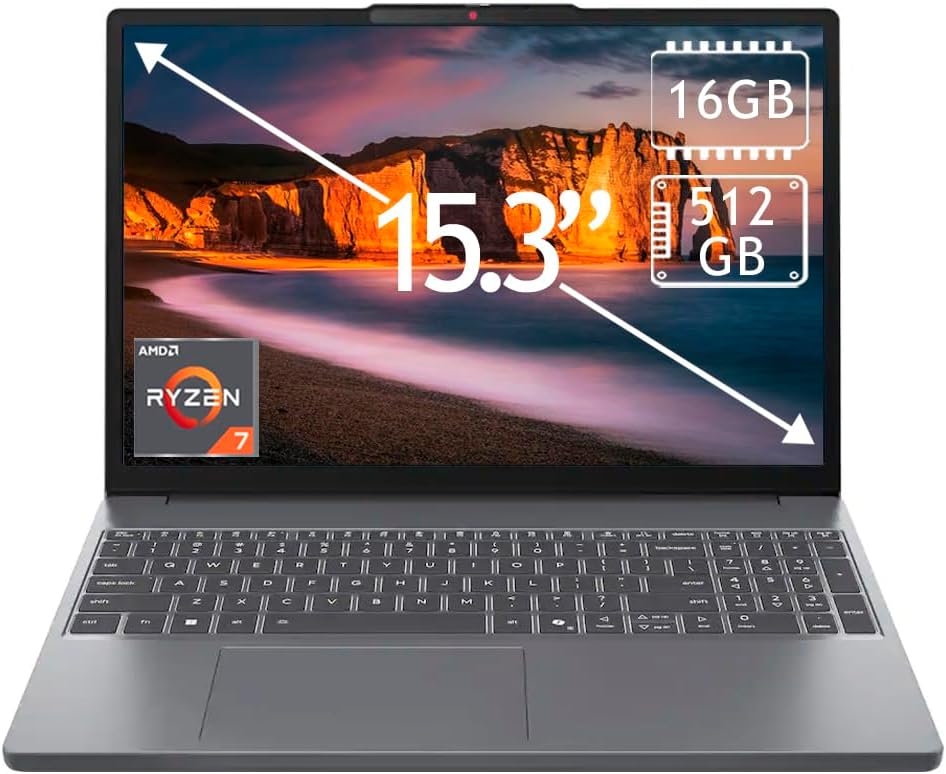
This Lenovo model offers a compelling blend of screen quality and performance at a reasonable price. The 15.3-inch 2K touchscreen allows for precise interactions and vibrant color reproduction.
We may earn a commission when you buy through this link, at no additional cost to you.
Powered by the AMD Ryzen 7 processor, it handles multitasking smoothly. The inclusion of 16GB of DDR5 RAM ensures that applications load quickly and run without stuttering.
The design is modern and fits well in professional environments. The matte finish helps reduce glare during long work sessions in different lighting conditions.
We recommend this for users who want a responsive display without spending extra on ultra-premium models. It is a solid choice for general productivity and media consumption.
The 2K resolution provides sharper text and smoother touch inputs than standard Full HD displays.
The Ryzen 7 ensures that heavy tasks like data analysis or video rendering remain efficient.
We may earn a commission when you buy through this link, at no additional cost to you.
This HP laptop is designed for users who need maximum memory and storage without upgrading the system later. It comes with 32GB of RAM which supports heavy multitasking across many applications.
We may earn a commission when you buy through this link, at no additional cost to you.
The 1TB SSD ensures you have enough room for large media files and project folders. Combined with the Ryzen 7 processor, it delivers solid performance for daily office tasks.
The touchscreen adds versatility for those who prefer tapping over using a mouse. It supports natural navigation through menus and documents with ease.
Ideal for home office setups where portability is less important than power and storage. It serves as a reliable primary machine for managing complex workloads.
Having 32GB of RAM allows you to keep many browser tabs and apps open without performance drops.
The 1TB SSD means you rarely need external hard drives for storing your essential documents and media.
We may earn a commission when you buy through this link, at no additional cost to you.
This model focuses on delivering essential features for daily productivity without unnecessary costs. It handles web browsing and document work smoothly with its Ryzen 7 processor.
We may earn a commission when you buy through this link, at no additional cost to you.
The design is modern with a slim profile that fits easily into a bag. The build quality feels sturdy despite its lightweight nature.
Connectivity options include USB-C and HDMI for easy connection to external displays. This makes it a good choice for home office setups with multiple monitors.
We recommend it for families or students needing a reliable secondary computer. It offers a great balance of speed and portability for general users.
The lightweight chassis makes it easy to carry between rooms or carry without feeling tired from weight.
Standard daily tasks run smoothly thanks to the efficient processor and sufficient memory capacity.
We may earn a commission when you buy through this link, at no additional cost to you.
The new MacBook Air features the M5 chip which delivers powerful AI capabilities in a compact design. It is ideal for users who prefer the macOS ecosystem and value battery life.
We may earn a commission when you buy through this link, at no additional cost to you.
The Liquid Retina display supports a billion colors making images and videos look vibrant. This is a great choice for creative work or watching high-quality media content.
It supports Wi-Fi 7 via the new N1 wireless chip ensuring fast internet speeds. The 12MP camera enhances video call quality significantly compared to older models.
We recommend this laptop for Apple users who need a portable machine with long battery life. It excels in performance per watt and provides a seamless user experience.
Seamless integration with iPhone and iPad allows for easy file sharing and continuity across devices.
The 10 million color support ensures accurate colors for designers and photographers.
We may earn a commission when you buy through this link, at no additional cost to you.
This laptop brings AI capabilities to the mainstream market with its dedicated Copilot Key. It simplifies access to Windows AI features for enhanced productivity.
We may earn a commission when you buy through this link, at no additional cost to you.
The Ryzen 7 processor ensures that general computing tasks are handled efficiently. The IPS display provides consistent viewing angles which is useful for collaborative work.
Storage speeds are improved with PCIe Gen4 SSD technology allowing quick boot times. This makes it suitable for users who need fast access to their files every day.
We recommend this for users looking to experience AI tools without a high investment. It is a solid entry-level machine for students and home office workers.
The dedicated Copilot key lets you launch AI tools instantly without navigating through menus.
PurifiedVoice technology ensures your voice is clear and background noise is reduced during calls.
We may earn a commission when you buy through this link, at no additional cost to you.
This model combines the latest AI processor with a large screen for an effective work setup. It supports AI workflows which are becoming essential for modern business applications.
We may earn a commission when you buy through this link, at no additional cost to you.
The 1TB SSD ensures you have ample space for files and data. Combined with the 16GB DDR5 RAM it handles multitasking smoothly across various applications.
The backlit keyboard allows for typing in low light conditions. This is useful for working late nights or in dimly lit environments.
We recommend this for users who need a desktop replacement with modern connectivity. It offers a strong balance of AI features and traditional laptop performance.
The Ultra 7 chip optimizes AI tasks improving efficiency in everyday productivity apps.
The large storage capacity means you can keep all your work and media locally without cloud limits.
We may earn a commission when you buy through this link, at no additional cost to you.
Selecting the right laptop with WiFi 7 requires considering several factors beyond just the wireless standard. This section breaks down the key components to help you make an informed decision.
Modern laptops often include specialized processors like Intel Core Ultra or AMD Ryzen with Neural Processing Units (NPU). These chips are essential for running AI tasks locally such as background blur or content generation without relying on internet speed.
Look for an NPU capable of at least 10 TOPS for smooth AI performance and ensure the CPU has enough cores for multitasking.
RAM and storage speeds directly impact how fast your computer runs. DDR5 memory is faster than DDR4 and ensures that applications load quickly. SSD storage should be at least 512GB to accommodate your files and operating system efficiently.
Prioritize 16GB of RAM for general use and 32GB if you run heavy professional software to avoid slowdowns.
The screen is what you interact with most so resolution and size matter. A 14 to 15-inch display offers a good balance of portability and workspace. Higher resolutions like QHD or 2K provide sharper text and better color accuracy for creative work.
Choose IPS panels for better viewing angles and aim for 400 nits brightness for visibility in bright environments.
For a laptop to be truly portable it must last through a full day. Look for manufacturers that claim up to 12 hours or more of real-world usage. High-efficiency processors and large battery capacity help extend this time.
Check independent reviews to verify battery claims as marketing estimates can sometimes differ from daily performance.
While Wi-Fi 7 covers wireless needs having physical ports is still important for peripherals. Ensure you have USB-C with Power Delivery and HDMI for external monitors. Thunderbolt 4 is ideal for high-speed data transfer and docking stations.
Count your devices like mouse and external drives to ensure the laptop has enough ports without needing multiple hubs.
A durable laptop should withstand daily travel and use. Metal chassis like aluminum or magnesium alloy offer better protection than plastic. However heavier builds may be less comfortable to carry in a backpack.
Consider if you need a ultraportable device or a stationary workstation to decide on the weight trade-off.
Video calls are a major part of remote work so webcam and microphone quality matter. Look for HD cameras with privacy shutters and noise cancellation microphones. Good speakers with Dolby Atmos enhance media experiences.
A 1080p camera is preferable to 720p for clearer video during professional meetings.
Windows 11 Home is standard for most laptops but Pro versions offer extra security features for business. Ensure the manufacturer offers a warranty and reliable customer support for hardware issues.
Check if the device receives regular BIOS updates to keep security and performance optimized over time.
To maximize battery life enable power-saving modes when not in use and avoid exposing the laptop to extreme temperatures. This helps the battery maintain its health for longer periods.
Keep your device in a cool and dry place and clean the vents regularly to prevent dust buildup. This ensures the cooling system works efficiently and avoids overheating issues.
Update your drivers and operating system regularly to benefit from the latest security patches and performance improvements. This is especially important for new features like AI tools.
You do not need a WiFi 7 router to use these laptops as they are backward compatible with older standards like WiFi 6. However you will only experience the full speed benefits if your router supports the latest standard.
WiFi 7 offers higher throughput lower latency and better handling of multiple devices simultaneously. This results in faster download speeds and a more stable connection for streaming or gaming.
While they handle light gaming well they are primarily designed for productivity and AI tasks. For high-end gaming consider models with dedicated graphics cards which are less common in this category.
8GB is the minimum for basic tasks but 16GB is recommended for most users. 32GB is ideal if you run virtual machines or heavy editing software to avoid slowdowns.
AI features like Copilot or local processing are becoming more useful for productivity. If you value automation and speed in your workflow they can be worth the extra cost.
Many modern laptops have soldered RAM which cannot be upgraded. Check the product specifications for upgradability if you plan to increase memory in the future.
Our top picks cover a range of needs from the high-performance HP OmniBook 7 to the budget-friendly HP OmniBook 3. Each offers unique benefits tailored to different workflows and budget constraints.
Prioritize features that align with your daily tasks such as display size or battery life. Choosing a laptop with the right balance of specs ensures it remains useful for years.
Prices and availability fluctuate so verify the latest details before purchasing. This guide aims to help you find the perfect device for your next step.