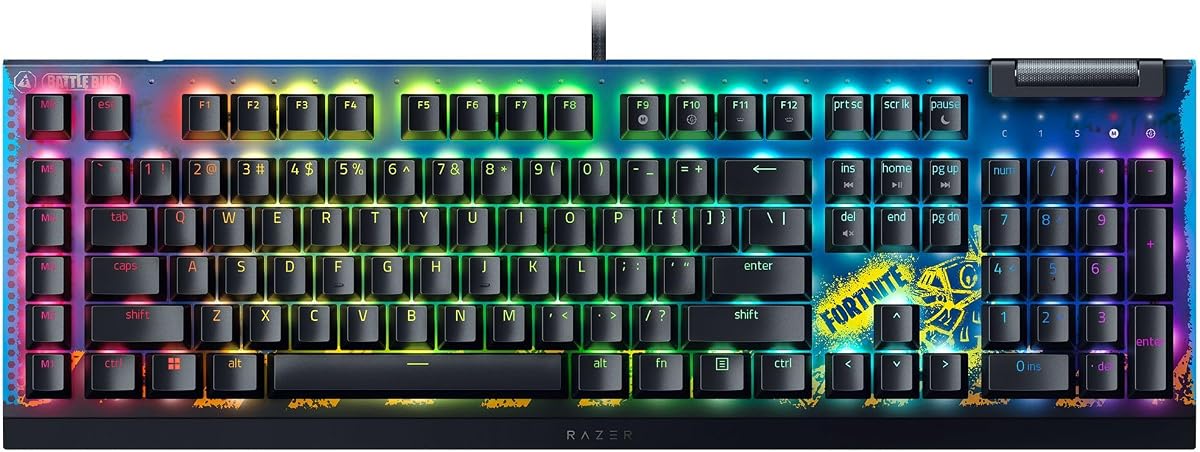
Razer BlackWidow V4 X Mechanical Gaming Keyboard
4.5Editor score
Yellow Linear Mechanical Switches
6 Dedicated Macro Keys
Multi-Function Roller & Media Keys
Discover the top 10 best Keyboard for Fortnite in 2026 with detailed comparisons of mechanical features, RGB lighting, and performance specs for every budget
Finding the right gaming peripherals is essential for competitive play in battle royale titles. A high-quality input device ensures your building and editing commands register instantly during intense firefights. This guide reviews the best options available for players seeking precision and reliability.
We evaluated ten top-rated keyboards based on switch type, build quality, customization options, and user feedback. Our analysis focuses on how each model supports the fast-paced demands of modern FPS gaming. We considered budget-friendly combos alongside premium mechanical options for diverse needs.
Each entry includes detailed specifications, pros and cons, and real-world usage insights to help you choose. Remember that pricing fluctuates frequently, so verify current deals before purchasing. Your ideal setup depends on your specific playstyle and budget constraints for optimal performance.
4.5Editor score

4.5Editor score

4.5Editor score
This side-by-side comparison highlights the key differences across our top ten selected models. You will find variations in layout size, switch technology, and additional features designed to enhance your gaming experience.






This mechanical keyboard is rated 4.5 stars for its exceptional performance in fast-paced titles. It features yellow linear switches that deliver quick actuation with minimal resistance for smooth keystrokes. Built-in sound dampeners keep noise levels low during intense gaming sessions.
We may earn a commission when you buy through this link, at no additional cost to you.
The six dedicated macro keys allow you to program complex commands for building or editing instantly. A multi-function roller and secondary media keys give you convenient control over volume and brightness without leaving the game. The Chroma RGB lighting offers over 16.8 million colors to match your setup.
While the price is higher than budget models, the durability and customization justify the investment for serious gamers. The double-shot ABS keycaps ensure labels never wear off despite heavy use. This model excels for players prioritizing speed and ergonomic design.
Buy this if you want a premium experience with dedicated macro functionality and robust build quality. It is ideal for gamers who spend long hours playing and need reliable, fast inputs. Check current pricing before purchasing to ensure the best deal.
Program complex building sequences into single macro keys to react instantly to enemy encounters.
Linear switches with sound dampeners provide the tactile feel of mechanical keyboards without loud clicks.
We may earn a commission when you buy through this link, at no additional cost to you.
Rated 4.5 stars, this complete set offers premium features at an accessible price. It includes a full-size RGB backlit keyboard and a high-precision gaming mouse. Soft-touch membrane keys provide satisfying feedback while remaining quiet for shared spaces.
We may earn a commission when you buy through this link, at no additional cost to you.
You can customize colors and patterns using intuitive software downloadable from the manufacturer. The five dedicated macro keys let you record command sequences for competitive advantages. Anti-ghosting ensures every key press registers instantly during chaotic gameplay moments.
While it lacks mechanical switches, the durability and responsiveness are impressive for the price. An ergonomic wrist rest reduces fatigue during long sessions. This combo is perfect for first-time gamers or those on a tight budget.
Choose this if you want a reliable full setup without spending much. It delivers everything needed for gaming and work in one package. Verify current deals online to maximize your savings on this versatile bundle.
Includes both keyboard and mouse with wrist rest for a ready-to-use gaming station immediately.
Record complex command sequences to execute actions quickly during intense match scenarios.
We may earn a commission when you buy through this link, at no additional cost to you.
This 60% keyboard earns 4.5 stars for its advanced magnetic switch technology and speed. It features Hall Effect switches that eliminate physical contact wear for consistent actuation over time. An 8000Hz polling rate ensures commands are processed instantly without lag.
We may earn a commission when you buy through this link, at no additional cost to you.
The rapid trigger mode allows ultra-low reset distances for faster movement and shooting. You can adjust actuation points per key to match your specific finger pressure preferences. A web-based driver makes customization easy without bulky software downloads or compatibility issues.
While compact and lacking a numpad, the layout maximizes mouse space for better movement. It is ideal for FPS titles where every millisecond counts in competitive matches. The dynamic RGB lighting adds style with 16.8 million color options available.
Buy this for unmatched speed and precise control tailored to your playstyle. It suits gamers who value customization and performance over traditional full layouts. Check system requirements to ensure full compatibility with the web driver tools.
Hall Effect technology ensures consistent actuation without physical contact wear for longevity.
Remap keys and create macros directly in your browser without needing heavy software.
We may earn a commission when you buy through this link, at no additional cost to you.
Rated 4.6 stars, this keyboard offers durability with IP32 water resistance against spills. Whisper quiet gaming switches deliver nearly silent use for shared environments. A premium magnetic wrist rest provides full palm support for long sessions.
We may earn a commission when you buy through this link, at no additional cost to you.
Ten-zone RGB illumination creates gorgeous color schemes and reactive effects for style. Dedicated multimedia controls allow quick volume adjustments without interrupting gameplay. It works with Windows, Mac, Xbox, and PlayStation consoles for broad compatibility.
While the membrane switches lack tactile feedback of mechanical ones, they are smooth and reliable. The water resistance offers peace of mind against accidental damage. It is a great choice for casual gamers or shared spaces needing quiet operation.
Choose this for a sturdy, quiet, and versatile keyboard. Its compatibility across platforms makes it useful for console and PC gaming alike. Review current deals to see if it fits your budget needs.
IP32 rating protects against liquid spills to prevent accidental damage to internal components.
Works seamlessly with Xbox and PlayStation consoles for cross-platform gaming versatility.
We may earn a commission when you buy through this link, at no additional cost to you.
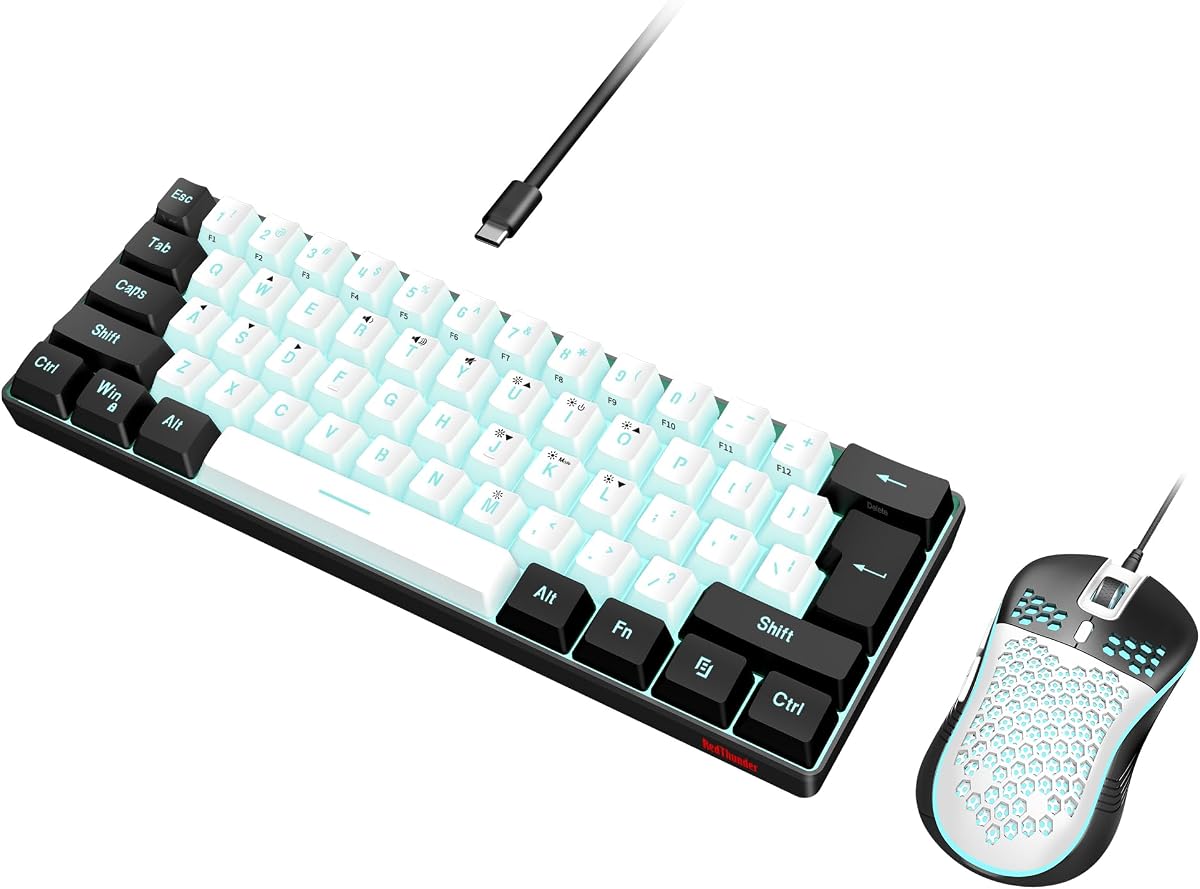
This compact keyboard earns 4.3 stars for its space-saving design ideal for small desks. A detachable Type-C cable provides a stable connection with ultra-low input latency. LED backlit modes offer visibility in dark environments with adjustable brightness.
We may earn a commission when you buy through this link, at no additional cost to you.
Sixty-five percent layout saves space without sacrificing essential arrow keys for navigation. Ergonomic keycap height maintains comfort during extended gaming. or work sessions. The mechanical feel technology provides an enjoyable typing experience without high costs.
While not mechanical, the build quality ensures over 10 million keystrokes lifespan. It is great for portability since it fits easily into backpacks for travel. Users looking for a minimalist setup will appreciate the reduced footprint and style.
Buy this for a lightweight portable option that balances function and form. It suits students or travelers needing reliable performance in tight spaces. Check shipping times and availability before ordering.
Easy to carry in a backpack for gaming setups on the go easily.
Separate arrow keys allow precision gaming without needing a full numpad section.
We may earn a commission when you buy through this link, at no additional cost to you.
Rated 4.6 stars, this wireless keyboard connects via Bluetooth, 2.4GHz, or USB-C. It supports up to five devices simultaneously with quick switching via shortcuts. A multi-function knob adjusts brightness in gaming mode or volume in office mode.
We may earn a commission when you buy through this link, at no additional cost to you.
Hot-swappable switches allow easy DIY customization without soldering. Pre-lubricated stabilizers and Reaper switches deliver smooth typing with pleasant mechanical sound. Side-printed PBT keycaps offer durability without fading and a soft touch feel.
While battery management adds a routine task, the 4000mAh battery ensures long life. The thocky structure with silencer filling provides a solid premium feel. Gamers who value customization will enjoy remapping keys and creating advanced macros easily.
Choose this for a flexible wireless setup with mechanical precision. It is excellent for multitasking professionals and gamers alike. Ensure you are comfortable with wireless charging routines before purchasing.
Connect five devices at once to switch between PC and mobile quickly.
Change switches easily to tailor sound and feel without soldering skills needed.
We may earn a commission when you buy through this link, at no additional cost to you.
This 68-key keyboard earns 4.5 stars for its fast trigger capabilities and magnetic switches. An 8000Hz polling rate offers 8x faster response than traditional mechanical keyboards. Adjustable actuation points let you personalize sensitivity down to 0.1mm units.
We may earn a commission when you buy through this link, at no additional cost to you.
A professional web driver allows customization of key mapping, macros, and RGB without heavy software. South-facing LEDs provide better visual experience with 16.8 million color options. The compact design saves desktop space while retaining essential arrow keys.
Note that the driver works only on Windows systems which limits compatibility. The detachable USB cable ensures a stable connection for consistent gaming. Speed is paramount here for competitive shooters needing immediate input registration.
Buy this for competitive play where every millisecond counts in reaction time. It suits Windows users needing advanced tweakable performance. Confirm OS compatibility before finalizing your order.
Set actuation points per key to match specific gameplay needs precisely.
Access customization directly via browser to avoid system compatibility issues.
We may earn a commission when you buy through this link, at no additional cost to you.
Rated 4.3 stars, this combo features an ultra-compact layout that organizes desktop gear neatly. Water-resistant design with triple protection prevents damage from accidental liquid spills. A lightweight honeycomb mouse shell ensures flexibility without fatigue.
We may earn a commission when you buy through this link, at no additional cost to you.
RGB backlit modes offer variety with breathing or permanent lighting options. Anti-interference magnet ring and gold-plate interface guarantee stable data transmitting. The compact design leaves more space for mouse movements essential for precision gaming.
While simple, the set delivers solid performance for entry-level gamers. The mouse DPI and tracking speed meet fast browsing needs effectively. It is ideal for those wanting a complete kit without complex setup requirements.
Choose this for a practical budget set with protective features. It works well for PC and console gaming with included RGB flair. Check current bundle pricing for maximum value.
Triple protection water resistance safeguards against accidental drink spills.
Compact layout frees desk space for wider mouse movements during games.
We may earn a commission when you buy through this link, at no additional cost to you.
This esports keyboard rates 4.6 stars for its durable GX Blue Click switches. Audible tactile feedback confirms secure keypress for precision action. Tenkeyless design frees table space for mouse movement and enhances portability.
We may earn a commission when you buy through this link, at no additional cost to you.
LIGHTSYNC lighting highlights keys with programmable patterns stored in onboard memory for tournaments. Detachable Micro USB cables feature a secure three-pronged design for easy transport. Three-step angle adjustment plus rubber feet ensure stability during intense play.
While the audible click is loud, it provides clear confirmation of inputs. Macros require Logitech G HUB software which may not be available on tournament systems. It is trusted by professional players globally for reliability.
Buy this for tournament-quality performance with proven track record. It suits competitive players who value tactile feedback and stability. Review software requirements before finalizing your purchase decision.
Store lighting profiles directly on keyboard to avoid software needs at events.
Audible clicks confirm every keystroke to prevent missed inputs in critical moments.
We may earn a commission when you buy through this link, at no additional cost to you.
Rated 4.6 stars, this keyboard offers adjustable hall effect magnetic switches with RT function. Bind four functions to one key based on four different pressing degrees for versatility. True 8000Hz polling rates ensure ultra-responsive inputs reducing latency impressively.
We may earn a commission when you buy through this link, at no additional cost to you.
Web driver allows remapping keys and adjusting actuation points to suit typing or gaming. Top-mounted structure with aluminum alloy plate ensures a quiet stable typing operation. PBT keycaps provide wear-resistant clear lettering and superior shine-through with LEDs.
Though compact, it retains separate arrow keys for navigation without numpad clutter. Compatibility includes Mac and PC systems switchable by one button. It suits users needing flexible input customization for complex game controls.
Choose this for advanced control and rapid trigger capabilities. It is ideal for gamers wanting to tailor actuation precisely. Verify web driver availability on your system before buying.
Map multiple actions to one key to execute complex moves faster.
Instant reset enables faster repeated inputs for competitive advantage.
We may earn a commission when you buy through this link, at no additional cost to you.
Selecting the right keyboard requires understanding key technical factors that impact gaming performance and longevity.
Mechanical switches offer faster actuation and durability compared to membrane options. Linear switches provide smooth inputs ideal for rapid fire, while clicky switches give tactile feedback but may be loud.
Look for switches rated for millions of keystrokes to ensure long-term reliability during intense use.
Full-size keyboards include a numpad but occupy more desk space, while tenkeyless or 60% designs save room for mouse movement. Compact layouts are better for gamers needing wide cursor sweeps.
Choose a size that balances your need for function keys and available desktop surface area.
Higher polling rates like 8000Hz reduce input lag significantly compared to standard 1000Hz models. Lower latency ensures your commands register instantly which is critical for fast-paced competitive play.
Prioritize models with high polling rates to maintain a competitive edge during matches.
Programmable macros and RGB lighting allow you to tailor the keyboard to your style and needs. Look for software that allows on-the-fly key remapping and macro recording for complex commands.
Ensure the customization tools are user-friendly and compatible with your operating system.
Keycaps made from double-shot ABS or PBT resist wear and fading over time. Frames constructed from aluminum or reinforced plastic provide better stability and durability against impacts.
Opt for sturdy materials that can withstand daily heavy use without structural failure.
Wired connections offer stability and zero latency ideal for competitive gaming. Wireless options provide flexibility and cleanliness but require battery management and may introduce slight input delay.
Decide between wired stability and wireless convenience based on your setup preferences.
Features like wrist rests and adjustable tilt angles reduce strain during extended sessions. Proper ergonomic design helps maintain comfort and prevents fatigue affecting performance.
Look for keyboards with included rests or adjustable feet to suit your posture.
Resistant ratings like IP32 protect against accidental spills that could damage internal components. Sealed switches or membranes ensure the keyboard remains functional after exposure to debris.
Consider resistant features if you drink near your setup or need durable gear for long use.
Always connect the keyboard securely before launching your game to ensure all keys register properly. Verify that macro keys are programmed correctly to avoid accidental in-game actions during matches.
Regularly clean your keyboard by flipping it upside down and tapping gently to remove debris. Use compressed air to clean between keys and a soft cloth with mild cleaner for the keycaps to maintain hygiene.
Store your keyboard in a dry environment away from direct sunlight to prevent keycap fading. If using wireless models, charge the battery before long sessions to avoid disconnection during play.
Linear mechanical switches are often preferred for their smooth actuation and quiet operation. They allow rapid consecutive keypresses essential for building and editing. However, clicky switches may suit players who value tactile confirmation.
Yes, macros can automate complex building or editing sequences for faster execution. Many competitive setups use these to streamline actions and reduce reaction time significantly.
Modern wireless keyboards with low latency technologies are increasingly reliable. However, wired options remain the standard for zero input delay assurance in pro tournaments.
Use compressed air to blow dust out from between keys. Gently wash keycaps with mild soap and water then dry completely before reinstalling.
Tenkeyless or compact layouts are popular to maximize mouse movement space. Full-size keyboards provide more function keys but take up more desk room.
Most gaming keyboards are compatible with Mac but require driver adjustments for specific keys. Check product compatibility details before purchasing to ensure full functionality.
Quality mechanical keyboards last years with proper care due to switch durability. Regular maintenance like cleaning extends lifespan significantly.
Polling rate is how many times per second the keyboard reports to the computer. Higher rates like 8000Hz reduce lag for faster response times in games.
We reviewed ten top-rated keyboards covering budget, premium, and specialty options. Each offers unique features like Hall Effect switches or macro customization to improve your gameplay experience.
Prioritize speed and reliability in your selection. Compact layouts and high polling rates provide tangible advantages in competitive matches.
Always check current pricing and availability before purchasing since deals change often. Select the model that best fits your budget and specific playstyle for maximum performance.