
Raywego 49 Inch Curved Ultrawide Gaming Monitor
4.6Editor score
165Hz refresh rate
5120×1440 resolution
1500R curved design
Finding the perfect display for your racing simulator setup is crucial for achieving peak performance and immersion. A large curved screen fills your peripheral vision, making you feel like you are actually in the cockpit.
We have analyzed ten leading models to find the best options for sim racers. Our comparison focuses on refresh rates, resolution, and panel technology to ensure smooth and detailed racing experiences.
Each pick highlights unique strengths like color accuracy or speed. Note that availability and offers change frequently so verify details before purchasing your new monitor today.
4.6Editor score

4.5Editor score

4.3Editor score
As an Amazon Associate we earn from qualifying purchases.
This side-by-side comparison highlights the key specifications of every model in our list. Use this table to quickly identify which monitor fits your specific sim racing needs and budget requirements.




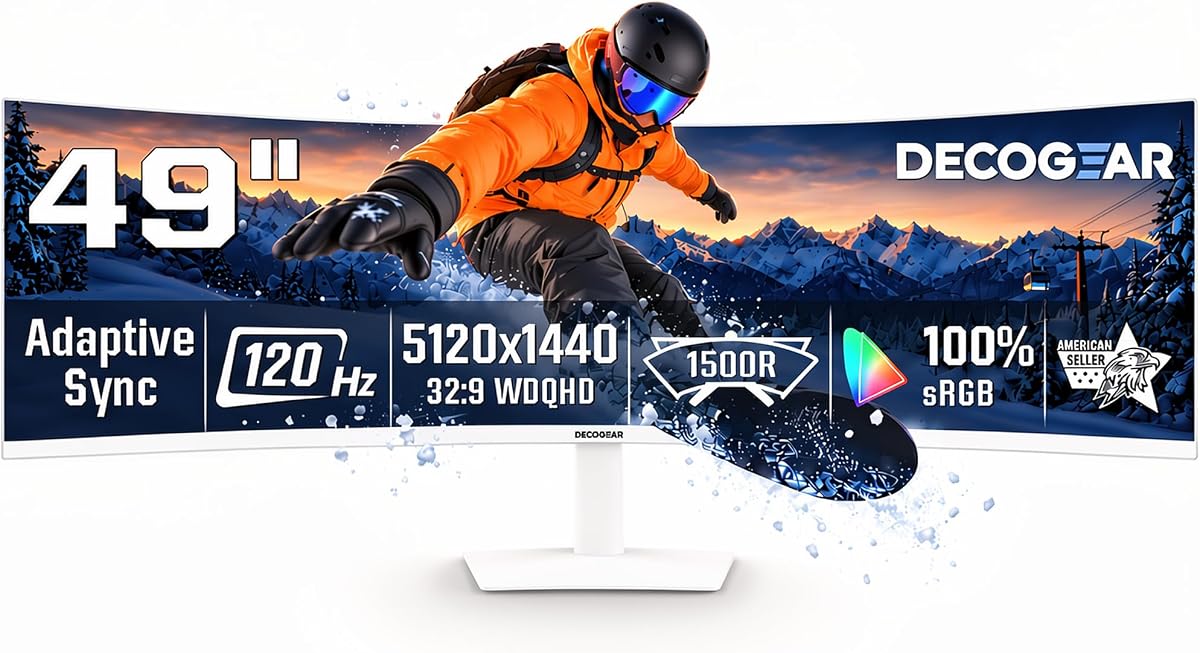


This monitor stands out as an affordable entry into the world of super ultrawide displays. With a solid rating, it delivers impressive visual fidelity and speed for its cost.
We may earn a commission when you buy through this link, at no additional cost to you.
The 165Hz refresh rate ensures that high-speed racing scenes remain fluid without stuttering. The DQHD resolution provides ample detail to spot track markers and opponents clearly across the wide canvas.
While the HDR400 support is modest, the VA panel offers deep contrast that helps in night racing simulations. It effectively replaces two screens without the distraction of a center bezel.
Enthusiasts seeking a large field of view on a budget will find this an excellent choice. It balances performance and cost effectively for serious sim racers who need immersion.
The expansive 32:9 format wraps around your vision to enhance spatial awareness during track navigation.
Fast refresh rates and low response times minimize motion blur allowing for precise cornering and braking.
We may earn a commission when you buy through this link, at no additional cost to you.
This OLED powerhouse offers a visual experience that is hard to match in the sim racing world. Its high rating reflects the exceptional quality of the display technology used here.
We may earn a commission when you buy through this link, at no additional cost to you.
The QD-OLED panel delivers true blacks and vibrant colors which make night tracks look incredibly realistic. The 0.03ms response time ensures that fast inputs are reflected instantly on screen.
Thermal modulation and burn-in prevention features add longevity to this premium investment. The wide view helps you spot competitors and track details with unprecedented clarity.
Competitive drivers who prioritize visual fidelity and speed should consider this top tier option. It represents the pinnacle of current monitor technology for immersive racing.
Infinite contrast and true blacks create a lifelike environment that deepens immersion during gameplay.
Ultra fast response eliminates ghosting allowing for cleaner edges on moving cars and objects.
We may earn a commission when you buy through this link, at no additional cost to you.
This model combines productivity features with gaming capabilities to serve as a versatile desktop solution. Its rating highlights its reliability and user satisfaction over time.
We may earn a commission when you buy through this link, at no additional cost to you.
The inclusion of USB Type-C with power delivery simplifies cable management for laptop users. The 5K2K resolution ensures that UI elements in sim software are sharp and readable.
With adaptive sync and HDR support, the screen handles various lighting conditions well. The 1800R curve reduces eye fatigue during long sessions of track tuning or racing.
Users who need a hybrid work and play screen will appreciate this flexible design. It offers a strong balance of features for those who value connectivity and clarity.
A single USB-C cable can handle video and power reducing clutter on your desk.
High pixel density ensures telemetry data and gauges remain crisp and easy to read.
We may earn a commission when you buy through this link, at no additional cost to you.
This monitor is engineered for high performance gaming where speed is the primary concern. Its design focuses on reducing latency and increasing frame rates for competitive play.
We may earn a commission when you buy through this link, at no additional cost to you.
The 240Hz refresh rate offers a level of smoothness that few other displays can match. Coupled with HDR1000, the screen remains vibrant even in brightly lit rooms.
The 1000R curvature wraps tightly around the viewer to create a true cockpit feel. This aggressive shape helps in perceiving depth and distance more accurately during laps.
Serious gamers who want the fastest possible response will love this model. It pushes the boundaries of what a standard gaming monitor can achieve in terms of speed.
The ultra high refresh rate ensures that every frame is updated instantly for fluid visuals.
The tight curve surrounds your vision to eliminate flat edge distractions during racing.
We may earn a commission when you buy through this link, at no additional cost to you.
As a newer model this monitor brings updated refinements to the Odyssey line. Its rating reflects strong user satisfaction with its overall performance and build quality.
We may earn a commission when you buy through this link, at no additional cost to you.
The 144Hz refresh rate provides smooth visuals that are suitable for most sim titles. The 1000R curve continues to offer a deeply immersive experience for track enthusiasts.
Features like auto source switching and split screen modes make switching between game and chat easy. The design ensures that you can reach the perfect viewing height without issues.
Those looking for a reliable modern option with good support are well served here. It balances high-end features with practical usability for daily sim racing sessions.
Smart detection of devices ensures you start racing immediately without manual input switching.
The ergonomic stand allows you to adjust height and tilt for long racing sessions.
We may earn a commission when you buy through this link, at no additional cost to you.
This model offers impressive specs at a competitive price point making it accessible to many. The rating indicates that it delivers well above average performance for its category.
We may earn a commission when you buy through this link, at no additional cost to you.
With 120% sRGB coverage, the colors remain vivid during gameplay which enhances the visual experience. The 165Hz refresh rate ensures that fast movements look smooth and clear.
The stand allows for tilt and lift adjustments to suit different desk heights. Wall mount compatibility also provides flexibility for setting up a dedicated racing rig.
Budget conscious buyers who still want high refresh rates will find this appealing. It proves that you do not need to spend a fortune to get a quality ultrawide experience.
Wide color gamut ensures that track textures and car paint look realistic and detailed.
Eye care technologies reduce strain allowing for longer practice sessions without fatigue.
We may earn a commission when you buy through this link, at no additional cost to you.
This monitor bridges the gap between workstation and entertainment with strong productivity tools. Its rating suggests it is reliable for users who split time between work and games.
We may earn a commission when you buy through this link, at no additional cost to you.
The high resolution display allows for multiple windows to be open side by side without clutter. KVM support lets you control multiple computers with one keyboard and mouse easily.
While it supports 120Hz for gaming, the focus is more on general usability and clarity. The USB-C port simplifies setup for laptops by providing power and video in one cable.
Professionals who also enjoy racing games will appreciate this versatility. It offers a robust set of tools to enhance both work efficiency and entertainment value.
The wide canvas allows for side by side windows to improve multitasking and workflow.
USB power delivery reduces the need for multiple power adapters on your desk.
We may earn a commission when you buy through this link, at no additional cost to you.
A reliable option for those who want a trusted brand without the latest high resolution cost. Its rating speaks to its longevity and consistent performance over time.
We may earn a commission when you buy through this link, at no additional cost to you.
The 144Hz refresh rate is smooth enough for most gaming needs. The DFHD resolution is lower than DQHD but still offers a wide aspect ratio for immersion.
Eye care technologies help reduce fatigue during long sessions which is key for racing. The stand offers tilt and height adjustments to ensure a comfortable viewing position.
Users looking for a solid entry level ultrawide from a reputable brand will like this. It is a steady choice for those who value reliability over cutting edge specs.
Proven build quality ensures this monitor will serve you well over many years of use.
Flicker free backlighting and filters help prevent headaches during extended gaming.
We may earn a commission when you buy through this link, at no additional cost to you.
This model excels in combining speed and clarity to offer a sharp viewing experience. Its strong rating reflects user satisfaction with the detailed and fluid display.
We may earn a commission when you buy through this link, at no additional cost to you.
The 240Hz refresh rate paired with high resolution ensures that every detail is crisp and smooth. This is ideal for seeing fine track details without blurring during fast turns.
Color accuracy is high which helps in visualizing track lighting and car details correctly. The wide array of ports supports various devices without the need for dongles.
Enthusiasts who want both speed and sharpness in one package should choose this. It delivers high-end specs at a price that remains competitive in the market.
The high resolution ensures that UI text and telemetry are legible at all times.
High refresh rate ensures that cars remain sharp during rapid acceleration and braking.
We may earn a commission when you buy through this link, at no additional cost to you.
This premium OLED model brings top tier visual quality to your racing setup. Its rating is consistent with high-end displays that offer exceptional image quality and speed.
We may earn a commission when you buy through this link, at no additional cost to you.
The QD-OLED panel delivers bright HDR blacks that make night racing look stunning. The 240Hz refresh rate ensures that competitive action remains fluid and responsive.
Design features like the metal finish give it a sleek look that matches modern setups. Auto source switching helps you jump straight into the game without menu navigation.
Those seeking the ultimate visual experience will find this model worth the investment. It offers a blend of design and performance that stands out in the market.
OLED technology provides unmatched contrast which brings depth to every racing environment.
The thin metal profile looks stylish on any desk while reducing visual clutter.
We may earn a commission when you buy through this link, at no additional cost to you.
Selecting the right monitor involves understanding key specs that affect immersion and performance. Here are the factors to consider before you make your final decision.
The refresh rate determines how many times the screen updates per second. Higher rates like 144Hz or 240Hz ensure that fast movements on the track remain smooth and clear.
Aim for at least 144Hz to avoid motion blur and maintain a competitive edge in your races.
Resolution impacts the clarity of UI elements and track details. A DQHD resolution offers a wide balance of sharpness and performance for most simulators.
Higher resolutions provide more detail but require stronger graphics hardware to maintain high frame rates.
Curvature wraps the screen around your field of view to enhance immersion. Common values include 1500R or 1000R with tighter curves feeling more like a cockpit.
Choose a curve that matches your seating distance to avoid distortion or eye strain.
Panel types like VA or OLED affect contrast and color. VA panels offer good contrast while OLED provides perfect blacks and speed.
Decide based on whether you prioritize black levels for night racing or budget for a standard setup.
Response time is the speed at which pixels change color. Lower times reduce ghosting which is critical for tracking fast moving cars.
Look for a response time of 1ms or lower to ensure clear images during high speed driving.
Ports like DisplayPort and HDMI must support the resolution and refresh rate you need. USB-C can simplify power and data for laptops.
Verify your graphics card output matches the monitor inputs to ensure smooth signal transmission.
Adjustability in height and tilt ensures you can sit comfortably for long sessions. Good ergonomics prevent neck strain during practice.
Ensure the stand allows for adjustments that fit your chair and desk height.
Features like FreeSync and G-Sync reduce screen tearing for smoother visuals. Additional tools like PIP can help with streaming or chatting while racing.
Choose a model that supports your GPU to maximize compatibility and performance.
Position your monitor at arm's length to prevent eye strain during long racing sessions. Adjust the tilt to reduce glare from overhead lighting.
Use the software provided by the manufacturer to calibrate colors for accurate track visuals. Enable game modes to optimize settings for racing software.
Keep the screen clean with a soft cloth to avoid scratches. Ensure proper ventilation to prevent overheating during extended use.
Yes it fills your peripheral vision to create an immersive experience. It allows you to see mirrors and track markers easily without moving your head.
A refresh rate of 144Hz or higher is ideal for smooth motion. It reduces blur during high speed turns and braking.
Driving high resolution and refresh rates requires a capable graphics card. Check the requirements of your sim software to ensure compatibility.
Curvature wraps the screen around you to reduce eye movement. It helps in depth perception which is useful for overtaking.
Use DisplayPort 1.4 or HDMI 2.1 to support high resolutions. Ensure the cable is rated for the speed you need.
OLED offers deep blacks which enhance night racing visuals. They also have fast response times but are more expensive.
Yes the wide screen is great for multitasking with spreadsheets or chat. It supports productivity as well as gaming.
Use a microfiber cloth to wipe away dust gently. Avoid harsh chemicals that could damage the coating.
We have highlighted ten top choices ranging from budget to premium. Each option offers unique strengths for different racing preferences and needs.
Prioritize refresh rate and resolution to ensure smooth and clear visuals. A good curvature also enhances immersion during your track sessions.
Prices and availability may change over time so check current offers before buying. Select the model that fits your specific goals and setup.