
Acer Gadget Auto Face Tracking Tripod
4.6Editor score
No app needed tracking
Detachable ring light included
Stable quadpod design
Finding the right stabilization tool is crucial for modern creators. An AI gimbal with tripod combines smooth motion tracking with hands-free flexibility. These devices help you capture professional-quality footage without constant manual adjustment during shoots.
We evaluated ten leading models based on tracking accuracy, battery life, and ease of use. Each product offers unique strengths for different shooting scenarios. Our list covers options from budget-friendly stands to advanced stabilizers with intelligent features.
Each pick highlights key capabilities and real-world performance insights. Prices and availability fluctuate frequently on marketplaces. Always verify current details before purchasing to ensure you get the best value for your creative needs today.
4.6Editor score

4.4Editor score

4.2Editor score
As an Amazon Associate we earn from qualifying purchases.
This side-by-side comparison highlights the core specifications and unique selling points of each model. Review the details to find the perfect match for your specific filming requirements and budget constraints.




This device stands out as the top choice for serious creators needing reliable motion control. It combines advanced AI tracking with a built-in tripod for versatility. The Apple DockKit integration ensures seamless operation with iOS apps.
We may earn a commission when you buy through this link, at no additional cost to you.
The active zoom tracking is a game changer for sports and performance recording. You can zoom up to 15x while the gimbal keeps the subject locked on. The multi-person tracking ensures groups stay framed without manual adjustment.
While the price is higher than budget options, the features justify the investment. The build quality is robust and the lighting is helpful for indoor shooting. Some Android users may miss full DockKit features.
Content creators who need professional results will find this device indispensable. It handles complex moves smoothly and offers tools like the teleprompter. For the best experience in the iOS ecosystem, this is the pick.
This feature allows precise tracking even at high zoom levels for dynamic action shots.
Maintain a consistent camera angle while moving the gimbal up and down for cinematic shots.
We may earn a commission when you buy through this link, at no additional cost to you.
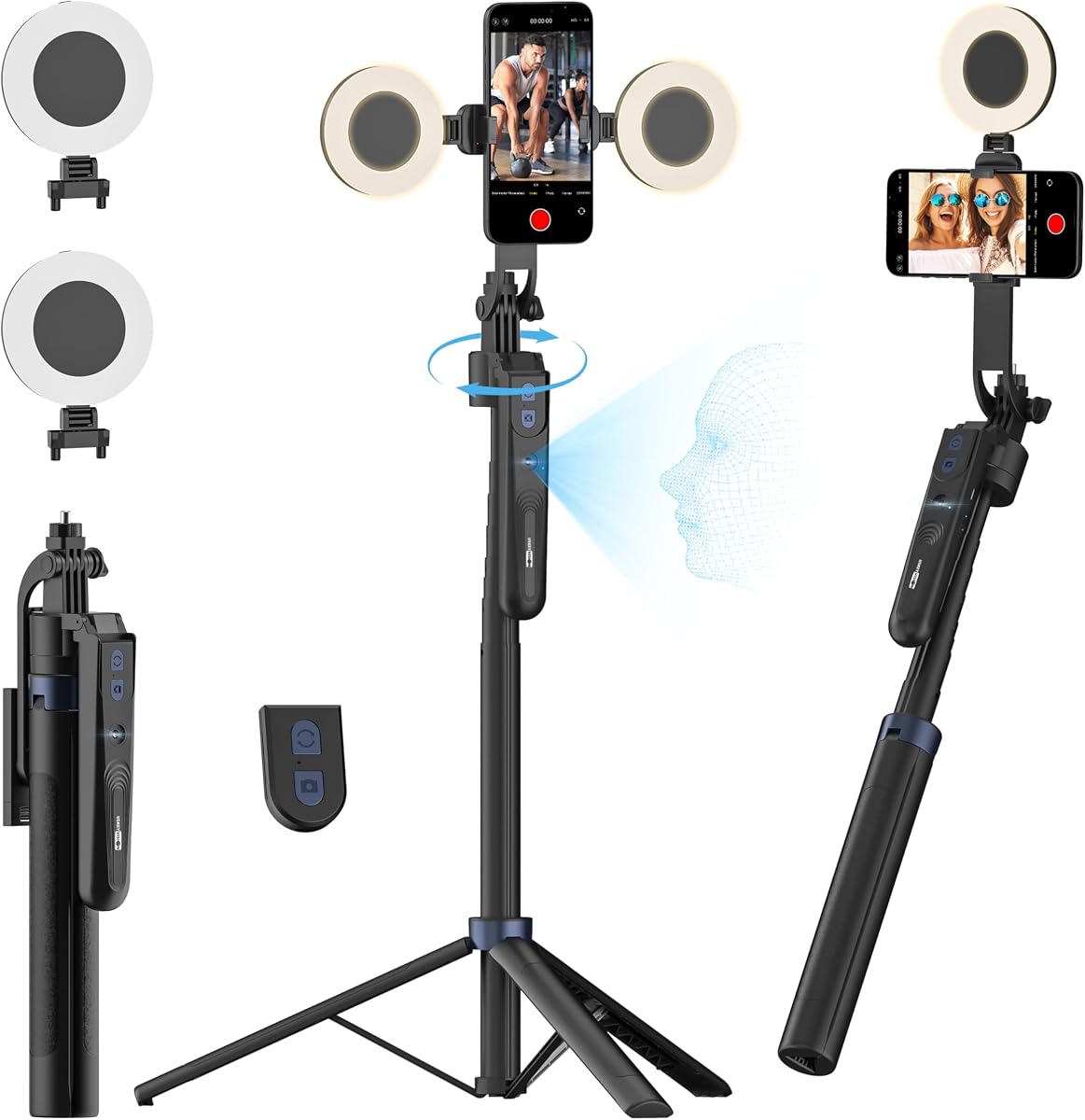
This model offers impressive AI face tracking without requiring a dedicated app. It serves as both a tripod and a stabilizer for flexible shooting. The price makes it accessible for beginners starting their content journey.
We may earn a commission when you buy through this link, at no additional cost to you.
The ring light adds significant value for low-light streaming or recording. The quadpod design ensures stability even when extended to full height. You can control recording with simple hand gestures for hands-free operation.
It may lack the sophisticated stabilization of dedicated gimbals but works well for static shots. The remote control range is sufficient for most setups. The trade-off is heavier weight compared to compact models.
Creators on a tight budget who need reliable auto-tracking will love this device. It simplifies the setup process for live streams or solo videos. A great entry point into automated framing without breaking the bank.
The built-in system tracks your face instantly without needing to install extra software.
Four feet provide a wide base that prevents tipping during extended use outdoors.
We may earn a commission when you buy through this link, at no additional cost to you.
This bundle delivers a complete solution for professional mobile filmmaking. It works seamlessly with both iOS and Android devices for broad compatibility. The lighting system is powerful enough for serious low-light work.
We may earn a commission when you buy through this link, at no additional cost to you.
Tracking works across hundreds of apps which is a major plus for streamers. The teleprompter helps with script reading while recording simultaneously. Free tilt mode allows unique camera movements that feel cinematic and smooth.
The price reflects the high-end features but may be steep for casual users. The setup requires some familiarity with the app to unlock all features. However, the results are consistently high quality when properly configured.
Professional vloggers and filmmakers will appreciate the comprehensive toolkit here. It eliminates the need for separate lights or accessories. Investing in this ensures you have a reliable camera partner for years.
Supports native tracking in over 200 apps for seamless integration without workarounds.
The built-in fill light elevates video quality without needing external lighting gear.
We may earn a commission when you buy through this link, at no additional cost to you.
This model brings DJI's reputation for stability to a portable form factor. The 3-axis stabilization ensures footage remains smooth even during movement. Tracking features are integrated for improved focus on subjects.
We may earn a commission when you buy through this link, at no additional cost to you.
The built-in tripod and extension rod allow for hands-free versatility. You can shoot group selfies or wide shots easily without extra gear. Battery life supports long days of filming without needing to recharge often.
Note that app availability may vary depending on your region. This is a minor inconvenience given the hardware performance. The grip is comfortable and the design is modern and efficient.
Users who want reliable stabilization with convenient tracking will find this suitable. It balances performance and portability well for daily vlogging. A solid choice for those familiar with DJI ecosystems.
The ergonomic handle reduces wrist strain during extended shooting sessions comfortably.
No need for extra accessories to capture high angle group photos easily.
We may earn a commission when you buy through this link, at no additional cost to you.
This gimbal offers extensive height options for dynamic angle changes. The detachable remote allows control from a distance for self-portraits. Tracking is reliable and helps keep subjects centered in the frame.
We may earn a commission when you buy through this link, at no additional cost to you.
The fill light is a useful addition for evening shoots. You can adjust brightness to suit different environments. The foldable design makes storage easier despite the length.
The height may be overkill for simple setups but great for events. The remote range supports group shots comfortably. It is heavier than smaller models which might impact portability.
Travel creators who need height flexibility will appreciate this tool. It handles sports and dynamic movement well due to stabilization. A strong option for diverse shooting needs without extra mounts.
Control your shots from a distance using the magnetic remote for self-portraits.
Built-in tracking ensures subjects stay focused during movement automatically.
We may earn a commission when you buy through this link, at no additional cost to you.
This bundle includes tools for comprehensive content creation. Animal tracking makes it unique for pet videos or outdoor adventures. The remote control offers flexibility in how you frame your shots.
We may earn a commission when you buy through this link, at no additional cost to you.
Multi-person tracking ensures you do not miss anyone in a group. The teleprompter helps maintain eye contact with the audience. Battery life supports all-day recording sessions efficiently.
The AI editing tools are convenient for quick post-production work. However, full features rely on the app which requires installation. The setup involves more steps than simple tripods.
Vloggers who need pet tracking or group coverage will find this valuable. It streamlines the process from recording to editing. A useful companion for travelers needing automated framing.
Keep your pets in focus automatically as they move during outdoor shoots.
Use your second screen to manage framing and recording remotely.
We may earn a commission when you buy through this link, at no additional cost to you.
This model prioritizes ease of use for quick filming. The magnetic mount allows fast attachment and detachment of phones. Tracking is efficient and keeps subjects well framed for most scenarios.
We may earn a commission when you buy through this link, at no additional cost to you.
The Multifunctional Module supports mic receivers for better audio quality. This is rare in compact gimbals and adds value for vloggers. The extension rod helps for wider angles without extra gear.
Battery life is consistent with other top models. It is lightweight enough for daily carrying without fatigue. The app dependency might be a hurdle for some users.
Streamers needing audio integration will find this appealing. It balances audio and video needs effectively. A great choice for creators focusing on storytelling with clear sound.
Connect DJI mics directly for professional audio without external adapters.
Unfold the gimbal and mount your phone to start filming instantly.
We may earn a commission when you buy through this link, at no additional cost to you.
This bundle combines the Osmo Mobile 8 with a wireless mic. Audio quality is a standout feature for creators who prioritize sound. The gimbal ensures video stays smooth while focusing on content.
We may earn a commission when you buy through this link, at no additional cost to you.
The included mic offers decent range and clarity for interviews. Tracking keeps your face centered while you move. Battery life ensures you can record long sessions without interruption.
The price is higher due to the added audio equipment. Setup involves pairing the mic which may take time. But the result is professional-grade audio and video together.
Interviewers and vloggers needing audio will find this convenient. It removes the need to buy a separate mic. A solid package for high-quality content production.
Wireless audio reception improves clarity for professional vlogs.
Getting audio and video tools together saves time and cost.
We may earn a commission when you buy through this link, at no additional cost to you.
This tripod reaches heights suitable for full-body shots or events. The dual lights provide adjustable lighting for different settings. It is a cost-effective option for those needing tall stands.
We may earn a commission when you buy through this link, at no additional cost to you.
Rotation is smooth and helps capture all angles. The gesture control allows easy start and stop commands. It works well for live streaming or group photos.
Tracking is basic but functional for most uses. It may struggle in low light without the lights. The weight makes it less ideal for hiking or travel.
Indoor streamers or studio users will find this versatile. It supports various camera types with the standard mount. A practical solution for budget-conscious creators.
Adjustable lights help you get the right look for any scene.
Get high angle shots without needing expensive equipment to climb.
We may earn a commission when you buy through this link, at no additional cost to you.
This version is a streamlined option for everyday travel. It retains key features like animal tracking and a tripod. The foldable design makes it easy to pack in a bag.
We may earn a commission when you buy through this link, at no additional cost to you.
Tracking works reliably for most subjects and pets. The remote control helps manage recording without touching the phone. It is lightweight enough for extended handheld use.
It does not include the advanced zoom or lighting bundles. This simplifies the device and reduces weight. Still, the stabilization is effective for casual filming.
Travelers who need a lightweight gimbal will enjoy this. It provides essential tools without bulk. A practical choice for simple mobile recording needs.
Compact size makes it easy to take anywhere for impromptu shoots.
Control your video recording effortlessly with the included remote.
We may earn a commission when you buy through this link, at no additional cost to you.
Selecting the right device requires considering several key factors. This section outlines what to look for to ensure you meet your production needs.
Look for devices with 3-axis stabilization to ensure smooth footage during movement. Check if the gimbal supports your phone size and weight for proper balance. Better motors reduce jitter and allow for smoother cinematic transitions.
Prioritize models with proven stabilization tech for reliable results in motion.
AI tracking should lock onto faces or objects reliably. Some models support multi-person or animal tracking for specific needs. Check if the tracking works within your favorite apps like TikTok or Instagram.
Ensure the tracking mode matches your primary use cases for better output.
Some gimbals extend to over 70 inches for full-body shots. Look for features like a wide tripod base or quad feet to prevent tipping. Height adjustments allow creative angles without extra equipment.
Choose a height that fits your typical shooting environment comfortably.
Aim for at least 10 hours of battery to last through long recording sessions. Check if the device can charge your phone while in use. Longer life means fewer interruptions during critical moments.
Long battery duration ensures uninterrupted workflow for daily creators.
Look for built-in lights or teleprompters if you plan to record indoors. Some models offer editing tools within the app to speed up post-production. These add-ons reduce the need for external gear.
Extra features should align with your specific workflow needs.
Verify if the gimbal works seamlessly with your phone OS. Some features like native tracking may be limited to iOS or Android. Ensure the app is available in your region for full functionality.
Compatibility prevents frustration during setup and daily use.
Foldable designs make it easier to carry the gimbal on trips. Check the weight to ensure it is not too heavy for handheld use. Compact models are better for travel or on-the-go shooting.
Balance features with portability to suit your lifestyle.
Compare the features against the cost to find the best deal. Higher prices often bring better tracking and build quality. Decide if you need premium features or a budget model will suffice.
Invest in the model that offers the best value for your goals.
Start by balancing your phone on the mount to ensure smooth movement. Most devices have a balancing slider that helps center the weight. Proper balance prevents motor strain and ensures better tracking performance.
Connect your device to the app for initial calibration. This step teaches the motors how to handle your phone. Follow on-screen instructions to set up gestures or tracking preferences.
Store the gimbal in a cool dry place to maintain battery health. Avoid dropping it or exposing it to rain unless rated for it. Clean the motors occasionally to prevent dust buildup.
Some models operate without an app using built-in sensors but most require the official app for full AI tracking. Check product specs to see if standalone tracking is supported. App-based systems often offer more customization.
Yes, many models support native tracking in apps like Instagram and TikTok. Look for ones with stable connections and long battery life. Some also include teleprompters to help during streams.
Height depends on your needs. Standard sizes reach about 60 inches while others go to 70 inches for full-body shots. Choose one that allows comfortable shooting angles for your typical scenes.
Most work with common smartphones but check the width limits. Tablets may not fit. Ensure the clamp or magnetic mount fits your device securely.
Ensure your subject has good lighting and contrast. Keep the phone clean and stable. Updating the app firmware often improves tracking algorithms.
Built-in tripods offer convenience but may be less stable than heavy external ones. For travel, built-in is better. For studio work, external stands might offer more stability.
The models reviewed here cover a range of needs from budget to premium. The Insta360 Flow 2 Pro leads with advanced features while budget options offer solid basics. Select based on your specific content needs.
Prioritize stabilization and tracking features that match your workflow. If you stream, look for lighting and app support. If you travel, focus on portability and battery life.
Prices fluctuate so check current deals before purchasing. Always compare the specs to your requirements. This guide helps you narrow down choices for a confident decision.