
Creality Laser Engraver Enclosure 2.0, Universal Laser Engraver Protective Cover Tent
4.4Editor score
Dual window design
4000 RPM ventilation fan
Foldable storage design
Working with laser engravers generates smoke, fumes, and bright light that can be hazardous. An enclosure protects your eyes and filters airborne particles for a safer environment.
We evaluated ten popular models based on ventilation power, material durability, and ease of setup. Each option offers unique features for hobbyists and small workshop owners.
Our list highlights top picks for budget, premium, and overall performance. Check current stock and specifications before buying since availability changes frequently.
4.4Editor score
4.2Editor score

As an Amazon Associate we earn from qualifying purchases.
The following table provides a side-by-side overview of key dimensions, materials, and features for each model to help you compare them quickly.


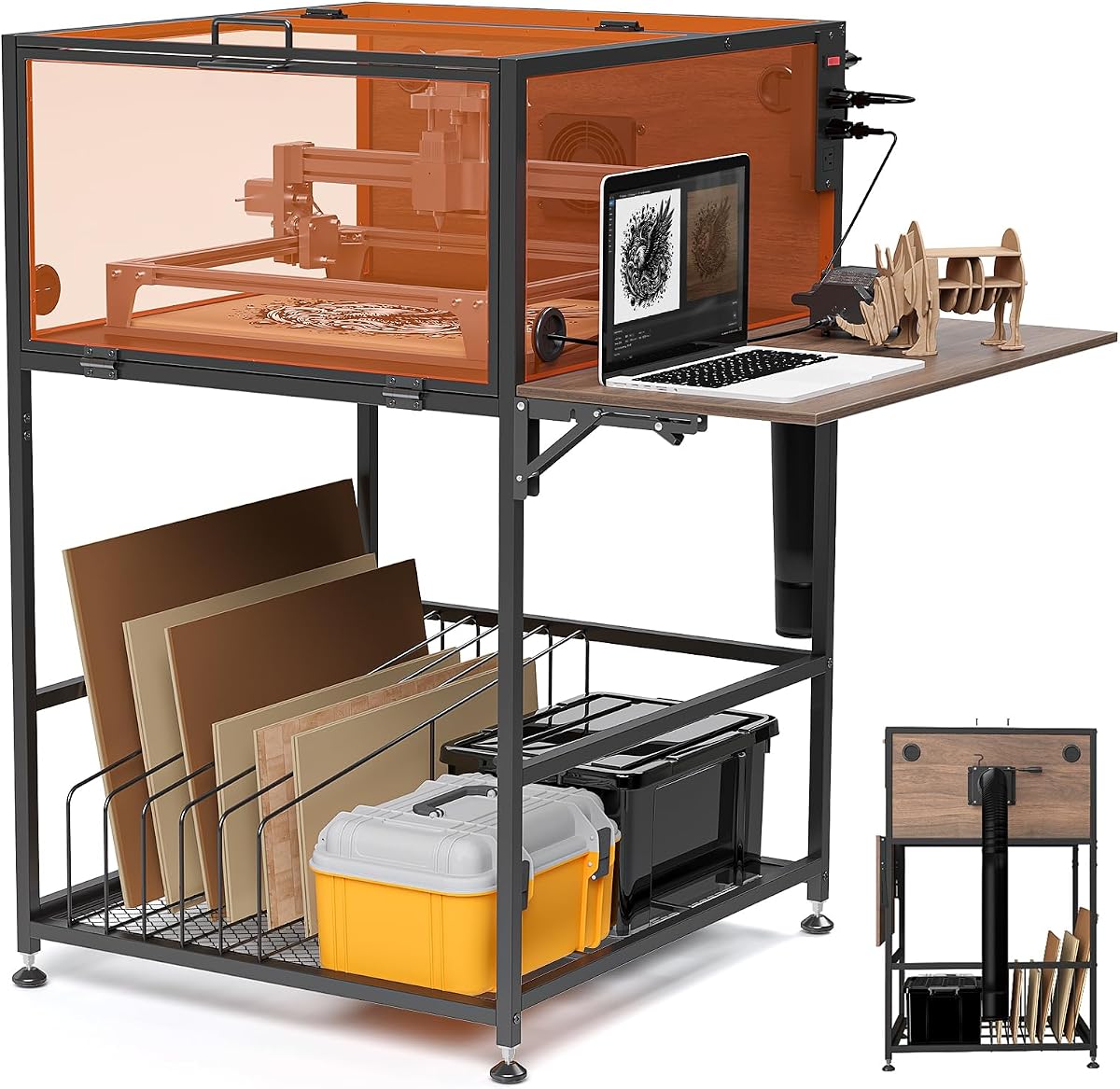
The Crafit Laser Engraver Enclosure Cabinet stands out for its robust construction and added convenience features. With a rating reflecting solid user satisfaction, it offers a dedicated space for your machine.
We may earn a commission when you buy through this link, at no additional cost to you.
Its interior measures about 24.8 by 27.1 by 12.6 inches, fitting most desktop units. The included power strip allows you to control the engraver and fan with one switch.
While it is heavier than fabric covers, the stability is worth it. The bottom rack keeps blanks organized and reduces clutter on your work surface.
This cabinet is best for users who want a permanent fixture in their workspace. If you need organized storage and strong containment, this is a top choice.
The built-in bottom rack with dividers keeps materials upright and handy without extra shelves.
Three AC outlets on the switch strip simplify wiring and allow coordinated shutdowns.
We may earn a commission when you buy through this link, at no additional cost to you.
The Creality Laser Engraver Enclosure 2.0 is an accessible choice for hobbyists seeking smoke control. Its rating indicates reliable performance for the price.
We may earn a commission when you buy through this link, at no additional cost to you.
Made of flame-retardant fabric with steel pipe supports, it covers a wide range of machines. The dual-window design helps you watch the process safely.
Trade-offs include less rigidity than hard cabinets. However, the portability makes it easy to store when not in use.
Buy this if you want a cost-effective solution that still handles smoke and noise. It is ideal for small studios with limited space.
The PVC material filters blue light to protect eyes during long engraving sessions.
A 4000 RPM fan quickly removes fumes and keeps the air inside the tent fresh.
We may earn a commission when you buy through this link, at no additional cost to you.
This enclosure improves visibility with an integrated LED light strip. The rating suggests users appreciate the added brightness for detailed work.
We may earn a commission when you buy through this link, at no additional cost to you.
The bottom design seals completely to prevent smoke escape. It works well with common engravers like XTool and Ortur.
The PVC window reduces glare while maintaining a clear view. However, it lacks the power management features of the Crafit cabinet.
Choose this if you need better lighting and smoke containment at a moderate cost. It fits well for those who already have external fans.
The LED strip ensures you can see fine details without external lamps.
The updated bottom design traps particles and stops smoke from leaking underneath.
We may earn a commission when you buy through this link, at no additional cost to you.
The Green Acrylic Laser Engraver Enclosure offers a permanent and robust solution. The build quality focuses on stability and long-term use.
We may earn a commission when you buy through this link, at no additional cost to you.
With a black aluminum alloy frame and thickened panels, it provides a rigid barrier. The green tinted panels reduce glare effectively.
Assembly involves multiple parts, which requires some patience. But the result is a sturdy unit that feels like a true workstation upgrade.
Invest in this if you want a durable cover that lasts. It suits users needing strong protection and a neat workshop look.
Black aluminum alloy brackets ensure the structure remains stable under frequent use.
Cable threading holes and a door handle simplify setup and operation.
We may earn a commission when you buy through this link, at no additional cost to you.
This version emphasizes smoke management and noise reduction. The rating indicates it performs well in keeping the air clean.
We may earn a commission when you buy through this link, at no additional cost to you.
The smoke ventilation system works quickly to expel fumes. It also dampens the sound of cooling fans for a quieter session.
The lightweight design makes it simple to move. Yet it is durable enough for regular daily projects.
Choose this if ventilation is your main concern. It is a solid option for those who prioritize air quality in small rooms.
Sound reduction helps lower the noise from fans during cutting.
Built-in vents ensure smoke does not build up inside the cover.
We may earn a commission when you buy through this link, at no additional cost to you.
The LONGER Large Size Enclosure provides generous room for bigger engravers. It offers a safe environment for larger materials.
We may earn a commission when you buy through this link, at no additional cost to you.
Its transparent design allows a full view of the work area. The smoke isolation ensures fumes stay contained.
While it takes up more space, the room for larger projects is a benefit. The material feels robust enough for heavy use.
This is best if you need extra height and width. Choose it to safely process larger wood panels or bulk items.
The bigger footprint accommodates larger machines and rotary attachments easily.
Large transparent panels allow continuous monitoring of the cutting process.
We may earn a commission when you buy through this link, at no additional cost to you.
The V2.0 model adds metal support rods for better stability. The rating shows users value this structural improvement.
We may earn a commission when you buy through this link, at no additional cost to you.
It has enough height to fit rotary rollers. The square shape helps absorption and viewing from multiple angles.
The 4000 RPM fan is powerful for smoke removal. However, the fabric still needs care to maintain fireproofing.
Buy this for improved durability over soft versions. It is great for those needing a rotary setup.
Added height allows installation of rotary rollers for cylindrical engraving.
Metal rods replace lighter materials to keep the structure firm.
We may earn a commission when you buy through this link, at no additional cost to you.
This enclosure provides strong fire and dust protection. The rating indicates good user satisfaction for daily use.
We may earn a commission when you buy through this link, at no additional cost to you.
The ventilation system keeps the air clean. It also isolates noise to make the workspace quieter.
Installation requires care to avoid pressure on the cover. But once set, it serves as a reliable barrier.
This is ideal for general hobby use. It balances cost and safety for most desktop laser engravers.
The system expels smoke and keeps the internal air clear.
Transparent windows filter light to reduce eye strain.
We may earn a commission when you buy through this link, at no additional cost to you.
This model focuses on high temperature resistance up to 1000 degrees. The rating reflects its reliability in protecting the workspace.
We may earn a commission when you buy through this link, at no additional cost to you.
The big viewing window helps you monitor progress. The light filter protects eyes from harmful blue light.
Installation is straightforward without tools. It folds for storage, saving floor space when idle.
This is best for those worried about fire safety. It is a practical choice for home studios.
Flame retardant material withstands high heat to prevent burning.
Folding design allows quick storage to save valuable space.
We may earn a commission when you buy through this link, at no additional cost to you.
The VEVOR enclosure offers a spacious interior and unique side storage. The rating indicates it meets basic needs well.
We may earn a commission when you buy through this link, at no additional cost to you.
Adjustable fastener strips hold tools. Exhaust ports on both sides allow flexible setup options.
While setup is needed, the design supports mobility. It folds to save time when moving.
Buy this if you need storage and a large space. It works for both hobbyists and professionals.
Side strips allow adjustable hanging of tools near the machine.
Ports on sides enable flexible exhaust pipe placement.
We may earn a commission when you buy through this link, at no additional cost to you.
Choosing the right enclosure depends on your workspace, machine size, and safety needs. Consider these key factors before buying.
Measure your engraver width depth and height carefully. Allow extra space for airflow and rotary attachments.
Ensure the internal volume fits your machine comfortably.
Look for enclosures with fans rated above 3000 RPM for effective smoke removal. A good fan keeps the air clean inside.
Choose models with exhaust pipes included for easy setup.
Hard acrylic or metal frames offer better stability than fabric. Fabric is lighter but may wear faster over time.
Pick materials that match how often you use your unit.
Check for flame retardant and fireproof materials. These prevent accidents and protect your workshop.
Ensure the cover seals well to block sparks and fumes.
A large clear window helps you watch the engraving process. Look for blue light filtering to reduce eye strain.
The window should provide a full view of your work.
Doors with handles or magnetic stops make loading materials easier. Easy access improves your workflow during projects.
Look for designs that allow quick entry and exit.
Some models include bottom racks or side strips for tools. Integrated storage helps organize blanks and accessories.
Choose a unit with storage if space is limited.
Foldable covers are easier to store and move. Hard cabinets require more setup but provide better stability.
Decide if you need portability or permanent placement.
Place the enclosure on a flat surface and ensure all sides are properly connected. Check that the fan is securely attached to the exhaust port.
Run the ventilation system before starting your machine. Keep the door closed during engraving to maintain air quality.
Clean the panels and interior regularly with a soft cloth. Check the fan and pipe for dust buildup to maintain performance.
Many models include a fan and exhaust pipe for smoke removal. Others are just covers, so check the product details carefully.
Measure the width depth and height of your machine. Add extra inches for clearance and accessories like rotary rollers.
Yes most are designed to reduce smoke and fumes indoors. Ensure ventilation is connected to the outside or an air filter.
Some enclosures are taller enough to fit rotary rollers. Check the height and compatibility before buying for this use.
Use a soft cloth to wipe dust from the interior and panels. Clean the fan and pipe regularly to ensure proper airflow.
Not all models include a power strip. Some have outlets while others require you to use external adapters.
The Crafit and Creality models offer strong value for safety and organization. Each option fits different budgets and workspace needs.
Prioritize ventilation power and safety materials to protect your workspace. A good enclosure improves air quality and comfort.
Prices and stock vary so check the latest listings before buying. Review your machine size to ensure a perfect fit.