
SILVIP 2 Set HOTAS Desk Mount
4.5Editor score
Wide platform compatibility
Dual pack included
Affordable pricing tier
Discover the top joystick Hotas mounts for flight sim enthusiasts. This guide compares stability, compatibility, and ergonomics to help you choose the ideal
Flight simulation enthusiasts demand precision and stability from their control setups. A quality joystick Hotas mount transforms any desk into a professional cockpit environment. These accessories elevate your hardware for better ergonomics and immersive gameplay experiences.
We evaluated ten leading mounts based on build quality, adjustability, and system compatibility. Our analysis covers budget options alongside premium solutions designed for heavy-duty hardware. Each entry offers distinct advantages for different cockpit configurations and user needs.
Every recommendation highlights key features, compatibility lists, and real-world performance traits. Note that product availability and pricing fluctuate frequently across retailers. Always verify current specifications before purchasing to ensure seamless integration with your existing flight controls.
4.5Editor score

4.6Editor score

4.4Editor score
This comprehensive comparison table outlines the core specifications and capabilities of every featured mount. Use these details to match each product's strengths with your specific flight simulator hardware and desk constraints.


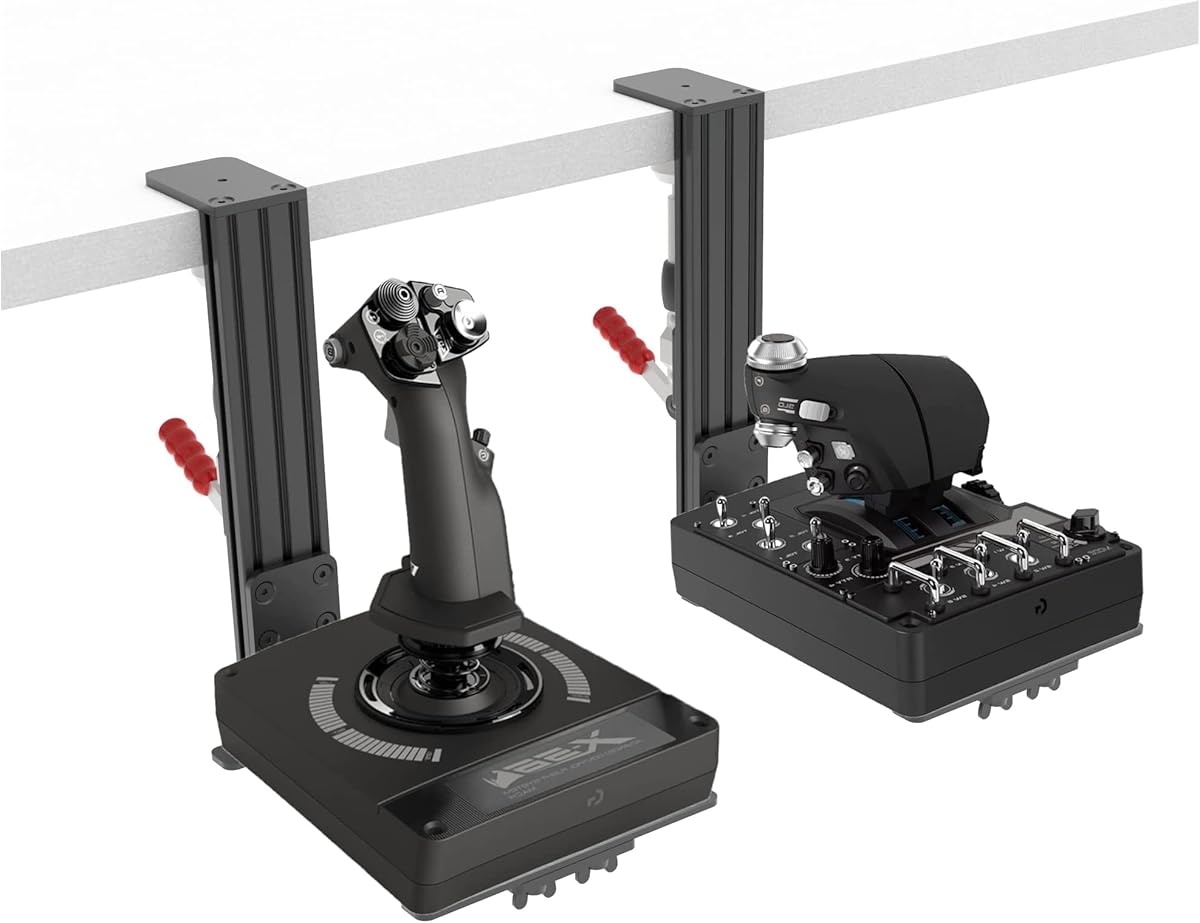
The SILVIP 2 Set HOTAS Desk Mount offers exceptional value for beginners entering flight simulation. Rated highly by users, this dual pack provides everything needed to mount both stick and throttle securely. Its broad platform compatibility ensures it works across PC and console ecosystems seamlessly.
We may earn a commission when you buy through this link, at no additional cost to you.
This mount supports numerous popular brands including Logitech, Thrustmaster, VKB, VPC, and Turtle Beach. The design prioritizes accessibility without sacrificing stability for most standard setups. It eliminates desktop clutter by elevating controls to an ergonomic operating height.
While assembly requires some manual effort, the process remains straightforward for most users. A few users noted limited support for newer X56 models in earlier versions, but updates may address this. Overall the trade-off favors affordability without major performance compromises.
Budget conscious pilots looking for a reliable dual mount solution will appreciate this option. It transforms any standard desk into a functional cockpit space without significant investment. We recommend verifying specific model compatibility before purchase to ensure full support.
Supports diverse hardware across PC Xbox PlayStation and other gaming ecosystems.
Includes two identical clamps for simultaneous joystick and throttle mounting.
We may earn a commission when you buy through this link, at no additional cost to you.
The Meza Mount-HOTAS Desk Mount Set of 2 stands out as the top choice for serious simmers requiring stability under load. Its heavy-duty metal construction ensures zero wobble during intense flight sessions. Users appreciate the dual clamp design tailored for joystick and throttle placement.
We may earn a commission when you buy through this link, at no additional cost to you.
This mount shines with Thrustmaster Warthog WinWing Orion 2 and VPC Mongoos systems. The reinforced structure supports substantial weight without compromising rigidity. Adjustable height and position settings allow precise ergonomic alignment for extended gaming comfort.
A higher price point reflects the premium build materials and specialized design focus. It may be overkill for lighter setups but essential for heavy hardware configurations. The stability trade-off justifies the investment for competitive or training environments.
Pilots with demanding hardware setups should prioritize this robust solution. It transforms desks into professional cockpits capable of handling rigorous simulations. We highly recommend verifying hardware compatibility before purchase for optimal results.
Reinforced metal structure supports demanding flight systems securely.
Adjustable positioning reduces strain during long simulation sessions.
We may earn a commission when you buy through this link, at no additional cost to you.
The RACGTING 2-Pack Foldable HOTAS Desk Mount delivers premium quality for users valuing versatility and stability. Its rock-solid aluminum clamp locks firmly onto desks ensuring zero wobble during gameplay. The foldable design allows seamless transition from cockpit to desk.
We may earn a commission when you buy through this link, at no additional cost to you.
This mount supports leading systems including Logitech X52 X56 Thrustmaster T16000M and VKB Gladiator. Adjustable height and reach enhance ergonomic comfort for long sessions. Installation completes in under five minutes for immediate setup convenience.
Premium pricing reflects the robust materials and innovative storage features. Users with shared desks will appreciate the ability to remove and store mounts efficiently. The design prioritizes both performance and space management seamlessly.
Pilots seeking a high-end solution that balances performance with convenience will love this. It enhances immersion without sacrificing workspace flexibility. Verify desk thickness compatibility before purchasing to ensure a perfect fit.
Easily removes and folds to preserve desk space between sessions.
Durable aluminum clamp provides near zero wobble during intense use.
We may earn a commission when you buy through this link, at no additional cost to you.
The Hikig 2 Set Desk Mount offers broad adaptability for nearly all flight hand-control devices. Rated solidly by users, it ensures stability and ergonomic comfort during gameplay. The dual pack accommodates both joystick and throttle for immersive cockpit setups.
We may earn a commission when you buy through this link, at no additional cost to you.
This mount supports Logitech X56 X52 Thrustmaster T Flight and TCA Officer Pack systems. Adjustable positioning reduces awkward reaches and enhances control access. Strong clamp force ensures equipment stays secure even during rapid maneuvers.
While performance remains consistent, some users may require precise installation for maximum stability. The adjustable height and reach help fine tune comfort levels effectively. Overall it delivers a dependable solution for varied hardware.
Pilot seeking versatile support across multiple hardware brands will find this option useful. It balances ease of setup with functional reliability. Always check specific device compatibility before purchase to confirm fit.
Compatible with nearly all flight hand-control devices on the market.
Height and position adjustments reduce strain during extended sessions.
We may earn a commission when you buy through this link, at no additional cost to you.
The DIWANGUS Foldable HOTAS Desk Mount excels in space management for shared workspaces. Its foldable design allows removal and storage after each session easily. The dual pack includes two identical mounts for simultaneous control positioning.
We may earn a commission when you buy through this link, at no additional cost to you.
This system supports broad HOTAS compatibility including Logitech VKB Thrustmaster and TCA models. Independent height adjustment helps users find the natural reach point reducing strain. The 90 percent preassembled state reduces setup time significantly.
Removal after use ensures no interference with regular desk activities. Users value this flexibility in offices or shared rooms. The assembly remains straightforward with included hardware and crossbars.
Home office users or those with limited desk space will benefit most. It enables immersive gaming without permanent desk footprint. Verify your desk thickness falls within the supported range before buying.
Most assembly is completed so users save setup time.
Folds flat for storage after flight sessions end.
We may earn a commission when you buy through this link, at no additional cost to you.
The Reashy Hotas Mount combines lightweight aluminum with exquisite craftsmanship for a durable solution. It supports popular joysticks like Logitech X56 and Thrustmaster T.16000M. The desk mount ensures stable positioning without excessive weight burden.
We may earn a commission when you buy through this link, at no additional cost to you.
A high pitch rotary knob clamp simplifies installation disassembly and folding storage. Users appreciate the ergonomic design allowing adjustable bracket height for comfort. Pre assembly reduces tedious work and speeds up readiness.
Compatibility focuses on mainstream brands which limits some niche hardware. The adjustable range permits fitting most desks within the thickness specs. Stability remains rock-solid for typical gaming needs.
Pilots valuing quality materials and ease of use will prefer this mount. It delivers a clean ergonomic setup without heavy hardware. Confirm your specific joystick model aligns with supported lists.
Combines aluminum and precision design for durable and sleek mounting.
Rotary knob makes fast clamp and fold storage possible.
We may earn a commission when you buy through this link, at no additional cost to you.
The Quick Release Desk Mount offers seamless integration for many popular joysticks including WINWING and Logitech. With a 4.7 rating it stands out for stability and ease of use. The quick release design allows effortless adjustments during play.
We may earn a commission when you buy through this link, at no additional cost to you.
All metal construction with aluminum alloy body ensures durability. It supports desk thicknesses up to 2.36 inches for flexible fitting. Silicone anti-slip stickers and included screws enable tool-free installation quickly.
This unit is a single mount requiring separate purchase for dual setups. It excels as a primary stick anchor for focused ergonomics. The clamping mechanism ensures secure hold even under vibration.
Solo pilots or those upgrading existing dual sets will find this valuable. Its high rating reflects strong performance and build quality. Verify your desk thickness before ordering to guarantee fit.
Quick release mechanism allows easy adjustment and removal.
Includes screws and anti-slip stickers for easy installation.
We may earn a commission when you buy through this link, at no additional cost to you.
The 2PCS Hotas Mount boasts a perfect 5.0 user rating for reliability. Its dual clamp design ensures outstanding stability during intense gameplay sessions. The product focuses on simplicity and essential features for effective setup.
We may earn a commission when you buy through this link, at no additional cost to you.
Supporting Logitech Thrustmaster and VKB models, this mount covers most common systems. Desk thickness must stay under 2.36 inches. Vertical height adjustments help customize reach without complex assembly steps.
Users must check specific compatibility lists to avoid fit issues. The dual clamp secures the stand firmly from the top. Anti-slip pads are optional but enhance grip on smooth surfaces.
Pilots seeking a straightforward and highly rated dual mount solution will appreciate this. It delivers consistent performance with minimal setup hassle. Always verify your desk meets the thickness constraints.
Achieves full satisfaction scores for stability and reliability.
Top securing dual clamp design prevents wobbling during play.
We may earn a commission when you buy through this link, at no additional cost to you.
The Hikig 2 Pack Desk Mount provides exceptional holding capacity up to 386kg ensuring safety for all controllers. The push-pull quick clamp makes loading and unloading rapid and efficient. Non-slip feet protect desk surfaces from scratches.
We may earn a commission when you buy through this link, at no additional cost to you.
Compatible with broad hand-control devices including Logitech Thrustmaster VKB and VPC. The ergonomic design allows users to adjust brackets vertically. Dual-handed positioning suits left and right-handed gamers equally.
Some desk surfaces may shift under the weight of heavier rigs. Users report excellent stability when properly installed. The design prioritizes safety without compromising adjustability or comfort.
Pilots prioritizing safety and strength in their setup will choose this. Its high capacity ensures no movement during dynamic flight. Always ensure the desk surface can bear the load.
Push pull clamp provides rapid and secure equipment locking.
Holds up to 386 kilograms ensuring equipment safety.
We may earn a commission when you buy through this link, at no additional cost to you.
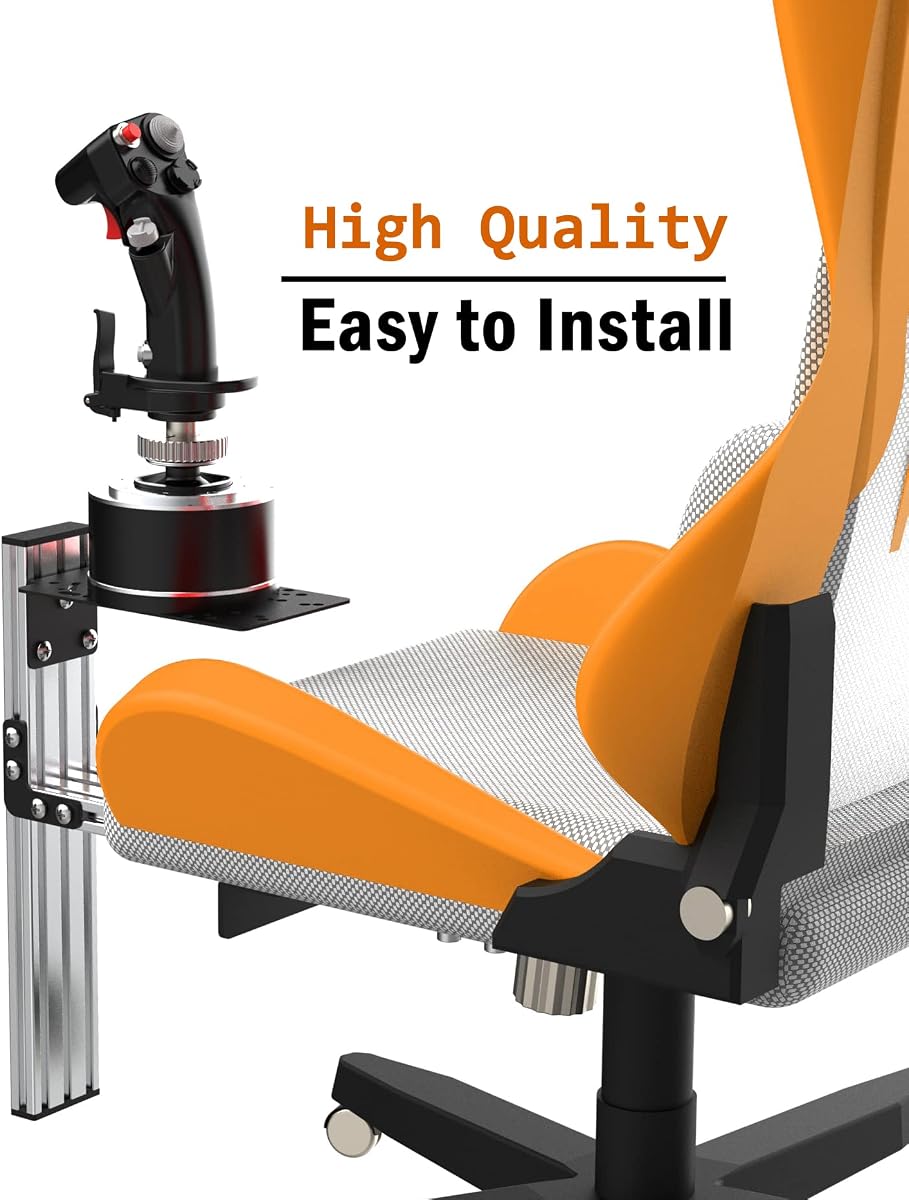
The Fosiya SIM Fighting Joystick Center Chair Mount offers a unique alternative by attaching directly to your chair. With M8 heavy duty screws it ensures high stability up to 300kg. This design frees desk space entirely while keeping controls close.
We may earn a commission when you buy through this link, at no additional cost to you.
Compatible with T-Flight Hotas 4 Warthog T16000M FCS and VKB Gunfighter Pro sticks. Users can adjust height and left right position for personalized ergonomics. Non-slip flange nuts protect chair appearance during fixing.
Chair compatibility is critical as not all seats support the mounting mechanism. Installation is straightforward but requires following manual steps precisely. It transforms any standard gaming chair into a cockpit.
Pilots wanting to clear desk clutter entirely will find this innovative. It provides a distinct ergonomic advantage for dedicated sim setups. Ensure your chair meets structural requirements before purchasing.
Attaches to chair to free up desk surface space completely.
M8 screws provide secure fastening up to 300 kilograms.
We may earn a commission when you buy through this link, at no additional cost to you.
Selecting the right Hotas mount requires balancing build quality compatibility and adjustability. This guide breaks down essential factors to consider for a stable cockpit setup.
Premium mounts use aluminum or reinforced metal to ensure zero wobble during rapid maneuvers. Lightweight options exist but may flex under heavy hardware like the Warthog. Inspect clamping mechanisms and screw quality for durability.
Choose heavy-duty metal for stability or lightweight aluminum for portability based on your hardware weight.
Confirm that the mount supports your specific joystick and throttle model. Some mounts exclude newer X56 variants or specialized shifter setups. Always check the manufacturer's compatibility list against your gear.
Cross reference your hardware model with the supported list before purchasing to avoid return hassles.
Most clamp mounts support desk thickness between 0.2 and 5.7 inches. Thicker desks require specialized wide clamps or screw-in bases. Measure your desk edge precisely before ordering to ensure a secure fit.
Verify your desk edge falls within the manufacturer's specified range for secure clamping.
Look for vertical and horizontal adjustments to find a natural reach point. Fixed mounts may cause awkward shoulder strain during long sessions. Height and position flexibility reduces fatigue significantly.
Prioritize models offering independent bracket adjustments for personalized comfort.
Preassembled mounts reduce setup time significantly. Others may require hand tools or multiple steps for assembly. Quick release mechanisms enable fast removal if you share desk space.
Opt for preassembled or quick-release designs to minimize setup effort.
Dual packs offer a complete cockpit solution for both stick and throttle. Single mounts work if you only need to elevate one controller. Budget considerations often dictate this choice.
Select dual packs for full setups or single units for targeted elevation.
Foldable designs allow easy removal and storage between sessions. This feature is critical for shared workspaces or limited desk real estate. Non-foldable options remain permanently mounted.
Choose foldable options if you need to reclaim desk space frequently.
Well-known brands often provide better quality control and customer support. Check for warranty coverage in case of defects or clamping failures. User reviews offer real-world reliability insights.
Prioritize established brands with positive reviews and clear warranty terms.
Install the mount on a sturdy desk edge where clamping force can apply securely. Align the joystick base into the bracket and fasten with provided bolts. Ensure all screws are tight to prevent slippage during flight.
Adjust the height and horizontal position to match your natural arm reach. Keep cables organized to prevent snagging during use. Regularly inspect clamp pads for wear and replace if slipping occurs.
Clean metal parts with a soft dry cloth to prevent corrosion. If the mount is foldable, store it flat in a dry safe place. Avoid placing heavy objects on the mount when not in use to preserve structural integrity.
Most mounts support major brands like Logitech and Thrustmaster but specific models may vary. Always check the compatibility list provided by the manufacturer before purchasing. Some exclusions exist for newer or proprietary hardware configurations.
Glass desks often require additional anti-slip pads to prevent scratching. Metal clamps may damage glass if not padded properly. Verify that the mount supports your surface material and add protective stickers.
Premium models with reinforced metal are designed for heavy hardware. Ensure the product specifies high holding capacity before buying for Warthog setups. Lightweight mounts may not offer sufficient stability under load.
Preassembled options can be ready in under five minutes. Standard mounts may require ten to twenty minutes depending on screw count. Read instructions carefully to avoid misaligning brackets during setup.
Foldable models allow removal without leaving marks if used correctly. Always lift the clamp rather than twisting to avoid scratching. Anti-slip pads help protect the surface during installation and removal.
Some manufacturers sell clamps or screws separately through support channels. Check the product listing for part availability before purchase. Keeping the original box aids in identifying specific replacement parts later.
Mounting via external clamps typically does not void the controller warranty. Avoid attaching brackets directly to the device body if not intended. Use the supplied hardware to maintain safe installation standards.
Most clamps support 0.2 to 5.7 inches of thickness. Ensure your desk fits within this range for safe clamping. Extremely thick or thin desks may require custom modifications or alternative mounts.
The Meza Mount, SILVIP, and RACGTING options represent top choices for varying budgets and needs. Each offers distinct advantages from heavy-duty metal builds to foldable convenience. Your selection should reflect your specific cockpit requirements.
Prioritize stability and compatibility to ensure your controls respond precisely. Ergonomic adjustability reduces strain during long sessions and enhances focus. Investing in the right mount elevates your flight sim experience significantly.
Always verify current pricing and availability before purchasing as deals change often. Check user reviews for the latest performance insights on hardware compatibility. A well-chosen mount transforms your desk into a professional cockpit.