
TP-Link AV600 Powerline
4.2Editor score
AV600 speeds up to 750 feet
100 Mbps port for secure wired networks
Power saving mode reduces energy consumption
This guide compares the top Ethernet Line Extender models for 2026, covering powerline adapters, VDSL kits, and long-range network solutions.
Extending your network connection can be challenging when walls block signals. Ethernet Line Extender solutions use existing wiring to reach distant rooms efficiently.
We compared ten top models based on speed, range, and reliability. Each product offers unique features for home or office network expansion needs.
Each pick highlights key specs and real-world performance. Prices fluctuate frequently, so check current listings before making your final purchasing decision today.
4.2Editor score

4.2Editor score

4.8Editor score
This side-by-side comparison highlights the key specifications and capabilities of each top-rated Ethernet Line Extender available today.



The TP-Link AV1000 Powerline Adapter Kit ranks as our top pick for extending Ethernet connections through electrical wiring. With a 4.2 rating, it delivers reliable speeds up to 750 feet. The kit includes two adapters for immediate setup.
We may earn a commission when you buy through this link, at no additional cost to you.
This device uses HomePlug AV2 technology to maximize data throughput over existing electrical circuits. It features a Gigabit Port suitable for desktops and game consoles. The nano size design fits easily without blocking adjacent outlets in most standard wall plates.
While performance depends on wiring quality, the AV1000 speed standard offers significant improvement over older models. However, it requires direct wall outlet installation and may struggle with AFCI breakers. These limitations are standard for powerline technology.
For users needing wired reliability without new cabling, this kit is ideal. It ensures secure connections for streaming and gaming. We recommend it for homes seeking balanced performance and ease of use without complex network configuration steps.
The AV1000 standard ensures high-speed data transfer over electrical wiring for seamless streaming.
The Gigabit port provides stable, interference-free network access for critical devices like consoles.
We may earn a commission when you buy through this link, at no additional cost to you.
The NETGEAR PLP2000 Adapter Kit offers a premium networking experience with speeds up to 2000 Mbps. Rated 4.2 stars, it utilizes advanced MIMO and Beamforming to direct signals effectively. This ensures reliable connectivity for bandwidth-heavy tasks.
We may earn a commission when you buy through this link, at no additional cost to you.
Its unique noise-filtered outlet prevents interference from other appliances plugged into the same device. The design includes extra plug functionality for convenience. Setup is straightforward with a plug-and-play mechanism that requires no additional drivers.
While the price is higher than basic adapters, the enhanced speed and filtering justify the cost. It is strictly designed for US electrical standards. Users must ensure compatibility with their local voltage and outlet types.
Ideal for 4K streaming and lag-free gaming, this kit maximizes existing electrical wiring potential. We recommend it for those needing top-tier powerline performance. It remains a solid choice for demanding home networks.
Beamforming directs the signal to specific locations for improved coverage and stability.
Built-in filtration minimizes interference from other devices plugged into the adapter.
We may earn a commission when you buy through this link, at no additional cost to you.
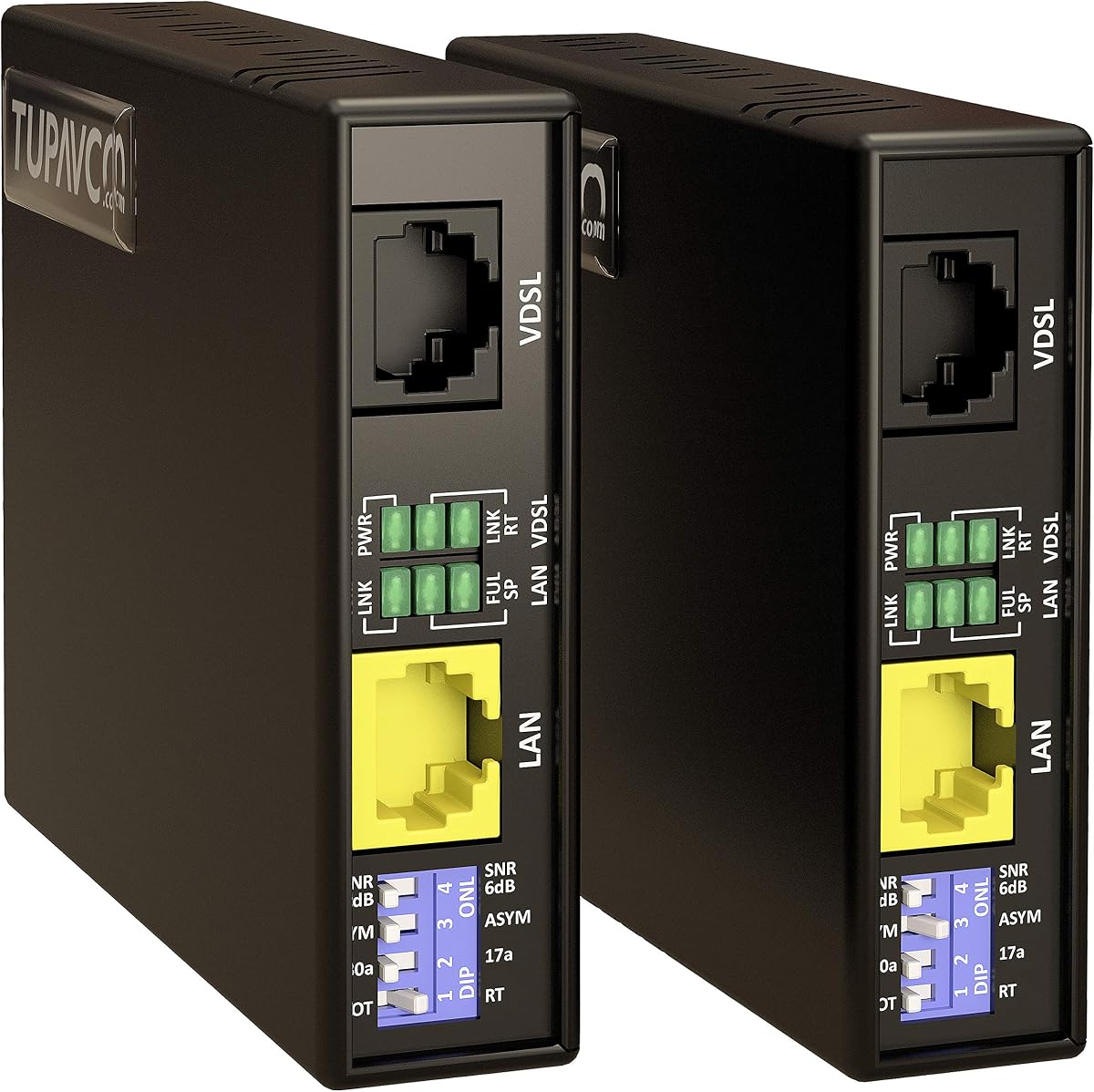
This VDSL Extender Kit excels at covering vast distances up to 7000 feet. With a 4.4 rating, it transforms standard phone or network cables into long-distance Ethernet links. It eliminates the need for expensive fiber or new cabling runs.
We may earn a commission when you buy through this link, at no additional cost to you.
The kit includes both central and remote units ready for immediate use. It supports various cable types including CAT5, CAT6, and even phone lines. This flexibility makes it perfect for extending network reach in older buildings.
While it offers incredible range, performance depends on the quality of the copper wiring used. Users should avoid using it for basic internet connections if high throughput is needed. It is best suited for remote access points.
For large properties or industrial sites, this solution is practical and cost-effective. It bridges gaps where traditional Ethernet fails. We recommend it for specific long-range connectivity needs.
Uses very high-speed digital subscriber line technology to boost range over copper wires.
Works with phone cables and standard network cables to provide adaptable connectivity.
We may earn a commission when you buy through this link, at no additional cost to you.
The StarTech 10/100 Ethernet Extender is a robust solution for industrial or government use. Rated 4.8 stars, it supports distances up to 0.5 miles over single or double pair cabling. It is TAA compliant for secure procurement contracts.
We may earn a commission when you buy through this link, at no additional cost to you.
It functions as a transparent device passing VLAN tags and other protocols unchanged. The kit includes adapters for RJ11 phone line cabling, offering versatility in deployment. LED indicators help IT administrators monitor network status easily.
While limited to 10/100 Mbps, this speed is sufficient for many remote monitoring and sensor applications. The cost is higher than home adapters but justified by reliability. It serves critical infrastructure needs where stability is paramount.
We recommend this extender for security cameras or remote equipment management. It bridges significant physical gaps reliably. It remains a trusted option for professional IT environments.
Meets Trade Agreements Act requirements for government and institutional purchasing.
Allows VLAN tags and DHCP to pass through without configuration changes.
We may earn a commission when you buy through this link, at no additional cost to you.
The TP-Link AV600 Adapter Kit is our top budget pick for basic network extension. With a 4.2 rating, it provides reliable speeds up to 750 feet without expensive new wiring. It is perfect for extending internet to secondary rooms.
We may earn a commission when you buy through this link, at no additional cost to you.
Its AV600 speed standard is sufficient for standard browsing and HD streaming. The power-saving mode reduces energy consumption significantly when devices are idle. Setup is as easy as plugging into outlets on the same circuit.
While the 100 Mbps port limits high-speed file transfers, it is cost-effective for light use. Users should ensure they plug directly into wall outlets without surge protectors. This ensures optimal performance and connection stability.
For those needing a simple and cheap solution, this kit delivers value. It keeps essential devices connected without breaking the bank. We recommend it for basic home office or TV setups.
Provides a low-cost way to extend wired internet access to distant rooms.
Automatically reduces power consumption to save energy during idle periods.
We may earn a commission when you buy through this link, at no additional cost to you.
This TP-Link kit combines AV1000 powerline speeds with AX1500 Wi-Fi 6. With a 4.1 rating, it offers both wired and wireless connectivity in one package. It is ideal for homes needing flexible coverage options.
We may earn a commission when you buy through this link, at no additional cost to you.
The Gigabit Ethernet port supports high-bandwidth devices like game consoles. It also supports EasyMesh for seamless roaming throughout the property. Setup includes instant cloning of router settings for easy management.
While it is more expensive, the dual functionality reduces the need for separate devices. Users must plug directly into outlets for best results. This avoids common powerline interference issues.
We recommend it for users needing both wired and wireless extension. It is a comprehensive solution for modern smart homes. Check compatibility with existing routers before purchase.
AX1500 Wi-Fi 6 provides faster speeds and better handling of multiple devices.
Connects to Mesh systems for seamless whole-home coverage without signal drops.
We may earn a commission when you buy through this link, at no additional cost to you.
This TP-Link Adapter offers AV1000 speeds with AC1200 Wi-Fi 5. Rated 4.0 stars, it includes a convenient passthrough power socket. This allows users to save outlets while extending both wired and wireless networks.
We may earn a commission when you buy through this link, at no additional cost to you.
The Gigabit port ensures stable wired connections for smart TVs and consoles. It supports OneMesh for creating a unified network across the house. Setup is quick with clone buttons that copy existing Wi-Fi settings.
Although it uses Wi-Fi 5, it remains sufficient for most household streaming needs. The passthrough design is a key convenience factor over standard models. Ensure the device is plugged directly into the wall outlet.
We recommend this for users wanting simplicity and outlet conservation. It balances powerline and Wi-Fi extension well. It is a solid mid-range option for expanding coverage.
Allows you to plug another device directly into the adapter to save an outlet.
Enables easy connection to compatible routers for a single unified network.
We may earn a commission when you buy through this link, at no additional cost to you.
The UGREEN Ethernet Coupler is designed for high-speed connections up to 10Gbps. With a 4.7 rating, it supports Power over Ethernet (PoE) for cameras and sensors. This eliminates the need for separate power cables for devices.
We may earn a commission when you buy through this link, at no additional cost to you.
It features a unique 'Z' shape structure for stable data transmission. The coupler is compatible with a wide range of cable types. It offers a simple way to join two Ethernet cables without signal loss.
While it is limited to 328ft, it is effective for short range fixes. Users should ensure cables are securely connected to maintain stability. It is ideal for extending runs in data centers.
We recommend this for high-speed environments needing PoE flexibility. It simplifies cabling for IP cameras. It is a reliable passive solution for network management.
Delivers electrical power along with data to devices like security cameras.
Maintains high-speed data transfer up to 10Gbps without throttling.
We may earn a commission when you buy through this link, at no additional cost to you.
This Ethernet Range Extender Kit covers up to 600 meters over two wires. With a 4.6 rating, it regenerates signals at each end for stability. It uses any two copper conductors, including alarm or coax cable.
We may earn a commission when you buy through this link, at no additional cost to you.
It acts as a transparent Layer 1 segment passing all protocols. Both units need mains power to function effectively as active extenders. It is ideal for remote sensors or legacy wiring systems.
While limited to 92 Mbit/s, this is sufficient for many industrial tasks. Users must ensure both ends have power sources. This setup avoids complex software or driver installations.
We recommend this for remote industrial or security applications. It bridges gaps where standard Ethernet fails. It is a robust solution for extending network reach.
Regenerates the signal at both ends to maintain stability over long distances.
Works with any two copper wires including spare pairs or coaxial cables.
We may earn a commission when you buy through this link, at no additional cost to you.
This VDSL Extender Kit provides speeds up to 300Mbps over 5000ft. Rated 4.6 stars, it uses G.INP technology to reduce interference. The device features 4-position DIP switches for 8 different profile settings.
We may earn a commission when you buy through this link, at no additional cost to you.
It allows reuse of existing phone or network cabling, saving costs on upgrades. The unit ships ready for deployment with LED indicators. It is ideal for remote offices or large facilities.
While setup is plug-and-play, users should verify cabling quality for best results. The profile settings allow optimization for distance and bandwidth. It is a robust alternative to fiber for medium distances.
We recommend this for businesses needing long-range Ethernet without fiber. It balances speed and distance effectively. Check wiring conditions before installation for optimal performance.
Reduces sensitivity to noise and interference for stable high-speed connections.
Offers flexible configuration options to optimize performance for specific conditions.
We may earn a commission when you buy through this link, at no additional cost to you.
Selecting the right Ethernet Line Extender depends on your specific distance and bandwidth needs.
Ethernet Line Extenders generally fall into three categories: Powerline, VDSL, and passive couplers. Powerline adapters use electrical wiring and are best for indoor home use. VDSL kits run over copper wires or phone lines for longer distances. Passive couplers simply join cables without boosting signals.
Determine the physical distance you need to cover. Powerline adapters typically reach up to 750 feet within a building. VDSL kits can extend up to 5000 feet or more. Always measure the path to ensure the chosen device meets your distance requirements.
Consider the speed you need for your devices. Basic browsing needs 100 Mbps, while gaming and 4K streaming require Gigabit speeds. Ensure the extender supports at least the speed of your internet plan to avoid bottlenecks.
Check which cables your network supports. Most extenders use RJ45 Ethernet ports. Some VDSL models can also use phone cables or coaxial cable. Verify your existing infrastructure to avoid needing additional cabling.
Active extenders require power at both ends. Some Powerline adapters plug directly into wall outlets. Others require external power supplies. Ensure you have accessible power sources at both the source and remote locations.
Look for Plug and Play devices that need no software. Some models allow you to clone router settings instantly. Avoid complex configurations if you lack technical expertise. A good extender should be ready out of the box.
Consider extra features like PoE support or Wi-Fi capabilities. Some kits combine wired and wireless extension. Others include passthrough sockets to save wall outlets. These features add value depending on your specific setup needs.
Finally, avoid placing adapters near large appliances like refrigerators. This minimizes electrical interference. Regularly check connections to ensure the network remains stable over time.
Standard Powerline adapters do not emit WiFi signals. However, some kits include combined extender units that broadcast WiFi alongside the powerline connection. Check product specs for WiFi capabilities if wireless coverage is needed.
No. Powerline adapters must be plugged directly into wall outlets. Using power strips or surge protectors can block the signal or cause data loss. Always plug the device directly into the wall for best performance.
VDSL extenders can reach up to 5000 feet or more depending on cable quality. Factors like wire gauge and interference impact the actual distance. Check specific product specs for exact range limits.
No. Most modern Ethernet Line Extenders are Plug and Play. They work immediately without software installation. You simply connect the cables and adapters to extend your network.
Yes. They are designed to operate safely. Many models include power-saving modes to reduce energy usage when not in use. Ensure they have proper ventilation to prevent overheating.
Use the Pair button on the first adapter, then press it on the second within two minutes. This creates a secure encrypted network between the units. Follow the specific instructions included in your kit.
Remember that prices change frequently so check current listings before buying. We hope this guide helps you find the perfect solution for your home.