
Canon MegaTank G3270
4.1Editor score
Includes up to two years of ink
Wireless printing copying and scanning
1.35 inch square LCD display
Ink tank printers offer incredible value by using refillable bottles instead of expensive cartridges. They are ideal for high-volume printing needs in homes and small offices alike.
We compared ten top models based on ink capacity, print speed, connectivity, and overall reliability. Each product was evaluated against key criteria to ensure accurate recommendations for all budgets.
Every pick highlights specific strengths like wireless features or duplex printing. Note that prices and stock change frequently so check current listings before making your final purchase decision today.
4.1Editor score

4.2Editor score

4.2Editor score
As an Amazon Associate we earn from qualifying purchases.
This table provides a quick side-by-side overview of all ten selected models. Compare key specifications like ink included, print capabilities, and screen size to find the right fit for your specific needs.





The Canon MegaTank G3270 is a solid entry-level choice for anyone seeking an affordable ink tank printer. It boasts a rating of 4.1 stars and includes enough ink for up to two years of typical home use.
We may earn a commission when you buy through this link, at no additional cost to you.
Its standout quality is the massive page yield from a single set of inks. You can print up to 6,000 black and white pages or 7,700 color pages. This reduces long-term costs significantly compared to cartridge models.
The trade-off is that it only supports single-sided printing. While acceptable for basic home needs, high-volume users might find manual flipping tedious. The small LCD screen also limits advanced navigation options.
Buyers looking for a reliable budget printer should consider this model. It offers great value for those prioritizing ink savings over advanced features like duplex printing or a large touchscreen.
You save up to $1,000 on ink costs compared to using cartridges over the same period.
Connect easily via wireless to print copy and scan directly from your devices.
We may earn a commission when you buy through this link, at no additional cost to you.
The Epson EcoTank ET-2803 is our top pick due to its balanced performance and innovative features. It holds a 4.2 rating and offers stress-free printing with up to two years of ink in the box.
We may earn a commission when you buy through this link, at no additional cost to you.
Its unique Micro Piezo Heat-Free technology ensures sharp text and impressive color photos on various paper types. The built-in scanner and copier make it a complete all-in-one solution for small offices.
Users must use genuine Epson ink for optimal quality and warranty coverage. Non-genuine ink might cause damage not covered by the limited warranty. Setup involves filling tanks which requires careful handling.
This printer is ideal for users wanting high-quality prints without frequent cartridge replacements. Its voice-activated printing and smart app support add modern convenience that few rivals match easily.
Unique Micro Piezo Heat Free technology produces sharp text and vibrant photos effortlessly.
Easily print from smart devices using AirPrint or the Epson Smart Panel app.
We may earn a commission when you buy through this link, at no additional cost to you.
The Canon Megatank G3290 is the premium version of the budget G3270. It retains the excellent ink capacity but adds a larger touchscreen and automatic duplex printing for better usability.
We may earn a commission when you buy through this link, at no additional cost to you.
With a 4.2 rating, it delivers up to 6,000 black and 7,700 color pages per ink set. The auto 2-sided printing feature helps save paper and time for larger documents.
The main downside is the higher initial price compared to lower-end models. However, the added convenience of double-sided printing and a larger interface justifies the cost for many users.
Those needing a step up from basic printing should choose this model. It is perfect for small offices requiring more automation and a better user interface than standard entry-level devices offer.
The 2.7 inch LCD color touchscreen makes navigation and setup more intuitive.
Auto 2-sided printing helps save paper and speeds up document handling tasks.
We may earn a commission when you buy through this link, at no additional cost to you.
The Epson EcoTank ET-2903 offers extended ink coverage with up to three years included in the box. It has a strong 4.2 rating and features fast print speeds suitable for busy environments.
We may earn a commission when you buy through this link, at no additional cost to you.
It prints at 11 pages per minute in black with zero warmup time. The permanent printhead design is engineered to last the life of the printer, enhancing reliability over standard models.
The paper tray holds 100 sheets which may require refilling for large batches. Also, the recommendation to use genuine ink ensures you maintain optimal performance and warranty status consistently.
This model is great for users prioritizing long-term reliability and speed. It works well in home offices needing robust printing without frequent maintenance or cartridge replacements.
Engineered for reliability with a permanent printhead designed to last the life of the printer.
Key productivity features include 11 black ppm print speeds with zero warmup time.
We may earn a commission when you buy through this link, at no additional cost to you.
The HP Smart Tank 5003 positions itself as the last printer you will ever need. It holds a 4.1 rating and includes up to three years of ink for high-volume home printing.
We may earn a commission when you buy through this link, at no additional cost to you.
Its key feature is the mess-free refill system. You simply plug ink bottles into the cartridge-free tank and let them drain. This reduces spills and simplifies maintenance significantly for busy users.
While it supports AI-capable functions, practical benefits may depend on your usage. The page yield is standard at 6,000 pages. This is sufficient but not unique compared to other tank models.
Buyers seeking ease of maintenance will appreciate this design. The borderless printing capability adds value for photo enthusiasts needing clean, frame-free prints regularly at home.
Replenish ink with HP's easy-access mess-free refill system to prevent mess and spills.
Fully loaded with savings offering up to 3 years of HP ink included right out of box.
We may earn a commission when you buy through this link, at no additional cost to you.
The Epson EcoTank ET-4800 is another strong option in the EcoTank series. It has a lower user rating of 3.8 but offers unique features like innovative cartridge-free printing and Heat-Free technology.
We may earn a commission when you buy through this link, at no additional cost to you.
Its high-capacity ink tanks eliminate the need for tiny cartridges. The unique Micro Piezo Heat-Free technology produces sharp text and color photos on virtually any paper type easily.
However, the lower rating suggests potential connectivity or software issues. Users should check recent reviews for stability. It remains a solid choice for those preferring Epson hardware reliability.
This printer works well for users wanting zero cartridge waste. It supports a wide range of media and includes a high-resolution scanner for document management tasks.
Innovative cartridge-free printing means no more tiny expensive ink cartridges for daily use.
Unique Micro Piezo Heat-Free technology produces sharp text and impressive color photos.
We may earn a commission when you buy through this link, at no additional cost to you.
The Epson EcoTank ET-2980 focuses on reliability with up to three years of ink included. It has a 4.0 rating and uses EcoFit bottles to ensure simple refilling without mix-ups.
We may earn a commission when you buy through this link, at no additional cost to you.
Each replacement ink bottle set is equivalent to about 90 individual cartridges. This high capacity reduces the frequency of replacements. Wireless printing allows convenient access from smart devices via apps.
Epson strongly recommends using genuine ink to avoid damage not covered by warranty. Non-genuine ink may cause performance issues. This limitation is common among tank printers for longevity.
Buyers needing a reliable black model will find this useful. It supports enhanced mobile printing and offers simple ink refilling for worry-free operation at home.
Each replacement ink bottle set is equivalent to about 90 individual cartridges for long use.
Enhanced mobile printing from the Epson Smart Panel app allows easy access from devices.
We may earn a commission when you buy through this link, at no additional cost to you.
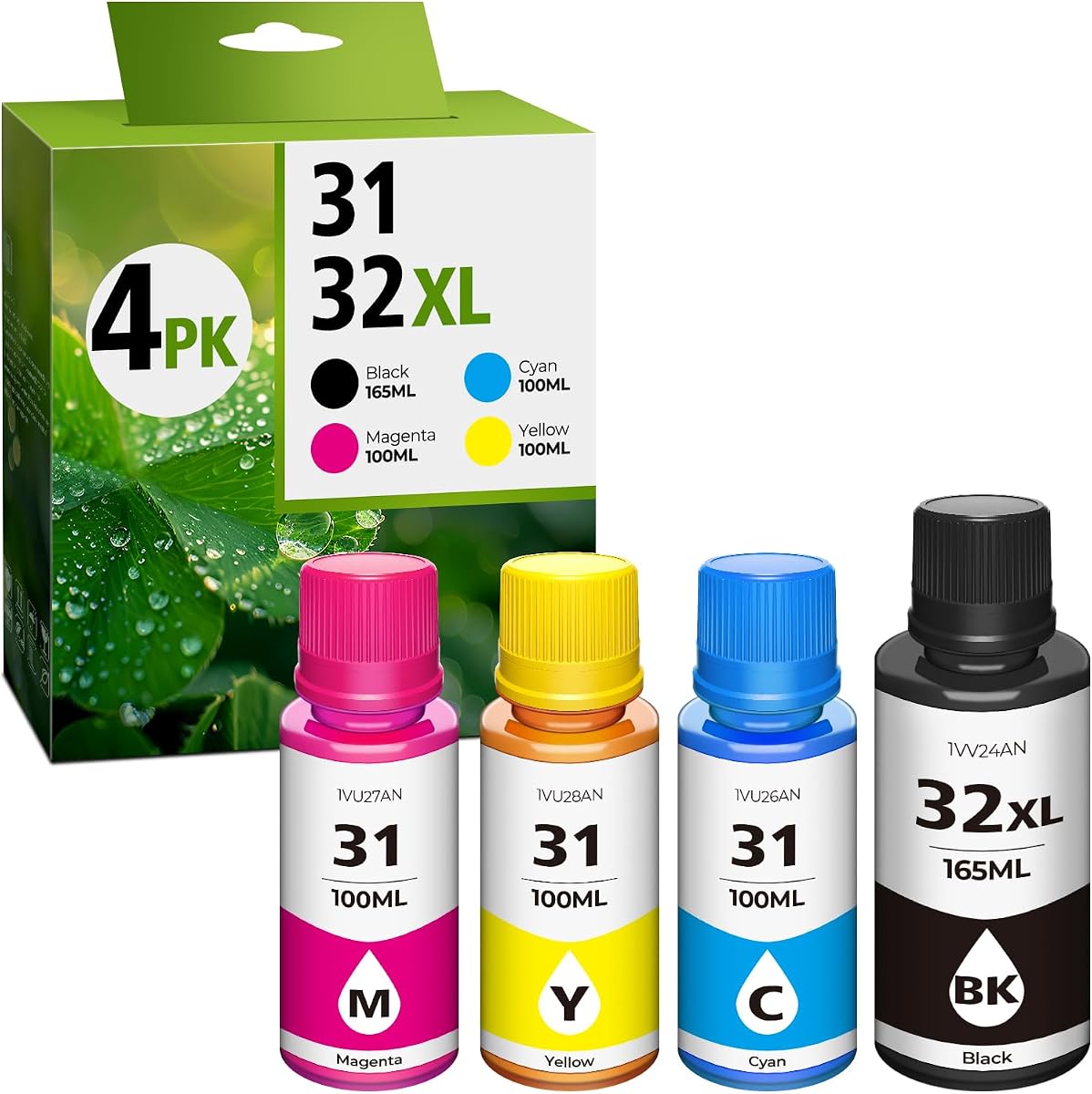
The 31 Ink 32XL Set is an accessory for existing Smart Tank printers. It has a 4.4 rating and offers higher yield page counts than standard OEM black ink for cost savings.
We may earn a commission when you buy through this link, at no additional cost to you.
The page yield of a 32XL black ink bottle is up to 9,500 pages. This set is compatible with many Smart Tank models. It ensures seamless refills with minimal effort and no leakage.
Note that these are dye inks, not pigment. Cleaning heads before refilling is important to maintain performance. Mixing with OEM pigment ink might affect print quality.
This set is ideal for owners needing affordable refills. It provides vibrant colors and sharp text. Perfect for both home and office environments needing consistent output.
The page yield is up to 9500 pages ensuring crisp professional-quality printouts with vibrant colors.
Designed for easy refilling ensuring seamless refills with minimal effort and no leakage.
We may earn a commission when you buy through this link, at no additional cost to you.
The HP Smart Tank 5003 offers a lower-rated alternative for budget-conscious buyers. It holds a 3.8 rating but promises easy, reliable printing with up to three years of ink included.
We may earn a commission when you buy through this link, at no additional cost to you.
It features borderless prints for clean documents. The mess-free refill system allows you to plug ink bottles into the tank and let them drain. This avoids squeezing and spilling.
Some users report connectivity or setup challenges. The lower score reflects varied experiences. However, its core printing functions remain strong for basic needs.
Those prioritizing simple setup should consider this model. It is best for home environments where basic print copy and scan functions are essential.
Mess-free refill allows replenishing ink with no squeezing and no spilling during maintenance.
Key features include borderless prints mobile and wireless printing for versatile home use.
We may earn a commission when you buy through this link, at no additional cost to you.
The Epson EcoTank ET-2988 is a renewed option offering fast speeds. It has a 3.9 rating and prints at 15 PPM with auto 2-sided printing for high productivity.
We may earn a commission when you buy through this link, at no additional cost to you.
It includes up to 6,600 pages black and 5,500 color. The 1.44 inch color display ensures easy navigation. High resolution prints deliver amazing image quality on wide media.
Renewed products may have cosmetic signs but offer significant value. Ensure warranty terms are clear. It supports AirPrint and Mopria for versatile mobile printing.
This printer suits users needing speed and duplex features. Check current listings for condition details before purchasing this cost-effective alternative.
Fast 15 black ppm print speeds with zero warmup time support rapid document processing.
Epson EcoTank comes with enough ink to print up to 6600 pages for fewer frustrations.
We may earn a commission when you buy through this link, at no additional cost to you.
Selecting the right ink tank printer requires evaluating ink capacity, print speed, and connectivity to match your workflow needs.
Look for printers that include enough ink for at least 1,000 pages. Higher yield models reduce the frequency of refills and lower long-term costs significantly for your home.
Prioritize models with refillable tanks over standard cartridges to ensure you get the most value per dollar spent on ink supplies.
Check the pages per minute (PPM) ratings to ensure the printer handles your daily load quickly. Faster speeds are essential for bulk documents to avoid waiting for output.
Choose printers with high-resolution settings for clear text and sharp photos to maintain professional presentation in all your printed materials.
Ensure the printer supports wireless and mobile printing via apps or AirPrint. Modern connectivity allows you to print from anywhere in your home office.
Look for models with direct USB connections for backup to maintain functionality even if network issues occur.
Automatic two-sided printing saves paper and time compared to manual flipping. It is a key feature for reducing costs and environmental impact.
Prioritize models with auto duplex if you print many double-sided documents regularly.
Touchscreen displays make setup and error resolution easier. A larger screen helps you manage settings without a computer.
Choose models with intuitive interfaces to streamline your daily printing tasks effectively.
Check the warranty period and support terms before purchasing. Good customer support is vital for resolving potential technical issues quickly.
Regular maintenance like cleaning heads ensures consistent print quality over the device's lifespan.
Start by setting up the printer in a well-ventilated area away from direct sunlight to prevent ink from drying out or degrading prematurely.
When refilling ink, use the included EcoFit bottles carefully to avoid spills. Clean the nozzle area regularly to maintain optimal print quality.
Perform a test print every few weeks if unused to ensure nozzles do not clog. This keeps the printer ready for immediate use.
Ink bottles typically last 1 to 3 years depending on print volume. Most models include enough ink for 5,000 to 10,000 pages before needing a refill.
Using third-party ink is possible but may void your warranty. Manufacturers recommend genuine ink for optimal performance and print quality.
Yes, they often produce sharper text and vibrant photos due to consistent ink flow and specialized printhead technology.
Clean the printhead monthly or if you notice faded prints. Regular cleaning prevents clogs and extends the printer's lifespan.
Yes, they are designed for high-volume printing with refillable tanks that reduce costs per page significantly.
Run the built-in cleaning utility or use a manual cleaning tool. If unresolved, contact customer support for further assistance.
Most models include built-in scanners and copiers, making them all-in-one solutions for document management tasks.
They reduce plastic waste by eliminating cartridges and encourage recycling through refillable systems. This supports eco-friendly office practices.
The Canon G3270 Epson ET-2803 and HP Smart Tank 5003 lead the list due to their balance of cost and performance. Each offers unique features to match different user needs effectively.
Prioritize ink yield and maintenance ease when making your decision. These factors determine long-term value and reliability more than initial purchase price.
Always check current listings for the latest prices and compatibility updates before finalizing your purchase decision today.