
Behringer X AIR XR18
4.6Editor score
Tablet controlled
WiFi built-in
18 channel inputs
This guide compares the top digital mixing consoles for live sound and studio use, highlighting features, connectivity, and performance for professionals.
Digital mixing consoles have transformed how engineers manage audio in live and studio settings. These devices offer precise control over multiple inputs, effects, and routing through intuitive interfaces that simplify complex tasks for operators of all skill levels.
We evaluated ten leading models based on input capacity, preamp quality, connectivity options, and user interface design. Our analysis focuses on real-world performance, reliability, and the specific features that matter most for touring bands, house sound teams, and recording studios.
Each pick below highlights key strengths and trade-offs to help you find the right fit for your workflow. Remember that specifications and availability can shift, so always verify current details before making your final purchase decision today.
4.6Editor score

4.7Editor score

4.2Editor score
The following table provides a side-by-side overview of each console's core specifications to help you quickly identify which model aligns best with your specific audio production requirements and budget constraints.




The Behringer X32 stands out as a top-tier option for both live and studio environments with its 40 inputs and 32 MIDAS preamps. Its 4.7 rating reflects strong user satisfaction regarding sound clarity and flexibility.
We may earn a commission when you buy through this link, at no additional cost to you.
Users praise the 25 buses and motorized faders for enabling complex scene management and DAW control. The LCD scribble strips make channel assignment intuitive even in low-light stage conditions.
While the interface can be dense for beginners, the depth of control justifies the time investment. Some users note that an external monitor helps navigate menus more efficiently.
Ideal for touring bands and sound engineers needing professional grade flexibility without the premium cost, this console delivers reliable performance for demanding applications.
The 32 MIDAS-designed preamps ensure audiophile quality signal capture across all inputs.
With 16 XLR outputs and multiple line options, it supports complex stage setups easily.
We may earn a commission when you buy through this link, at no additional cost to you.
The Yamaha DM3 offers a small footprint ideal for portable setups while maintaining high fidelity with 96kHz sampling. It achieves a 4.4 rating from users appreciating its ease of use.
We may earn a commission when you buy through this link, at no additional cost to you.
Its 9 inch touchscreen simplifies navigation, and the 16 professional preamps ensure clean gain stages for microphones. The 18×18 USB interface supports direct recording for documentation.
However, the 22 channel limit might restrict large productions. Also, the limited physical controls require reliance on screen menus for deeper adjustments.
Best for small venues and churches needing a reliable all-in-one solution without taking up too much rack space.
96kHz sampling preserves detail for critical listening and high-quality recordings.
The large touchscreen makes accessing parameters faster than traditional knobs.
We may earn a commission when you buy through this link, at no additional cost to you.
Designed for large scale productions, the WING offers 48 channels and 28 buses for unmatched flexibility. Its 4.2 rating indicates strong performance despite the complexity of features.
We may earn a commission when you buy through this link, at no additional cost to you.
Features like 24 motorized faders and SuperMAC technology ensure precise control and ultra-low latency over AES50 ports. The touch-sensitive editing section allows for quick parameter tweaks.
The cost and complexity mean it is not ideal for casual users. Proper planning is required to utilize all the input and output options effectively.
Recommended for professional touring crews and large installations needing maximum flexibility and future-proof connectivity options.
Supports up to 144 inputs via remote I/O for expanding stage configurations.
Dedicated rotary controls and displays keep critical parameters accessible quickly.
We may earn a commission when you buy through this link, at no additional cost to you.
The MGX12 earns a perfect 5.0 rating for its user-friendly approach to digital mixing. It includes software bundles like Cubase Al to streamline workflow for creators.
We may earn a commission when you buy through this link, at no additional cost to you.
Features like Auto Gain and Clip Safe simplify operation for novice engineers. The USB-HDMI interface adds 4K video pass-through for streamers and presenters.
The 18 channel limit might constrain larger groups. However, for home studios and small bands, it provides a solid entry point into digital audio.
Perfect for content creators and small bands needing an easy transition from analog to digital mixing.
Includes DAW software and basic FX to reduce extra costs for new users.
Assistive features like Simple Mode make mixing accessible immediately.
We may earn a commission when you buy through this link, at no additional cost to you.
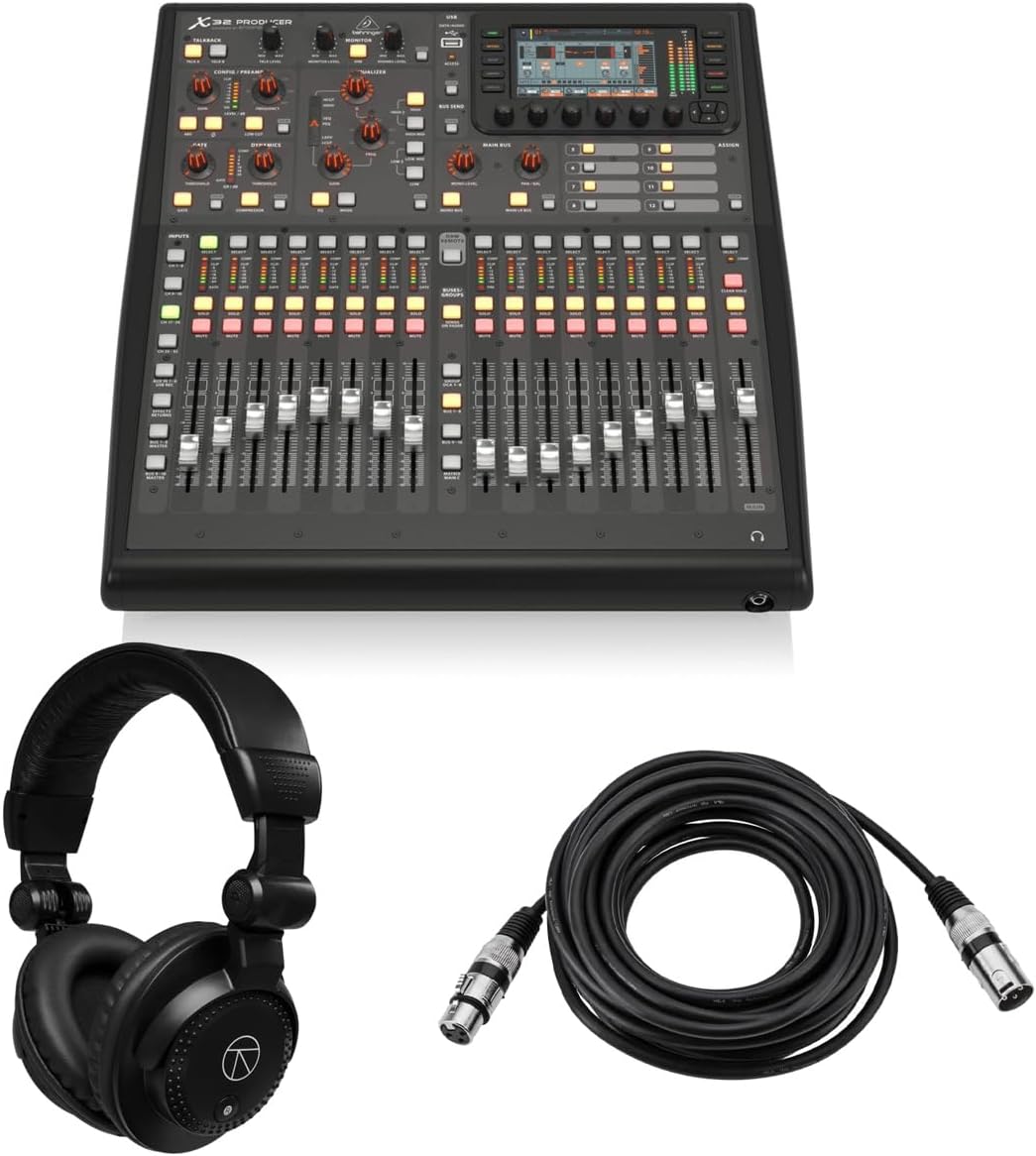
The X32 Producer brings the power of the full X32 to a compact rack unit with a perfect 5.0 rating. It includes headphones and cables for immediate setup.
We may earn a commission when you buy through this link, at no additional cost to you.
Features 16 MIDAS preamps and 40 inputs to handle complex sessions. The 17 motorized faders and recall scenes allow for consistent show performance.
While it lacks some features of the full X32, the rack design saves space. The included accessories add value to the initial purchase cost significantly.
Ideal for broadcast and installation scenarios where space is limited but quality must remain high.
Headphones and cables included help users start mixing right out of the box.
Rack-mountable design fits easily into standard AV cabinets and trucks.
We may earn a commission when you buy through this link, at no additional cost to you.
The X32 Compact retains the core engine of the flagship model in a smaller chassis with a 4.7 rating. It offers 17 motorized faders for immediate scene management.
We may earn a commission when you buy through this link, at no additional cost to you.
Features like LCD scribble strips help organize channels easily. The talkback section and multiple outputs support versatile communication needs during live events.
While it lacks the full depth of the original X32, it balances power and size well. Users appreciate the familiarity of the interface without the bulk.
Best suited for mid-size venues needing robust mixing power without excessive physical space requirements.
Retains the X32 layout users know for faster operation during live shows.
Includes phone connectors and extra line outputs for flexible monitoring.
We may earn a commission when you buy through this link, at no additional cost to you.
The StudioLive Classic offers 16 inputs with Fat Channel processing for consistent tone shaping. It scores 3.9 due to mixed feedback on reliability versus features.
We may earn a commission when you buy through this link, at no additional cost to you.
Features include a 31-band graphic EQ and unlimited scene recall. The included Capture software allows for 18-in recording sessions easily.
Some users report limitations in expansion and update support. However, for fixed installations, the integrated processing remains a strong asset.
Good for small recording studios and houses of worship needing reliable multi-track recording capabilities.
Fat Channel EQ and compression on every channel ensure professional tone shaping.
USB interface captures all channels to a computer for later editing.
We may earn a commission when you buy through this link, at no additional cost to you.
The XR18 offers affordable access to digital mixing with 16 MIDAS preamps and tablet control for a 4.6 rating. It eliminates the need for external routers with built-in WiFi.
We may earn a commission when you buy through this link, at no additional cost to you.
Users appreciate the wireless operation allowing control from anywhere. The 18×18 USB interface supports direct recording on iPads or computers.
Lack of physical faders means you need a screen to mix. The reliance on mobile devices can be a downside in low power environments.
Great for budget-conscious bands or remote engineers needing flexible control without heavy hardware.
Built-in tri-mode WiFi allows control without extra network setup.
16 MIDAS-designed preamps provide high-end sound at a low price point.
We may earn a commission when you buy through this link, at no additional cost to you.
The Qu-5 utilizes FPGA processing for exceptional audio quality with ultra-low latency. Its high-end specs make it suitable for professional live and recording work.
We may earn a commission when you buy through this link, at no additional cost to you.
Features include 17 motorized faders and a 7-inch touchscreen. The SLink port allows for significant expansion via digital snakes.
Limited reviews make it hard to gauge long-term reliability. The high price point restricts its appeal to larger budgets and professional studios.
Recommended for professionals prioritizing raw performance and high-resolution audio quality over cost.
XCVI FPGA delivers high processing power without thermal issues.
SLink expansion supports growth without replacing the main console unit.
We may earn a commission when you buy through this link, at no additional cost to you.
The TouchMix-16 simplifies digital mixing with preset effects and parametric EQ on all channels. It earns a 4.4 rating for ease of use and portability.
We may earn a commission when you buy through this link, at no additional cost to you.
Includes a bag for transport and TRS outs to drive In-Ear Monitors directly. The gate and compressor on all inputs help clean up tracks quickly.
Lacks the deep routing of larger consoles but is excellent for single-operator needs. The included bag adds immediate value for road use.
Best for solo sound techs and small groups needing a portable yet capable mixing solution.
Included bag makes travel safer for road crews and mobile teams.
TRS aux outputs allow direct connection to In-Ear Monitor systems.
We may earn a commission when you buy through this link, at no additional cost to you.
Selecting the right digital mixer requires evaluating your input needs, audio quality requirements, and control preferences. This guide breaks down the essential factors to consider.
Match the console's channel count to your typical performance or recording setup. More inputs allow for future growth but add complexity.
Choose a model with enough XLR and line inputs for all your instruments and microphones.
Look for reputable preamp designs like MIDAS or XMAX for clean sound. High gain ranges help with low output microphones.
Prioritize consoles with known quality preamps to ensure clear vocals and instruments.
Decide between physical faders and touchscreens based on your workflow. Motorized faders aid in visual consistency.
Ensure the interface allows quick access to EQ and dynamics during live shows.
Check for USB audio interfaces, AES50 ports, and remote I/O support. Good connectivity simplifies recording and multi-stage setups.
Look for consoles that can expand via digital snakes or remote units easily.
Consider the physical size and weight if you travel. Rack-mountable options save space in fixed installations.
Choose a compact model if you move gear frequently between venues.
Review the built-in effects and DAW software bundles. Good DSP tools reduce the need for external processors.
Select a console with sufficient internal FX for the genre you mix.
Balance cost with features. Entry-level models like the XR18 offer great value while premium models offer depth.
Invest in a unit that meets current needs without outgrowing it too quickly.
Check firmware update history and user forums. Strong community support ensures long-term stability.
Choose brands with a track record of reliable customer support.
Connect your microphones and instruments first, then set levels using the preamps. Ensure gains are set properly to avoid distortion in the digital path.
Use scene recalls to switch between show setups quickly without manual adjustments. Label channels clearly for faster identification during live events.
Store the unit in a dry, cool place and avoid extreme temperatures. Use a carrying bag or flight case during transport to protect internal components.
Digital consoles offer scene recall, built-in effects, and more efficient routing without external racks. They allow complex setups to be managed by fewer people.
No, most operate standalone, but a computer is useful for recording and saving backups. Some models allow remote control via tablets.
Yes, because they integrate multi-track recording and EQ directly. The smaller footprint saves space in a limited room.
With proper care, these units can last over a decade. Firmware updates extend their useful life over time.
A bus is a channel path used to send multiple signals to a single output. Buses help create subgroups and aux sends.
Not all. Higher-end models usually include them for visual tracking of levels. Budget units may rely on static sliders.
The Behringer X32, Yamaha MGX12, and Behringer X AIR XR18 lead the pack for overall value and specific use cases. Each offers a distinct balance of power and ease of use.
Prioritize your input needs and interface preferences to find the best fit. Consider your typical environment and whether you need remote control options.
Always check current availability and pricing before purchasing. Specifications and bundles can change, so verifying details ensures you get the right unit.