
CENMATE Aluminum 4 Bay
4.3Editor score
Aluminum alloy build quality
Supports 2.5 and 3.5 inch drives
Includes cooling fan for heat management
This guide compares the top ten Direct Attached Storage enclosures for speed capacity and compatibility to help you choose the right external hard drive
Direct attached storage devices offer a reliable way to expand your computer's capacity without network complexity. These enclosures connect via USB or Thunderbolt to provide immediate access to massive data archives. Choosing the right model depends on your specific needs for speed reliability and drive compatibility.
We have evaluated ten leading DAS enclosures based on their transfer speeds build quality and feature sets. Each product was analyzed for its ability to handle multiple drives and its compatibility with various operating systems. Our goal is to help you find the perfect storage solution for your workflow.
Each pick highlights unique strengths ranging from budget-friendly options to high-performance hybrid models. You will find detailed pros and cons to guide your decision-making process. Please note that prices and availability change frequently so check current listings before purchasing.
4.3Editor score

4.2Editor score

5.0Editor score
The following table provides a side by side comparison of all ten enclosures. It highlights key specifications such as interface speed drive count and special features to help you differentiate between models at a glance.




The TERRAMASTER D4-320 stands out as a versatile choice for users needing high-speed external storage. It achieves a 4.2 star rating and supports up to four 3.5 inch drives. Its USB 3.2 Gen2 interface ensures rapid data transfers suitable for large media files.
We may earn a commission when you buy through this link, at no additional cost to you.
Performance is a key strength with read speeds reaching over 1000 MB/s using four HDDs. The enclosure manages heat well with an intelligent temperature controlled fan that stays quiet. Drive installation is effortless thanks to the tool-free trays and push-lock mechanism.
While it lacks RAID support which limits data redundancy options the speed and capacity compensate for this. Users focused on raw throughput will find this model highly effective for video editing workflows.
This unit is ideal for professionals who need reliable plug-and-play storage across multiple operating systems. It balances performance and usability exceptionally well making it a top recommendation for general DAS needs.
The USB 3.2 Gen2 protocol delivers up to 10Gbps bandwidth. This enables swift movement of large video projects without bottlenecks.
Intelligent fans adjust speed based on drive temperature. Noise levels drop below 21 dB in standby for quiet environments.
We may earn a commission when you buy through this link, at no additional cost to you.
The QNAP TR-004 offers robust hardware RAID support rare in budget DAS units. It rates 4.2 stars and connects via USB Type-C. This model is designed for users who need redundancy without a full NAS system.
We may earn a commission when you buy through this link, at no additional cost to you.
Key strengths include RAID 0 1 and 5 modes managed by dedicated hardware. This ensures data safety even if a drive fails. The lockable bays prevent unauthorized access to your drives. It also serves as expansion for QNAP NAS units.
The main drawback is its dependency on QNAP NAS models for full functionality. If you do not own a compatible NAS the device works as simple storage but loses advanced features. Compatibility checks are essential before purchase.
Choose this unit if you require RAID redundancy on a budget. It is also perfect for expanding existing QNAP storage systems efficiently without complex networking setup.
Hardware RAID provides redundancy without software overhead. Drives remain protected even if the host computer is off.
Works as external storage or NAS expansion. Compatible with QNAP QTS 4.3.6 and later versions.
We may earn a commission when you buy through this link, at no additional cost to you.
The TERRAMASTER D8 Hybrid is unique for combining HDD and NVMe drives in one enclosure. It rates 3.5 stars and supports up to 152TB. This hybrid approach allows users to optimize speed and capacity simultaneously.
We may earn a commission when you buy through this link, at no additional cost to you.
Users can store active data on fast SSDs while archiving on HDDs. The enclosure supports 10Gbps transfer speeds ensuring SSDs perform at peak potential. Hot swapping is convenient with the push-lock design. Backup software is included for data security.
Managing different drive types requires some planning for best performance. Some users report lower satisfaction due to complexity in setup. However those needing both speed and bulk storage find it invaluable.
This unit is perfect for video editors needing fast access plus long-term archiving. It is a flexible solution for maximizing workstation storage efficiency.
Combine HDD capacity with SSD speed. Ideal for hot and cold data separation strategies.
Tool-free design and push-lock mechanism ensure ease of use. Includes backup software for peace of mind.
We may earn a commission when you buy through this link, at no additional cost to you.
The CENMATE Aluminum 4 Bay offers reliable storage at an affordable price. It rates 4.3 stars and features a durable aluminum chassis. This model is designed for users needing simple plug-and-play storage without extra cost.
We may earn a commission when you buy through this link, at no additional cost to you.
Its aluminum build helps dissipate heat while housing up to four drives. The cooling fan is effective though noise levels can reach 50 dB. USB 3.0 speeds are adequate for general backups and file transfers.
The main trade-off is the audible fan which might bother sensitive users. However the build quality and low cost make it a strong value proposition. It supports hot swapping for quick drive changes.
Buy this if you need a cost-effective way to expand storage. It suits home offices or businesses needing basic external capacity on a budget.
Aluminum alloy provides structural strength. Helps with heat dissipation during heavy use.
Plug and play without drivers. Compatible with Windows and macOS systems.
We may earn a commission when you buy through this link, at no additional cost to you.
The SABRENT 5-Bay is built for performance with dedicated controllers per drive. It rates 4.1 stars and supports five 3.5 inch drives. This setup ensures stable connections without bandwidth sharing bottlenecks.
We may earn a commission when you buy through this link, at no additional cost to you.
Its 10Gbps USB-C connection handles large video files efficiently. The PWM controlled fan remains quiet during everyday use. Daisy-chaining allows connection to peripherals saving ports. Aluminum housing adds durability for heavy workloads.
The price is higher than basic models but justified by reliability. Limited to five drives but ideal for focused workflows. Stability makes it worth the investment for professional environments.
Choose this for video editing where stability is critical. Its independent connection per drive reduces failure risk during transfers.
Dedicated controller per drive ensures no data drops. Perfect for high-stakes video editing workflows.
Reinforced aluminum housing withstands daily use. Integrated power supply removes need for external bricks.
We may earn a commission when you buy through this link, at no additional cost to you.
The TERRAMASTER D8 Hybrid 2 boasts a perfect 5.0 star rating. It supports 8 independent drives with 10Gbps speeds. This model is engineered for maximum performance and efficiency in professional settings.
We may earn a commission when you buy through this link, at no additional cost to you.
Its TPM technology optimizes power usage for faster wake-ups. Read speeds reach 1020MB/s enabling quick access to media files. It combines HDD capacity with NVMe speed seamlessly. TPC Backupper software is included for backups.
The cost is high but reflects top-tier build and features. Managing mixed drives requires planning but offers unmatched flexibility. Perfect for users prioritizing performance above budget.
Select this if you need the fastest available DAS. Its efficiency and speed make it ideal for high-end workstations.
Proprietary power management reduces energy use. Enhances drive wake-up speed for active workflows.
Read speeds of 1020MB/s ensure minimal wait times. Supports up to 152TB total storage capacity.
We may earn a commission when you buy through this link, at no additional cost to you.
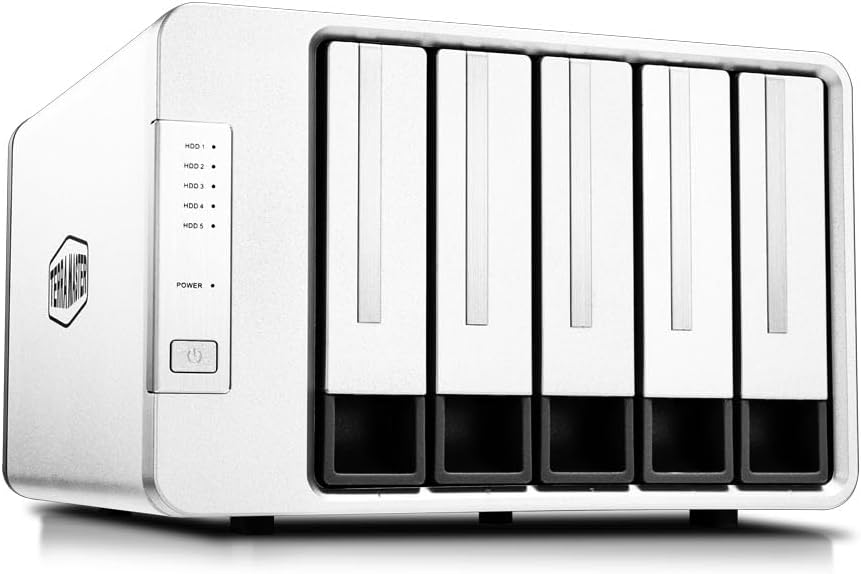
The TERRAMASTER D5-310 features a dedicated RAID knob for easy switching. It rates 3.6 stars and supports up to five drives. This model is built for users who want physical control over data protection.
We may earn a commission when you buy through this link, at no additional cost to you.
RAID modes like 0 1 and 5 are managed without software. Hot spare disks add extra safety against drive failures. It works well with macOS where other units fail. Backup software is included for data protection.
Speed is limited to 5Gbps which slows large file transfers. Some users report lower satisfaction due to reliability issues. However RAID flexibility remains a strong selling point.
Use this if physical RAID control is essential for your workflow. It is best for users prioritizing simplicity over raw speed.
Turn a knob to switch RAID modes. No software configuration needed for basic setups.
Fully supports macOS without extra drivers. Seamless integration with Apple ecosystems.
We may earn a commission when you buy through this link, at no additional cost to you.
The WAVLINK 4-Bay stands out with HDMI output for direct video playback. It rates 4.0 stars and supports 10Gbps speeds. This model adds multimedia capabilities to standard storage functions.
We may earn a commission when you buy through this link, at no additional cost to you.
Its HDMI port supports 4K resolutions for direct connection to screens. Data transfers are fast with USB 3.2 Gen2. Aluminum build helps with heat management. Fans activate at 48 degrees to protect drives.
The HDMI feature is useful but requires host support. Noise can be noticeable during intensive transfers. Still the versatility makes it a unique choice.
Buy this if you want to view media directly from drives. Its speed and build quality support general storage needs well.
HDMI port connects directly to screens. Supports 4K resolution for high-quality viewing.
Aluminum shell withstands daily use. Temperature fans ensure optimal operating conditions.
We may earn a commission when you buy through this link, at no additional cost to you.
The ORICO 5 Bay uses magnetic chips for tool-free cover access. It rates 4.0 stars and supports up to 110TB. This model focuses on ease of use and large capacity support.
We may earn a commission when you buy through this link, at no additional cost to you.
The magnetic cover makes drive changes quick. USB 3.1 speeds ensure reasonable transfer rates. Protection features include anti-voltage and overheat safeguards. A 60mm fan provides cooling during operation.
Linux users face limitations with multi-drive recognition. Fan performance may not be enough for heavy loads. Still the simplicity is a strong benefit.
Choose this for quick access to large storage. It is suitable for home users needing flexible drive options.
Magnetic cover removes without screws. Reduces setup time for frequent drive swaps.
Overvoltage and overheat safeguards included. Protects data during power fluctuations.
We may earn a commission when you buy through this link, at no additional cost to you.
The QNAP TR-002 is a compact unit for small setups. It rates 4.0 stars and supports two drives via USB-C. This model is designed for users needing basic RAID or expansion.
We may earn a commission when you buy through this link, at no additional cost to you.
Its small size saves desk space while offering RAID protection. Lockable bays prevent unauthorized access. It integrates smoothly with QNAP NAS systems. Ideal for small businesses or home office use.
Two drives limit total capacity compared to larger units. Best for those needing minimal storage. However simplicity and build quality are high.
Buy this if you need a small reliable storage unit. It suits users prioritizing security and compact design.
Small footprint saves valuable desk space. Fits easily in crowded workstations.
Connects to QNAP NAS for extra space. Enhances storage pool without full NAS setup.
We may earn a commission when you buy through this link, at no additional cost to you.
Choosing the right DAS requires considering speed capacity and compatibility. This section explains the key factors to ensure you select a model that fits your specific needs.
USB 3.2 Gen2 offers up to 10Gbps speeds which are vital for large video files. USB 3.0 is limited to 5Gbps and may slow workflows. Check your computer ports to ensure compatibility.
For high-performance needs prioritize 10Gbps models. Slower speeds may suffice for general backups.
Consider the total TB you need for long-term storage. Models support up to 152TB depending on drive size. Ensure the enclosure allows for future drive upgrades.
Choose a model with extra bays if you expect to grow your library quickly.
Hardware RAID protects data against drive failure without needing a NAS. Software RAID relies on your host computer and is slower. Decide if redundancy is critical for your workflow.
If data loss is unacceptable choose units with hardware RAID features.
Most units work with Windows and macOS but verify macOS support specifically. Some models lack full compatibility with latest OS versions. Check reviews for Linux support if needed.
Ensure the unit is plug-and-play on your primary system.
Active cooling fans prevent overheating during heavy transfers. Passive models rely on aluminum shells and may struggle with heat. Noise levels matter for quiet office environments.
Look for temperature-controlled fans to balance noise and efficiency.
Tool-free bays allow easy drive replacement without tools. Hot swapping lets you change drives while powered on. Lockable bays add physical security for your drives.
Prioritize tool-free designs for convenience and flexibility.
DAS units range from budget to premium. Higher costs often mean better cooling and speed. Balance features with your actual needs to avoid overspending.
Select a model that offers necessary features without extra costs.
Aluminum housings offer better durability than plastic. A sturdy build protects drives during travel. Check warranty terms for long-term support.
Invest in robust models for long-term reliability.
Connect the enclosure to a USB 3.0 or 3.2 port. Ensure your operating system recognizes the drives and format them if needed.
Safely eject drives before disconnecting to prevent data corruption. Use the provided cables for best transfer speeds.
Keep the enclosure in a cool ventilated area. Clean dust regularly to maintain cooling efficiency and drive lifespan.
Direct Attached Storage is simpler and faster for single users. NAS offers network access for multiple devices. Choose DAS for direct computer connection.
Some models offer hardware RAID for data redundancy. Others support individual drives only. Check specs for RAID options.
Most units support SATA SSDs and HDDs. Hybrid models allow NVMe SSDs. Verify drive type compatibility before buying.
USB 3.0 supports 5Gbps. USB 3.2 Gen2 supports 10Gbps. Speeds vary by drive count and controller.
Each drive appears as a separate volume. Use disk management tools to partition space. Avoid mixing formats on same unit.
Many units include fans which can make noise. Standby modes often reduce fan noise. Check noise ratings for quiet use.
The ten units reviewed offer diverse options from budget to premium. The TERRAMASTER D4-320 and D8 Hybrid 2 stand out for performance.
Prioritize speed if you handle large media files daily. Consider RAID for data safety in business settings.
Always check current pricing before purchasing. Availability changes frequently so stay updated for the best deals.