
22MP Film & Slide Scanner with 5 LCD LCD
4.3Editor score
Affordable price point
5 inch LCD display
Complete accessory kit included
This guide compares the best 35mm Slide Scanner models to help you digitize old film, negatives, and slides into high-quality digital files with ease.
Preserving your cherished memories is more important than ever in today's digital age. A reliable 35mm Slide Scanner allows you to convert old film, negatives, and slides into high-quality digital files that can be shared, edited, and stored safely without the risk of physical degradation over time.
We evaluated the top models on the market based on scanning quality, ease of use, screen size, and connectivity options. Our comparison covers standalone units that require no computer as well as versatile devices that support multiple film formats including 35mm, 110, 126, and Super 8 for comprehensive archiving needs.
Each pick in this list highlights specific strengths such as resolution, editing features, or bundle value to help you find the right fit. Prices and availability change frequently so please verify current details on the product pages before making your final decision to ensure you get the best value today.
4.3Editor score

4.3Editor score

5.0Editor score
The following table provides a side-by-side overview of all ten models featured in this guide so you can quickly compare their key specifications and features to find the perfect solution for your digitization needs.


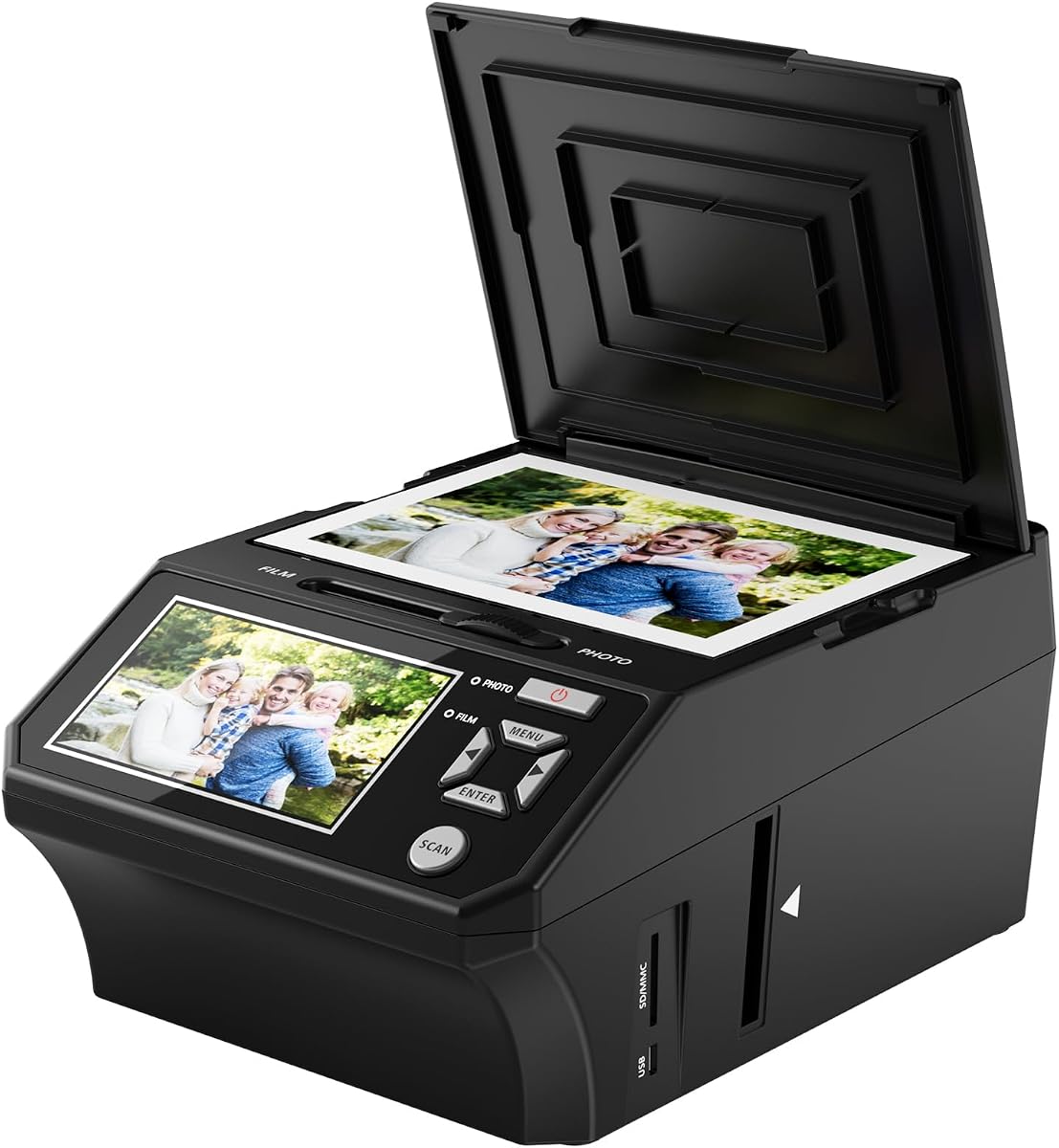




The KODAK Slide N Scan ranks as our top choice for its balance of performance and ease of use. With a 22MP output and a bright 5-inch LCD screen it makes previewing and editing photos straightforward even for users with little technical experience.
We may earn a commission when you buy through this link, at no additional cost to you.
Its quick-feeding tray technology simplifies the loading process allowing for continuous scanning without constant repositioning. The device supports a wide range of formats from 135mm to 126mm and includes adapters for both negatives and slides making it a versatile tool for any photo collection.
While the build quality feels slightly lightweight compared to higher-end units the functionality remains solid. The lack of an included SD card is a minor inconvenience but the device supports up to 32GB which is sufficient for most users looking to preserve memories.
Anyone looking to digitize old family albums without the hassle of complex software will find this model ideal. It offers a seamless workflow from scan to save and the ability to connect to a TV via HDMI enhances the sharing experience significantly.
The advanced capture software lets you enhance resize and convert photos with a single touch without needing complex settings or external applications.
Connect to any Type-C USB-enabled computer or use the HDMI cable to display images on your TV for a larger viewing experience.
We may earn a commission when you buy through this link, at no additional cost to you.
The Magnasonic All-in-One scanner stands out for its high 24MP resolution and support for a wide array of film formats including Super 8. It offers a robust standalone experience that allows users to view and edit directly on the device without needing a computer.
We may earn a commission when you buy through this link, at no additional cost to you.
Users appreciate the fast scanning speed which can process images in less than five seconds each. The large 5-inch screen provides a clear view of the content making it easy to adjust brightness and color correction right on the scanner.
One trade-off is that the HDMI cable is not included so users may need to purchase one separately for TV viewing. Additionally some users find the settings menu slightly complex compared to simpler models but the functionality remains comprehensive for the price.
This unit is perfect for collectors who have mixed film types including older Super 8 formats. It balances performance and cost effectively making it a strong contender for anyone looking to preserve diverse photo archives without breaking the bank.
Enjoy frustration-free operation without needing to install complicated software or drivers on your computer to get started.
The SD card slot supports up to 128GB giving you ample space to store scanned images directly on the device.
We may earn a commission when you buy through this link, at no additional cost to you.
The KODAK Slide N Scan Max offers a streamlined scanning experience with its smooth-moving tray that reduces the need for constant repositioning. It supports up to 4208×3120 resolution and allows for direct SD saving making it a convenient standalone solution.
We may earn a commission when you buy through this link, at no additional cost to you.
Its universal film support covers 135mm, 110mm, and 126mm formats easily handling both slides and negatives. The one-touch editing feature simplifies the process allowing users to resize and adjust images without navigating complex menus or software.
While it comes at a higher price point the improved workflow efficiency may justify the cost for frequent users. The lack of an extended warranty option is a consideration but the device performs reliably for typical home archiving needs.
Ideal for users who want a premium feel and efficient workflow this scanner delivers crisp digital files with minimal effort. It is a great choice for families with large collections who need a reliable tool to manage their photo digitization projects.
The smooth-moving tray feeds film efficiently reducing the time spent on manual adjustments during the scanning process.
With direct SD saving you can preserve memories on the go without needing to connect to a computer immediately.
We may earn a commission when you buy through this link, at no additional cost to you.
This versatile scanner distinguishes itself by supporting printed photos alongside standard film formats making it an all-in-one solution for various memory types. It comes with an 8GB SD card and offers a reliable three-year warranty for peace of mind.
We may earn a commission when you buy through this link, at no additional cost to you.
The large 5-inch HD screen provides a vibrant viewing experience allowing for instant previews and edits without needing an external monitor. Users can easily digitize 35mm slides and negatives in seconds and save them directly to the card.
While the included SD card is small it serves as a starting point and the device likely supports larger cards. The absence of an HDMI cable in the bundle means you may need to purchase one separately for TV sharing options.
This model is perfect for families who have both physical prints and slides to digitize. The inclusion of an SD card and a robust warranty makes it a hassle-free purchase for those seeking a complete and reliable scanning solution.
Digitize photos, slides, negatives, and business cards with one device offering a comprehensive solution for all your memory needs.
Backed by a three-year warranty and dedicated customer support this scanner ensures long-term reliability for your projects.
We may earn a commission when you buy through this link, at no additional cost to you.
Priced very affordably this scanner delivers strong performance with a 22MP resolution and support for Super 8 film. It comes with a complete kit including necessary cables and holders which adds significant value for budget-conscious buyers.
We may earn a commission when you buy through this link, at no additional cost to you.
The 5-inch LCD display allows for clear previews and editing directly on the device. Users can adjust color and brightness with built-in software making it simple to enhance scanned photos without external tools.
One limitation is that the SD card is not included in the package so you will need to purchase one separately. The build is basic compared to premium models but it remains functional for regular use.
Anyone on a tight budget who still wants robust format support will find this model ideal. It provides a cost-effective way to digitize memories without sacrificing essential features like HDMI output and Super 8 capability.
The kit includes USB HDMI cables power adapter and all necessary film holders making it ready to use right out of the box.
Connect via HDMI to display scanned images on your TV for a larger shared viewing experience with family and friends.
We may earn a commission when you buy through this link, at no additional cost to you.
This HP scanner features a large 7-inch touch screen that makes navigation and editing intuitive. The touchscreen interface reduces the need to memorize physical buttons and allows for seamless previewing directly on the device.
We may earn a commission when you buy through this link, at no additional cost to you.
With a 13MP CMOS sensor it transforms negatives into vivid digital memories. The quick-feed loading tray simplifies the scanning of mixed formats like 135 and 126mm increasing overall efficiency during large digitization sessions.
While it has a slightly lower user rating the interface advantages are clear. The higher price point is justified for those who value a touch-first workflow but the performance may not exceed other 22MP models significantly.
It is best suited for users who prioritize ease of navigation and a modern interface. If you want a digital picture frame experience combined with scanning this model offers a compelling feature set for your home office.
The 7-inch color LCD touch display allows you to preview, edit, and showcase photos directly on the device with ease.
The built-in gallery mode transforms the scanner into a digital picture frame keeping your memories on continuous display.
We may earn a commission when you buy through this link, at no additional cost to you.
This model offers a compact design with USB-C power allowing for versatile connectivity options without needing bulky adapters. It delivers 22MP interpolated output ensuring crisp images from color and black-and-white film without computer assistance.
We may earn a commission when you buy through this link, at no additional cost to you.
The 5-inch touchscreen enables intuitive navigation and direct image editing. The quick-load tray allows for seamless scanning of various film strips making it efficient for processing mixed batches of negatives and slides.
While the screen is slightly smaller than the 7-inch models it remains sufficient for detailed previews. The USB-C power source is convenient but users should ensure they have a compatible adapter for optimal performance.
It is an excellent choice for users who value modern connectivity and compact design. If you want a reliable touchscreen experience in a portable package this scanner balances functionality and size effectively.
Powered through USB Type-C this negative scanner functions efficiently from a PC USB or external 5V adapter.
Equipped with a 13MP CMOS sensor and 22MP interpolation this scanner delivers exceptional image clarity.
We may earn a commission when you buy through this link, at no additional cost to you.
The KODAK SCANZA is unique for its ability to handle 8mm and Super 8 films which many other scanners do not support. It features a 3.5-inch TFT LCD with adjustable brightness and tilt for easy operation and viewing.
We may earn a commission when you buy through this link, at no additional cost to you.
The unit comes with multiple film inserts and adapters to support fast flexible operation. One-touch buttons allow for quick scanning and saving making it simple to digitize negatives and slides into JPEG files.
As an older model its screen is smaller than modern options but the functionality remains robust. The included cleaning brush is a helpful tool to avoid marks on scanned images which adds value to the purchase.
This scanner is perfect for collectors who specifically need to digitize 8mm reels. While it lacks modern large screens its specialized support makes it an indispensable tool for specific film archives.
Convert old Super 8 and 8mm negatives into JPEG files preserving formats that other modern scanners often miss.
Use the included brush to clean the light box and avoid marks on scanned images ensuring clear digital files.
We may earn a commission when you buy through this link, at no additional cost to you.
This unit is designed for portability with a plug-and-play interface that requires no software or drivers. It features a 2.4-inch LCD for previews and adjustment making it a compact solution for basic digitization needs.
We may earn a commission when you buy through this link, at no additional cost to you.
The high-speed batch scanning for 135 film allows you to process negatives quickly. The easy-load film adapters ensure stability during scanning which helps prevent shifting or blurring in your final digital results.
The screen is significantly smaller than most other models which may require squinting for detailed edits. While it is affordable and portable the lower rating suggests it may lack the durability of other options.
It is suitable for users who want a simple portable scanner for occasional use. If you need a compact tool to convert slides to digital for travel or quick projects this model fits the bill.
A truly portable scanner with no software or drivers needed making it easy to use anywhere without setup.
Precision adapters ensure film stability during scanning preventing shifting or blurring for sharp professional results.
We may earn a commission when you buy through this link, at no additional cost to you.
The ClearScan T7 offers a modern touch interface with a large 7-inch screen that simplifies navigation and editing for beginners. It supports multiple formats including Super 8 and delivers clear digital images with 24MP output.
We may earn a commission when you buy through this link, at no additional cost to you.
The unit includes a 16GB SD card so you can start scanning immediately without purchasing extra accessories. The touch interface reduces button confusion making it comfortable for parents and grandparents to digitize old film at home.
While it carries a higher price point the convenience of the touch screen and included SD card adds significant value. The perfect rating suggests high user satisfaction but limited review data means long-term reliability is still being assessed.
Ideal for families seeking a user-friendly and modern solution this scanner is a strong choice. The included SD card and easy controls make it the best premium option for hassle-free digitization today.
Unlike traditional button-only scanners this model features a large touch screen for easier previewing adjusting and saving.
The 16GB SD card is included so you can preview adjust scan and save directly without complex software setup.
We may earn a commission when you buy through this link, at no additional cost to you.
Selecting the right scanner involves weighing several factors to ensure the device meets your specific needs for resolution, format support, and ease of use.
Resolution determines how sharp your digital images will be. Look for models offering at least 14MP to 24MP to ensure that fine details from old photos are captured clearly. Higher resolution allows you to zoom in and print larger photos without losing detail.
Choose a scanner with a high pixel count to future-proof your digital archive for better quality over time.
Ensure the scanner supports all the film types you own. Most models handle standard 35mm slides and negatives but some also support older formats like 110 126 Super 8 or 8mm. Verify compatibility before purchasing to avoid limitations.
Check the adapter list to confirm your specific film strips can be scanned correctly.
Many modern scanners allow you to scan without a computer using an internal screen and SD card slot. This standalone feature is ideal for seniors or users who prefer a simple plug-and-play experience. It saves time and reduces software complexity.
Prioritize models with a large built-in screen if you want to preview and edit photos directly on the device.
A larger LCD screen makes it easier to view small slides and adjust settings. Devices range from 2.4 inches to 7 inches so consider how comfortable you want to be during long scanning sessions. Touchscreens further enhance usability.
Opt for at least a 5-inch display for a comfortable viewing experience.
Look for USB Type-C or HDMI ports that allow you to transfer photos or display them on a TV. Some models include cables while others require separate purchases. Connectivity options determine how easy it is to share your digitized memories.
Ensure the device supports HDMI for big-screen viewing if you plan to share photos at family gatherings.
One-touch scanning and intuitive menus are essential for a smooth workflow. Avoid devices that require complex drivers or software installation if you want a hassle-free experience. The best units guide you through the process with simple buttons or touch controls.
Choose a model with clear one-touch buttons to reduce the time spent on setup and adjustments.
Built-in editing tools let you crop adjust brightness and correct colors without extra software. These features are vital for restoring old faded photos quickly. Look for options that allow basic edits directly on the scanner.
Select a device with simple editing tools to save time on post-processing.
Some scanners come with SD cards cleaning brushes and cables while others do not. A comprehensive bundle saves you from buying accessories separately. Additionally check for warranty coverage to protect your investment against defects.
Look for a model with a 3-year warranty and an included SD card for the best value.
Start by inserting the correct film holder based on your media type. Use the provided tray to load slides or film strips gently ensuring they are positioned flat to avoid distortion during the scan.
Press the scan button and wait for the device to process the image. Preview the result on the screen and use the editing tools to adjust brightness or color if needed before saving the file to the SD card.
After scanning clean the glass plate with the included brush to remove dust that could affect future images. Store the scanner in a cool dry place and handle the film with care to prevent fingerprints or scratches.
Most modern 35mm slide scanners are designed to work without a computer. They feature built-in screens and SD card slots that allow you to preview edit and save images directly on the device. This standalone capability makes them ideal for users who prefer a simple plug-and-play setup.
For high-quality digital archives aim for a scanner with at least 14MP to 24MP resolution. Higher resolution ensures that fine details from old photos are captured clearly and allows you to print larger images without losing sharpness. Look for models that interpolate to 22MP or higher for best results.
Yes many of the models reviewed support multiple film formats including 135 110 126 and Super 8. Always check the product description to ensure your specific film types are compatible. Most bundles include adapters to handle these different formats easily.
Some scanners include an SD card in the bundle while others do not. Models like the ClearScan T7 come with a card included so you can start immediately. Others may require you to purchase a card separately so check the box contents before buying.
You can transfer photos by connecting the scanner to your computer via USB or by removing the SD card and using a card reader. Some models also support HDMI connections to view photos on a TV. Check the connectivity options to choose your preferred method.
Yes most modern scanners include built-in editing tools that let you crop adjust brightness and change colors on the device screen. This eliminates the need for external software and makes the digitization process simpler and faster for all users.
Choosing the right 35mm slide scanner depends on your specific needs for resolution, format support, and ease of use. The top picks in this guide offer a mix of high performance, budget-friendly value, and modern touchscreen interfaces.
For most users a standalone model with a large screen and high resolution is the best choice. These devices simplify the workflow and allow you to preserve memories without complex software installations or computer connections.
Remember to check current prices and availability before making your purchase as these can change frequently. We hope this guide helps you find the perfect solution to bring your family photos back to life in the digital age.