
NexiGo N60 1080P Webcam
4.3Editor score
Full HD 1080P video
Built-in noise-cancelling mic
Privacy protection cover
Choosing the right external webcam for your Mac can significantly improve your video call quality and overall streaming experience. With many options available, finding a camera that integrates seamlessly with macOS is essential for professionals and creators alike.
We evaluated ten top-rated webcams based on image quality, compatibility, audio performance, and build design. Each product was scrutinized to ensure it meets the specific needs of Mac users looking for reliable and high-performance video solutions.
Every pick in this list highlights key strengths and potential trade-offs to help you make an informed decision. Please note that availability and pricing may fluctuate over time, so check current listings before purchasing your new camera.
4.3Editor score

4.6Editor score

4.6Editor score
As an Amazon Associate we earn from qualifying purchases.
This side-by-side comparison highlights the key specifications and capabilities of each webcam to help you quickly identify the best fit for your specific needs and setup requirements.




This Acer 4K Webcam stands out as the top choice for Mac users seeking professional-grade video quality. With a 4.6-star rating, it delivers exceptional clarity and a sleek design that complements any workspace setup.
We may earn a commission when you buy through this link, at no additional cost to you.
Its Sony 1/2 inch sensor captures true-to-life visuals with superior light gathering, making it ideal for streaming and video calls. The Phase Detection Autofocus ensures you stay sharp even when moving during meetings.
While it commands a higher price, the build quality and performance justify the cost. The only minor drawback is the need for a USB-A to USB-C adapter if your Mac lacks USB-A ports.
Professionals and creators who prioritize image quality and durability should consider this model. It offers a balanced mix of premium features and reliable performance for daily use.
The large Sony sensor ensures balanced visuals with excellent detail even in varying light conditions.
The all-metal unibody not only looks elegant but also dissipates heat for stable long-term performance.
We may earn a commission when you buy through this link, at no additional cost to you.
The Anker PowerConf C200 offers a compelling mid-range option with 2K resolution and advanced audio features. It earns a solid 4.4-star rating for its ability to handle dim environments effectively.
We may earn a commission when you buy through this link, at no additional cost to you.
Its AI noise cancellation ensures your voice is crystal clear even in busy spaces. The low-light correction technology helps you look your best without needing extra studio lighting.
However, changing viewing angles requires software intervention which may be less convenient than hardware adjustments. The privacy cover is functional but feels less robust than on higher-end models.
This webcam is ideal for home office workers who need clear video and audio without breaking the bank. It balances performance and affordability well for daily conferencing needs.
Dual mics with AI noise cancellation filter out background sounds to keep your voice front and center.
Choose from multiple viewing angles to frame your shot perfectly during virtual meetings or streams.
We may earn a commission when you buy through this link, at no additional cost to you.
The EMEET C960 delivers true 4K video quality at a budget-friendly price point. With a 4.5-star rating, it provides excellent clarity for remote meetings and online education settings.
We may earn a commission when you buy through this link, at no additional cost to you.
Its PDAF autofocus keeps your image sharp, while the dual omnidirectional microphones capture natural sound. The 73-degree field of view focuses on you without showing too much background clutter.
Note that it defaults to 1080p and requires software switching to enable 4K. Also, lack of physical angle adjustment might limit flexibility for some desk setups.
This webcam is perfect for users wanting 4K quality without paying premium prices. It offers strong performance for everyday video communication and content creation.
PDAF technology provides faster and more stable focus compared to standard autofocus methods.
Built-in dual microphones ensure your voice is heard clearly during calls and recordings.
We may earn a commission when you buy through this link, at no additional cost to you.
The NexiGo N60 is an excellent entry-level webcam that provides solid 1080P video at a very affordable price. Its 4.3-star rating reflects its reliability for basic video calling needs.
We may earn a commission when you buy through this link, at no additional cost to you.
It features a glass lens optimized for indoor use and a noise-cancelling microphone that reduces ambient sound. The privacy cover adds a layer of security when the camera is not in use.
The fixed lens range may limit positioning options compared to adjustable models. Also, the build feels more plastic than premium, which is expected at this price level.
This webcam is ideal for students or casual users needing reliable video quality without extra costs. It delivers good performance for the price with minimal setup hassle.
No drivers required ensures quick connection and immediate use with your Mac computer.
The privacy cover blocks the lens to protect your privacy between video calls.
We may earn a commission when you buy through this link, at no additional cost to you.
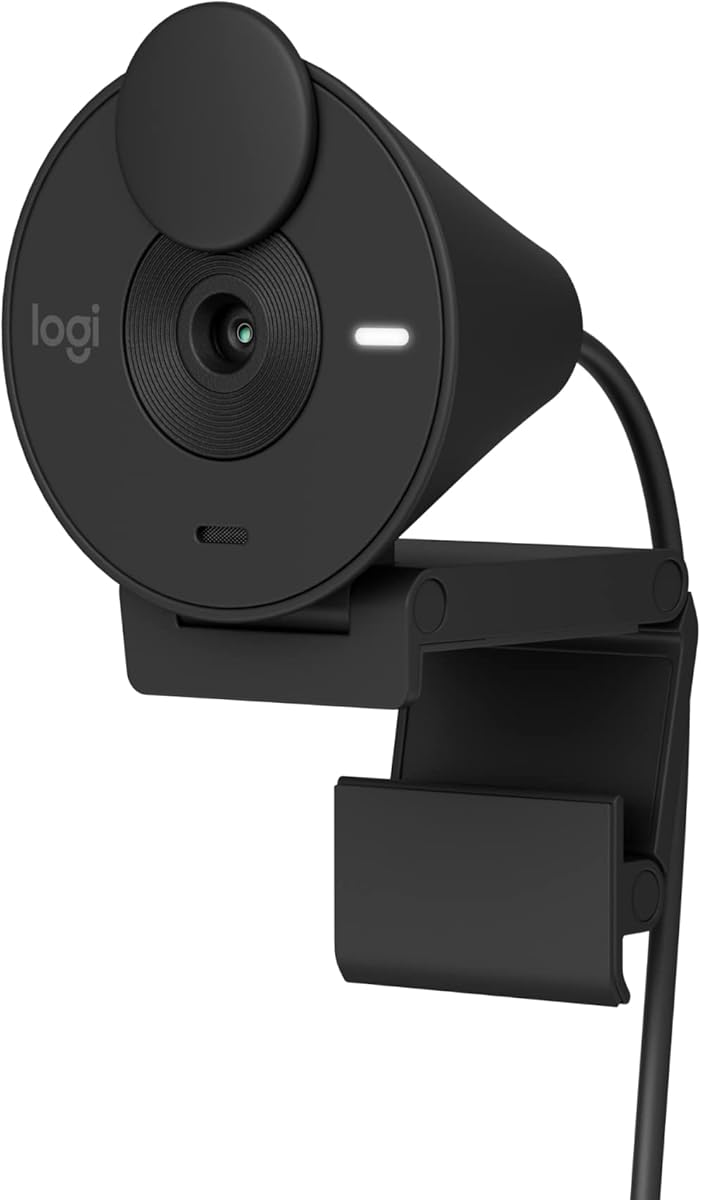
The Logitech Brio 100 offers dependable 1080p video with intelligent lighting features for consistent appearance. It scores a 4.4 rating for its ease of use and compatibility with major conferencing apps.
We may earn a commission when you buy through this link, at no additional cost to you.
RightLight technology boosts brightness to reduce shadows and improve your look. The slide privacy cover makes quick privacy switches simple during meetings.
It lacks autofocus which may require manual adjustment for varying distances. The microphone is functional but not as refined as models with dedicated noise cancellation.
This webcam suits users seeking a trusted brand with straightforward functionality. It is a great choice for everyday video calls and basic streaming needs.
RightLight tech automatically adjusts brightness to ensure you look clear even in dim rooms.
A physical slide cover lets you instantly block the lens when not on a call.
We may earn a commission when you buy through this link, at no additional cost to you.
The Logitech Brio 301 is designed for professional meetings with certified compatibility for Teams and Zoom. Its 4.4 rating highlights its reliability and ease of use in corporate environments.
We may earn a commission when you buy through this link, at no additional cost to you.
RightLight 2 compensates for poor lighting conditions automatically. The spin shutter adds a unique touch for quick privacy protection during breaks.
Audio is limited to a mono mic without noise suppression which might not suit noisy rooms. It lacks streaming-specific features like background removal software.
This webcam is ideal for office workers needing a certified device for work calls. It provides steady performance with simple controls for daily meetings.
Certified for Teams and Zoom ensures seamless integration with your workplace tools.
Logi Tune software allows you to adjust color and image quality easily.
We may earn a commission when you buy through this link, at no additional cost to you.
The Logitech C920e is built for business use with certifications that guarantee compatibility and security. Its 4.6 rating reflects strong performance in professional video conferencing scenarios.
We may earn a commission when you buy through this link, at no additional cost to you.
Autofocus keeps your image sharp while dual mics capture clear audio from up to one meter. The privacy screen flips down to cover the lens when needed.
The price is higher than consumer models due to business features. Also, it lacks advanced color adjustment tools found in streaming-focused webcams.
This webcam is perfect for companies needing reliable certified devices for employees. It delivers consistent quality for daily business meetings and remote work.
Certified for Zoom and Teams ensures seamless integration with enterprise communication tools.
Dual omnidirectional mics capture natural voice sounds with minimal background noise.
We may earn a commission when you buy through this link, at no additional cost to you.
The Logitech C922x HD Pro is tailored for streamers and content creators needing professional video tools. Its 4.6 rating highlights its advanced features and reliable performance for broadcasting.
We may earn a commission when you buy through this link, at no additional cost to you.
It offers 1080p/30fps or 720p/60fps options with HD light correction and autofocus. The included XSplit VCam license lets you remove backgrounds without a green screen.
At a higher price point it may not suit casual users. Also it lacks a physical privacy shutter which some might prefer for security.
This webcam is ideal for creators wanting streaming-specific features and high-quality video. It provides the tools needed for polished and professional content production.
XSplit VCam lets you blur or replace backgrounds using software instead of a green screen.
Choose 60fps at 720p for smoother motion during fast-paced streaming sessions.
We may earn a commission when you buy through this link, at no additional cost to you.
The Logitech C920S remains a top choice for everyday video calls with reliable performance and a privacy shutter. Its 4.6 rating underscores its lasting quality and popularity among users.
We may earn a commission when you buy through this link, at no additional cost to you.
It features HD autofocus and light correction for sharp visuals. Dual microphones capture stereo sound making conversations more natural compared to mono setups.
It lacks newer streaming software features available on the C922x. Also being an older model it may not have the latest optimization for newer OS versions.
This webcam is perfect for users wanting a proven camera for video conferencing. It delivers excellent clarity and essential features for home office use.
Longstanding reputation for reliability makes it a trusted choice for daily video calls.
Dual microphones capture natural sound with stereo separation for richer voice quality.
We may earn a commission when you buy through this link, at no additional cost to you.
This Acer 4K Webcam provides excellent video quality and a durable build for streamers and gamers. Its 4.4 rating reflects consistent performance and user satisfaction with its features.
We may earn a commission when you buy through this link, at no additional cost to you.
The Sony sensor and PDAF focus deliver sharp crisp video. The all-metal design ensures fast cooling during long sessions to maintain stability.
While slightly cheaper than the top pick its rating is a bit lower. The USB-A connection may still require an adapter for modern Mac models.
This webcam is a strong option for those wanting 4K performance at a competitive price. It works well for streaming and business meetings alike.
The aluminum body dissipates heat efficiently for reliable 24/7 video performance.
Weighing just 57 grams it is ultra-portable for mobile workers on the go.
We may earn a commission when you buy through this link, at no additional cost to you.
Selecting the right webcam involves evaluating several factors to ensure compatibility and performance with your Mac setup.
Higher resolution like 4K provides sharper images and more detail for professional video calls or streaming. 1080p is sufficient for most everyday use and balances quality with bandwidth needs.
Prioritize higher resolution if clarity is critical for your work or content creation.
Sony sensors and large image sensors gather more light for better low-light performance. This technology ensures clearer images without graininess in dim environments.
Look for webcams with reputable sensor brands for consistent image quality.
Phase Detection Autofocus offers faster and more accurate focus than standard systems. This keeps you sharp even when moving around during meetings.
Ensure the webcam includes PDAF if you move frequently during calls.
Dual microphones with noise cancellation improve voice clarity and reduce background distractions. Stereo audio adds depth compared to mono microphones.
Select models with dedicated audio processing for clearer communication.
Built-in privacy covers or shutters allow you to block the lens physically when not in use. This provides peace of mind against accidental activation.
Always check for a privacy shutter if security is a priority.
Most webcams use USB-A which may require an adapter for newer Macs with USB-C ports. Plug-and-play functionality avoids driver installation hassles.
Verify connection compatibility with your Mac before purchasing.
Some webcams offer proprietary software for customizing angles or backgrounds. Others are simpler with no software dependency.
Consider if you need advanced controls or prefer simplicity.
Metal bodies offer durability and better heat dissipation than plastic alternatives. A sturdy design ensures longevity for daily use.
Invest in higher build quality for frequent or professional usage.
Connect your webcam securely to an available USB port on your Mac. Ensure the connection is stable to prevent intermittent disconnections during calls.
Position the webcam at eye level for natural framing. Adjust the angle using the included mount or tripod if needed to avoid unflattering perspectives.
Keep the lens clean with a microfiber cloth to maintain image quality. Avoid touching the glass with fingers to prevent smudges that blur your video.
Yes most modern external webcams are designed to work with macOS without additional drivers. They use standard USB protocols recognized immediately by the operating system.
External webcams typically offer higher resolution better autofocus and improved audio. They also allow flexible placement for better angles compared to fixed laptop cameras.
Choose a webcam with low-light correction or a large sensor. Adding ambient lighting like a ring light also enhances image clarity in dim rooms.
Most of these webcams are plug-and-play and do not require driver installation. Some advanced features may benefit from proprietary software but basic functions work immediately.
Not all models include privacy covers but many do. Check product specifications carefully to confirm if a physical privacy shutter or cover is included.
Newer Macs use USB-C so you may need a USB-A to USB-C adapter if the webcam uses USB-A. Always verify cable compatibility before purchasing.
These ten webcams offer a wide range of options for every user and budget. The Acer 4K Webcam stands out for its premium quality while the NexiGo N60 provides excellent budget value.
Prioritize features like autofocus low-light performance and privacy based on your specific needs. Professional users may prefer higher-end models while casual users can find great value in mid-range choices.
Always verify current availability and compatibility before purchasing to ensure the best experience. Technology evolves quickly so checking latest updates ensures your webcam meets your needs.