
Motherboard USB 2.0 to Type C Front Panel Cable
4.8Editor score
Uses 9pin USB 2.0 header
Affordable entry level price
Simple plug and play
Finding the right front panel USB C header can transform your desktop computer into a modern workstation ready for fast data transfer and sleek connectivity. These internal adapters allow you to access high-speed ports directly from your case front, eliminating the need to reach behind your tower constantly.
We evaluated these products based on data transfer speeds, build quality, compatibility with various motherboard headers, and overall value for PC enthusiasts. Our analysis focuses on how well each adapter integrates with existing systems while providing reliable performance for external devices like drives and phones.
Each pick below highlights specific strengths such as high-speed support, versatile connector options, or robust construction materials suitable for long-term use. Please note that availability and specific model details may change over time, so always verify compatibility with your current hardware before purchasing.
4.8Editor score

4.6Editor score

4.6Editor score
As an Amazon Associate we earn from qualifying purchases.
The following table provides a side by side overview of key specifications and features for all ten products reviewed in this guide to help you make an informed decision based on your specific system requirements.


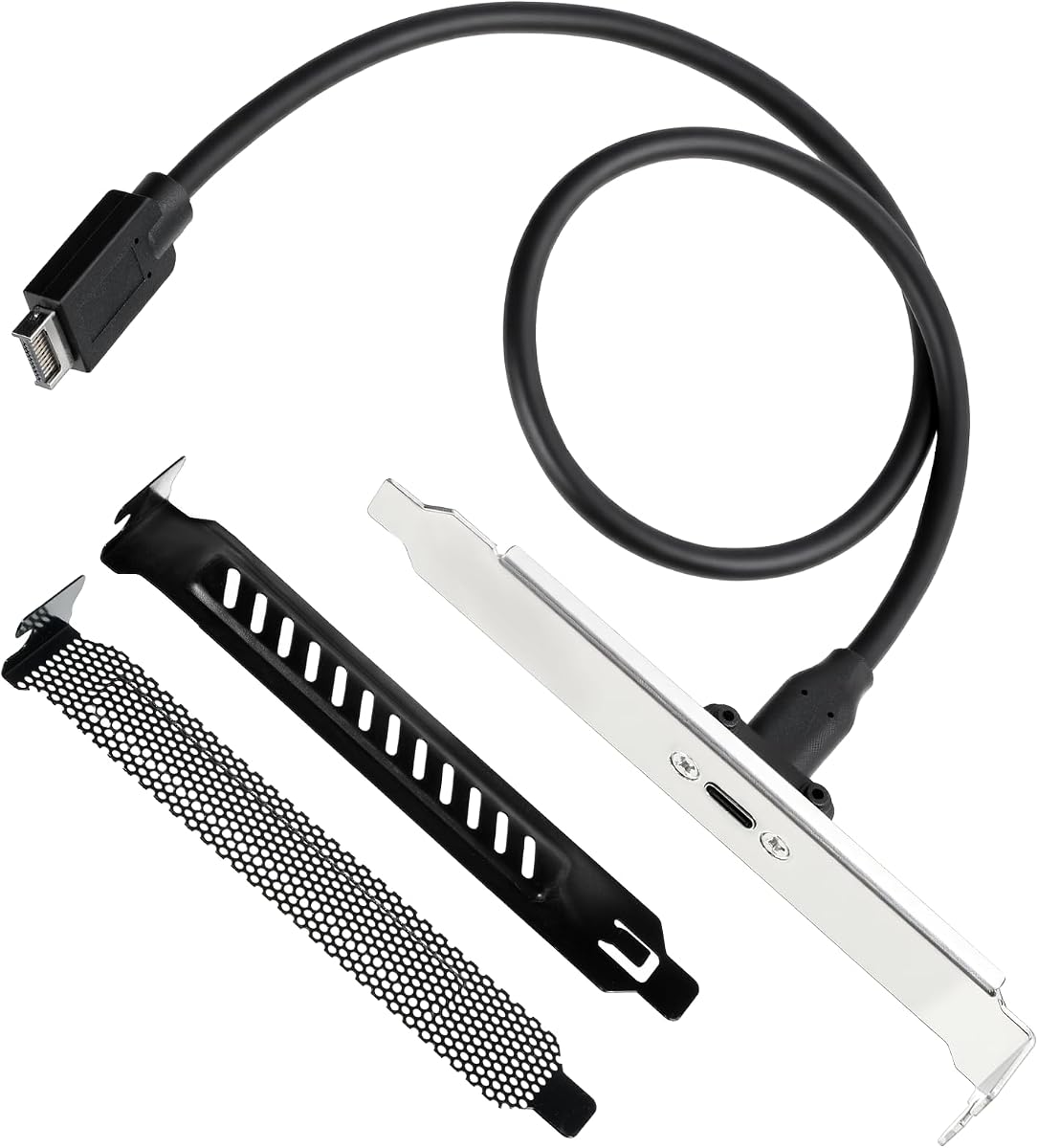


This adapter is a top choice for users seeking maximum data throughput from their front panel. It supports USB 3.2 Gen 2×2 speeds which are essential for modern high capacity storage devices. The build quality is robust with shielding to maintain signal integrity over longer cable runs.
We may earn a commission when you buy through this link, at no additional cost to you.
The inclusion of a metal PCI bracket ensures a clean installation on the back of your PC case. This helps secure the connection and provides a professional look compared to loose cables. It connects directly to the motherboard headers without requiring external power supplies for operation.
While the performance is excellent, users must ensure their motherboard has the specific Type E header before purchasing. Older boards might lack this port which could require additional adapters to work correctly. The cable length is sufficient for most standard cases but check your specific layout.
If you need reliable high speed connectivity for external drives or docking stations this product delivers consistent performance. It is ideal for workstation builds where data transfer efficiency is a priority for daily tasks. The plug and play nature makes it accessible for most users.
Supports 20Gbps rates for fastest possible external connection speeds available on modern PCs.
Metal bracket provides stable support and prevents cable strain at the connection point.
We may earn a commission when you buy through this link, at no additional cost to you.
This extension cable offers a direct path from your motherboard to the front panel with high speed support. It is designed for systems that have the Type E Key A header to utilize full bandwidth capabilities. The cable length allows for flexible routing within different case sizes.
We may earn a commission when you buy through this link, at no additional cost to you.
Users appreciate the sturdy construction which includes a metal bracket for mounting on the chassis rear. This reduces the risk of accidental disconnection and keeps the internal layout organized. The shielding helps prevent electromagnetic interference which is critical for stable data transfer.
The main limitation is that it requires a specific 20-pin header which is not present on all motherboards. If your board lacks this port you might need an additional adapter to make it functional. Ensure your system specifications match before purchase.
For those with compatible hardware this provides a reliable way to add fast USB C ports to the front of your build. It is well suited for professionals who need quick access to external storage without opening the case.
Sixty centimeter length provides ample slack for routing in larger computer cases easily.
Double shielding maintains data integrity and reduces noise from other internal components.
We may earn a commission when you buy through this link, at no additional cost to you.
This adapter is unique because it provides both USB C and traditional USB A ports from a single solution. It connects to two different motherboard headers which allows for greater flexibility in device connections. This is useful if you have legacy devices alongside modern ones.
We may earn a commission when you buy through this link, at no additional cost to you.
The inclusion of a PCI bracket ensures the ports are mounted securely on the case front panel area. It supports high speed data transfer which is great for external drives that benefit from faster throughput. The build quality appears durable for long term daily use.
However the requirement for both a Type E and a USB 3.0 header can be restrictive for older motherboards. You must verify that your system has both available ports before buying to avoid compatibility issues. This adds a step to the planning process.
If you need a mix of port types on your front panel this is a solid option that avoids the need for multiple separate cables. It streamlines the setup while offering high performance for devices that support it.
Connects to both Type E and USB 3.0 headers for versatile device compatibility.
Designed for 20Gbps speeds to handle large file transfers efficiently and quickly.
We may earn a commission when you buy through this link, at no additional cost to you.
This unit functions as a full hub rather than a simple cable extension providing four ports at once. It replaces a floppy drive bay which makes it a great option for older cases that still have that space. The metal housing provides structural rigidity and heat dissipation.
We may earn a commission when you buy through this link, at no additional cost to you.
Each port supports high data speeds ensuring that multiple devices can be used without significant bandwidth throttling. Safety features like over current protection help safeguard your connected devices from electrical issues during operation. This makes it a reliable choice for workstation environments.
Installation does require a SATA power connection from your power supply which adds a small complexity compared to cables. You also need the specific Type E header on your motherboard to power the data lines. Check your power supply availability before proceeding.
If you need multiple front ports for a shared workspace or lab environment this hub is an excellent solution. It expands connectivity significantly while maintaining high performance standards for all attached peripherals effectively.
Fits standard 3.5 inch drive bay space for integrated and clean installation.
Includes over voltage and over current protection for enhanced device safety.
We may earn a commission when you buy through this link, at no additional cost to you.
This is an expansion card that creates new front panel ports when you have no available motherboard headers. It plugs into a PCIe x1 slot to provide additional connectivity options without needing internal headers on the board. This is ideal for older systems or custom builds.
We may earn a commission when you buy through this link, at no additional cost to you.
The speed is standard for USB 3.0 which is sufficient for most common peripherals and storage drives. It does not require external power as it draws energy directly from the PCIe slot itself. This simplifies the installation process significantly for most users.
One trade-off is that it occupies a PCIe slot which might be limited in smaller motherboards or cases. Also the speed is limited to 5Gbps which might not meet the needs of the very fastest external SSDs. Ensure your slots are available.
For users needing to add ports without a specific motherboard header this card is a practical workaround. It expands the versatility of your desktop computer significantly with minimal effort and compatibility across systems.
Uses PCIe x1 slot to bypass motherboard header limitations entirely.
Draws power directly from PCIe slot so no extra power cables are needed.
We may earn a commission when you buy through this link, at no additional cost to you.
This hub offers a combination of modern USB C and traditional USB 3.0 ports in one unit. It is designed to fit into the 3.5 inch bay space found on many desktop computer cases. The support for 20Gbps speeds is particularly attractive for high performance data transfer needs.
We may earn a commission when you buy through this link, at no additional cost to you.
Safety mechanisms like over voltage and over current protection ensure that your connected devices remain safe during use. The metal case helps with heat dissipation and adds durability compared to plastic alternatives. This makes it suitable for continuous usage scenarios.
You will need both a Type E header and a USB 3.0 header on your motherboard to utilize all features fully. This might limit compatibility with some older systems that do not have both available at the same time. Verify your motherboard layout carefully.
If you have the correct headers this hub provides an excellent way to modernize an old case with fast modern connectivity. It balances speed and legacy support effectively for a wide range of user needs.
Converts floppy drive bay into high speed USB hub seamlessly for cleaner builds.
Delivers 20Gbps speeds for efficient data exchange on USB C connected devices.
We may earn a commission when you buy through this link, at no additional cost to you.
This cable is an entry-level option designed to bring USB C connectivity to older motherboards. It connects to a standard 9-pin USB 2.0 header which is common on many legacy systems. While the speed is limited to USB 2.0 levels it still offers the convenience of the C connector.
We may earn a commission when you buy through this link, at no additional cost to you.
The simplicity of this product makes it easy to install with just a few steps inside the case. It does not require any additional drivers which means it works immediately after plugging it in. This is great for quick upgrades without system configuration changes.
The main limitation is the transfer speed which is much slower than modern USB 3.0 or higher standards. It is best suited for basic peripherals like mice or keyboards rather than large external drives. Users should manage expectations regarding performance.
If you have an older system and want to try USB C without upgrading hardware this is a low-cost way to do it. It demonstrates the physical benefits of the connector without needing advanced motherboard features.
Connects to USB 2.0 headers to add Type C ports to older systems.
Plug and play design ensures immediate functionality without software setup.
We may earn a commission when you buy through this link, at no additional cost to you.
This adapter offers a solid balance of performance and build quality for those seeking high speed transfer. It supports the latest USB 3.2 Gen 2 standard which allows for faster data exchange rates. The cable is constructed with durable materials to withstand repeated bending.
We may earn a commission when you buy through this link, at no additional cost to you.
It comes with a PCI bracket to secure the connection at the back of the case which adds stability. The inclusion of slot covers helps keep dust and debris out of the unused expansion slots. This attention to detail improves the overall build quality.
The price point makes it an attractive option for users who need performance without spending much. However some users report variance in quality so checking recent reviews is recommended before purchase. Ensure you have the correct header type on your motherboard.
For general use cases needing fast front panel access this product provides a reliable and affordable solution. It is easy to install and supports most modern devices that require fast data speeds.
Metal bracket and PVC wiring combine for lasting performance and secure fitting.
Includes slot covers to maintain cleanliness and aesthetic of the PC chassis.
We may earn a commission when you buy through this link, at no additional cost to you.
This cable is designed for flexibility and ease of routing inside tight PC cases. It uses a TPE material that allows it to be bent without damage which is helpful for complex layouts. The shielding helps maintain signal stability during data transfer operations.
We may earn a commission when you buy through this link, at no additional cost to you.
It supports 10Gbps speeds which are standard for most USB C peripherals and external drives. This ensures that you can utilize the full bandwidth of compatible devices without unnecessary bottlenecks. The build is robust enough for daily use.
The length is sufficient for most mid tower cases but might be tight for larger full tower chassis. Also you must have the Type E header available on your motherboard to use this adapter. If you have the space it offers good value.
If you need to route cables neatly in a compact build this flexibility is a major advantage over rigid flat cables. It simplifies cable management and reduces strain on the connector pins.
TPE material allows easy bending around tight corners without damage to wires.
Double shielding layer prevents interference for consistent data transfer speed.
We may earn a commission when you buy through this link, at no additional cost to you.
This adapter provides both a USB C and a USB A connector to accommodate different device types. It connects to both Type E and USB 3.0 headers on your motherboard to enable both ports simultaneously. This flexibility is valuable for users with mixed legacy and modern devices.
We may earn a commission when you buy through this link, at no additional cost to you.
The USB C port supports 20Gbps speeds which is top tier for data transfer rates. The metal bracket ensures that the ports are mounted firmly to the case rear to prevent wobbling. This stability is key for long term reliability and daily usage.
You need to verify that your motherboard has both headers available to make full use of this adapter. Older systems might lack the Type E header which would prevent the C port from working. Check your specs before installation.
For anyone needing to keep older USB A devices while upgrading to C this is a very practical solution. It offers high performance where needed and maintains compatibility with existing peripherals effectively.
Combines Type C and Type A connectors to support all device standards.
Type C port delivers 20Gbps for fast connection to modern high-speed storage.
We may earn a commission when you buy through this link, at no additional cost to you.
Selecting the right header adapter depends on your motherboard capabilities and your usage needs.
The most critical factor is ensuring your motherboard has the specific header required. Many adapters need a 20-pin Type E header which is common on newer boards but missing on older ones. Check your manual to see if this port exists.
If your board lacks the correct header you may need an adapter card or a different cable solution.
Speed matters when you use external drives for large files. Modern headers support 20Gbps which is ideal for SSDs. Older headers might limit you to 5Gbps. Check the product specs for supported standards.
Select a header that matches the speed of your connected devices for best performance.
Some adapters only have USB C while others offer both Type C and Type A. If you still use legacy devices choose a dual port option. This ensures you do not need multiple cables.
A versatile adapter provides more connectivity options for your front panel setup.
Measure your case depth to ensure the cable will reach from the motherboard to the front panel. Short cables might not reach in large cases while long cables can create clutter. Choose the length that fits your chassis.
Proper cable length ensures a clean build without excessive slack or strain.
Look for cables with metal brackets and shielding to prevent interference. Cheap cables might fail under stress or cause noise issues. High quality materials ensure longevity and stable data transfer.
Invest in well shielded cables to maintain signal integrity over time.
Some options are simple cables while others require external power or multiple headers. Simpler solutions are easier to set up. Consider how comfortable you are with internal hardware changes.
Choose an option that matches your technical comfort level for smooth installation.
A bracket ensures the port is fixed securely to the case. This prevents accidental disconnection during use. Check if a bracket is included or if you need to buy one separately.
Secure mounting improves durability and keeps your case looking organized.
Prices vary based on features and speed. A simple cable is cheaper but limited in speed. Advanced hubs cost more but offer multiple ports. Determine your budget and needed features.
Balance cost with performance to find the best value for your needs.
Start by ensuring your PC is powered off and unplugged before opening the case. Locate the correct header on your motherboard using the manual. Connect the adapter cable carefully aligning the pins to avoid bending them.
Secure the bracket to the case rear using screws to keep the port stable. If your model requires external power connect that cable before turning the system on. Test the connection with a simple device to ensure it works.
To maintain the connector avoid bending the cable sharply near the connection point. Keep the area free of dust and debris. Check connections periodically to ensure they remain tight and secure.
Yes most adapters require a 20-pin Type E header which is common on modern motherboards. Older boards might lack this port so you need to check your specifications first. If missing you may need a PCIe card to add the port.
They are compatible with standard USB C devices like phones and drives. The adapter ensures the physical connection fits the case front. Speed will depend on both the adapter and the connected device limits.
These are designed for desktop cases with internal expansion slots and headers. Laptops typically do not have the required motherboard headers or space for these adapters. Desktop use is the intended application.
Most simple extension cables do not need external power. However hubs with multiple ports might need a SATA power connection. Always check the product details to see if extra power is required.
Type E is a 20-pin header found on newer boards for USB C. Type A is a 19-pin header used for USB 3.0. Adapters may use one or both depending on the connectors they provide.
Check if your case has a mounting bracket or cutout for USB ports. Most mid towers have standard 3.5 or 5.25 inch slots. Measure the space to ensure the adapter fits properly.
We have reviewed ten options that cover a range of speeds and mounting needs for desktop users. From simple cables to multi port hubs there is a solution for most system configurations. The GRAUGEAR options stand out for speed and reliability.
When choosing prioritize compatibility with your motherboard and the speed you require. If you have older hardware consider the PCIe expansion cards to add functionality easily. Ensure you have the correct headers before purchasing any adapter.
Keep in mind that prices and availability can change so always check the latest details. Verify your system specs to make sure the product fits your needs. This approach ensures you get the right performance and ease of use.