
Zobirez 420W 10-Port Fast USB Charging Station
4.5Editor score
Includes eight short mixed cables
Features dual 65W fast ports
Built with flame-retardant ABS
This guide compares the top 10 charging stations for Chromebooks to help schools and offices organize devices efficiently with safe and reliable power
Finding the right charging solution for Chromebooks is essential for maintaining productivity in modern classrooms and offices. These stations ensure devices stay powered and organized while preventing cable clutter and potential safety hazards.
We evaluated ten top-rated models based on capacity, build quality, safety features, and ease of use. Our selection includes options for various needs, from compact desktop racks to mobile carts designed for high-traffic environments.
Each pick highlights specific strengths like surge protection, ventilation, and storage capacity. Please note that prices and availability change frequently, so check current listings before making your final purchasing decision today.
4.5Editor score

4.7Editor score
4.8Editor score
The following table provides a side-by-side overview of key specifications for each model to help you compare features at a glance.


The POCHAR 8-Device Universal AC Laptop Charging Station stands out as a top choice for educators and office managers needing reliable device management. With a solid rating of 4.7 stars, it offers a robust solution for charging multiple Chromebooks and laptops simultaneously without clutter. Its wide-angle slots accommodate devices up to 14 inches and 1.4 inches thick, making it versatile for various hardware setups.
We may earn a commission when you buy through this link, at no additional cost to you.
Safety is a key strength with its included power strip featuring surge protection to guard against voltage spikes. The unit arrives fully assembled, allowing immediate deployment in classrooms or workstations. Its durable construction ensures it withstands daily use in high-traffic environments while keeping devices neatly arranged and easily accessible for teachers and staff.
While the price is higher than basic racks, the included power strip and assembly-free setup justify the investment. The fixed slot size might not fit every laptop case perfectly, but the 1.4-inch thickness allowance covers most standard models. For those prioritizing safety and convenience, this unit delivers excellent value and performance.
This charging station is ideal for schools and offices managing fleets of Chromebooks or tablets that need organized storage. Its compact footprint fits on standard desks or tables, freeing up valuable workspace. We recommend it for anyone seeking a plug-and-play solution that balances capacity, safety, and build quality effectively.
The slots are engineered to fit laptops and Chromebooks up to 14 inches and 1.4 inches thick, ensuring compatibility with most standard devices.
Built-in surge protection safeguards connected devices from voltage spikes, providing peace of mind during charging sessions in any environment.
We may earn a commission when you buy through this link, at no additional cost to you.
This 10-Device Charging Station offers a versatile setup with both AC outlets and USB ports, making it suitable for a wide range of devices beyond Chromebooks. It holds up to ten items simultaneously and includes a built-in surge protector for safe charging. The open rack design allows quick access without doors or latches, which is helpful in busy shared spaces like libraries or office lounges.
We may earn a commission when you buy through this link, at no additional cost to you.
Cable management is handled through integrated routing channels that reduce clutter on countertops. The surge-protected power strip ensures stable voltage delivery during charging sessions. Its vertical layout maximizes storage while minimizing the desktop footprint, which is ideal for environments where space is limited but device capacity is high. The open design also promotes airflow to prevent overheating during extended use.
While it lacks physical dividers to separate devices, users can organize cables neatly with the provided clips. Assembly is required but straightforward, allowing customization of the setup once built. The absence of slots might lead to devices touching if not spaced carefully, but the open frame keeps them accessible for quick retrieval.
This station works well for offices or libraries needing a mix of charging options for tablets, laptops, and phones. The combination of AC and USB ports adds flexibility for various chargers and adapters. It is a strong contender for those who prioritize port diversity and space-saving design over rigid device separation.
With six AC outlets and four USB ports, this unit supports a diverse array of devices and charging needs without requiring additional adapters.
The compact vertical layout reduces countertop usage while maintaining high capacity, making it perfect for smaller workstations or shared desks.
We may earn a commission when you buy through this link, at no additional cost to you.
This 14-Slot Open Charging Rack is designed for high-density charging needs, accommodating up to fourteen devices simultaneously in a compact form. With a perfect 5.0 star rating, it emphasizes durability and ventilation to prevent overheating. The steel frame provides stability and load-bearing capacity for daily use in classrooms or offices. Leveling feet ensure the unit sits securely even on uneven floors or surfaces.
We may earn a commission when you buy through this link, at no additional cost to you.
The open-frame design allows natural ventilation to keep devices cool during extended charging sessions. Its sturdy construction resists deformation from frequent device insertion and removal. The lack of a power strip means you must use external power sources, which can be managed through existing wall outlets. This makes it a cost-effective option for users who already have sufficient power management.
While it lacks dividers, the individual slots help organize devices loosely. Users should ensure cables are managed separately to avoid tangles since routing clips are not included. The high capacity makes it suitable for schools managing large batches of Chromebooks or tablets needing efficient storage and charging.
This rack is best for environments needing high capacity without the cost of built-in power strips. It is ideal for schools or libraries with existing surge protectors or power distributions. The leveling feet add versatility for placement in various settings, ensuring stability regardless of surface conditions.
With fourteen independent slots, this rack meets the needs of large groups requiring simultaneous charging and storage for multiple laptops or tablets.
Adjustable leveling feet ensure the rack remains stable on uneven surfaces, preventing tipping or shifting during daily use.
We may earn a commission when you buy through this link, at no additional cost to you.
The Workington 8-Device Charging Cart focuses on device protection with soft pads on shelves to prevent scratches. It includes an UL-approved power strip for safe charging and comes with cord clips to manage wires neatly. The open design allows quick access to devices, which is useful for students switching tasks quickly. Removable dividers let you adjust compartments for larger laptops or tablets.
We may earn a commission when you buy through this link, at no additional cost to you.
A dedicated back tray helps hold cables and adapters separately, reducing clutter and risk of tangling. The plastic dividers are durable and allow customization of space for different device sizes. Assembly is required but straightforward, enabling you to tailor the setup to your specific storage needs. The compact dimensions fit well on desks or counters without taking up too much space.
The main limitation is the eight-device capacity, which may not suffice for larger fleets. Assembly adds a bit of time before use, but the included tools and instructions make it manageable. Overall, it offers strong protection and safety features for schools or offices prioritizing device care.
This cart is ideal for smaller classrooms or offices needing a secure charging spot for up to eight devices. The UL certification and soft pads provide confidence in safety and device care. It works best where easy access and protection are prioritized over high capacity or mobility.
Soft pads on shelves prevent accidental scratches and damage during storage and charging, ensuring your hardware remains in pristine condition.
Removable dividers allow you to adjust slot sizes to fit various laptops or tablets with protective cases intact.
We may earn a commission when you buy through this link, at no additional cost to you.
The Moezuti 20-Port Charging Station is a powerhouse for charging many small devices like tablets, phones, and accessories simultaneously. It features ten USB-C and ten USB-A ports with a total output of 600W. Ten short cables are included to avoid messy cords on walls. The built-in GaN chip monitors temperature and prevents overcharging or overheating for safe daily use.
We may earn a commission when you buy through this link, at no additional cost to you.
Two high-speed 65W PD ports can charge laptops like MacBook Pro or USB-C Chromebooks directly. The one-piece slots are durable and flame-retardant, holding smaller devices upright. However, it is not designed for storing laptops physically due to limited space. This makes it best for accessories or smaller devices rather than full laptop charging racks.
The main trade-off is the lack of physical storage for larger devices. While it charges efficiently, you must provide your own storage solution for laptops. The included cables help keep things tidy, but the compact size means it is not a dedicated cart for many laptops. Still, it offers great value for multi-device charging needs.
This station is ideal for homes, offices, or classrooms needing to charge many small devices at once. It is also useful as a secondary charger alongside a larger rack. The safety features and included cables make it a practical addition to any tech-heavy environment.
GaN technology provides real-time temperature monitoring and protection against overcharging, overheating, and short circuits.
Two 65W ports support fast charging for laptops and larger devices, ensuring quick power-ups even during busy periods.
We may earn a commission when you buy through this link, at no additional cost to you.
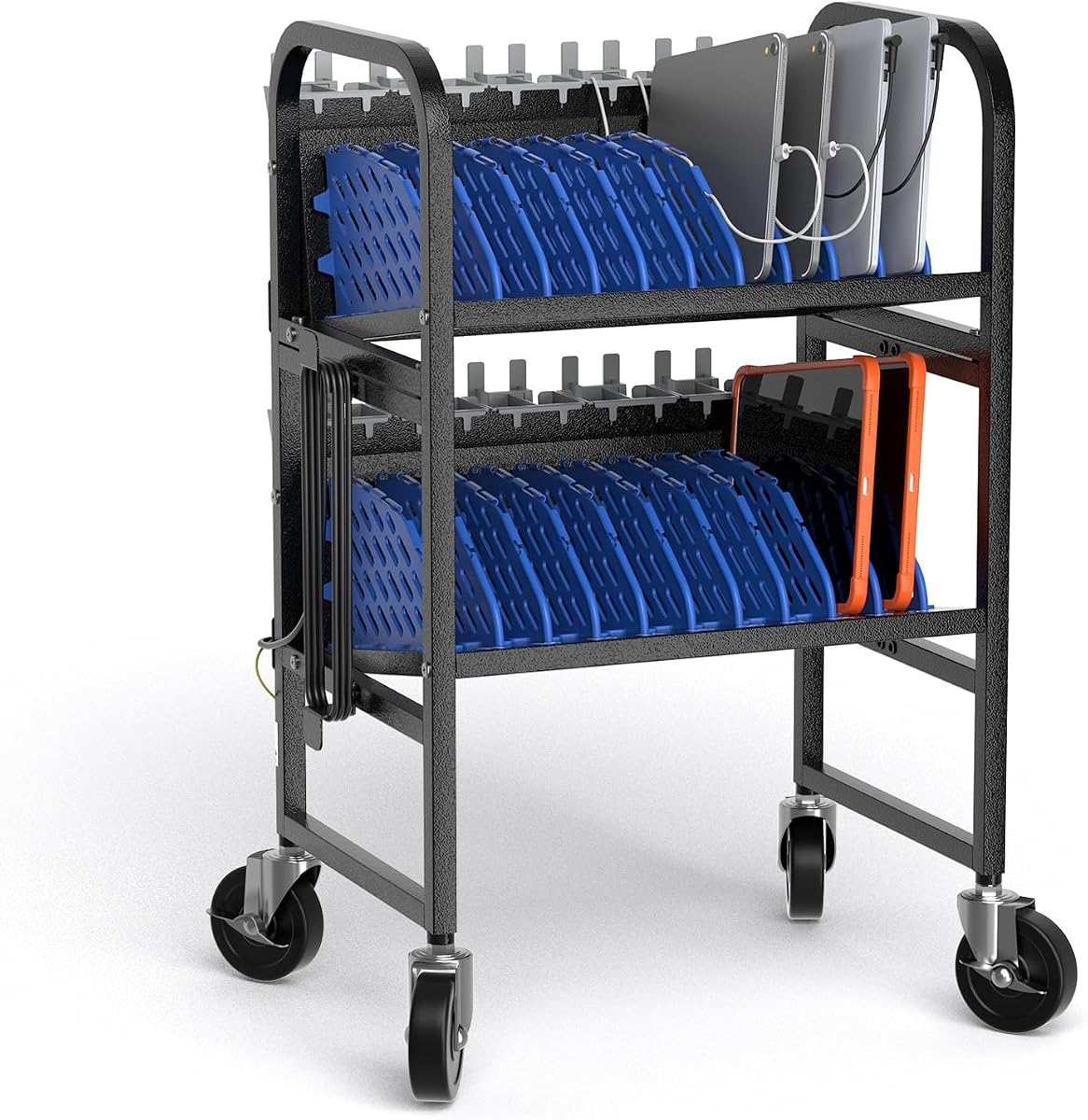
This POCHAR 20-Device Laptop Charging Cart is a premium mobile solution for schools and offices needing to move devices between rooms. It holds up to twenty devices with adjustable dividers to fit Chromebooks and tablets up to 15.6 inches. Four locking casters allow easy transport while keeping the cart stable when stationary. The open design improves airflow to reduce heat buildup during charging.
We may earn a commission when you buy through this link, at no additional cost to you.
A dedicated rear cable management system keeps cords tidy and prevents tangling during movement. The industrial-grade construction ensures durability in high-traffic environments. Its larger size offers significant capacity but requires more floor space. This makes it ideal for computer labs or training centers where devices need to be stored and moved regularly.
The main drawback is the size and price compared to smaller units. It is designed for heavy-duty use rather than casual home settings. However, the mobility and capacity make it indispensable for large educational institutions. The dividers are removable to accommodate different device sizes as needed.
This cart is best for schools or training facilities managing large fleets of laptops or tablets. Its mobility and storage capacity support dynamic learning environments. We recommend it for those needing a permanent, high-capacity mobile solution.
Four swivel casters with two locking wheels ensure easy movement between spaces while maintaining stability when parked.
Adjustable dividers allow flexible storage for laptops and tablets up to 15.6 inches, supporting a wide range of device sizes.
We may earn a commission when you buy through this link, at no additional cost to you.
This 10-Device Charging Station offers a clean open design with a built-in power strip and storage tray. The steel frame ensures stability and durability for daily use in offices or schools. It supports devices up to 14 inches and 1.5 inches thick. Cable clips on the back help minimize clutter and tangles during charging.
We may earn a commission when you buy through this link, at no additional cost to you.
The lower storage tray holds chargers or accessories, keeping your workspace organized. The power strip is integrated for convenience without needing extra outlets. While dividers are not adjustable, the slots securely hold devices upright. It is a reliable choice for environments needing simple, effective charging and storage.
The fixed slot size may not fit oversized cases perfectly. However, the build quality and included storage tray add value. It works well for classrooms needing a quick and tidy solution without complex setups. The open design promotes cooling during extended charging sessions.
This station is ideal for offices or schools needing a straightforward way to charge and store up to ten devices. It combines practicality with durability. We recommend it for users prioritizing storage and cable management alongside charging.
The lower tray provides convenient space for chargers and accessories, keeping your workspace clutter-free and organized.
An open-frame design promotes optimal airflow to prevent overheating during long charging sessions.
We may earn a commission when you buy through this link, at no additional cost to you.
The Belkin 10-Device Charging Station is designed for secure storage with wide-angle slots. It holds up to ten devices and includes surge-protected outlets for safety. The unit can be mounted to tables or carts, offering flexibility in placement. Its small footprint helps save space on countertops while keeping devices accessible.
We may earn a commission when you buy through this link, at no additional cost to you.
Built-in cable management reduces tangles, and it supports devices up to 13 inches. The design focuses on portability and mounting options rather than mobility. It is suited for K-12 classrooms needing organized storage without moving equipment often. The included warranty adds extra peace of mind for buyers.
The lack of wheels makes it less suitable for environments requiring frequent relocation. Additionally, the size limit may exclude some larger laptops. Still, it offers reliable protection and organization for standard-sized devices. Mounting allows secure placement out of reach of children.
This station is ideal for classrooms or offices needing secure, mounted storage for up to ten devices. It works well where mobility is not required. We recommend it for settings prioritizing safety and space efficiency over transport.
Mounting features allow secure attachment to desks or carts, keeping devices safe and out of reach.
Wide slots accommodate various tablets and laptops up to 13 inches, even with protective cases on.
We may earn a commission when you buy through this link, at no additional cost to you.
The Zobirez 420W Charging Station offers fast charging with USB-C ports for laptops and smaller devices. It includes eight short mixed cables to organize charging needs. The non-slip pads keep it securely in place on any surface. Its flame-retardant design provides safety for extended overnight charging sessions.
We may earn a commission when you buy through this link, at no additional cost to you.
Two 65W ports deliver fast power to laptops or larger tablets efficiently. The one-piece slots are durable and do not use fragile dividers. However, it is strictly a charger without built-in power strips. This makes it ideal for users who already have outlets and just need a tidy charging solution.
The main trade-off is the lack of storage slots for physical device placement. You must use separate shelving if you want to hold devices. Still, the charging performance and included cables make it a valuable asset. It is perfect for homes or offices needing efficient USB charging.
This station is best for users needing fast USB charging without AC outlets. It offers great value and safety features. We recommend it for anyone wanting a compact, high-power charger for multiple gadgets.
Advanced GaN technology ensures efficient power delivery while keeping the unit cool and safe during use.
Eight short mixed cables are included to help you eliminate messy cords and wall charger clutter.
We may earn a commission when you buy through this link, at no additional cost to you.
This Mobile Charging Station is designed for easy assembly and portability. It holds up to ten devices with removable dividers for custom sizes. Four locking casters allow it to roll between rooms while staying stable when needed. The open design ensures devices stay cool during charging sessions.
We may earn a commission when you buy through this link, at no additional cost to you.
Integrated cable clips and routing holes keep cords organized. The bottom shelf adds extra storage for power adapters. It is built from premium steel with rounded edges for safety. While external power is required, the unit focuses on storage and transport. Its small size fits in tight spaces or classrooms.
The main limit is its ten-device capacity and lack of built-in power. However, it offers great mobility and organization. The tool-free setup saves time during installation. It is ideal for small groups needing to move devices between locations easily.
This cart is best for schools or offices needing a portable storage solution for up to ten devices. It works well where movement is required regularly. We recommend it for users prioritizing mobility and compact storage.
Tool-free assembly allows you to get the station up and running quickly without needing extra tools or hardware.
Integrated cable clips and routing holes keep charging cords neat and prevent tangling during daily use.
We may earn a commission when you buy through this link, at no additional cost to you.
Selecting the right charging station depends on your specific needs such as capacity, mobility, and safety features.
Capacity determines how many devices you can charge at once. For larger classrooms, look for stations holding 10 to 20 devices. For smaller setups, 8 to 10 devices may suffice.
Always choose a capacity slightly higher than your current device count to allow for growth.
Check if the unit includes a power strip or requires an external one. Integrated strips simplify setup and ensure stable power delivery for multiple devices.
Surge protection is essential to safeguard your hardware from voltage spikes and electrical surges.
If you need to move devices between rooms, choose a cart with casters. Locking wheels provide stability when parked to prevent accidental movement.
Desktop racks without wheels are better for permanent setups on counters or tables.
Ensure slots accommodate your device size and case thickness. Some models support up to 14 or 15.6-inch devices while others may be smaller.
Adjustable dividers add flexibility if you have different sized tablets or laptops.
Look for certifications like UL approval and built-in surge protectors. Ventilation design helps prevent overheating during long charging sessions.
Quality materials such as flame-retardant plastics or steel add durability and safety.
Organized cable management keeps cords from tangling and reduces clutter. Integrated clips or routing holes make setup cleaner and safer.
Units that include cables save time and ensure compatibility without extra purchases.
Industrial-grade steel frames withstand heavy daily use in high-traffic areas. Durable plastics may be suitable for lighter office environments.
Check warranty terms to ensure long-term support and replacement options if needed.
Some units require tools and time to assemble while others are plug-and-play. Consider your ability to handle assembly when purchasing.
Simple setups save time and reduce installation frustration for busy staff or educators.
Place the charging station on a stable, flat surface to ensure devices sit securely. Avoid areas with excessive humidity or direct sunlight to prevent damage to hardware.
Connect the unit to a surge-protected outlet and plug in each device securely. Ensure that cables are routed through management clips to minimize tangling and wear.
Regularly wipe down the shelves and frame with a soft cloth to remove dust. Check for any loose cables or connectors and tighten as needed to maintain safety and performance.
Most stations are designed to fit Chromebooks up to 14 or 15.6 inches and up to 1.5 inches thick. Always verify slot dimensions against your device size before purchasing.
Yes, modern units include safety features like overheating protection and surge guards. However, it is good practice to check that ventilation is not blocked.
Not all models include built-in strips. Some require external power sources, so check product details before buying.
Mobile carts come with locking casters for smooth transport between rooms. Desktop racks are stationary and not designed for frequent movement.
Some models require tool-free assembly while others come pre-assembled. Check product descriptions for setup requirements before purchase.
Use a damp cloth to wipe shelves and the frame. Avoid using harsh chemicals that could damage the material or electronics.
Units designed for classrooms often include rounded edges and secure storage. However, supervise children to ensure they do not pull on cords or overload slots.
Yes, most stations are compatible with tablets and iPads up to the specified size limits. Check product descriptions for full compatibility details.
We reviewed ten top options ranging from desktop racks to mobile carts. Each offers unique strengths in capacity, safety, and design to suit different environments.
Prioritize safety features like surge protection and ventilation when selecting a unit. Consider your device count and mobility needs to find the perfect fit.
Prices and availability can change frequently, so always verify current details before purchasing. We hope this guide helps you find the ideal charging solution.