
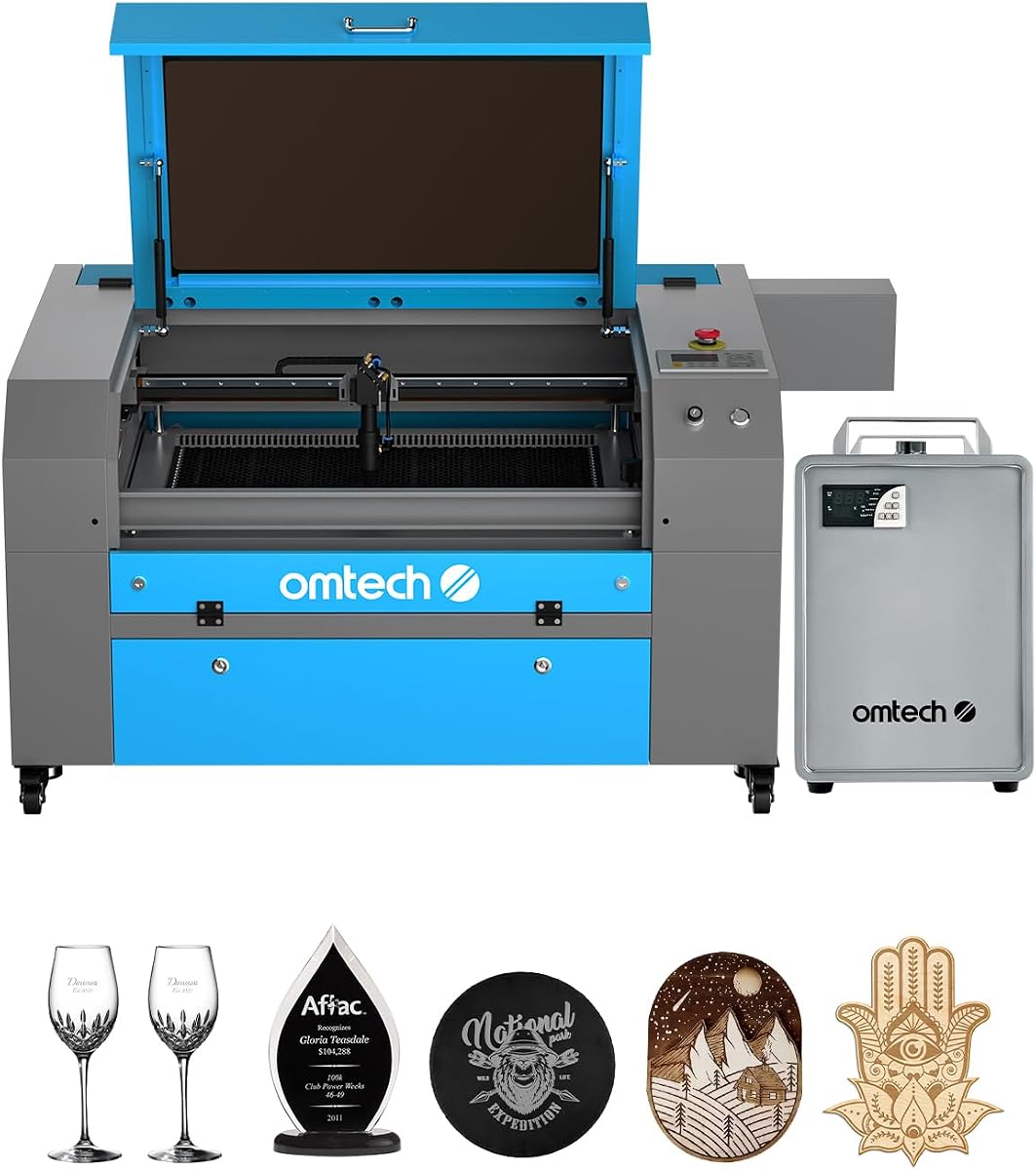
OMTech K40+ 45W Desktop CO2 Laser Engraver
4.4Editor score
Compact 12×8 inch workspace
45W upgraded laser power
LightBurn software compatible
This guide compares the top ten CO2 laser cutters available in October 2026, evaluating power, speed, safety, and features to help you choose the right machine
CO2 laser cutters have revolutionized how makers and businesses create precise designs in wood, acrylic, and more. Selecting the right machine requires understanding power output, workspace size, and safety features to match your specific project demands and budget constraints effectively.
We analyzed ten leading models based on user reviews, technical specifications, and real-world performance data. Our comparison covers everything from compact desktop units to industrial-grade systems, ensuring you find a cutter that balances speed, precision, and reliability for your workflow needs today.
Each pick highlights key strengths and potential trade-offs to guide your decision. While prices and availability change frequently, these models represent the current best options in the market. Always verify the latest details before purchasing to ensure you get the best value.
4.4Editor score

4.5Editor score

5.0Editor score
Below is a side-by-side comparison of the top ten CO2 laser cutters. This table highlights key specifications like laser power, working area, and safety features to help you quickly identify the model that fits your production needs.



The xTool P3 80W stands out as a flagship CO2 laser cutter designed for professionals who need reliability and speed. It offers powerful 80W output that cuts thick materials effortlessly while maintaining precision in fine details.
We may earn a commission when you buy through this link, at no additional cost to you.
Its revolutionary automated creation system uses LiDAR ranging and dual HD cameras to simplify setup and ensure accurate positioning. This reduces manual adjustments and allows for a seamless Place and Go workflow that boosts productivity significantly.
While the price is high, the investment pays off through time savings and reduced material waste. The Class 1 safety rating ensures a secure environment, making it suitable for shared workspaces without additional enclosures.
This machine is ideal for businesses scaling production or serious makers wanting industrial features. If you value automation and safety, the P3 offers unmatched performance in its class for CO2 laser cutting tasks.
The ACS system integrates autofocus and positioning to minimize setup time. This allows you to focus on design rather than manual calibration during production runs.
Class 1 safety includes lid interlocks and active detection systems. This ensures safe operation even in unattended scenarios with advanced protection against hazards.
We may earn a commission when you buy through this link, at no additional cost to you.
The OMTech K40+ 45W is an excellent entry-level CO2 laser cutter for hobbyists and small businesses. It delivers reliable 45W power that handles common materials like wood and acrylic with ease.
We may earn a commission when you buy through this link, at no additional cost to you.
Its integrated air assist system clears debris and protects the lens during cutting. This feature enhances cut quality and reduces carbonization on wood surfaces for cleaner results.
The compact 12×8 inch workspace is a limitation for large projects but perfect for small custom items. This keeps the footprint small and affordable for home studios or workshops.
Choose this model if you need a cost-effective solution for regular engraving. It supports popular software like LightBurn making it accessible for both beginners and experienced users.
Despite the low price, the 45W laser cuts through acrylic up to 10mm. This power level is sufficient for most personal and small business applications without high costs.
Full support for LightBurn and LaserGRBL allows flexible design options. You can use industry standard tools without needing proprietary or expensive software packages.
We may earn a commission when you buy through this link, at no additional cost to you.
The OMTech Pro 130W represents the pinnacle of desktop CO2 laser cutting with its massive power and workspace. It is built for industrial applications where speed and capacity are critical factors.
We may earn a commission when you buy through this link, at no additional cost to you.
With 130W power and servo motors, it achieves impressive cutting speeds up to 1200mm per second. This ensures rapid production times even for thick materials requiring multiple passes.
The built-in CW-5200 water chiller maintains stable temperatures during long runs. This extends tube life and prevents overheating issues that can occur with high power usage.
Ideal for professional manufacturers, this model handles large sheets and heavy volumes. If you need top tier performance and have the budget, it offers unmatched capability in its class.
The 130W laser cuts through thicker materials faster than lower wattage models. This reduces project time significantly for high volume production needs.
Servo motors provide precise movement for detailed engraving. This ensures accuracy in intricate designs and reduces errors during complex cutting tasks.
We may earn a commission when you buy through this link, at no additional cost to you.
The VEVOR 100W CO2 laser engraver offers a powerful mid-range solution with a spacious workspace. It is perfect for projects that require cutting larger sheets without needing industrial pricing.
We may earn a commission when you buy through this link, at no additional cost to you.
Its digital control panel integrates well with third-party software like LightBurn and CorelDRAW. This flexibility allows for efficient file management and precise cutting adjustments during operation.
The 24×35 inch working area supports substantial projects while maintaining a manageable footprint. Pass-through doors allow for continuous operation when working with long materials like lumber.
This model is a great value for makers needing more power than desktop units. It balances performance and cost effectively for small businesses producing varied product lines.
The 24×35 inch area fits standard 4×8 sheets partially or smaller large items. This provides flexibility for diverse projects without requiring additional accessories.
The digital panel allows quick adjustments and file transfers via USB. This streamlines the workflow compared to traditional button-only interfaces.
We may earn a commission when you buy through this link, at no additional cost to you.
The OMTech Maker 90W is a robust CO2 laser cutter designed for extended use. It features a bundled water chiller that ensures consistent performance during long production sessions.
We may earn a commission when you buy through this link, at no additional cost to you.
The Yongli H2 tube delivers reliable 90W power for cutting various nonmetallic materials. This tube has a long lifespan, making it suitable for commercial environments needing durability.
Its four-way pass-through doors accommodate larger items beyond the 20×28 inch bed. This flexibility is essential for cutting long materials without manual intervention.
For users needing consistent power without high automation costs, this is a strong choice. It offers a balance of durability and performance for serious production needs.
The bundled water chiller maintains cooling for long runs. This prevents overheating and extends the life of the laser tube significantly.
The 90W power handles deep engraving on wood and acrylic. This allows for multi-pass cuts that create rich textures in materials.
We may earn a commission when you buy through this link, at no additional cost to you.
The OMTech Maker 60W offers a convenient bundle with LightBurn software and a water chiller. This makes it an excellent choice for users who want a complete package out of the box.
We may earn a commission when you buy through this link, at no additional cost to you.
Its autofocus feature simplifies setup by automatically finding the focal distance. This reduces manual adjustment time and ensures consistent engraving depth across projects.
With 60W power, it handles medium thickness materials effectively. The bundled chiller helps maintain stable operation during longer engraving or cutting sessions.
This model is best for small businesses or hobbyists wanting ease of use. The included software and cooling save money and time for new owners.
The autofocus system adjusts the bed with a touch of a button. This ensures precise focus without manual tools or trial and error.
Includes LightBurn software and a water chiller for total solution. This eliminates the need to source these items separately for new users.
We may earn a commission when you buy through this link, at no additional cost to you.
The OMTech K40+ 45W is an ideal entry point for those new to CO2 laser cutting. It provides essential features without overwhelming complexity, making it user friendly for beginners.
We may earn a commission when you buy through this link, at no additional cost to you.
With 45W power, it handles basic engraving and cutting tasks effectively. The compact design fits well in home offices or small workshops with limited space.
OMTech provides strong global support to assist with setup and troubleshooting. This ensures you get help quickly when encountering issues during your first projects.
For anyone looking to start laser engraving without large investment, this is a solid pick. It balances safety and ease of use effectively for new users.
24/7 global support ensures you can get help anytime. This is crucial for beginners learning to operate complex machinery safely.
Includes flame-retardant panel and emergency stop for protection. This adds peace of mind during operation in shared spaces.
We may earn a commission when you buy through this link, at no additional cost to you.
The OMTech Pronto 100W offers revolutionary engraving speeds up to 39.4 inches per second. This makes it one of the fastest models in its category for production work.
We may earn a commission when you buy through this link, at no additional cost to you.
Its autofocus technology simplifies setup ensuring consistent results without manual adjustments. This reduces downtime between jobs and improves overall workflow efficiency.
The 40×24 inch work area accommodates most standard projects comfortably. A powerful air pump ensures clean cuts by removing smoke and debris effectively.
If speed is your top priority and you have a medium budget, this model stands out. It delivers rapid production times without compromising on quality.
The 1000mm/s speed is significantly faster than traditional models. This reduces production time for bulk orders and complex designs.
A powerful air pump ensures clean cuts and minimal smoke. This improves cut quality and protects optical components from debris.
We may earn a commission when you buy through this link, at no additional cost to you.
The OMTech Pronto 130W offers the highest power and largest workspace in this lineup. It is designed for professionals who need to cut large materials efficiently.
We may earn a commission when you buy through this link, at no additional cost to you.
With 130W power, it handles thick materials with ease. The 51×35 inch area allows for full sheet cutting without needing multiple passes.
Autofocus technology ensures precision while maintaining speed on large areas. This balance is rare in high power machines that often require manual calibration.
This machine is ideal for industrial or heavy commercial use. If you need capacity and power, it delivers exceptional performance for demanding tasks.
The 51×35 inch area fits full 4×8 sheets partially. This supports large format signage and custom furniture projects easily.
The 130W power enables faster cutting of thick materials. This reduces the need for multiple passes on dense substrates.
We may earn a commission when you buy through this link, at no additional cost to you.
The OMTech K40+ 45W continues to be a popular choice for reliable desktop laser cutting. It offers consistent performance for small scale projects and custom gifts.
We may earn a commission when you buy through this link, at no additional cost to you.
Its compact design fits into tight spaces while providing sufficient power for wood and acrylic. This makes it suitable for home users needing a dedicated engraving station.
Safety features like door protection and emergency stops ensure secure operation. These basic protections are vital for maintaining safety in non-industrial settings.
For consistent and dependable engraving at an affordable price, this model is recommended. It remains a top pick for those entering the hobby.
The compact design fits standard desks or shelves easily. This makes it practical for home offices without dedicated workshop space.
Offers reliable performance at a budget friendly price point. This ensures accessibility for hobbyists with limited investment.
We may earn a commission when you buy through this link, at no additional cost to you.
Choosing the right CO2 laser cutter involves evaluating several technical and practical factors. Understanding these elements will help you match a machine to your specific project needs and budget.
Laser power measured in watts determines cutting speed and depth. Higher wattage like 100W or 130W allows cutting thicker materials faster, while lower power like 45W or 60W is sufficient for engraving and thin sheets.
Select power based on material thickness needs. High power ensures speed for production, while lower power saves cost for basic hobby use.
The working area defines the maximum material size you can process in one pass. Larger areas like 35×55 inches accommodate full sheets, while compact areas like 12×8 inches suit small custom items.
Choose size based on common project dimensions. Larger beds offer flexibility but require more space, while smaller beds fit tighter environments.
Safety features like Class 1 ratings, interlocks, and emergency stops protect users from hazardous radiation. Look for flame-retardant panels and proper enclosures to ensure safe operation in shared spaces.
Prioritize safety ratings that match your environment. Class 1 machines are safer for unattended work, while Class 2 requires more supervision.
Compatible software like LightBurn or LaserGRBL allows flexible design options. Ensure the cutter supports these programs for seamless file transfer and precise control over settings.
Check software support before buying. Popular software saves money and simplifies workflows compared to proprietary systems.
Cooling systems like water chillers maintain tube temperature during long runs. Without cooling, overheating can damage the tube or reduce performance significantly.
Look for built-in chillers or easy setups for external cooling. This ensures longevity and consistent performance during extended operation.
An air assist system clears smoke and debris during cutting to protect the lens and improve cut quality. It reduces carbonization on wood and ensures cleaner edges on acrylic.
Ensure the cutter has an integrated air assist. This feature enhances cut quality and maintenance intervals significantly.
Automation features like autofocus and autofocus positioning reduce setup time and manual errors. These features simplify workflows for both beginners and experienced users.
Consider models with autofocus for ease of use. This improves efficiency and reduces the learning curve for new operators.
Budget constraints often dictate the balance between features and power. Entry-level models cost less but may lack advanced safety or automation. High-end models offer more but require investment.
Evaluate total cost including accessories. Ensure the price matches the power and safety features you need for long-term value.
Start by setting up the machine on a stable surface with proper ventilation. Ensure the exhaust fan is connected to remove smoke and fumes effectively from the workspace.
Calibrate the laser head using autofocus features or manual adjustments before starting. This ensures precise cuts and avoids errors caused by incorrect focal distances.
Clean the lens and mirrors regularly with alcohol and lint-free cloths. Maintain water levels in the chiller to prevent overheating during extended engraving sessions.
CO2 laser cutters are ideal for non-metallic materials such as wood, acrylic, leather, paper, and fabric. They can also engrave coated metals and glass but are not suitable for raw metals like aluminum or stainless steel.
Yes, a water chiller is essential for cooling the laser tube during operation. Without it, the tube can overheat and suffer permanent damage. Most professional models include a bundled chiller for convenience.
CO2 lasers are safe if used with proper safety features like interlocks and enclosures. Always wear appropriate eye protection and ensure the room is well ventilated to avoid harmful fumes.
A typical CO2 laser tube lasts between 6000 to 12000 hours depending on usage and maintenance. Proper cooling and lower power settings can extend its lifespan significantly.
Most modern CO2 laser cutters support LightBurn software. Always verify compatibility with the specific model before purchasing to ensure seamless workflow integration.
For thick acrylic above 10mm, a power of 90W or higher is recommended. Lower power models may struggle with speed or require multiple passes to cut through thick materials.
Yes, most manufacturers offer warranties on laser tubes and components. Check the specific warranty terms for each model to understand coverage periods and support options.
We have reviewed the top ten CO2 laser cutters available in October 2026 to help you find the right machine. From budget-friendly desktop units to high-power industrial models, each pick offers unique benefits.
Prioritize safety features and power output based on your specific project needs. Automation tools like autofocus can significantly improve your workflow efficiency and results.
Prices and availability change frequently so verify current details before purchasing. Choose the model that balances performance and cost for your long-term goals.