
NETGEAR 48-Port Gigabit Ethernet Smart Switch
4.5Editor score
4 x 1G SFP Ports
Lifetime Limited Warranty
Smart Management Interface
Discover the top 48 port gigabit managed switch models reviewed for performance, security, and scalability in enterprise and small business network environments
Selecting the right network infrastructure is critical for maintaining reliable connectivity across modern offices. A 48 port gigabit managed switch provides the backbone for high-speed data transfer and advanced network control.
This guide evaluates ten leading models based on switching capacity, management features, and build quality. We analyzed technical specifications, user feedback, and vendor support to determine the best options.
Each pick highlights specific strengths for different deployment scenarios. Keep in mind that availability and pricing may fluctuate over time as market demand changes rapidly.
4.5Editor score

4.7Editor score

4.3Editor score
The following comparison table outlines key specifications for each model to help you identify the best fit for your specific network requirements.




The TP-Link SG2452LP stands out as a top choice for organizations needing a fully managed switch with cloud capabilities. Its high rating reflects consistent performance and reliability in diverse network environments.
We may earn a commission when you buy through this link, at no additional cost to you.
This model integrates seamlessly with the Omada Cloud Management Platform, offering remote configuration, AI features, and Zero Touch Provisioning. These features streamline network administration and reduce operational overhead significantly.
While the cloud integration is powerful, it may present a learning curve for those unfamiliar with the Omada ecosystem. However, the advanced security features and robust management options make this a worthwhile investment for enterprise networks.
Ideal for offices, healthcare facilities, and conference rooms requiring quiet operation and scalable management, this switch delivers excellent value. We highly recommend it for those seeking a fully managed solution with cloud integration.
This platform enables centralized network monitoring, remote configuration, and AI-driven insights to optimize performance across multiple sites efficiently.
Protection against threats like DoS attacks is ensured through 802.1X authentication, IP-MAC-Port binding, and ACLs, keeping your network secure.
We may earn a commission when you buy through this link, at no additional cost to you.
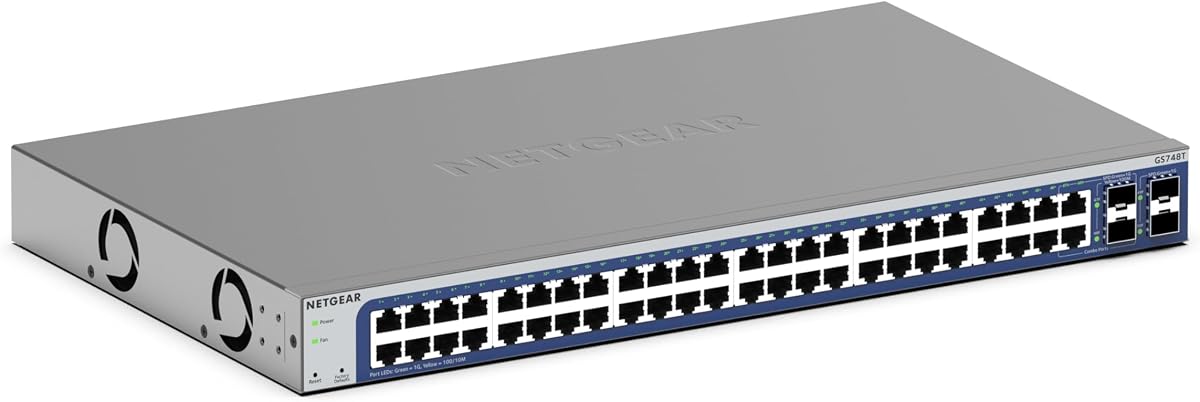
The NETGEAR GS748T offers a robust set of smart managed features, highlighted by the inclusion of NETGEAR Insight for remote network management. It earns a strong rating for its reliability and ease of use.
We may earn a commission when you buy through this link, at no additional cost to you.
Key strengths include its 48 gigabit ports and four SFP slots, enabling flexible fiber optic connections for network expansion. The Insight software provides centralized control, allowing administrators to manage networks from anywhere conveniently.
The one-year Insight subscription is a generous inclusion but may require renewal for continued remote capabilities. Despite this limitation, the switch's smart software and energy-efficient design make it a solid choice for many businesses.
This switch is ideal for businesses needing a balance of smart management and flexibility. It suits environments where remote oversight and scalability are priorities, making it a versatile addition to any network infrastructure.
Included for one year, Insight allows you to remotely manage your networks from anywhere, offering real-time insights and easy configuration.
Four SFP ports support fiber optic connections, enabling high-speed uplinks and network expansion without compromising performance.
We may earn a commission when you buy through this link, at no additional cost to you.
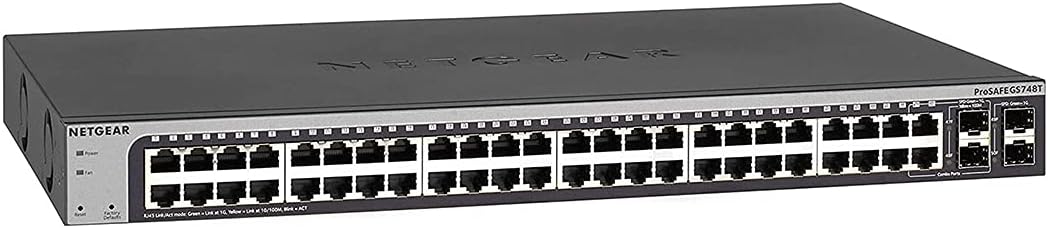
The NETGEAR GS748T model with lifetime warranty is a standout for organizations prioritizing long-term reliability and support. It delivers consistent performance with a focus on ease of use and durability.
We may earn a commission when you buy through this link, at no additional cost to you.
Key strengths include its comprehensive smart software and lifetime hardware warranty, offering peace of mind for network administrators. The flexible mounting options and quiet operation make it suitable for diverse deployment scenarios.
While it offers limited smart features compared to pro models, the lifetime warranty and reliable performance justify its value. It is well-suited for businesses seeking a dependable switch without needing advanced pro features.
This switch is ideal for environments where reliability and long-term support are critical. We recommend it for those who want a solid, well-supported switch with minimal maintenance requirements.
NETGEAR provides a lifetime hardware warranty with next-business-day replacement, ensuring your investment is protected against defects.
The easy-to-use interface simplifies secure setup and access control, allowing for efficient network management.
We may earn a commission when you buy through this link, at no additional cost to you.
The Omada SG3452 is a robust L2+ smart managed switch that integrates seamlessly with the Omada Software Defined Networking platform. Its rating highlights its versatility in diverse network setups.
We may earn a commission when you buy through this link, at no additional cost to you.
This model offers flexible full gigabit port configurations and cloud access via the Omada app, enabling centralized management from anywhere. It supports both hardware and software controllers, providing adaptability for various network sizes.
While it requires compatible SDN firmware, the switch's standalone mode ensures usability even outside the SDN ecosystem. The five-year protection further enhances its value for long-term deployments.
Ideal for organizations looking to expand their network with SDN capabilities, this switch provides the flexibility and features needed for modern business environments. We recommend it for those invested in the Omada ecosystem.
The SDN platform integrates network devices like switches and APs, allowing centralized control via hardware or software controllers.
Remote cloud access and the Omada app enable centralized network management across different sites from a single interface.
We may earn a commission when you buy through this link, at no additional cost to you.
The TP-Link TL-SG3452P is a powerful L2+ managed PoE switch designed to deliver both high-speed data and reliable power to connected devices. Its exceptional rating reflects its strong performance and feature set.
We may earn a commission when you buy through this link, at no additional cost to you.
With 48 PoE+ ports and a 384W power budget, this switch supports power-hungry devices like IP cameras and wireless access points effectively. Integration with the Omada SDN platform adds advanced management capabilities and scalability.
While the higher price point reflects its advanced capabilities, the robust PoE budget and reliability justify the investment. It is particularly suitable for environments where powering multiple devices over Ethernet is essential.
This switch is ideal for businesses requiring extensive PoE capabilities alongside advanced network management. We highly recommend it for those building or expanding a PoE-dependent network infrastructure.
With up to 30W per port and a total of 384W, this switch supports a wide range of PoE+ devices reliably.
Seamless integration with Omada SDN allows for centralized control and efficient management across your entire network.
We may earn a commission when you buy through this link, at no additional cost to you.
The NETGEAR GS348 is an unmanaged switch designed for simplicity and reliability, earning a near-perfect rating for its plug-and-play ease of use. It is ideal for environments needing basic connectivity without complex management.
We may earn a commission when you buy through this link, at no additional cost to you.
With 48 gigabit ports and a fanless design, it offers silent performance and energy efficiency. Its compact metal design supports both desktop and rack-mount installations, making it versatile for various setups.
While it lacks advanced management features, its straightforward operation makes it perfect for expanding basic network capacity. Users benefit from its reliability and low maintenance requirements.
This switch is best for small offices or departments needing reliable connectivity without configuration overhead. We recommend it for those prioritizing ease of use and quiet operation in their network infrastructure.
With no software to install or configuration required, this switch offers immediate connectivity for all connected devices.
Compliance with IEEE 802.3az reduces power consumption without compromising high-speed performance, saving energy costs.
We may earn a commission when you buy through this link, at no additional cost to you.
This renewed NETGEAR GS748T offers an affordable entry point for businesses needing reliable smart managed capabilities. It provides ProSAFE lifetime protection, ensuring long-term support and peace of mind.
We may earn a commission when you buy through this link, at no additional cost to you.
With 48 gigabit ports and four SFP ports, it delivers robust connectivity and expansion options. Its design supports both desktop and rackmount placements, making it adaptable to different environments.
While no customer rating is available due to its renewed status, the lifetime protection and reliable model make it a low-risk choice. Users save on costs while maintaining performance expectations.
This switch is ideal for budget-conscious businesses seeking a dependable smart managed solution. We recommend it for those comfortable with renewed products and looking for cost-effective network upgrades.
Renewed units include ProSAFE lifetime protection, ensuring your investment is backed by NETGEAR support.
Features like easy-to-use interface and secure setup offer the benefits of managed networking without excessive complexity.
We may earn a commission when you buy through this link, at no additional cost to you.
The UBIQUITI EdgeSwitch Lite is a powerful managed gigabit switch offering exceptional throughput and flexible mounting options. Its high rating reflects its performance in handling demanding network traffic.
We may earn a commission when you buy through this link, at no additional cost to you.
With a 140 Gbps switching capacity and two SFP+ ports, this switch supports high-speed uplinks and efficient data transfer. Its wall mountable design provides installation versatility for diverse environments.
While it lacks PoE support and advanced smart features, its raw performance makes it ideal for high-throughput scenarios. The DC input option ensures reliability in critical network segments.
This switch is ideal for environments requiring high-speed data transfer without PoE. We recommend it for businesses prioritizing throughput and flexible installation options.
With 140 Gbps switching capacity and non-blocking performance, this switch ensures efficient data transfer.
Two SFP+ ports provide flexibility for high-speed uplinks and network expansion options.
We may earn a commission when you buy through this link, at no additional cost to you.
The YuanLey PoE switch delivers advanced L3 management features and robust PoE capabilities, making it ideal for growing businesses. Its rating reflects strong performance across diverse network scenarios.
We may earn a commission when you buy through this link, at no additional cost to you.
With a 460W PoE budget and six 10G SFP+ slots, this switch supports high-throughput data and power-hungry devices effectively. Flexible management options include web-based interfaces and CLI commands.
While it offers less established brand support compared to major vendors, its feature set and performance justify consideration. It is particularly suitable for businesses needing advanced routing and VLAN capabilities.
This switch is ideal for small to medium businesses seeking cost-effective L3 management and extensive PoE support. We recommend it for those needing scalable networking solutions without high costs.
Advanced L3 features allow for static routing and VLAN segmentation, enhancing network efficiency and security.
Delivering up to 30W per port, this switch supports a wide range of PoE+ devices reliably.
We may earn a commission when you buy through this link, at no additional cost to you.
The NETGEAR GS348TPv2 stands out for its extensive PoE+ capabilities and reliable smart management features. It achieves a perfect rating, reflecting its outstanding performance and user satisfaction.
We may earn a commission when you buy through this link, at no additional cost to you.
With 48 PoE+ ports and a 380W power budget, this switch supports power-intensive devices like IP cameras and wireless access points. Its smart management interface ensures secure setup and access control.
While its features focus on core smart management capabilities, the robust PoE support and energy-efficient design make it a versatile choice. It is ideal for businesses requiring extensive power delivery.
This switch is ideal for environments needing high PoE capacity and reliable smart management. We highly recommend it for those seeking a dependable solution for powering network devices.
Delivering up to 30W per port, these ports support a wide range of power-hungry devices efficiently.
The smart software interface offers managed control for secure setup and access, simplifying network management.
We may earn a commission when you buy through this link, at no additional cost to you.
Selecting the right switch requires evaluating several critical factors that impact network performance and scalability.
Ensure the switch provides sufficient 48 gigabit ports for current and future connectivity needs. Consider whether you require additional SFP or SFP+ ports for fiber optic uplinks and scalability.
Look for auto-negotiating ports that adapt to device speeds for optimal performance without manual configuration.
Determine if you need managed, smart managed, or unmanaged features based on your need for VLANs, QoS, and remote access. Smart managed switches offer advanced control without the complexity of fully managed models.
Evaluate web interfaces, CLI access, and cloud management platforms to ensure they align with your administrative capabilities and remote management requirements.
If you plan to power devices like IP cameras or access points, verify the PoE budget matches the combined power needs of all devices. Ensure the switch supports PoE+ (802.3at) if high-wattage devices are used.
Consider whether PoE ports are distributed evenly across the switch to optimize power usage and prevent overloading specific sections.
Look for advanced security capabilities like 802.1X authentication, ACLs, and port security to protect your network from unauthorized access. These features are vital for maintaining data integrity and preventing attacks.
Ensure the switch supports encryption protocols and can integrate with existing security systems for comprehensive protection.
Verify support for VLAN segmentation (802.1Q) to manage traffic and optimize network performance across different departments or user groups. Proper VLANs help isolate traffic and enhance security.
Consider whether the switch supports multicast protocols like IGMP for IPTV or VoIP deployment if your network requires these services.
Choose a switch with a form factor and mounting options that suit your environment, whether desktop, rack-mount, or wall-mount. Compact designs save space, while metal casings enhance durability and heat dissipation.
Fanless designs are preferable for quiet environments like conference rooms or healthcare facilities where noise reduction is essential.
Look for switches compliant with IEEE 802.3az Energy Efficient Ethernet standards to reduce power consumption and operational costs. Energy-efficient designs contribute to sustainability goals and lower utility bills.
Consider how the switch manages power during low traffic periods to ensure long-term energy savings without compromising performance.
Evaluate the warranty period and vendor support options, such as lifetime protection or 24/7 technical assistance. A strong warranty ensures long-term reliability and peace of mind.
Check for available documentation and community resources to assist with troubleshooting and configuration when needed.
Begin by reviewing the manufacturer's documentation to understand initial setup steps, including default access credentials and software requirements. Connect the switch to your primary network devices securely.
Regularly update the switch firmware to ensure compatibility with new features and security patches. Keep an eye on system logs to detect and resolve issues promptly.
Maintain proper ventilation and avoid placing the switch in dusty or humid environments to extend its lifespan. Monitor power consumption and temperature to prevent overheating and ensure stable performance.
Managed switches offer advanced configuration options like VLANs and QoS for optimized network traffic control, while unmanaged switches provide simple plug-and-play connectivity. Managed switches require more technical knowledge but deliver greater flexibility for enterprise environments.
You need a PoE switch if you plan to power devices like IP cameras or access points directly through Ethernet cables. Without PoE, you would need separate power sources for each device, increasing complexity and costs.
Yes, SFP ports enable fiber optic connections and network expansion to other switches or high-speed links. This flexibility is essential for scaling networks without replacing the entire switch.
VLAN segmentation isolates traffic between different user groups, preventing unauthorized access between departments. This limits the spread of potential threats and enhances overall network security.
Cloud management platforms allow remote monitoring and configuration from anywhere, simplifying administration across multiple locations. They provide centralized insights and streamline updates without physical access to devices.
Energy efficiency reduces operational costs and environmental impact without compromising performance. Efficient switches lower power consumption during low traffic, contributing to sustainable network operations.
Our top picks highlight versatile models like the TP-Link SG2452LP for cloud management and the NETGEAR GS348TPv2 for extensive PoE+ capabilities. Each option offers unique strengths for different organizational needs.
Prioritize factors like management features, PoE budget, and scalability when selecting a switch. Choosing the right fit ensures smooth network operation and future growth.
Remember to check current pricing and availability before making a purchase as market conditions change frequently. With the right choice, you can build a robust network infrastructure that supports your business goals.