
VIMIN 10G PCI-E Network Card
4.5Editor score
Dual RJ45 ports
Intel X540-T2
Heat dissipation
Discover the top 10GB Ethernet cards for speed and reliability. This guide compares PCIe and USB adapters for gaming, NAS, and professional networking needs.
Finding the right network adapter is crucial for modern computing. A 10GB Ethernet Card provides the bandwidth needed for high-speed data transfers and seamless connectivity.
We evaluated various models based on compatibility, performance, and build quality. Our list includes options for desktops, servers, and laptops with USB ports.
Each pick highlights specific strengths and ideal use cases. Prices fluctuate often so check current listings before buying to ensure the best deal.
4.5Editor score

4.2Editor score

4.6Editor score
This side-by-side comparison highlights the key specifications of each adapter. Use this table to quickly identify the best fit for your system.




The TP-Link TX401 offers a strong starting point for upgrading desktop connectivity. It delivers reliable 10Gbps speeds and supports modern operating systems effectively.
We may earn a commission when you buy through this link, at no additional cost to you.
Its design prioritizes simplicity with included hardware like the CAT6A cable. This ensures you can connect immediately without needing extra purchases.
While it only has one port it handles heavy traffic well. The QoS feature helps maintain performance during gaming or streaming sessions.
This card is ideal for home users needing faster uploads and downloads. It balances cost and performance for most standard desktop upgrades.
Achieve faster file transfers with 10Gbps throughput. This helps when backing up large media files or working with high-resolution content.
Works with Windows and Linux systems. Drivers are readily available and support is provided for server environments too.
We may earn a commission when you buy through this link, at no additional cost to you.
The VIMIN card provides a cost effective way to get dual 10Gbps connections. It is well suited for servers or workstations needing redundancy.
We may earn a commission when you buy through this link, at no additional cost to you.
Its Intel X540-T2 chipset is known for stability in enterprise environments. This makes it a safe choice for critical data tasks.
The dual ports allow for link aggregation or separate networks. This adds flexibility that single port cards cannot offer at this price.
Consider this if you need more than one port. It delivers solid performance without the high cost of premium brands.
Connect two devices or create a failover setup. This improves reliability and throughput for network intensive workloads.
Uses a proven Intel controller. This reduces the risk of compatibility issues found with less common chipsets.
We may earn a commission when you buy through this link, at no additional cost to you.
Asus brings its reputation for build quality to this network adapter. It focuses on ease of use for desktop upgrades.
We may earn a commission when you buy through this link, at no additional cost to you.
The support for standard copper cables is a plus. You do not need specialized fiber optics for high speeds here.
QoS technology helps manage bandwidth during heavy loads. This keeps your connection smooth when multiple devices are active.
This card fits users who want trusted brand support. It is a reliable option for home labs or small offices.
Quickly turn your desktop into a high speed machine. Installation is straightforward for most PC users.
Prioritize critical traffic like VoIP or gaming. This ensures consistent performance even during network congestion.
We may earn a commission when you buy through this link, at no additional cost to you.
This adapter is built for server environments that need robust connectivity. The dual ports support redundant links effectively.
We may earn a commission when you buy through this link, at no additional cost to you.
It works well with virtualization platforms like ESXi. This makes it suitable for virtual machine networking needs.
The Intel X540 controller ensures stable throughput. Users benefit from consistent performance during heavy data operations.
Consider this for server racks or virtualization labs. It balances cost and enterprise level features well.
Optimized for use with VMs and server OS. This ensures drivers work correctly in managed environments.
Dual ports allow for failover configurations. This keeps your services online even if one link fails.
We may earn a commission when you buy through this link, at no additional cost to you.
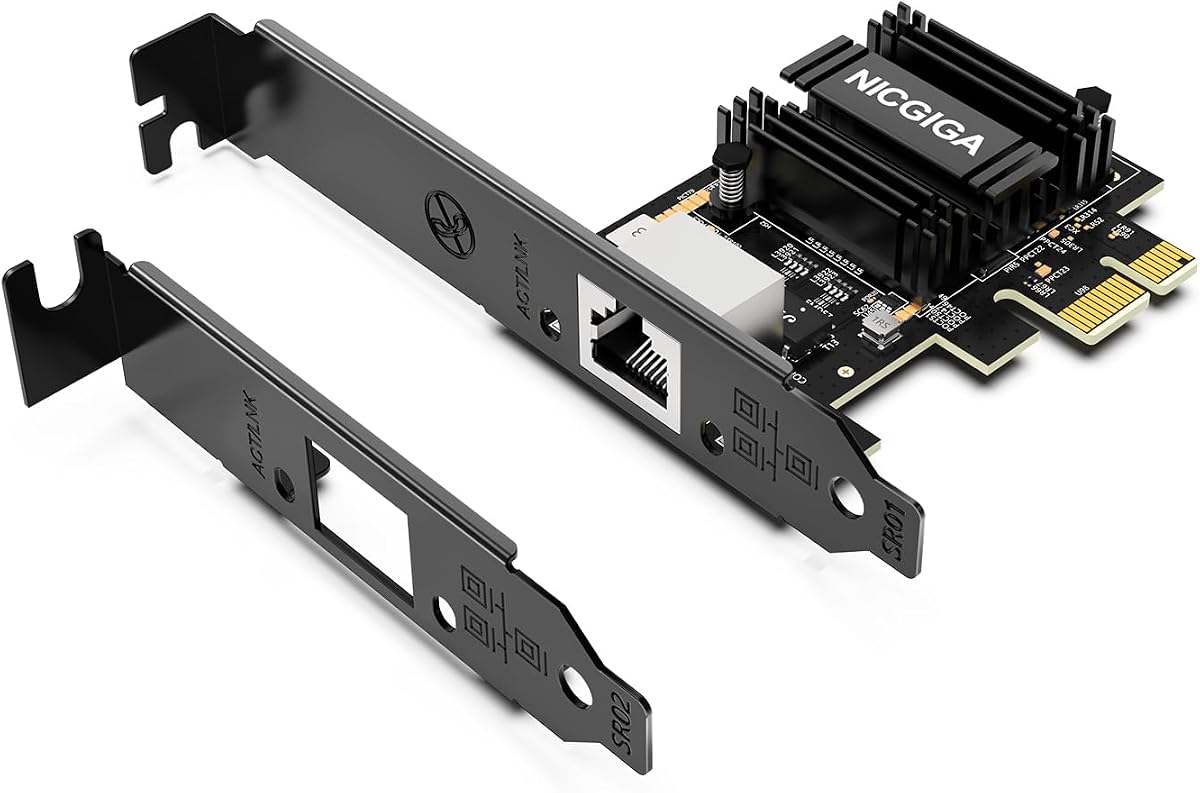
NICGIGA focuses on compact designs with the PCIe 4.0 x1 interface. This makes it ideal for Mini PCs and ITX builds.
We may earn a commission when you buy through this link, at no additional cost to you.
The Realtek RTL8127 offers great efficiency. It runs cooler than many older 10G chips found in larger cards.
Auto-negotiation works well for multi-gigabit setups. You can connect to switches that offer varying speeds easily.
This is a smart pick for small form factor users. It brings high speed networking to smaller cases.
Designed to fit tight spaces in small cases. It uses only one lane so does not block GPU slots.
Lower power consumption means less heat. This helps maintain system stability in compact chassis.
We may earn a commission when you buy through this link, at no additional cost to you.
VunLink offers a competitive alternative with the RTL8127AT. It shares many benefits with the NICGIGA model.
We may earn a commission when you buy through this link, at no additional cost to you.
The energy efficient design helps reduce heat. This is good for builds where cooling is a constraint.
It supports a range of speeds automatically. This ensures compatibility with a wide variety of routers.
Consider this for NAS or small server setups. It provides high speed at a reasonable cost.
Designed to stay cool under load. This reduces the risk of thermal throttling during long tasks.
Works with 2.5G and 5G networks too. This future proofs your connection for evolving home networks.
We may earn a commission when you buy through this link, at no additional cost to you.
This adapter supports SFP+ modules for fiber connections. It is ideal for environments requiring long distances.
We may earn a commission when you buy through this link, at no additional cost to you.
The aluminum heatsink helps with cooling. This ensures stable performance during high throughput periods.
QoS technology helps prioritize important data. This is useful for professional streaming or critical data.
Choose this if you need fiber capabilities. It adds versatility beyond standard copper connections.
Use fiber optics for longer cable runs. This is great for connecting separate buildings.
Built-in cooling keeps the chip stable. This maintains high speeds without overheating.
We may earn a commission when you buy through this link, at no additional cost to you.
Synology designed this adapter specifically for their NAS systems. It integrates seamlessly with DiskStation Manager.
We may earn a commission when you buy through this link, at no additional cost to you.
Two ports allow for link aggregation. This doubles throughput for large file transfers.
The five-year warranty shows confidence in quality. It is a strong choice for long-term use.
Buy this for Synology NAS users. The integration is worth the extra cost.
Works perfectly with DSM updates. No extra drivers are needed for basic use.
Combine ports for faster speeds. This helps when multiple users access the NAS.
We may earn a commission when you buy through this link, at no additional cost to you.
TRENDnet offers a solid PCIe option for businesses. It is NDAA and TAA compliant for government needs.
We may earn a commission when you buy through this link, at no additional cost to you.
It supports 2.5G and 5G speeds easily. This makes it future proof for evolving networks.
The manufacturer protection ensures long-term support. You get peace of mind with purchase.
Choose this for government or enterprise use. Compliance makes it a safe pick.
Meets standards for public sector projects. This ensures you follow regulatory requirements.
Handles various speeds without issue. This ensures compatibility with older switches.
We may earn a commission when you buy through this link, at no additional cost to you.
This adapter brings high speed to laptops without PCIe slots. It is great for mobile professionals.
We may earn a commission when you buy through this link, at no additional cost to you.
The Realtek RTL8159 handles heat well. The aluminum housing helps dissipate warmth.
Mac users see up to 5G speeds. This is still faster than typical Gigabit options.
Buy this for Mac or travel use. It offers flexibility for portable setups.
Works with macOS and Apple Silicon. This makes it a good choice for MacBooks.
Small size fits in travel bags easily. Connect to hotel networks with speed.
We may earn a commission when you buy through this link, at no additional cost to you.
Selecting the right 10GB Ethernet Card requires understanding your system requirements and network goals.
The interface dictates where the card fits. PCIe cards go inside desktops while USB adapters work for laptops.
Choose PCIe for full power and USB for portability.
Some cards offer one port while others offer two. Dual ports are useful for redundancy or link aggregation.
Pick dual ports if you need failover or higher throughput.
Intel and Realtek chipsets have different strengths. Intel is common for servers while Realtek is good for home.
Verify chipset compatibility with your OS before buying.
Ensure the card has drivers for your system. Windows support is common but Linux may need extra steps.
Check vendor docs for Linux kernel requirements.
10G cards generate heat so cooling matters. Look for cards with heatsinks for stability.
Better cooling ensures consistent performance.
Cables must match the speeds. Cat6A is needed for full 10G rates.
Use certified cables to avoid speed drops.
A longer warranty shows quality. Some brands offer three years while others offer more.
Select a card with solid warranty support.
Consider why you need 10G. Is it for gaming NAS or servers?
Match the card to your specific needs.
Install the card in an available PCIe slot. Ensure it is securely seated before closing the case.
Connect the card using Cat6A or higher cables. This ensures you reach full speeds.
Install any drivers needed for your OS. Check the vendor site for the latest updates.
To get full 10G speeds you need a switch with 10G ports. Without one the connection will downgrade to lower speeds like 1Gbps.
PCIe cards need a Mac with a slot which is rare. USB adapters work with modern Macs but speeds may vary.
Use Cat6A or Cat7 cables for 10G rates. Older cables like Cat5e may not handle the speed.
Many cards work with Linux but drivers might need manual install. Check kernel support before buying.
Yes if you have fast internet or NAS. It improves transfers between local devices significantly.
It helps with low latency and QoS. This ensures smoother gameplay during network traffic.
We covered ten options for desktops and laptops. Each offers unique benefits for different needs.
Prioritize chipset and OS support first. This avoids compatibility issues later.
Check current listings before buying. Prices may vary based on demand and sales.