
ASRock PG 1600G
4.4Editor score
1600W Continuous Power
Japanese Capacitors
TempGuard Technology
This guide compares the top 1500W PSUs for 2026 focusing on efficiency wattage ATX standards and build quality to help you choose the right power supply.
High wattage power supplies are essential for modern high-performance gaming rigs and workstations. A 1500W unit ensures stable power delivery for multiple GPUs and demanding processors. Choosing the right one involves checking efficiency ratings and connector types.
We evaluated ten leading models based on certification build quality and features like modular cabling. Each product offers unique benefits for different user needs from budget builds to extreme overclocking. Our analysis focuses on real-world performance and reliability data.
Each pick highlights specific strengths and ideal use cases for various system configurations. We include detailed specifications and user feedback to guide your decision. Please note that availability and pricing may change frequently so check current listings before buying.
4.4Editor score

4.5Editor score

4.7Editor score
This side by side comparison highlights key specifications and ratings for each model. Use this table to quickly identify efficiency ratings connector types and warranty terms across all options.


The CORSAIR HX1500i stands out as a top choice for high-end gaming and workstation builds. It carries a strong 4.5 rating from users and offers robust features like full ATX 3.1 certification. This unit ensures stable power for the latest GPUs and CPUs.
We may earn a commission when you buy through this link, at no additional cost to you.
Key strengths include its fully modular cabling which simplifies cable management significantly. The 140mm Fluid Dynamic Bearing fan provides exceptional cooling while remaining quiet. Users appreciate the iCUE software allowing detailed monitoring and control over fan curves and protection settings.
One trade-off is the higher price compared to standard units but this reflects premium components. Another consideration is the size which may not fit in smaller cases. However the performance and silence justify the investment for enthusiasts.
This PSU is ideal for builders seeking silence and future-proofing. It handles transient spikes well and maintains efficiency under load. If you value software control and build quality this is a recommended choice for your system.
ATX 3.1 and PCIe 5.1 readiness ensures compatibility with next-gen hardware and transient power management.
Zero RPM fan mode shuts down cooling at low loads for near-silent experience during light tasks.
We may earn a commission when you buy through this link, at no additional cost to you.
The ASRock PG 1600G offers exceptional value for users needing massive power without breaking the bank. With a 4.4 rating it delivers 1600W continuous power suitable for extreme multi-GPU setups. Its price point makes it accessible for many builders.
We may earn a commission when you buy through this link, at no additional cost to you.
It features high-quality Japanese capacitors ensuring long-term reliability and stability. The unit includes native 12V-2×6 connectors for modern GPUs. Efficiency is solid with Cybenetics Platinum ratings. The TempGuard technology adds safety by monitoring terminal temperatures.
The main downside is its large 180mm depth which may not fit all cases. Users must verify chassis clearance before buying. Brand support is primarily through Amazon direct contact which might be less convenient than others.
Buy this if budget is a priority and you need raw wattage. It handles high loads well and provides robust protection. Ensure your case can accommodate the size for a safe installation.
1600W output supports extreme overclocking and professional workstations with multiple high-end components.
TempGuard technology monitors connector temperature to prevent overheating at the terminal point.
We may earn a commission when you buy through this link, at no additional cost to you.
The Seasonic Prime TX-1600 Noctua Edition is a premium powerhouse designed for those seeking ultimate silence. It holds a high 4.7 rating for its performance and noise levels. This unit combines Seasonic reliability with Noctua cooling excellence.
We may earn a commission when you buy through this link, at no additional cost to you.
It features a renowned Noctua NF-A12x25 fan for extremely low noise levels. Semi-passive operation keeps the fan off until 50% load for near silent use. Titanium efficiency reduces heat and power consumption significantly. Voltage regulation is tight for stable performance.
The primary trade-off is the high price and significant weight. This makes it less portable and more expensive than competitors. However for silent workstations the noise reduction is unmatched. The build quality justifies the cost for enthusiasts.
Choose this if silence is your top priority. It offers flawless operation for critical builds. The Noctua branding signals top-tier component quality. Ensure you have a strong stand for installation.
Custom Noctua fan and grill reduce noise to ~8-10dB quieter than standard models for true silence.
Titanium certification ensures maximum efficiency at partial loads reducing waste heat and energy bills.
We may earn a commission when you buy through this link, at no additional cost to you.
The NZXT C1500 Platinum emphasizes digital precision for stable power delivery. With a 4.1 rating it excels in voltage regulation and ripple noise. It is designed for future-proofing with ATX 3.1 and PCIe 5.1 compliance.
We may earn a commission when you buy through this link, at no additional cost to you.
It includes two 16-pin 12V-2×6 cables for demanding GPUs. The magnetic levitation fan ensures high airflow with low noise. Efficiency exceeds 80 Plus Platinum standards. Japanese capacitors provide solid long-term reliability and safety.
A trade-off is the higher cost compared to standard models. Availability may be limited in some regions. The digital features add value but require specific use cases. It remains a strong contender for NZXT users.
This unit fits well in modern gaming rigs needing dual GPU connectors. The efficiency lowers power usage effectively. If you value NZXT ecosystem integration this is a solid option for high-end builds.
Digital control enables precise voltage regulation resulting in higher efficiency and lower ripple noise for stable builds.
Dual 12V-2×6 connectors deliver over 600 watts each for power-hungry graphics cards.
We may earn a commission when you buy through this link, at no additional cost to you.
The be quiet! Dark Power Pro 13 is designed for stability and overclocking needs. It holds a 4.3 rating for its build quality and features. This model offers a unique switch to change between single and multi-rail modes.
We may earn a commission when you buy through this link, at no additional cost to you.
It features fully digital control and full bridge LLC technology. This ensures unmatched signal stability under load. The front mesh funnel design improves airflow significantly. Titanium efficiency keeps power consumption low during operation.
The complexity of the rail switch may confuse novice users. Size considerations are necessary for smaller cases. However for extreme tuning this flexibility is valuable. The brand reputation for quietness holds true.
Choose this if you need flexible rail configurations. The high efficiency supports heavy workloads well. It is ideal for systems where stable voltage is critical for performance tasks.
Overclocking key switches between six 12V rails and one massive 12V rail for customized stability.
Full mesh PSU front with funnel-shaped air inlet improves cooling efficiency and reduces internal heat.
We may earn a commission when you buy through this link, at no additional cost to you.
The Corsair HX1500i provides excellent software integration for system control. With a 4.7 rating it offers precise monitoring of power settings. It adheres to ATX 3.1 standards for modern hardware support.
We may earn a commission when you buy through this link, at no additional cost to you.
Its iCUE software allows custom fan curves and overcurrent protection toggling. The 140mm FDB fan delivers long-lasting quiet performance. Modular cabling keeps the build clean and organized. Zero RPM mode ensures silence at low loads.
Reliance on software for some settings may be a hurdle. The price is higher than basic models. However the control it offers is unmatched for enthusiasts. Build quality is robust for daily use.
This unit suits users who want detailed system insights. It works well in larger cases for airflow. If you value control and efficiency this is a top choice for high-performance systems.
Powerful iCUE software creates custom fan curves and toggles protection settings on-the-fly for customization.
Zero RPM fan mode switches off cooling fan entirely at low loads for near-silent operation.
We may earn a commission when you buy through this link, at no additional cost to you.
The Corsair HX1500i HXi Series supports triple EPS12V connectors. With a 4.6 rating it ensures compatibility with modern motherboards. This model focuses on ultra-low noise performance and efficiency.
We may earn a commission when you buy through this link, at no additional cost to you.
It features a 140mm Fluid Dynamic Bearing fan for quiet running. The digital power supply enables precise voltage regulation. Fully modular cables simplify installation. Zero RPM mode keeps it silent during light loads.
Triple EPS connectors might be unnecessary for standard builds. However they ensure stability for high-end CPUs. The price reflects its premium components. It offers strong protection features for reliability.
Use this for boards needing multiple EPS inputs. The build quality ensures long-term stability. If you want a quiet and reliable power source this fits well.
Triple EPS12V connectors provide full compatibility with modern motherboards requiring extra power inputs.
Fluid Dynamic Bearing fan delivers extremely quiet and long-lasting performance for noise-sensitive builds.
We may earn a commission when you buy through this link, at no additional cost to you.
The Seasonic Prime TX-1600 is ideal for AI workstations. With a 4.5 rating it delivers consistent power under heavy loads. ATX 3.1 readiness ensures it handles modern components efficiently.
We may earn a commission when you buy through this link, at no additional cost to you.
Hybrid fan control manages noise effectively during low loads. 100% Japanese capacitors guarantee high reliability. Dual native connectors support latest GPUs. Titanium efficiency minimizes power waste.
High cost and weight may be limiting for some. However stability is paramount for professional tasks. The unit handles excursions well. It supports high-end cards without throttling.
Choose this for professional or AI workloads. It ensures continuous power for multi-GPU setups. If you need reliability for critical systems this is a strong option.
80 PLUS and Cybenetics Titanium A certified for best-in-class energy efficiency and minimal heat.
Ideal for AI workstations needing continuous power for multi-GPU setups and heavy compute loads.
We may earn a commission when you buy through this link, at no additional cost to you.
The EVGA SuperNOVA 1600 T2 stands out for its warranty coverage. With a 4.6 rating it offers robust protection for high-end systems. It provides up to 96% efficiency under typical loads.
We may earn a commission when you buy through this link, at no additional cost to you.
Full protections include OVP UVP OCP OPP SCP and OTP. ECO mode reduces noise at low loads. The double ball bearing fan ensures durability. Modular design simplifies cable management.
The unit is heavy and lacks some modern software features. However the warranty offers peace of mind. It handles multi-GPU setups well. Reliability is a key strength here.
Choose this if warranty matters most. It works well for SLI Crossfire and workstations. Ensure you have a strong base for its weight. It is a dependable power source.
10 Year Warranty ensures long-term security and support for your high-performance power supply.
Heavy-duty protections including OVP UVP OCP OPP SCP and OTP cover all electrical risks.
We may earn a commission when you buy through this link, at no additional cost to you.
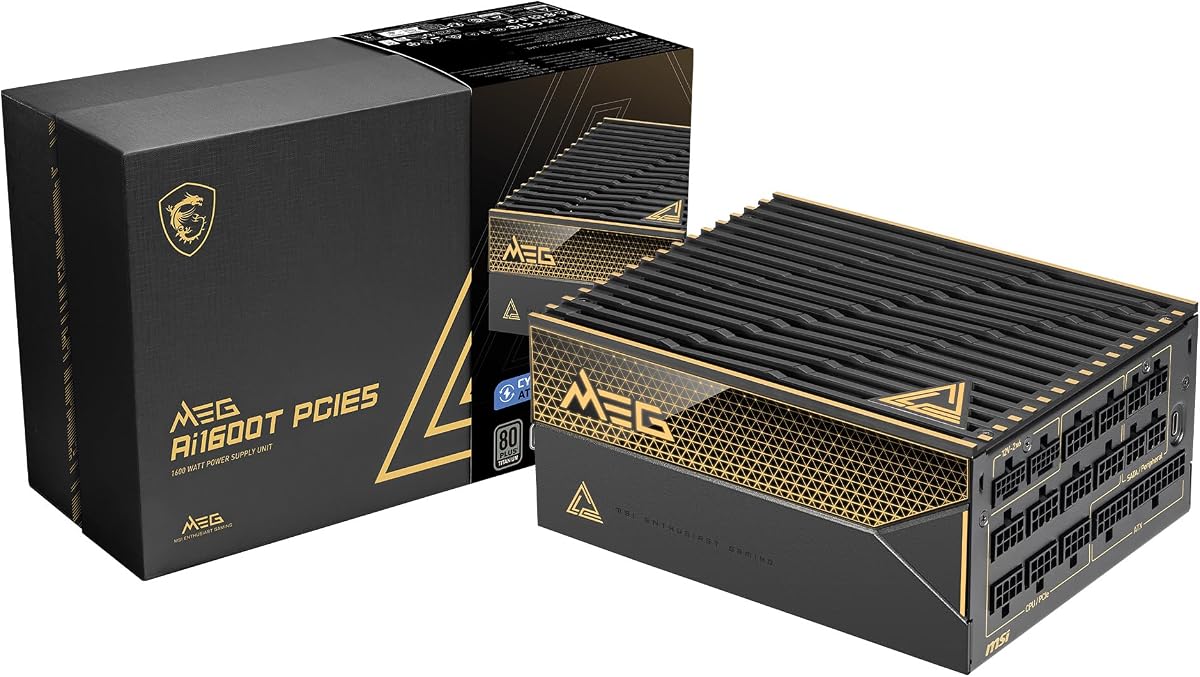
The MSI MEG Ai1600T PCIE5 offers top industrial protection. With a 4.5 rating it covers all electrical risks. It is fully modular and ready for ATX 3.1 standards.
We may earn a commission when you buy through this link, at no additional cost to you.
Server-grade capacitors ensure stability under stress. Dual native 12V-2×6 cables are included. The 12-year warranty is a major plus. Titanium certification maximizes efficiency for energy savings.
The cost is premium and size is large. However the reliability matches high-end needs. It handles heavy loads well. Good for those needing long-term security.
Select this for high-end gaming rigs. It covers industrial levels of protection. The braided cables add a neat look. Ensure you have the space for installation.
Industrial level protection with OCP OTP OPP SCP OVP UVP SIP NLO covers all electrical risks.
100% all Japanese 105 C capacitors ensure exceptional reliability and long-term stability.
We may earn a commission when you buy through this link, at no additional cost to you.
Selecting the right power supply involves checking wattage ratings and safety features. This guide explains key factors to consider for your specific build needs.
Efficiency ratings like 80 Plus Gold Platinum or Titanium indicate how much power is converted versus wasted. Higher ratings mean lower energy bills and less heat. For 1500W units Titanium or Platinum ensures stable performance under heavy loads.
Look for at least Platinum certification to ensure energy efficiency and reduced heat.
ATX 3.1 standards support new GPUs with higher transient spikes. This compliance ensures your power supply can handle sudden power demands without instability. It is critical for modern systems with RTX 4000 series cards.
Verify ATX 3.1 certification for future-proofing and GPU stability.
Modern GPUs require 12V-2×6 or PCIe 5.1 connectors. Check if the unit includes native cables to avoid using adapters. Native connectors improve safety and reliability for high-wattage components.
Ensure native 12V-2×6 cables are included for GPU safety.
Fully modular units allow you to connect only needed cables. This reduces clutter and improves airflow inside the case. It simplifies building and maintenance for better thermal performance.
Choose fully modular for clean builds and better airflow management.
A good PSU includes OVP UVP OCP and SCP protection. These guard against power spikes and short circuits. Quality components ensure system safety during unexpected power events.
Verify full protection suite for component safety and longevity.
Warranty terms reflect build quality. A 10 to 12-year warranty suggests confidence in the components. It also provides support if issues arise during long-term use.
Prioritize units with 10+ year warranties for reliability and peace of mind.
Fan bearings like FDB or Noctua reduce noise levels. Zero RPM modes are beneficial for silent builds. Consider your environment when choosing a fan type.
Look for FDB fans and Zero RPM modes for quiet operation.
Japanese capacitors and solid construction ensure long-term stability. Avoid units with lower grade components. Higher build quality translates to fewer failures over time.
Choose Japanese capacitors and solid construction for stability.
Install the PSU in a well-ventilated area of your case to ensure proper airflow. Connect all necessary power cables to the motherboard GPU and drives securely. Ensure no loose ends are left exposed inside the chassis.
Monitor temperatures regularly using software to detect any overheating issues early. Clean the dust filters and fan blades every few months to maintain cooling performance. A clean PSU runs efficiently and quietly.
Keep your system firmware updated to maintain compatibility with new components. Avoid overloading the unit beyond its continuous rating during overclocking. A balanced load ensures longevity and safety for all hardware.
1500W indicates the maximum continuous power the unit can deliver. It supports multiple GPUs and high-end CPUs. This capacity allows for extreme setups and future upgrades without needing replacements.
You need it if you have dual high-end GPUs or extreme overclocking. For single GPU systems lower wattage might suffice. Assess your total system draw before purchasing a high-wattage unit.
ATX 3.1 is a new standard supporting higher transient power spikes. It ensures safe power delivery for next-gen graphics cards. Compliance is vital for stability on modern hardware.
These connectors provide 500W or more per cable safely. They replace older 8-pin connectors for efficiency. Ensure your GPU supports them for secure power transfer.
Platinum offers higher efficiency than Gold reducing heat and power waste. The difference is noticeable at high loads. Choose Platinum for better energy savings and cooler operation.
A long warranty reflects confidence in component quality. It protects your investment against manufacturing defects. Look for this term when buying a premium power unit.
The CORSAIR HX1500i Seasonic Prime TX-1600 and ASRock PG 1600G lead our list for different reasons. Each offers unique features for specific user needs and build types. Select based on your specific requirements.
Prioritize efficiency ATX compliance and safety features when making your choice. A high-quality power supply protects your investment for years to come. Ensure it fits your case and provides enough power.
Always check current pricing and availability before purchasing. Models may vary by region and stock levels. Review your system requirements to confirm this wattage is necessary for your setup.