
ASRock PG 1600G
4.4Editor score
1600W Continuous Power
ATX 3.1 Compliant
Fully Modular Design
This guide compares the top 1600W power supplies for high-end PCs, evaluating efficiency, stability, features, and build quality to help you choose the right
High-performance computing demands reliable power delivery. A 1600W power supply ensures your system handles extreme workloads without instability or failure during critical tasks.
We compared ten leading models based on efficiency ratings, compliance with ATX standards, component quality, noise levels, and manufacturer warranty support to build this list.
Each pick highlights key strengths and trade-offs for different needs. Prices fluctuate frequently so verify current offers before purchasing to ensure you get the best value available today.
4.4Editor score

4.7Editor score

4.3Editor score
The following table provides a side-by-side comparison of all ten units evaluated in this guide. Use these specs to quickly identify the model that fits your system requirements and budget constraints best.




The ASRock PG 1600G stands out as an accessible entry point into the 1600W category. It delivers robust power with ATX 3.1 and PCIe 5.1 compliance, ensuring stability for next gen GPUs without breaking the bank.
We may earn a commission when you buy through this link, at no additional cost to you.
Its standout feature is the inclusion of native 12V-2×6 connectors alongside TempGuard technology to monitor terminal temperature. The physical 5V BOOST switch also compensates for voltage drops during transient spikes improving system reliability significantly.
While it lacks Titanium efficiency, the 80 Plus Gold rating offers excellent value. The fan offers semi-passive operation but the unit is slightly deeper than standard so verify your case clearance before installation to avoid fit issues.
This unit is ideal for builders who need high wattage on a budget. If you prioritize raw power and modern connector support over ultimate silence or maximum efficiency, the PG 1600G is a compelling choice.
Native 12V-2×6 connectors ensure safe and stable connection for high power GPUs without using adapters.
The built-in 5V BOOST switch helps maintain optimal voltage levels during transient load spikes.
We may earn a commission when you buy through this link, at no additional cost to you.
The Seasonic Prime TX-1600 Noctua Edition is the undisputed king of quiet high wattage power supplies. Featuring a renowned Noctua fan and Cybenetics Lambda A++ certification it offers nearly silent operation even under heavy loads.
We may earn a commission when you buy through this link, at no additional cost to you.
Its Titanium certification ensures peak efficiency reducing heat waste and power consumption significantly. The semi-passive fan allows the unit to remain completely silent during low to medium loads which is perfect for office or streaming setups.
The main trade-off is the cost which is higher than most competitors. Additionally the unit is physically heavy so ensure your case mounting points are sturdy enough to support the weight without flexing during use.
If absolute silence and top efficiency are your top priorities this model justifies its price. It is an excellent choice for workstations and high end gaming PCs where acoustic comfort matters most.
The custom Noctua fan and optimized grill deliver near silent operation rated A++ for noise levels.
Titanium efficiency reduces energy waste and heat making it ideal for 24/7 operation.
We may earn a commission when you buy through this link, at no additional cost to you.
The be quiet! Dark Power Pro 13 offers unique digital control features that set it apart from traditional analog units. It provides unmatched signal stability and flexible rail configurations for advanced overclocking scenarios.
We may earn a commission when you buy through this link, at no additional cost to you.
A key strength is the Overclocking Key which allows you to switch between six 12V rails or one massive rail instantly. This gives you precise control over power delivery tailored to your specific GPU and CPU needs.
However this digital functionality adds to the complexity and cost. The fully mesh front is great for airflow but requires careful cable management to maintain the clean look expected from be quiet units.
This unit is best suited for enthusiasts who demand precise voltage control. If you value digital flexibility and stability alongside high efficiency this PSU delivers exceptional performance for demanding setups.
The dedicated key switch allows instant switching between multiple 12V rails and single rail configurations.
Fully digital control and LLC technology ensure consistent voltage output under all load conditions.
We may earn a commission when you buy through this link, at no additional cost to you.
The Seasonic Prime TX-1600 is a solid standard option for those who want proven quality without niche features. It maintains Seasonic's reputation for reliability with Titanium efficiency and full ATX 3.1 compliance.
We may earn a commission when you buy through this link, at no additional cost to you.
It includes dual native 12V-2×6 connectors which are essential for supporting multiple high-end GPUs safely. The hybrid fan control ensures silent operation during lighter loads while ramping up only when necessary for cooling.
While it lacks the extra bells and whistles of the Noctua edition it offers consistent performance. It is a great choice for builds that prioritize stability and durability over unique design elements or specific aesthetic themes.
Choose this unit if you value straightforward high performance. It balances quality components and modern features well making it a dependable workhorse for professional or enthusiast systems.
Two 12V-2×6 connectors simplify cable management for multi-GPU setups without needing extra adapters.
Fan remains off at low loads ensuring silent operation when the system is idle or lightly used.
We may earn a commission when you buy through this link, at no additional cost to you.
The CORSAIR HX1500i brings smart functionality to high wattage power supplies through its integration with iCUE software. Users can customize fan curves and monitor power settings directly from their system interface.
We may earn a commission when you buy through this link, at no additional cost to you.
Its Zero RPM fan mode ensures silence during low loads while the 140mm FDB fan provides robust cooling when needed. This blend of smart features and robust cooling makes it versatile for modern builds.
While it offers slightly less wattage than others it remains highly capable for most systems. The ability to toggle between single and multi-rail protection on the fly adds a layer of safety and customization.
This unit is perfect for CORSAIR ecosystem users. If you want detailed software control and efficient cooling with modern safety features this PSU delivers both reliability and smart management.
iCUE software integration allows custom fan curves and real time power monitoring for optimized performance.
Toggle between single or multi-rail overcurrent protection on the fly based on your system needs.
We may earn a commission when you buy through this link, at no additional cost to you.
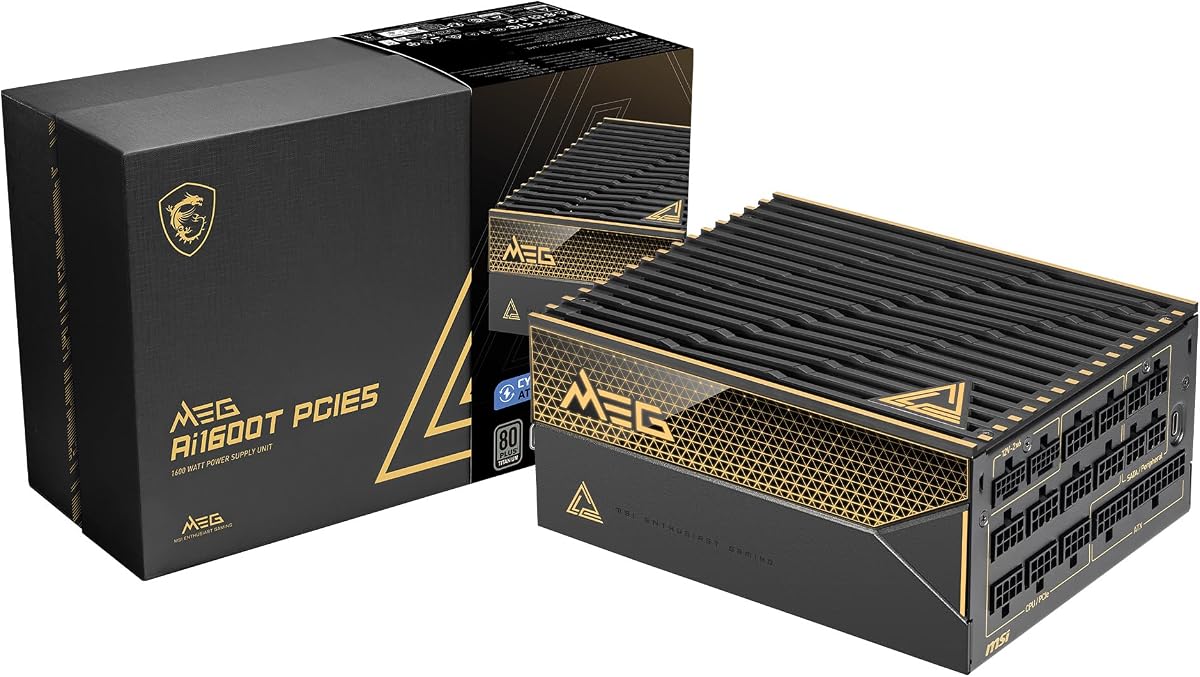
The MSI MEG Ai1600T PCIE5 distinguishes itself with an impressive 12-year warranty and server-grade capacitors designed for longevity. It meets modern standards with full ATX 3.1 and PCIe 5.1 compliance.
We may earn a commission when you buy through this link, at no additional cost to you.
Its industrial level protection covers a wide range of electrical risks ensuring your components stay safe. The inclusion of dual native 12V-2×6 cables simplifies setup for next-gen graphics cards without extra adapters.
While it is priced similarly to other high-end units the warranty offers significant peace of mind. This makes it a strong candidate for users who plan to keep their system for many years without replacement.
Choose this unit if long-term reliability is a top priority. The combination of durability features and extended warranty makes it a smart investment for critical workloads and gaming rigs.
Server-grade capacitors and a 12-year warranty ensure the unit lasts through years of heavy use.
Industrial level OCP OTP and SCP protections guard your components against electrical surges.
We may earn a commission when you buy through this link, at no additional cost to you.
The ASUS ROG Thor 1600W Titanium III offers a unique magnetic OLED display that shows real-time power consumption. This visual feedback helps you track system load without relying solely on software.
We may earn a commission when you buy through this link, at no additional cost to you.
It uses GaN MOSFETs for higher efficiency and cooler operation. The patented GPU-First voltage stabilizer improves voltage delivery by up to 45% ensuring your graphics card receives optimal power under load.
While the design is visually striking it commands a premium price. The display may slightly impact airflow depending on case layout but the performance gains and unique features justify it for enthusiasts.
This is the ideal choice for builders who want style and advanced tech. If you value visual feedback and top-tier stabilization this PSU delivers unmatched performance for high-end setups.
The magnetic OLED panel displays real-time power consumption helping you monitor system load instantly.
The patented GPU-First stabilizer boosts voltage delivered to the graphics card for smoother gaming.
We may earn a commission when you buy through this link, at no additional cost to you.
The EVGA SuperNOVA 1600 G2 is a classic choice for those who want reliable performance without modern ATX 3.1 features. It delivers consistent power with an 80 Plus Gold rating and robust build quality.
We may earn a commission when you buy through this link, at no additional cost to you.
Its double ball bearing fan ensures longevity and quiet operation under load. With heavy-duty protections like OVP UVP and SCP it provides solid safety for standard system configurations.
It may lack the latest connectors for next-gen GPUs but remains a great fit for existing systems. It offers a reliable balance of power and value at an accessible price point.
Choose this unit if you prioritize cost and reliability over future connectors. It is an excellent workhorse for builds that do not require the absolute newest standards.
Double ball bearing fan design ensures long lifespan and consistent cooling performance over years.
Heavy-duty protections against voltage and current issues keep your components safe from surges.
We may earn a commission when you buy through this link, at no additional cost to you.
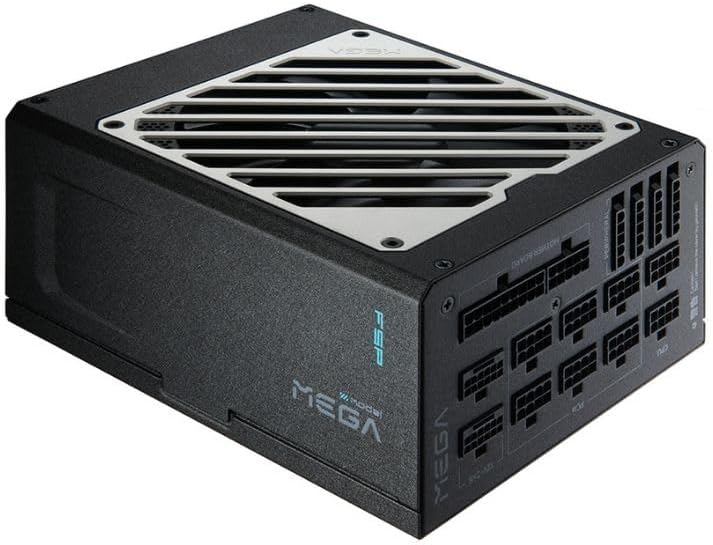
The FSP MEGA TI 1650W offers the highest continuous power in this comparison at 1650W. It provides ample headroom for extreme overclocking and multi-GPU setups with full ATX 3.1 compliance.
We may earn a commission when you buy through this link, at no additional cost to you.
Its 80 Plus Titanium rating ensures efficient power use reducing heat and waste. The Eco semi-fanless mode keeps it silent during low loads while a 105°C capacitor ensures thermal resilience.
While it is a slightly larger unit it handles extreme loads easily. The compact footprint helps in cases where depth is limited while maintaining full cable management flexibility.
Choose this unit if you need maximum headroom and efficiency. It is ideal for professionals and enthusiasts who demand the highest output and top-tier performance.
1650W output provides significant headroom for extreme overclocking and complex multi-GPU setups.
The 105°C Japanese bulk capacitor ensures stability even during high-temperature operation.
We may earn a commission when you buy through this link, at no additional cost to you.
The EVGA SuperNOVA 1600 P2 offers Platinum efficiency at a competitive price point. It is a strong choice for those who want high efficiency without the cost of Titanium models.
We may earn a commission when you buy through this link, at no additional cost to you.
Its 100% Japanese capacitors ensure long-term reliability and stable power delivery. The ECO mode allows the fan to stop at low loads reducing noise during normal daily tasks.
While it does not support the newest ATX 3.1 standard it is a solid workhorse for current systems. It balances performance and cost well for builders who prioritize efficiency.
Choose this unit for a cost-effective Platinum option. It provides reliable power and good efficiency for standard high-end builds that do not need next-gen connector support.
Platinum efficiency ensures low heat output and reduced power consumption compared to lower tiers.
100% Japanese capacitors provide stable and reliable performance over many years of use.
We may earn a commission when you buy through this link, at no additional cost to you.
Selecting the right 1600W power supply requires evaluating efficiency, safety, and features. This guide explains the key factors to help you choose a unit that matches your system needs.
Efficiency ratings like 80 Plus Gold Titanium or Platinum determine how much power is converted into usable energy. Higher ratings like Titanium reduce waste heat and electricity costs over time.
Always choose a higher efficiency tier if possible to lower long term operating costs and keep your system cooler under load.
Newer GPUs like the RTX 4090 require specific power connectors and transient protection. ATX 3.1 compliant units provide native 12V-2×6 connectors and handle power excursions safely.
Ensure your unit is ATX 3.1 compliant if you plan to use next-gen high-end GPUs for safety and compatibility.
Capacitors play a major role in voltage stability and lifespan. High-quality Japanese capacitors reduce ripple and ensure reliable power delivery over many years.
Look for units that specify 100% Japanese capacitors to ensure the best long-term reliability and stability.
Power supplies generate heat that must be managed efficiently. Units with FDB fans or semi-passive modes stay quieter during low loads while providing adequate cooling when under stress.
Check fan size and bearing type to ensure you get a unit that stays quiet during normal usage.
A longer warranty indicates the manufacturer's confidence in the unit's durability. Many top units offer ten or twelve years of coverage which protects your investment against failure.
Prioritize units with extended warranties to safeguard your purchase and ensure access to support if issues arise.
Fully modular designs allow you to attach only the cables your system needs. This reduces clutter inside the case and improves airflow for better overall cooling.
Always choose a fully modular unit to simplify installation and maintain a clean internal build environment.
Modern systems often require specific connector counts for GPUs and drives. Verify that the unit includes enough PCIe and SATA cables for all your components before buying.
Check the included cable count to ensure it meets your specific component requirements without needing adapters.
Before installing your unit ensure your case supports its depth and weight. Proper mounting prevents flexing and ensures safe airflow paths for cooling components effectively.
Route cables neatly to avoid obstructing fans or blocking airflow. Use cable ties to secure loose ends and maintain a clean interior that promotes consistent temperatures.
Keep your system dust-free to maintain cooling efficiency. Clean the PSU intake regularly and avoid placing your PC near heat sources or in enclosed spaces that trap air.
ATX 3.1 compliance ensures your power supply can handle transient power spikes from modern GPUs safely. It also provides native 12V-2×6 connectors so you do not need adapters for next-gen cards.
Most gamers do not need 1600W unless they plan to run multiple high-end GPUs or extreme overclocking. A 1200W unit is often sufficient for single GPU systems with high efficiency.
Semi-passive fan mode means the fan remains off until the load reaches a certain threshold like 50%. This keeps the unit completely silent during low usage tasks.
Yes Japanese capacitors generally offer better heat resistance and longer lifespans. They contribute to stable voltage delivery and overall reliability under demanding conditions.
Some 1600W units are deeper than standard. Always check chassis clearance for depth and fan orientation to ensure it fits properly without blocking airflow.
Higher efficiency means less wasted energy is converted to heat. This reduces overall power consumption and lowers your electricity bill over the lifespan of the unit.
Our top pick for best budget is the ASRock PG 1600G which offers modern features at a low cost. The Seasonic Prime TX-1600 Noctua Edition stands out for silence and the ASUS ROG Thor for its unique OLED display.
When choosing prioritize efficiency and ATX 3.1 compliance for future compatibility. Consider your system's actual power draw to ensure you are not overspending on unnecessary wattage for your needs.
Prices for these units fluctuate frequently so check current offers before buying. Compare current deals and warranties to make sure you get the best value for your specific build configuration.