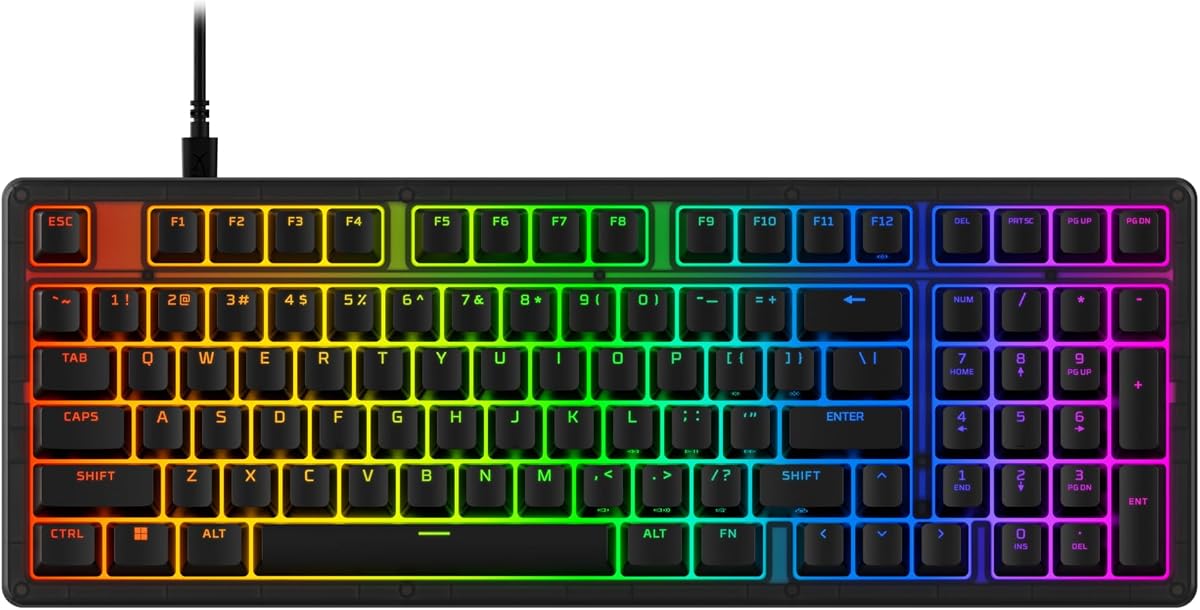
HyperX Eve 1800
4.6Editor score
Ten zone RGB lighting
Media button controls
Anti ghosting keys
Finding the right 1800 compact keyboard can transform your workspace by saving desk space without sacrificing functionality. These layouts offer a numpad and full function row in a streamlined design suitable for various setups.
We evaluated ten leading models based on build quality, switch type, connectivity options, and user feedback. Our comparison covers mechanical and membrane options ranging from industrial durability to sleek wireless designs for modern desks.
Each selection highlights specific strengths like customization, ergonomic design, or portability. Keep in mind that product availability and costs fluctuate frequently, so verify current details before making your final purchase decision online.
4.6Editor score

4.6Editor score

4.4Editor score
As an Amazon Associate we earn from qualifying purchases.
The following table provides a side-by-side overview of each model's core specifications and design characteristics to help you quickly identify the right fit for your specific needs and workflow.


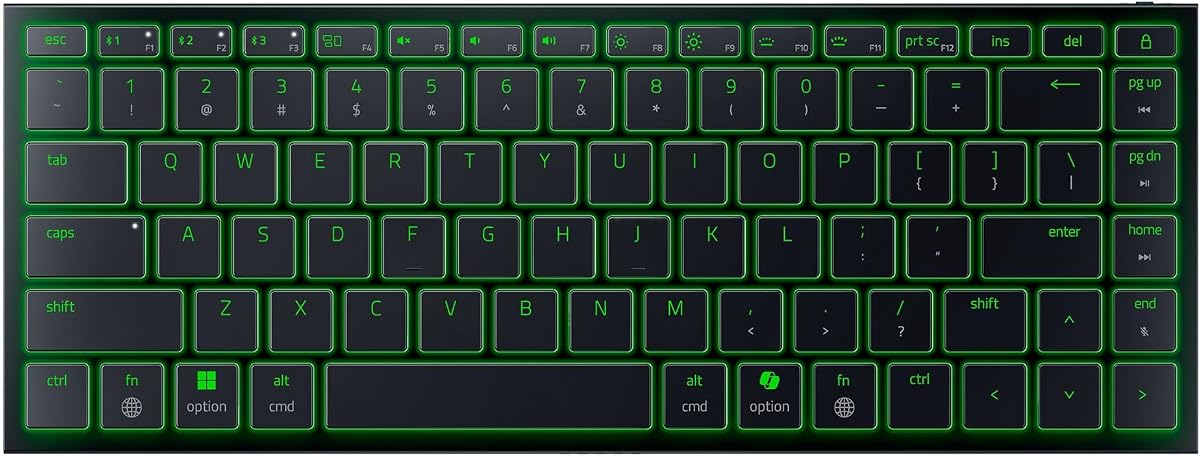


The HyperX Origins 2 1800 stands out as a top choice for enthusiasts who value customization and performance. With its hotswap switches and swappable housing, it offers flexibility rare at this price range.
We may earn a commission when you buy through this link, at no additional cost to you.
Its 8k polling rate ensures near instant input registration which is crucial for competitive gaming. The high profile design elevates keys for easier engagement while reducing fatigue during long sessions.
While the price is higher than standard options the ability to swap switches without soldering adds significant long term value. The included software allows deep customization of macros and lighting effects seamlessly.
This keyboard is ideal for gamers or power users who want a personalized setup. Its blend of speed, comfort, and modularity makes it a standout choice in the compact market.
The swappable housing allows users to change the look of their desk without buying a new board using simple screw assembly.
With an 8k polling rate the keyboard communicates with your PC up to 8000 times per second for instant responsiveness.
We may earn a commission when you buy through this link, at no additional cost to you.
The HyperX Eve 1800 delivers exceptional value by combining a full function layout with a compact footprint. Its membrane switches provide cushioned feedback suitable for casual gaming and office work alike.
We may earn a commission when you buy through this link, at no additional cost to you.
Ten zone RGB lighting allows users to personalize their setup with dynamic effects. Dedicated media buttons let you control volume and gaming modes quickly without leaving your active application window.
While it lacks mechanical switches the anti ghosting and twelve key rollover ensure reliable keypress performance during intense gameplay. The layout maximizes desk space for mouse movement and accessories effectively.
This model is perfect for budget conscious users who want style and functionality. It offers a robust feature set without the cost of mechanical switches making it an accessible entry point.
The compact 1800 layout provides extra room for your headset and mouse while retaining essential keys for productivity and gaming.
Customizable RGB lighting across ten zones complements your aesthetic and syncs with your gaming environment for an immersive experience.
We may earn a commission when you buy through this link, at no additional cost to you.
The Logitech Alto Keys K98M combines wireless convenience with premium mechanical typing. Its gasket mount design absorbs vibrations to deliver a satisfying and precise keystroke experience for work and play.
We may earn a commission when you buy through this link, at no additional cost to you.
You can swap switches easily without soldering allowing you to tailor the feel to your preference. The layout keeps your workspace clean and functional with a compact design that includes a numpad.
Battery life supports up to twelve months of use on a single charge which reduces downtime significantly. Multi device connectivity lets you switch between machines with a single button press effortlessly.
This keyboard suits professionals who demand high quality and wireless flexibility. Its balance of comfort style and performance makes it a top tier choice for demanding work environments.
The UniCushion gasket mount absorbs vibrations providing a clicky typewriter feel that enhances precision and comfort throughout the day.
Program Action Keys via the Logi Options app to tailor the keyboard and access AI enhanced features with one click.
We may earn a commission when you buy through this link, at no additional cost to you.
The Cherry G80-1800 is designed for continuous use in demanding environments. Its mechanical switches ensure reliable and long-lasting performance even under heavy industrial or commercial workloads.
We may earn a commission when you buy through this link, at no additional cost to you.
The included PS/2 adapter adds flexibility allowing connection to Unix computers or legacy systems. A long cable ensures you can position the keyboard comfortably even at a distance from the PC.
While the design is utilitarian the gold crosspoint contacts provide exceptional service life. The compact dimensions fit well into tight spaces or standard 19 inch rack applications without issue.
This keyboard is ideal for industrial setups or retro computing enthusiasts. Its robustness and compatibility with older systems make it a specialized but highly effective tool.
Individual keys with gold crosspoint contacts ensure reliable switching performance over 100 million actuations per key for longevity.
The included PS/2 adapter allows the keyboard to be used on Unix computers or other legacy machines easily.
We may earn a commission when you buy through this link, at no additional cost to you.
This model builds on the trusted G80 series with dual interface support for maximum compatibility. It is engineered to meet ISO standards ensuring quality and safety in industrial applications.
We may earn a commission when you buy through this link, at no additional cost to you.
The compact design saves valuable desk space while maintaining a full set of keys. Mechanical keyswitches provide the tactile feedback needed for precise data entry and control tasks.
Users value its robust construction which withstands continuous use in busy environments. The ability to switch between USB and PS/2 adds versatility for older workstation configurations.
Best suited for factories or labs where reliability is paramount. It offers a no-nonsense solution for users who prioritize function and durability over flashy aesthetics or features.
The keyboard meets international organization for standardization standards 9001 and 14001 for quality and environmental management.
With its compact dimensions the keyboard is ideal for tight spaces and 19 inch applications where space is at a premium.
We may earn a commission when you buy through this link, at no additional cost to you.
The Razer Joro Wireless packs gaming performance into a hyper slim portable design. It includes a function row and full arrow keys in a 75 percent layout that fits easily in a backpack.
We may earn a commission when you buy through this link, at no additional cost to you.
Ultra low profile switches minimize strain during all-day use while providing quick actuation. Bluetooth 5.0 lets you pair with up to three devices across Windows Mac and mobile platforms.
Battery life is enhanced by a power saving mode that extends usage for travel or work sessions. Razer Chroma RGB customization lets you personalize the look with millions of colors.
This keyboard is perfect for commuters or travelers who game on the go. Its balance of portability and performance makes it a versatile tool for both work and play.
Weighing just 374 grams and only 16.5 mm thin it is effortlessly lightweight and easy to carry anywhere you need to type.
Razer Synapse 4 prioritizes inputs between two keys for faster responsive controls that help with instant directional changes in games.
We may earn a commission when you buy through this link, at no additional cost to you.
This model offers the classic 104 key layout in a compact industrial chassis. It uses individual keys with gold crosspoint contacts to ensure outstanding performance and high service life.
We may earn a commission when you buy through this link, at no additional cost to you.
The PS/2 connection supports Codeset 3 which is useful for legacy Unix computers or specialized industrial setups. It maintains a standard ergonomic shape that familiar users to use comfortably.
While modern interfaces may be preferred in some contexts its compatibility with older systems is a key advantage. It is built to fulfill high demands in environments where reliability is critical.
Ideal for legacy system maintenance or industrial control panels. Its proven track record of durability makes it a trusted choice for professional and specialized applications.
Support for Codeset 3 via PS/2 connection makes this keyboard suitable for Unix computers and other specialized legacy systems.
Its high quality compact design is space-saving and ergonomic fitting well into professional office and industrial environments.
We may earn a commission when you buy through this link, at no additional cost to you.
The Cherry Stream TKL removes the numpad to save space while keeping essential keys for productivity. Its scissor technology ensures a precise pressure point and a quiet typing experience.
We may earn a commission when you buy through this link, at no additional cost to you.
The layout places the mouse closer to you for a more natural ergonomic position. Six practical multimedia keys and abrasion resistant lettering add convenience and longevity to daily use.
It has been awarded the GS mark for tested safety ensuring reliability and safety for users. Non slip rubberized feet and an integrated metal plate give it stability on any desk.
This keyboard suits office users who value quiet and efficiency. Its focus on comfort and reduced noise makes it ideal for shared workspaces or late night work sessions.
CHERRY SX scissor technology ensures a precise pressure point and an unbeatable typing experience perfect for frequent typists.
Without the number pad the mouse and keyboard are closer together automatically putting you in a more natural and ergonomic position.
We may earn a commission when you buy through this link, at no additional cost to you.
The Logitech Pebble Keys 2 K380s offers a slim portable design that fits anywhere. It connects via Bluetooth to up to three devices and lets you switch between them with one click.
We may earn a commission when you buy through this link, at no additional cost to you.
Its scooped round keys provide a familiar laptop like typing experience that feels comfortable for everyday use. The keyboard includes recycled plastic parts showing a commitment to sustainability.
You get instant access to search and emoji menus via Fn keys which you can personalize using the Logi Options app. A three year battery life ensures worry free usage for extended periods.
This keyboard is great for students or travelers who need a reliable secondary typing tool. Its portability and ease of use make it a friendly companion for multiple devices.
Use Bluetooth to connect up to three wireless devices across OSs and switch between them with one click of Easy-Switch buttons.
Plastic parts include a minimum of 49 percent certified post-consumer recycled plastic for a design choice you feel good about.
We may earn a commission when you buy through this link, at no additional cost to you.
The ProtoArc XK04 Foldable folds into a compact size ideal for carrying in a bag. Its Bluetooth 5.1 range lets you connect to up to three devices and switch easily via dedicated keys.
We may earn a commission when you buy through this link, at no additional cost to you.
It is specifically optimized for phones and tablets providing a physical typing experience on mobile devices. The PU leather cover protects the keyboard while giving it a premium look.
With USB-C charging you can rely on auto-sleep standby for up to 150 days. The small keycaps fit comfortably on airplane trays or cafe tables where desk room is minimal.
This keyboard is perfect for digital nomads who need to type on mobile. Its travel focused design ensures you can create a workspace anywhere without bulky gear.
The ultra-compact two-fold design folds into a small form with premium PU leather cover making it the lightweight travel companion.
Compact keyboard layout optimized for mobile devices provides physical typing capability for iPhone iPad and Android tablets.
We may earn a commission when you buy through this link, at no additional cost to you.
Selecting the right compact keyboard involves understanding your specific needs such as typing style portability or industrial durability. This guide breaks down the critical factors to consider before you buy.
Mechanical switches offer a tactile and durable typing experience suitable for heavy use. Membrane switches provide a softer cushioned feel and are often more affordable for casual users.
Choose mechanical for longevity and feedback or membrane for quiet operation and lower cost.
The 1800 layout is a full size keyboard without the numpad making it compact yet functional. Ensure it fits your desk space while keeping essential keys for your workflow.
Check that arrow keys and function rows are present to avoid losing productivity features.
Wired keyboards offer stable low latency connections ideal for gaming or industrial tasks. Wireless options provide flexibility and cable management benefits for clean desks.
Verify Bluetooth compatibility or USB/PS/2 interfaces match your computer or system requirements.
Look for robust materials like metal plates or high grade plastics that withstand daily wear. Industrial keyboards often have higher service life ratings for continuous use.
Durability matters most in commercial or heavy typing environments to ensure long term use.
Features like hotswappable switches or RGB lighting allow you to personalize your setup. Software support helps with macro programming and key rebinding for advanced workflows.
Consider customization if you want to tailor the board to your specific aesthetic or function needs.
Adjustable feet and high profile designs can reduce strain during long typing sessions. A comfortable typing angle helps prevent fatigue and supports healthy posture.
Prioritize comfort features if you spend several hours typing daily for work or gaming.
Wireless models vary in battery life from days to months depending on usage and backlighting. Look for auto-sleep modes and rechargeable options to minimize downtime.
Check recharge types like USB-C for convenience and ensure battery life fits your usage patterns.
Budget models offer basic functionality while premium options add customization and wireless features. Determine how much you value advanced specs versus essential typing capabilities.
Balance cost against features you actually need to find the best value for your needs.
Position your keyboard so your wrists remain straight to prevent strain. Adjust the tilt feet to find a comfortable angle that suits your chair and desk height.
Keep the keys clean by gently blowing out debris or using a soft brush. Avoid spills and store the device in a safe place when not in use to prevent damage.
Update firmware or software periodically to ensure compatibility and access new features. Use provided software to customize macros and lighting if your model supports these options.
A 1800 compact keyboard retains the full function row and arrow keys but removes the numeric keypad to save space. This design keeps essential functionality while offering more room for mouse movement or accessories.
Yes many models feature anti-ghosting and high polling rates that ensure reliable keypress performance during fast-paced gameplay. Some offer specific gaming modes or RGB customization for enhanced immersion.
Most modern options support both macOS and Linux via standard USB or Bluetooth protocols. Check specific system compatibility notes especially if you plan to use PS/2 or specialized legacy connections.
Hotswappable sockets allow you to change mechanical switches without soldering. You simply remove the old switch and insert a new one to customize the feel or replace worn parts easily.
Wireless offers cleaner desk setups and flexibility for multi-device use. Wired ensures lower latency and constant power which is often preferred for industrial or competitive gaming tasks.
Many models include dedicated buttons for volume control and playback. These allow you to manage audio or gaming profiles quickly without needing to leave your active application window.
Look for batteries that last weeks to months to avoid frequent charging. Auto-sleep modes and USB-C rechargeable options help ensure the keyboard is always ready when you need it.
Use a soft brush or compressed air to remove dust from keycaps. Avoid liquids and use a slightly damp cloth for surface cleaning while the device is powered off.
The HyperX Origins 2 1800 Logitech Alto Keys K98M and HyperX Eve 1800 lead our list by offering distinct advantages in customization premium feel and budget value respectively.
Consider your primary usage whether it is industrial work gaming or mobile typing when selecting a model. Balance features like connectivity ergonomics and build quality against your specific requirements.
Product availability and costs can change quickly so verify current prices and stock before buying. Choose the option that best fits your workflow and environment for long term satisfaction.