
Heavy Duty 3D Printer Stand with Filament Storage 23.6"×23.6"
4.8Editor score
Thick steel tubing construction
Dual-tier 32 spool storage
Adjustable leveling feet included
Finding the right workstation is crucial for serious makers. A good stand stabilizes your machine, reduces vibration, and keeps materials organized. This ensures smoother prints and a cleaner workspace overall.
We evaluated ten top-rated models based on stability, storage capacity, and build quality. Our analysis focuses on real-world usability for hobbyists and professionals alike in any setting.
Each pick highlights key features, pros, and cons to help you decide. Note that availability and pricing fluctuate frequently, so verify details before purchasing your ideal setup today.
4.8Editor score

4.3Editor score

4.6Editor score
As an Amazon Associate we earn from qualifying purchases.
This table provides a side-by-side look at the top ten models. Compare key specs like dimensions, storage capacity, and unique features to find the perfect fit for your needs.
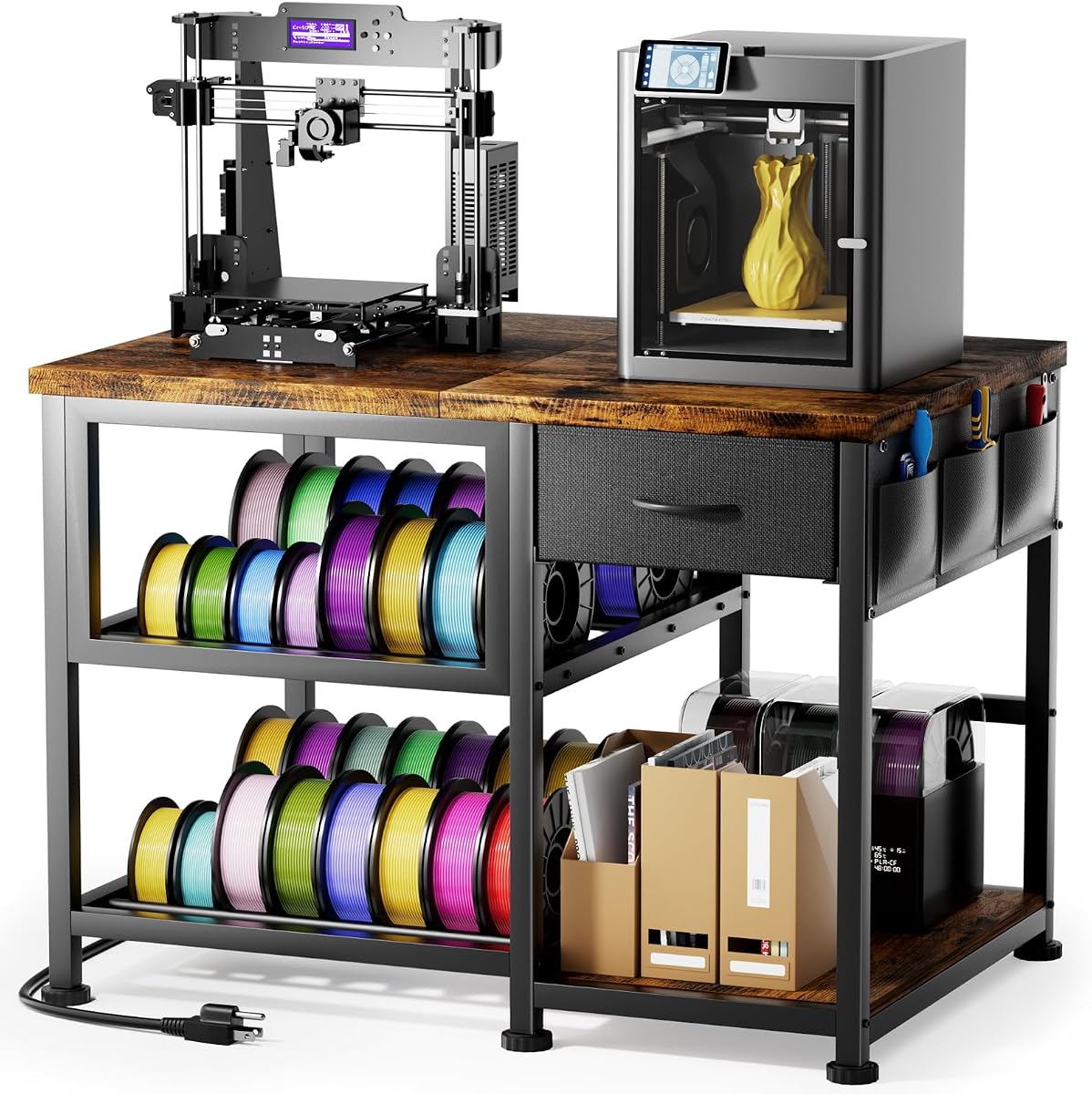


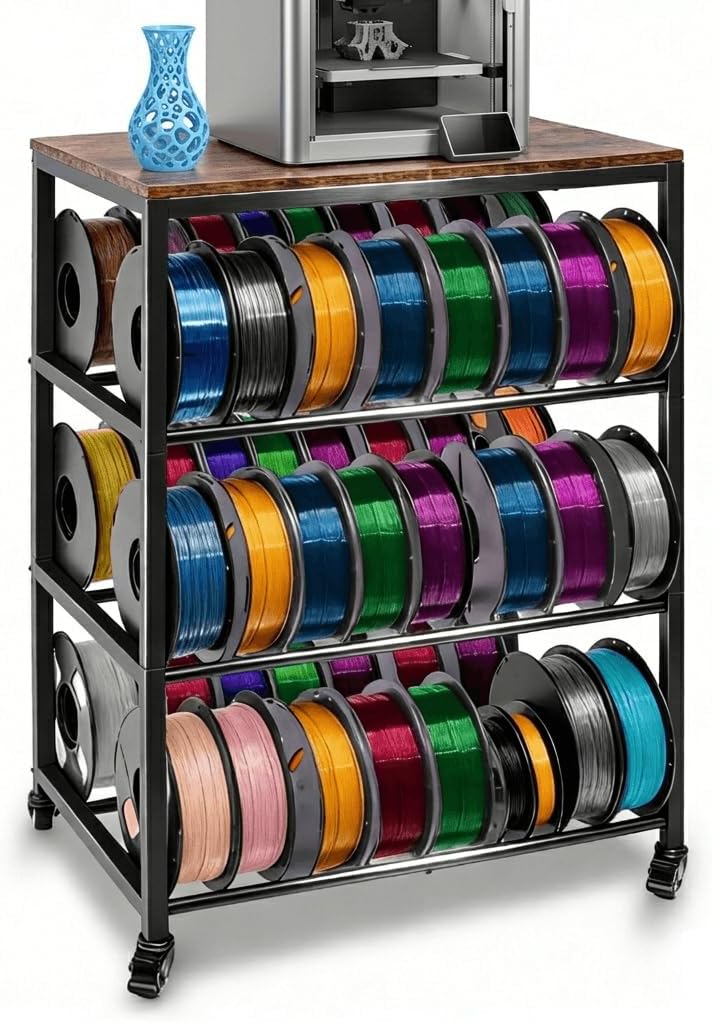
This heavy-duty table stand earns top marks for stability and organization. With a 4.3 rating, it solves common wobble issues while maximizing vertical space for spools.
We may earn a commission when you buy through this link, at no additional cost to you.
Its patented vibration absorption technology ensures smoother prints on tall or complex models. The integrated metal drawer keeps tools accessible without cluttering the work surface.
The 56-spools center is unmatched in this category. While the powder coat finish is durable, the assembly process requires patience and precise alignment of the heavy components.
Ideal for creators needing a central hub for multiple machines. If vibration control and maximum storage are your priorities, this model delivers professional-grade performance.
The frame design actively dampens mechanical vibrations to improve print quality significantly.
Open shelves organize up to 56 spools efficiently within a small floor footprint.
We may earn a commission when you buy through this link, at no additional cost to you.
Rated 4.8 by buyers, this compact stand offers incredible value. Its thick steel tubing construction ensures stability for smaller printers without breaking the budget.
We may earn a commission when you buy through this link, at no additional cost to you.
The dual-tier design holds up to 32 spools securely. Adjustable leveling feet allow perfect balance on uneven floors, preventing unwanted movement during long print jobs.
While it lacks power strips, the focused design maximizes stability for its size. The quick 20-minute assembly means you can start organizing your space almost immediately.
Perfect for hobbyists with limited space. If you need a reliable, no-frills base that just works, this budget-friendly pick is hard to beat.
A square 23.6 inch top provides ample support while saving valuable floor space.
Rotatable bottom pads protect surfaces and ensure a wobble-free setup anywhere.
We may earn a commission when you buy through this link, at no additional cost to you.
This cart stands out with its protective enclosed cabinet. A 4.6 rating reflects its ability to keep sensitive materials safe while offering full mobility for any studio.
We may earn a commission when you buy through this link, at no additional cost to you.
The solid metal frame absorbs shocks effectively. Locking wheels allow you to move the setup easily, then stabilize it perfectly for critical printing tasks.
The extra height reduces bending over for adjustments. While it costs more and takes more space, the protection against environmental factors makes it ideal for long-term use.
Recommended for professionals needing environmental control. If protecting your filaments from dust and moisture is vital, this premium cart is a top choice.
Enclosed compartments shield sensitive spools from dust and moisture effectively.
360-degree swivel casters with brakes ensure easy movement and absolute stability.
We may earn a commission when you buy through this link, at no additional cost to you.
With a 4.7 rating, this model combines style and function. The integrated power outlet simplifies cable management, making it perfect for home offices or shared workspaces.
We may earn a commission when you buy through this link, at no additional cost to you.
The blend of wood and metal offers a modern look. Side pockets provide quick access to tools, while the 3-tier structure keeps spools organized and within reach.
Users appreciate the thoughtful design that balances form and utility. However, the wood finish needs occasional maintenance to prevent wear over time in high-traffic areas.
Great for makers valuing aesthetics. If you want a centerpiece that fits decor while offering essential power solutions, this stand is an excellent middle ground.
Built-in outlets reduce cable clutter and simplify device connectivity instantly.
Wood and metal combine for an elegant look suitable for any office.
We may earn a commission when you buy through this link, at no additional cost to you.
This all-in-one hub scores well for connectivity and stability. The built-in power strip with USB ports eliminates the need for extra extension cords on your desk.
We may earn a commission when you buy through this link, at no additional cost to you.
The reinforced X-bracket design reduces wobble significantly. A spacious drawer keeps tools organized, while the universal layout fits most standard 3D printer models easily.
While the structure is robust, assembly instructions are sometimes minimal. Still, the heavy-duty steel construction ensures long-term reliability for daily heavy printing workflows.
Recommended for power users needing connectivity. If you value a clean, cable-free setup with robust support for multiple brands, this workstation stands out clearly.
Built-in strip with USB ports powers all your devices from one spot.
Steel X-brackets provide superior stability to reduce vibration during printing.
We may earn a commission when you buy through this link, at no additional cost to you.
Rated 4.2, this dual-zoned table is designed for serious multi-printer setups. Each zone has an independent closed-loop frame to maintain stability even when both machines run.
We may earn a commission when you buy through this link, at no additional cost to you.
The unique hanging mesh racks offer specialized storage for tools. With a capacity of 48+ filament coils, it keeps your workshop tidy and fully stocked for production runs.
While it supports heavy loads up to 300 lbs, the wide dimensions require ample floor space. The detailed manual helps, but first-time builders should expect a longer setup time.
Perfect for small production shops. If you run multiple printers and need dedicated zones with high storage, this model handles the demand effectively.
Separate frames ensure stability for both printers without interference.
Hanging mesh racks maximize vertical space for tools and accessories efficiently.
We may earn a commission when you buy through this link, at no additional cost to you.
This 4.1-rated model balances utility and comfort. The dual fabric drawers offer a softer touch compared to metal bins, ideal for storing tools and accessories neatly.
We may earn a commission when you buy through this link, at no additional cost to you.
The dedicated shelves hold over 50 spools securely. While the particleboard top is durable, regular cleaning helps maintain its appearance against potential wear and tear.
Assembly is straightforward with included tools. Although the drawers are stylish, they are best for lightweight items rather than heavy metal tools that might tear the fabric.
Ideal for home offices. If you prefer a softer, cleaner look and need solid spool storage, this stand offers a good compromise between style and function.
Fabric bins protect tools and add a unique aesthetic touch to the stand.
Shelves engineered for 1kg spools ensure organized and efficient storage.
We may earn a commission when you buy through this link, at no additional cost to you.
Rated 4.3, this workstation combines a wood-style top with modern power features. The built-in ports allow you to keep devices connected without messy extension cords.
We may earn a commission when you buy through this link, at no additional cost to you.
The spacious desktop accommodates large printers easily. While the drawer is convenient for small tools, its shallow depth limits bulk storage options for larger components.
The 4-tier holder keeps filament organized and visible. The sturdy metal frame ensures stability during use, making it a practical choice for various workshop environments.
Great for versatile home setups. If you want a clean look with integrated power and solid storage, this workstation provides a balanced solution.
Integrated ports provide convenient access to charge and power devices.
Wood-style desktop adds warmth and stability to any creative environment.
We may earn a commission when you buy through this link, at no additional cost to you.
This 4.5-rated stand offers great functionality in a smaller footprint. The compact design fits into tight corners while still providing essential storage for spools and tools.
We may earn a commission when you buy through this link, at no additional cost to you.
The embedded power strip simplifies connectivity. Fabric drawers keep small parts organized without taking up valuable surface space. The tube racks ensure your filaments stay accessible.
While it is not height adjustable, the stability is impressive for its size. Assembly is quick, and the included power strip is a welcome bonus for busy workspaces.
Perfect for apartments or small studios. If you need a compact, ready-to-use solution with built-in power, this organizer is a strong contender.
Compact dimensions make it easy to fit into smaller rooms easily.
Built-in strip and drawers reduce clutter and improve workflow efficiency.
We may earn a commission when you buy through this link, at no additional cost to you.
This 4.6-rated cart stands out for its massive 480-pound load capacity. The heavy-duty metal frame ensures stability, even when loaded with multiple printers and bulk filament.
We may earn a commission when you buy through this link, at no additional cost to you.
The wooden top provides a clean work surface. Four tiers of shelving offer ample room for spools, and the silent casters allow smooth movement across workshop floors.
While the top surface is durable, it may need protection from hot tools. The adjustable feet ensure a level base even on uneven ground during operation.
Ideal for workshops needing heavy loads. If you need maximum capacity and mobility without sacrificing strength, this cart delivers exceptional value and performance.
Reinforced frame supports heavy equipment reliably without flex or vibration.
Silent casters allow easy repositioning while protecting floor surfaces.
We may earn a commission when you buy through this link, at no additional cost to you.
Choosing the right table requires looking at stability, storage, and features. These factors ensure your printer runs smoothly and your workspace remains organized efficiently.
The material and frame design play a critical role in print quality. Heavy-duty metal frames often reduce vibrations better than lighter wood options.
Look for reinforced structures like X-brackets to prevent wobble during long printing sessions.
Determine how many spools you need to store simultaneously. Models vary from holding 30 to over 50 spools, which impacts overall vertical height and footprint.
Ensure shelves are adjustable to accommodate different spool weights and widths easily.
Measure your available floor space before buying. A larger footprint might be necessary for dual printers, while compact models suit smaller home offices.
Check the height to ensure comfortable working posture without excessive bending over.
Stands with built-in power strips reduce cable clutter significantly. Look for models with both AC outlets and USB ports for charging devices simultaneously.
This feature keeps your workspace cleaner and simplifies connection for your printer.
Locking wheels allow you to move heavy equipment easily when needed. Ensure the casters have strong locking mechanisms to prevent accidental shifting during printing.
Mobility is essential for cleaning or rearranging your workshop layout frequently.
Drawers keep nozzles and scrapers organized and out of the way. Metal drawers offer more durability, while fabric options add a softer aesthetic touch.
Ensure there is enough depth to store all your essential maintenance tools safely.
Some premium models offer enclosed cabinets to protect filaments from dust and moisture. This is critical for maintaining material quality over long periods.
Consider enclosed lower sections if your workspace is prone to humidity or dust.
Complex setups require more time and tools. Check if the product includes clear instructions and all necessary hardware for assembly.
Simpler designs often mean quicker setup and less frustration for individual builders.
Begin by assembling the stand on a flat, level surface. Use the adjustable feet to ensure the unit is perfectly balanced to prevent vibration.
Place your filament spools on the shelves ensuring they are not overhanging. Keep tools in designated drawers to maintain a clear work surface.
Clean the tabletop regularly with a dry cloth to remove dust. Check casters and feet occasionally to ensure smooth movement and stability.
Most models support up to 300 lbs, which fits many consumer and prosumer units. Check the specific weight capacity listed in the product specs before purchasing for heavier machines.
Yes, most designs feature adjustable spacing to fit both standard 1kg and larger 2kg spools securely. Ensure you measure your specific spool width before buying.
Ensure spools are placed in grooves or slots that allow them to rotate freely. Proper spacing and tension management help prevent accidental tangles during printing.
While many units include power outlets, not all have surge protection. Check product specifications for safety features before connecting sensitive electronics directly.
Most models are designed for single-person assembly with basic tools. However, having a second person helps with heavy metal components and stabilizing the frame during assembly.
Look for stands with adjustable leveling feet. These feet allow you to compensate for uneven floors and ensure the unit remains stable during operation.
The models reviewed offer robust solutions for stability and storage. Selecting the right one depends on your specific printer size and workshop needs.
Prioritize vibration control and spool capacity to improve print quality and workflow. A good stand protects your equipment and keeps your workspace organized efficiently.
Always verify current availability and specifications before buying to ensure the best fit for your unique setup.