
Nektar SE49
4.5Editor score
Full-size velocity-sensitive keys
DAW integration included
Compact studio-friendly design
Explore our expert guide comparing the top 49 key MIDI keyboards for music production, studio control, and live performance features.
Finding the right 49 key MIDI keyboard is essential for producers and musicians seeking a balance between portability and expressive control. These controllers offer enough keys for melodic playing without taking up excessive desk space. Whether you are composing at home or performing live, the right controller can elevate your workflow significantly.
We have evaluated ten leading models based on keybed quality, software integration, build durability, and overall value. Our comparison focuses on features that matter most to creators, such as velocity sensitivity, DAW mapping, and included production tools. This list helps you narrow down options based on your specific creative needs and studio setup.
Each pick highlights unique strengths, from budget-friendly options to premium controllers with advanced modulation capabilities. Prices and availability can change frequently, so verify current details before purchasing. Use this guide to find the perfect companion for your digital audio workstation and start creating music with confidence today.
4.5Editor score

4.7Editor score

4.4Editor score
This side-by-side comparison highlights the core specifications and unique selling points of each model. Use these details to identify which controller aligns best with your workflow requirements and budget constraints.




The Novation Launchkey 49 MK4 stands out as a top-tier controller for producers seeking deep integration with their digital audio workstation. With a 4.7 rating from users, it delivers professional-grade control over your creative process. The combination of velocity-sensitive keys and 16 FSR pads offers a versatile surface for both playing and drumming.
We may earn a commission when you buy through this link, at no additional cost to you.
Its seamless DAW integration works intuitively with major software like Ableton Live, Logic, and FL Studio, reducing setup time. The pads support polyphonic aftertouch, enabling advanced performance techniques like chord triggering and step sequencing. Scale and Chord modes help you avoid wrong notes, making it accessible for composers at any skill level.
While the feature set is impressive, it may require some time to fully master all controls and custom scripts. The price reflects its premium positioning, which might be a consideration for tighter budgets. However, the included software suite and hardware quality justify the investment for serious producers.
This controller is ideal for producers who want a unified workflow between hardware and software without constant manual mapping. Whether you are scoring music, producing beats, or performing live, the Launchkey 49 MK4 provides the control and flexibility needed to bring your ideas to life efficiently.
The controller maps directly to your software parameters for intuitive mixing and instrument control without needing manual setup every session.
Scale modes Chord modes, and arpeggiators ensure you always hit the right notes, freeing you to focus on melody and arrangement.
We may earn a commission when you buy through this link, at no additional cost to you.
The Nektar SE49 delivers exceptional value for creators who need a reliable MIDI keyboard without breaking the bank. Rated 4.5 by users, it provides full-size velocity-sensitive keys that feel natural under your fingers. This makes it an excellent starting point for beginners or a reliable backup for professionals on a budget.
We may earn a commission when you buy through this link, at no additional cost to you.
Its standout feature is the DAW integration that works out of the box with popular software, simplifying your setup process. The included Bigwig Studio DAW package adds immediate production capability, saving you from needing separate software licenses. Despite its compact build, it maintains solid construction quality for regular use.
Trade-offs include a simpler control layout with fewer knobs and faders compared to high-end models. There is no display screen, meaning some settings require manual reference to software. However, these limitations are acceptable given the low price and essential functionality it provides.
Ideal for students and hobbyists, this controller offers everything needed to start composing and recording immediately. It balances cost and performance effectively, making it one of the best value options in the 49-key market today.
Pre-mapped controls work instantly with major DAWs, allowing you to start recording without spending hours configuring settings.
Bigwig Studio DAW plus sound content means you can produce music right away without buying additional software licenses.
We may earn a commission when you buy through this link, at no additional cost to you.
The Arturia KeyLab mk3 represents a premium option for producers seeking refined control and tactile feedback. With a 4.4 rating, it features a robust 49-key bed with aftertouch for expressive performances. The design emphasizes build quality and connectivity, including modern USB-C power options.
We may earn a commission when you buy through this link, at no additional cost to you.
It comes with 12 pressure-sensitive performance pads and 9 encoders, offering deep control over synths and effects. This level of customization allows for intricate sound shaping during live performance or mixing. The included software, including Analog Lab V, adds significant value by providing thousands of ready-to-use presets.
The main drawback is the higher price, which might be steep for casual users. Its larger footprint requires dedicated desk space, which could be limiting for smaller studios. Yet, for professionals, the enhanced features and build justify the investment.
This keyboard is perfect for experienced producers who want maximum control and durability. Whether you are scoring orchestral music or electronic beats, the KeyLab mk3 delivers the performance tools needed for professional results.
Aftertouch on every key lets you modulate sound dynamically, adding emotional depth to performances without needing extra controls.
The bundled Analog Lab V provides access to a vast library of synthesized sounds, making it a standalone studio solution.
We may earn a commission when you buy through this link, at no additional cost to you.
The M-AUDIO Keystation 49 MK3 focuses on simplicity and essential features for straightforward music creation. Rated 4.5 by users, it offers velocity-sensitive keys that respond accurately to your playing dynamics. Its compact design makes it easy to fit on any desk or stage setup.
We may earn a commission when you buy through this link, at no additional cost to you.
Setup is effortless with plug-and-play USB connectivity that requires no drivers or external power. The included software suite like MPC Beats and Ableton Live Lite gives you immediate access to production tools. Pitch and modulation wheels provide basic expressive control without complicating the layout.
The main limitation is the lack of knobs and faders, which restricts real-time sound shaping. There is no aftertouch, limiting dynamic expression. However, for those who prioritize key feel and portability over advanced controls, this is a solid choice.
Best for beginners or travelers, this keyboard provides a reliable foundation for learning composition and production. It strips away complexity, allowing you to focus purely on playing and creativity without technical distractions.
With fewer distractions, you can focus on your music creation without needing to map complex controls or learn new workflows.
Included MPC Beats and Ableton Live Lite ensure you have a complete production environment right out of the box.
We may earn a commission when you buy through this link, at no additional cost to you.
The M-AUDIO Oxygen 49 MKV strikes a balance between features and affordability, making it a favorite among intermediate producers. With a 4.6 rating, it includes 49 velocity-sensitive keys and 8 assignable knobs for detailed sound control. The smart chord and scale modes help prevent mistakes during creative sessions.
We may earn a commission when you buy through this link, at no additional cost to you.
It offers 2 banks of 8 backlit drum pads for beat production and clip launching. The NKS integration allows seamless browsing of Native Instruments libraries directly from the keyboard. This connectivity enhances workflow efficiency when using compatible plugin ecosystems.
While powerful, the array of controls might be overwhelming for complete beginners. The price is higher than entry-level options but lower than premium models, making it a middle ground. Its software package ensures you have tools for various production styles.
This keyboard suits producers looking for expanded control without premium pricing. Whether you are building beats or composing arrangements, the Oxygen 49 MKV provides the flexibility needed for growing production skills.
Smart Chord and Scale modes simplify complex harmony creation, allowing you to experiment with professional sounds easily.
NKS compatibility lets you browse and control presets directly from the hardware, speeding up sound selection in your DAW.
We may earn a commission when you buy through this link, at no additional cost to you.
The Arturia KeyLab Essential mk3 offers a modern approach to MIDI control with integrated visual feedback. Rated 4.5 by users, it features a bright 2.5-inch LCD screen that provides real-time information about your settings and patches. This clarity helps you navigate sound libraries more efficiently.
We may earn a commission when you buy through this link, at no additional cost to you.
It includes Analog Lab V with 2000 presets, covering vintage and modern sounds. The RGB-backlit pads add tactile visual cues for your workflow. DAW integration scripts ensure seamless control over your chosen software environment.
While the screen and software are advantages, it has fewer physical knobs than higher-end models. The price is slightly higher than basic controllers but justified by the included software value. Beginners benefit greatly from the guided interface.
Best for producers transitioning from software-only workflows, this keyboard bridges the gap between screen and hands. The included tools ensure you can start producing high-quality tracks immediately without additional purchases.
The LCD screen displays preset details and parameter values, removing guesswork when managing complex sound settings.
Analog Lab V offers thousands of curated sounds, saving time on sound design while you focus on composition.
We may earn a commission when you buy through this link, at no additional cost to you.
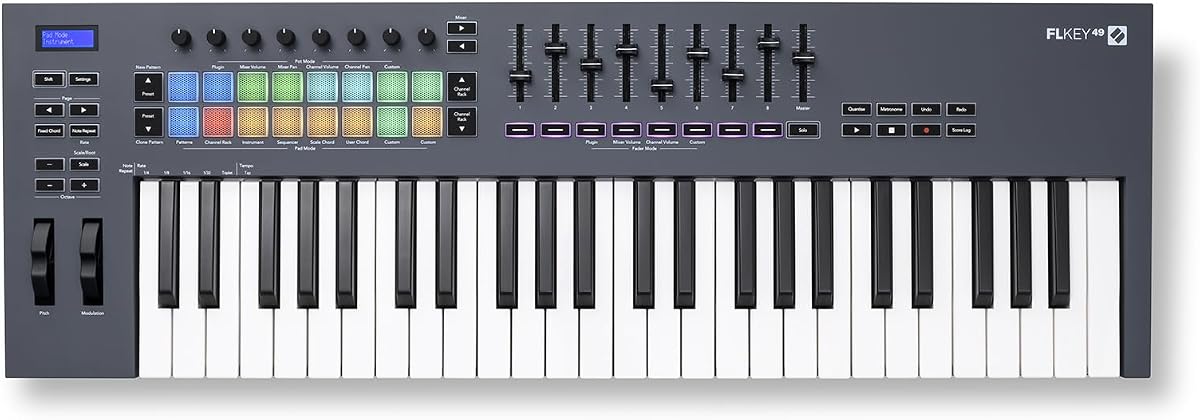
The Novation FLkey 49 is specifically designed for FL Studio users seeking hands-on control over their DAW. With a 4.6 rating, it maps automatically to FL Studio's channel rack and mixer, saving time on setup. Eight pots and nine faders let you tweak volumes and pans directly.
We may earn a commission when you buy through this link, at no additional cost to you.
Sequencer Mode turns the pads into a step sequencer, allowing you to create and modify patterns instantly. Scale and Chord modes ensure harmonic accuracy during beat-making. The keyboard supports instrument triggers like FPC and SliceX for expressive melody programming.
Its strength is highly specific, making it less ideal for users of other DAWs. The price point is moderate, offering good value for FL Studio enthusiasts. It bridges the gap between software menus and physical control effectively.
If FL Studio is your primary tool, this keyboard enhances your workflow significantly. The deep integration ensures you spend less time on setup and more time producing music.
Automatic mapping to FL Studio's mixer and rack means you can control your mix without touching the mouse.
The pads function as a dedicated step sequencer, allowing precise rhythm programming without software interaction.
We may earn a commission when you buy through this link, at no additional cost to you.
The M-AUDIO Oxygen Pro 49 delivers advanced features for producers needing extensive control and expression. Rated 4.5, it features semi-weighted keys with aftertouch for nuanced performances. The 16 RGB backlit pads offer ample room for drumming and clip launching.
We may earn a commission when you buy through this link, at no additional cost to you.
It includes a dedicated 5-pin MIDI output for connecting external hardware gear. The Smart Chord and Scale modes simplify complex arrangements. NKS integration allows direct browsing of Native Instruments libraries for quick sound selection.
The expanded features come with increased complexity and a higher price tag. The layout is denser, which may be overwhelming initially. However, for professional studios, these tools justify the investment.
Ideal for advanced producers working with multiple hardware synths, this keyboard provides robust control. The aftertouch and dedicated MIDI output make it a versatile hub for complex production setups.
Aftertouch allows dynamic volume or filter changes by pressure, adding depth to chords and leads without extra knobs.
The 5-pin MIDI out enables connection to legacy hardware synthesizers, making it a true studio centerpiece.
We may earn a commission when you buy through this link, at no additional cost to you.
The midiplus AK490 is an economical choice for those needing basic MIDI input without extra complexity. With a 4.3 rating, it offers 49 velocity-sensitive piano-style keys that capture dynamic playing. It includes pitch and modulation wheels for standard expression.
We may earn a commission when you buy through this link, at no additional cost to you.
Its lightweight build makes it easy to transport between locations. The sustain jack allows pedal control for sustained notes. This simplicity ensures it works reliably across various software setups.
The build materials are basic, and it lacks advanced features like pads or knobs. This makes it less suitable for complex production tasks. However, for basic input needs, it delivers solid performance.
Best for students or secondary setups, this keyboard fulfills essential MIDI needs. Its affordability and portability make it a practical tool for casual users.
It provides just the basics like pitch wheel and sustain, ensuring it does exactly what you need without extra cost.
The lightweight design allows easy transport, making it a convenient option for on-the-go recording sessions.
We may earn a commission when you buy through this link, at no additional cost to you.
The Generic 49-Key MIDI Keyboard serves as a basic tool for users seeking an affordable entry into music production. Rated 4.0, it features a compact ABS construction suitable for desktop setups. The simple design prioritizes functionality and space-saving.
We may earn a commission when you buy through this link, at no additional cost to you.
It connects via USB for straightforward plug-and-play operation. The black finish fits neatly into any workspace. While it lacks advanced controls, it provides fundamental MIDI input capabilities.
The construction is basic compared to branded models, and it lacks dedicated software or advanced mapping. It is best suited for very basic tasks. Despite these limitations, it remains a practical option for budget users.
Ideal for beginners on a tight budget, this keyboard offers basic functionality without financial commitment. It allows you to test your interest in production before investing in advanced equipment.
This model provides the lowest cost entry point, allowing you to explore music production without a large initial investment.
The small size ensures it fits on small desks, making it suitable for apartments and limited workspace environments.
We may earn a commission when you buy through this link, at no additional cost to you.
Selecting the right MIDI keyboard requires understanding your specific production needs and workflow requirements. Use these factors to narrow down the best model for your studio.
Keybeds range from synth-action to semi-weighted, affecting how your music feels to play. Velocity sensitivity ensures notes respond to your playing dynamics, which is crucial for expressive performances. Semi-weighted keys offer more resistance and are better for piano-style playing, while synth-action keys are lighter for rapid electronic melodies.
Always test the key response if possible, as personal preference varies significantly. Consider your primary instruments to ensure the keybed supports your playing style effectively.
Seamless integration with your digital audio workstation saves time during setup and operation. Controllers with custom scripts can map knobs and faders directly to your software's mixers and instruments. Brands like Novation and M-AUDIO often provide specific mapping for major platforms like Ableton, Logic, and FL Studio.
Check for compatibility with your preferred software before purchasing to avoid manual mapping headaches. Look for auto-mapping features that streamline your workflow immediately.
Beyond keys, faders and knobs allow tactile control over volume, panning, and effects parameters. Drum pads are essential for beat producers, while encoders help navigate plugin interfaces. Consider how many simultaneous controls you need to manage during live performance versus studio composition.
More controls offer flexibility but increase desk space requirements. Match the controller layout to the complexity of your typical production tasks.
Many controllers include DAW licenses or virtual instrument plugins that provide immediate production value. Packages often include Ableton Live Lite, MPC Beats, or specialized synthesizers. These inclusions can save significant money compared to purchasing software separately.
Review the specific software provided to ensure it aligns with your production goals. High-quality inclusions can make a budget controller significantly more valuable.
Modern controllers typically use USB for power and data, but some offer additional 5-pin MIDI outputs for external gear. USB-C is becoming standard for durability and modern connectivity. Ensure your computer has the appropriate ports or plan for adapters.
Consider power requirements; bus-powered controllers reduce cable clutter but may lack sufficient power for all features. Check if your setup supports the connection type offered by the keyboard.
A 49-key controller offers a balance between range and compactness, fitting well on desks or stages. Weight and depth determine if it is suitable for travel or stationary use. Some models are significantly thinner, allowing for better integration into small home setups.
Measure your available space before buying to ensure a comfortable fit. Portability matters if you plan to take the controller to different studios or gigs.
Plastic bodies are lighter but may feel less durable than metal chassis models. The sturdiness of knobs and faders affects longevity during frequent use. Premium materials often justify a higher price through better tactile response and resilience.
Read user reviews regarding long-term durability for the specific model. A sturdy build ensures your investment lasts through years of creative work.
Prices vary significantly, and higher cost does not always mean better for your needs. Entry-level models cover basic needs, while premium ones offer advanced features like aftertouch and extensive software. Balance your budget against the features you actually use daily.
Identify which features are essential versus nice-to-have before setting your spending limit. Sometimes a mid-range model offers the best balance of quality and cost.
Connect the keyboard to your computer via USB and install any required drivers. Ensure your DAW recognizes the device and configure MIDI input settings within your software preferences.
Clean keys regularly with a soft cloth to prevent dust buildup. Avoid exposure to direct sunlight or high humidity to protect internal electronics and plastic components.
Update firmware regularly through the manufacturer's website to maintain compatibility with new software versions. Proper storage in a padded case extends the lifespan of your equipment significantly.
A 49-key keyboard offers a great balance between portability and playing range. It is sufficient for most melody and chord tasks without overwhelming desk space. Consider your playing style and space constraints before deciding on a size.
Velocity detects how hard you press a key to control volume and brightness. Aftertouch measures pressure after the key is pressed for modulating effects like vibrato or filter cutoff.
Many controllers include free DAW licenses or virtual instruments. However, you can use them with any existing software you already own without extra purchases.
Check if the controller supports your specific DAW natively. Most major brands offer custom scripts for popular software to ensure instant mapping of controls.
USB-C offers reversible connections and higher durability. It also provides faster data transfer speeds for modern setups. Ensure your computer has the right ports or adapters available.
Most modern controllers support iOS via a USB Camera Adapter. Check compatibility details on the product page to confirm mobile device support.
We recommend the Novation Launchkey 49 MK4 as the top choice for deep DAW integration and control. For budget-conscious buyers, the Nektar SE49 offers exceptional value without compromising core functionality.
Prioritize keybed feel and control features that match your genre. A controller that fits your workflow will inspire more creativity than one with unused advanced features.
Always verify current prices and availability since these details can change frequently. Choosing the right keyboard ensures your music production setup grows with your creative needs effectively.