
DIERYA T68SE 60% Gaming Mechanical Keyboard
4.5Editor score
Tri-Mode Connectivity
Full Anti-Ghosting
Linear Red Switches
This guide compares the top 60 percent percent keyboard models for gamers and typists in October 2026 based on performance, build, and features.
The 60 percent percent keyboard offers a minimalist design that frees up desk space while retaining essential gaming and typing functions. These compact boards remove the numpad and navigation cluster to improve mouse movement and portability for modern setups.
We evaluated ten distinct models focusing on switch quality, build materials, connectivity options, and customization features. Our analysis prioritizes durability, sound profile, and software support to ensure you find a board that matches your specific workflow requirements.
Each pick highlights unique strengths like hot-swappability, gasket mounting, or RGB ecosystems. Note that availability and pricing fluctuate frequently so verify current details before purchasing to ensure you get the best value available today.
4.5Editor score

4.6Editor score
4.6Editor score
This table provides a side-by-side comparison of all ten models highlighting key specifications to help you quickly identify the best fit for your needs.





The HITIME x XVX H61 stands out as the Editor's Choice for its exceptional build quality and thoughtful features. It combines a durable aluminum chassis with sound dampening foams to deliver a premium typing experience that rivals much more expensive custom boards.
We may earn a commission when you buy through this link, at no additional cost to you.
Its hot swappable PCB supports both 3 and 5 pin switches allowing you to tailor the feel without soldering. The creamy pre lubed linear switches provide a smooth and thocky sound profile while the PBT keycaps ensure long lasting durability against shine and wear.
The main trade off is the wired only connectivity which may not suit mobile users who need Bluetooth. However for a stationary desk setup the stability and performance of a wired connection are often preferred by competitive gamers.
This board is ideal for enthusiasts who value aesthetics and sound quality without breaking the bank. We recommend it for anyone looking to upgrade from a budget board to a more refined mechanical experience.
Integrated foam and pads reduce hollow sound making every keystroke feel solid and professional.
Dynamic RGB modes allow deep customization to match your gaming setup theme perfectly.
We may earn a commission when you buy through this link, at no additional cost to you.
The DIERYA T68SE earns the Best Budget badge by offering impressive versatility at a low cost. It supports Bluetooth wireless and wired modes making it a flexible choice for users with multiple devices like laptops and phones.
We may earn a commission when you buy through this link, at no additional cost to you.
Its linear red switches deliver smooth keystrokes ideal for rapid gaming inputs without tactile bumps. The full anti ghosting ensures all keys register simultaneously so you can execute complex combos during intense gaming sessions without conflict.
Users may notice the keycaps lack the texture of premium materials but this is expected at this price point. The lighting is bright and vibrant though it lacks the depth of full RGB customization found in higher end models.
We recommend this board for students or budget conscious gamers needing a reliable workhorse. It balances cost and function better than almost any other option in the entry level category.
Switch seamlessly between devices using Bluetooth or wired connections to fit any workflow.
Linear switches provide the speed needed for competitive play without unnecessary resistance.
We may earn a commission when you buy through this link, at no additional cost to you.
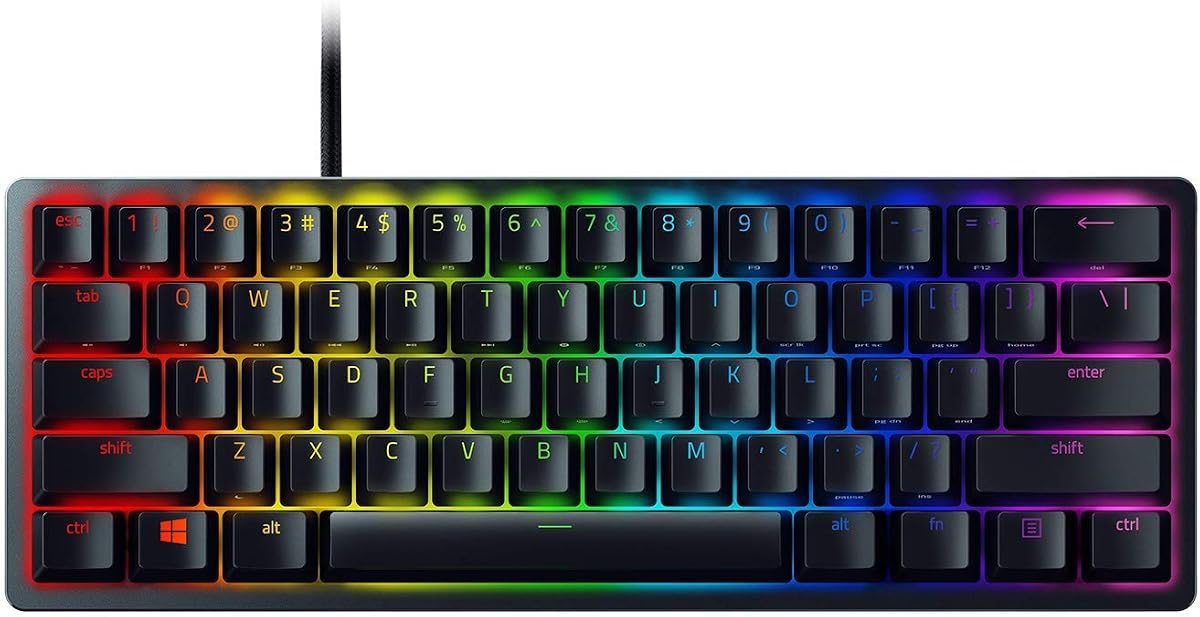
The Razer Huntsman Mini delivers flagship performance with optical switches that register inputs at the speed of light. This technology reduces actuation distance significantly allowing for faster reactions in fast paced competitive games.
We may earn a commission when you buy through this link, at no additional cost to you.
It features an aluminum frame for structural integrity and oil resistant doubleshot PBT keycaps that stay textured over time. The Razer Chroma ecosystem integrates with games and other hardware to create an immersive lighting environment.
The main downside is the requirement for software to unlock full macro and lighting capabilities. Additionally the renewed status may vary so checking the condition upon arrival is wise before committing.
This model is perfect for competitive gamers who demand every millisecond advantage. The combination of optical tech and build quality justifies the premium price for serious users.
Light based actuation eliminates contact bounce for instant and accurate input registration.
Sync lights and effects with games for a truly immersive visual gaming experience.
We may earn a commission when you buy through this link, at no additional cost to you.
The Redragon K617 offers an accessible entry into hot swappable customization without breaking the bank. It features an upgraded socket that accepts almost any 3 or 5 pin switch enabling you to customize the feel easily.
We may earn a commission when you buy through this link, at no additional cost to you.
Stock linear switches are smooth and quiet making it suitable for shared spaces or office environments. The vibrant RGB modes provide an esports vibe with adjustable brightness and flow speed to match your mood.
While it lacks wireless capabilities the stable wired connection ensures zero latency for gaming. The white and grey colorway also offers a refreshing alternative to the standard black boards dominating the market.
We recommend this to hobbyists wanting to learn about switches without investing in a full custom build. The software support adds depth for those who want to program macros for specific games.
No soldering required allows anyone to experiment with different switch types freely.
Compact 60 percent layout frees up room for wider mouse movements and accuracy.
We may earn a commission when you buy through this link, at no additional cost to you.
The RK ROYAL KLUDGE R65 stands out with a metal volume knob and gasket mount that provide a premium feel. This design reduces noise and vibration while allowing keycaps to flex slightly for a softer typing experience.
We may earn a commission when you buy through this link, at no additional cost to you.
It includes QMK/VIA support which allows deep customization of key mapping without relying on proprietary software. The cream switches are pre lubed to ensure a smooth and thocky sound that enthusiasts appreciate.
The main limitation is the lack of wireless options which limits mobility for some users. However the desk based functionality is robust enough to satisfy most power users who prioritize performance over portability.
We recommend this for advanced users who want custom features like VIA support at a reasonable price. It bridges the gap between mass market and custom builds effectively.
The dedicated metal knob allows instant audio adjustments without leaving your game.
Gasket mount design absorbs shock making long typing sessions more comfortable.
We may earn a commission when you buy through this link, at no additional cost to you.
The TMKB 60% offers a sleek and minimalist design with a clean white finish that fits modern aesthetics. Its linear switches have a light 45g actuation force which is ideal for rapid typing and gaming without fatigue.
We may earn a commission when you buy through this link, at no additional cost to you.
The detachable USB-C cable makes it easy to store or transport in a bag for travel. It features 15 lighting modes that add color to your desk without overwhelming the simple layout.
Users should expect a straightforward plug and play experience with few advanced software features. The anti ghosting ensures reliable performance during intense gaming sessions where every keypress counts.
We recommend this for users who prefer a simple clean setup without complex software needs. It is a reliable choice for general use and light gaming tasks.
Low actuation force reduces finger strain during long work or play sessions.
Detachable cable allows easy packing for LAN parties or office travel.
We may earn a commission when you buy through this link, at no additional cost to you.
This mechanical keyboard features blue switches that deliver a satisfying clicky sound and tactile bump with every press. It is a great choice for typists who want clear feedback to confirm their keystrokes accurately.
We may earn a commission when you buy through this link, at no additional cost to you.
The RGB backlight effects provide color variation to suit different moods and environments. The keycaps are designed with a stair up layout to reduce hand fatigue over long periods of use.
The loud click can be disruptive in quiet environments so users should be mindful of their surroundings. However for personal home setups the feedback provides a very engaging typing experience.
We recommend this for typists and coders who enjoy tactile feedback. It is a solid option for those who prioritize touch over silence.
Physical bump confirms keypress helping reduce errors during fast typing.
Ergonomic key heights match natural finger angles to reduce strain.
We may earn a commission when you buy through this link, at no additional cost to you.
The Linear optical version of the Razer Huntsman Mini focuses on speed with an actuation distance of just 1mm. This allows for incredibly fast inputs that give competitive players a distinct advantage in movement.
We may earn a commission when you buy through this link, at no additional cost to you.
It includes the Snap Tap feature which prioritizes the latest input between assigned keys for quicker movement toggling. The PBT keycaps resist oil and shine ensuring the keyboard looks new for years.
Users need to enable Snap Tap in software which may not be obvious to newcomers. However the performance benefits once configured are significant for competitive gaming scenarios.
We recommend this for esports athletes who need every speed advantage possible. It is a top tier choice for serious competitive gaming.
Shorter actuation distance means keys register faster than standard mechanical switches.
Snap Tap allows instant direction changes without complex key combinations.
We may earn a commission when you buy through this link, at no additional cost to you.
The RK61 is designed to work seamlessly across Windows and Mac systems making it versatile for mixed OS environments. It features a hot swappable PCB allowing you to change switches to match your preference easily.
We may earn a commission when you buy through this link, at no additional cost to you.
The pre lubed red switches provide a smooth quiet feel that works well for both gaming and typing. It includes QMK and VIA support which adds a layer of customization for advanced users.
Users may find the initial software setup complex but the long term benefits are significant. The anti ghosting ensures that every keypress registers accurately even during heavy usage.
We recommend this for Mac and Windows users who need a reliable compact board. It balances features and price exceptionally well for the average user.
Full compatibility with Mac operating systems for seamless cross platform use.
Pre lubed switches reduce friction for a buttery typing experience.
We may earn a commission when you buy through this link, at no additional cost to you.
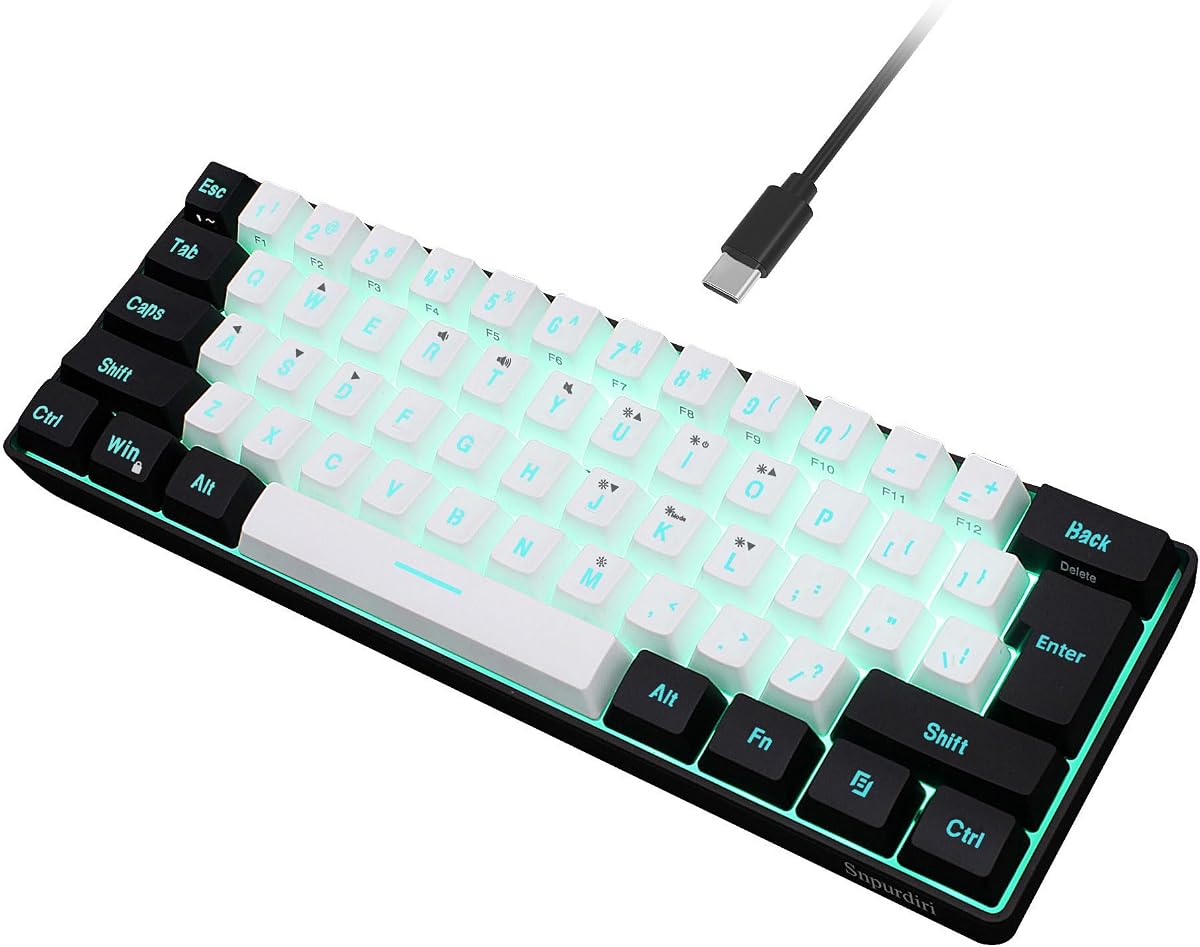
The Snpurdiri 60% offers an entry level option with a mechanical feel at a very accessible price. It uses imitation mechanical technology to provide a tactile response without the cost of true switches.
We may earn a commission when you buy through this link, at no additional cost to you.
The two-color injection molding ensures characters stay visible for years while the RGB effects add a cool vibe to your desk. The ergonomic design keeps your hands comfortable even after long sessions.
While it lacks the speed of true mechanical switches it is quiet enough for shared spaces. It is an excellent budget choice for those transitioning from a standard keyboard.
We recommend this for casual gamers or students on a tight budget. It provides a reliable experience without financial strain.
Lowest price point makes it accessible for everyone regardless of budget.
Injection molded characters prevent fading ensuring clear visibility.
We may earn a commission when you buy through this link, at no additional cost to you.
Selecting the right 60 percent keyboard requires understanding key factors that impact performance comfort and longevity for your specific needs.
Switches define the feel and sound of your board. Linear switches are smooth and quiet ideal for gaming. Tactile switches offer a bump for typing feedback. Clicky switches are loud but provide strong confirmation.
Choose a switch type that matches your workflow to avoid fatigue and frustration.
Materials like aluminum or ABS plastic affect durability and weight. Heavier boards stay stable during intense play. Solid construction also enhances the sound profile making typing feel premium.
Prioritize sturdy materials if you plan to use the board daily over years.
Wired boards ensure zero latency which is critical for competitive gaming. Wireless options offer flexibility but may introduce lag or require charging. Decide if mobility is a priority for your setup.
Select connectivity that aligns with your performance and mobility needs.
Hot swappable PCBs let you change switches without soldering. Software support like QMK or VIA allows deep key mapping. These features futureproof your board for evolving preferences.
Look for hot swap and programming support if you value flexibility.
LED backlights improve visibility in low light. RGB offers customization to match themes. Ensure brightness is adjustable to avoid eye strain during night sessions.
Choose lighting levels that suit your environment and aesthetic preferences.
Keycap profiles and kickstands affect hand angle. Lower profiles reduce fatigue while tilt improves reach. A board that fits your hand prevents strain over time.
Test ergonomics if possible to ensure long term comfort.
Robust software enables macros and remapping. Simple setups avoid unnecessary bloat. Ensure the software is stable and easy to update.
Verify software compatibility before buying to avoid driver issues.
Budget boards offer basics while premium boards add materials and features. Determine your ceiling and compare value based on specs. Avoid overpaying for features you will not use.
Balance your budget with essential features to get the best value.
Start by connecting the keyboard via USB or Bluetooth and allowing your system to install drivers. Ensure all keys register correctly before beginning your tasks.
Clean your board regularly using compressed air to remove dust and a soft cloth to wipe keycaps. Avoid harsh chemicals that could damage coatings or electronics.
For best performance update firmware via official software if available. This ensures stability and access to the latest features and bug fixes.
A 60 percent layout removes the numpad and navigation keys to save space. It typically includes 61 to 68 keys. You access missing keys via function combinations.
Yes it is excellent for gaming because it frees up mouse space. The compact layout reduces hand travel. Many pro gamers prefer it for FPS titles.
You typically use the Fn key combined with other keys to simulate arrow keys. Check your manual for the specific layout. This saves physical space on the board.
Mechanical switches offer better durability and tactile feedback. They are faster for gaming and typing. Membrane is quieter but wears out faster.
Most modern boards support Mac systems natively. Some require remapping keys for Mac specific functions. Check product specs for Mac compatibility before buying.
Most do not include a wrist rest in the box. You can buy one separately for added comfort. Ensure it fits your desk dimensions properly.
We highlighted top picks like the HITIME x XVX H61 for build quality and the DIERYA T68SE for budget value. These boards offer distinct strengths for different users.
Prioritize factors like switch type and connectivity based on your daily tasks. A balanced choice ensures you get features that matter most to your workflow.
Remember to check current pricing and availability as stock varies frequently. Making an informed choice ensures a satisfying typing and gaming experience.