
HP Smart Tank 5003
4.1Editor score
Mess-free refill
Cartridge-free design
High-volume printing
This guide compares the best AI printers for home and office use, evaluating smart features, print quality, and connectivity to help you choose the right model.
Artificial intelligence is transforming how we interact with printers, making them smarter and more efficient. These devices now offer automated layout optimization and predictive maintenance to enhance productivity.
We compared ten top models based on their AI capabilities, print speed, and ease of use. Each product was evaluated on its ability to streamline workflows and deliver consistent high-quality output.
Every pick highlights specific strengths like wireless connectivity and smart scanning. Please note that availability and features may change, so verify details before purchasing your next printer.
4.1Editor score

3.9Editor score

4.2Editor score
This side-by-side comparison highlights the key specifications and unique features of each AI printer to help you make an informed decision for your specific needs.




The HP OfficeJet Pro 8125 stands out as a reliable all-in-one printer with AI capabilities. It earned a 3.9 rating for its balanced performance and home office features.
We may earn a commission when you buy through this link, at no additional cost to you.
Its standout feature is the HP AI tool that optimizes print formatting. This removes unwanted content from web pages and emails to reduce wasted paper and improve layout precision.
While the 20 ppm black print speed is solid, users should note the cartridge restrictions. Firmware updates may block non-HP chips, which could affect long-term costs for some.
This printer is ideal for small teams needing professional color documents. Its security features and sustainable design make it a strong recommendation for modern workspaces.
HP AI automatically adjusts web and email prints to ensure clean layouts. This minimizes waste and ensures professional-looking outputs without manual editing.
The dual-band Wi-Fi system automatically resolves connection issues. This keeps your printing workflow smooth and minimizes downtime during busy work sessions.
We may earn a commission when you buy through this link, at no additional cost to you.
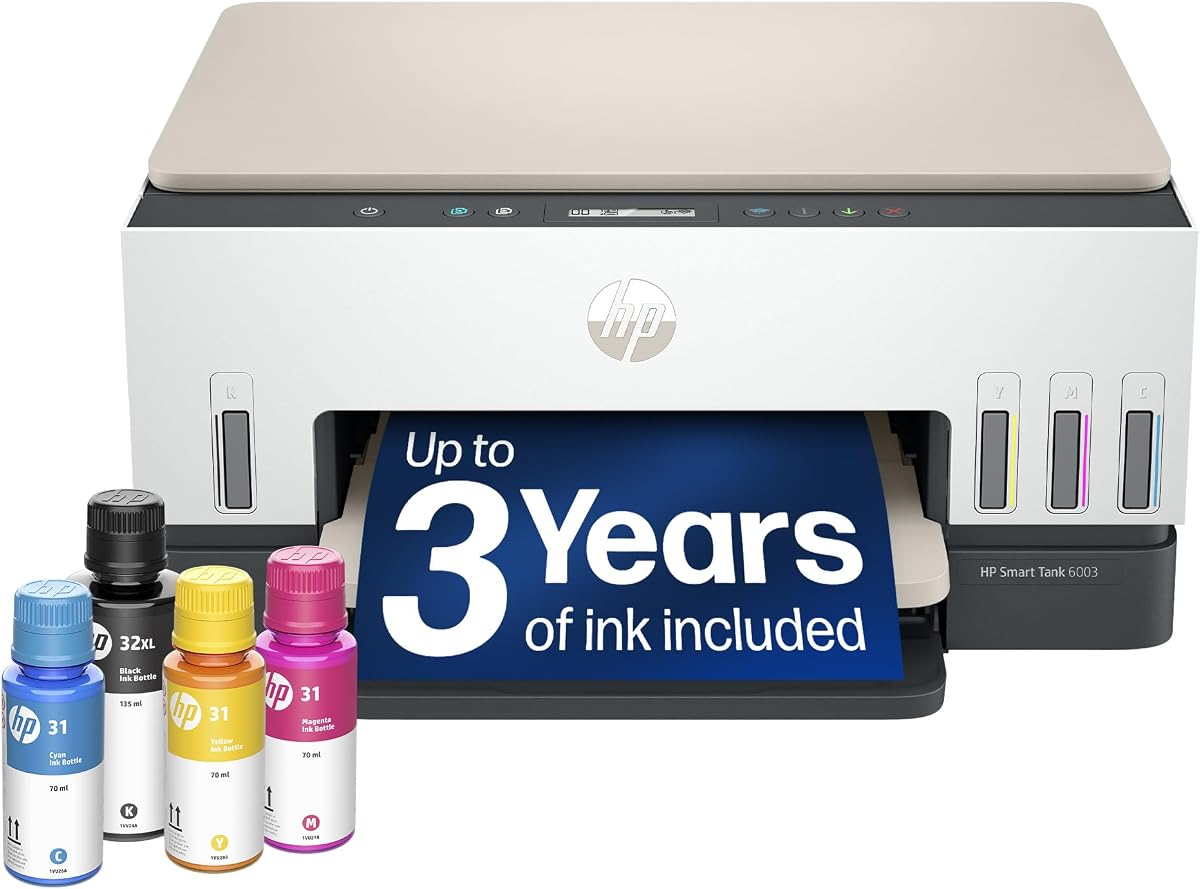
The HP Smart Tank 5003 offers incredible value with up to three years of ink included. Its 4.1 rating reflects strong satisfaction with its low maintenance and high capacity.
We may earn a commission when you buy through this link, at no additional cost to you.
Key strengths include the mess-free refill system and cartridge-free design. Users simply plug in ink bottles, eliminating the hassle of traditional small cartridges.
The main trade-off is slower speeds compared to laser models. However, the cost savings per page make it a worthy choice for high-volume home printing needs.
Choose this printer if you want to minimize ongoing costs. It is perfect for families or students who print frequently without needing enterprise-grade speed.
With up to three years of ink in the box, you can print up to 6000 pages. This significantly reduces the total cost of ownership for home users.
The system is designed to prevent spills and messes. Simply insert the bottle and let it drain automatically for a clean refill experience.
We may earn a commission when you buy through this link, at no additional cost to you.
The Liene PixCut S1 is a specialized device combining printing and cutting with advanced AI tools. Its 4.2 rating highlights the quality of its thermal dye-sublimation technology.
We may earn a commission when you buy through this link, at no additional cost to you.
Standout features include AI image extraction and precise auto-cutting. You can upload photos, and the device removes backgrounds and cuts stickers perfectly in minutes.
While ideal for crafters, it may be too niche for general document printing. The waterproof and scratch-resistant output ensures your creations last longer.
This printer is best for hobbyists and small businesses creating custom labels. Its no-subscription model allows for endless creativity without hidden software costs.
Upload a photo and let the AI automatically remove the background. This simplifies the design process for creating custom stickers and labels.
The four-layer thermal dye-sublimation process laminates your prints. This makes stickers waterproof and scratch-resistant for long-lasting use.
We may earn a commission when you buy through this link, at no additional cost to you.
The HP Envy 6155 is designed for home users prioritizing quality and simplicity. With a 4.2 rating, it delivers excellent photo printing and smart AI formatting tools.
We may earn a commission when you buy through this link, at no additional cost to you.
True-to-screen technology ensures documents look vibrant and accurate. The 2.4-inch touchscreen makes navigating menus and settings straightforward for all users.
Its compact design fits well in small spaces, though it prints slower than office models. The 60 percent recycled plastic content aligns with eco-friendly values.
This is a great choice for families printing homework and photos. The Instant Ink trial helps manage costs while you explore its full capabilities.
HP ensures colors match what you see on your display. This is essential for school projects and personal photo printing at home.
The large touchscreen simplifies operations like scanning and copying. Even non-tech-savvy users can navigate the menu with ease.
We may earn a commission when you buy through this link, at no additional cost to you.
The Bambu Lab P2S Combo is a high-performance 3D printer with AI-driven features. Its 4.7 rating reflects its ability to deliver professional results quickly.
We may earn a commission when you buy through this link, at no additional cost to you.
AI failure detection and automatic calibration ensure high success rates. The adaptive airflow system keeps prints crisp while maintaining chamber temperature for engineering materials.
While powerful, it requires more setup than a standard office printer. However, the speed and multi-color capabilities justify the investment for enthusiasts.
Ideal for makers and engineers needing precise 3D models. The ability to print multiple colors seamlessly adds significant creative value.
The 3D printer reaches speeds up to 600 mm/s without losing accuracy. This means you can create complex parts in a fraction of the time.
The AMS 2 Pro allows for smooth color switching. This enables detailed and vibrant 3D prints without manual intervention.
We may earn a commission when you buy through this link, at no additional cost to you.
The HP OfficeJet Pro 9135 is built for demanding office environments. It earned a 4.0 rating for its speed, security features, and reliable AI-assisted printing.
We may earn a commission when you buy through this link, at no additional cost to you.
With 25 ppm black speed and fax capabilities, it handles high volumes efficiently. The HP Wolf Pro Security ensures sensitive business data remains protected from threats.
It is larger than home models, so ensure you have desk space. The dual 250-sheet trays reduce refills and keep workflows uninterrupted.
This printer is perfect for small to medium businesses. It balances speed with robust security to meet professional requirements.
HP Wolf Pro Security protects your network from cyber threats. This is vital for offices handling confidential documents and sensitive data.
Fast printing and single-pass duplex scanning save valuable time. This efficiency supports busy teams needing quick turnaround on reports.
We may earn a commission when you buy through this link, at no additional cost to you.
The HP Smart Tank 7603 supports high-volume home office tasks with ease. It holds up to 8000 color pages in the box, minimizing frequent maintenance needs.
We may earn a commission when you buy through this link, at no additional cost to you.
Its magic touch control panel simplifies navigation, while fax capabilities add utility for older document workflows. The cartridge-free system saves money over time.
Consider the physical size before purchasing to ensure fit. The mess-free refill system ensures that adding ink remains clean and simple.
Choose this for heavy printing requirements without cartridge costs. It supports professional needs at a home office budget.
Up to 8000 color pages reduce the need for refills. This makes it a cost-effective solution for small businesses or busy families.
The touch panel offers intuitive controls for all functions. This reduces the learning curve for new users in a home office.
We may earn a commission when you buy through this link, at no additional cost to you.
The HP OfficeJet Pro 8139 offers a full year of Instant Ink trial, a unique benefit. Its 4.0 rating reflects reliable performance for home office documents and emails.
We may earn a commission when you buy through this link, at no additional cost to you.
Features include AI formatting tools and HP Wolf security to protect data. The ADF and duplex printing support efficient scanning and multi-page tasks.
The trial is helpful, but users must manage the subscription afterward. This ensures continuous ink delivery without running out unexpectedly.
This model fits well for small businesses needing consistent supplies. The security features add peace of mind for remote work setups.
With a one-year trial, you save significantly on ink costs initially. This gives you ample time to evaluate your print usage habits.
Optimize print layouts automatically to avoid wasted paper. This feature helps keep your printed documents looking clean and professional.
We may earn a commission when you buy through this link, at no additional cost to you.
The HP Smart Tank 7603 provides versatile printing, scanning, copying, and faxing. Its 4.0 rating highlights consistent performance for home offices needing reliability.
We may earn a commission when you buy through this link, at no additional cost to you.
With up to 8000 color pages in the box, this model minimizes interruptions. The mess-free refill system is easy to use and prevents spills.
It is larger than standard models, so consider your desk space. The magic touch control panel makes navigation intuitive for all users.
Select this for heavy-duty printing without high costs. It balances utility with low maintenance for busy households.
Ideal for tasks requiring thousands of pages without refilling. The large capacity ensures productivity is not interrupted by maintenance.
The magic touch panel simplifies complex tasks like copying. This reduces errors and speeds up the printing process for everyone.
We may earn a commission when you buy through this link, at no additional cost to you.
The HP Smart Tank 6003 delivers value with up to three years of ink included. Its 3.8 rating shows solid performance for general home printing needs.
We may earn a commission when you buy through this link, at no additional cost to you.
It supports borderless prints and wireless connectivity for convenience. The refill system is simple, ensuring you can replenish ink without hassle.
It lacks fax capability and is slower than office models. However, the low ongoing costs make it a smart choice for families.
This printer is best for budget-conscious users. It provides reliable quality without expensive cartridge replacements.
Create photo-quality prints without borders using this model. This feature enhances the look of personal photos and flyers.
Print directly from smartphones or tablets without cables. This flexibility allows printing from anywhere within your network.
We may earn a commission when you buy through this link, at no additional cost to you.
Selecting the right AI printer involves evaluating specific features that match your usage patterns and budget.
Modern printers use AI for layout optimization, predictive maintenance, and automated scanning. Look for models that offer specific tools like automatic background removal or formatting adjustments to reduce manual work.
Prioritize devices with proven AI features if you print frequently from web or email sources.
Evaluate the cost of ink and whether the printer supports refillable tanks or subscription plans. Cartridge-free models often save money over time but require larger upfront investments.
Calculate the total cost of ownership rather than just the initial purchase price.
Print speed is measured in pages per minute. Higher speeds are critical for offices with high demand, while home users may prioritize quality over speed.
Choose a speed that matches your daily volume to avoid delays.
Wi-Fi connectivity allows for wireless printing from multiple devices. Dual-band support ensures a stable connection even in areas with network congestion.
Ensure the printer supports your preferred mobile app for easy remote printing.
Office printers should include advanced security like Wolf Pro Security to protect sensitive data. Home printers may offer basic encryption but should still secure network access.
Look for models with regular firmware updates to patch vulnerabilities.
Many printers combine printing, scanning, copying, and faxing. Determine if you need an Automatic Document Feeder (ADF) for scanning multi-page documents efficiently.
Choose an all-in-one unit if you need to handle multiple document tasks.
Desktop models fit on desks while tower models require more space. Consider the footprint and whether the unit fits your designated area.
Measure your workspace before purchasing to ensure proper fit.
Eco-friendly models use recycled plastics and energy-efficient modes. Some brands offer recycling programs for old cartridges.
Consider environmental impact if sustainability is a priority for your business.
Start by installing the printer driver and connecting it to your Wi-Fi network. Most modern printers guide you through setup via an on-screen menu or mobile app.
Regularly clean the paper path and print heads to maintain quality. Check for updates in the manufacturer's app to ensure AI features function correctly.
Use the correct paper type to avoid jams. Store paper in a dry place to prevent curling and ensure smooth feeding into the machine.
AI helps optimize layouts, remove unwanted elements, and predict maintenance needs. This reduces wasted paper and downtime, ensuring your device runs smoothly with less manual intervention.
Not necessarily. While some high-end models cost more, the time saved and reduced material waste often offset the initial investment over the long term.
Most basic AI features work without subscriptions. However, services like Instant Ink are optional and can be cancelled anytime if you prefer purchasing ink normally.
You can still achieve similar results using desktop software to edit documents. However, built-in AI simplifies the process by handling tasks directly on the device.
Yes, many models offer high-resolution outputs and color correction tools. For best results, use the specific photo paper recommended by the manufacturer.
It is safer to use secure private networks. Always enable security features like firewalls and ensure the device firmware is updated regularly.
Check for updates monthly or when prompted by the app. Regular updates provide the latest security patches and improvements to AI features.
Many printers are designed to work only with original chips. Using non-original cartridges may void warranties or block printing due to firmware checks.
We reviewed ten diverse models ranging from home office all-in-ones to specialized sticker makers. The HP OfficeJet Pro 8125 offers the best balance for general users, while the Liene PixCut S1 leads in niche creative tasks.
When choosing, prioritize AI features that match your specific workflow. Whether you need high-speed document handling or creative design tools, there is a model to fit.
Always check current availability and specific requirements before purchasing. Technology evolves quickly, so verifying the latest specs ensures you get the most reliable experience.