
Redragon BM4195 AI Wireless Optical Computer Office Mouse
3.9Editor score
AI voice typing available
Triple mode connectivity
Type-C fast charging
This guide compares the top AI Smart Wireless Mouse options for productivity featuring voice typing translation and smart features to help you choose the right
The modern workspace demands tools that adapt to your workflow rather than the other way around. AI Smart Wireless Mouse models are emerging as powerful assistants that combine traditional pointing with voice commands and translation capabilities.
We evaluated ten leading models based on connectivity options voice accuracy battery life and overall usability. Our analysis focuses on how well these devices integrate with your existing computer systems and daily tasks.
Each pick highlights specific strengths like silent operation multi-device switching or advanced AI tools. Please note that product availability and details may change so verify current specifications before purchasing.
3.9Editor score

4.1Editor score

5.0Editor score
The following table provides a side-by-side view of key specifications across all ten models. Use this to quickly identify which device matches your specific needs for connectivity battery or features.


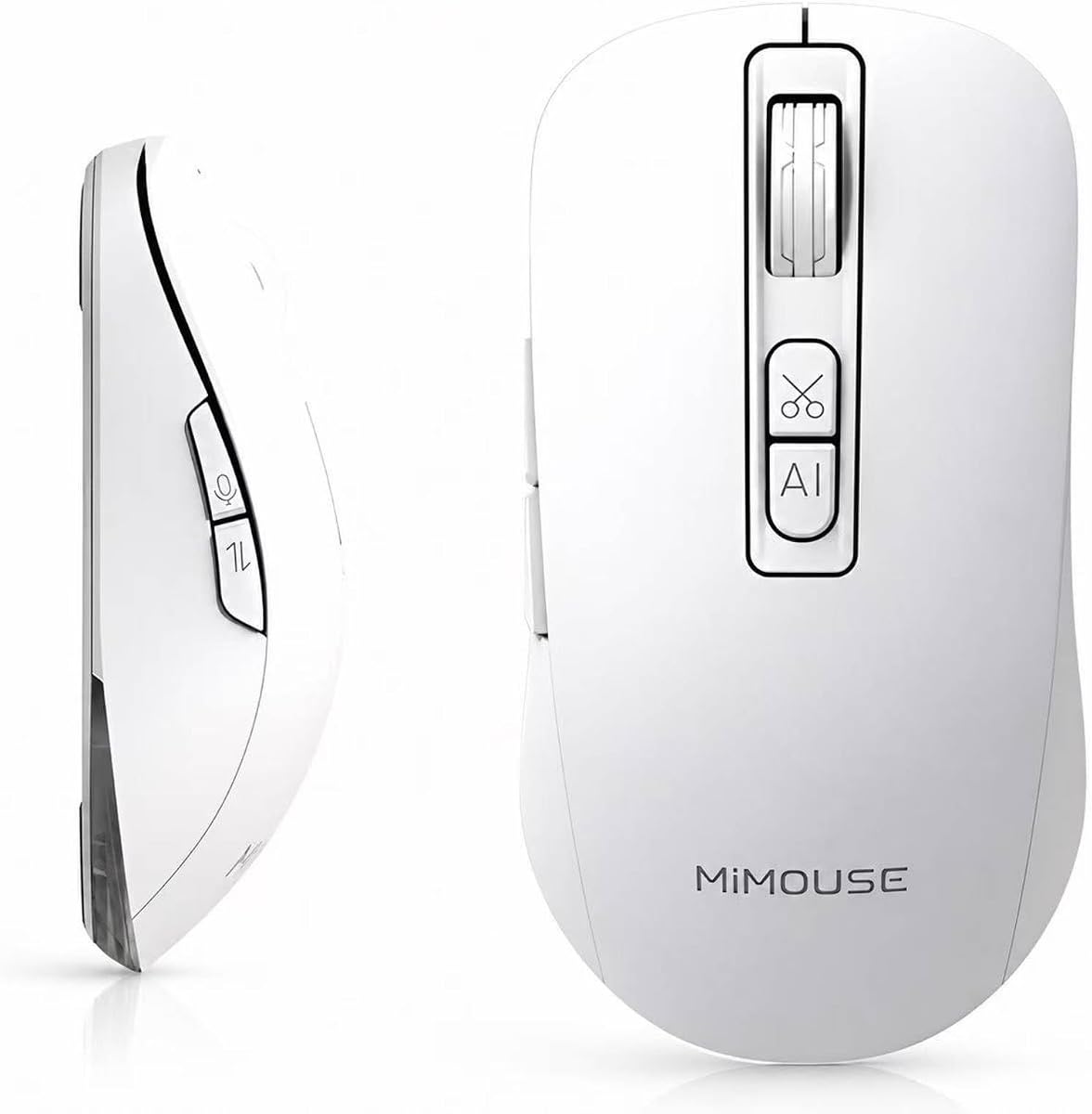


This model stands out as a top performer in the AI Smart Wireless Mouse category. With a rating of 4.1 stars it balances advanced features with practical usability for everyday tasks.
We may earn a commission when you buy through this link, at no additional cost to you.
The standout feature is its ability to dictate text with high accuracy. You can speak at speeds up to 400 words per minute and have the device convert your speech into written content instantly.
While the software offers robust tools like summarization and translation some users may find the initial configuration requires patience. The local processing ensures your data remains private but adds steps to setup.
Ideal for professionals who handle multilingual communication or heavy document creation this mouse offers a compelling upgrade from standard peripherals. It streamlines workflows significantly once configured properly.
The device recognizes speech with high precision across multiple languages including English Chinese and Spanish.
All voice and text data is processed locally on your device rather than stored in the cloud.
We may earn a commission when you buy through this link, at no additional cost to you.
For those seeking an entry point into smart mice this model offers essential AI features without a high cost. It provides a practical blend of connectivity and voice control capabilities.
We may earn a commission when you buy through this link, at no additional cost to you.
The ability to toggle between 2.4G and Bluetooth modes makes it versatile for users with multiple computers. The 500mAh battery ensures you do not need to swap batteries frequently.
The voice typing functionality requires downloading specific software to activate which may deter users wanting plug-and-play simplicity. However the performance is solid for basic tasks once set up.
This device is perfect for students or casual users who want to try voice input without investing heavily. It delivers reliable wireless performance and decent battery life for daily use.
Users can seamlessly switch between desktop tablet and laptop connections using the mode button.
The Type-C port allows for fast charging using standard cables found with most modern electronics.
We may earn a commission when you buy through this link, at no additional cost to you.
This unique device redefines what a mouse can be by integrating presentation tools and voice recording. It is designed for professionals who frequently present or travel for business meetings.
We may earn a commission when you buy through this link, at no additional cost to you.
The magnetic detachable design allows you to use it as a full mouse or detach it to function as a presenter. This versatility reduces the number of gadgets you need to carry.
Battery life is exceptional at up to 20 days which means you rarely need to worry about charging during a work week. The lightweight design ensures comfort during extended carrying periods.
If you need a comprehensive tool for meetings and travel this model justifies its cost with functionality. It combines audio recording transcription and presentation control into one sleek package.
Walk around freely while controlling slides and highlighting points without being tied to a podium.
Double tap to record meetings and convert them to text automatically for future reference.
We may earn a commission when you buy through this link, at no additional cost to you.
This model places a strong emphasis on language translation and privacy. It supports over 200 languages making it suitable for global communication needs and multilingual environments.
We may earn a commission when you buy through this link, at no additional cost to you.
The battery display screen offers a unique visual indicator of remaining power so you can plan charging cycles effectively. Combined with local AI processing it ensures your data stays secure.
Setting up the specific application is required to unlock the full voice capabilities which might be a hurdle for some users. Once active the voice typing and translation work efficiently.
It is an excellent choice for writers or students who need to handle multiple languages. The silent design also makes it appropriate for shared office spaces where noise is a concern.
Translate spoken words instantly across 200 plus languages with near-zero latency.
An LED display on the mouse shows remaining battery life at a glance.
We may earn a commission when you buy through this link, at no additional cost to you.
This variant introduces RGB lighting to the smart mouse category which adds a visual appeal for users who prefer a modern aesthetic. It retains the core voice typing and translation features.
We may earn a commission when you buy through this link, at no additional cost to you.
The ergonomic design ensures comfort during long sessions while the silent clicks maintain a quiet environment. Battery life is supported by Type-C fast charging so downtime is minimized.
Users should be aware that the voice features depend on the software being installed and configured correctly. The visual design is distinct but might not match minimalist office setups.
It is a good option for those who want a stylish device without compromising on productivity tools. The voice capabilities are robust enough for daily note-taking and content creation.
RGB lighting options allow you to customize the look of your workspace setup.
Ergonomic shape and silent switches reduce strain and noise during extended use.
We may earn a commission when you buy through this link, at no additional cost to you.
Focused on comfort and quiet operation this model is designed for office environments where noise and strain are factors. It offers a practical implementation of voice typing features.
We may earn a commission when you buy through this link, at no additional cost to you.
The ergonomic shape helps reduce hand fatigue during long workdays. The quiet click mechanism ensures that typing and clicking do not disturb colleagues in shared spaces.
While it supports voice typing the feature set is streamlined to focus on essential productivity tasks. The rechargeable battery with fast charging is a convenient addition for continuous use.
If you need a reliable mouse that works well for general office tasks without flashy extras this is a strong candidate. It balances comfort with basic AI voice input effectively.
The shape is designed to fit naturally in the hand to reduce strain over time.
Silent clicks allow for discreet use in libraries or quiet office zones.
We may earn a commission when you buy through this link, at no additional cost to you.
This model represents a more traditional approach with a focus on reliability and battery endurance. It is known for its consistent performance and comfortable design for long use.
We may earn a commission when you buy through this link, at no additional cost to you.
The battery life is exceptionally long which reduces the need for frequent charging or battery swaps. It connects via Bluetooth or a Logi Bolt receiver for stable performance across devices.
While it lacks the advanced voice typing of other models it serves well for users who prioritize stability over complex features. The build quality is solid and fits standard office workflows.
For users who prefer a proven brand and do not require speech input this mouse offers peace of mind. It is a dependable choice for general productivity and browsing.
Enjoy months of usage on a single battery set depending on your usage habits.
Dual connectivity options allow flexible pairing with various computers and tablets.
We may earn a commission when you buy through this link, at no additional cost to you.
This device is tailored for meeting notes and transcription tasks. It includes tools to summarize audio and convert spoken words into organized text for future reference.
We may earn a commission when you buy through this link, at no additional cost to you.
The multi-device connectivity allows you to switch between a laptop and desktop seamlessly during work sessions. The ergonomic design ensures that holding it for long meetings does not cause fatigue.
Users should ensure their software environment is set up to handle the voice processing features correctly. The battery life is robust enough to last through multiple work weeks on a single charge.
Ideal for professionals who attend frequent meetings this mouse helps automate note-taking. It streamlines the workflow from recording to summarization with integrated tools.
Automatically summarize audio recordings to capture key points without manual typing.
Integrated microphone and recorder allow for capturing discussions directly through the device.
We may earn a commission when you buy through this link, at no additional cost to you.
This mouse offers a range of productivity tools including PPT generation and real-time transcription. It is suited for remote workers who need to manage multiple tasks efficiently.
We may earn a commission when you buy through this link, at no additional cost to you.
The triple-mode connectivity supports switching between devices easily which is essential for remote setups with multiple screens. The ergonomic design helps maintain comfort during long remote work sessions.
While the feature set is rich it requires initial setup to fully utilize the smart capabilities. The battery life varies based on usage but is generally sufficient for daily needs.
It is a solid tool for those who need to handle presentations and notes simultaneously. The translation and summarization features add significant value for global teams.
Generate presentation slides quickly using voice commands to streamline workflows.
Compatible with various remote work setups including tablets and laptops.
We may earn a commission when you buy through this link, at no additional cost to you.
This model focuses on simplicity and core voice-to-text functionality. It is designed for users who want basic transcription without complex features.
We may earn a commission when you buy through this link, at no additional cost to you.
The silent design makes it suitable for quiet environments while the rechargeable battery reduces waste. It supports multiple languages for basic translation needs.
While it offers summarization tools the performance may vary based on software updates and conditions. It serves as an entry-level option for voice input users.
It is a good choice for those who need occasional voice notes without advanced tools. The straightforward design ensures ease of use for basic tasks.
Focused on essential voice-to-text features without complex setups.
Basic tools to summarize text content for quick review.
We may earn a commission when you buy through this link, at no additional cost to you.
Selecting the right AI Smart Wireless Mouse depends on your specific workflow needs. This guide outlines key factors to consider before making a purchase.
Voice recognition accuracy is critical for effective dictation. Look for models claiming high accuracy rates and support for your primary language.
Prioritize devices with proven recognition rates to ensure your text input is correct the first time.
Most smart mice offer Bluetooth and USB receiver options. Ensure the model supports the connections your devices require for seamless switching.
Choose a mouse with multi-device connectivity if you use more than one computer.
Wireless mice vary from rechargeable to battery models. Check the expected runtime and charging method to avoid frequent interruptions.
Rechargeable batteries with fast charging are preferred for continuous daily use.
Some AI models process data locally while others use the cloud. If privacy is a priority, choose a device that processes voice locally.
Local processing ensures your voice data stays on your device.
The shape of the mouse affects comfort during long sessions. Look for ergonomic designs that reduce strain on your hand and wrist.
A comfortable shape prevents fatigue during extended work periods.
Many smart features require specific software or apps. Ensure you are comfortable downloading and managing additional programs on your device.
Verify software compatibility with your operating system before buying.
For office environments silent clicks are often preferred. Check if the mouse has a silent click mechanism to avoid disturbing others.
Silent designs are ideal for shared workspaces and meetings.
If you work with multiple languages, check the number of supported languages. Some models offer real-time translation for international communication.
Ensure the language support matches your communication needs.
To get started, insert the USB receiver or pair via Bluetooth. Download the required software to unlock voice features.
Keep the mouse on a clean surface for optimal tracking. Avoid dust buildup on the sensor for best performance.
Charge the battery regularly to maintain longevity. Follow the manufacturer's guidelines for charging times.
Voice typing converts spoken words into text using built-in microphones and AI software. The data is processed either locally or in the cloud depending on the model.
Most models are compatible with both Windows and macOS systems. Always verify specific OS requirements on the product page before buying.
Yes, most smart mice require software installation to activate advanced AI functions. Basic wireless functionality works without extra programs.
Bluetooth enabled models work well on planes without interference. Ensure the device is charged fully for long travel periods.
Many models support over 200 languages for translation and typing. Check the specific language list for the model you choose.
These mice are designed for productivity rather than high-speed gaming. Gaming mice typically have higher DPI and faster response rates.
Battery life varies by model but ranges from days to months. Rechargeable models often last weeks on a single charge.
Privacy depends on the device. Some models process locally to keep data secure while others may use cloud services.
The models listed above offer a range of features from basic voice typing to advanced translation and presentation tools.
Consider your daily workflow needs like language support and privacy when deciding on a device.
Product specifications may change so always check the current details before making your final decision.