
Canon PIXMA TR4720
3.9Editor score
Wireless 4-in-1 functionality
Auto document feeder included
Compact home office design
Discover the top all in one printer with fax models for 2026. We compare features, speed, and value to help you choose the right multifunction device for your
Finding the right all in one printer with fax can streamline your workflow significantly. These devices combine printing, scanning, copying, and faxing into one compact unit. Choosing wisely ensures reliability and cost efficiency for home offices or small businesses.
Our team analyzed ten top-rated models based on performance, connectivity, and user feedback. We evaluated print quality, speed, and additional features like duplexing and mobile support. This list helps you navigate the market to find a device that fits your specific workflow requirements.
Each pick highlights unique strengths and ideal use cases for different users. Prices and availability may change, so verify details before purchasing. Use this guide to make an informed decision that supports your productivity and communication needs effectively.
3.9Editor score

3.9Editor score

4.3Editor score
This side-by-side comparison highlights key specifications across all ten models to help you evaluate performance, features, and value at a glance.






The HP OfficeJet Pro 9125 is a robust multifunction printer designed for professional offices needing reliable color output. With a rating of 3.9 stars, it delivers fast print speeds and intelligent features that reduce wasted paper and streamline workflows.
We may earn a commission when you buy through this link, at no additional cost to you.
Key strengths include its ability to print up to 22 ppm in black and 18 ppm in color. The HP AI feature optimizes formatting for web pages and emails, ensuring clean outputs. Wolf Pro Security helps protect your network from cyber threats during operations.
However, the printer restricts use to cartridges with original HP chips, which may limit third-party options. Firmware updates maintain this restriction, so users must plan for ongoing supply costs or rely on the Instant Ink service for savings.
This model suits businesses needing high-volume color prints with minimal maintenance. The included Instant Ink trial adds value, and the dual-band Wi-Fi ensures consistent connectivity. For offices prioritizing speed and security, this is a top-tier choice.
HP AI removes unwanted content from web pages and emails to prevent awkward layouts and wasted ink during professional document creation.
Wolf Pro Security bolsters network defenses by helping protect your printer and connected devices from potential cyber threats during daily use.
We may earn a commission when you buy through this link, at no additional cost to you.
The Canon PIXMA TR4720 offers essential multifunction capabilities at an accessible price point for home users. With a 3.9 rating, it handles printing, copying, scanning, and faxing efficiently while maintaining a small footprint suitable for tight spaces.
We may earn a commission when you buy through this link, at no additional cost to you.
Its auto document feeder and auto 2-sided printing save time on routine tasks. The Alexa integration notifies you when ink is low and can place smart reorders, reducing the chance of running out unexpectedly during critical projects.
Print speeds are modest compared to office models, and the 100-sheet capacity may require frequent refills for heavy users. However, these trade-offs are acceptable for those with lower volume needs who prioritize cost efficiency over speed.
Ideal for students or remote workers needing basic fax and print functions, this printer balances functionality and affordability. Ensure you enroll in smart reorders to maximize convenience and maintain steady supply levels without manual tracking.
Alexa monitors ink levels and can automatically place orders when supplies run low, ensuring you never stop working due to empty cartridges.
This compact unit fits easily on home desks without sacrificing essential features like faxing and automatic duplex printing for daily document needs.
We may earn a commission when you buy through this link, at no additional cost to you.
The Brother MFC-L2820DW delivers professional-grade monochrome performance with a high 4.3 star rating. It excels in small offices needing fast, reliable document processing with integrated fax, scanning, and copying capabilities in a compact laser unit.
We may earn a commission when you buy through this link, at no additional cost to you.
With speeds up to 36 ppm and a 50-page auto document feeder, it handles multi-page tasks efficiently. Secure connections via dual-band Wi-Fi or Ethernet protect sensitive data, while the mobile app lets you manage supplies and track toner usage remotely.
While it lacks color, the laser output ensures crisp text suitable for contracts and reports. The Refresh subscription trial offers up to 50% savings on genuine toner, though opting out later means returning to standard retail pricing for replacements.
This model is best for businesses prioritizing speed and security over color graphics. The Alexa integration and cloud app support add convenience for modern workflows. Choose this if you need high-volume black-and-white output with minimal downtime.
Built-in dual-band wireless and Ethernet options allow secure network integration to protect sensitive documents during transmission and storage.
Up to 36 pages per minute ensure quick turnaround for large document batches, reducing wait times in busy office environments.
We may earn a commission when you buy through this link, at no additional cost to you.
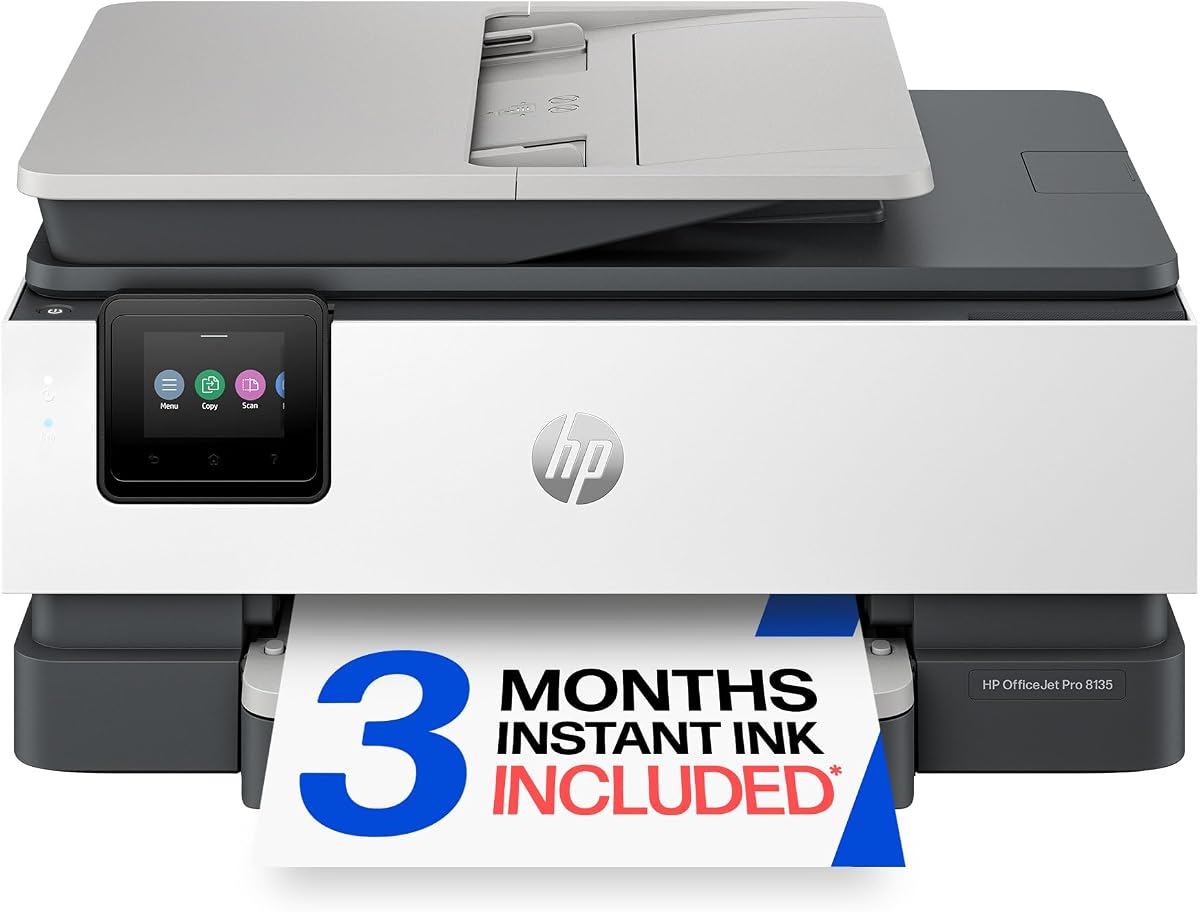
Designed specifically for home offices, the HP OfficeJet Pro 8135 balances professional output with user-friendly operation. Its 3.9 rating reflects consistent performance in printing, scanning, copying, and faxing tasks common in remote work environments.
We may earn a commission when you buy through this link, at no additional cost to you.
It prints up to 20 ppm in black and 10 ppm in color, handling business documents efficiently. HP Essential Security helps protect against cyber threats, and the dual-band Wi-Fi resolves connection issues automatically to keep workflows uninterrupted during busy days.
Like other HP models, it uses chip-based cartridges which may increase long-term costs unless managed through Instant Ink. The 2.7-inch touchscreen simplifies navigation, though those preferring larger screens might find this adequate rather than exceptional.
For freelancers and small business owners, this printer offers a reliable all-in-one solution. The 45% recycled plastic content supports sustainability goals. Enroll in Instant Ink to avoid surprise fees and ensure consistent delivery of supplies to your home office.
Automatic detection and resolution of connection issues ensure reliable wireless printing without manual troubleshooting interruptions during work hours.
Made with over 45% recycled plastic content, this model reduces environmental impact while maintaining high performance for daily office tasks.
We may earn a commission when you buy through this link, at no additional cost to you.
The Epson EcoTank ET-4800 eliminates traditional ink cartridges with high-capacity tanks that offer significant long-term savings. Rated 3.8 stars, it provides versatile color printing, scanning, and copying with minimal ongoing supply hassle for heavy users.
We may earn a commission when you buy through this link, at no additional cost to you.
Its Micro Piezo Heat-Free Technology produces sharp text and vibrant photos on various paper types without wasting energy. The EcoFit ink bottles make refilling easy and mess-free, supporting a zero-cartridge waste initiative that benefits the environment.
While the initial investment is higher than cartridge models, the reduced cost per page justifies the expense over time. The built-in scanner and color display ensure easy navigation and high-quality document management for both personal and professional needs.
Ideal for households or offices with high print volumes, this model minimizes recurring costs. Ensure you use genuine EcoFit bottles to maintain print quality and avoid clogging issues that could disrupt workflow during critical projects or deadlines.
High-capacity ink tanks mean you never deal with tiny expensive cartridges, reducing waste and saving money over the printer lifespan.
By avoiding disposable cartridges, users reduce landfill waste significantly while maintaining consistent print quality for daily business documents.
We may earn a commission when you buy through this link, at no additional cost to you.
The HP OfficeJet Pro 8125 is optimized for home offices needing efficient printing without extra bulk. While it lacks fax functionality compared to similar models, its robust scanning, copying, and printing capabilities make it a solid choice for daily document tasks.
We may earn a commission when you buy through this link, at no additional cost to you.
Print speeds reach 20 ppm black and 10 ppm color, ensuring quick turnaround for reports and flyers. HP AI optimizes formatting to avoid awkward layouts, and the 2.7-inch touchscreen offers intuitive navigation similar to a smartphone interface for ease of use.
Users must rely on original HP cartridges and may face restrictions if firmware updates block non-original chips. The Instant Ink trial provides initial savings, but ongoing costs depend on subscription plans chosen after the trial period expires.
Ideal for remote workers focused on print quality and speed, this model balances value and performance. Ensure your workflow doesn't require faxing before purchasing. Otherwise, its Wi-Fi reliability and app support simplify mobile printing from any location.
HP AI removes unwanted content from web pages and emails to ensure precise printing without wasted pages or awkward formatting issues.
The three-month trial allows users to experience how ink delivery service works and potentially save up to fifty percent on total ink costs.
We may earn a commission when you buy through this link, at no additional cost to you.
The HP OfficeJet Pro 8139 stands out with a one-year Instant Ink trial, offering long-term value for home office users. With a 4.0 rating, it delivers consistent performance across printing, scanning, copying, and faxing tasks with ease and reliability.
We may earn a commission when you buy through this link, at no additional cost to you.
It prints up to 20 ppm in black and 10 ppm in color, suitable for most business documents. Wolf Essential Security keeps networks safe, and the dual-band Wi-Fi automatically resolves connection issues to maintain productivity without frustrating interruptions during work.
Like other HP models, cartridge restrictions apply, which may affect cost if the trial ends and you switch to retail purchases. However, the extended trial period allows users to budget effectively and understand supply needs before committing to ongoing fees.
Best for home offices prioritizing long-term ink savings, this model offers a seamless start with minimal immediate costs. Ensure you review subscription terms post-trial. Otherwise, its speed and security make it a strong contender for daily multifunction tasks.
A one-year trial of Instant Ink provides extended supply coverage, reducing initial expenses and helping users plan budget for ongoing costs.
Wolf Essential Security helps protect your network from cyber threats while maintaining safe access to printer features for authorized users only.
We may earn a commission when you buy through this link, at no additional cost to you.
The HP OfficeJet Pro 9135 leads the group in speed and screen size, rated 4.0 stars for professional performance. It handles high-volume office tasks with print speeds up to 25 ppm black and 20 ppm color, reducing wait times during busy periods.
We may earn a commission when you buy through this link, at no additional cost to you.
Its 4.3-inch touchscreen simplifies navigation, and dual 250-sheet input trays minimize refills. Single-pass duplex scanning saves time on multi-page documents, while Wolf Pro Security ensures your network remains protected during daily operations in connected environments.
Users must adhere to HP chip restrictions, and ongoing costs depend on Instant Ink subscriptions. The premium features justify the cost for offices needing efficiency and large displays. Otherwise, basic users may find cheaper alternatives more cost-effective for lower needs.
Ideal for offices prioritizing speed and interface usability, this model reduces bottlenecks. Ensure your budget supports the initial investment. Otherwise, its reliability and high capacity make it a top choice for demanding multifunction environments requiring minimal downtime.
This feature scans both sides of a document in one pass, doubling scanning speed and reducing paper handling for multi-page reports.
A 4.3-inch display makes navigation intuitive, reducing training time for new users and improving workflow efficiency in busy office settings.
We may earn a commission when you buy through this link, at no additional cost to you.
The HP Smart Tank 7603 offers up to three years of ink included, making it ideal for high-volume printing without constant cartridge replacements. Rated 3.9 stars, it combines scanning, copying, and faxing with a reliable tank system for consistent output.
We may earn a commission when you buy through this link, at no additional cost to you.
Its mess-free refill system lets you plug ink bottles directly into the tank without squeezing or spilling. Magic touch controls simplify operations, and borderless printing supports photo-quality outputs suitable for marketing materials or personal projects needing professional finishes.
While slower than laser printers for text, the cost per page is significantly lower. The initial price is higher, but long-term savings justify the investment. Ensure you check ink levels before bulk runs to avoid interruptions during critical project phases or deadlines.
Best for home offices with heavy color printing needs, this model reduces supply hassles. If you print frequently, the included ink saves money and effort. Otherwise, consider faster alternatives for text-heavy documents where speed outweighs cost per page considerations.
Simply plug ink bottles into the tank and let them drain without squeezing or spilling, making maintenance clean and hassle-free for users.
Up to three years of ink included upfront reduces ongoing supply costs significantly for users with frequent printing demands over time.
We may earn a commission when you buy through this link, at no additional cost to you.
The Canon PIXMA TR8620a excels in voice control and paper capacity, rated 4.0 stars for home office versatility. It integrates seamlessly with Alexa for voice printing and smart reorder notifications, enhancing convenience for users managing busy workflows remotely.
We may earn a commission when you buy through this link, at no additional cost to you.
With 15/10 ipm speeds and 200-sheet total capacity, it handles moderate volume well. The Micro SD slot allows direct printing from storage, and auto 2-sided printing conserves paper. Alexa ensures you never run out unexpectedly by alerting you when ink is low.
While print speeds are modest compared to laser models, the smart features justify its position. The lack of complex setup makes it accessible, but non-tech users might find voice commands unnecessary. Ensure your smart home supports Alexa for full functionality.
Ideal for smart home users needing reliable fax and print functions, this model adds convenience. If you prioritize voice commands, it is a strong choice. Otherwise, standard Wi-Fi models may offer better performance for users focused purely on printing tasks.
Just say Alexa discover my printer to enable voice commands for printing tasks, adding a layer of convenience to daily office routines.
Alexa notifies you when ink is low and can place orders automatically, ensuring you never stop working due to empty supplies unexpectedly.
We may earn a commission when you buy through this link, at no additional cost to you.
Selecting the right all in one printer with fax requires evaluating your specific needs and budget constraints carefully.
Consider how many pages you print weekly to determine needed speed. Faster models handle bulk jobs efficiently, while slower ones suit occasional use without overspending.
Choose speeds matching your workload to avoid bottlenecks without paying for unnecessary capacity.
Inkjet models offer lower upfront costs but higher ongoing expenses, while laser options require higher initial investment but cheaper per-page costs over time.
Calculate cost per page based on your volume to find the most economical supply type for your budget.
Ensure the printer supports dual-band Wi-Fi, Ethernet, or USB for reliable connections across all devices and network setups effectively.
Prioritize wireless features for flexibility if you work from multiple devices in your home or office environment daily.
Confirm fax capabilities are truly needed as many modern workflows prefer digital transmission via email or cloud storage instead.
If faxing remains essential, choose a model with a dedicated fax line or VoIP support to maintain communication.
Larger input trays and auto document feeders reduce refill frequency and enable bulk scanning or copying without manual intervention constantly.
Check tray size matches your typical job length to minimize interruptions during peak work hours regularly.
Look for security tools like firewall protection or data encryption to safeguard sensitive documents transmitted through your network.
Prioritize these if you handle confidential client or business information daily in your office.
A robust mobile app allows printing, scanning, and monitoring from anywhere, enhancing workflow flexibility for remote workers effectively.
Test the app usability to ensure it meets your needs for remote management and control.
Recycled materials and ENERGY STAR certification reflect eco-friendly practices and may reduce long-term energy costs in your workspace.
Choose models aligning with your environmental goals if sustainability impacts your purchasing decisions.
Begin by connecting the printer to your network via Wi-Fi or Ethernet using the setup instructions included in the manual for initial configuration.
Regularly update firmware through the manufacturer app to ensure security patches are applied and performance remains optimized across all functions.
Clean print heads and rollers periodically to prevent clogs or paper jams, especially after long periods of inactivity to maintain reliability.
Fax remains relevant in industries requiring signed documents or legal filings. While email and cloud tools dominate, some contracts still mandate fax transmission for compliance reasons effectively.
Most all in one printers support scan-to-email functionality through the device settings or mobile app. This allows quick document sharing without needing a computer interface.
Yes, most models support macOS via AirPrint or dedicated drivers. Check compatibility before purchase to ensure seamless integration with your Apple devices.
Navigate to printer settings or the mobile app to enable double-sided printing. This reduces paper usage automatically for documents that do not require one-sided layouts.
Instant Ink is a subscription that delivers ink before you run out based on usage. It offers savings over retail purchases but requires an active subscription after trials expire.
Many modern printers block third-party cartridges via chip checks. Using incompatible inks may void warranties or disrupt printing operations permanently.
Laser models tend to be louder than inkjets due to mechanical components. Check noise ratings if you work in quiet environments to avoid distractions.
Traditional faxes require a landline, but VoIP adapters allow fax over internet lines. Check your provider compatibility before connecting to avoid signal issues.
The HP OfficeJet Pro 9125 and Brother MFC-L2820DW lead our list for performance and speed respectively. The Canon PIXMA TR4720 offers exceptional value for budget-conscious buyers.
Prioritize speed and security for offices, or ink efficiency and smart features for home users. Match the model to your workflow volume and connectivity needs.
Prices and availability change frequently, so verify current details before buying. Use this guide to narrow down options and secure a reliable solution for your needs.