
ESP32-S3-Nano Microcontroller
5.0Editor score
8MB PSRAM and 16MB Flash
Arduino and MicroPython ready
Compact onboard wireless module
This guide compares the top Arduino Nano ESP32 boards and alternatives for wireless IoT projects, evaluating power, connectivity, and ease of use for makers.
The Arduino Nano ESP32 represents a significant leap in microcontroller technology, combining powerful processing with seamless wireless connectivity. This compact board is ideal for makers who need robust performance in a small form factor for IoT and embedded projects.
We evaluated ten leading development boards based on processing power, wireless features, and ecosystem compatibility. Our comparison focuses on real-world usability for building smart devices, wearables, and automated systems without unnecessary complexity.
Each pick highlights specific strengths like battery efficiency, advanced interfaces, or beginner-friendly tools. Note that availability and pricing fluctuate frequently, so verify current stock and costs before making your final purchase decision today.
5.0Editor score

4.6Editor score

4.7Editor score
The following table provides a side-by-side comparison of the ten selected development boards. We highlight key technical specifications to help you quickly identify the right hardware for your specific project requirements and budget constraints.


The Arduino Nano ESP32 stands out as a leading choice for modern embedded projects. With a 4.6 rating, it delivers powerful dual-core performance and seamless wireless connectivity right out of the box. Its integration of MicroPython makes it exceptionally accessible for rapid prototyping.
We may earn a commission when you buy through this link, at no additional cost to you.
This board features the ESP32-S3 chip which runs at up to 240 MHz. It supports both Wi-Fi and Bluetooth 5.0 for reliable cloud and device communication. The inclusion of HID profiles allows it to act as a keyboard or mouse, expanding its utility significantly for interactive applications.
While the board is powerful, users might find it slightly more expensive than third-party alternatives. However, the official support and rigorous quality control justify the cost for professional and educational deployments where reliability is paramount.
We recommend this board for hobbyists and engineers needing a blend of high performance and ease of use. Its comprehensive feature set makes it ideal for smart home systems, wearable tech, and advanced IoT sensors that require robust communication.
The board supports both Wi-Fi and Bluetooth 5.0 enabling seamless communication with networks and other devices.
Users can code in C/C++ or MicroPython offering flexibility for different skill levels and project needs.
We may earn a commission when you buy through this link, at no additional cost to you.
This ESP32-S3-Nano board offers exceptional value for developers seeking high specs without a premium price tag. With a perfect 5.0 rating from users, it delivers impressive performance including 16MB Flash and 8MB PSRAM for complex projects.
We may earn a commission when you buy through this link, at no additional cost to you.
The board adopts the ESP32-S3R8 chip allowing seamless switching between Arduino IDE and MicroPython. It also supports HID emulation making it easy to create custom input devices. Connectivity is handled by integrated 2.4GHz Wi-Fi and Bluetooth LE.
Some users note that documentation is less comprehensive than official Arduino products. Despite this, the community support and proven hardware quality make it a reliable choice for those comfortable with independent troubleshooting.
Ideal for budget-conscious makers, this board is perfect for learning embedded systems or prototyping IoT devices. Its high capacity memory ensures you can handle large data sets or complex logic without running into constraints.
With 16MB Flash and 8MB PSRAM this board handles large datasets and complex applications efficiently.
Developers can switch between Arduino and MicroPython for flexible usage across different project phases.
We may earn a commission when you buy through this link, at no additional cost to you.
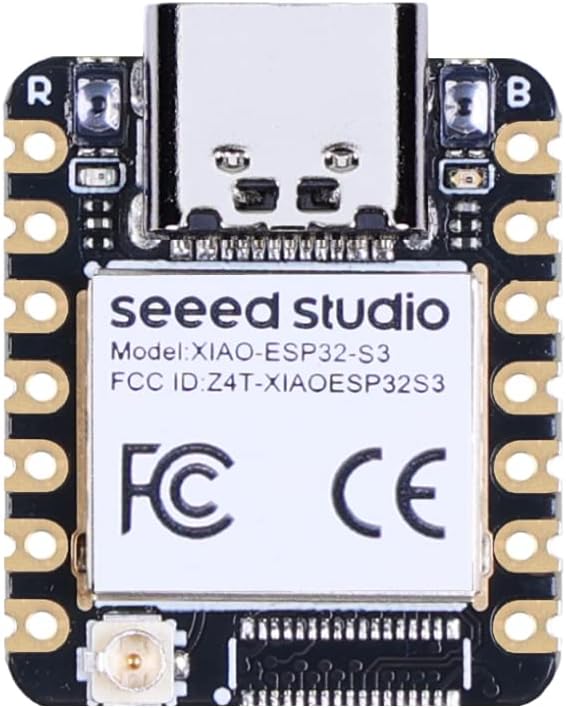
The Seeed Studio XIAO ESP32S3 is designed specifically for space-constrained applications like wearables and portable sensors. Its thumb-sized footprint hides a powerful dual-core processor and rich interface options for diverse project needs.
We may earn a commission when you buy through this link, at no additional cost to you.
Power efficiency is a standout feature with four consumption models allowing deep sleep down to 14uA. The board also supports lithium battery charge management ensuring long operational life for portable devices. RF performance supports 100m+ communication with an antenna.
Handling such a small board requires patience and steady hands especially when connecting to breadboards. However, the SMD design and lack of components on the back make it perfect for integration into production assemblies.
We suggest this board for projects requiring miniaturization and battery operation. Whether building a smartwatch prototype or a remote environmental sensor the XIAO provides the necessary power in a tiny package.
Four power consumption models allow deep sleep mode usage as low as 14uA for extended battery life.
At 21 by 17.5mm it fits easily into space limited projects like wearables and small robots.
We may earn a commission when you buy through this link, at no additional cost to you.
The ESP32-P4-NANO board is tailored for projects requiring heavy image and voice processing capabilities. With RISC-V dual-core processors and specialized hardware accelerators it handles complex tasks that standard microcontrollers cannot.
We may earn a commission when you buy through this link, at no additional cost to you.
Key features include MIPI-CSI and MIPI-DSI interfaces for connecting cameras and displays directly. It also offers 32MB PSRAM and onboard Ethernet for high speed data transmission. Security features like secure boot and flash encryption protect sensitive data.
This board is significantly more complex than typical ESP32 modules requiring advanced knowledge of hardware interfaces. It is best suited for developers building vision systems or advanced embedded terminals rather than simple IoT nodes.
We recommend this board for specialized industrial or robotics applications. If your project involves real-time video analysis or sophisticated human-machine interfaces this platform provides the necessary hardware acceleration and throughput.
MIPI CSI and DSI ports allow direct connection to cameras and displays for multimedia projects.
Dedicated accelerators for JPEG and H264 ensure smooth real-time image and voice processing.
We may earn a commission when you buy through this link, at no additional cost to you.
Waveshare offers a 3-pack of ESP32-S3 Mini boards ideal for prototyping and small production runs. The module features castellated pads allowing direct soldering onto carrier boards for compact custom designs.
We may earn a commission when you buy through this link, at no additional cost to you.
It runs on the ESP32-S3FH4R2 chip at 240MHz with 2MB PSRAM and ceramic antenna. Independent power supply settings allow flexible low power consumption configurations. This modularity makes it perfect for embedding into custom hardware.
The lack of headers means users need soldering skills to use it in breadboard prototyping. However, the robust design and cost effective pack pricing make it a favorite for developers integrating modules into final products.
Choose this board if you need to build custom carriers or multiple units. Its flexibility and soldering options provide the necessary control for advanced embedded designs and production deployments.
Castellated module pads allow soldering directly to custom carrier boards for compact integrated designs.
Independent power supply settings enable low power consumption optimization for different scenarios.
We may earn a commission when you buy through this link, at no additional cost to you.
This super starter kit includes an ESP32 board plus over 35 electronic components to jumpstart your electronics journey. It is designed to be beginner friendly with detailed tutorials guiding you through each step.
We may earn a commission when you buy through this link, at no additional cost to you.
The kit comes with sensors displays motors and input devices allowing you to build weather stations or smart home controllers immediately. Tutorials include complete code and circuit diagrams helping you understand the fundamentals quickly.
Some users find the sheer number of components overwhelming at first. However, the structured learning path provided by ELEGOO ensures you can progress from basic circuits to advanced IoT applications effectively.
We recommend this kit for students and hobbyists new to electronics. It removes the guesswork from sourcing parts and provides a clear path to learning essential skills for real-world innovation.
Includes over 35 different modules and components for a vast range of practical projects.
30+ projects with code and diagrams make learning accessible for all skill levels.
We may earn a commission when you buy through this link, at no additional cost to you.
The Arduino Nano 33 IoT focuses on secure connectivity for industrial and commercial applications. It features a dedicated secure element chip ensuring hardware-level encryption for cloud communication and data privacy.
We may earn a commission when you buy through this link, at no additional cost to you.
Powered by a SAMD21 ARM Cortex-M0+ processor it offers efficient performance for low power wireless applications. Connectivity is handled by a u-blox module supporting both Wi-Fi and Bluetooth Low Energy. It comes with pre-soldered headers for easy connection.
While less powerful than ESP32 variants it excels in secure deployments where data integrity is critical. The built-in secure element simplifies complex security implementations that would otherwise require external modules.
This board is ideal for professional IoT deployments requiring guaranteed security. If you are building smart home systems or enterprise sensors where data protection is paramount this board offers the necessary hardware safeguards.
The u-blox Secure Element provides hardware-level encryption for safe cloud communication.
Pre-soldered headers make it easy to connect to breadboards and external components immediately.
We may earn a commission when you buy through this link, at no additional cost to you.
This ESP-WROOM-32 development board offers a cost effective solution for general purpose IoT projects. Sold as a 3-pack it provides excellent value for multiple prototypes or classroom setups. The board supports 2.4GHz dual-mode Wi-Fi and Bluetooth.
We may earn a commission when you buy through this link, at no additional cost to you.
It is fully compatible with the Arduino IDE making it accessible to a wide range of developers. Features include AP STA and AP+STA modes for flexible network configuration. Low power consumption makes it suitable for battery operated devices.
Some users find the layout basic compared to newer boards with USB-C. However, the reliability and price point make it a staple for hobbyists needing simple wireless connectivity without extra features.
We suggest this board for basic smart home sensors and learning projects. Its versatility and affordability ensure you have enough boards to experiment freely without worrying about breaking expensive components.
Supports AP STA and AP+STA modes allowing versatile network configurations for different scenarios.
3-pack offering ensures you have multiple units for prototyping and backup projects.
We may earn a commission when you buy through this link, at no additional cost to you.
ELEGOO brings a modern twist to the ESP32 Dev Board with a USB-C port for easier connection and power. This 3-pack offers high performance dual-core processing and reliable wireless communication for various IoT projects.
We may earn a commission when you buy through this link, at no additional cost to you.
The board uses a CP2102 USB UART chip ensuring stable data transmission during programming. It supports Over-the-Air updates allowing you to deploy new firmware via Wi-Fi without physical connections. Power management features help reduce energy use.
One minor downside is the inclusion of Bluetooth 4.2 instead of the newer BLE 5.0 which may limit range for some applications. Despite this the board remains highly rated for its usability and quality construction.
Recommend this board for developers preferring modern interfaces. The USB-C port simplifies development and the OTA feature is excellent for maintaining deployed devices in the field.
USB-C port enables efficient power delivery and fast programming compared to traditional micro USB.
Over-the-Air update support allows deploying new firmware via Wi-Fi without physical connections.
We may earn a commission when you buy through this link, at no additional cost to you.
The Arduino UNO R4 WiFi combines a Renesas RA4M1 processor with an ESP32-S3 chip for unmatched versatility. It features a built-in 12×8 LED Matrix for instant visual feedback and supports advanced analog outputs via 12-bit DAC.
We may earn a commission when you buy through this link, at no additional cost to you.
This board is built for industrial and automotive applications with CAN bus support for reliable real-time communication. The Qwiic Connector simplifies adding I2C sensors while the OP AMP provides precise signal amplification for analog tasks.
Its larger size and premium price make it less suitable for simple battery projects. However, for advanced robotics or control systems requiring robust communication and display capabilities it offers unparalleled integrated features.
We recommend this board for professional developers needing rich hardware interfaces. If you require analog precision and industrial communication standards the UNO R4 WiFi provides a comprehensive all-in-one solution.
Includes a built-in 12×8 LED Matrix for dynamic visuals and real-time data on the board itself.
Controller Area Network support allows reliable real-time communication in automotive or robotic systems.
We may earn a commission when you buy through this link, at no additional cost to you.
Selecting the right development board requires balancing performance, features, and cost. We break down the essential factors to help you find the best match for your specific project needs.
Most boards use the ESP32-S3 with dual cores running at 240 MHz. This provides sufficient power for most IoT tasks. However, some advanced boards like the UNO R4 use dual chips for extra speed. Ensure the processor speed meets your project complexity.
Choose faster boards for real-time data processing or complex logic. Slower chips may suffice for simple sensor readings. Always check the architecture to ensure compatibility with your code libraries.
Bluetooth 5.0 offers better range and efficiency than older versions. Wi-Fi support is standard across all boards. Check if you need Bluetooth Low Energy specifically for battery devices. Some boards also offer proprietary protocols for longer ranges.
Prioritize Bluetooth 5.0 for modern smart devices. Older Bluetooth versions may limit connectivity options. Ensure the board supports both Wi-Fi and Bluetooth simultaneously for full functionality.
Memory determines how much code and data your board can store. Look for at least 16MB Flash for complex apps. PSRAM is crucial for data heavy tasks like image processing. Larger memory prevents crashes during execution.
High PSRAM capacity is necessary for multimedia or logging. Standard Flash handles most sketches. Always check memory specs before planning large data storage projects.
USB-C is the standard for modern power and programming. Legacy micro-USB requires older cables. Check for additional interfaces like CAN or I2C headers. Compatibility with your existing tools is key.
USB-C ensures faster data transfer and better power. Legacy ports might limit future upgrades. Verify physical interface standards match your requirements.
Battery projects need deep sleep modes to conserve energy. Look for boards supporting microamp sleep currents. Check if battery charging is integrated on the board. Long life is critical for outdoor sensors.
Efficient power design extends battery life significantly. Integrated charging simplifies portable setups. Always calculate power consumption for your specific use case.
Compact boards fit into tight spaces like wearables. Larger boards like UNO R4 are easier to solder. Consider the physical dimensions for your final product. Some boards offer castellated pads for custom integration.
Size matters for final deployment. Compact is great for hidden sensors. Larger is easier for prototyping and breadboards.
Official boards ensure compatibility with Arduino IDE and tools. Third-party boards may have driver issues. MicroPython support is valuable for quick prototyping. Check community support and documentation availability.
Official support simplifies development for beginners. Open-source support helps advanced users. Always check documentation before buying.
Secure elements protect data in critical deployments. Secure boot prevents unauthorized code execution. Encryption features are vital for cloud connected projects. Standard boards may lack hardware security.
Security is essential for commercial products. Verify hardware encryption features. Standard hobby boards lack robust protection.
Start by connecting the board to your computer via USB-C. Install the Arduino IDE or MicroPython environment on your system. Ensure you have the latest drivers installed for stable communication with the board.
Avoid exposing the board to moisture or extreme temperatures. Store it in a static-free bag when not in use. Keep the soldering points clean to prevent corrosion over time during storage.
Upload sketches in small batches to test functionality quickly. Do not overload the processor with too many tasks. Monitor power consumption carefully if running on battery power.
Yes, it is fully compatible with the latest Arduino IDE. You can use it with C++ or MicroPython for flexible development. Ensure you install the ESP32 board manager packages to access all features.
The S3 version offers more RAM and advanced AI instructions. It supports better Bluetooth 5.0 connectivity compared to older models. The S3 is more suitable for complex IoT and vision tasks.
Many of the boards listed like the official Nano ESP32 support MicroPython natively. This allows for easier coding and faster prototyping. Check specific board documentation for language support details.
You need a standard USB-C to USB-A or USB-C cable. Ensure it supports data transfer and not just charging for programming. Any standard cable from your phone will work for most setups.
The ELEGOO Starter Kit or the official Nano ESP32 are ideal for starters. They offer extensive tutorials and clear documentation. Avoid advanced boards with complex interfaces initially.
Press the reset button on the board to restart the firmware. If that fails, unplug the USB cable and reconnect it. You may need to reinstall drivers if it is not recognized.
We covered ten top boards ranging from budget options to premium industrial tools. Each offers unique features to suit different project scopes. The Nano ESP32 leads with its balance of power and ease of use.
Prioritize connectivity and memory if you plan complex projects. For simple tasks consider smaller boards like XIAO or ESP-WROOM. Always match the hardware to your specific power and size constraints.
Always verify current stock before purchasing as availability changes. Check the latest prices to ensure you get the best value. Your choice ultimately depends on your project requirements and budget limits.