
Creality Ender 3 V3 SE
3.8Editor score
CR Touch auto leveling
Sprite direct extruder
Quick assembly design
This guide compares the top auto bed leveling 3D printers for beginners to help you find a reliable machine with easy setup and consistent print quality.
Finding the right 3D printer can be overwhelming for newcomers who want reliable results without complex calibration. Auto bed leveling technology simplifies the process by ensuring the first layer adheres perfectly every time. This guide highlights models designed to make printing accessible and enjoyable for hobbyists starting their journey.
We evaluated ten leading 3D printers based on their auto leveling capabilities, ease of use, build quality, and community support. Each selection offers unique features ranging from high-speed printing to enclosed chambers for safety. Our goal is to provide a clear overview so you can choose the best fit for your workspace.
Each product pick includes detailed specifications and real-world performance insights based on available data. You will see how different models handle filament types and maintenance tasks efficiently. Remember that pricing and availability can change frequently so always verify details before making your final purchase decision online.
3.8Editor score

4.3Editor score

4.3Editor score
This side-by-side comparison outlines the key specifications and capabilities of each selected 3D printer to help you understand their differences at a glance. From print speeds to nozzle temperatures and build volumes these details matter for your specific project needs and workspace constraints.


The FLASHFORGE Adventurer 5M stands out as a top choice for beginners seeking reliability and speed. It earns high marks for its one-click auto leveling system that ensures a perfect first layer every time without manual calibration hassle. Users appreciate the straightforward setup process and robust build quality found in this open frame design.
We may earn a commission when you buy through this link, at no additional cost to you.
Its Core XY motion system enables speeds up to 600mm/s with exceptional acceleration for rapid prototyping. Vibration compensation technology minimizes ghosting so prints remain sharp even at high velocities. The direct drive extruder handles a wide range of filaments including flexible TPU materials with consistent extrusion performance.
While the build volume is modest compared to industrial machines the included PEI plate offers excellent adhesion and part removal. Some users may find the open frame less suitable for materials like ABS that require enclosed environments. However for PLA and PETG projects it delivers professional results with minimal user intervention required.
This printer is ideal for hobbyists who want to start printing immediately without spending hours tuning settings. The power loss recovery feature adds peace of mind during long prints. If you value speed and ease of use the Adventurer 5M provides a solid foundation for your 3D printing journey today.
The high acceleration and vibration compensation ensure that prints finish quickly without sacrificing surface quality or detail resolution on complex models.
One-click leveling and quick detachable nozzles reduce the technical barrier for new users who might feel intimidated by traditional manual calibration steps.
We may earn a commission when you buy through this link, at no additional cost to you.
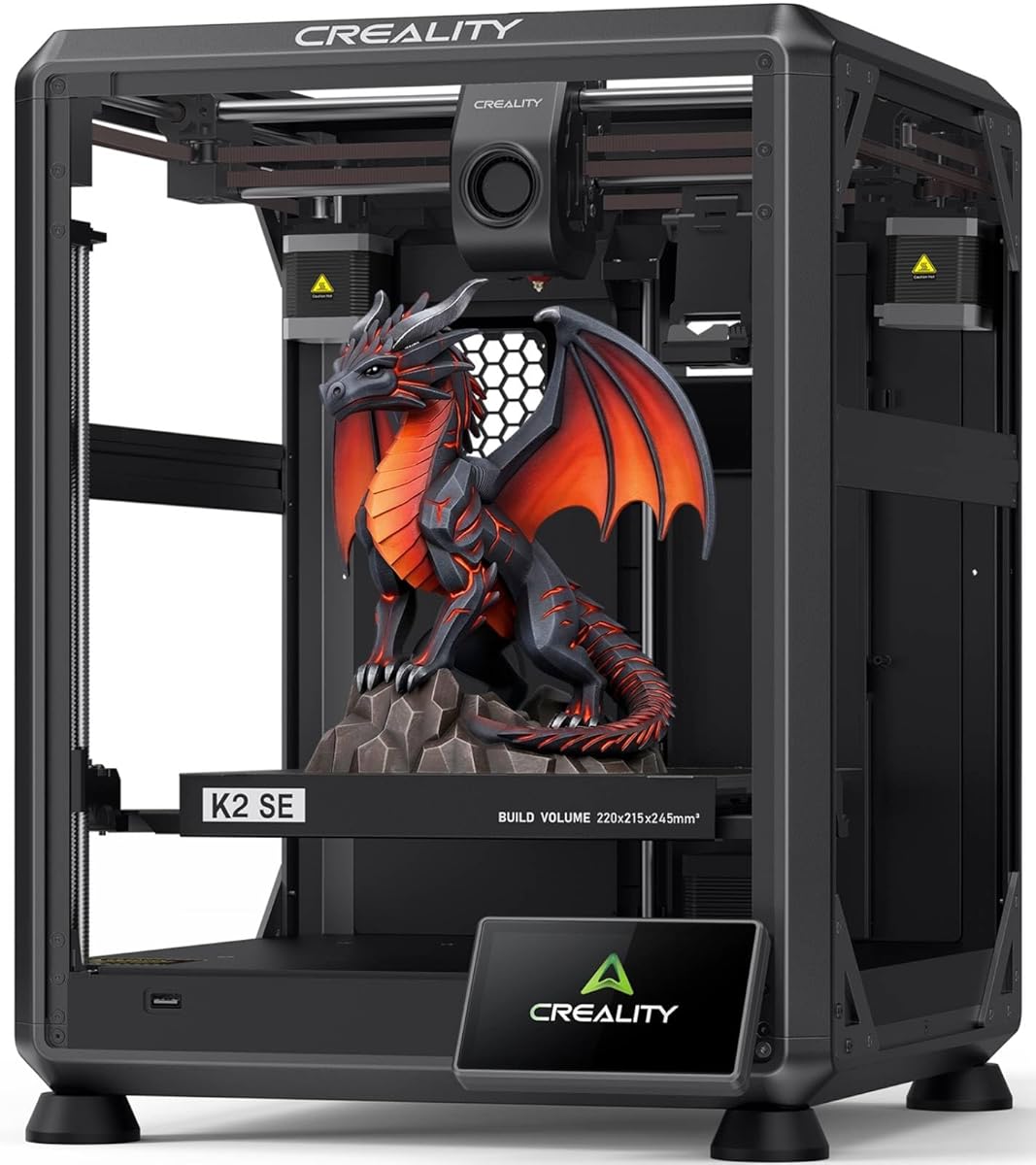
The Creality K2 SE brings advanced features to the beginner market with its solid metal build and multi-color printing readiness. It scores well for its auto leveling system that integrates seamlessly with the Creality OS for a streamlined workflow. The direct drive extruder supports precise filament control essential for detailed and functional prints.
We may earn a commission when you buy through this link, at no additional cost to you.
Its CoreXY motion system achieves speeds up to 500mm/s while maintaining stability through input shaping algorithms. This ensures that even fast prints have smooth walls and sharp details without excessive ringing artifacts. The quick-swap nozzle design minimizes downtime when switching between different filament diameters or materials.
Although the K2 SE is compatible with the CFS multi-color system this adds complexity and cost for beginners who only need single color prints. The frame rigidity is excellent but the overall size may require more desk space than smaller units. Users looking to expand their capabilities later will appreciate this growth potential.
This model is best for those who plan to grow into multi-material projects without buying a new printer later. The auto leveling reduces the frustration of failed first layers significantly. If you want a machine that can evolve with your skills the K2 SE offers a compelling mix of performance and versatility.
The ability to add the CFS system later means you can start simple and upgrade to full multi-color printing when your projects demand more variety.
The reinforced frame and input shaping work together to maintain print integrity even when pushing the speed limits for faster turnaround times.
We may earn a commission when you buy through this link, at no additional cost to you.
The E-Leveler 2 is a specialized tool rather than a printer but it assists significantly with bed leveling on manual machines. It receives high praise for its LED feedback which helps users achieve a perfectly level bed without guesswork. This is a great addition for those who already own a printer but struggle with initial calibration steps.
We may earn a commission when you buy through this link, at no additional cost to you.
Its design features a strong battery holder and improved LED indicators to make the process smoother than traditional paper methods. The balancing end caps allow it to stand securely on the print bed while you adjust the screws. This provides a more consistent reading across different points on the plate.
While it does not automate the process like onboard sensors it offers a reliable way to ensure manual leveling is accurate. It is not compatible with resin or delta printers which limits its scope to common FDM setups. For owners of older machines this tool can extend their usability and print success rate.
This item is perfect for budget conscious users who want to improve print quality without buying a new printer. It complements auto leveling systems by providing a secondary check or alternative if sensors fail. If your current printer lacks auto leveling this tool is an affordable way to get professional level bed accuracy.
The LED light gives immediate visual cues so you know exactly when the bed is level without relying on touch or paper sliding methods.
The simplified nozzle target and balancing legs make it easier to hold steady while tightening the bed leveling knobs during setup.
We may earn a commission when you buy through this link, at no additional cost to you.
The FLASHFORGE AD5M combines brand new technology with superior craftsmanship to meet the needs of both beginners and experts. It earns high marks for its fully automatic one-click leveling system that measures offsets precisely without manual intervention. The all-metal CoreXY structure ensures stability even during high speed operations.
We may earn a commission when you buy through this link, at no additional cost to you.
The patent quick-release nozzle allows users to swap different diameters in just three seconds which simplifies maintenance significantly. This flexibility supports both high-precision and high-efficiency printing needs depending on your project requirements. The Orca-flashforge slicer integration enables one-click batch file transmission for added convenience.
While the build volume remains standard at 220x220x220mm the included features make it very reliable for daily use. The flexible PEI plate makes part removal easy without tools and supports different materials on either side. Some users may prefer a more robust enclosure for higher temperature filaments like ABS.
This printer is an excellent choice for those who want a reliable workhorse without constant adjustments. The resume function after power outages prevents wasted material on long jobs. If you prioritize ease of maintenance and consistent first layers the AD5M delivers a smooth experience for a wide range of projects.
Tool-free nozzle swaps mean you can switch from fine details to large parts quickly without needing extra tools or technical expertise.
The Flash Maker APP allows you to monitor print status from anywhere so you can check progress without being near the printer constantly.
We may earn a commission when you buy through this link, at no additional cost to you.
The QIDI Q2 redefines the entry to expert 3D printer with a unique nozzle leveling sensor and heated chamber. It receives high praise for its ability to handle advanced materials like PPS-CF that other printers cannot. The 65C heated chamber minimizes warping and ensures strong layer adhesion for structural parts.
We may earn a commission when you buy through this link, at no additional cost to you.
Its built-in nozzle sensor acts as the leveling mechanism for unmatched first layer accuracy without extra touch sensors. The high-temp nozzle reaches 370C which unlocks a vast range of engineering grade filaments. This makes it a powerful tool for functional prototypes that need to withstand heat and stress.
While the price is higher than typical beginners printers it covers all bases from PLA to carbon fiber composites. The triple filtration system makes indoor printing safe by reducing odors and harmful particles. The setup may require more attention to detail but the reliability rewards that effort significantly.
This printer is best for makers who want professional results without buying multiple machines for different materials. The auto leveling feature removes the guesswork from first layer adjustments. If you need to print high-performance parts the QIDI Q2 provides the stability and temperature control to succeed.
Using the nozzle itself for leveling avoids external sensor issues and ensures the measurement happens exactly where the print starts for perfect accuracy.
The advanced filtration system allows you to print engineering materials indoors without worrying about harmful fumes affecting your home environment.
We may earn a commission when you buy through this link, at no additional cost to you.
The FLASHFORGE 5M Pro focuses on quiet and safe printing with its low-speed silent mode and dual filtration system. It earns high marks for its automatic leveling system that calculates offsets without manual Z-axis calibration. The closed structure helps optimize air quality for home or classroom use effectively.
We may earn a commission when you buy through this link, at no additional cost to you.
Its direct drive extruder supports a wide range of filaments including high temp materials with consistent extrusion. The bundled nozzles give you flexibility from day one to switch between standard and faster prints easily. The silent mode ensures you can work or study without distraction during long print runs.
While the closed structure adds safety it limits visibility compared to open frames unless you use the camera monitoring features. The price point is higher than basic models but the included filters add significant value for health conscious users. This is a great choice for schools or busy home offices.
This printer is ideal for environments where noise and fumes are a concern during operation. The one-click leveling removes the frustration of failed first layers for students. If you need a reliable and quiet machine for frequent use the 5M Pro delivers a comfortable and clean printing experience.
The silent mode reduces noise to under 50dB so you can print overnight without disturbing others in your home or workspace.
HEPA13 and activated carbon filters block particulate matter to keep your breathing environment safe during plastic printing sessions.
We may earn a commission when you buy through this link, at no additional cost to you.
The Creality Ender 3 V3 SE is a highly affordable upgrade that includes CR Touch auto leveling out of the box. It scores well for its simplified assembly process that takes only three steps to get printing. The Sprite direct extruder provides smooth filament feeding for a variety of common materials.
We may earn a commission when you buy through this link, at no additional cost to you.
Its 250mm/s speed is significantly faster than older models which saves time on daily prints. The dual Z-axis lead screws reduce wobbling and improve vertical accuracy over long prints. This makes it a solid choice for hobbyists who want performance without a large financial investment.
While some users report variability in quality control the auto leveling feature consistently helps with first layer success. The auto loading and unloading of filament makes switching colors or spools much easier than manual pull. If you need a budget option that still automates the tricky parts this fits well.
This printer is best for those entering 3D printing who want to skip manual bed leveling completely. The official support service provides a safety net for new users facing issues. If you want to start making things quickly and cheaply the Ender 3 V3 SE offers a reliable path forward.
The preassembled design means you spend more time printing and less time struggling with complex mechanical setup tasks.
Dual Z-axis screws ensure that the bed moves evenly without tilting which reduces banding and improves surface quality on tall models.
We may earn a commission when you buy through this link, at no additional cost to you.
The Creality CR Touch auto leveling kit allows you to upgrade older printers without buying a new machine. It receives high praise for its multi-point detection that builds a virtual plane for automatic compensation of tilt. This extends the life of older units and improves their reliability significantly for beginners.
We may earn a commission when you buy through this link, at no additional cost to you.
Its independent development ensures stable function with hundreds of millions of users data backing the system. The sensor records height at multiple points so the software adjusts the Z-axis accordingly during printing. This reduces manual calibration needs and improves the success rate for first layers.
While it requires flashing new firmware to the motherboard this can be done by following official guides carefully. Compatibility is limited to specific Creality motherboards so you must verify your model before purchasing. However for those who own a compatible unit this is the most cost-effective way to get auto leveling.
This kit is best for owners of older Ender printers who want to modernize without major spending. The included installation guide helps simplify the setup process for non technical users. If you want to add reliability to an existing printer this sensor offers a proven solution for better results.
By measuring multiple points the system knows exactly how the bed tilts and adjusts the nozzle path to compensate automatically for a perfect print.
The durable sensor is designed for over 100,000 uses so you can move it between printers or use it for years without failure.
We may earn a commission when you buy through this link, at no additional cost to you.
The FLASHFORGE AD5X brings multi-color printing capability to a high-speed auto leveling platform. It earns high marks for its Intelligent Filament System which manages refills and detection automatically. This reduces the interruptions common in multi-color prints and enhances productivity for complex models.
We may earn a commission when you buy through this link, at no additional cost to you.
Its CoreXY structure provides stability during high-speed printing up to 600mm/s without sacrificing quality. The support for TPU and other flexible materials adds versatility for functional and artistic projects alike. The large printing size accommodates diverse tasks with precision and consistent performance.
While the four-color system is powerful it adds complexity to daily maintenance compared to single nozzle machines. The auto leveling ensures that each color adheres correctly without manual intervention. This is ideal for artists who want vibrant designs without hand painting every piece after printing.
This printer is best for hobbyists who want to explore multi-color designs without buying multiple separate printers. The Intelligent Filament System keeps projects running smoothly by managing spools efficiently. If you value creativity and speed the AD5X offers a capable platform to bring colorful ideas to life.
The ability to print four colors simultaneously opens up creative possibilities that are difficult or impossible with single extruder machines.
The IFS detects filament status and refills automatically so you do not need to watch the printer constantly during multi-color jobs.
We may earn a commission when you buy through this link, at no additional cost to you.
The Creality Ender 3 V3 SE is designed specifically for beginners who want a fast and straightforward setup. It receives high praise for its CR Touch auto leveling and automatic Z-offset calibration. This ensures a reliable first layer right out of the box for new users.
We may earn a commission when you buy through this link, at no additional cost to you.
Its silent mainboard reduces operating noise which makes the printer pleasant to have on a desk. The flexible PC spring steel build plate allows quick model removal with minimal effort or tools. This combination of features creates a comfortable experience for daily hobby use.
While the build size is modest it covers the majority of small and medium parts needed for prototyping. The dual Z-axis lead screws help maintain consistent alignment which supports accurate layer adhesion over time. The design is proven and supports reliable extrusion across many common filament types.
This printer is best for those who need a simple machine to start learning without frustration. The quiet operation and auto leveling reduce the common pain points for new hobbyists. If you want a hassle-free introduction to 3D printing this model offers a reliable and effective starting point.
The optimized speed allows you to test ideas quickly while the auto leveling ensures those tests come out right on the first try.
Low noise levels mean you can keep the printer in a shared space without causing disruption to others during operation.
We may earn a commission when you buy through this link, at no additional cost to you.
Selecting the right 3D printer involves understanding key features that impact ease of use and print quality for new users.
Auto leveling ensures the first layer sticks properly by measuring the bed surface and adjusting nozzle height automatically. Look for one-click systems that use sensors or nozzle detection to simplify setup. This feature is essential for beginners to avoid failed prints and wasted material.
Choose a printer with a reliable sensor that requires minimal manual calibration. This saves time and frustration while guaranteeing consistent results from the start.
The build volume determines the maximum size of objects you can print in one piece. Beginners often start with small hobby projects so a compact size may be sufficient. However if you plan to make larger prototypes consider a machine with expanded dimensions for flexibility.
Select a size that fits your available workspace and typical project requirements. A larger build offers more creative freedom but takes up more desk space.
Higher speeds reduce wait times for parts but must be balanced with stability to avoid quality issues. Look for machines with input shaping or compensation to maintain detail at high velocities. Speed is crucial for iterative design but accuracy remains the priority for functional results.
Prioritize stable speeds over maximum claims to ensure good quality. A balanced machine produces reliable parts without requiring constant tuning.
Nozzle temperature limits and extruder types determine which materials you can use. Direct drive extruders handle flexible filaments better than Bowden setups. Ensure the printer supports the range of plastics you plan to use such as PLA, PETG, or TPU.
Check if quick-swap nozzles are available for changing diameters easily. This versatility allows you to switch between fine details and fast printing without buying extra units.
Assembly complexity varies from fully preassembled to kits requiring significant setup. Beginners benefit from machines that are ready to use within minutes of unboxing. Simplified assembly reduces the barrier to entry and gets you printing sooner.
Choose a model with clear instructions and pre-tested parts. This ensures you start creating rather than troubleshooting mechanical issues.
Filament run-out sensors detect empty spools to pause printing before failure. Automatic loading features simplify switching materials and reduce manual handling. These small conveniences prevent project interruptions and make workflow smoother.
Opt for a printer with built-in sensors to protect your long print jobs. This saves wasted material and time when you are away from the machine.
Enclosed printers provide safety and consistent temperature for materials like ABS. Open frames allow better visibility and airflow for PLA. Consider your primary use case and safety needs when selecting a frame style.
An open frame is often sufficient for beginners using common plastics. It offers more flexibility for ventilation and monitoring during prints.
Access to good slicing software and remote monitoring adds convenience to printing tasks. Look for models with companion apps or cloud services for easy management. Good software simplifies the transition from design to physical object.
Ensure the printer supports standard slicing tools and user-friendly interfaces. This reduces learning time and helps you achieve better results faster.
Begin by ensuring the printer sits on a level surface to minimize initial calibration errors. Run the auto leveling routine before the first print to confirm accurate offsets. Verify that the nozzle and bed are clean for optimal adhesion.
Regularly clean the print bed with isopropyl alcohol to remove oils that affect sticking. Check the nozzle for clogs and clear them if extrusion seems inconsistent. Keep the frame and moving parts free of dust to prevent mechanical wear.
Store filament in a dry place to prevent moisture absorption which ruins print quality. Use the resume feature cautiously if power outages occur and check layer alignment. Periodically update firmware to access new features and performance improvements.
Auto bed leveling is a feature that measures the distance between the nozzle and the build plate automatically. It adjusts the print settings to ensure the first layer is even and adheres properly without manual adjustment.
Not all beginner models include this feature so you must check the specifications carefully. Many modern entry-level machines now come with sensors to make setup easier for new users.
It reduces failed prints caused by uneven first layers which wastes filament and time. Consistent setup means you spend less on wasted materials while learning new techniques.
While it reduces manual tasks it still requires occasional cleaning of the sensor or nozzle. Keep the probe free of dust to ensure accurate measurements over time.
Yes many users install aftermarket kits like CR Touch sensors to add this function. Check motherboard compatibility and firmware requirements before purchasing an upgrade kit.
Typical PLA prints work well at 60 degrees Celsius while PETG may require higher. Always follow the specific recommendations provided by the filament manufacturer.
We explored ten top options ranging from budget-friendly to premium models for beginners seeking reliability. The FLASHFORGE Adventurer 5M and Creality Ender 3 V3 SE offer strong entry points with distinct features. Each choice simplifies setup so you can focus on creativity rather than calibration.
Prioritize features like speed, material support, and ease of maintenance based on your needs. A printer with a good auto leveling system saves frustration and builds confidence quickly. Invest in a machine that aligns with your long-term goals for your hobby.
Remember that availability and pricing change frequently so always check current offers before buying. Verify warranty terms and support options to ensure you get help if needed. Your ideal printer is the one that fits your budget and workspace perfectly today.