
Ostrich Charger Compatible with Dell Laptop Computer 65W 45W Round Tip Power Adapter
4.5Editor score
Fits 65W and 45W models
Includes safety mechanisms
Comes with converter cable
This guide compares the top battery backup solutions for Dell laptops including UPS units power banks and chargers to help you choose the right power protection
Keeping your Dell laptop powered during outages requires reliable backup solutions. Whether you need surge protection or portable charging, selecting the right device ensures uninterrupted work and protects your hardware from power fluctuations.
We evaluated ten top-rated products ranging from UPS systems to high-capacity power banks. Each option was analyzed for compatibility, output wattage, safety features, and overall value to help you find the ideal power solution for your specific Dell model.
Every selection includes detailed specifications pros and cons to guide your decision. Remember that availability and pricing fluctuate regularly so always verify current offers before purchasing to ensure you get the best deal available today.
4.5Editor score

4.4Editor score

4.3Editor score
The following table provides a side-by-side comparison of all ten selected products. Review the key specifications to quickly identify which device best matches your Dell laptop model and power requirements for reliable backup support.




The CyberPower EC850LCD stands out as the top choice for stationary Dell setups. Rated highly by users, it provides essential power backup and surge protection ensuring your hardware remains safe during electrical spikes or outages.
We may earn a commission when you buy through this link, at no additional cost to you.
This unit features twelve outlets with six offering battery backup. The LCD panel displays real-time power conditions allowing you to monitor voltage and battery life easily. ECO mode automatically cuts power to peripherals when the computer sleeps saving energy.
While it is not designed for portability its robust protection makes it ideal for home offices. The size requires dedicated desk space but the benefit of safeguarding expensive equipment against power issues outweighs the spatial trade-off.
Buy this if you need reliable stationary power protection for your Dell laptop and monitor setup. It ensures continuous operation during short outages and protects against damaging surges making it a vital investment for critical work environments.
This UPS system protects connected equipment from voltage spikes ensuring your Dell laptop and external drives remain safe during electrical storms or unstable grid conditions.
The ECO controlled outlets automatically disconnect unused peripherals when your laptop sleeps reducing unnecessary power consumption and lowering overall energy costs over time.
We may earn a commission when you buy through this link, at no additional cost to you.
The Ostrich Charger offers an excellent budget-friendly solution for Dell users needing a replacement power adapter. With high ratings for reliability it supports 65W and 45W models ensuring your device charges efficiently without breaking the bank.
We may earn a commission when you buy through this link, at no additional cost to you.
It features a round tip connector compatible with Inspiron and Vostro series. The product meets US and Canadian safety standards protecting against overvoltage and overheating. A converter cable allows use with 7.4mm connectors enhancing versatility.
Some users prefer original equipment manufacturer parts for long-term peace of mind. However the included safety mechanisms and robust return policy mitigate these concerns making it a trustworthy choice for immediate power needs.
Choose this charger if you need a cost-effective replacement for standard Dell laptops. It delivers consistent power performance and includes necessary adapters making it a practical buy for students and casual users on a budget.
Listed by a leading consumer product testing laboratory this charger meets strict electrical safety standards ensuring safe operation for your laptop and internal components.
The included converter cable enables compatibility with various Dell connector sizes allowing one adapter to serve multiple device types conveniently.
We may earn a commission when you buy through this link, at no additional cost to you.
The UGREEN Power Bank delivers premium performance for professionals needing significant portable power. Its massive 25000mAh capacity can recharge Dell XPS laptops multiple times making it essential for travelers or field workers requiring extended usage away from outlets.
We may earn a commission when you buy through this link, at no additional cost to you.
With 145W total output it supports PD3.1 and QC3.0 standards. The USB-C1 port provides up to 140W capable of charging a laptop from zero to fifty-six percent in thirty minutes. The digital display shows remaining life at a glance.
Recharging the bank itself takes only two hours with a 65W charger. While high capacity offers great freedom it adds weight to your bag. The premium cost reflects the high output and convenience features offered to power users.
Invest in this power bank if you require substantial portable charging for Dell laptops and mobile devices. Its high wattage and capacity ensure you stay productive during long flights or remote work sessions without worrying about battery drain.
Utilizing PD3.1 technology this power bank delivers rapid charging speeds capable of powering high-demand laptops efficiently in short time windows.
Compatible with a broad range of devices including Dell XPS MacBooks and tablets it serves as a versatile power hub for all your essential tech.
We may earn a commission when you buy through this link, at no additional cost to you.
The Omni 20C+ is a versatile power solution combining high-output charging with a functional USB hub. Rated highly for its all-in-one design it keeps laptops and peripherals powered simultaneously making it perfect for mobile workstations and creative professionals.
We may earn a commission when you buy through this link, at no additional cost to you.
It features two high-powered USB-C ports delivering up to 100W to charge most Dell laptops. The USB hub mode allows file transfers and connection of additional devices through USB-A ports. It also supports wireless charging for smartphones.
While versatile the unit requires a separate wall charger for recharging which adds to the total cost. The feature set is rich but might be unnecessary for users who simply need basic battery extension without extra connectivity features.
Select this bank if you need a portable workstation that powers your laptop and transfers data without a dock. Its ability to charge multiple device types and offer wireless charging makes it a flexible tool for diverse work environments.
This device integrates charging hubs and wireless pads into one unit simplifying cable management and ensuring all devices stay powered during travel.
With 100W USB-C ports it delivers enough energy to run and charge high-performance laptops efficiently without needing multiple adapters.
We may earn a commission when you buy through this link, at no additional cost to you.
This genuine Dell AC adapter ensures perfect compatibility with specific Latitude and XPS models. As an official product it guarantees safety standards and performance reliability providing peace of mind for users who prioritize original hardware components for their devices.
We may earn a commission when you buy through this link, at no additional cost to you.
The adapter supports multiple output voltages including 65W 45W and 27W options. It features a USB Type C tip suitable for modern Dell laptops. The package includes a power cord making it ready for immediate use upon arrival.
While it costs more than third-party alternatives the assurance of a genuine product reduces risk of compatibility issues or damage. Users with specific Dell model numbers will find this the safest and most reliable charging option available.
Choose this official adapter if you own a compatible Latitude or XPS laptop. Its proven reliability and safety compliance make it the recommended choice for ensuring your device charges efficiently without risk of hardware damage.
This adapter is manufactured by Dell ensuring full compatibility and adherence to strict safety standards designed specifically for your device model.
Featuring a Type C tip it supports modern laptop standards allowing for reversible plug insertion and broad device compatibility within the Dell ecosystem.
We may earn a commission when you buy through this link, at no additional cost to you.
While not a power source this external DVD drive complements laptops lacking optical drives. With high ratings for reliability it offers a sleek solution for reading discs installing software or burning backups on your Dell laptop efficiently.
We may earn a commission when you buy through this link, at no additional cost to you.
It features a low profile slim design that fits easily in bags. The drive draws power directly from the USB port eliminating the need for extra power cords. CyberLink Media Suite is pre-loaded for immediate disc burning and playback.
Users seeking portable media solutions will appreciate the convenience. However it does not provide battery backup capabilities so it should be paired with a proper UPS or power bank for uninterrupted operation during power loss.
Add this drive if you need to access optical media on the go. Its portability and ease of use make it a practical accessory for Dell notebooks but it serves a specific media role rather than power backup.
This lightweight drive features a streamlined design that blends seamlessly with modern notebooks making it easy to carry in a laptop bag.
Setup is effortless as the drive connects directly to the USB port requiring no complex drivers or external power adapters to operate effectively.
We may earn a commission when you buy through this link, at no additional cost to you.
This charger is designed specifically for the Inspiron range offering reliable power delivery for everyday use. With a high rating of 4.4 it provides a cost-effective alternative to original adapters ensuring your laptop stays powered for work or entertainment.
We may earn a commission when you buy through this link, at no additional cost to you.
It supports multiple Inspiron models from 11 to 17 inches. The eight-foot cord offers flexibility for reaching outlets without stretching. Safety certifications like CE and FCC ensure secure operation and protection against electrical issues.
Some users may find third-party units bulkier than originals but this model performs well. The long cord is a practical benefit though it might be slightly heavy for travel. Overall it offers solid value for stationary use.
Select this charger if you own an Inspiron laptop and need a reliable replacement. Its long cord and compatibility with many models make it a convenient choice for home or office setups where mobility is less critical.
This adapter is designed to fit a broad range of Inspiron laptops ensuring a secure connection and reliable power delivery for your specific device model.
With an eight-foot cord this charger offers the flexibility to reach outlets across a room making it easier to use your laptop comfortably while charging.
We may earn a commission when you buy through this link, at no additional cost to you.
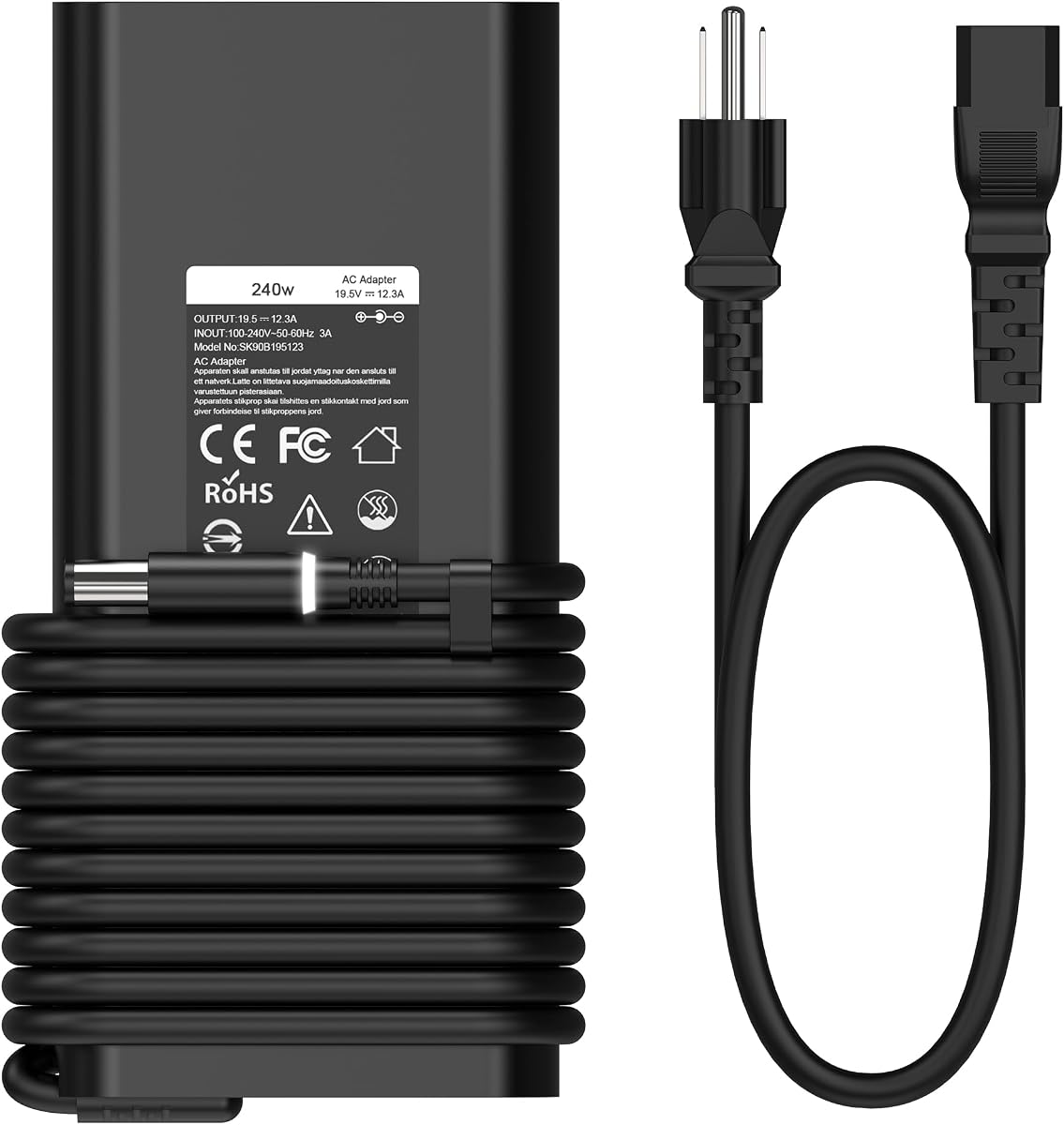
This charger addresses the high power needs of Alienware gaming laptops. With 240W output it supports demanding workloads and gaming sessions ensuring your GPU and CPU remain powered without throttling during intensive tasks.
We may earn a commission when you buy through this link, at no additional cost to you.
It fits a broad range of Alienware and Precision models including M15 M17 and G series. The slim design reduces bulk in bags and the cable is sufficient for desk setups. An extended warranty option adds confidence to the purchase.
High wattage chargers may run warmer than standard adapters. Ensure proper ventilation during use to maintain longevity. Despite this the performance and compatibility make it a solid choice for gamers needing an affordable replacement.
Choose this charger if you own a high-performance Alienware laptop. Its ability to deliver consistent high wattage power ensures your gaming experience remains smooth and uninterrupted without compromising system performance.
Designed for high-wattage requirements this adapter ensures powerful gaming laptops receive consistent energy to handle graphics rendering and gaming without power drops.
Supporting multiple Alienware and Precision models this charger serves as a versatile replacement option for various high-performance Dell hardware configurations.
We may earn a commission when you buy through this link, at no additional cost to you.
With a top rating of 4.7 this charger delivers maximum power for premium Alienware systems. The 330W output ensures even the most demanding hardware runs without power limits allowing for peak performance in gaming and rendering tasks.
We may earn a commission when you buy through this link, at no additional cost to you.
It features a 7.4mm tip specifically for Alienware series devices. The adapter is designed to prevent thermal throttling ensuring smooth frame rates and consistent power. Safety features protect the laptop from overheating during long usage sessions.
The high wattage means larger physical size and power draw. It is best suited for desktop replacements or heavy workloads. The premium price matches the performance capabilities making it ideal for enthusiasts needing reliable top-tier power.
Invest in this adapter if you own a high-end Alienware laptop like the M18 or Area-51m. It guarantees stable full-rated power output ensuring your system operates at maximum potential without performance drops.
This charger delivers full-rated power output to prevent thermal throttling ensuring your laptop performs smoothly during intensive gaming and video editing tasks.
Advanced protection mechanisms prevent overheating keeping the charger and laptop safe during extended usage sessions.
We may earn a commission when you buy through this link, at no additional cost to you.
This adapter kit offers maximum versatility by converting USB-C power to various DC tips. With fifteen different plugs it serves as a universal backup solution for laptops that use barrel connectors ensuring you can charge devices with standard PD power sources.
We may earn a commission when you buy through this link, at no additional cost to you.
It includes a smart charging chip that adjusts current automatically. This supports devices up to 100W providing safe charging across different models. The kit is handy for travelers who carry one power source for multiple devices.
Ensure your power source outputs 20V PD for compatibility. The connectors must match your specific laptop jack which can be tricky to verify. While versatile it requires careful selection to avoid mismatched connections or inefficient charging.
Choose this kit if you manage multiple devices or travel often. Its universal nature and tip variety make it a valuable backup option but verify connector sizes carefully to ensure proper fit and function for your specific laptop.
The included fifteen connectors cover most laptop brands allowing you to use a single USB-C power source for various devices efficiently.
An intelligent chip adjusts charging current automatically to ensure safe and efficient power delivery compatible with different device requirements.
We may earn a commission when you buy through this link, at no additional cost to you.
Selecting the right battery backup involves considering compatibility output power and portability to ensure your Dell laptop stays operational during outages.
Ensure the backup device provides sufficient wattage for your Dell model. Gaming laptops require 200W or higher while standard office laptops typically need 45W to 65W to operate correctly without throttling.
Always check your laptop charger label for wattage requirements and choose a backup with equal or higher output to avoid power drops during high load.
Verify the physical connector matches your laptop's port. Older Dell models use round barrel tips while newer ones use USB-C. Using the wrong tip can damage ports or prevent charging.
Use adapters cautiously and confirm voltage settings match your device requirements to ensure safe and reliable power connection.
Capacity measured in milliamp hours determines how long your device stays powered. Power banks with 20000mAh or more can provide multiple charges for laptops making them ideal for long trips or work sessions.
Consider your daily usage time and travel needs to select a capacity that balances weight with runtime requirements effectively.
Decide if you need a stationary UPS or a portable power bank. UPS units offer more power and surge protection but are heavy and meant for desks. Power banks are lighter but have less capacity.
Assess your location needs to choose between desktop protection and mobile convenience for your specific workflow.
Look for products with CE FCC or UL certifications to ensure electrical safety. Reliable backups include protection against overcharging short circuits and overheating to keep your hardware safe during operation.
Avoid unbranded products lacking safety markings to reduce risks of electrical faults or fire hazards during power issues.
Stick with established brands or verified sellers for reliable performance. Reviews and ratings help gauge real-world performance ensuring the backup device works as advertised during critical times.
Research customer feedback to confirm the product meets expectations for longevity and charging speed before purchasing.
Check warranty terms to ensure peace of mind. Quality products offer at least a one-year warranty covering defects in materials or charging performance which protects your investment over time.
Prioritize brands with responsive customer service to resolve any issues quickly if the product fails to perform.
Always connect your laptop to the backup before unplugging from the wall to ensure smooth transition during power loss. Test the unit periodically by unplugging it to confirm it provides power as expected and check the battery levels regularly.
Store power banks and UPS units in cool dry places away from direct sunlight to prevent battery degradation. Extreme heat or cold can permanently damage internal cells reducing the overall lifespan and runtime capacity of the unit.
Avoid letting the battery discharge completely to 0 percent frequently as it can harm battery health. Recharge the device after each use if possible and keep the firmware updated to ensure optimal performance and safety features are active.
Yes you can use a UPS for a Dell laptop by connecting the wall adapter to a protected outlet on the UPS. This provides battery backup and surge protection ensuring safe operation during outages. Verify the output wattage matches your charger needs for best results.
Charge time depends on the bank capacity and laptop wattage. A 20000mAh bank charging a 65W laptop typically takes around two to three hours. Always check the specific wattage and capacity details in the product specs to estimate accurately.
USB-C power banks are better for newer Dell laptops with Type-C charging ports. They offer fast PD charging and single-cable convenience. Ensure the bank supports enough wattage and voltage to meet your laptop's specific power requirements.
A UPS is a desktop unit that provides power backup and surge protection through wall outlets and has no built-in battery. A power bank is portable with internal batteries for on-the-go charging. Choose a UPS for home office stability.
Not any charger will work as voltage and connector tips must match. Using incorrect wattage or tip size can damage your laptop. Always check your original charger's specifications and buy replacements that meet those exact power and size requirements.
Check the label on the bottom of your laptop or the original charger for output wattage and connector size. Most Dell models require 45W 65W or higher. Refer to your model manual to confirm the exact voltage and amperage ratings for safety.
We have explored ten reliable solutions from the CyberPower EC850LCD UPS to the UGREEN Power Bank. Each option caters to different needs ranging from stationary desktop protection to mobile travel power ensuring you find the right fit.
Prioritize compatibility and safety when selecting a backup. Ensure wattage matches your laptop model and look for certifications to protect your hardware. Investing in a quality device now can save costs and data loss later.
Prices and availability may vary so check current listings before purchasing. Verify the specs and warranty details on the retailer site to ensure you get the exact device you need for your Dell laptop setup.