
HP Smart Tank 5003
4.1Editor score
Mess free refill system
Up to 3 years ink included
AI capable printing features
Finding a reliable cartridge free printer can transform how you handle daily printing tasks at home or in small offices. These devices eliminate the need for expensive disposable ink cartridges by using large refillable tanks instead. This approach saves money over time and reduces waste significantly for environmentally conscious users seeking efficiency.
We evaluated ten leading models based on print quality, connectivity options, ink capacity, and ease of maintenance. Our analysis focuses on real-world performance metrics like pages per minute and the simplicity of the refilling process. Each product offers unique strengths tailored to different user needs and workspace requirements across various budgets.
Every selection below highlights key features and potential trade-offs to help you make an informed decision quickly. We include detailed insights on connectivity and software support to ensure seamless integration with your devices. Note that availability and specific promotions may change frequently so verify current details before purchasing.
4.1Editor score

4.3Editor score
4.2Editor score
As an Amazon Associate we earn from qualifying purchases.
This side-by-side comparison highlights the core specifications and capabilities of each top rated cartridge free printer model to help you identify the right fit for your specific workflow needs.





The Epson EcoTank ET-2903 stands out as the top choice for households needing reliable high-volume printing. It comes with enough ink to last up to three years which drastically reduces recurring costs compared to traditional cartridge models.
We may earn a commission when you buy through this link, at no additional cost to you.
Its 11 pages per minute black print speed ensures you waste no time on large document jobs while the 1.44 inch color screen makes navigation intuitive for all users. The included ink bottles provide up to 3600 black and 6500 color pages right out of the box.
While the upfront investment is higher than basic models the long-term savings quickly offset this difference. The only notable limitation is the paper tray size which may require frequent refills for very large batches.
Choose this model if you prioritize speed and efficiency alongside significant cost savings over time. It is ideal for families or small offices that print regularly and want a hassle-free experience.
Each replacement ink bottle set equals about 80 cartridges meaning you buy ink far less often and save significantly on ongoing costs.
With 5760 x 1440 dpi resolution this printer delivers stunning photographic prints and sharp text suitable for both personal and professional use.
We may earn a commission when you buy through this link, at no additional cost to you.
The HP Smart Tank 5003 offers exceptional value for budget-conscious buyers seeking a cartridge-free solution. It includes up to three years of ink and features a simple mess-free refill system that prevents spills and waste during setup.
We may earn a commission when you buy through this link, at no additional cost to you.
Its AI-capable technology helps optimize print quality and maintenance tasks automatically reducing user intervention. You can print up to 6000 pages from the included ink bottles making it a practical choice for heavy users on a tight budget.
The design is functional rather than sleek which fits well in utilitarian spaces but might lack visual appeal for modern offices. Color printing is slightly slower than black but remains adequate for most standard home document needs.
Pick this printer if you want maximum value without compromising on ink longevity. It is perfect for students or families who need dependable printing without worrying about constant cartridge replacements.
Built-in AI helps manage print settings and maintenance tasks to ensure consistent quality and reduce the need for manual troubleshooting.
Simply plug the ink bottles into the tank and let them drain without squeezing or spilling ensuring a clean and stress-free refilling experience.
We may earn a commission when you buy through this link, at no additional cost to you.
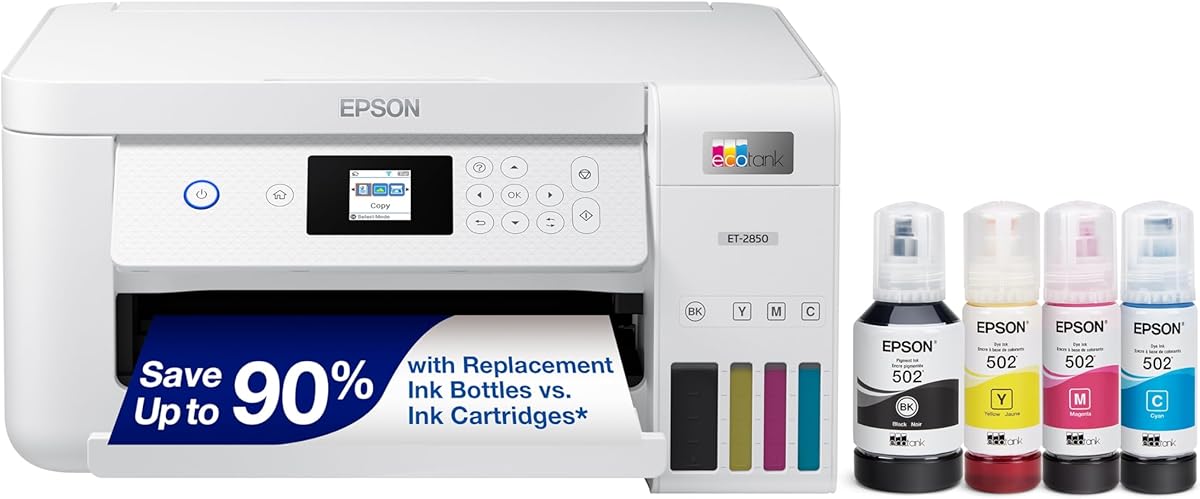
The Epson EcoTank ET-2850 brings premium features like automatic two-sided printing and pigment black ink for professional-grade text quality. It supports voice-activated printing and offers dramatic savings on replacement ink bottles compared to standard cartridges.
We may earn a commission when you buy through this link, at no additional cost to you.
Its Heat-Free technology ensures energy efficiency and consistent performance over time. The included ink provides up to 2 years of printing which minimizes interruptions and keeps your workflow uninterrupted during busy workdays.
The added features come with a higher price tag and a larger physical size that requires more desk space. However the value of saved ink and time on manual flipping makes it a strong investment for offices.
Choose this model if you need professional quality text and automated features to streamline your workflow. It suits small businesses or home offices that prioritize efficiency and high-quality document output.
Pigment black ink produces extremely sharp text ideal for contracts and reports that require professional readability and durability against fading.
Hands-free voice activated printing allows you to send jobs quickly without touching your device enhancing convenience in busy environments.
We may earn a commission when you buy through this link, at no additional cost to you.
The Epson EcoTank ET-2803 provides a solid balance of performance and ease of use for general home printing. It includes enough ink for up to 4500 black pages and features unique Micro Piezo Heat-Free technology for sharp text and vibrant photos.
We may earn a commission when you buy through this link, at no additional cost to you.
Its EcoFit ink bottles make refilling simple and worry-free while reducing the amount of waste ending up in landfills. You can also print hands-free using voice commands which adds convenience when your hands are busy with other tasks.
While it lacks automatic double-sided printing the overall print quality and ink savings remain strong. The basic interface might feel less modern compared to newer models but it gets the job done efficiently.
This printer is an excellent choice for households needing straightforward color printing and scanning. It works well for families who print school projects and photos regularly without needing advanced automation.
By using refillable tanks you help reduce the amount of plastic cartridge waste going into landfills supporting a cleaner environment for everyone.
Micro Piezo Heat-Free technology produces sharp text and impressive color graphics on virtually any paper type ensuring reliable results every time.
We may earn a commission when you buy through this link, at no additional cost to you.
The Epson EcoTank ET-4800 focuses on high capacity and ease of refilling for users who need substantial ink reserves. It uses exclusive EcoFit bottles and Micro Piezo Heat-Free technology to deliver sharp text and vivid photos across various paper types.
We may earn a commission when you buy through this link, at no additional cost to you.
Its color display makes navigation easy while reducing cartridge waste significantly compared to traditional printers. However the lower user rating suggests there may be occasional connectivity or maintenance issues that some owners encounter.
If you prioritize ink volume and easy refills this model might suit your needs despite potential hiccups. Just be prepared to check firmware updates regularly to ensure smooth operation.
Select this printer if you need a high-capacity solution for a shared home environment. It serves well for users who value ink economy and are comfortable with basic troubleshooting.
High capacity ink tanks mean no more tiny expensive cartridges ensuring you have enough ink for months of regular printing without frequent buys.
Unique Micro Piezo Heat-Free technology produces sharp text plus impressive color photos and graphics on virtually any paper type.
We may earn a commission when you buy through this link, at no additional cost to you.
The Canon MegaTank G3270 is a strong competitor for those seeking a simple and affordable cartridge-free printer. It includes up to two years of ink and can print up to 6000 black pages with a single set of inks.
We may earn a commission when you buy through this link, at no additional cost to you.
Its 1.35 inch LCD display offers basic navigation while wireless connectivity ensures easy printing from smart devices. The device helps you save up to $1000 on ink over the lifetime which is a significant benefit for budget-conscious users.
It lacks automatic two-sided printing which means you must flip pages manually for double-sided documents. However for basic home tasks this trade-off is often acceptable given the low cost.
Pick this model if you want a no-frills printer that gets the job done. It is perfect for users who print mostly documents and prefer a simple interface.
Save up to $1000 on ink with these refillable tanks which reduces long-term costs significantly compared to traditional cartridge systems.
Print up to 6000 black and 7700 color pages using a single set of inks to keep your printing uninterrupted for months.
We may earn a commission when you buy through this link, at no additional cost to you.
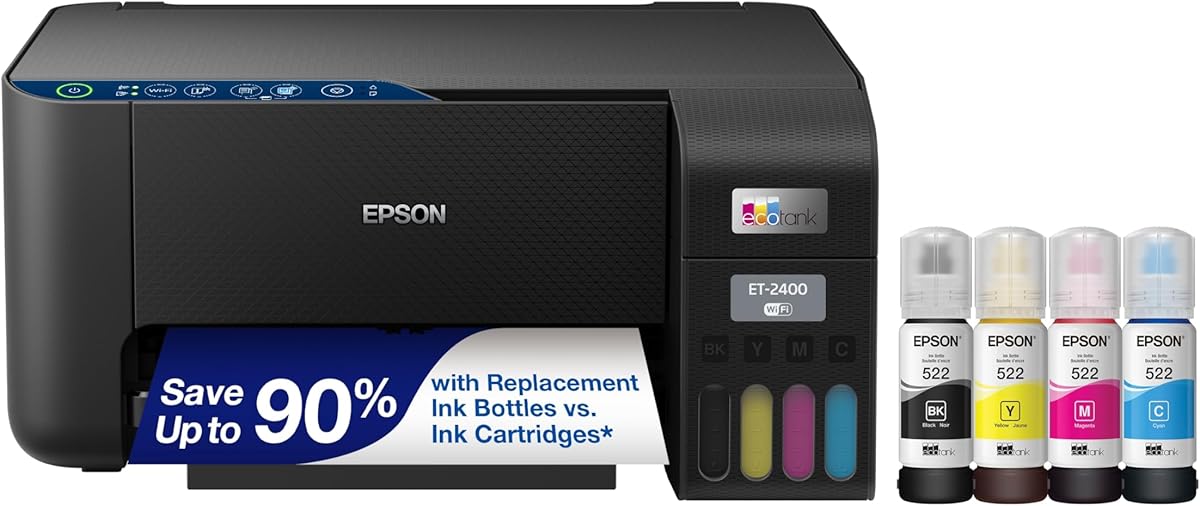
The Epson EcoTank ET-2400 is a compact option designed to fit easily into smaller home workspaces. It delivers up to 4500 black pages and 7200 color pages with bottles that are equivalent to about 80 cartridges.
We may earn a commission when you buy through this link, at no additional cost to you.
Its refill process is simple and worry-free thanks to exclusive EcoFit bottles. The Micro Piezo Heat-Free technology ensures consistent quality without overheating or excessive energy use during operation.
It lacks advanced connectivity features but covers all basics like printing scanning and copying efficiently. If you have limited desk space and need reliable performance this model fits the bill well.
Choose this printer for small apartments or home offices where space is premium. It provides all the essentials for home printing without taking up too much room.
This home printer keeps printing longer with a smaller footprint that fits virtually any workspace without cluttering your desk or shelf.
Printer scanner and copier utilizes Epson's exclusive EcoFit ink bottles making the refill process easy and worry-free for every user.
We may earn a commission when you buy through this link, at no additional cost to you.
The Epson EcoTank ET-2800 is built for reliability and vivid detailed prints suitable for both documents and photos. It fires off 10 ISO pages per minute to easily finish large jobs without long wait times.
We may earn a commission when you buy through this link, at no additional cost to you.
It includes enough ink for up to 2 years of printing to reduce out-of-ink frustrations significantly. The EcoTank design helps reduce cartridge waste ending up in landfills which is a plus for environmentally conscious households.
While it misses voice-activated features it handles standard tasks efficiently and maintains excellent print quality. Users appreciate the robust design that keeps printing consistently over time.
This printer works well for families needing consistent daily output. It is a practical choice for those who value dependability and straightforward printing capabilities.
Epson EcoTank ET-2800 All-in-One Supertank Color Printer creates vivid detailed prints and documents thanks to Micro Piezo Heat-Free Technology.
Fire off 10 ISO pages per minute to easily finish large jobs and get back to your day without unnecessary delays.
We may earn a commission when you buy through this link, at no additional cost to you.
The Epson EcoTank ET-2980 includes enough ink to print up to 6600 black pages and 5500 color pages for worry-free printing over three years. Each replacement ink bottle set is equivalent to about 90 individual cartridges.
We may earn a commission when you buy through this link, at no additional cost to you.
Supersized ink tanks and unique EcoFit bottles make refilling simple without worrying about drying out. You can print and scan from your smartphone using the Epson Smart Panel app for seamless mobile workflows.
It offers a solid mid-range option with reliable brand performance and straightforward design. While it lacks unique advanced features it meets all standard home needs efficiently.
Select this model if you need long-term ink coverage and mobile convenience. It is great for households that want to avoid frequent ink shopping.
Cartridge-free printer comes with enough ink to print up to 6600 pages black and 5500 color for worry-free printing and fewer out-of-ink frustrations.
Home printer allows you to print and scan from the convenience of your smart phone or device with enhanced mobile printing.
We may earn a commission when you buy through this link, at no additional cost to you.
The Epson EcoTank ET-2988 offers fast 15 black per minute speeds and auto duplex printing in a renewed package. It includes enough ink for up to 6600 black pages and features a 1.44 inch color display for easy navigation.
We may earn a commission when you buy through this link, at no additional cost to you.
High resolution output ensures exceptional photos and text quality while wireless mobile printing keeps your workflow flexible. The auto duplex feature saves paper and time by printing on both sides automatically.
Buying renewed often means lower costs but check the warranty details carefully before purchasing. If you want high performance at a lower price this model is a strong contender for home offices.
Choose this printer for speed and automation benefits at a reduced cost. It suits users comfortable with renewed tech who want premium features without paying full price.
Fast 15 black and 8 color ISO ppm print speeds with zero warmup time ensure you finish jobs quickly and efficiently.
Auto duplex printing helps you save paper automatically by printing on both sides of the sheet during large document jobs.
We may earn a commission when you buy through this link, at no additional cost to you.
Selecting the right cartridge free printer involves evaluating several key factors to ensure it meets your specific printing volume and quality needs.
Look for models that offer the highest pages per bottle such as those providing up to 3 years of ink. This ensures minimal interruptions and lower long-term costs compared to frequent cartridge replacements.
Prioritize tanks with large capacities like 6000 or more black pages to reduce the frequency of refills significantly.
A good refill system should be mess-free with clear labels and unique keyed bottles to prevent spills or mixing colors. Systems like EcoFit or easy-access bottles simplify the process for everyone.
Ensure the design allows simple drainage without squeezing which saves time and reduces the risk of ink staining your workspace.
Check pages per minute ratings especially for black text if you print frequent documents. Faster speeds like 15 PPM can make a big difference during busy workdays.
Consider that color speeds might be lower so look for models that balance both needs efficiently.
Wireless capabilities are essential for printing from smartphones or laptops without cables. Look for voice-activated printing support for added convenience.
Ensure compatibility with major apps like Epson Smart Panel or AirPrint for seamless mobile integration.
Higher dpi ratings like 5760 x 1440 ensure sharper text and better photo results. This is vital for households needing high-quality graphics or documents.
Micro Piezo Heat-Free technology often delivers consistent quality without overheating during long sessions.
Auto two-sided printing saves paper and reduces clutter in your files automatically. It is a premium feature that benefits users who print many double-sided reports.
If you do not need this feature you can save money by choosing models without it.
Consider the footprint and ensure it fits your desk or workspace comfortably. Compact models are ideal for small apartments while larger ones offer more capacity.
Check if the design includes a clear display for easy navigation and status updates.
Choose established brands known for durable hardware and consistent support. Check for warranties that cover potential issues like printheads or motor failures.
Read user reviews to gauge real-world reliability before making your final purchase decision.
Start by following the setup guide carefully to prime the ink tanks before first use. This ensures the printhead is filled properly and prevents clogging during early printing sessions.
Clean the printhead regularly using the printer's maintenance menu to keep lines clear. Use a soft cloth to wipe any spills on the exterior or refill ports.
Keep the printer in a stable environment away from direct sunlight or extreme temperatures. This helps maintain ink quality and prolongs the device's overall lifespan significantly.
Yes they are significantly cheaper in the long run because one bottle set can equal 80 cartridges. The initial cost is higher but you save hundreds on ink over the first two years of use.
No you will only need to refill once every few months or even years depending on your usage. High capacity tanks allow you to print thousands of pages before needing more ink.
Manufacturers recommend genuine ink to avoid damage and ensure warranty coverage. Third-party bottles may not fit the unique keyed systems and could cause clogs or failures.
Most modern models include full wireless and mobile printing support. You can print directly from smartphones tablets or laptops without connecting any cables.
Absolutely they are ideal for small offices needing high-volume document output. Features like duplex printing and auto scanning make them efficient for daily workflows.
It is best to print a test page once a month to keep the lines clear. This prevents the ink from drying out and clogging the printhead during long idle periods.
The Epson EcoTank ET-2903 and HP Smart Tank 5003 lead the list for overall value and budget efficiency respectively. Both models offer impressive long-term savings and reliable daily performance.
Prioritize ink capacity and refill ease if you plan to print frequent large documents. Speed and duplex features will matter most for active home offices needing automated tasks.
Always verify current stock and any limited-time deals before making your final decision. Prices and availability change frequently so checking today ensures you get the best available option.