
8mm & Super 8 Film to Digital Converter
3.7Editor score
32GB SD Card Included
Frame by Frame Conversion
TV Playback Capability
This guide compares the best digital converters for Super 8 and 8mm film to help you digitize your old movie reels easily.
Preserving your family history is crucial. Digital converters for Super 8 and 8mm film allow you to transform aging analog reels into modern digital files. These devices make it easy to save precious memories for future generations without needing a projector.
We analyzed ten top-rated film digitizers based on ease of use, output quality, and compatibility. Our selection includes models with built-in screens, touch controls, and various reel sizes. This list covers standalone units that require no computer software for immediate conversion.
Each pick highlights key features like resolution, screen size, and included accessories. We focus on standalone operation to simplify the process. Keep in mind that prices and availability may change, so check the latest details before purchasing your preferred device.
3.7Editor score

4.1Editor score

4.0Editor score
The following table provides a side-by-side comparison of the top ten film digitizers. It highlights essential specifications like screen size, reel compatibility, and output formats to help you find the right tool for your collection.




The KODAK REELS Film Digitizer is a robust standalone device designed to convert 8mm and Super 8 film into digital files. It features an impressive 8MP sensor and a large 5 inch LCD screen. This model stands out for its ease of use and high definition video output.
We may earn a commission when you buy through this link, at no additional cost to you.
Its standout feature is the intuitive touch interface. You can zoom, align frames, and adjust settings like exposure and tint directly on the device. It supports reel sizes from 3 to 9 inches and saves files to an SD card. This eliminates the need for a computer or software.
The lack of audio recording is a trade-off. If sound is important, this device captures video only. However, the visual clarity is excellent for preserving family movies. The 1080p output ensures your films look sharp on modern TVs.
This device is ideal for users who want a high-quality screen process without technical hassle. The included accessory kit makes setup straightforward. For anyone looking to digitize a large collection efficiently, this is a top choice.
The touch screen allows for quick adjustments to brightness and alignment without a physical interface.
The 8MP sensor captures detailed frames ensuring your old movies retain their original clarity in digital format.
We may earn a commission when you buy through this link, at no additional cost to you.
This budget-friendly converter provides a straightforward way to digitize your film collection. It captures video frame by frame into 1080p MP4 files. The inclusion of a 32GB SD card makes it ready to use right out of the box.
We may earn a commission when you buy through this link, at no additional cost to you.
The device is simple to operate. You load the film onto the universal supply reel and follow the prompts. The 2.4 inch screen allows for instant review of your converted clips. It is compatible with Windows, Mac, and Linux systems for easy file transfer.
While it lacks advanced features like touch controls, it gets the job done effectively. The frame rate of 20 fps is standard for this type of device. It is a solid choice for those who want functionality without spending much.
For users on a tight budget, this converter offers great value. The included storage saves an extra purchase. If you need a basic tool to save old memories quickly, this model is a reliable option.
With the included SD card, you can start digitizing your films as soon as you unpack the device.
The straightforward layout ensures even those with little tech experience can convert their film reels easily.
We may earn a commission when you buy through this link, at no additional cost to you.
The Magnasonic FS81 scanner is designed for convenience and quality. It automatically converts 8mm and Super 8 film into digital MP4 files with a single button press. The vibrant 2.3 inch screen lets you view your memories instantly.
We may earn a commission when you buy through this link, at no additional cost to you.
You can adjust brightness, sharpness, and framing directly on the scanner. This control ensures you get the best possible image from old film. The RCA video out cable allows you to connect to a TV for a larger viewing experience.
Its maximum reel capacity is 7 inches which may limit larger collections. However, for standard reels, it performs excellently. The lack of included storage means you must provide your own SD card.
This scanner is perfect for users who want a polished device with minimal setup. The automatic features make it a great gift. If you value image control and ease of use, this model is highly recommended.
Adjusting brightness and sharpness on the device ensures your films look their best in the digital format.
The built-in screen allows you to review your scans right away without transferring files to another device.
We may earn a commission when you buy through this link, at no additional cost to you.
This converter features a full color LCD screen with touch buttons. It uses a 5 Megapixel sensor to capture images with exceptional clarity and color accuracy. The interface allows you to adjust brightness and framing easily without software.
We may earn a commission when you buy through this link, at no additional cost to you.
It supports reels up to 9 inches and includes a 32GB SD card. The RCA video out cable connects directly to a television. This makes it easy to share your digitized films with family on a big screen.
The touch interface simplifies navigation and settings. It is designed for frustration-free operation. While it does not capture sound, the visual quality is strong. The package includes all necessary cables and adapters.
For users who want a touch enabled device at a mid-range price, this is a good option. The included accessories reduce the need for extra purchases. It is a thoughtful gift for family members looking to save memories.
The touch buttons allow you to change settings and film types without digging through menus.
With cables and adapters included you have everything needed to start converting film immediately.
We may earn a commission when you buy through this link, at no additional cost to you.
The MovieMaker Pro is an automated digitizer that converts reels into digital videos. It supports large 9 inch reels which is rare for this class. The device saves files directly to an SD card. It works with Windows, Mac, and Linux.
We may earn a commission when you buy through this link, at no additional cost to you.
Its main appeal is the automated nature. You load the film and let the device handle the rest. The 2.4 inch screen provides a quick view of your work. It is designed for those who do not want to deal with a computer.
Some users find the design basic compared to others. But the capacity for large reels is a significant advantage. It allows you to digitize extensive collections without changing reels often. The 1080p output ensures clarity.
If you have many large reels to process, this model is a practical choice. It saves time and effort on a large scale. For those prioritizing capacity and automation, it is a strong contender.
The ability to handle 9 inch reels means you can digitize longer films without frequent interruptions.
The automated process removes the need for manual intervention, making conversion faster for bulk projects.
We may earn a commission when you buy through this link, at no additional cost to you.
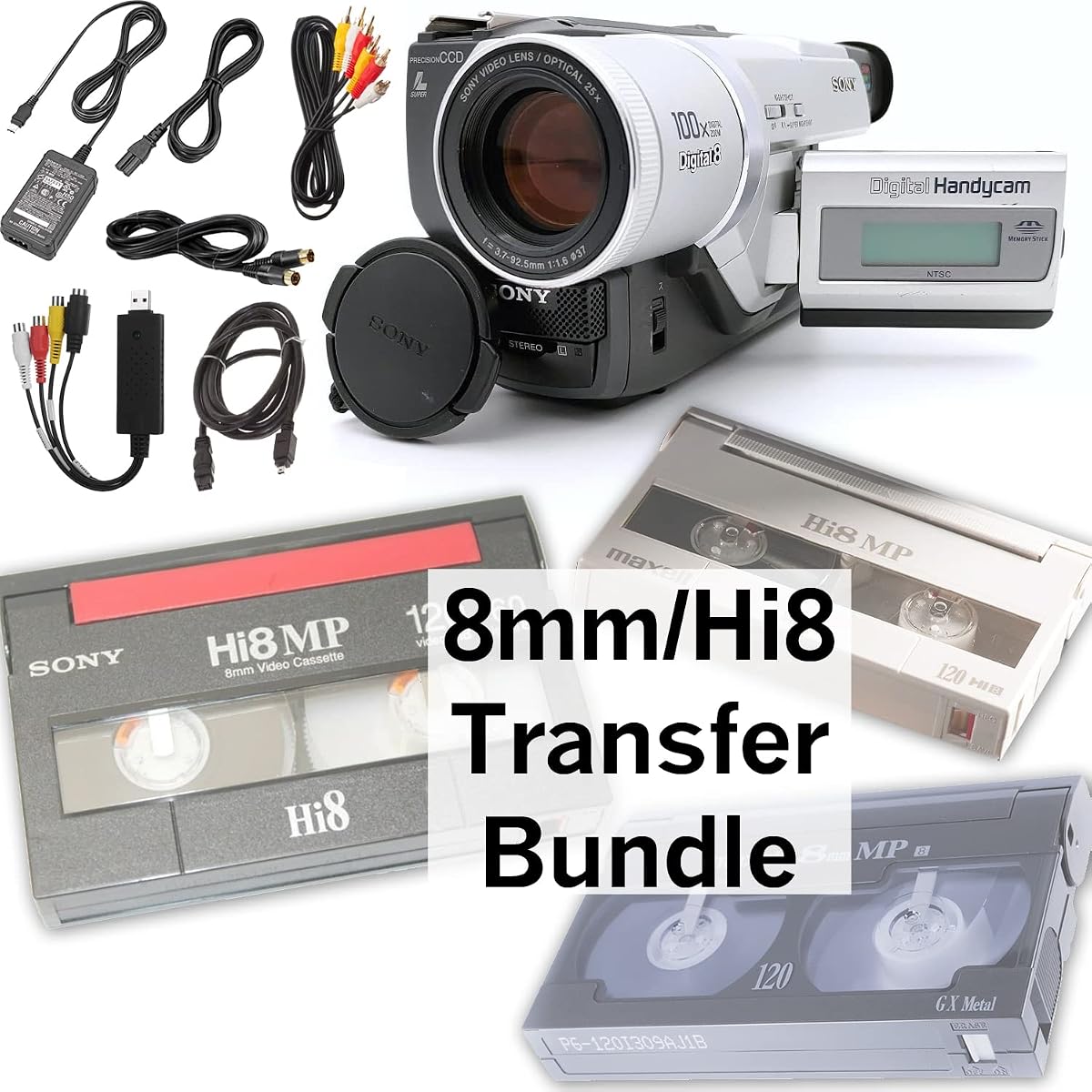
This bundle is designed for users with tape formats like Digital8 or Hi8. It includes a camcorder and a USB capture device to transfer footage. You can save files to a computer or burn them to DVD. This is ideal for those with tape collections.
We may earn a commission when you buy through this link, at no additional cost to you.
The camcorder is guaranteed to work so you can playback tapes immediately. The AV cables allow for transfer or TV playback. It simplifies the transfer process by providing necessary hardware in one package.
Since it focuses on tapes, it does not work with film reels. But for tape preservation, it is a complete solution. The free returns policy gives extra peace of mind for buyers.
If your goal is to digitize tapes rather than film, this bundle is essential. It covers all the bases for tape playback and transfer. For those with mixed media, this is the right tool for tapes.
By including a camcorder and capture device you get everything needed to digitize your tape collection.
You can choose to save as digital files or burn directly to DVD for physical copies.
We may earn a commission when you buy through this link, at no additional cost to you.
This kit is tailored for converting 8mm and Hi8 tapes into digital files. It includes a camcorder and a blank tape for testing. The USB capture device handles the transfer to your computer. It is a cost-effective way to save tape footage.
We may earn a commission when you buy through this link, at no additional cost to you.
The blank tape allows you to test playback before transferring. The device is guaranteed to work so you avoid defective items. AV cables are included for quick connection to a TV for review.
It does not work with film reels so know your media type. If you have tapes this kit provides all the necessary tools. The returns policy ensures you are satisfied with the working unit.
This bundle is best for those looking to archive tapes without buying separate hardware. The inclusion of a blank tape adds value. For tape preservation, this is a reliable and affordable kit.
The included blank tape lets you test your camcorder and setup before digitizing valuable footage.
The USB capture device connects directly to your PC for immediate file transfer and editing.
We may earn a commission when you buy through this link, at no additional cost to you.
This scanner converts 8mm and Super 8 film into MP4 files. It features a 2.4 inch LCD and a digital photo frame mode. You can view your scans on the device or use it as a frame. It supports standard film supply reels.
We may earn a commission when you buy through this link, at no additional cost to you.
The on-screen prompts guide you through the process. It is designed to be simple and quick. The output format is MP4 which is widely compatible. This makes sharing and storage easy.
The frame mode adds a decorative use for your old photos. It is a unique feature for a scanner. The SD card is not included but you can add your own.
For those who want both scanning and display features, this is a great option. It brings old films into a modern display format. It is ideal for family photo albums or living room displays.
You can use the device to display your scans on a wall, preserving memories actively in your home.
Clear prompts guide you through loading and scanning so you avoid confusion during setup.
We may earn a commission when you buy through this link, at no additional cost to you.
This scanner converts 8mm and Super 8 film into JPEG images. It includes a display screen for immediate viewing. It supports digital negatives so you can capture still frames easily. The process is straightforward with universal film supply.
We may earn a commission when you buy through this link, at no additional cost to you.
It is ideal if you want to archive specific moments as photos. The JPEG format is easy to share or print. The screen lets you check images without a computer. It works with most standard film sizes.
The focus is on images rather than full video playback. This makes it a specialized tool for photography. It is a great way to create a digital photo album from old film.
If your goal is to create photo albums from your film, this scanner is perfect. It simplifies the capture of single frames. For users preferring still images, this is a strong choice.
Converting to JPEG allows you to easily print or share specific frames as individual photos.
The included display lets you check your captured images immediately after scanning without extra devices.
We may earn a commission when you buy through this link, at no additional cost to you.
This scanner includes a full accessory kit with cables and manual. It converts film to MP4 files with a universal supply reel. The setup is clean and stable. It offers a complete package for those starting digitization.
We may earn a commission when you buy through this link, at no additional cost to you.
You can save footage directly to an SD card. The device is user friendly with on-screen prompts. The included accessories ensure you do not need to buy extra cables. It is ideal for home users.
The comprehensive kit adds value to the purchase. It simplifies the setup process significantly. While the SD card is separate, all other tools are provided. This ensures a smooth experience from start to finish.
For users who want a complete solution in one box, this is a great pick. It removes the guesswork from setup. It is a reliable choice for saving your family movies.
The included cables and manual ensure you have everything needed to start digitizing right away.
The design ensures stable operation which helps capture clear frames without unexpected interruptions.
We may earn a commission when you buy through this link, at no additional cost to you.
Choosing the right converter requires considering several factors like reel size compatibility, screen features, and output format. This section breaks down the key elements to ensure you select a device that meets your needs.
Different models support different reel diameters. Some devices handle up to 7 inches while others support 9 inches. If you have large reels, ensure the device can accommodate them to avoid constant rethreading.
Check the reel capacity before buying to match your collection size. Larger capacity models save time and effort.
Standalone converters usually have a built-in screen. Touch screens offer easier control while standard LCDs are simpler. A larger screen helps you align frames accurately.
Look for a screen size that suits your viewing preferences. Touch interfaces can enhance usability significantly.
Most devices output MP4 files in 1080p. Some may offer JPEG for still images. Check if the device captures audio or just video.
Higher resolution ensures your films look sharp. MP4 is widely supported for easy sharing.
Some bundles include SD cards, cables, and adapters. Others require you to purchase these separately. Accessories can save you extra costs.
Look for a complete kit to avoid additional purchases. Accessories simplify the setup process.
Standalone devices should not require a computer. Look for intuitive interfaces with clear prompts. Automatic features reduce the need for manual adjustments.
A user friendly interface ensures you can convert films quickly. Automation helps with repetitive tasks.
Many converters only capture video without sound. If audio is important, check for audio input capabilities. Most models focus on visual preservation.
Understand that audio may be lost. Focus on video quality for most film preservation needs.
Look for USB, RCA, or HDMI outputs. These allow you to view films on a TV or computer. Transfer methods impact how you share your memories.
Multiple connection options increase versatility. TV connectivity enables easier viewing for family.
Prices vary based on features and brand. Check warranty terms to protect your investment. Some models offer 1-year warranties or support.
Balance features with your budget. Warranty support is key for long-term reliability.
Start by loading your film reel onto the universal supply reel. Follow the on-screen prompts to align the film and set the correct type. Use the touch or physical buttons to adjust brightness and framing for the best image.
Initiate the scan process and let the device run. It captures frames frame by frame. Monitor the progress on the built-in screen. Ensure the film remains taut to avoid blurring.
After conversion, remove the SD card and transfer files to your computer. Clean the scanner lens with the included cloth. Store the device in a cool, dry place to maintain its longevity.
No most standalone converters do not require a computer. You can digitize films directly to an SD card using the built-in screen and controls. This simplifies the process significantly.
Most devices output MP4 video files. This format is widely compatible with computers, smartphones, and TVs. It ensures easy sharing and long-term storage of your memories.
Most standalone converters only capture video. They do not record audio from the film soundtracks. Some advanced models may have audio inputs but they are rare.
Yes the models listed support both Super 8 and standard 8mm film. Check the specs to confirm compatibility. Most use the same film width and mounting.
Most devices support SD cards up to 32GB. If you are not buying one the device might include a card. Use a high-speed card to ensure smooth file writing.
Use the included RCA or HDMI cable to connect the device to your TV. Some models allow direct transfer to a smart TV. This enables easy family viewing without a computer.
Yes most standalone models allow real-time adjustments via buttons or touch screens. You can tweak exposure and framing to enhance image quality before saving.
Choosing the right digital converter for your 8mm or Super 8 film depends on your specific needs. The KODAK REELS offers top-tier features like touch control and high resolution. The budget-friendly options provide simplicity and value.
Prioritize reel capacity and screen usability when selecting a model. If you have large collections look for devices supporting 9-inch reels. For ease of use focus on standalone operation with clear on-screen guides.
Remember to check current availability and accessories before purchasing. Prices and stock can vary over time. Select the model that best balances your needs with the included features.