
Microsoft Surface Dock 2
4.5Editor score
199W power supply
Dual 4K at 60Hz
Four USB-C ports
This guide compares ten top docking stations for Surface Pro devices, evaluating connectivity, charging power, display support, and build quality to help you
Finding the right docking station for your Surface Pro is essential for transforming your tablet into a powerful desktop workstation. A quality hub expands your connectivity options, supports multiple external displays, and ensures your device stays charged throughout long work sessions.
We evaluated ten real products based on their port selection, charging capabilities, display support, and overall build quality. Our analysis focuses on how well each dock integrates with the Surface ecosystem to provide a seamless user experience.
Each pick highlights specific strengths like Thunderbolt performance or triple display support. Prices and availability change frequently, so check the current links for the most up to-date information before making your final purchase decision.
4.5Editor score

4.4Editor score

4.1Editor score
This side-by-side comparison evaluates all ten selected docking stations across key performance metrics. We analyze port configurations, charging wattage, display capabilities, and unique features to help you identify the best fit for your specific workflow requirements.




The Microsoft Surface Thunderbolt 4 Docking Station stands out as a premium option for users requiring maximum connectivity speed and display flexibility. With a rating of 4.4 stars, it delivers reliable performance for power users who need to transfer large files quickly.
We may earn a commission when you buy through this link, at no additional cost to you.
Its Thunderbolt 4 ports enable lightning-fast data transfer and media streaming while supporting up to two 4K monitors simultaneously. The dock includes three USB-C and three USB-A ports alongside a 2.5G Ethernet port for high-speed network connections.
While the price is higher than many alternatives, the rapid charging technology that powers up your laptop in just 2.5 hours justifies the investment. The raised tactile indicators on each port make it easy to identify connections quickly without visual assistance.
This dock is ideal for professionals working with heavy data loads or multiple displays. If you prioritize speed and display quality over cost, this Thunderbolt dock offers the most robust connectivity solution for your Surface Pro.
Thunderbolt 4 technology ensures you get the fastest possible data transfer speeds and charging capabilities available for your Surface Pro.
The dock is made with 20% recycled ocean-bound plastic demonstrating Microsoft commitment to environmental responsibility without compromising performance.
We may earn a commission when you buy through this link, at no additional cost to you.
The original Microsoft Surface Dock transforms your Surface into a desktop PC using the magnetic Surface Connect cable for a clean setup. With a 4.5 star rating it offers solid reliability for users with older Surface devices needing straightforward expansion.
We may earn a commission when you buy through this link, at no additional cost to you.
It features two Mini DisplayPort outputs along with four USB 3.0 ports and a Gigabit Ethernet port for comprehensive connectivity. The magnetic cable makes plugging in and out effortless which is great for daily commuting between home and office.
While this model lacks modern USB-C ports its broad compatibility with Surface Pro 3 through Surface Book 2 ensures it works across many generations of devices. It is an excellent choice if you own older Surface hardware.
Consider this dock if you value simplicity and magnetic connection reliability. It provides essential desktop functionality without unnecessary complexity making it a practical choice for basic productivity workflows.
The magnetic Surface Connect cable allows you to dock and undock your Surface quickly without fumbling with traditional connectors.
This dock supports a wide range of older Surface devices making it a versatile option for organizations with mixed hardware.
We may earn a commission when you buy through this link, at no additional cost to you.
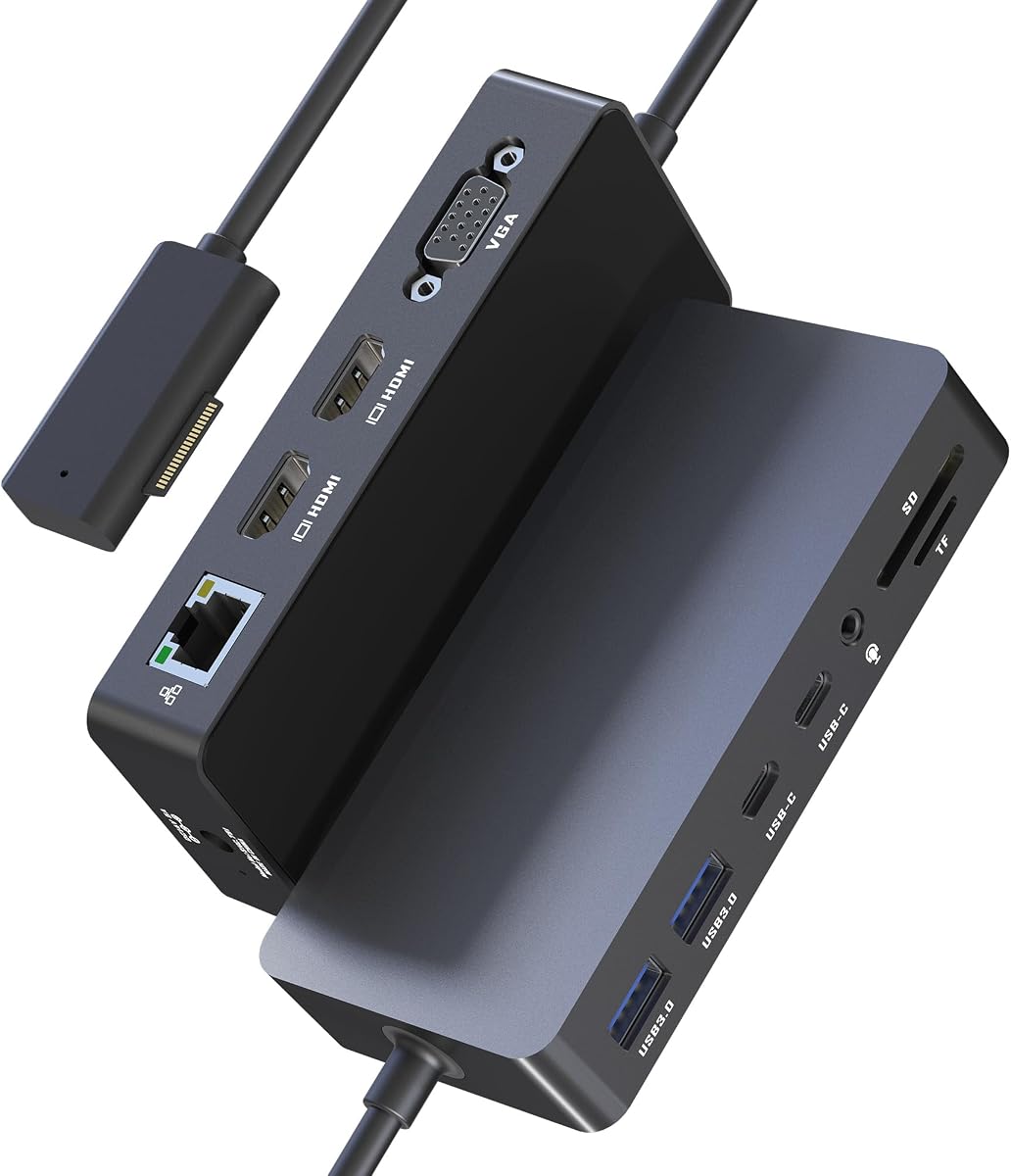
This 12-in-1 Surface Docking Station offers impressive triple display capabilities at a budget-friendly price point making it accessible for users needing multiple monitors. With a 4.1 star rating it delivers solid value for basic productivity tasks.
We may earn a commission when you buy through this link, at no additional cost to you.
The dock features two HDMI ports supporting up to 4K and one VGA port for a total of three external displays plus your Surface screen. It includes two USB-C and two USB-A ports alongside SD and TF card slots for versatile connectivity.
While the Ethernet is limited to 100Mbps and VGA maxes out at 1080P this dock covers essential needs for most users. The included power adapter ensures stable charging while you work on extended sessions.
Choose this dock if you need multiple screens without breaking the budget. It is ideal for students or professionals who require extra screen real estate for multitasking but do not need enterprise-grade network speeds.
Using three external displays can boost your efficiency by enabling you to reference data while working on primary tasks.
Dedicated SD and TF card slots allow photographers and creators to transfer media files directly without extra adapters.
We may earn a commission when you buy through this link, at no additional cost to you.
This upgraded version of the triple display dock boasts an impressive 4.8 star rating indicating high customer satisfaction. It provides similar connectivity options to the previous model but with refined features for better performance.
We may earn a commission when you buy through this link, at no additional cost to you.
It includes a 72W power supply which is a significant upgrade over older 45W chargers ensuring your device stays charged while running multiple peripherals. The dock supports two 4K HDMI outputs plus a VGA port for comprehensive display options.
Two USB 3.0 ports offer data transfer speeds up to 5Gbps making file movement efficient. The integrated SD TF card slots support up to 104MB/s for rapid photo and video offloading without additional adapters.
This dock is perfect for mobile professionals needing reliable performance without premium pricing. The plug-and-play design means no driver headaches allowing you to focus on work immediately upon setup.
The 72W power supply meets the demands of busy mobile professionals ensuring your device stays powered during intensive work sessions.
A minimalist design pairs seamlessly with MS Surface devices reducing desk clutter while maximizing functionality for office environments.
We may earn a commission when you buy through this link, at no additional cost to you.
This Surface Docking Station stands out with its 72W fast charging capability ensuring your device stays powered all day. With a 4.2 star rating it offers a reliable mix of connectivity and power for daily workflows.
We may earn a commission when you buy through this link, at no additional cost to you.
It supports dual 4K HDMI outputs and a VGA port allowing up to three external monitors for enhanced multitasking. The dock includes two USB-C and two USB-A ports with speeds up to 5Gbps for quick file transfers.
The included 72W DC power port ensures your device remains charged while connected to peripherals. This eliminates the need for separate chargers simplifying your desk setup significantly.
Ideal for users prioritizing charging speed and display quality this dock works with a wide range of Surface devices. The 18-month warranty provides peace of mind for long-term use.
The 72W fast-charging capability keeps your Surface Laptop or Pro running while connected to multiple devices.
Extend your workspace across multiple screens to manage complex workflows efficiently without constant window switching.
We may earn a commission when you buy through this link, at no additional cost to you.
The Microsoft Surface Dock 2 represents the pinnacle of Surface connectivity offering next-gen ports and exceptional power delivery. With a 4.5 star rating it transforms your Surface into a robust desktop workstation instantly.
We may earn a commission when you buy through this link, at no additional cost to you.
It includes a 199W power supply and a longer 80cm Surface Connect cable providing ample reach for desk setups. The dock supports dual 4K displays at 60Hz ensuring smooth visuals for creative professionals.
With two front-facing and two rear-facing USB-C ports plus two USB-A ports you have versatile connectivity options. The included Gigabit Ethernet port ensures stable network connections for video calls.
This dock is perfect for power users demanding maximum performance and future-proof connectivity. If you value premium build quality and dual 4K 60Hz support this is the ultimate choice.
The 199W power supply ensures you can run multiple high-power peripherals while keeping your Surface fully charged.
Dual 4K at 60Hz support delivers fluid visuals essential for video editing and creative design work.
We may earn a commission when you buy through this link, at no additional cost to you.
This specific listing of the Surface Dock 2 offers the same premium features with verified wide compatibility across Surface devices. With a 4.8 star rating it promises reliable performance for both Pro and Book users.
We may earn a commission when you buy through this link, at no additional cost to you.
It comes with a 199W power supply and an extended 80cm Surface Connect cable for flexible desk placement. The dock provides two front and two rear USB-C ports alongside two USB-A ports for convenient access.
Supporting dual 4K monitors at 60Hz this dock ensures high-resolution visuals for demanding creative workflows. The Kensington-compatible security lock support adds a layer of physical security for office environments.
Choose this dock if you need a reliable high-performance hub with extensive port options. It bridges the gap between mobile flexibility and desktop productivity seamlessly.
The 80cm Surface Connect cable provides extended reach for flexible desk setups.
Kensington-compatible security lock support adds peace of mind for shared office environments.
We may earn a commission when you buy through this link, at no additional cost to you.
This docking station offers dual 4K at 60Hz HDMI outputs making it an excellent alternative for users needing high refresh rates. With a 4.3 star rating it provides reliable performance for creative professionals.
We may earn a commission when you buy through this link, at no additional cost to you.
It features a 100W DC charging adapter ensuring your device stays powered while connected to multiple displays. The 12-in-1 design includes HDMI VGA and USB ports alongside integrated SD TF card slots.
The Gigabit Ethernet port provides stable network connections essential for video conferencing. Unlike bus-powered hubs this dock delivers dedicated power so you never worry about battery drain.
Ideal for traders and designers needing superior screen real estate this dock eliminates adapter clutter effectively. It serves as a reliable upgrade path for those needing more ports than standard docks provide.
Dual 4K at 60Hz outputs deliver lag-free crystal-clear resolutions essential for video editing.
The Gigabit Ethernet port ensures smooth video conferencing and high-speed downloads without interruptions.
We may earn a commission when you buy through this link, at no additional cost to you.
This renewed listing of the Surface Dock 2 offers premium features at a lower price point. With a 4.7 star rating it provides a cost-effective way to access top-tier connectivity.
We may earn a commission when you buy through this link, at no additional cost to you.
It includes the original 199W power supply and a USB-C cable ensuring you have everything needed for instant setup. The dock supports dual 4K at 60Hz for immersive visuals.
Rigorously tested for durability the renewed unit features integrated thermal management. It works with a wide range of Surface devices from Surface Pro 3 to newer models.
Choose this option if you want premium performance without the full new price. Just ensure you understand the warranty terms for renewed products before purchasing.
This renewed option provides premium Surface connectivity at a more accessible price point.
Includes the 199W power supply and USB-C cable ensuring you have everything for instant setup.
We may earn a commission when you buy through this link, at no additional cost to you.
This Surface Dock provides reliable connectivity with a 90W power supply for stable performance. With a 4.2 star rating it serves well for users with older Surface models needing basic expansion.
We may earn a commission when you buy through this link, at no additional cost to you.
It features two Mini DisplayPort outputs supporting 4K at 60Hz or combined 4K and 1080P. The four USB 3.0 ports allow connections for various peripherals while charging mobile phones.
The gigabit network card ensures your Internet speed remains stable during heavy usage. The 10-in-1 design offers the interfaces you need without clutter or unnecessary complexity.
Ideal for budget-conscious users with compatible older Surface devices this dock simplifies your workspace effectively. It provides essential expansion without the premium cost of newer models.
Dual Mini DP interfaces support either single 4K 60Hz or combined 4K and 1080P outputs.
Four USB 3.0 ports support everything from storage drives to mobile phone charging.
We may earn a commission when you buy through this link, at no additional cost to you.
Selecting the right docking station involves considering your specific display needs power requirements and port configurations. Here are key factors to evaluate before making your decision.
Check whether the dock supports single dual or triple display setups. High-end docks like the Surface Dock 2 offer dual 4K at 60Hz while budget options may provide triple displays with one lower resolution VGA port.
Ensure the dock matches your preferred resolution and refresh rate for smooth visuals.
Verify the dock provides sufficient wattage to power your Surface and all connected peripherals simultaneously. Models with 72W or higher supplies ensure stable charging during intensive work sessions.
Higher wattage prevents battery drain when using multiple external devices.
Assess the types of ports available such as USB-C USB-A HDMI VGA or Ethernet. Choose a dock that aligns with your specific peripheral needs to avoid extra adapters.
Having diverse port options simplifies your setup significantly.
Look for USB 3.0 or Thunderbolt 4 ports if you frequently move large files. Speeds of 5Gbps or higher ensure rapid data transfers essential for creative professionals.
Faster speeds save valuable time during daily workflows.
Ethernet ports provide stable connections essential for video conferencing. Ensure the dock includes Gigabit Ethernet for reliable performance during work calls.
Wired networks reduce latency compared to Wi-Fi alternatives.
Evaluate the physical size and build quality of the dock. A compact design helps reduce desk clutter while durable materials ensure long-term reliability.
Quality construction maintains consistent performance over time.
Confirm that the dock explicitly supports your specific Surface Pro model. While many docks work across multiple generations compatibility is not guaranteed for all features.
Checking compatibility prevents connection issues upon purchase.
Balance your budget against the features you truly need. Premium docks cost more but offer better performance and longer warranty coverage for peace of mind.
Investing in quality ensures better long-term value.
Begin by connecting your Surface to the dock using the appropriate Surface Connect or USB-C cable. Ensure the power adapter is plugged in to provide stable charging while your peripherals are connected.
Install any necessary drivers if required though most modern docks offer plug-and-play functionality. This allows you to start using all ports immediately without complex setup steps.
Clean the dock periodically with a dry cloth to prevent dust buildup on ports. Avoid using harsh chemicals that could damage the exterior finish or internal components.
The Surface Dock 2 offers excellent compatibility and performance for Surface Pro 7 with its 199W power supply and dual 4K display support. However the budget-friendly 12-in-1 options also work well for basic connectivity needs.
Yes most quality docking stations include power delivery functionality that can charge your device. Ensure the dock provides sufficient wattage like 72W or higher for stable charging during use.
Standard Surface Dock 2 supports two external monitors. Third-party options like the 12-in-1 stations can support three displays using HDMI and VGA combinations.
Most modern Surface docks are plug-and-play and do not require manual driver installation. Simply connect the device and Windows will automatically configure the necessary settings.
The Surface Dock 2 offers next-gen ports including four USB-C connections and supports dual 4K at 60Hz. The original model uses Mini DisplayPort and has fewer modern connectivity options.
Yes third-party docks designed for USB-C or Surface Connect will work with your Surface Pro. Ensure they support your specific model and provide adequate power delivery for your needs.
Ensure the power adapter is properly connected and the dock supports your Surface model. Some docks require you to connect the power adapter directly to the Surface simultaneously.
If you need maximum data speeds and dual 4K support upgrading is worth the investment. For basic needs standard USB-C docks provide excellent value at lower price points.
We have reviewed ten top options ranging from premium Microsoft docks to affordable third-party alternatives. The Surface Thunderbolt 4 Docking Station leads for speed while the Surface Dock 2 excels in display performance.
Prioritize your specific workflow needs like the number of monitors or charging power before making a purchase. A dock that perfectly matches your daily tasks will provide the best long-term value.
Remember to check current prices and availability before buying as offers change frequently. Always verify compatibility with your specific Surface model to ensure seamless integration.