
Large Aluminum Heat Sink 150x93x15 mm
4.7Editor score
Passive cooling design
Pre-applied thermal tape
Widely compatible
This guide compares the top ten GPU backplates for cooling and protection covering passive radiators active fan models and custom fits for major graphics card
GPU backplates serve as essential protective layers for your graphics card while also helping to dissipate heat generated during intensive gaming or workstation tasks.
We evaluated ten distinct options based on material quality thermal performance compatibility with specific card models and ease of installation to help you make an informed decision.
Each pick highlights unique strengths and considerations so you can find the right solution for your build note that product availability and details may change over time.
4.7Editor score

4.0Editor score

4.2Editor score
The following table provides a side-by-side comparison of all ten GPU backplate options highlighting their key specifications and compatibility details for quick reference.

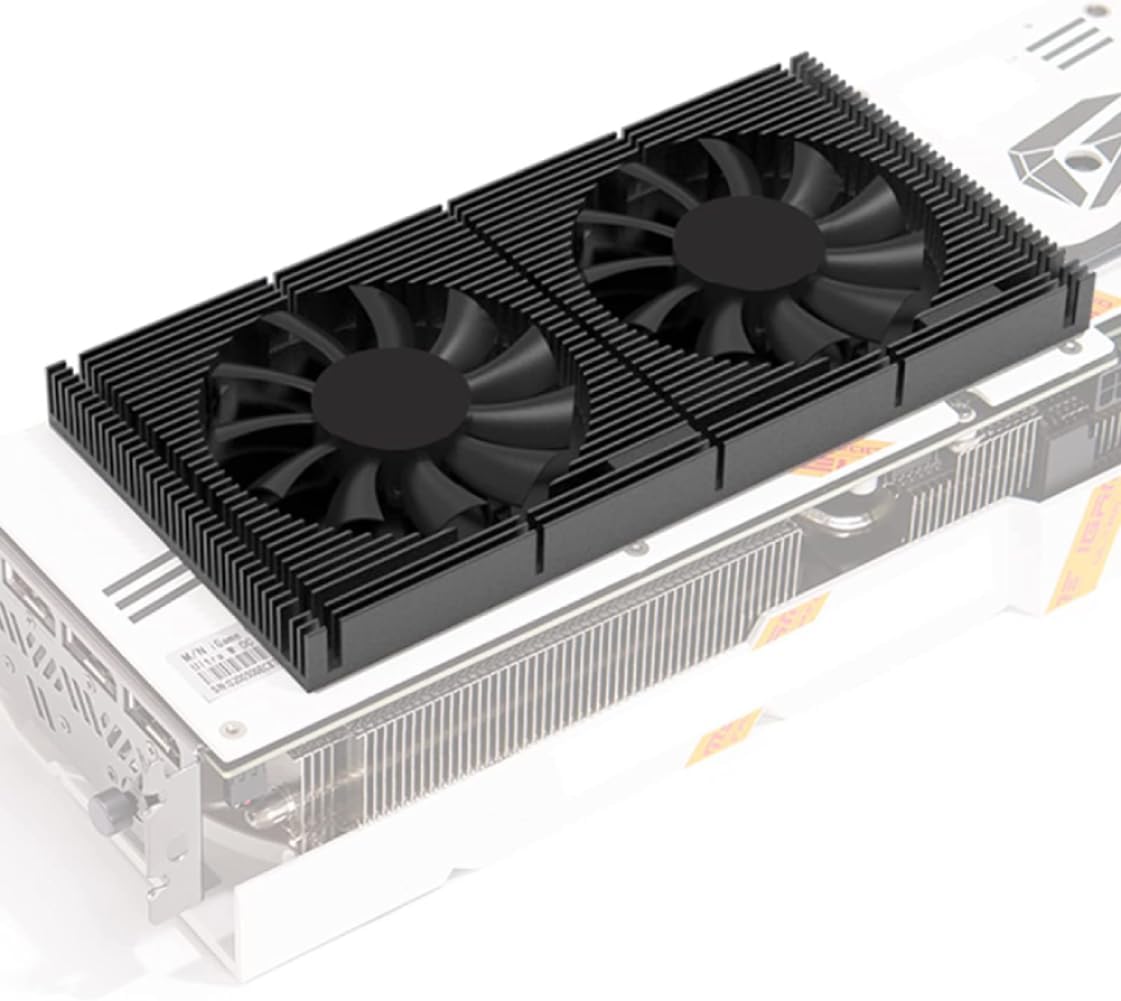


The Large Aluminum Heat Sink offers an affordable entry point for builders looking to add passive cooling protection to their GPU. With a high rating of 4.7 it is praised for its solid construction and ease of use thanks to the included thermal tape.
We may earn a commission when you buy through this link, at no additional cost to you.
This unit features 294 fins designed to increase surface area for better heat transfer from your card. The aluminum material is durable and the dimensions fit many standard GPU sizes including the popular RTX 3090.
While it lacks active fans it provides reliable passive cooling that reduces overheating risks without drawing extra power. The generic nature means you may need to ensure alignment with your specific card layout.
Budget conscious builders or those upgrading older cards will find this a practical upgrade. It is a straightforward solution for protecting your GPU and improving airflow without breaking the bank.
The fins increase the area of the board and thus provide for greater heat transfer without requiring external power.
Widely used in Computers GPU HDD etc it suits various PCBs beyond just graphics cards.
We may earn a commission when you buy through this link, at no additional cost to you.
The GOWENIC GPU Backplate Memory Radiator stands out as a balanced option combining structural support with active cooling. It holds a 4.0 rating and is designed to fit high end cards like the RTX 3090 3080 and 3070.
We may earn a commission when you buy through this link, at no additional cost to you.
Its aluminum alloy construction ensures sturdiness while the 4 pin fan connects directly to your motherboard for controlled cooling. The standard fan design makes installation easy for most users.
Although some users report noise levels the fan provides significant heat dissipation compared to passive models. The 15mm thickness allows for ample thermal pad contact with memory components.
For gamers seeking reliable active cooling without complex modding this is a top recommendation. It delivers on both protection and thermal management for mainstream high performance GPUs.
The 4 pin fan connector connects to the motherboard fan socket for low noise operation and precise control.
Made of aluminum alloy it is sturdy and not easy to damage ensuring a long service life.
We may earn a commission when you buy through this link, at no additional cost to you.
This premium GPU Backplate Memory Heatsink delivers top tier cooling with dual 70mm PWM fans and aviation grade aluminum construction. It earns a 4.2 rating and is ideal for enthusiasts pushing their RTX 3090 3080 or 3070 to the limits.
We may earn a commission when you buy through this link, at no additional cost to you.
The 1.2mm thermal pad ensures optimal contact while the dual fans adjust speed from 1500RPM to 2800RPM based on temperature. This active system keeps memory cool during long renders or gaming sessions.
Its 6061 aluminum build offers a perfect balance of lightweight and sturdy properties. However the larger size requires careful case planning to avoid airflow conflicts.
For those who prioritize maximum thermal performance and build quality this is the ultimate choice. It transforms passive backplates into active cooling systems for demanding workloads.
Two 70mm fans provide better cool capacity than standard 50mm units while maintaining low noise levels.
Aviation aluminum 6061 ensures superior strength and antioxidation for long term durability.
We may earn a commission when you buy through this link, at no additional cost to you.
Designed specifically for GIGABYTE RTX 5060 and 5050 Low Profile cards this backplate ensures perfect alignment with the PCB. It holds a 3.6 rating due to its niche application but offers precision engineering.
We may earn a commission when you buy through this link, at no additional cost to you.
The CNC-cut design prevents port blocking and maintains low-profile bracket clearance. It strengthens the card with thick rigid aluminum to prevent flex and sag over time.
Installation is simple with pre-drilled holes aligning with original mounting points. No modifications are required making it safe for builders wary of voiding warranties.
Owners of these specific low profile GPUs should consider this for added protection. It addresses sag and dust issues common in compact SFF builds effectively.
Precision CNC-cut to match the PCB layout without blocking ports or interfering with low-profile brackets.
Adds structural rigidity to prevent GPU bending over time especially important for vertical mounting setups.
We may earn a commission when you buy through this link, at no additional cost to you.
The Hilitand GPU Backplate Radiator mirrors many features of the GOWENIC model offering solid active cooling for RTX 3090 3080 and 3070 cards. It also holds a 4.0 rating from users.
We may earn a commission when you buy through this link, at no additional cost to you.
Its anodized black CNC machining gives it a clean look while the 4 pin interface allows motherboard fan control. The 15mm thickness ensures proper heat dissipation with the included thermal pad.
Support for vertical mounting is a bonus for cases using GPU risers. The sturdy aluminum alloy ensures it won't crack under stress.
This is a strong alternative if other models are out of stock. It delivers consistent performance for memory cooling without complicating your build.
Supports vertical mounting of graphics cards which is increasingly popular in modern cases.
Backplane memory cooler is compatible and dissipates heat quickly to maintain stable temperatures.
We may earn a commission when you buy through this link, at no additional cost to you.
This Gpu Backplate Radiator impresses with a 4.5 rating suggesting high user satisfaction despite being a budget option. It shares the standard 15mm and 4 pin design found in similar products.
We may earn a commission when you buy through this link, at no additional cost to you.
The anodized black finish keeps it looking neat while the aluminum alloy ensures durability. It fits RTX 3090 3080 and 3070 cards effectively.
The 15mm thickness with thermal pad provides good heat transfer. The 4 pin fan connector helps keep noise levels manageable.
If you want active cooling without spending much this is a smart pick. It balances cost and performance well for mainstream users.
A 4.5 rating indicates it meets expectations for cooling and build quality among buyers.
Supports vertical mounting of graphics cards for flexible case setups.
We may earn a commission when you buy through this link, at no additional cost to you.
While not a traditional backplate this support bracket is crucial for preventing GPU sag and damage. It holds a 4.7 rating and is made from high-quality aluminum alloy for durability.
We may earn a commission when you buy through this link, at no additional cost to you.
Its adjustable height accommodates different GPU sizes and case configurations. It works with most ATX M-ATX and ITX cases.
Installation is tool-free and stable. It provides strong support to protect your GPU and motherboard from long-term damage.
Use this in tandem with a backplate for complete protection. It solves sag issues that passive or active backplates alone may not fully address.
Easily adjustable to accommodate different GPU sizes and case configurations.
Made from high-quality aluminum alloy ensuring superior strength and resistance to wear.
We may earn a commission when you buy through this link, at no additional cost to you.
This High Power Large Aluminum Heat Sink Plate offers robust passive cooling with 294 fins and a 4.6 rating. Its dimensions match the first product in this guide providing an alternative packaging option.
We may earn a commission when you buy through this link, at no additional cost to you.
It is made of aluminum and weighs 310g per piece ensuring solid thermal mass. It reduces hardware failure risk by preventing overheating.
Suitable for computers GPUs and even routers it is highly versatile. It increases surface area for greater heat transfer without needing electricity.
Ideal for users who prioritize reliability and simplicity. It is a cost-effective way to add passive cooling to your build.
The fins increase the area of the board and thus provide for greater heat transfer.
Reduces the risk of hardware failure and power loss due to overheating.
We may earn a commission when you buy through this link, at no additional cost to you.
This bracket is an external cover for EVGA RTX 3060ti 3070 3080 and 3090 FTW3 XC3 cards. It has no rating but uses sturdy black zinc alloy.
We may earn a commission when you buy through this link, at no additional cost to you.
It is precisely sized at 12×3.8cm to fit the slot securely. The durable zinc material ensures it lasts long.
Installation requires only screws and is hassle-free. It safeguards your graphics card slot from dust and debris.
Use this as a secondary measure alongside a proper backplate. It provides a neat finish to the rear of your GPU.
Ideal for safeguarding your graphics card slot from dust and damage.
Compatible with specific EVGA RTX models like FTW3 and XC3.
We may earn a commission when you buy through this link, at no additional cost to you.
This ZOTAC specific backplate is a perfect fit for RTX 5060 and 5050 Solo 8GB cards earning a flawless 5.0 rating. It features CNC-machined aluminum for superior strength and rigidity.
We may earn a commission when you buy through this link, at no additional cost to you.
Strategically placed ventilation cutouts assist heat dissipation without blocking original cooling. It prevents sag and protects the PCB from dust and pressure.
Pre-drilled mounting holes make installation easy with included hardware. No permanent modifications are needed.
Owners of these ZOTAC models should grab this immediately. It ensures factory-like fit and stability for your GPU.
Specifically engineered to ensure perfect alignment with the PCB layout and mounting holes.
Ventilation cutouts help improve airflow and assist heat dissipation for stable performance.
We may earn a commission when you buy through this link, at no additional cost to you.
Selecting the right GPU backplate involves balancing cooling needs protection requirements and case compatibility.
Aluminum alloy and zinc alloys are common choices offering a good balance of weight and durability. Higher grade aluminum like 6061 provides better rigidity for sag prevention.
Prioritize thick rigid metal that matches your GPU size to ensure long term protection.
Passive backplates use fins to dissipate heat silently and cost effectively. Active models add fans for better memory cooling but require case space and power.
Choose active if you run high workloads or passive if you prefer silence and simplicity.
Check dimensions and PCB layout to avoid blocking ports or brackets. Custom CNC cut backplates offer the best fit but are card specific.
Ensure the backplate aligns with your card and case before purchase to avoid return hassles.
A good backplate adds structural rigidity to prevent GPU bending over time especially for heavy cards. This helps protect the motherboard PCIe slot.
Look for reinforced designs that include brackets or screw points for stable mounting.
Thermal pads and adhesive tape are crucial for transferring heat to the backplate. Quality pads ensure efficient cooling without air gaps.
Verify the included pad thickness and conductivity for optimal heat dissipation.
If choosing active cooling ensure the fan connects via a standard 4 pin socket for motherboard control. This allows speed adjustment and reduced noise.
PWM fans provide better temperature responsiveness than fixed speed models.
Ventilation cutouts on the backplate help maintain airflow rather than trapping heat. Ensure the design does not block existing case fans.
Opt for models with strategic airflow holes to support overall case cooling.
Tools free or pre-drilled designs simplify installation and reduce risk of damage. Ensure mounting points align with your GPU without needing modifications.
Select options with included hardware for quick setup and secure attachment.
Begin by powering off your PC and disconnecting the power cables before handling the graphics card. Place the system on a grounded surface to avoid static damage.
Clean the back of your GPU and memory components with a microfiber cloth to remove dust and old thermal residue. Apply the new thermal pad carefully ensuring it covers all components without air pockets.
Align the mounting holes and secure the backplate with the provided screws or adhesive tape. Double check that no cables are pinched and airflow paths remain clear for optimal performance.
Passive backplates offer modest thermal benefits by spreading heat across the PCB and protecting memory. Active fan models can lower memory temps more noticeably by drawing air directly over them.
Most manufacturers do not void warranties unless damage is caused by the aftermarket part. Follow instructions carefully to avoid modifying the card or overheating components.
Yes many aftermarket backplates fit most modern graphics cards if dimensions align. Ensure your specific model layout allows for proper screw placement and thermal pad contact.
Passive backplates rely on fins to dissipate heat silently while active models include fans powered via motherboard connectors. Active options cool memory more aggressively but require more space.
Custom CNC backplates offer exact fit and clean aesthetics that generic options lack. They are ideal if you value precision and want to avoid clearance issues in compact builds.
Check your GPU memory gap typically 1 to 1.5mm for most cards. Using the correct thickness ensures solid contact without compressing too much or leaving air gaps.
A well mounted aluminum backplate adds rigidity and helps reduce PCB flex over time. Pairing it with a support bracket provides maximum protection against sagging.
Many backplates support vertical mounting if the mounting holes are symmetric. Verify your case and GPU orientation requirements before purchasing to ensure proper clearance.
Our guide highlights top picks ranging from budget passive sinks to active cooling solutions tailored for specific models like ZOTAC and GIGABYTE.
Prioritize compatibility and material quality to ensure long term protection and cooling performance for your graphics card investment.
Always verify current product details and availability before purchasing as offerings may change frequently.