
Alacrity Handheld PDA
4.2Editor score
10-core CPU power
80mm fast printing
Android 12 support
Modern businesses need flexible payment solutions that move with them. Handheld Pos Systems allow merchants to accept cards anywhere, reducing lines and improving customer experience through portable technology.
We evaluated ten top models based on connectivity, battery life, and printing speed. Our selection includes devices for small retail, food services, and professional use with verified user feedback.
Each pick shows real capabilities and key specs to help you decide. Prices and availability change frequently so check the current links before purchasing your new mobile terminal today.
4.2Editor score

4.7Editor score

5.0Editor score
As an Amazon Associate we earn from qualifying purchases.
This side-by-side comparison highlights key differences between the top portable terminals available this month.




The Square Handheld is a top-rated portable terminal designed for businesses needing flexibility. With a 4.7 rating it stands out for its slim design and ability to take orders tableside or anywhere.
We may earn a commission when you buy through this link, at no additional cost to you.
Its standout qualities include offline payment support and a built-in barcode scanner. You can accept payments even if the internet is down and scan items quickly with one device.
The device is water and dust resistant making it durable for various environments. While it lacks a printer you can email receipts. An optional case protects against drops.
This tool is ideal for food services, retail, and professional services. If you want simplicity and portability without hidden fees, this is the best overall choice for modern merchants.
Taking orders tableside reduces wait times and increases customer satisfaction significantly during busy hours.
Offline capabilities ensure you never lose a sale due to connection issues in remote or crowded areas.
We may earn a commission when you buy through this link, at no additional cost to you.
The H10 offers a robust all-in-one solution with Android 14 and an integrated thermal printer. Rated 4.2 stars it is popular among food trucks and mobile retailers needing receipts on the go.
We may earn a commission when you buy through this link, at no additional cost to you.
Its key strengths include a 6000mAh battery lasting 14 hours and full NFC support for tap-to-pay. The built-in scanner reads 1D and 2D codes accurately for inventory tasks.
The device is compatible with custom software via SDK and supports 4G LTE. While not the lightest, its connectivity options make it versatile. Fast charging minimizes downtime effectively.
Choose this if you need a self-contained system without extra peripherals. It handles daily operations smoothly and is great for businesses needing both payments and receipts.
The 14-hour runtime ensures your terminal lasts through entire shifts without needing a recharge.
Dual-band Wi-Fi and 4G LTE keep you connected even in areas with poor infrastructure.
We may earn a commission when you buy through this link, at no additional cost to you.
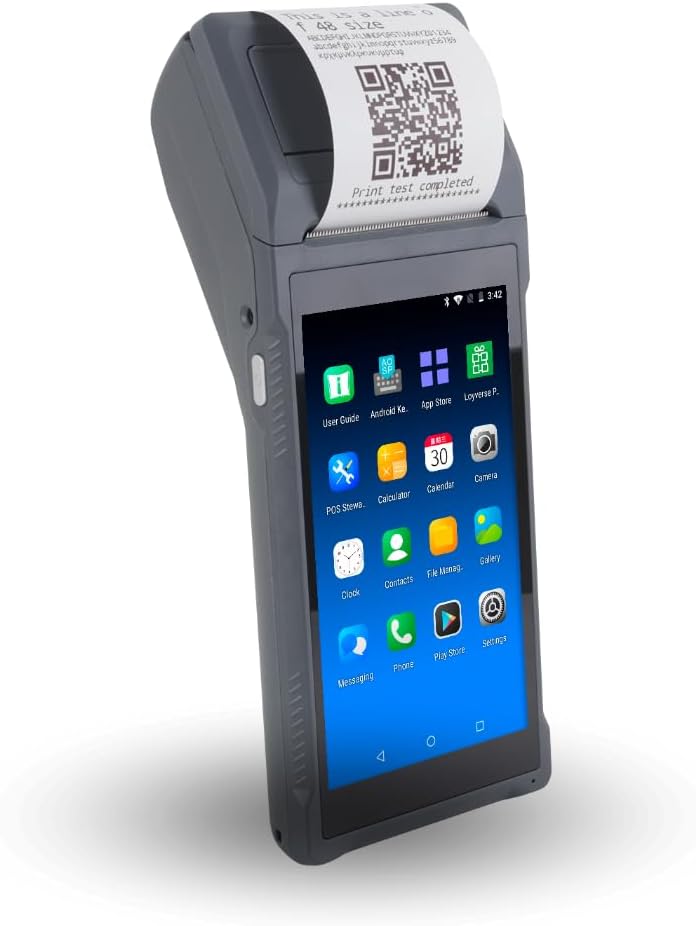
The Alacrity Q50 is a high-performance PDA ideal for scanning and printing tasks. With a 4.2 rating it excels in speed and screen clarity for managing queues and takeaway orders efficiently.
We may earn a commission when you buy through this link, at no additional cost to you.
Its powerful 10-core CPU and 5.9 inch screen ensure smooth multitasking. The thermal printer is fast and includes a zigzag cutter for convenience. The scanner handles damaged codes well.
Note this device is optimized for scanning non-encrypted cards and needs a third-party reader for payments. This makes it a budget-friendly core unit for businesses with existing payment systems.
Buy this if you need a reliable scanning and printing terminal. It maximizes efficiency for inventory and ticketing while keeping costs low compared to all-in-one payment terminals.
Fast 80mm/s printing keeps lines moving during peak hours without frustrating delays for customers.
The professional 2D engine reads scratched or folded codes quickly improving inventory accuracy.
We may earn a commission when you buy through this link, at no additional cost to you.
The Alacrity NB65 boasts a perfect 5.0 rating with top-tier specs like Android 14 and a 6400mAh battery. This powerful PDA is ideal for complex logistics or high-volume retail environments needing reliability.
We may earn a commission when you buy through this link, at no additional cost to you.
It features a 6.5-inch screen and 30W scanning module for ultra-fast transactions. The printer supports both 80mm and 58mm widths providing flexibility. Full 4G connectivity ensures stable connections.
With 3GB RAM and 32GB storage, performance is smooth during peak hours. The only trade-off is the higher cost compared to simpler models. Durability is designed for daily industrial use.
Select this for businesses needing maximum power and storage. It handles heavy workflows effortlessly and is a premium choice for those who need every connectivity and battery feature available.
The 6400mAh battery supports extended daily use without frequent charging interruptions during busy shifts.
Adjustable print width allows for both receipts and labels, reducing the need for separate hardware.
We may earn a commission when you buy through this link, at no additional cost to you.
The Bisofice POS Receipt Printer is an intelligent terminal with Android 8.1 for basic needs. Rated 4.0 it offers a smooth experience for small businesses like cafeterias and boutiques needing simple solutions.
We may earn a commission when you buy through this link, at no additional cost to you.
It features a 58mm thermal printer without ribbons, reducing costs. The 5000mAh battery supports long working hours. Connectivity includes 3G and WiFi for reasonable flexibility in standard shops.
The compact size makes it easy to carry around for mobile sales. While the OS is older, it remains stable for essential apps. The design is efficient for low-volume retail tasks.
Choose this if you need an affordable entry-level device. It covers the basics of printing and payments effectively without the cost of latest 5G hardware or new OS versions.
Thermal printing eliminates the need for ink cartridges, saving money and maintenance time.
The portable size fits easily in a pocket or small counter, perfect for small boutique stores.
We may earn a commission when you buy through this link, at no additional cost to you.
The Bisofice 4G PDA runs on Android 13 for smooth modern operations. Rated 4.0 it provides a reliable option for warehouses needing barcode collection and network connectivity without high costs.
We may earn a commission when you buy through this link, at no additional cost to you.
Its 4G network ensures seamless work anywhere. The device includes a roll of paper for immediate use. The 5-inch HD+ display is vibrant enough for clear navigation during daily tasks.
With autofocus and flash, barcode scanning is accurate in various lighting. The battery life is decent for standard shifts. It balances cost and features well for logistics environments.
Buy this for warehouse or manufacturing needs. It offers the best balance of modern OS and connectivity while keeping the price reasonable for small operational teams.
Includes a roll of paper so you can start printing immediately without extra setup costs.
Full 4G support ensures you can work in remote areas without relying on Wi-Fi only.
We may earn a commission when you buy through this link, at no additional cost to you.
The Square Terminal is a trusted device with a 4.5 rating known for speed and simplicity. It combines sales and payments in one tool, ideal for counter retail needing fast transactions.
We may earn a commission when you buy through this link, at no additional cost to you.
Its chip processing in two seconds keeps lines moving. The device works cordlessly and supports all major cards. Getting money the next business day helps cash flow for small businesses.
While slightly larger than handheld units, it remains portable within a store. The rate structure is simple with no contracts. It offers reliability that merchants appreciate for daily sales.
Choose this if you prefer a dedicated, trusted terminal over a generic phone. It is excellent for retail stores valuing speed and transparency in their payment processing.
Processing chip cards in just two seconds reduces wait times and increases customer throughput.
No hidden fees and simple rates help small businesses plan finances without surprise costs.
We may earn a commission when you buy through this link, at no additional cost to you.
The Q2i Mobile POS Terminal is designed for businesses needing an affordable all-in-one kit. Rated 3.2 stars it offers essential features like 1D scanning and thermal printing for basic retail needs.
We may earn a commission when you buy through this link, at no additional cost to you.
It supports major POS apps like Loyverse and Square. The device includes a full kit with cables and paper. Connectivity includes dual-band Wi-Fi for reliable in-store performance.
While not the highest rated, it provides value for simple operations. It prints receipts at 80mm per second. The 1-year warranty offers peace of mind for small shops.
Select this for budget-conscious entry into mobile POS. It provides the core features needed for basic transactions without the cost of premium advanced scanning capabilities.
The package includes everything needed to start selling immediately, reducing initial setup costs.
Supports popular POS applications making it easy to integrate with existing business workflows.
We may earn a commission when you buy through this link, at no additional cost to you.
The P1 Terminal offers a perfect 5.0 rating for reliable transaction processing. It features a vibrant 5-inch display and built-in thermal printer, ideal for fixed retail locations needing efficiency.
We may earn a commission when you buy through this link, at no additional cost to you.
Its secure merchant account onboarding and fast payouts are key benefits. Hybrid connectivity ensures stable connections. The Android OS allows easy navigation for staff and customers alike.
This device is designed for countertop use in salons or stores. While not handheld for roaming, it offers top performance. It balances speed with user-friendly interfaces effectively.
Choose this if you need a powerful stationary terminal. It maximizes efficiency for fixed checkout points with robust hardware and reliable processing.
Transparent processing ensures customer data is protected throughout the entire payment journey.
Accepting modern payment types like tap and mobile wallets speeds up customer throughput significantly.
We may earn a commission when you buy through this link, at no additional cost to you.
The Clover GO 3rd Generation is a mobile reader with a perfect 5.0 rating. It pairs via Bluetooth to your phone, offering secure payments and flexible receipt options for small US businesses.
We may earn a commission when you buy through this link, at no additional cost to you.
Its security protects data from start to finish. You can set custom tips and taxes easily. The device allows email or text receipts. It also supports multiple employee permissions.
Note it requires processing through SwyftPAY and is US based. The dock is sold separately. This simplicity makes it ideal for solo entrepreneurs needing quick setup.
Buy this for easy, secure mobile payments. It provides a seamless experience for those wanting to avoid complex hardware setups.
Connecting wirelessly to your phone makes setup quick and avoids cable management issues.
Custom permissions ensure only authorized staff can view sensitive business data or settings.
We may earn a commission when you buy through this link, at no additional cost to you.
Selecting the right terminal depends on your specific business needs and environment.
Ensure the device supports Wi-Fi, 4G/5G, and Bluetooth to maintain connections in various settings.
Look for dual-band Wi-Fi and cellular support to prevent dropped transactions during peak hours.
For mobile use, choose a terminal with at least 6000mAh battery capacity for all-day operation.
Fast charging capabilities are essential to minimize downtime when you need to recharge quickly.
Thermal printers without ink save money and offer speed. Look for 80mm/s printing rates.
Check if the device supports 58mm or 80mm paper based on your receipt requirements.
A scanner that reads both 1D and 2D barcodes is vital for inventory and product scanning.
Verify autofocus and flash features to ensure codes are read even in poor lighting.
Android 13 or newer provides better security and compatibility with modern POS applications.
Ensure the device has enough RAM and storage to run your specific software smoothly.
Check if the device includes payment processing or requires a third-party card reader.
Look for EMV, NFC, and contactless support to accept all modern payment methods.
For outdoor or active environments, select a device with water and dust resistance.
A rugged build quality ensures the terminal survives accidental drops and spills.
Consider the total cost of ownership including hardware fees and transaction processing rates.
Choose providers with no long-term contracts to maintain flexibility for your business needs.
Charge the battery fully before first use and keep it charged when idle to maintain health.
Update the operating system and applications regularly to ensure security and optimal performance.
Clean the screen and scanner lens gently with a microfiber cloth to avoid scratches.
Yes, many modern handheld terminals offer offline modes that store transactions locally. Once the connection is restored, the data syncs automatically to the payment processor. This ensures you can keep selling even if the internet connection drops temporarily.
A 1D scanner reads traditional linear barcodes like UPC and EAN. A 2D scanner reads square codes including QR and Data Matrix codes. For modern inventory and payments, a 2D scanner is often more versatile.
Most of the reviewed devices are designed for mobility. They support food trucks and retail equally with wireless connectivity. Ensure the battery life is sufficient for long shifts without power.
Hardware costs usually do not include transaction fees. You typically sign up with a payment processor which charges a rate per transaction. Always check the processor fees separately from the device price.
Yes, most modern handheld terminals support NFC contactless payments. This includes Apple Pay, Google Pay, and tap-to-pay cards. It speeds up checkout significantly compared to traditional card insertion.
Thermal printers do not use ink, so they last as long as the print head remains functional. They rely on special heat-sensitive paper rolls. Maintenance mainly involves replacing these rolls when empty.
Warranty periods vary by manufacturer but often range from one to three years. Some sellers offer extended options or protection plans. Check the specific terms before purchasing to understand coverage.
Most terminals require compatible POS applications to function fully. You may need to install software like Square, Clover, or custom tools. Check compatibility requirements to ensure smooth integration with your workflow.
We reviewed ten top handheld POS systems ranging from compact pocket terminals to robust PDAs. The Square Handheld and Alacrity Q50 stand out for versatility and value respectively.
When choosing, prioritize connectivity options and battery life for your specific environment. Ensure the device supports the payment types your customers expect to use regularly.
Prices and availability change frequently so check the current links for the most up-to-date details. Investing in the right terminal will streamline your sales and improve customer experience significantly.