
HDMI Tester Portable High Definition Network Cable Tester Checker
4.4Editor score
Supports HDMI 1.2 to 2.0 versions
Tests 19 wires for short circuits
Portable main and remote unit design
This guide compares the top HDMI Signal Tester models for professionals and home users, evaluating features like resolution support, cable diagnosis, and
Choosing the right HDMI Signal Tester is essential for technicians and enthusiasts who need to verify cable integrity and signal quality. These devices ensure that your high definition video and audio streams transmit without errors or loss of fidelity across various setups.
We have evaluated ten distinct models ranging from basic continuity checkers to advanced 8K generators. Our analysis focuses on ease of use, diagnostic capabilities, build quality, and support for modern HDMI standards like 2.1 and HDCP protocols.
Each pick in this list highlights specific strengths such as portability, screen quality, or advanced signal analysis. Please note that availability and pricing may fluctuate on retail platforms, so always check the current listings before making a final purchase decision.
4.4Editor score

4.8Editor score
![HDMI Test Signal Generator Analyzer Up to 8K 60Hz HDR 40Gbps, 64 Video Resolution 33 Patterns, HDMI 2.1 HDCP 2.3 CEC, Portable Design [JTECH-40GA]](https://m.media-amazon.com/images/I/617T2rTjplL._AC_SL1200_.jpg)
The following table provides a side-by-side comparison of all ten selected HDMI Signal Tester units. It highlights key specifications such as supported versions, wire count detection, portability features, and unique capabilities to help you differentiate between the options quickly.


This unit serves as both a signal generator and a display emulator. It is a robust tool for verifying video resolutions and HDCP content capabilities on various monitors and TVs. With a 4.0 rating it remains a favorite for technical users needing specific protocol outputs.
We may earn a commission when you buy through this link, at no additional cost to you.
The device provides detailed control over video signals including 4K at 60Hz in multiple color formats. It supports HDCP versions ranging from off to 2.2 allowing comprehensive testing of copyright protection layers. The DIP switches make it easy to set exact output parameters without software.
While it is highly capable it lacks some of the visual feedback found in models with LCD screens. Users will need to connect to a monitor to verify the output directly. However for precise signal generation tasks this limitation is often acceptable given its reliability.
It is ideal for installers who need to push specific video signals to validate display compatibility. If you require a dedicated generator without screen feedback this model offers excellent value for its focused functionality in professional environments.
The DIP switches allow precise control over resolution and HDCP settings for accurate testing.
It supports multiple HDCP versions which helps verify content protection compatibility effectively.
We may earn a commission when you buy through this link, at no additional cost to you.
This device is designed for quick and easy cable diagnostics. It helps identify issues like color shifts and missing pictures by checking signal components directly. Its 4.3 rating reflects its reliability for basic continuity and signal quality checks.
We may earn a commission when you buy through this link, at no additional cost to you.
The tester is compact and portable making it easy to carry in a toolkit. It can be placed at either the source or display end of a system to isolate where a signal failure occurs. This flexibility saves time during installation troubleshooting.
It does not offer advanced video generation capabilities like 4K pattern output. Its primary focus is on ensuring the cable path is clear and functional. For users needing deep signal analysis it may not be sufficient but for general checks it is effective.
Choose this for straightforward cable verification tasks where portability is key. It is a practical tool for technicians who need to confirm cable integrity without heavy equipment or complex setup procedures.
It helps pinpoint causes of sparkle or color shift in video displays quickly.
The unit can be located at the source or display end to isolate faults.
We may earn a commission when you buy through this link, at no additional cost to you.
This unit stands out as a budget-friendly option that covers both HDMI and network cables. It features a main unit and a remote unit that stores conveniently on the side. With a 4.4 rating it is highly regarded for its value and multi-functionality.
We may earn a commission when you buy through this link, at no additional cost to you.
It can scan up to 19 wires to detect open or short circuits efficiently. The LED lights indicate connectivity status clearly. Additionally it supports RJ45 connectors making it a versatile tool for network technicians as well.
The device relies on a simple battery or USB power source which may require planning for field work. While it lacks a screen it provides immediate feedback on wire continuity. This simplicity makes it very fast to use for basic checks.
Buy this if you need an affordable solution for home or office cable verification. It is perfect for quick checks where detailed signal analysis is not required and budget is a primary concern.
It supports both HDMI and RJ45 testing reducing the need for separate tools.
The remote unit stores on the side of the main unit for easy transport.
We may earn a commission when you buy through this link, at no additional cost to you.
This handheld unit offers a significant advantage with its built-in HD LCD screen. It allows technicians to view audio and video directly without connecting to a TV. Rated 4.5 it is praised for its durability and ease of use in challenging environments.
We may earn a commission when you buy through this link, at no additional cost to you.
The display is resistant to dust water and scratches ensuring longevity on job sites. It includes three HDMI ports enabling complex continuity tests and channel lineup checks. The rechargeable battery provides several hours of continuous operation for extended tasks.
While the price is higher than basic units the convenience of the integrated screen justifies the cost. Users avoid carrying a separate monitor which streamlines workflow. The rugged housing protects against drops and harsh conditions effectively.
Select this unit for professional installations where immediate visual confirmation is critical. It is a robust choice for installers who value durability and portability with screen capabilities.
The HD LCD allows you to verify set-top box output without a TV.
Tempered glass and rugged housing protect the device from water and shocks.
We may earn a commission when you buy through this link, at no additional cost to you.
This model represents the pinnacle of portable testing capabilities with support for 8K at 60Hz. It includes 33 video patterns and 64 resolutions for comprehensive signal validation. While it lacks a user rating due to its professional nature its feature set is unmatched in portability.
We may earn a commission when you buy through this link, at no additional cost to you.
It verifies HDCP 2.3 compliance which is crucial for modern content protection checks. The unit also manages CEC and timing details essential for high-end AV setups. A large battery capacity ensures it can run through extensive testing sessions.
The advanced features come at a premium price point which might not suit all users. However for those needing to verify cutting-edge standards it provides unmatched value. It bridges the gap between benchtop analyzers and field tools.
Invest in this unit if you require 8K verification and deep signal analysis. It is tailored for professionals who must validate HDMI 2.1 features and complex protocol interactions on site.
It supports up to 40Gbps bandwidth to test the latest 8K standards.
Tests HDCP 2.3 and CEC controls for full compliance checks.
We may earn a commission when you buy through this link, at no additional cost to you.
This generator and analyzer delivers strong performance with 18Gbps bandwidth capability. It supports scaling from 4K down to 1080p to match various display capabilities efficiently. With a 4.2 rating it is respected for its ability to verify signal stability across resolutions.
We may earn a commission when you buy through this link, at no additional cost to you.
The device includes EDID management tools which are essential for custom setups. It checks cable bandwidth to ensure that the cabling meets specific HDMI standards. This makes it suitable for complex home theater or commercial AV installations.
While effective it may lack the rugged portability of handheld testers. It is generally used in semi-permanent setups or bench testing environments. For deep signal analysis in a fixed location it is a reliable companion.
Choose this unit if you need robust signal generation with scaling features. It is ideal for integrators verifying that cables can sustain high data rates over distance.
4K signals can be scaled to 1080p to test compatibility with older displays.
Tools for managing EDID help ensure proper handshake between source and display.
We may earn a commission when you buy through this link, at no additional cost to you.
This model combines HDMI and network cable testing into a single portable package. It features two distinct modes for fast scanning or full display of connections. Although it has a 3.9 rating it still serves well for general maintenance tasks.
We may earn a commission when you buy through this link, at no additional cost to you.
It supports various HDMI versions and RJ45 connectors to cover most common cabling. The auto shut-down function helps preserve battery life during storage or idle periods. This makes it a convenient option for intermittent use.
The LED indicators provide clear feedback on wire integrity but lack detailed diagnostic info. For simple continuity checks it is adequate but complex issues may require a more advanced tool. It is best used for quick verification.
Use this tool for mixed network and AV cable checks. It is practical for facilities managers who need one device to verify multiple types of cabling.
Choose between fast scan and full display to balance speed and detail.
The auto shut-down function activates after 10 minutes to save battery life.
We may earn a commission when you buy through this link, at no additional cost to you.
This tool is specifically designed for testing HDMI and Mini HDMI cables with high precision. Its main feature is a detachable remote unit allowing technicians to test long cables remotely. With a 4.4 rating it is reliable for identifying specific wire faults.
We may earn a commission when you buy through this link, at no additional cost to you.
The scan mode lets you view individual connections while full display shows all wires at once. This versatility helps in diagnosing complex issues like wrong wire ordering or shorts. It is robust enough for professional daily use.
The need for a 9V battery is a minor inconvenience but ensures stable power. While it lacks a screen the LED feedback is clear and actionable. For cable integrity checks this level of detail is highly valuable.
Pick this unit for installations involving long cable runs where remote access is needed. It is perfect for verifying cable continuity before connecting to expensive display equipment.
The remote unit can be detached to test cables that are fully installed.
Scan mode allows you to see each individual connection being tested in sequence.
We may earn a commission when you buy through this link, at no additional cost to you.
The UT681 is highly rated for its ability to test various HDMI connector types including Micro and Mini. It provides rapid analysis of all 19 wires in a cable for accurate diagnostics. Its 4.8 rating reflects exceptional performance and user satisfaction.
We may earn a commission when you buy through this link, at no additional cost to you.
The unit uses an intuitive LED display to show faults like shorts or disconnects. It also features a warning system for low voltage to prevent unexpected shutdowns. The separate transceiver design ensures efficient single-person operation in the field.
While it is compact the transceiver adds a small amount of bulk to the kit. However the accuracy and speed of testing make it a top choice for technicians. The build quality supports a wide temperature range for durability.
Select this model for its superior performance and versatile connector support. It is a reliable companion for any technician who values precision and speed in cable verification.
It supports Type A and Type C interfaces to adapt to quality verification needs.
The device includes a battery warning and auto power-off to conserve energy.
We may earn a commission when you buy through this link, at no additional cost to you.
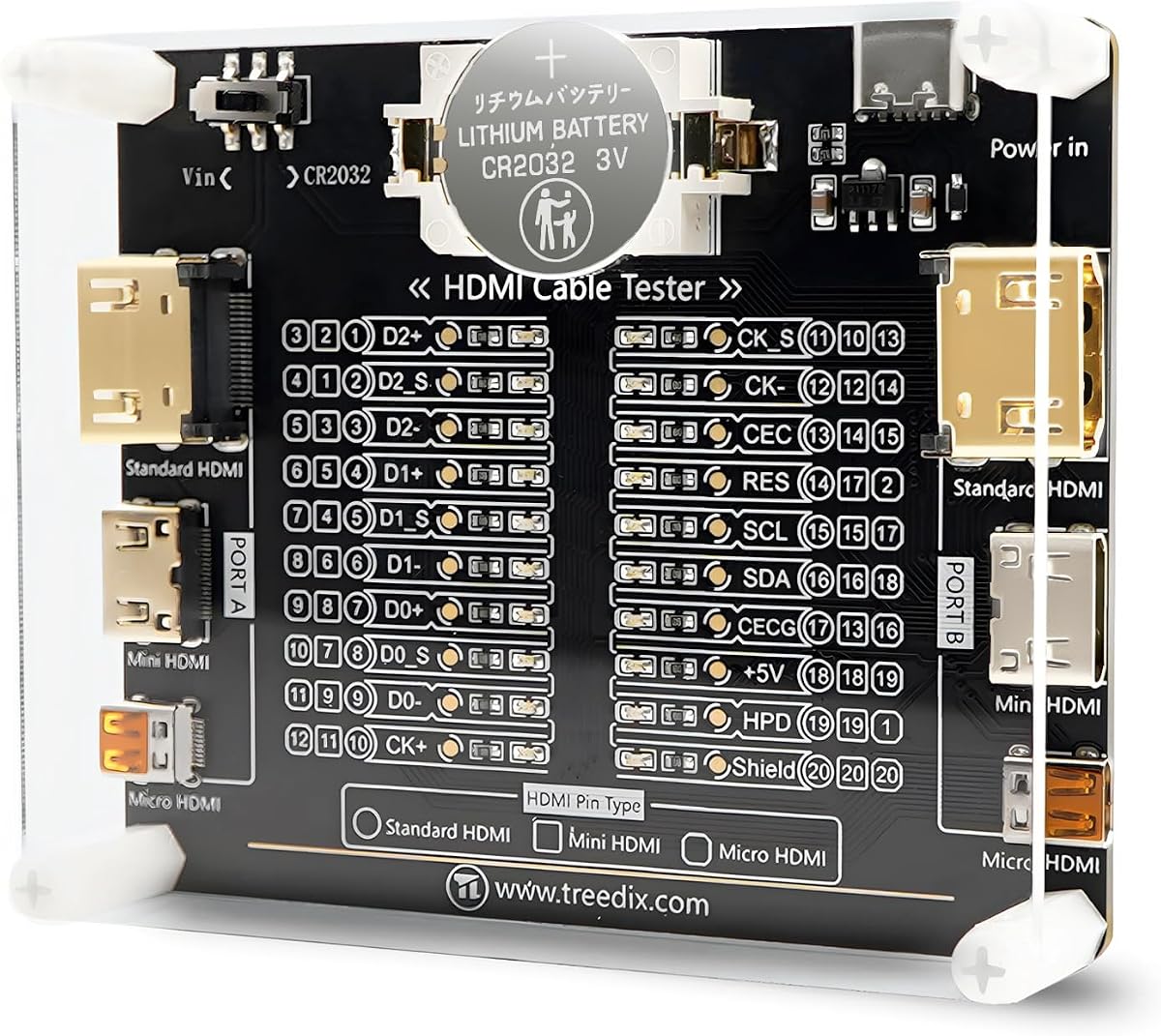
This tester board offers a straightforward solution for checking HDMI continuity. It uses 20 LED indicators to map out pin connections clearly. With a 4.6 rating it is appreciated for its simplicity and clear visual feedback.
We may earn a commission when you buy through this link, at no additional cost to you.
It supports HDMI versions from 1.0 to 2.1 and various connector types. The housing is acrylic to keep it portable and durable. Power can come from a battery or external supply offering flexibility on the workbench.
The design lacks advanced features like signal generation but excels at quick checks. Its compact nature means it fits easily into a small toolkit. For maintenance crews it is a practical addition for routine checks.
Choose this for basic continuity checks where portability is a priority. It is an affordable tool that simplifies the maintenance process for various HDMI setups.
Each pin corresponds to one LED light for immediate understanding of cable function.
Supports both battery and external supply for adaptable use in the field.
We may earn a commission when you buy through this link, at no additional cost to you.
Selecting the right HDMI Signal Tester involves balancing budget needs and technical requirements. This guide outlines the critical factors to consider when evaluating different models for your workflow.
Ensure the tester supports the specific HDMI versions used in your environment such as 1.4 2.0 or 2.1. Modern setups often require higher bandwidth validation and a device that cannot handle newer specs may miss critical compatibility issues.
Look for explicit mentions of 4K and 8K support to future-proof your investment.
Some units come with built-in LCD screens while others rely on LED indicators. A screen allows for visual verification of audio and video without an external display which can save time and equipment.
If you often work in tight spaces where connecting to a TV is difficult opt for a model with an integrated screen.
Field technicians need devices that are lightweight and durable. Consider the physical size and whether it includes a detachable remote unit for testing long cables from a distance.
Ruggedized housings are beneficial for construction sites to protect against drops and dust.
Check if the device uses disposable batteries or has a rechargeable system. Rechargeable units are more cost-effective for frequent use while battery units offer convenience when charging access is limited.
Also verify the battery life to ensure it lasts through long installation shifts.
Advanced testers offer features like HDCP verification EDID management and signal generation. These are vital for professional installers ensuring that copyright protection and display settings function correctly.
Basic users may only need continuity checks so evaluate if these extras are necessary for your specific tasks.
Invest in a unit with a solid build quality to withstand daily handling. A comprehensive warranty provides peace of mind and protection against manufacturing defects or accidental damage.
Read customer reviews to gauge the real-world longevity of the product before purchasing.
While cost is a factor aim for the best value relative to features. A budget unit may save money but could lack the capabilities needed for high-end professional projects.
Balance the initial investment against the frequency and complexity of your testing needs.
Technical support can be crucial if you encounter issues or need advice on usage. Brands that offer warranty support and resources make troubleshooting easier.
Prioritize manufacturers that are responsive and provide clear documentation with their products.
Start by connecting the source device to the input port and the display or cable to the output port. Ensure that the device is powered on and set to the correct mode for your testing needs. This initial setup prepares the unit to analyze the signal path effectively.
Regularly inspect the connectors for any signs of wear or debris that could affect accuracy. Clean the ports gently with a soft brush or air blower to maintain optimal contact. This simple habit helps prevent false readings and extends the life of the tester.
Store the device in a protective case when not in use to prevent physical damage. If the unit uses batteries remove them if you plan to store it for extended periods. Proper storage ensures that the tester is ready for use whenever a new project arises.
A signal generator creates video signals to test displays while a tester checks existing cables for continuity or faults. Some units combine both functions allowing you to verify the source output and the cable path simultaneously for thorough diagnostics.
Yes many modern testers support 4K resolutions and higher bandwidths. However it is important to check the specific specs of the device to ensure it can handle the speed requirements of 4K at 60Hz or higher.
Signal loss often results from damaged wires poor connectors or excessive cable length. Use the tester to isolate which specific wire or segment is failing and consider replacing the cable if the faults are irreparable.
Some advanced models verify HDCP compliance to ensure content protection works correctly. Basic continuity testers may not offer this feature so check the device description if you are dealing with copyrighted content or streaming services.
With proper care an HDMI tester can last several years. Factors like build quality battery usage and physical wear affect longevity but rugged professional grade units tend to outperform simpler consumer models over time.
Many testers include adapters or support Mini HDMI interfaces directly. Verify the included connectors or accessory options to ensure compatibility with your specific device ports before making a purchase.
Some multi-function units support both HDMI and RJ45 network cables. This versatility is useful for technicians who handle mixed media setups and want to reduce the number of tools they carry on a job.
First check the battery level or power connection to ensure the device is receiving power. If the power source is stable and the device does not respond it may indicate a hardware fault requiring replacement or warranty service.
The right HDMI Signal Tester depends on your specific needs whether for professional installation or simple cable checks. Top models like the JTECH-40GA offer advanced features while budget options provide essential connectivity verification.
Prioritize features such as supported resolutions and power flexibility to ensure the tool fits your workflow. A well chosen tester saves time and prevents headaches during complex audio video installations.
Always check the latest availability and pricing before buying to ensure you get the best deal. With the correct tool you can maintain high quality signal integrity across all your HDMI setups effectively.