
MINISFORUM MS-01
4.5Editor score
PCIe 4.0 x16 Expansion Slot
Dual 10Gbps SFP+ Ports
Enterprise Grade Storage Support
Discover the top Intel Core i9 Mini PC options for 2026. This guide compares performance, ports, cooling, and features across ten high power desktop models.
The Intel Core i9 Mini PC represents the pinnacle of compact computing power available today. These systems pack flagship processors into spaces smaller than a lunchbox, delivering desktop class speed for work and play without the bulk.
We compared ten leading models based on processor generation, memory capacity, storage speed, and connectivity options. Each unit was evaluated for real world multitasking, thermal management, and expandability to ensure they meet professional and enthusiast demands.
Each pick highlights specific strengths like triple display support or enterprise networking. Prices and stock fluctuate frequently so please check current listings before purchasing to confirm availability and the most up to date specifications for your needs.
4.5Editor score

4.5Editor score

4.6Editor score
This side by side comparison breaks down the key specifications of every model on our list. Use this table to quickly identify which unit offers the specific ports, memory, and storage configurations you need for your workflow.


This unit stands out as the top choice for general users needing maximum processing power in a small footprint. It earns a strong rating for its ability to handle complex multitasking and creative workloads with ease.
We may earn a commission when you buy through this link, at no additional cost to you.
The Intel Core i9-13900HX processor provides 24 cores and 32 threads ensuring you never hit a bottleneck. The 32GB of DDR4 RAM supports expansion up to 96GB making it future proof for heavy memory demands.
While it uses DDR4 instead of DDR5 the high frequency of the CPU compensates for memory latency. The cooling system handles the heat well allowing sustained performance during long rendering or compilation sessions.
Buyers looking for a desktop replacement for professional work will find this model ideal. It balances raw power with a clean aesthetic suitable for offices and home studios alike.
The triple 4K display output lets you manage multiple projects simultaneously without needing extra hardware or bulky docks.
With 2.5G LAN and WiFi 6E you get reliable high speed internet for large file transfers and cloud backups.
We may earn a commission when you buy through this link, at no additional cost to you.
This model excels with modern features like Thunderbolt 4 and DDR5 memory. It is rated highly for its innovative additions that bridge the gap between a computer and a smart hub.
We may earn a commission when you buy through this link, at no additional cost to you.
The 32GB DDR5 RAM offers significantly higher bandwidth than DDR4 which speeds up data processing. Thunderbolt 4 allows you to connect a docking station or external GPU for even more versatility.
Innovative features like the built-in AI chip and fingerprint sensor add convenience for daily use. The dual 2.5G ports support network aggregation which is great for NAS access or server tasks.
This is a great pick for early adopters who want the latest connectivity standards. It is also excellent for smart home control due to its voice interaction capabilities.
Thunderbolt 4 ensures you can connect high speed peripherals and charge devices with a single cable.
Built-in voice recognition and a fingerprint sensor make login and control seamless without needing extra hardware.
We may earn a commission when you buy through this link, at no additional cost to you.
This unit brings the latest 14th Gen Intel Core i9 to a very compact chassis. It is praised for its thermal design which keeps performance stable even under heavy gaming or rendering loads.
We may earn a commission when you buy through this link, at no additional cost to you.
The processor reaches up to 5.8GHz providing incredible single-core performance. The cooling system uses dual copper heat pipes and a centrifugal fan to dissipate heat efficiently without loud noise.
While it uses DDR4 the speed of the processor ensures fast response times. The VESA mount allows you to hide the PC behind a monitor saving significant desk space.
Gamers and users with limited space will appreciate this balance of power and size. It is a strong contender for anyone prioritizing CPU clock speeds.
The dual copper heat pipes and aluminum heatsink ensure the CPU and SSD stay cool during extended use.
At just 5 inches wide and with a VESA mount it fits discreetly in any setup.
We may earn a commission when you buy through this link, at no additional cost to you.
This model is unique for its support of four independent displays making it perfect for trading or control rooms. It delivers solid performance with a focus on visual output and connectivity.
We may earn a commission when you buy through this link, at no additional cost to you.
The dual 2.5G Ethernet ports allow for network aggregation or firewall setups. This makes it more versatile than standard home PCs for network enthusiasts.
Storage expansion is easy with support for both M.2 and 2.5-inch drives. The top cover is tool-free allowing you to upgrade quickly without needing special tools.
Users needing multiple monitors without buying a dedicated workstation will find this affordable and capable. It is a specialized tool for visual workflows.
Support for four 4K displays means you can keep multiple apps open without cluttering the screen.
Dual Ethernet ports give you flexibility for wired connections or network segmentation tasks.
We may earn a commission when you buy through this link, at no additional cost to you.
This unit is a true workstation in a small box. It is designed for professionals who need external GPU support or enterprise networking capabilities without buying a full tower.
We may earn a commission when you buy through this link, at no additional cost to you.
The PCIe x16 slot allows you to install a dedicated graphics card for heavy rendering. This turns the Mini PC into a powerful workstation for 3D and video work.
Networking is top tier with 10Gbps SFP+ ports for direct server connections. The vPro support ensures advanced manageability and security for business environments.
Buyers needing desktop upgradeability in a small form factor should choose this model. It offers the most expansion options of any Mini PC listed.
The full PCIe x16 slot is a game changer for adding discrete GPUs or specialized network cards.
Intel vPro allows for secure remote management and hardware based security features.
We may earn a commission when you buy through this link, at no additional cost to you.
This model features the new Intel Core Ultra processor with a dedicated NPU for AI work. It is rated well for its ability to run local AI models without cloud latency.
We may earn a commission when you buy through this link, at no additional cost to you.
The IceBlast cooling system is designed to be whisper quiet which is ideal for shared spaces. It maintains high performance without disturbing others in the room.
Linux compatibility is excellent making it a favorite for developers. It runs Docker and other tools smoothly out of the box.
If you need a quiet office PC that can handle AI tasks this is the best option. It balances power with a very silent user experience.
The NPU allows you to run local LLMs and AI tools efficiently without using the main CPU.
The quiet fan ensures you can work late or in a hospital setting without noise distractions.
We may earn a commission when you buy through this link, at no additional cost to you.
This barebone version lets you customize the memory and storage to your exact needs. It is highly rated for enthusiasts who want specific components or enterprise drives.
We may earn a commission when you buy through this link, at no additional cost to you.
You can install DDR5 RAM and enterprise class U.2 SSDs for maximum speed. The PCIe slot allows you to add a GPU to match your workload.
It is a cost effective way to build a custom workstation without buying unnecessary pre-installed parts. You avoid paying for storage you do not need.
DIY users and homelab enthusiasts will love this flexibility. It provides the chassis and cooling for a high-end custom server or work PC.
Choosing your own RAM and storage ensures you get the exact capacity and speed you need.
The 10G SFP+ ports make it easy to connect to high-speed storage networks.
We may earn a commission when you buy through this link, at no additional cost to you.
This unit comes with generous 32GB RAM and 2TB storage out of the box. It is designed to handle AAA games and creative apps smoothly.
We may earn a commission when you buy through this link, at no additional cost to you.
The integrated graphics support AV1 encoding which is great for streamers. It handles multitasking well without slowing down during heavy use.
The three year warranty covers hardware defects reducing long term risk. This gives peace of mind for buyers investing in a high performance device.
Gamers needing a portable rig for LAN parties should consider this. It offers plenty of internal storage for large game libraries.
2TB of storage means you can install many modern games without worrying about space.
The three year warranty and local repair support add significant value to the purchase.
We may earn a commission when you buy through this link, at no additional cost to you.
This model emphasizes privacy by running AI tasks locally on the device. It is rated for users who need to keep sensitive data secure without cloud uploads.
We may earn a commission when you buy through this link, at no additional cost to you.
Intel Arc graphics provide decent performance for creative workloads and light gaming. The quad display support allows for massive workspace setups.
The build quality is robust with reinforced ABS housing for durability. It is tested for extreme temperatures making it suitable for various environments.
Professionals needing secure AI tools will find this model appealing. It offers privacy without sacrificing general performance.
Running AI models locally ensures your sensitive documents never leave your computer.
Support for four 4K displays gives you plenty of room to organize complex workflows.
We may earn a commission when you buy through this link, at no additional cost to you.
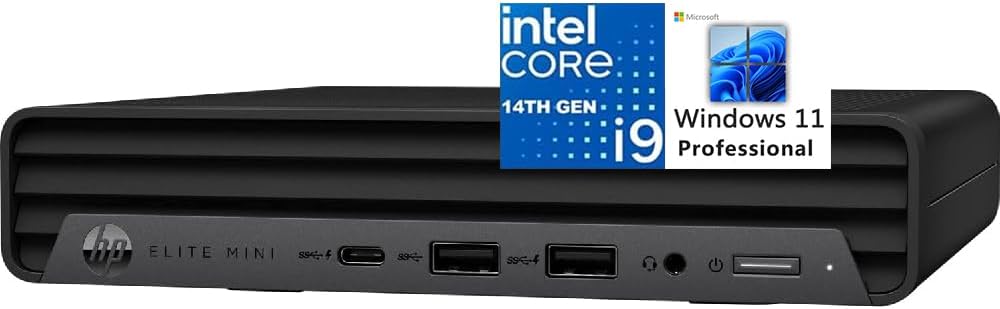
HP offers a reliable option with Windows 11 Pro for business users. It is praised for its ultra-quiet operation and professional design.
We may earn a commission when you buy through this link, at no additional cost to you.
The processor is a T-series low power model which runs cooler. This allows the fan to stay silent during normal work.
Six USB ports ensure you can connect all peripherals without a dock. It is a complete package with keyboard and mouse included.
Corporate buyers looking for a standard and quiet solution should choose this. It delivers a polished experience ready for deployment.
Windows 11 Pro includes features like BitLocker and Hyper-V for business security and virtualization.
The six USB ports and included peripherals mean you can set up quickly without extra costs.
We may earn a commission when you buy through this link, at no additional cost to you.
Selecting the right Mini PC involves more than just looking at the processor. You must consider memory, storage, connectivity, and thermal design to match your specific needs.
Newer generations offer better energy efficiency and AI capabilities. Look for 13th or 14th Gen Core i9 for maximum raw power.
Choose the latest generation for future-proofing and better AI performance.
Ensure the unit has enough RAM for your tasks. 32GB is recommended for heavy multitasking or virtualization.
Check for expandability to upgrade memory or storage later without buying a new device.
High performance generates heat so check if the unit uses copper pipes or large fans. Quiet cooling is essential for home offices.
Prioritize models with good thermal design to maintain speeds without loud fans.
Look for sufficient USB ports and high-speed LAN if you use network storage. Thunderbolt 4 is useful for fast external drives.
Match the ports to your peripherals to avoid needing extra adapters or hubs.
Verify how many displays the Mini PC can drive. Some support triple or quad screens for better productivity.
Ensure the video outputs match your monitor inputs like HDMI or DisplayPort.
Some models allow adding a GPU or extra SSDs. Barebone units let you choose your own components.
Consider if you need future upgrades before deciding on a locked configuration.
Choose brands that offer at least a three year warranty for reliability. Better support helps if hardware issues arise.
Look for local repair options and responsive customer service for peace of mind.
Place the Mini PC in a well ventilated area to prevent overheating. Avoid covering the air vents with papers or other objects.
Regularly clear dust from the vents using compressed air. This keeps the cooling system running efficiently over time.
Update drivers and BIOS regularly for the best performance and security. Use system updates to keep your software current.
Yes most models allow RAM upgrades. Some have soldered memory so check the specs before buying. Models with slots let you increase capacity up to 96GB.
They handle casual and older games well. For heavy AAA titles check if the model supports external GPUs. Integrated graphics are improving for light gaming.
Most models support two or three displays. Some allow four for advanced setups. Check the video ports to match your monitor needs.
Some business models include Windows 11 Pro. Others may require a license purchase. Check the product description for the OS version.
Most modern Mini PCs are very quiet. Models with large fans are quieter. Look for units with noise ratings under 30dB.
Yes most units work with major Linux distributions. They include necessary drivers for WiFi and graphics. You can install Ubuntu or Debian easily.
The top picks offer a range of options for every user. The M1-1390 leads for raw power while the MS-01 stands out for workstation needs.
Prioritize cooling and RAM capacity to ensure long term reliability. A quiet system is better for home office productivity.
Prices change often so verify current deals before you buy. Checking listings helps you get the best value for your budget.