
typecase Folio iPad A16
4.6Editor score
7-color backlit keys
Slim folio protection
Includes pencil holder
Discover the top iPad A16 Folio Case with Keyboard options for 2026. This guide compares features, compatibility, and value to help you choose the perfect
Finding the right accessory for your new tablet can transform how you work and create daily. A quality Folio case with keyboard turns your device into a capable workstation suitable for professionals and students alike who need reliable typing.
We have carefully evaluated the leading options available on the market to bring you this comprehensive list. Each product was selected based on build quality, typing experience, trackpad functionality, and overall value for money in the current landscape.
Every pick in this guide highlights specific strengths and weaknesses to help you decide quickly. Keep in mind that pricing and availability can shift rapidly, so verify details before finalizing your purchase decision online today.
4.6Editor score

4.4Editor score

4.4Editor score
This side-by-side comparison highlights the key differences between the top ten options available today. Consider these specs to find the perfect match for your specific workflow and budget needs.





The Apple Magic Keyboard Folio stands out as the top choice for users seeking a seamless typing experience with their iPad A16. With a strong rating from verified buyers, this accessory delivers premium quality that matches the tablet's design aesthetics perfectly.
We may earn a commission when you buy through this link, at no additional cost to you.
Its standout feature is the built-in trackpad which supports Multi-Touch gestures for precise cursor control without needing extra peripherals. The two-piece design allows you to detach the keyboard easily while keeping the back panel attached for continuous protection and viewing stand functionality.
While the price is higher than third-party alternatives, the reliability and instant connection via magnetic contacts justify the investment for professional users. You save time on pairing and charging since power comes directly from the iPad itself without interruptions during your workflow.
This option is ideal for students and professionals who prioritize stability and ease of use over budget constraints. If you want a laptop-like setup that integrates natively with your device, this Folio case offers the most polished experience available today.
No Bluetooth pairing is needed as the keyboard attaches and connects instantly through magnetic contacts for immediate typing readiness.
The keyboard detaches from the protective back panel giving you flexibility to use the iPad as a standalone tablet whenever needed.
We may earn a commission when you buy through this link, at no additional cost to you.
Harvopu offers a feature-rich keyboard case that appeals to users who value customizable lighting and robust protection for their iPad. The inclusion of RGB backlighting sets it apart in the budget-friendly category while maintaining solid typing performance.
We may earn a commission when you buy through this link, at no additional cost to you.
The high-sensitive trackpad allows for smooth gestures like swiping and scrolling which enhances productivity when navigating documents or browsing the web. You can adjust brightness levels and choose from seven pure backlight colors to match your personal style or environment.
One trade-off is the slightly more complex pairing process compared to Apple accessories though the Bluetooth connection remains stable once established. The case material is designed to resist stains and scratches ensuring it looks new even after frequent daily handling.
This is a great pick for students who want a laptop-like experience without spending a fortune. If you need a case that looks good and functions well in dim lighting, the Harvopu model delivers significant value for the price.
Enjoy seven RGB backlight colors with three adjustable brightness levels for a relaxing typing experience in any lighting condition.
The upgraded soft PU material resists stains and scratches while the TPU interior with honeycomb design protects against heat and shocks.
We may earn a commission when you buy through this link, at no additional cost to you.
The typecase Folio stands as an excellent budget-friendly option that does not compromise on essential features like backlighting and protection. With a high rating from users, it proves that affordable cases can still offer reliable typing and convenience.
We may earn a commission when you buy through this link, at no additional cost to you.
Its ultra-light design makes it easy to carry in a bag without adding bulk which is perfect for commuters or travelers. The scissor-style keys provide a quiet and comfortable typing experience while the seven backlight colors add a touch of style.
While the trackpad is functional, it may not offer the same precision as premium models but it handles basic navigation tasks effectively. The included pencil holder ensures your stylus stays secure and within reach without needing a separate pouch or pocket.
If you are looking for a cost-effective solution that covers all the basics, this case is highly recommended. It balances weight, protection, and typing comfort well enough for daily school or work tasks at a very competitive price.
The lightweight folio case combines synthetic leather and flexible TPU edges to help protect your iPad from daily wear and bumps.
Type comfortably day or night with quiet scissor-style keys and laser-etched letters for clear visibility in any condition.
We may earn a commission when you buy through this link, at no additional cost to you.
CHESONA brings a versatile keyboard case designed for users who juggle multiple devices daily. With support for two wireless channels, you can easily switch between your iPad and another device with just one click for seamless workflow.
We may earn a commission when you buy through this link, at no additional cost to you.
The integrated multi-touch trackpad adapts well to the iPadOS system allowing you to scroll, click, and swipe effortlessly. A powerful 500mAh battery ensures long standby times and the backlight saves power by turning off automatically after periods of inactivity.
While it requires periodic charging like most wireless keyboards, the convenience of dual pairing often outweighs this minor inconvenience for multitaskers. The case includes precise cutouts for all ports and sensors ensuring full access without removing the cover at all.
This option is best suited for power users who need efficient switching between tablets or phones often. If you value connectivity flexibility and a robust battery life, the CHESONA case provides a solid foundation for productive work sessions.
Pair with up to two devices simultaneously and switch between them instantly with one click for a seamless workflow experience.
Backlight turns off automatically after thirty seconds and the battery enters sleep mode to extend standby time to one hundred twenty days.
We may earn a commission when you buy through this link, at no additional cost to you.
The typecase Edge offers a premium design that elevates your iPad above the keyboard for a true laptop-like posture. This floating magnetic stand setup improves ergonomics and viewing angles making long typing sessions more comfortable for your neck and wrists.
We may earn a commission when you buy through this link, at no additional cost to you.
Its precision multi-touch trackpad includes palm rejection to reduce accidental cursor movement while typing so you can work faster without errors. The keyboard features eleven backlight colors and three brightness levels giving you exceptional customization for your personal workspace environment.
While it is priced higher than other options the build quality and warranty support reflect the premium nature of the product. The vegan leather and secure magnetic closure ensure your device stays protected while looking professional in business or academic settings.
If you want a setup that looks and feels like a full computer, this case delivers on those expectations. It is a strong choice for professionals who value ergonomics and high-quality materials in their daily tech accessories.
The magnetic floating stand holds your iPad above the keyboard for a laptop-like setup ideal for typing and remote work.
Scroll, swipe, edit and multitask with familiar gesture controls while palm rejection helps reduce accidental cursor movement.
We may earn a commission when you buy through this link, at no additional cost to you.
Logitech Rugged Folio is built for durability with proprietary shock-absorbent technology that exceeds military standard drop tests. This makes it the ideal choice for environments where the iPad might be subjected to bumps, drops, or harsh conditions daily.
We may earn a commission when you buy through this link, at no additional cost to you.
The Smart Connector technology allows for instant connection without Bluetooth pairing and sources power directly from the iPad for endless uptime. A durable membrane seals the keyboard to protect against spilled drinks and crumbs which you can wipe clean if an accident occurs.
It offers four unique use modes including Type, Write & Sketch, View, and Read to adapt to various tasks throughout your day. The magnetic latch holds the case securely and provides a safe storage place for your Logitech Crayon or Apple Pencil stylus.
If you work in rugged environments or need a case that can survive accidents, this is the safest bet. The heavy-duty build ensures your device stays protected while maintaining full functionality without the need for additional protective gear.
Proprietary shock-absorbent technology helps the case exceed military standard drop tests for protection from drops and mishaps.
A durable membrane seals the keyboard to protect from spilled drinks and crumbs which can be wiped clean after an accident.
We may earn a commission when you buy through this link, at no additional cost to you.
This typecase Folio Duo design offers unique flexibility by allowing you to detach the keyboard while keeping the case attached. You can switch between productivity mode and pure tablet mode quickly without removing the whole cover or dealing with extra bulk.
We may earn a commission when you buy through this link, at no additional cost to you.
The case supports both portrait and landscape orientations with stable support that holds its position better than fixed-position designs. You get a precision trackpad with multi-touch gesture support making navigation smooth while the seven-color backlighting adds style to your setup.
Its refined leather-style exterior and soft shock-absorbing inner case protect your iPad from scratches while the pencil slot keeps your stylus secure. The full row of iPadOS shortcut keys helps you access common functions like screenshots and dictation quickly.
Ideal for users who want versatility between typing and viewing tasks, this case adapts well to your daily needs. If you appreciate a balance of style and function with a solid warranty backing, the Folio Duo is a reliable choice to consider.
Snap on the keyboard for focused typing then detach it in seconds for a slimmer lighter tablet experience when you want to read.
Whether you are working studying or watching enjoy comfortable viewing in landscape or a low-angle setup for writing.
We may earn a commission when you buy through this link, at no additional cost to you.
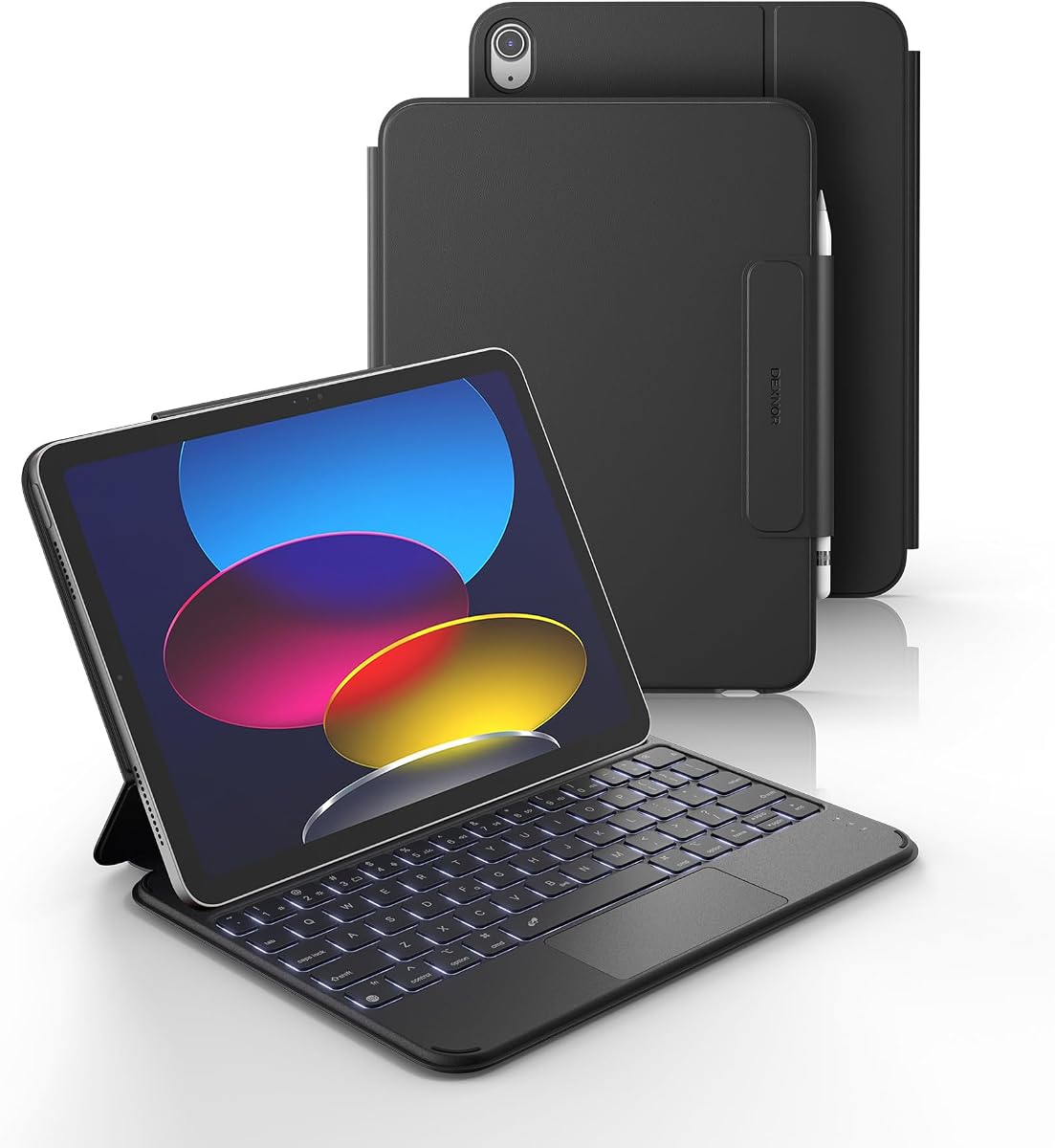
Dexnor focuses on endurance and portability with a battery that supports up to two hundred hours of typing and twelve hundred hours of standby. This makes it perfect for travelers or students who cannot always be near a power outlet during busy days.
We may earn a commission when you buy through this link, at no additional cost to you.
The case weighs just one point one six pounds making it light enough for commuting without sacrificing stability. A reinforced magnetic system anchors the iPad securely to the keyboard preventing wobbling even when you hold it with one hand on your lap.
A built-in multi-touch trackpad supports gestures for editing documents and browsing the web efficiently. You can disable the trackpad using a function key to prevent accidental cursor movement if you prefer direct touch screen interaction while typing.
If long battery life and low weight are your priorities, this case delivers exceptional value. It is a practical choice for anyone who values energy efficiency and portability over premium features like floating stands or extensive backlighting options.
A 650mAh lithium polymer battery supports up to 200 hours of typing and 1200 hours of standby reducing frequent charging needs.
The keyboard enters sleep mode after 30 minutes and the backlight sleeps after 45 seconds of inactivity to save power.
We may earn a commission when you buy through this link, at no additional cost to you.
ESR offers a slim keyboard case featuring an extra-large precision trackpad that is sixty-five percent larger than regular options. This provides effortless navigation with multi-finger gestures making editing and browsing feel smooth and responsive on your tablet.
We may earn a commission when you buy through this link, at no additional cost to you.
At just six point nine millimeters thick, this keyboard is super slim and easy to carry anywhere without adding extra bulk. The magnetic detachable design lets you use the keyboard remotely or detach it for pure tablet mode when watching videos or sketching.
It offers two viewing angles a sixty-five degree for work and a twenty-degree angle for writing or sketching. The triangular support keeps everything steady without wobbling while the durable cover with Air Guard corners keeps your iPad safe from drops and dust.
Ideal for users who prioritize a large trackpad for precise control, this case is a strong contender. If you do not need backlighting but want a lightweight and stable typing solution with a generous trackpad, the ESR model fits the bill perfectly.
Enjoy a 65% larger touchpad than regular keyboards for effortless navigation with intuitive gestures from one-finger drag to three-finger scroll.
At just 6.9mm thick this keyboard is super slim and easy to carry anywhere great for working on the go without bulk.
We may earn a commission when you buy through this link, at no additional cost to you.
CC Store provides a reliable keyboard case with a large capacity battery that delivers over two hundred hours of working time on a single charge. This marathon performance ensures you can type for days without worrying about finding a power source frequently.
We may earn a commission when you buy through this link, at no additional cost to you.
The magnetic design allows for quick attachment and detachment so you can switch between typing and reading modes instantly. The built-in pencil holder keeps your stylus safe and easily accessible while the premium PU leather defends against scratches and spills.
Its adjustable kickstand offers multiple tilt angles for ideal typing or viewing whether you are working at a desk or lounging on the couch. The featherlight design maintains laptop-grade convenience without adding unnecessary weight to your daily carry.
This is a great option for budget-conscious buyers who want strong battery life and essential features. If you need a durable, lightweight case with a built-in pencil slot and long endurance, the CC Store case offers excellent everyday value.
The built-in large capacity battery delivers 200+ hours of working time after just 2-3 hours of charging for long sessions.
Designed with a pencil holder and pen slot on top making it easy to take the stylus out for use quickly.
We may earn a commission when you buy through this link, at no additional cost to you.
Choosing the right keyboard case involves balancing features, protection, and budget to fit your specific needs.
Ensure the case explicitly supports your iPad A16 or 10th Generation model number. Check the model number on the back of your device before purchasing to avoid fit issues or connector mismatches.
Always verify the model code listed in the product description matches your tablet before ordering.
Decide between Bluetooth wireless or Smart Connector options. Bluetooth offers detachable flexibility but requires charging while Smart Connector provides instant power but limits how you can detach the keyboard.
Consider if you prefer detachable versatility over constant power availability when making your final decision.
Look for a trackpad that supports multi-touch gestures for smoother navigation. Larger pads with palm rejection reduce accidental clicks and improve the laptop-like experience significantly.
Prioritize models with precise trackpads if you rely heavily on cursor control for productivity.
Choose a case with adjustable backlight if you often type in dim environments. RGB or single-color options with brightness control help reduce eye strain and add style.
Select adjustable backlight levels to ensure visibility in low-light conditions while saving battery life.
Evaluate the case material for durability against drops and scratches. Features like corner guards, water resistance, and strong magnetic closures ensure your iPad stays safe during daily transport.
Choose materials like vegan leather or rugged shells based on your environment and protection needs.
Check the battery capacity to ensure it lasts through your workday without frequent charging. Look for sleep modes that conserve power when the device is not in use.
Opt for larger batteries if you travel often or have limited access to charging outlets regularly.
Consider the total weight when the keyboard is attached to the case. Ultra-light options are easier to carry in bags for commuting or traveling daily.
Balance the weight with features like trackpads or stands to avoid adding too much bulk.
Look for brands offering clear warranty terms and responsive customer support. A twelve-month warranty shows confidence in the product and gives you peace of mind.
Prioritize brands with good reputation for customer service in case of technical issues.
Connect the keyboard by following the pairing instructions provided in the manual. For Bluetooth models, enable Bluetooth on your iPad and select the keyboard from the list of available devices to establish a secure connection.
Clean the keyboard regularly using a soft, dry cloth to remove dust and debris. Avoid using harsh chemicals or spraying liquids directly onto the keys to prevent damage to the internal components or circuitry.
Store the case in a dry and cool place when not in use to preserve the battery life. If you will not use it for a long time, turn it off completely to avoid draining the internal battery unnecessarily.
No, these cases are specifically designed for the iPad A16 (11th Generation) and the 10th Generation. Always verify your model number on the back of your iPad before purchasing to ensure compatibility.
It depends on the model. Apple models use the Smart Connector and do not need charging. Third-party models typically have built-in batteries that need to be charged via USB-C periodically.
Most models include a dedicated pencil holder or slot designed to secure your Apple Pencil. However, ensure the case design supports your specific generation of pencil for a secure fit.
For magnetic models, you can simply pull the keyboard away from the case gently. Some models require you to switch to a different mode or release a latch before removing the keyboard completely.
Not all models feature backlighting. Some budget options do not have lights, while others offer multiple color choices and brightness levels for typing in low-light environments.
Yes, most magnetic keyboards can be detached quickly allowing you to use the case as a standard Folio cover for reading, watching videos, or drawing freely.
We have explored the top ten options available for the iPad A16 Folio Case with Keyboard ranging from budget-friendly picks to premium choices with advanced features.
Prioritize features like trackpad quality and battery life based on how you use your device daily to ensure the accessory fits your workflow seamlessly and without interruption.
Prices and availability can change quickly so double-check current listings and stock levels before making your final purchase decision online today.