
iAbler iPod Shuffle Cable
4.4Editor score
2 in 1 Charge and Sync data transfer
Compact and lightweight design for portability
Works with 3rd to 7th Generation MP3 players
This guide compares the top ten replacement cables and dock stations for iPod Shuffle models to help you choose the reliable charging and syncing solution
Finding a reliable replacement cable for your favorite portable music player can be surprisingly difficult when the original accessory is missing or damaged over time. You need a solution that charges efficiently and syncs data without errors.
We have analyzed ten highly rated options based on user feedback and technical specifications to build this comprehensive list. Our focus remains on durability and compatibility with your specific generation of device.
Each entry in this guide highlights key features and real world performance insights to help you decide quickly. Please note that product availability and stock levels may fluctuate regularly.
4.4Editor score

4.4Editor score

4.4Editor score
The following table provides a side-by-side comparison of every product selected for this guide so you can quickly assess compatibility and key features for your specific needs.


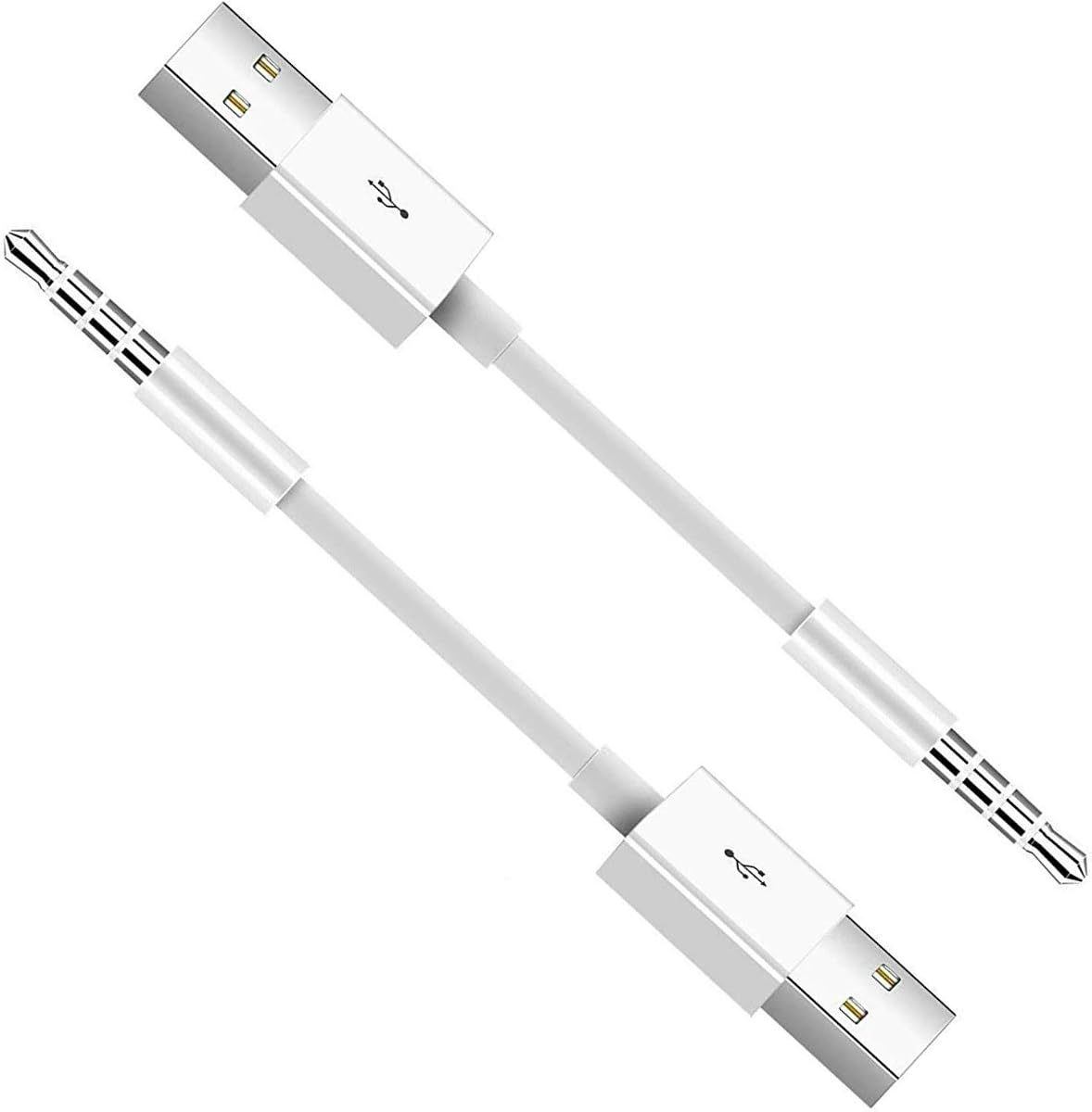

This replacement cable is a top choice for users seeking a reliable way to power and sync their iPod Shuffle devices. It holds a strong user rating and is designed to work seamlessly with multiple generations of the player.
We may earn a commission when you buy through this link, at no additional cost to you.
The primary strength of this product lies in its versatility and ease of use. You can connect the 3.5mm connector directly to your Shuffle and the USB plug into any standard port on a laptop or desktop computer. This allows you to charge the battery while transferring music files through iTunes software simultaneously. The packaging includes two cables which adds significant value for households with multiple devices or for keeping one at home and one in your travel bag.
There are minor trade-offs to consider regarding the physical design. The white casing may show wear or dirt more visibly than a black alternative and the length of the cable might not reach your desk comfortably if your power source is far away. These issues are acceptable given the overall durability and consistent performance reported by most users.
This pick is ideal for anyone who needs a straightforward and affordable solution to get their music player working again. Whether you are replacing a lost original cable or buying a spare for backup this option provides the stability and compatibility you need without breaking the bank.
You can charge your device and sync new songs at the same time without needing extra hardware or adapters to get started.
Works with most iPod Shuffle generations including the 3rd 4th 5th 6th and 7th generations to ensure you find the right fit.
We may earn a commission when you buy through this link, at no additional cost to you.
This two pack offers an excellent balance of performance and affordability for those looking to replace a lost cable. It maintains a solid user rating and is engineered to handle both power delivery and data sync tasks effectively.
We may earn a commission when you buy through this link, at no additional cost to you.
The key advantage here is the practicality of having two cables in the box. You can keep one connected to your computer for regular updates and use the other with a wall adapter for charging in another room. The design is compact which makes it easy to toss into a backpack or purse without adding bulk. Connecting the 3.5mm end to your device and the USB end to your Mac or PC allows for quick song transfers and battery top ups.
Some users note that the cable material is quite flexible which is great for portability but might feel less rigid than premium options. Also ensure your device is within the supported range before purchasing. These factors are minor compared to the cost savings and functionality you get.
Choose this option if you want a reliable backup cable or a primary replacement that does not cost much. It is perfect for daily commuters or students who need a dependable way to keep their playlist loaded and battery charged.
Having two cables allows you to set up a permanent station at home while keeping a spare for travel or work seamlessly.
You can connect directly to a computer port or use an adapter for a wall outlet to charge your device quickly.
We may earn a commission when you buy through this link, at no additional cost to you.
This official cable provides a premium experience for owners of the third generation iPod Shuffle. It comes from Apple directly and is designed to ensure a stable connection for both power and data tasks.
We may earn a commission when you buy through this link, at no additional cost to you.
The standout feature is the assurance of compatibility and build quality. Since it is made by the original manufacturer you can trust that the connectors fit precisely and that the cable will not interfere with data transfer speeds. The package includes two cables which is consistent with what you might expect from older Apple accessory sets. You can plug one end into your computer and the other into the Apple USB Power Adapter for charging from a wall outlet.
The main limitation is that it only works with the third generation model so it is not a universal solution for other generations. Additionally the price is higher than many third party alternatives. However for users who prioritize reliability and original specs these trade-offs are often worth the extra cost.
This is the best choice if you own a 3rd gen Shuffle and want to ensure maximum performance and longevity. It is ideal for collectors or users who prefer official accessories to avoid any compatibility issues with their device.
Designed specifically for the 3rd generation this cable ensures a perfect fit and reliable data exchange every time you connect.
Using an official cable reduces the risk of connection failures and ensures safe charging for your device battery over time.
We may earn a commission when you buy through this link, at no additional cost to you.
This docking station offers a different approach to charging by providing a dedicated cradle for your device. It is designed to hold the iPod securely while you sync songs or recharge the battery.
We may earn a commission when you buy through this link, at no additional cost to you.
The primary benefit is the stability it provides. Instead of fiddling with a small cable you simply slide your player into the dock. This makes it convenient for home use where you want your music player to stay in one spot while it charges. It also supports a few older Nano models which adds versatility if you have multiple classic devices. Syncing is straightforward once you connect the USB to your computer.
Users have reported mixed feedback on the build quality which might be why the rating is lower than the cables. Also it is limited to the 2nd and 3rd generation models so you must check your device type before buying. These limitations are manageable for those who want a neat desktop solution.
This dock is suitable for users who prefer a stationary charging setup over carrying a loose cable. It is a good fit for collectors or anyone who wants their music player to look tidy on a desk or shelf while it powers up.
The cradle design holds your player firmly so it stays connected and upright while charging on any flat surface.
Besides the 2nd and 3rd gen Shuffle it also works with select classic Nano models for a broader range of players.
We may earn a commission when you buy through this link, at no additional cost to you.
This cable is tailored for owners of the earliest iPod Shuffle generations. It provides a basic but effective way to charge and transfer data to these classic devices.
We may earn a commission when you buy through this link, at no additional cost to you.
The main strength is its specific compatibility with the 1st and 2nd generation models. It is a good choice if you have an older player that is still working well and needs a replacement cable. The design is compact which makes it easy to carry in a pocket or bag. You can connect it to any standard USB port on your computer to sync music or charge the battery.
It is important to note that this will not work with the 3rd generation or later models so you must verify your device before purchasing. The features are minimal compared to other options but that is expected for a budget accessory. These trade-offs are acceptable for users who need a specific fit for an older player.
Choose this if you own a 1st or 2nd generation Shuffle and need a functional replacement. It is best for casual users who want to keep their older device alive without investing in expensive accessories.
This cable is built to fit the specific connector design of the 1st and 2nd generation models perfectly.
Its lightweight build makes it easy to carry along for quick charge ups when you are away from home.
We may earn a commission when you buy through this link, at no additional cost to you.
This two pack offers a practical solution for users with multiple compatible devices or those who need a reliable spare. It supports a wide range of generations making it a versatile option for many households.
We may earn a commission when you buy through this link, at no additional cost to you.
The key feature is its broad compatibility with models from the 3rd to 7th generation. This makes it useful if you have more than one player or if you are unsure which generation your device is. The cable supports fast USB 2.0 data transfer which helps you sync your library quickly. With two cables in the package you can keep one at your desk and another in your car or bag.
It is worth noting that it does not fit the 1st or 2nd generation models so check your device before buying. Some users report occasional quality inconsistencies but overall it performs well for daily use. These issues are minor compared to the flexibility and value offered.
This option is great for anyone who wants a dependable backup or primary cable that works across many models. It is a solid pick for travelers or students who need consistent charging and syncing performance.
Supports 3rd through 7th generation models so you can use it with most modern iPod Shuffle devices available.
Uses USB 2.0 technology to ensure that your music library transfers quickly without long wait times.
We may earn a commission when you buy through this link, at no additional cost to you.
This pair of cables emphasizes durability and build quality to withstand regular use. It is designed for users who want a long lasting replacement that can handle daily wear and tear.
We may earn a commission when you buy through this link, at no additional cost to you.
The standout features are the nickel plated connectors and the TPE body. The plating helps avoid oxidation and rust which ensures the connection stays reliable over time. The TPE material is strong and resistant to bending or fracturing so the cable is less likely to break from frequent plugging and unplugging. It works seamlessly with models from the 3rd to 7th generation and allows you to sync and charge efficiently.
One minor drawback is that it is only available in white which might not suit every aesthetic preference. Also it does not fit the earliest generations so verify your model first. These are small compromises given the focus on physical durability.
Choose this if you prioritize a cable that will last a long time without fraying or connection issues. It is an excellent choice for everyday use at home or in a bag where reliability is key.
The nickel plated interface protects the connector from corrosion to keep the connection stable over time.
The TPE body is tough and resists bending and breaking for better resistance to everyday wear.
We may earn a commission when you buy through this link, at no additional cost to you.
This cable focuses on material quality to provide a flexible and safe charging experience. It is built with a durable outer layer that resists tangling and heat buildup.
We may earn a commission when you buy through this link, at no additional cost to you.
The TPE material makes the cable flexible and easy to manage without getting knots. It also has excellent heat dissipation which helps maintain safety and stability during charging. The high quality plating casting ensures that the electrical connection is secure and safe for your device. It supports fast charging and is compatible with models from the 3rd to 7th generation.
A minor point is that the white color may show dirt more easily and the design does not support the oldest models. These are acceptable trade-offs for the durability and safety features included. The cable is lightweight which makes it convenient to carry in a backpack or purse.
This is a good pick for users who want a cable that stays tangle free and charges safely. It is suitable for daily commuters or students who need a reliable and lightweight option.
The TPE material keeps the cable flexible and dust free so you avoid tangles during daily use.
High quality plating ensures stable power delivery and helps protect your device during charging cycles.
We may earn a commission when you buy through this link, at no additional cost to you.
This two pack is designed for users who want a reliable replacement with a focus on portability. It supports three common generations and provides a straightforward way to power and sync.
We may earn a commission when you buy through this link, at no additional cost to you.
The main strengths are its lightweight design and full compatibility with the 3rd 4th and 5th generation models. You can connect the 3.5mm connector to your Shuffle and the USB plug to a laptop or tablet to charge and transfer data at the same time. This dual functionality saves you from needing separate cables for power and syncing. The compact size makes it easy to carry around when you are on the go.
The only limitation is that it does not work with the 6th 7th or earlier generations so check your model before buying. The build quality is standard which is expected for this price point. These limitations are acceptable for users who need a simple and effective solution for their specific model.
Choose this if you own a 3rd 4th or 5th generation Shuffle and need a portable cable for daily use. It is a practical option for students or travelers who want to sync music quickly.
The design is lightweight and small so it fits easily in a backpack or purse for travel or daily use.
You can transfer data and power up your device at the same time without needing extra adapters.
We may earn a commission when you buy through this link, at no additional cost to you.
This two pack stands out for its emphasis on speed and durability. It is designed to provide a faster charging experience while maintaining a secure connection for syncing.
We may earn a commission when you buy through this link, at no additional cost to you.
The primary benefit is the fast charging capability which allows you to get your device back to full power quicker than standard cables. The connector head is super durable and ultra compact which helps it withstand repeated unplugging and storage without wear. It works with models from the 3rd to 6th generation and ensures a stable connection for both charging and syncing data. Having two cables in the box adds value for keeping one at home and one for travel.
The only limitation is that it does not support the 7th generation so check your device model before buying. This is a minor drawback given the performance and durability features. The design is compact which makes it easy to carry around without bulk.
This is an excellent choice for anyone who wants to minimize charging time and maximize durability. It is a great pick for daily users who need a robust and quick replacement for their older Shuffle models.
The cable offers faster charging than conventional options so you spend less time waiting for your battery to fill up.
The connector is designed to be strong enough to handle repeated unplugging and storage without damage.
We may earn a commission when you buy through this link, at no additional cost to you.
Selecting the right replacement cable requires careful attention to compatibility build quality and functionality to ensure your device continues to work properly.
The most critical factor is ensuring the cable matches your specific iPod Shuffle generation. Models from the 1st and 2nd generation use a different connector design than those from the 3rd generation onwards. Some cables are labeled to work with 3rd to 7th generations while others are made for the 2nd generation or earlier. Always check your device model number or look at the physical port to confirm which type of cable you need before purchasing.
Verify your device generation against the product description to avoid buying an incompatible cable that will not fit.
Cable length can impact how you use your device during charging. A longer cable gives you more flexibility to place your iPod on a desk or nightstand while it is connected to a power source further away. However if you carry your cable in a bag for travel a shorter and more compact option might be easier to manage. Consider where you will use the cable most often to choose a length that suits your needs.
Choose a length that balances convenience for desktop use with ease of carrying in a travel bag.
The material used for the cable body and connectors affects how long the replacement will last. Some cables use TPE material which is flexible and resists fraying while others may have metal plating on the connectors to prevent rust and oxidation. A cable that is too thin might break near the ends over time while a reinforced design can handle daily plugging and unplugging better. Look for reviews or descriptions that mention durability and resistance to wear.
Look for cables with reinforced ends or quality materials to ensure they last through regular use.
Most replacement cables allow you to charge and sync data at the same time which is convenient for updating your music library while recharging the battery. This dual function is supported by the 3.5mm to USB connection found on most modern cables. Ensure the product description confirms that it supports both charging and data transfer to avoid getting a charge only cable.
Confirm the cable supports both power and data transfer to update songs while you charge your device.
Many replacement options come in packs of two which provides excellent value and convenience. Having two cables allows you to keep one permanently connected to your computer or docking station while using the other for travel or as a backup. This setup ensures you always have a spare if one gets lost or damaged. Compare the price of single cables versus two packs to find the best value for your needs.
Consider buying a two pack to have a backup cable ready for travel or home use.
Replacement cables are generally affordable but prices can vary based on brand and build quality. Third party options often offer a lower price point while official brand cables might cost more but promise better reliability. Evaluate the features included such as the number of cables and build materials to determine if a higher price is justified. In many cases a well rated third party cable provides the same functionality for less money.
Compare the features and build quality against the price to find the best value for your needs.
While color does not affect performance it might matter to some users who want a cable that matches their device or personal style. Most replacement cables are available in white which matches the classic iPod design but some brands might offer black options. If you prefer a specific color check the product images and description to ensure it meets your expectations before purchasing.
Check available color options if you want the cable to match your device or personal style.
User feedback can provide insights into real world performance that product descriptions might not cover. Look for reviews that mention reliability and connection issues or build quality to gauge how the cable performs over time. A high average rating is a good indicator but reading recent comments can help you identify any recurring problems with the product.
Read recent user reviews to confirm reliability and connection stability before buying a replacement cable.
To use your replacement cable simply connect the 3.5mm end into the port on your iPod Shuffle. Make sure the connector is aligned properly and push gently until it clicks into place securely.
Plug the other end of the cable into a USB port on your computer or into a USB power adapter. If you are using a computer you can open iTunes to sync your music library and check the battery level.
To maintain the cable avoid bending it sharply near the connector ends and store it loosely coiled when not in use. Keep it away from moisture and extreme temperatures to extend its lifespan and prevent connection issues.
Yes you can use the cable to charge from a wall outlet if you have a USB power adapter. Simply plug the USB end of the cable into the adapter and the other end into your iPod Shuffle to begin charging. Make sure the adapter provides sufficient power for your device.
Many replacement cables are compatible with the 3rd generation iPod Shuffle but you must verify the product description before buying. Some cables are specifically made for the 3rd to 7th generations while others are designed for the 2nd generation. Check the listed compatibility to ensure it matches your model.
You can identify your iPod Shuffle generation by looking at the design and the port location. The 1st and 2nd generations have a smaller 3.5mm port while the 3rd generation and later use a different connector shape. Check the back of your device for model details or compare images online to confirm.
Yes most replacement cables support data transfer which lets you sync music using iTunes software. Connect the cable to your computer and open iTunes to manage your library. Ensure the cable is fully plugged in to avoid connection issues during syncing.
Generally third party cables are safe to use if they are well made and rated for your device. Look for cables with proper insulation and quality connectors to ensure safe power delivery. Avoid using damaged cables that expose wires or have loose connections to prevent any risks.
If the cable does not fit it is likely incompatible with your iPod generation. Check the product details to confirm compatibility before buying. You may need to order a different cable designed for your specific model or return the one you have for a refund.
This guide has explored ten reliable options for replacing your lost or damaged iPod Shuffle cable. The top picks include the Amicable USB Data Cable Replacement for its all around performance and the iAbler Cable for budget value.
When choosing a replacement prioritize compatibility with your specific device generation to ensure a secure connection. Durability and the ability to sync while charging are also important factors to consider for a smooth experience.
Keep in mind that availability and stock levels can change over time so check the product pages for current information before making your purchase. With the right cable you can keep your music player working smoothly for years to come.