
AULA WIN60 HE
4.5Editor score
Adjustable actuation points
Rapid Trigger mode enabled
Web-based driver customization
Discover the top 10 keyboards for Valorant ranked by speed and accuracy. Compare Hall Effect, Optical, and Magnetic switches to find your perfect setup today.
Finding the right keyboard for Valorant is critical for competitive success. Precision, speed, and reliability define every movement and shot. Players need devices that respond instantly to inputs without latency or drift during intense rounds.
We evaluated ten top models based on switch technology, polling rates, and build quality. Our analysis focuses on features like Rapid Trigger and magnetic switches that enhance counter-strafing. Each product offers unique advantages for different playstyles and budgets.
This guide highlights key strengths and potential trade-offs for every recommendation. You will see detailed specs and real-world performance notes for each pick. Prices and availability may change frequently so verify details before purchasing your next gear.
4.5Editor score

4.1Editor score

4.6Editor score
This section provides a side-by-side comparison of all ten keyboards. Each entry highlights core specifications to help you quickly identify the best fit for your specific gaming needs and budget constraints.

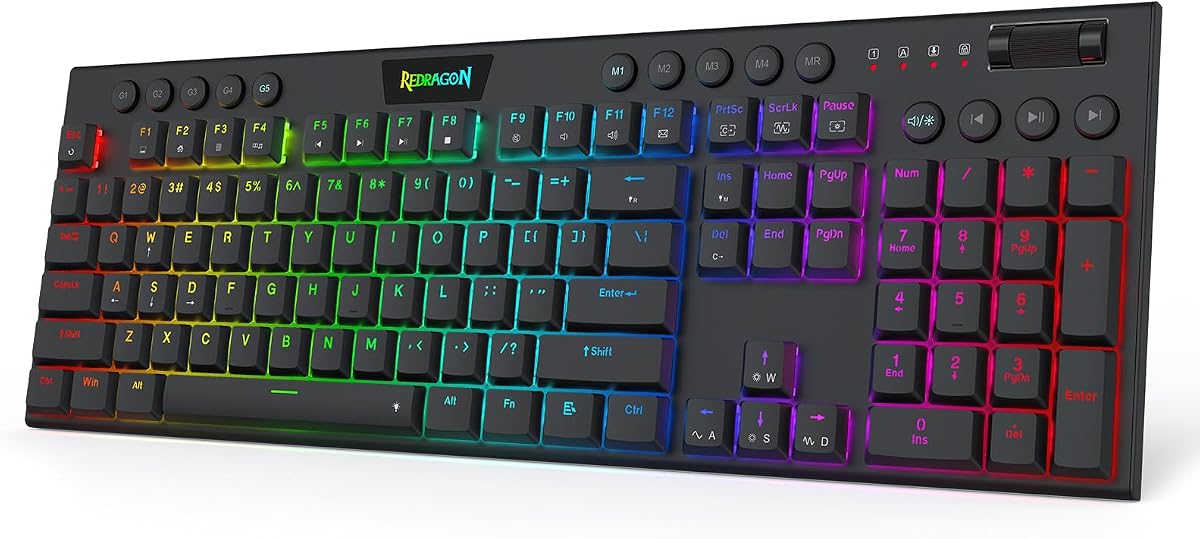





The Redragon K673 HE stands out as a top contender for Valorant players. With a solid rating, it offers Hall-Effect technology that delivers rapid trigger capabilities essential for competitive gaming.
We may earn a commission when you buy through this link, at no additional cost to you.
Its UltraMag POM magnetic switches sense keypresses without physical contact ensuring precise control during critical moments. The 8000Hz Hyper-Polling rate transmits inputs up to eight times faster than standard keyboards for near-zero latency.
While the software offers deep customization profiles from 0.1mm to 3.4mm it may be daunting for casual users. The wired connection limits portability but ensures maximum stability during intense gaming sessions.
This keyboard is ideal for competitive players seeking high performance at a reasonable price. It balances advanced features with usability making it a strong recommendation for improving your in-game performance.
UltraMag switches eliminate physical contact to prevent wear and ensure consistent actuation over time.
Dynamic key activation cuts redundant keystrokes allowing faster direction changes without missed inputs.
We may earn a commission when you buy through this link, at no additional cost to you.
The Redragon K686 HE shares the core advantages of the K673 model but with distinct structural benefits. It features the same Hall-Effect switches for precise input detection and rapid trigger support for smooth movement.
We may earn a commission when you buy through this link, at no additional cost to you.
Users appreciate the anti-wobble independent switch-plate design paired with dampening layers for a soft bounce. This reduces noise and fatigue during long sessions compared to harsh mechanical switches found in other budget options.
The absence of a wireless option might deter mobile users but the stable connection ensures reliability. Software allows for calibration so your setup stays consistent across different games and environments.
This model is perfect for gamers prioritizing consistent performance over portability. It offers a compelling mix of speed durability and user-friendly controls suitable for focused Valorant practice.
Internal dampening layers reduce harsh clacking sounds for a quieter more immersive gaming experience.
Calibrate magnetic switches via desktop or web driver for consistent actuation profiles across sessions.
We may earn a commission when you buy through this link, at no additional cost to you.
The Redragon K618 HE is designed specifically for those who prefer low-profile typing and gaming. Its shortest travel magnetic switches sense keypresses faster than standard switches making it ideal for rapid inputs.
We may earn a commission when you buy through this link, at no additional cost to you.
With a 30% slimmer design keystrokes register quicker reducing strain on wrists during extended matches. The dedicated 4×5 macro zone allows you to record combos without installing additional software or drivers.
Some users may find the low-profile feel different from traditional mechanical keyboards. However the speed and responsiveness it offers for counter-strafing make it a top choice for FPS enthusiasts.
This keyboard is recommended for players seeking speed and ergonomics in a compact form factor. The high rating reflects user satisfaction with its ability to deliver precise timing in fast-paced games.
Record and execute combos instantly using dedicated keys without needing complex software configurations.
The 30% slimmer profile reduces wrist strain while maintaining full functionality and key range.
We may earn a commission when you buy through this link, at no additional cost to you.
The Corsair Clipper PRO MINI is a compact powerhouse built for FPS setups where mouse space is crucial. It uses MGX Hyperdrive Core Hall Effect switches for instant reset and rapid taps.
We may earn a commission when you buy through this link, at no additional cost to you.
IP57 durability ensures it withstands dust and accidental spills making it reliable for long sessions. The 60% layout maximizes mouse space for low-sensitivity aiming while keeping essential keys accessible.
Missing dedicated arrow keys might be an issue for navigation heavy games but FN combos can help. The price point is higher but the build quality and resistance features justify the investment for many.
Choose this keyboard if you need a rugged compact option with competitive features. Its focus on space optimization and durability makes it a strong fit for dedicated desktop gaming stations.
Rated for dust and water resistance to withstand accidental spills and extended gaming environments.
Linear fast-actuating switches with adjustable actuation points for precise control and zero drift.
We may earn a commission when you buy through this link, at no additional cost to you.
The Razer Huntsman Mini is a classic choice for gamers who prefer optical switches. It uses optical beams to register presses at the speed of light offering superior speed over traditional mechanical options.
We may earn a commission when you buy through this link, at no additional cost to you.
Razer Synapse 4 enables Snap Tap for prioritizing latest inputs between assigned keys. This feature helps with rapid movement and complex combos common in competitive shooters like Valorant.
While it lacks advanced magnetic switch features like adjustable actuation its optical tech is highly responsive. The aluminum frame adds premium durability and the lighting ecosystem is unmatched for customization.
This keyboard suits users who prioritize speed build quality and lighting. It is a solid option for those already invested in the Razer ecosystem seeking a compact reliable setup.
Prioritize the latest input between assigned keys for faster movement and reduced finger fatigue.
Light-speed registration via optical beams ensures faster response than mechanical switch contact.
We may earn a commission when you buy through this link, at no additional cost to you.
The AULA WIN60 HE brings high-end features to a budget-friendly price point. It features advanced self-developed magnetic switches that ensure precise and consistent actuation without physical contact.
We may earn a commission when you buy through this link, at no additional cost to you.
Optimized for FPS titles this keyboard enables faster peeking and quick-stop shooting. The web-based driver allows remapping and lighting customization without bulky downloads for seamless access.
Some users might find the web driver interface different from desktop apps but it simplifies setup. The hot-swappable design lets you replace switches easily if desired extending the lifespan of the device.
This is an exceptional value for gamers needing competitive features without breaking the bank. Its combination of speed durability and affordability makes it a top pick for budget-conscious players.
Accessible customization without system compatibility issues or the need for heavy software downloads.
Ultra-low RT step distance ensures lightning-fast response times perfect for rapid shooting combos.
We may earn a commission when you buy through this link, at no additional cost to you.
The AULA WIN68 HE offers a 68-key layout that includes essential function keys often missing in 60 percent boards. It retains arrow keys and basic function keys while maintaining a compact footprint.
We may earn a commission when you buy through this link, at no additional cost to you.
Hall Effect magnetic switches provide adjustable actuation points and reset sensitivity settings. This customization allows you to match keystroke habits across different game types for consistent performance.
The web driver is powerful but currently supports only Windows systems. Mac users may find limitations but the keyboard's core features still deliver high speed and responsiveness for gaming.
Ideal for users needing more keys than a 60 percent board allows. Its balance of compact design and essential functionality makes it versatile for gaming and daily productivity tasks.
Retains arrow keys and function keys for versatility without sacrificing space efficiency.
Centralized management of macros and RGB via a streamlined web interface.
We may earn a commission when you buy through this link, at no additional cost to you.
The AULA F75 Pro offers tri-mode connectivity for seamless switching between Bluetooth 2.4GHz and USB. This flexibility suits users who connect multiple devices like laptops tablets and consoles simultaneously.
We may earn a commission when you buy through this link, at no additional cost to you.
Pre-lubricated stabilizers and LEOBOG reaper switches bring smooth typing and pleasant mechanical sound. The side-printed PBT keycaps are durable and sweat-proof offering a unique aesthetic touch.
As a wireless option it may not match wired magnetic switches for raw speed but convenience is high. The long-lasting battery supports extended use without frequent recharging or tethering.
This keyboard is great for multi-device setups needing reliable connectivity. Its hot-swap base and rich feature set make it a versatile choice for both gaming and creative work.
Switch between Bluetooth 2.4GHz and wired modes easily to support up to five devices.
Supports 3-pin or 5-pin switch replacement without soldering for easy customization.
We may earn a commission when you buy through this link, at no additional cost to you.
The ATTACK SHARK X68 HE is engineered for extreme precision with adjustable hall effect switches. It features a true 8000Hz polling rate and 0.01mm RT accuracy for unmatched responsiveness in games.
We may earn a commission when you buy through this link, at no additional cost to you.
Web driver access allows remapping and lighting adjustments without installation. This streamlined approach simplifies customization while keeping system resources free for gaming performance.
Top mount structure and dual PORON layers reduce cavity noise ensuring a stable quiet typing feel. While brand support is less mainstream the specs offer genuine competition to larger names.
This keyboard is recommended for enthusiasts seeking raw performance and customization freedom. Its accuracy and polling rate make it a strong contender for competitive FPS environments.
Aluminum positioning plate and PORON layers enhance stability and reduce noise during keystrokes.
True 8000Hz polling and precise reset points ensure instant reaction during intense gameplay.
We may earn a commission when you buy through this link, at no additional cost to you.
The ASUS ROG Strix Scope II 96 brings full-size functionality to a compact design. It retains keys and a number pad while staying only 1 cm wider than a standard 80 percent keyboard.
We may earn a commission when you buy through this link, at no additional cost to you.
Tri-mode connectivity supports Bluetooth 2.4GHz wireless and USB for versatile setups. ROG SpeedNova technology ensures low latency and exceptional battery life of up to 1500 hours.
Pre-lubed switches and integrated sound-dampening foam enhance acoustics and typing comfort. The higher price reflects premium materials and extensive feature set for both work and play.
This keyboard is perfect for those needing a full layout without bulk. Its premium build and connectivity options make it a top-tier choice for professional and casual users alike.
Connect up to three devices via Bluetooth or low-latency 2.4GHz wireless for seamless switching.
Integrated sound-dampening foam reduces pinging and echo for quieter satisfying keystrokes.
We may earn a commission when you buy through this link, at no additional cost to you.
Selecting the right keyboard involves evaluating several technical factors. This guide breaks down key considerations to help you align your hardware with your specific gaming goals and setup needs.
The type of switch determines speed precision and durability. Hall Effect and Magnetic switches offer rapid trigger capabilities that allow faster counter-strafing by resetting instantly without physical contact. Optical switches use light beams for speed but lack the fine-tuning of magnetic ones.
For competitive Valorant gaming prioritize switches with adjustable actuation and low reset points.
Polling rate measures how often the keyboard reports to the computer. Higher rates like 8000Hz reduce input lag making movements appear smoother. Standard 1000Hz keyboards can feel slightly delayed during fast-paced action.
Choose a high polling rate keyboard to ensure your inputs register as fast as possible.
Layout size impacts mouse space and ergonomics. 60% boards free up desk space but lack arrow keys. 65% or 75% layouts add essential keys while staying compact. Full-size boards offer number pads but restrict mouse movement.
Select a layout that matches your mouse sensitivity and desk size preferences.
Wired keyboards offer zero latency and stable connections. Wireless options provide flexibility and clean setups but may introduce latency. Tri-mode keyboards allow switching between Bluetooth and wired for versatility.
Prioritize wired connections for competitive gaming to ensure consistent response times.
Adjustable actuation points let you set how far a key needs to press to register. Software drivers or web-based tools help configure macros and lighting. This flexibility ensures your keyboard adapts to your unique playstyle.
Look for models with robust software or web drivers for deep customization options.
Durable materials like PBT keycaps and aluminum frames withstand wear over time. Sound dampening reduces noise making the keyboard more pleasant to use. A sturdy base prevents wobble during intense typing or gaming sessions.
Invest in sturdy build materials to ensure your keyboard lasts through heavy usage.
Prices range from affordable options to premium models. High-end features like Rapid Trigger are becoming more accessible. Determine what features matter most before spending beyond your financial limits.
Balance cost with necessary features to get the best value for your setup.
Comfort during long sessions depends on design. Low-profile switches reduce wrist strain and key travel. A detachable wrist rest helps maintain a neutral hand position for extended play.
Choose a design that supports comfortable hand positioning to prevent fatigue.
Install the provided driver or web driver to activate features like Rapid Trigger and macro keys. Configure actuation points to suit your playstyle before diving into matches for maximum benefit.
Keep the keyboard clean by using compressed air to remove dust from switches. Wipe keycaps with a slightly damp cloth to maintain their texture and prevent grime buildup over time.
Check for firmware updates regularly to ensure optimal performance. Avoid consuming liquids near the device unless it has specific spill resistance ratings to protect internal components.
Rapid Trigger allows keys to reset instantly when released enabling faster counter-strafing and input cycles. It is essential for competitive shooters like Valorant where quick movement is crucial.
Hall Effect switches are more durable and offer higher customization than traditional mechanical switches. They eliminate physical contact reducing wear and allowing precise actuation adjustments for gaming.
Yes 60% keyboards are popular for their space-saving design. However ensure they have customizable key bindings since they lack dedicated arrow keys or function rows.
Higher polling rates reduce input lag by reporting data more frequently. While noticeable in high-speed games the difference depends on your monitor refresh rate and overall system performance.
Modern wireless tech like 2.4GHz minimizes latency but wired connections remain slightly faster. For competitive play prioritize wired or low-latency options to avoid any potential delay.
Use the manufacturer software or web driver to access calibration settings. Adjust actuation points and reset distances to match your typing style and game requirements.
This guide reviewed ten exceptional keyboards tailored for competitive Valorant play. The Redragon K673 HE leads as the top pick offering advanced magnetic switch tech at a great price.
Prioritize features like Rapid Trigger high polling rates and build durability to gain an edge. Your choice depends on budget layout needs and connectivity preferences.
Always verify current availability and pricing as these details change frequently. Investing in the right tool can significantly enhance your performance and enjoyment in the game.