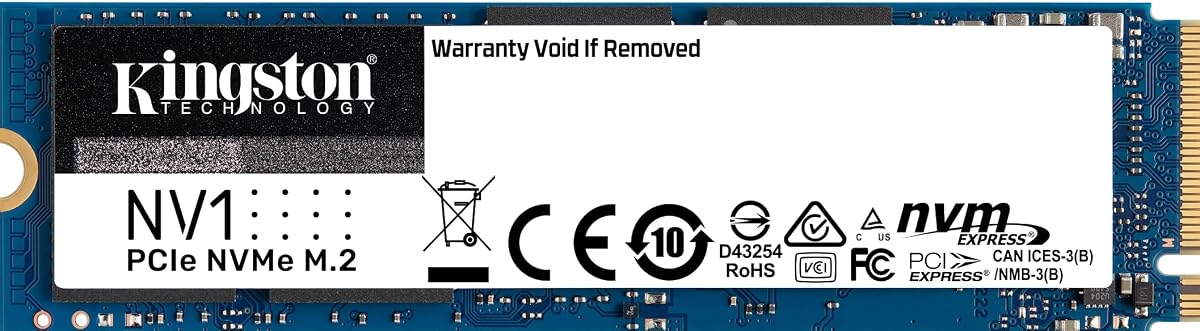
Kingston NV1 500G
4.8Editor score
Ideal for laptops and small PCs
Up to 2100MB/s Read speed
Up to 1700MB/s Write speed
This guide compares the top 10 Kingston Internal NVME SSD models for performance and value to help you find the best storage upgrade for your system today.
Modern computing demands fast reliable storage to handle complex applications and large media files efficiently. Kingston Internal NVME SSDs offer high-speed data transfer rates that significantly improve system responsiveness and load times for everyday tasks and professional workflows alike.
We evaluated ten leading models based on speed specifications compatibility and warranty support to determine which drives deliver the best value. Our analysis focuses on real-world performance metrics and feature sets that matter most to gamers content creators and general users seeking reliable internal storage solutions.
Each pick highlights unique strengths such as thermal management speed tiers or specific form factors for different devices. Prices and availability fluctuate frequently so verify current listings before purchasing to ensure you get the most up-to-date deals on these high-performance storage components.
4.8Editor score
4.7Editor score

5.0Editor score
The following table provides a side-by-side comparison of all ten reviewed models highlighting key specifications and performance metrics to help you quickly identify the drive that matches your specific computing needs and budget constraints.


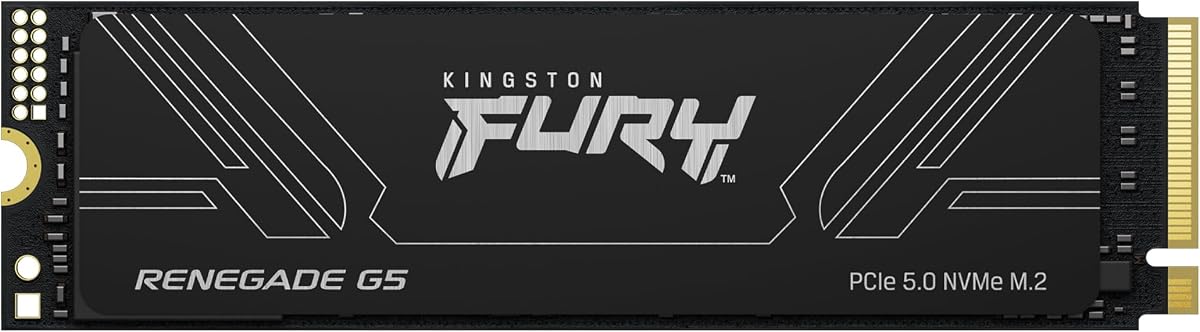
This drive delivers cutting-edge performance with PCIe 5.0 speeds reaching up to 14,800MB/s read and 14,000MB/s write rates. It is ideal for power users seeking the fastest available storage for demanding applications and gaming experiences.
We may earn a commission when you buy through this link, at no additional cost to you.
The advanced thermal design features a 12-layer PCB and low-power DDR4 cache to maintain stable performance under heavy loads. With a 4096GB capacity this SSD provides ample space for extensive media libraries and project files without compromising speed.
While the price is high it reflects the top-tier technology and reliability offered by this model. Users should ensure their motherboard supports Gen 5×4 to fully utilize the bandwidth capabilities of this drive.
Buyers looking for the absolute fastest storage available today will find this product meets their expectations. It represents the best option for high-end workstations and future-proof gaming rigs.
The PCIe 5.0 interface ensures ultra-fast load times and performance gains across demanding apps.
Advanced thermal design keeps power consumption low while maintaining reliable performance under stress.
We may earn a commission when you buy through this link, at no additional cost to you.
The Kingston NV1 500G offers an affordable entry point for upgrading storage in laptops and small form factor PCs. With read speeds up to 2100MB/s it provides a noticeable improvement over traditional SATA drives.
We may earn a commission when you buy through this link, at no additional cost to you.
Its compact M.2 2280 form factor makes it versatile for various devices. The 500G capacity is sufficient for operating systems and essential applications ensuring smooth daily operations.
Although it lacks the extreme speeds of PCIe 4.0 models it delivers reliable performance for general users. The high user rating suggests strong satisfaction with its value and longevity.
This drive is perfect for budget-conscious buyers needing basic performance upgrades. It remains a solid choice for expanding storage without breaking the bank.
Ideal for users seeking affordable storage solutions for laptops and small PCs.
Delivers consistent read and write speeds for standard computing tasks.
We may earn a commission when you buy through this link, at no additional cost to you.
The Kingston KC3000 stands out with a perfect 5.0 user rating indicating exceptional customer satisfaction. It combines high-speed performance with a reliable 1TB capacity for demanding users.
We may earn a commission when you buy through this link, at no additional cost to you.
Read speeds up to 7000MB/s and write speeds up to 6000MB/s ensure rapid data access and efficient file transfers. This performance level is ideal for gaming and content creation tasks.
The product is quality assured which adds confidence to the purchase. Its compatibility with notebooks makes it suitable for mobile high-performance computing needs.
Users seeking top-tier reliability and speed will appreciate this model. It is highly recommended for those who need consistent performance for professional and recreational use.
The perfect rating reflects strong trust and reliability among its users.
High read and write speeds support smooth operation for heavy workloads.
We may earn a commission when you buy through this link, at no additional cost to you.
The NV3 1TB provides a balanced mix of speed and capacity for mainstream users. It features PCIe 4.0 Gen 4×4 performance with read speeds up to 6000MB/s.
We may earn a commission when you buy through this link, at no additional cost to you.
Acronis cloning software is included which simplifies upgrading from older drives. The 5-year limited warranty offers peace of mind for long-term usage.
This drive is designed for high speed and low power efficiency. It is a practical choice for users who want modern performance without top-tier costs.
Buyers looking for a straightforward upgrade should consider this model. It delivers excellent value with essential features for reliable internal storage.
Includes Acronis software to streamline the transition from old to new drives.
Protected by a 5-year limited warranty for extended reliability.
We may earn a commission when you buy through this link, at no additional cost to you.
This drive features an included heatsink which helps maintain optimal thermal performance during intensive workloads. It offers PCIe Gen 4.0 speeds up to 7300MB/s for fast system operation.
We may earn a commission when you buy through this link, at no additional cost to you.
The PS5 Ready status ensures compatibility with Sony consoles for expanded gaming storage. Its slim M.2 2280 form factor fits easily into desktops and laptops.
High capacities up to 4TB are available for users needing massive storage space. The 4.8 rating indicates strong user approval for its build quality and speed.
Gamers and creators needing a reliable drive with thermal protection will benefit. It is a top choice for high-performance internal storage.
The included heatsink ensures stable performance under heavy gaming loads.
PS5 Ready designation allows easy storage expansion for next-gen consoles.
We may earn a commission when you buy through this link, at no additional cost to you.
Designed for handheld gaming devices and SFF PCs this model uses the 2230 form factor. It delivers read speeds up to 6000MB/s ensuring quick game loads.
We may earn a commission when you buy through this link, at no additional cost to you.
Capacities up to 2TB meet the growing storage needs of portable systems. The 1TB variant is a popular choice for balancing cost and space.
Its performance aligns with modern high-speed requirements for mobile gaming. The 4.7 rating reflects solid performance in constrained environments.
Users upgrading Steam Deck or similar devices should consider this option. It provides essential speed and space in a compact package.
Ideal for systems requiring the smaller 2230 M.2 size.
Delivers high performance for handheld gaming experiences.
We may earn a commission when you buy through this link, at no additional cost to you.
The KC2500 supports end-to-end data protection using XTS-AES 256 bit hardware-based encryption. It is a self-encrypting drive ideal for sensitive business data.
We may earn a commission when you buy through this link, at no additional cost to you.
Microsoft eDrive support ensures seamless integration with BitLocker security. This makes it a robust choice for professionals prioritizing data confidentiality.
Read and write speeds up to 3500/2900MB/s provide solid performance for enterprise workflows. The 4.6 rating confirms its reliability in corporate settings.
Users requiring secure storage will find this drive meets strict standards. It remains a strong option for encrypted internal storage.
Hardware-based encryption safeguards data against unauthorized access.
Supports TCG Opal 2.0 and BitLocker for secure environments.
We may earn a commission when you buy through this link, at no additional cost to you.
With 2TB capacity this drive meets extensive storage requirements for data and media. It features read speeds up to 2100MB/s suitable for everyday tasks.
We may earn a commission when you buy through this link, at no additional cost to you.
Ideal for laptops and small form factor PCs it provides a flexible upgrade path. The 4.7 rating highlights user satisfaction with its stability and space.
It balances storage size with cost effectively for non-gaming needs. The NVMe interface ensures faster performance than older SATA alternatives.
Users needing bulk storage without high cost will benefit from this choice. It is a reliable pick for archiving and general file management.
2TB capacity handles large files and extensive project libraries.
Provides consistent speeds for daily computing and file transfers.
We may earn a commission when you buy through this link, at no additional cost to you.
This drive supports Stream Deck and similar devices needing a 2230 NVMe slot. It provides essential internal storage for specialized hardware setups.
We may earn a commission when you buy through this link, at no additional cost to you.
The 128GB size is enough for lightweight OS or utility applications. Its gaming designation ensures it meets performance expectations for fast data access.
Compatibility with laptops and desktops adds versatility. The 4.3 rating indicates good performance for its intended niche use.
Users with specific hardware requirements should look at this option. It is designed for compact internal storage where space is limited.
Designed specifically for devices requiring 2230 NVMe connections.
Provides essential storage for small form factor hardware.
We may earn a commission when you buy through this link, at no additional cost to you.
This model offers huge speed boosts over previous generations with random read/write 40/55% faster. It is a strong competitor for users seeking top-tier performance options.
We may earn a commission when you buy through this link, at no additional cost to you.
Power efficiency is improved by 50% while delivering max PCIe 4.0 performance. Smart thermal control via nickel-coated controllers ensures reliable heat management.
Samsung Magician Software provides tools to monitor health and optimize the drive. The 4.7 rating reflects its reliability and high performance in tests.
Buyers considering alternatives to Kingston will find this drive compelling. It delivers premium features for demanding professional workflows.
Samsung Magician tools help optimize performance and monitor drive health.
Nickel-coated controllers manage heat effectively under load.
We may earn a commission when you buy through this link, at no additional cost to you.
Selecting the right storage drive involves considering speed capacity and thermal design. This guide breaks down key factors to help you make an informed decision.
The interface determines how fast data moves between your system and the drive. PCIe 5.0 models offer ultra-fast speeds while PCIe 3.0 provides adequate performance for general tasks. Ensure your motherboard supports the required generation.
Check compatibility with your system before purchasing to avoid bottlenecks or installation issues.
Capacity ranges from 128GB to 4TB depending on usage. Small form factor devices might need 500GB while gaming rigs benefit from 2TB or more. Consider how many large files you need to store.
Choose a size that grows with your needs without requiring frequent replacement.
Read and write speeds impact boot times and file transfers. Look for MB/s numbers in the specs. Higher is better for professional workflows but lower speeds save money.
Match the drive speed to your typical workload for balanced value.
Overheating can throttle performance during long tasks. Heatsink options help maintain speeds under stress. Desktops need more cooling than laptops.
Select drives with proper thermal protection to ensure consistent speed.
M.2 2280 is standard for most desktops. 2230 fits smaller devices like handhelds. Verify your slot dimensions.
Ensure the physical size matches your motherboard slot for correct installation.
Most models include a 5-year warranty which covers defects. Check the manufacturer's support policies for drive health monitoring.
A longer warranty protects your investment against unexpected failures.
Cloning tools help migrate OS data easily. Encryption support secures business data. Some brands provide monitoring software.
Look for included tools that simplify management and protect your data.
Compare total cost against capacity to find value. Entry-level models offer lower costs but slower speeds. Premium models cost more but deliver performance.
Balance your budget with the performance you actually need.
Before installing check your motherboard manual for supported M.2 slots and thermal limits. Ensure you have the necessary mounting screws or clips to secure the drive in place.
After installation update your firmware using the manufacturer's software to maintain performance. Monitor health status regularly to prevent unexpected drive failures.
Avoid exposing the drive to extreme heat or humidity. Keep your system ventilated to allow air flow around the drive area for consistent operation.
Yes PCIe 5.0 drives are backward compatible with PCIe 4.0 slots. They will run at the lower slot speeds however so you should verify your motherboard supports the faster interface if you want full speed.
Most modern laptops support M.2 NVME drives. However some small form factor devices require the 2230 size. Check your device specs before buying to ensure the physical dimensions fit the available slot.
Not strictly required but recommended for high-performance gaming or workstation use. Heatsinks prevent throttling during long tasks. Desktop cases with limited airflow may benefit from additional cooling solutions.
Use software like Acronis True Image which is often included with Kingston drives. Connect both drives and run the software to migrate data and settings. Make sure to back up critical files before starting.
PCIe 4.0 offers double the bandwidth of 3.0 allowing faster data transfer. This benefits gaming and large file transfers. Check if your system supports the newer generation before purchasing.
Use tools like CrystalDiskInfo or manufacturer utilities such as Samsung Magician. These apps display drive temperature and lifespan. Monitor these regularly to prevent data loss issues.
NVME drives often have higher endurance ratings for daily writes. Their solid state nature makes them resistant to shocks. However proper thermal management extends lifespan for all SSDs.
This guide highlighted top options from entry level to PCIe 5.0 speeds. The NV1 offers value while the Renegade G5 delivers maximum performance.
Prioritize speed and capacity based on your specific workloads. Desktop users may prefer higher throughput options while laptop users need thermal efficiency.
Always check current prices and compatibility before purchasing. Availability and pricing can change frequently so verify listings on official retailer sites.