
QUI Presentation Clicker with Volume Control
4.3Editor score
328 feet wireless range
Volume control buttons
Portable clip included
This guide compares the top laser pointer for presentations devices for teachers and professionals, evaluating visibility, range, battery life, and ease of use
Finding the right laser pointer for presentations can transform how you deliver slides in classrooms or boardrooms. A good device offers clear visibility, reliable wireless range, and intuitive controls that keep your focus on the audience.
We analyzed ten top-rated models based on user feedback, technical specifications, and real-world performance. Our comparison covers green and red lasers, rechargeable options, and classic battery-powered designs to help you choose wisely.
Each pick below highlights key strengths and potential trade-offs so you can match a tool to your specific needs. Note that prices and availability change frequently, so check current listings before purchasing to secure the best deal available.
4.3Editor score

4.6Editor score

4.6Editor score
The following table provides a side-by-side view of key specifications for all ten models reviewed. Use this to quickly compare laser color, battery type, wireless range, and unique features before making your final decision.




This presentation clicker stands out for its bright green laser that cuts through ambient light better than typical red pointers. It holds a 4.6 rating from users who value reliability in classrooms and lecture halls.
We may earn a commission when you buy through this link, at no additional cost to you.
The USB-C rechargeable battery eliminates the need to hunt for AAA batteries before important sessions. Its intuitive layout includes dedicated buttons for hyperlinks, volume, and screen toggles, giving you full control without looking down.
While green lasers often cost more, the visibility gain on bright projectors justifies the investment for many educators. Some users might prefer a lower price point if they only present in dim environments.
Teachers and frequent presenters should buy this model for its consistent performance and user-friendly design. It balances modern charging tech with classic presentation controls effectively.
The 532nm green light delivers a crisp, highly visible dot that works best on projection screens and whiteboards.
A single one-hour USB-C charge powers weeks of daily classroom presentations, reducing waste and saving money.
We may earn a commission when you buy through this link, at no additional cost to you.
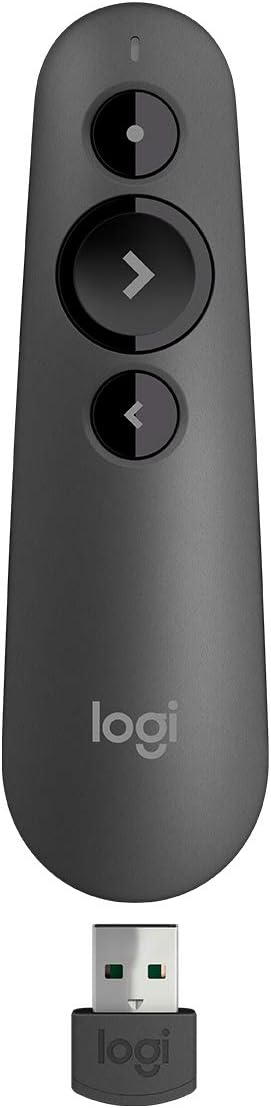
The R400 is a classic choice known for simplicity and steady performance in small to medium rooms. Its 4.6 rating reflects consistent trust from users who need a no-fuss tool.
We may earn a commission when you buy through this link, at no additional cost to you.
It features a built-in Class 2 red laser and intuitive touch keys for slide control. The receiver docks inside the unit to prevent loss, which is a thoughtful touch for busy professionals.
However, its 50-foot range is shorter than many modern competitors, which might limit movement in large auditoriums. Also, relying on AAA batteries means keeping spares on hand.
This model suits users who prioritize brand reputation over cutting-edge features. It is a solid backup or primary tool for standard meeting rooms.
Just plug the receiver into a USB port to begin, with no software installation required for immediate use.
The built-in docking bay stores the receiver for easy pack up and portability after presentations end.
We may earn a commission when you buy through this link, at no additional cost to you.
This presenter offers advanced features like volume control and hyperlink navigation at an affordable price. It has a 4.4 rating from users who appreciate its extended wireless range.
We may earn a commission when you buy through this link, at no additional cost to you.
The device supports page forward and backward, full screen toggle, and volume adjustments. A magnetic USB storage slot ensures you never lose the receiver during travel.
Users should note the red laser may not show well on LCD or LED TV screens. Additionally, it relies on an AAA battery which is not included in the package.
Ideal for presenters who need more control than a basic clicker provides. It bridges the gap between budget and premium functionality effectively.
Experience a wireless range of up to 100 feet allowing you to move around even in a large room.
Support functions include page forward, backward, volume control, hyperlink, switch windows, and full or black screen.
We may earn a commission when you buy through this link, at no additional cost to you.
The R800 is a top-tier option featuring a green laser and an LCD timer to help manage your speaking time. It holds a 4.6 rating for its professional design and performance.
We may earn a commission when you buy through this link, at no additional cost to you.
Its timer lets you manage time with silent vibrating alerts so you can focus on the audience. The green laser is powerful and easy to see even on LCD and plasma displays.
The ergonomic contours feel great in your hand and the receiver stores inside the presenter for easy packing. The higher cost reflects its advanced timing features and build quality.
Business professionals and keynote speakers will appreciate the timer feature. This model is best for those who want to stay organized without checking a phone.
The LCD display with timer lets you manage your time with silent, vibrating alerts and easy to set controls.
The brilliant green laser pointer is powerful and easy to see even on LCD and plasma displays.
We may earn a commission when you buy through this link, at no additional cost to you.
The R500s offers dual connectivity options including USB and Bluetooth low energy for flexible connection. It holds a 4.4 rating among users who value long battery life.
We may earn a commission when you buy through this link, at no additional cost to you.
You can pair it with the Logitech Presentation App to customize button functions and set on-screen timers. Smart battery management extends life up to 12 months on a single AAA battery.
Bluetooth requires software installation which may be a hurdle for some users. The red laser might not perform as well as green on bright projector screens.
This clicker suits tech-savvy users who want to customize their tool. Its versatility makes it a strong contender for mixed operating system environments.
Connect via USB receiver or Bluetooth low energy technology to suit your specific presentation setup needs.
The R500 pairs with the Logitech Presentation App to customize button functions and monitor battery life.
We may earn a commission when you buy through this link, at no additional cost to you.
This affordable clicker delivers impressive range and control at a budget-friendly price. It holds a 4.3 rating from users who prioritize value and portability.
We may earn a commission when you buy through this link, at no additional cost to you.
It supports control distance of up to 328 feet allowing you to roam the entire hall. The device includes volume control and a handy clip to attach to your notebook.
While it offers great features, the red laser is not recommended for LED or TV screens. You will need to purchase an AAA battery separately as well.
Students and entry-level presenters will find this device excellent for its price. It proves you do not need to spend much to get a capable tool.
Deliver a control distance of up to 328 ft allowing you to roam the entire hall and interact with your audience.
Includes a convenient clip that attaches to a notebook or pocket for easy carrying during travel.
We may earn a commission when you buy through this link, at no additional cost to you.
The N95 offers a bright green pointer and USB-C rechargeability at a mid-range price. It holds a 4.5 rating from users who value its long control range.
We may earn a commission when you buy through this link, at no additional cost to you.
You can remap button functions via the Norwii Presenter app to suit personal needs. It connects via a 2-in-1 USB receiver that works with iPad and mobile phones too.
Be aware the charging cable is not included and the laser is not recommended for TV screens. The 100-meter range is excellent for large auditoriums or churches.
Educators and church speakers will appreciate the range and rechargeability. It is a versatile tool for diverse environments where screen types vary.
Reprogram button functions via the Norwii Presenter app to match your specific presentation workflow needs.
With a wireless control range of up to 100 meters you can move around freely in large rooms.
We may earn a commission when you buy through this link, at no additional cost to you.
This compact presenter focuses on ergonomics and ease of carrying in your pocket. It holds a 4.4 rating from users who prefer simple plug and play functionality.
We may earn a commission when you buy through this link, at no additional cost to you.
It is compact but perfect size meeting ergonomic principle with a rubber feeling material. The USB is stored under the battery cover so you never worry to lose it.
The wireless range is up to 49 feet which is less than long range models. Mac users might need to complete an easy set-up first before using.
Individuals looking for a simple lightweight clicker will find this appealing. It is a great choice for quick meetings where portability is key.
Made with high quality material the presenter has a rubber feeling and fits comfortably in your hand.
The USB is stored under the battery cover so you never worry to lose it during presentations.
We may earn a commission when you buy through this link, at no additional cost to you.
This clicker features a receiver with both USB-A and USB-C connectors built right in for universal device support. It holds a 4.4 rating from users who appreciate its convenience.
We may earn a commission when you buy through this link, at no additional cost to you.
It works instantly without drivers or software on Mac OS, Windows, and Linux. The magnetic slot at the bottom securely holds the receiver so you never lose it.
The range is up to 100 feet allowing you to walk freely and interact with your audience. However it needs two AAA batteries and the red pointer may not work well on TVs.
Modern Mac and PC users will find this dual-receiver feature very useful. It eliminates the need to hunt for dongles when moving between devices.
This presentation clicker features a receiver with both USB-A and USB-C connectors built right in for instant work.
A magnetic slot at the bottom securely holds the receiver so you never lose your USB A and C receiver again.
We may earn a commission when you buy through this link, at no additional cost to you.
This clicker is designed with a cool ergonomic design that makes you more comfortable when using it. It holds a 4.5 rating from users who value its lightweight and compact build.
We may earn a commission when you buy through this link, at no additional cost to you.
The remote presentation pointer fits easily in your pocket or bag and weighs only 38 grams with battery. It supports many systems and software including PowerPoint and Google Slides.
Users need to remove the film of the battery when start using it out of the box. This is a basic tool so it lacks advanced features like volume control.
If portability is your main concern this device is ideal. It is a lightweight and friendly choice for students and casual presenters.
The presentation pointer fits easily in your pocket or bag with a size of 109mm and weight of 38g.
Supports systems like Windows and Mac OS and software like Keynote, Google Slides, and MS Word.
We may earn a commission when you buy through this link, at no additional cost to you.
Selecting the right clicker involves weighing laser visibility, range, battery options, and ergonomic features against your presentation needs.
Green lasers like those in the Norwii N95 or Logitech R800 stand out better on bright screens and in lit rooms than red pointers.
Choose green if you present often in well-lit spaces and red for budget-friendly needs in dimmer settings.
Models like the QUI Presentation Clicker offer up to 328 feet allowing you to move freely across large auditoriums.
Standard 50 to 100 feet range works well for most meeting rooms but larger spaces need extended range.
USB-C rechargeable options like the Green Light Clicker save money and reduce waste compared to disposable AAA batteries.
Look for long life stats like the R500s 12 month rating if you prefer minimal maintenance.
Buttons for volume, hyperlinks, and screen toggles provide more control over your software during live delivery.
Basic models might only offer slide advance so check if extra functions match your workflow needs.
Lightweight units like the Presentation Clicker for PowerPoint at 38 grams are easier to carry in pockets or bags.
Ergonomic grips and magnetic receiver slots help prevent drops and loss during travel.
Ensure the clicker works with your OS and software such as PowerPoint Keynote Google Slides and Mac or Windows systems.
Most modern models are plug and play but some apps require extra software installation for full features.
Prices range significantly so decide if advanced features like timers justify a higher cost for your usage.
Affordable picks like the QUI Presentation Clicker deliver excellent value for standard classroom presentations.
Rubberized buttons and compact designs improve longevity and comfort over repeated use.
Choose sturdy builds from trusted brands if the device will face daily classroom or conference room handling.
To start pairing insert the USB receiver into your computer and ensure the clicker is powered on or in pairing mode if required by the model.
Test the laser and slide advance before your presentation to confirm the connection is stable and the range is adequate for your room.
Store the device in a protective case or pocket and avoid exposing it to extreme heat or moisture to maintain battery health and function.
Green lasers are more visible on bright projectors and LCD screens while red lasers are more affordable. Green typically costs more but cuts through ambient light better for large audiences.
It varies by model. Some rechargeable units last weeks on one charge while AAA powered ones can run for months depending on usage frequency and brightness settings.
Most modern clickers are plug and play and require no software. Some advanced models like the R500s offer optional apps for customization but basic functions work instantly.
Some models like the Norwii N95 offer 2-in-1 USB receivers that support iPad and mobile phones. Check compatibility before purchasing as standard USB-A receivers may need adapters.
For small meeting rooms 50 to 100 feet is adequate. Large auditoriums or lecture halls benefit from 300-foot ranges like those found on the QUI Presentation Clicker model.
Check the battery level and ensure the receiver is connected to a USB port. Some devices require a pairing button press or software setup to activate specific functions.
Yes if you present frequently. They reduce battery waste and save money long term. Ensure the charging method like USB-C matches your existing accessories.
The Green Light Presentation Clicker and Logitech R800 lead in overall performance with bright green lasers and useful features like timers or rechargeable batteries.
Budget-conscious buyers should consider the QUI Presentation Clicker for its exceptional range and volume control at a low price point.
Always verify current pricing and availability before purchase since deals change regularly and the right model for your needs depends on your specific presentation environment.