
Lexar OC DDR5 RAM 1x8GB
4.8Editor score
6000MHz speed rating
CL38 low latency
Compact 39mm profile
This guide compares the top Lexar DDR5 RAM kits for gaming and workstations, evaluating speed, latency, and cooling for optimal system performance.
Modern computing demands high-speed memory to handle intensive tasks like gaming, content creation, and AI workloads efficiently. Selecting the right RAM kit is crucial for unlocking your system's full potential without bottlenecks or instability.
We evaluated ten leading DDR5 memory kits based on speed ratings, latency timings, thermal design, and platform compatibility. Our analysis focuses on real-world performance benefits and build quality to help you make an informed decision.
Each product in this guide highlights specific strengths such as overclocking support, RGB aesthetics, or compact profiles. Prices and availability fluctuate frequently, so verify current details before finalizing your purchase to ensure you get the best value.
4.8Editor score

4.4Editor score

4.8Editor score
The following table provides a side-by-side comparison of all ten memory kits featured in this guide, highlighting key specifications to help you quickly identify the best fit for your build.



This Lexar DDR5 RAM kit offers an excellent starting point for users seeking high-speed memory without breaking the bank. Rated highly by customers, it delivers reliable performance for both gaming and general productivity tasks.
We may earn a commission when you buy through this link, at no additional cost to you.
The 6000MT/s speed combined with CL38 latency ensures responsive multitasking. Its low-profile 39mm heatsink fits easily in tight cases, while On-die ECC and PMIC enhance stability under load.
While it lacks RGB lighting and comes as a single stick, these trade-offs are acceptable for budget builds. The minimalist aluminum armor provides effective thermal control without adding bulk to your system.
Ideal for users upgrading older systems or building cost-effective rigs, this kit supports Intel XMP 3.0 and AMD EXPO for seamless overclocking. It remains a strong choice for those prioritizing value and compatibility.
The 39mm profile ensures compatibility with large air coolers and compact enclosures, reducing clearance issues in modern PC builds.
Built-in On-die ECC and PMIC improve data integrity and power efficiency, ensuring consistent performance during extended use.
We may earn a commission when you buy through this link, at no additional cost to you.
The Lexar Thor Z RGB kit combines next-gen performance with striking aesthetics. With 32GB of capacity and 6000MHz speeds, it handles demanding workloads while enhancing your build's visual appeal through vibrant lighting effects.
We may earn a commission when you buy through this link, at no additional cost to you.
Its streamlined aluminum heatsink balances style and thermal control, keeping memory cool during intense gaming sessions. On-die ECC and PMIC ensure stability, while seamless compatibility with Intel and AMD platforms simplifies installation.
The main drawback is the premium cost compared to non-RGB options. Additionally, achieving rated speeds requires enabling XMP/EXPO profiles in BIOS, which may challenge novice users without guidance.
Recommended for gamers and creators who prioritize both performance and looks, this kit delivers full-throttle advantage for next-gen titles. It stands out as a top choice for immersive gaming setups.
Brighter and more vibrant than previous generations, the customizable RGB effects synchronize with other components for a cohesive visual experience.
The solid sandblasted aluminum heatsink provides uncompromising thermal control, ensuring sustained peak performance under heavy loads.
We may earn a commission when you buy through this link, at no additional cost to you.
This G.SKILL Flare X5 Series kit is designed specifically for AMD systems with full EXPO support. It delivers robust performance with tight CL36 timings, making it ideal for users seeking stability and speed without visual flair.
We may earn a commission when you buy through this link, at no additional cost to you.
The matte black design fits stealth builds, while JEDEC default profiles ensure easy booting. Users must enable overclock profiles in BIOS for rated speeds, and mixing kits is discouraged to avoid instability.
Although it lacks RGB lighting, the focus remains on raw performance and reliability. The CL36 latency offers a slight edge over CL38 kits in latency-sensitive applications like competitive gaming.
Buy this if you use AMD AM5 platforms and prioritize performance over aesthetics. It remains a reliable choice for workstations and gaming rigs needing consistent high-speed memory.
Fully optimized for AMD EXPO ensures seamless one-click overclocking on compatible motherboards, simplifying setup for AMD users.
Non-ECC design with matched kit pairing ensures stable operation, though users should verify motherboard QVL compatibility.
We may earn a commission when you buy through this link, at no additional cost to you.
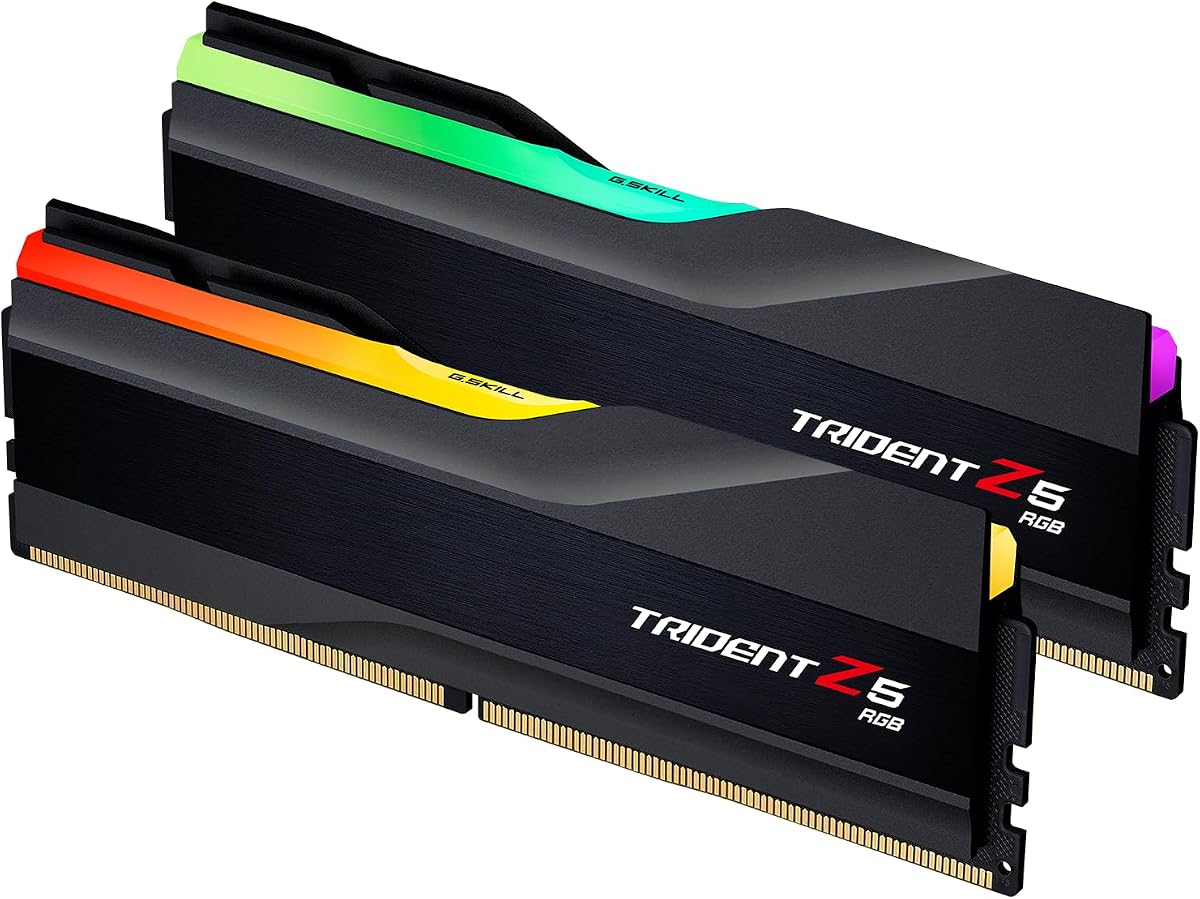
The Trident Z5 RGB series combines elite performance with eye-catching aesthetics. With 6000MT/s speeds and CL36 timings, it delivers low-latency performance ideal for gaming and productivity across Intel and AMD platforms.
We may earn a commission when you buy through this link, at no additional cost to you.
Its heatsink design manages heat efficiently, while customizable RGB lighting enhances build visuals. Users should verify motherboard QVL for compatibility and enable XMP/EXPO profiles to achieve rated speeds.
While priced higher than non-RGB alternatives, the combination of speed, latency, and lighting justifies the cost for enthusiasts. It avoids common pitfalls like instability when used as a matched kit.
Select this for high-end builds where performance and looks matter. It remains a top-tier option for users seeking a balance of speed and aesthetics in DDR5 memory.
Supports both Intel XMP 3.0 and AMD EXPO, offering flexibility for users across different CPU ecosystems without compromising performance.
The matte black heatsink provides effective thermal dissipation, maintaining stability during extended gaming or rendering sessions.
We may earn a commission when you buy through this link, at no additional cost to you.
This 64GB kit is tailored for professionals handling large datasets, virtual machines, or heavy multitasking. It maintains the same fast CL36 timings as lower capacity kits, ensuring speed isn't sacrificed for capacity.
We may earn a commission when you buy through this link, at no additional cost to you.
Designed for Intel and AMD platforms, it requires BIOS enablement for rated speeds. Users must ensure motherboard support for high-density modules to avoid compatibility issues during boot or operation.
While expensive, the capacity justifies the price for workstation users. It avoids stability pitfalls by using matched kits and adhering to manufacturer specifications for optimal performance.
Ideal for content creators and engineers needing substantial memory headroom. This kit delivers the necessary capacity without compromising on speed or stability for demanding workflows.
64GB capacity eliminates bottlenecks in memory-intensive tasks like 3D rendering, video editing, and scientific simulations.
Verify motherboard QVL for high-density module support to ensure stable operation and avoid system failures during boot.
We may earn a commission when you buy through this link, at no additional cost to you.
ADATA's Lancer Blade stands out with an 11-month warranty, offering peace of mind for budget-conscious buyers. It delivers 6000MHz speeds and RGB lighting, making it a versatile option for entry-level gaming builds.
We may earn a commission when you buy through this link, at no additional cost to you.
While specs are fewer than competitors, the kit supports modern platforms. The black RGB heatsink adds style without excessive bulk, ensuring broad compatibility with various cooling solutions and cases.
The single-stick configuration limits dual-channel performance compared to matched kits. Users should consider upgrading to a matched pair for optimal bandwidth if budget allows.
Recommended for those seeking warranty coverage and decent speed. It balances performance and reliability, making it a safe choice for first-time DDR5 adopters or budget builds.
The extended warranty provides added security against defects, distinguishing this kit from standard industry offerings.
RGB lighting enhances build aesthetics, allowing users to create immersive setups without high-end pricing.
We may earn a commission when you buy through this link, at no additional cost to you.
The Trident Z5 Neo RGB is designed for AMD AM5 users seeking a premium look and performance. With CL36 timings and 6000MT/s speeds, it offers low-latency performance for gaming and productivity tasks.
We may earn a commission when you buy through this link, at no additional cost to you.
Its Neo aesthetic design and RGB lighting cater to visual enthusiasts. Users must enable EXPO profiles for rated speeds and verify motherboard QVL for optimal compatibility.
Though priced higher, the combination of aesthetics and performance justifies the cost. It maintains stability through matched kits and adheres to manufacturer specifications for reliable operation.
Choose this for AM5 builds prioritizing aesthetics and speed. It remains a strong contender for users wanting both form and function in their DDR5 memory setup.
The Neo series design appeals to AMD enthusiasts with sleek styling and customizable lighting effects.
CL36 timings deliver consistent performance across workloads, ensuring smooth gaming and productivity experiences.
We may earn a commission when you buy through this link, at no additional cost to you.
This standard Flare X5 kit offers dependable performance for users prioritizing speed and stability over aesthetics. It features CL36 timings and supports both AMD EXPO and Intel XMP for broad compatibility.
We may earn a commission when you buy through this link, at no additional cost to you.
The matte black finish fits minimalist builds, and dual-channel design ensures optimal bandwidth. Users should verify motherboard QVL and enable BIOS profiles to achieve rated speeds.
While lacking RGB, the focus remains on functional performance. It avoids stability pitfalls by using matched kits and adhering to manufacturer guidelines for reliable operation.
Ideal for users seeking a reliable, no-fuss DDR5 upgrade. It delivers consistent speed for gaming and workloads without unnecessary visual embellishments.
Dual-channel configuration maximizes bandwidth, ensuring efficient data transfer for demanding applications.
The matte black finish suits stealth builds, blending seamlessly with modern PC aesthetics.
We may earn a commission when you buy through this link, at no additional cost to you.
This XPG kit stands out with ultra-tight CL30 latency at 6000MHz, offering a competitive edge for latency-sensitive tasks. Its customizable RGB lighting and PMIC support ensure stable power delivery and visual appeal.
We may earn a commission when you buy through this link, at no additional cost to you.
The compact heatsink design saves space, fitting easily in modern enclosures. Users should enable XMP/EXPO profiles for rated speeds and verify motherboard compatibility to avoid issues.
While priced at a premium, the CL30 timings justify the cost for enthusiasts. It maintains reliability through high-quality materials and adheres to manufacturer specifications for consistent performance.
Buy this for high-end gaming or workstation builds requiring minimal latency. It delivers exceptional speed and aesthetics, making it a top choice for discerning users.
CL30 latency reduces response times, enhancing performance in competitive gaming and real-time applications.
On-die PMIC ensures consistent power delivery, improving reliability during overclocking and sustained workloads.
We may earn a commission when you buy through this link, at no additional cost to you.
This CL36 variant offers a balanced mid-range option for users seeking performance and aesthetics. With 6000MHz speeds and RGB lighting, it provides reliable performance for gaming and productivity without the premium CL30 cost.
We may earn a commission when you buy through this link, at no additional cost to you.
The compact heatsink design fits modern enclosures easily. Users should enable BIOS profiles for rated speeds and verify motherboard compatibility to ensure stable operation.
While latency is slightly higher than CL30 kits, the price-performance ratio remains competitive. It avoids stability issues through matched kits and manufacturer specifications for consistent results.
Ideal for mid-range builds prioritizing balance. It delivers solid performance and style, making it a versatile choice for most DDR5 users.
CL36 timings offer a balanced mix of speed and affordability, suitable for most gaming and productivity workloads.
The compact heatsink design ensures compatibility with various cooling solutions, reducing clearance concerns in tight cases.
We may earn a commission when you buy through this link, at no additional cost to you.
Selecting the right DDR5 memory involves evaluating several key factors that impact performance, stability, and compatibility with your system.
Speed and latency determine how quickly your CPU can access data. Look for kits rated at 6000MT/s or higher with low CL values like CL30 or CL36 for optimal gaming performance. Higher speeds improve multitasking and application loading times significantly.
Prioritize low latency kits to minimize delays in data processing.
Capacity depends on your workload. 16GB suffices for basic tasks, while 32GB handles modern gaming and creative workloads. For professional rendering or virtual machines, 64GB offers future-proofing without compromising performance.
Match capacity to your specific usage needs to avoid overspending.
Ensure the RAM supports your CPU and motherboard. Intel platforms rely on XMP 3.0 while AMD uses EXPO. Check your motherboard's QVL list to confirm compatibility and avoid boot issues or reduced performance.
Verify platform support before purchasing to ensure seamless integration.
DDR5 modules run hotter than DDR4, making effective heatsinks crucial for stability. Look for aluminum armor designs that dissipate heat efficiently. Low-profile options are ideal if you use large air coolers or compact cases.
Choose kits with robust thermal control to maintain consistent performance.
RGB features enhance visual appeal but may affect thermal performance depending on design. Ensure your motherboard supports RGB synchronization if you plan to customize lighting effects. Non-RGB kits often offer better value for performance-focused builds.
Decide if aesthetics matter enough to justify additional cost.
Features like On-die ECC and PMIC improve data integrity and power efficiency. These are vital for sustained loads in workstations or intensive gaming. They reduce error rates and ensure reliability under stress.
Look for stability features if you run demanding applications regularly.
Balance cost against performance needs. Single sticks may be cheaper but lack dual-channel speed. Matched kits provide better performance but cost more. Evaluate if premium features like CL30 justify the price increase for your use case.
Assess value based on long-term usage rather than upfront cost.
A strong warranty protects against defects. Check duration and terms before purchasing. Reputable brands offer reliable support channels for troubleshooting compatibility or performance issues that may arise.
Prioritize brands with proven support to minimize risk.
Install the RAM in matching slots on your motherboard to enable dual-channel mode. Consult your motherboard manual to identify correct slots for optimal performance. Power off and discharge static electricity before installation.
Enable XMP or EXPO profiles in BIOS to achieve rated speeds. Without this, RAM runs at default JEDEC speeds which are slower. Update BIOS to latest version for best compatibility with DDR5 kits.
Monitor temperatures using software tools to ensure thermal limits aren't exceeded. Clean dust from heatsinks regularly to maintain airflow. Replace thermal pads if they degrade over time to preserve cooling efficiency.
Yes, 32GB is the sweet spot for modern gaming and content creation. It handles demanding titles and multitasking without bottlenecks. Only power users requiring heavy video editing or virtualization need 64GB.
No, most kits support XMP or EXPO profiles for one-click overclocking. Enable these in BIOS to achieve rated speeds. Manual overclocking is optional and requires technical knowledge to avoid instability.
No, mixing kits can cause stability issues or system failure. Use matched kits sold together for reliability. Manufacturers design these kits to run together without conflicts or timing mismatches.
CL30 offers lower latency than CL36 for better responsiveness in gaming. However, CL36 provides a balance of speed and cost. The difference is noticeable in competitive games but minor in productivity tasks.
Default speeds occur if XMP or EXPO profiles are disabled in BIOS. Ensure BIOS settings are updated and profiles enabled. Motherboard compatibility also affects whether rated speeds can be achieved.
Only if aesthetics are a priority. RGB adds visual appeal but costs more. Non-RGB kits offer same performance at lower prices. Choose based on whether build appearance matters to your setup.
This guide reviewed ten top Lexar DDR5 RAM kits catering to various budgets and needs. From budget-friendly single sticks to premium CL30 kits, each option delivers reliable performance for gaming and productivity tasks.
Prioritize speed, latency, and platform compatibility when selecting a kit. Ensure your motherboard supports rated speeds through XMP or EXPO profiles. Thermal design and capacity also play critical roles in long-term system stability.
Prices and availability change frequently so check current listings before purchasing. Verify motherboard QVL compatibility to avoid issues. With the right choice, your system will handle demanding workloads efficiently.