
X99 LGA 2011-3 Motherboard
3.9Editor score
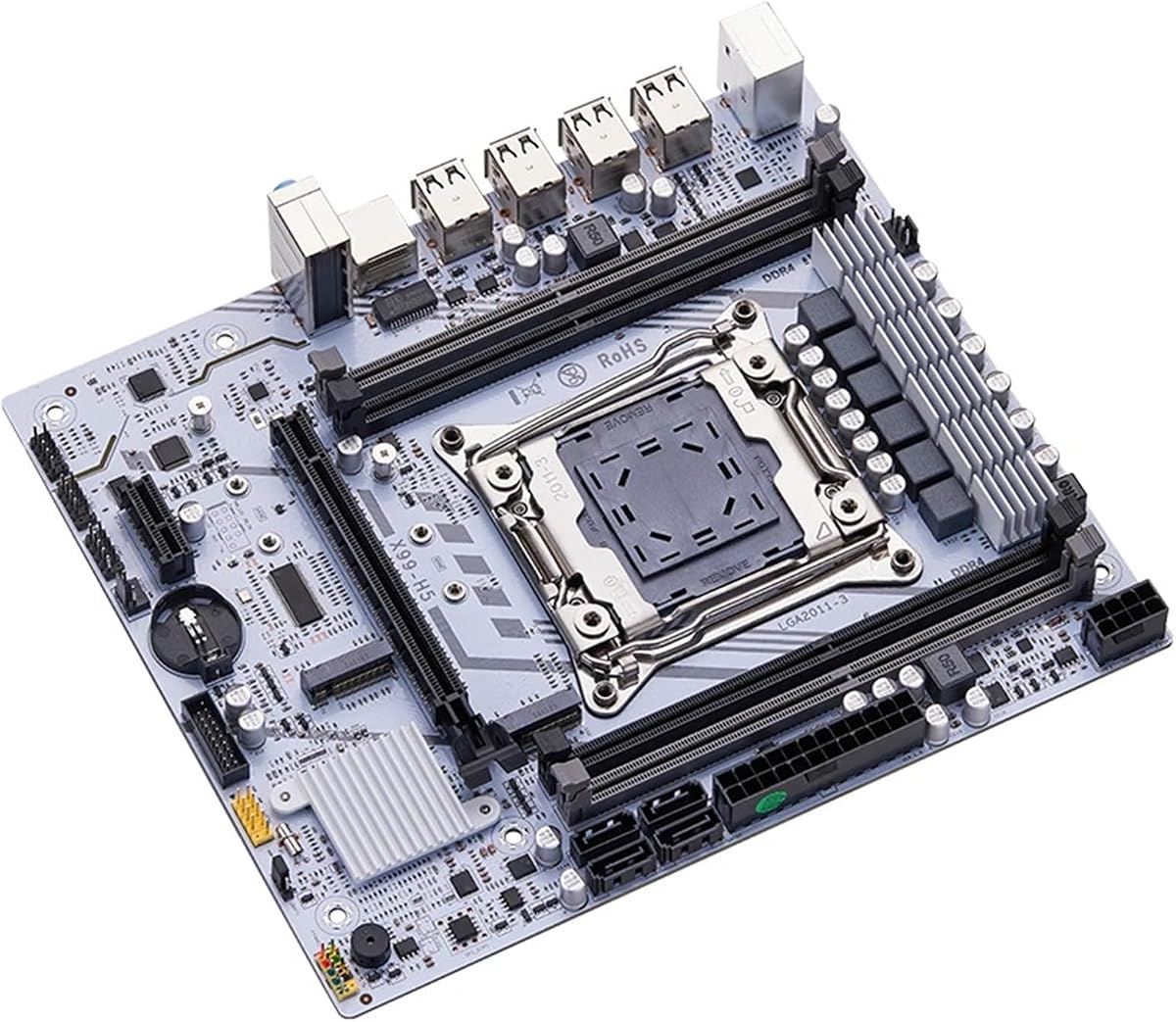
Supports E5 V3 V4 CPUs
Four DDR4 Memory Slots
Gigabit LAN and USB Ports
Explore our guide to the best Lga 3 X99 Motherboard options comparing features specs and performance for Intel Xeon and Core i7 systems in 2026.
Finding the right foundation for your high-performance workstation requires careful consideration of chipset capabilities and expansion options available today.
We compared ten leading models based on socket support memory channels and connectivity standards to help you select the optimal platform for your needs.
Each selection highlights unique strengths while noting compatibility considerations so you can build a stable system with current hardware choices and future upgradability in mind.
3.9Editor score

4.1Editor score

3.9Editor score
This side by side comparison outlines key specifications across all ten selected motherboards to highlight differences in form factor slot configuration and target use cases.



This ASUS EATX motherboard stands out for professional workstations requiring multi GPU setups and high speed data transfers.
We may earn a commission when you buy through this link, at no additional cost to you.
It supports four way graphics link configurations and includes the latest USB 3.1 built directly into the board design.
While older than newer models it offers premium power efficiency and reliable maintenance tools like Q Code Logger.
Buy this if you need maximum expandability for rendering or computational tasks with a trusted manufacturer.
The board supports 4 Way PCI-E Gen3 x16 links ideal for SLI or CrossFireX configurations in workstation environments.
USB 3.1 provides twice the speed of USB 3.0 ensuring faster external storage and peripheral connections.
We may earn a commission when you buy through this link, at no additional cost to you.
The ASUS X99-A combines robust features like OC Socket with user friendly tuning tools for both enthusiasts and professionals.
We may earn a commission when you buy through this link, at no additional cost to you.
Its Dual Intelligent Processors 5 allow one click overclocking and cooling optimization making system management simpler.
Crystal Sound 2 and Gigabit Ethernet deliver reliable gaming and networking experiences essential for home labs.
Choose this if you prefer ASUS reliability and want a proven platform with strong audio networking features.
OC Socket helps drive 8 core CPU and DDR4 performance beyond expectations for demanding computational workloads.
5 Way Optimization allows users to optimize performance and cooling with a single click for convenience.
We may earn a commission when you buy through this link, at no additional cost to you.
This white X99 motherboard offers a cost effective solution for builders needing dual CPU compatible or ECC memory support.
We may earn a commission when you buy through this link, at no additional cost to you.
It features a Realtek audio codec and gigabit LAN port ensuring solid performance for standard desktop use.
The M-ATX design fits many cases and includes necessary brackets and shields for easy physical installation.
Consider this if you need a functional server or workstation board without paying premium brand pricing.
Supports DDR4 ECC RECC and Non-ECC memory allowing versatile memory choices based on workload needs.
NVME M.2 slot supports speeds up to 3600M/S for fast system drives and application loading.
We may earn a commission when you buy through this link, at no additional cost to you.
The MACHINIST X99 board provides significant storage expansion with three NVME M.2 slots ideal for multi drive setups.
We may earn a commission when you buy through this link, at no additional cost to you.
Its 4 channel DDR4 design allows for up to 128GB memory capacity using ECC or non-ECC modules.
VRM cooling fan and heat dissipation armor protect components during sustained loads ensuring system stability.
Buy this if you need multiple high speed NVME drives and high memory capacity on a budget.
Equipped with 3 NVME M.2 slots providing multiple PCIe 3.0 x4 bandwidth options for fast storage.
Supports 4 Channel DDR4 with max capacity of 4x32GB for demanding virtualization or rendering tasks.
We may earn a commission when you buy through this link, at no additional cost to you.
This dual CPU capable motherboard targets workstation users needing multi processor power and extensive memory channels.
We may earn a commission when you buy through this link, at no additional cost to you.
With eight DDR4 DIMM slots it can handle large memory configurations required for heavy multitasking and virtualization.
RTL8111H gigabit NIC ensures network connectivity while six channel audio supports multimedia requirements.
Consider this if you need a dual socket platform for high core count workloads at a low cost.
Support the CPU number 2 allowing for dual processor configurations to boost total core count.
Eight DDR4 DIMM slots provide massive memory capacity options for intensive computational work.
We may earn a commission when you buy through this link, at no additional cost to you.
The Tangxi X99 targets gamers and workstation users with a 4 channel DDR4 architecture for higher bandwidth.
We may earn a commission when you buy through this link, at no additional cost to you.
Its 8 layer PCB design and solid capacitors contribute to stable power delivery during demanding usage.
Support for both NVME and NGFF drives offers flexible storage choices for system and data drives.
Choose this if you need 4 channel memory support and a durable power design for gaming tasks.
4 Channel DDR4 architecture allows effective frequency support up to 3200MHz for high bandwidth needs.
8 layer PCB with solid capacitors ensures stable operation and longer service life under load.
We may earn a commission when you buy through this link, at no additional cost to you.
This board mirrors the dual CPU support features found in similar models focusing on maximum memory capacity.
We may earn a commission when you buy through this link, at no additional cost to you.
Eight DDR4 DIMM slots provide room for up to 256GB of RAM if using 32GB sticks per slot.
Multiple PCIe X16 slots allow for multiple GPU configurations useful for compute or graphics tasks.
Buy this if you need dual CPU support and high memory capacity for virtualized workloads.
Support 8X32G Memory configuration allowing for massive RAM capacity for server or workstation use.
Two PCIe X16 slots enable multi GPU setups or additional expansion cards for specialized hardware.
We may earn a commission when you buy through this link, at no additional cost to you.
This motherboard offers dual M.2 NVME slots and support for both DDR3 and DDR4 memory which provides flexibility.
We may earn a commission when you buy through this link, at no additional cost to you.
Careful routing of traces improves signal integrity which helps with memory overclocking stability.
Passive chipset heatsink and aluminum heatsinks provide thermal protection without extra noise from fans.
Consider this if you need flexible memory support and multiple NVME drives for a workstation build.
Support Both DDR3 and DDR4 allowing users to utilize existing RAM inventory when building systems.
Ground layer optimizations preserve signal integrity for improved memory overclocking performance.
We may earn a commission when you buy through this link, at no additional cost to you.
This standard X99 motherboard supports E5 V3 and V4 CPUs with essential NVME and PCIe 3.0 connectivity.
We may earn a commission when you buy through this link, at no additional cost to you.
Its M-ATX form factor helps fit in smaller cases while maintaining necessary expansion slots.
The inclusion of NVME M.2 ensures you can add a fast boot drive alongside SATA storage.
Choose this if you need a straightforward X99 board with NVME support for a compact build.
Supports CPU E5 V3 V4 providing access to high core count server processors for workstation tasks.
M-ATX design allows fitting into mid tower cases while keeping expansion capability intact.
We may earn a commission when you buy through this link, at no additional cost to you.
The E5 MR9A V1.0 offers an ATX form factor with solid power supply and cooling for stable operation.
We may earn a commission when you buy through this link, at no additional cost to you.
It supports high-frequency memory and NVME M.2 SSDs ensuring smooth multitasking and fast storage access.
Complete external interfaces and safety protections make it suitable for office and gaming environments alike.
Buy this if you want a standard ATX board with modern connectivity features for a Xeon system.
Solid power supply and cooling ensure stable low temperatures under full load for reliable performance.
Complete external interfaces are widely compatible with peripherals for versatile connectivity options.
We may earn a commission when you buy through this link, at no additional cost to you.
Selecting the right Lga 3 X99 Motherboard depends on matching CPU sockets memory type and expansion needs to your specific workload requirements.
Ensure the board explicitly supports your Intel Xeon E5 V3 V4 or Core i7 5th 6th gen processors. Check specific CPU lists on manufacturer pages to confirm support for your exact model.
Verify the LGA 2011-3 socket matches your CPU and that BIOS updates support the processor you intend to use.
Decide between Dual Channel and Quad Channel memory architectures. Quad Channel boards offer higher bandwidth which is critical for rendering and virtualization tasks.
Check if the board supports ECC RECC or non-ECC DDR4 memory based on your stability and cost requirements.
Look at the number of PCIe 3.0 x16 slots if you plan to add multiple GPUs or capture cards. Ensure the lanes are distributed correctly for multi GPU setups.
Consider additional x1 slots for Wi-Fi or sound cards that do not need high bandwidth connections.
NVME M.2 support is essential for fast boot drives. Check how many slots are available and whether they share bandwidth with SATA ports.
Confirm SATA 3.0 port count if you plan to use multiple traditional hard drives or SSDs for bulk storage.
Choose M-ATX for smaller cases or ATX EATX for more expansion slots. Ensure your case supports the board size you select.
Check for pre-installed I/O shields and clearances for large coolers to simplify physical installation steps.
A robust VRM design with solid capacitors ensures stable power to CPU under load. Look for boards with adequate heatsinking on the VRM area.
High core count CPUs require stable power delivery so avoid boards with poor cooling if overclocking or running sustained workloads.
Verify USB 3.0 and 3.1 port counts on the rear panel. Some cheaper boards may have fewer ports than expected.
Ensure gigabit LAN is included and audio codecs meet your quality requirements if using integrated sound.
Consider boards from established manufacturers like ASUS if you want better BIOS updates and driver support. White label boards may lack these resources.
Check availability of user manuals online as some products exclude physical copies to reduce costs.
Install the CPU carefully aligning the triangle marker on the processor with the socket guide to avoid pin damage.
Ensure memory modules are fully seated in the correct channel order to enable multi channel memory modes.
Clear the CMOS if you experience boot issues by shorting the jumper pins or removing the battery for 10 seconds.
Most X99 boards support both ECC RECC and non-ECC memory but mixing types is not allowed. Check compatibility lists before buying to ensure your RAM will work.
X99 boards generally support Windows 10 fully. Windows 11 support may require a bypass install since TPM 2.0 is not standard on older chipsets.
Compatible CPUs include Intel Xeon E5 V3 V4 series and Core i7 5th 6th gen. Examples are E5-2680 V3 and i7-5960X among others listed in specs.
Varies by model. Some boards offer one M.2 slot while others have two or three. Check the specific product specs to confirm slot count.
Most packages do not include the CR2032 battery required for BIOS settings. You will need to purchase it separately from local stores.
Specific dual CPU models exist but many standard X99 boards support only one processor. Check product descriptions for dual CPU capability before buying.
Our top picks highlight the ASUS EATX for professionals and the budget friendly X99 models for cost conscious builds.
Prioritize memory channels and NVME support if your workflow demands high speed data access and multitasking.
Always check current availability and compatibility notes before purchasing since these boards often have limited stock and varying firmware support.