
Learning Resources Code & Go Robot Mouse Activity Set
4.5Editor score
Screen-free coding buttons
Includes maze grids
Perfect for ages four
Affordable STEM intro
Discover the best coding toys for kids in October 2026. This expert guide compares top robotic kits and screen-free learning tools for all ages.
Coding toys are revolutionizing how children learn technology by turning abstract programming concepts into tangible, interactive play experiences. These educational tools introduce logic, sequencing, and problem-solving skills through hands-on robotics and gamified challenges that captivate young minds effectively. Parents seeking screen-free or app-enhanced options will find diverse choices suitable for various developmental stages and learning styles today.
We have meticulously evaluated ten standout coding toys based on educational value, build quality, ease of use, and long-term engagement potential. Our comparison considers age appropriateness, coding complexity, physical durability, and the breadth of available learning resources to ensure every recommendation delivers genuine STEM benefits. Each product was analyzed for its unique approach to teaching coding fundamentals without overwhelming young learners with unnecessary complexity.
Every selection in this guide highlights specific strengths such as screen-free operation, advanced sensor integration, or extensive expandability for growing skills. While we provide detailed insights based on manufacturer specifications and user feedback, retail prices fluctuate frequently so always verify current costs before purchasing. Use this resource to find the perfect coding companion that matches your child interests curiosity and educational goals right now.
4.5Editor score

4.1Editor score

4.6Editor score
This comprehensive comparison table breaks down the key specifications and features of all ten selected coding toys to help you make an informed decision quickly. We highlight critical details like recommended ages, coding methods, and included accessories so you can easily identify which kit fits your needs best without getting lost in technical jargon.






The Thames & Kosmos My Robotic Pet stands out as a top-tier coding toy that combines physical building with interactive programming in a unique way. With a rating reflecting strong user satisfaction, this kit offers an immersive experience where children construct a lifelike chameleon that responds to color cards and touch inputs. The absence of screens ensures focus remains on logical sequencing and mechanical engineering principles rather than digital distractions.
We may earn a commission when you buy through this link, at no additional cost to you.
This robotic chameleon features articulated joints that mimic realistic reptile movements, controlled via physical action cards that represent coding commands. The color-sensing capability allows the robot to adapt its behavior based on the environment, teaching kids about sensor integration and conditional logic effectively. Three distinct play modes including Coding, Wild, and Pet ensure that the toy grows with the child's developing understanding of programming concepts.
While the build process requires patience and adult assistance for younger children, the educational payoff is substantial through hands-on assembly and testing phases. Some users might find the instruction manual lengthy but it serves as a valuable guide for understanding robotic components and engineering design problems inspired by nature. The need for batteries not included is a minor inconvenience common in this category that does not detract from the overall value.
Parents seeking a sophisticated screen-free coding introduction will find this kit ideal for children aged eight and older who enjoy building and robotics. The blend of creative play and technical learning makes it a standout choice for fostering curiosity about how machines work and respond to input. We highly recommend this product for families wanting to spark interest in STEM fields through interactive and tangible play experiences at home.
By using physical action cards instead of tablets, children learn sequencing and logic without digital distractions interrupting their focus on mechanical assembly.
The color and infrared sensors teach kids how robots perceive their environment, laying a foundational understanding for future robotics and automation studies.
We may earn a commission when you buy through this link, at no additional cost to you.
The Makeblock mBot is a highly-rated entry-level robot designed to guide children from basic visual programming to more complex text-based languages seamlessly. Its impressive rating indicates strong performance in educational settings and home learning environments where durability and expandability are key factors. This kit empowers young engineers to explore electronics and robotics through a structured path that scales with their increasing technical skills.
We may earn a commission when you buy through this link, at no additional cost to you.
Building the mBot takes about fifteen minutes with clear instructions, allowing kids to quickly engage with coding concepts like line-following and obstacle avoidance. The robot works with free apps that support block-based coding similar to Scratch, making it accessible for beginners while still allowing progression to Arduino for older or more experienced learners. The open-source nature means it can connect to hundreds of other modules providing endless possibilities for custom projects.
Although the remote controller requires a specific battery that is not included, the value provided by the learning resources and versatility far outweighs this minor omission. Users note that while some initial setup requires patience, the satisfaction of seeing a custom-built robot perform complex tasks is immense. The metal construction ensures it can withstand the rigors of active play, making it a durable choice for repeated use over several years.
This product is perfect for children aged eight to twelve who are ready to move beyond simple toys and into genuine engineering projects. The ability to add parts and learn real coding languages prepares them for future STEM challenges in an engaging and fun way. We recommend this kit for families looking to invest in a long-term educational tool that grows alongside the child's technical development.
Starting with Scratch and moving to Arduino allows children to develop coding skills gradually without feeling overwhelmed by complex syntax too early on.
With compatibility for over 100 electronic modules and LEGO parts, this robot can be transformed into almost anything imagination allows.
We may earn a commission when you buy through this link, at no additional cost to you.
The Sphero Mini packs a surprising amount of functionality into a tiny ball that fits easily in a pocket, making it the ultimate portable coding toy. With a strong rating based on user feedback, this device offers an engaging introduction to robotics and coding for beginners and older kids alike. Its compact form factor allows for play in virtually any space, removing barriers to entry for families with limited room.
We may earn a commission when you buy through this link, at no additional cost to you.
Children can program the Sphero Mini using drag-and-drop blocks or even JavaScript through the free app, offering flexibility in how they learn to code. The ball includes a gyroscope and accelerometer that enable control via tilting or joystick commands, adding a physical layer to digital programming that enhances engagement. It also comes with cones and pins to create obstacle courses or to challenge kids to solve navigation puzzles creatively.
While the small size is a major benefit for portability it also means the robot can be easily lost if not stored carefully after play sessions. Additionally, operation requires a smartphone or tablet which may not be desirable for parents seeking completely screen-free experiences though the learning value is high. Battery life lasts about an hour which is sufficient for short but intensive coding and gaming sessions without constant recharging.
This toy is ideal for kids aged eight and up who enjoy interactive games and want to explore coding concepts on the go. The combination of entertainment and education makes it a hit for parties or travel where traditional large robots might not be practical. We recommend this product for those seeking a fun entry into robotics that balances playfulness with genuine technical learning opportunities.
Using the robot as a controller for arcade-style games keeps kids engaged while reinforcing movement logic and programming sequences.
Supporting both block-based coding and JavaScript allows users to start simple and advance to more complex programming languages.
We may earn a commission when you buy through this link, at no additional cost to you.
The Learning Resources Code & Go Robot Mouse is an exceptional value that introduces early learners to coding concepts through simple, tactile interaction. Its solid rating reflects high approval from parents and teachers who appreciate its ability to engage children as young as four in meaningful problem-solving activities. This set provides a complete kit with all the necessary components to start coding immediately without needing any additional tools or technology.
We may earn a commission when you buy through this link, at no additional cost to you.
Programming the mouse involves pressing buttons that correspond to directional movements which teaches sequencing and planning in a way that is intuitive for toddlers and preschoolers. The included maze grids, walls, and tunnels allow for endless setup variations that keep the toy fresh and challenging as skills develop. The mouse navigates these mazes by following the programmed sequence, rewarding children with successful completion of tasks through visible movement.
Although it lacks the advanced features of more expensive kits, this set is designed specifically to build foundational skills without overwhelming younger users. The requirement for batteries is a standard consideration in this price range and does not impact the educational quality of the toy itself. Parents appreciate that it focuses purely on logic and movement without introducing screen time which is a growing concern for many families today.
This product is the perfect starting point for parents who want to introduce STEM concepts to children aged four to six years old. It balances affordability with high-quality construction to make it accessible for classrooms and households alike without sacrificing educational value. We highly recommend this kit for anyone looking for a reliable, screen-free way to build early programming confidence in young children.
By eliminating screens, the toy focuses entirely on physical sequencing and logic helping kids understand cause and effect through tactile interaction.
Durable components and clear instructions make this set ideal for teacher-led rotations and small group activities in early education settings.
We may earn a commission when you buy through this link, at no additional cost to you.
The TEACH TECH Mech-5 is a specialized kit designed for children aged ten and older who have a specific interest in mechanical engineering and robotics. With a solid rating reflecting satisfaction with its educational depth, this robot offers a unique approach where coding is integrated directly into the mechanical structure of the device. The experience is less about screen-based commands and more about understanding how physical parts interact to create motion and functions.
We may earn a commission when you buy through this link, at no additional cost to you.
Assembly is an in-depth project that can take multiple hours which is a feature rather than a bug for serious builders looking to learn engineering principles. Once built, the robot can be coded using snap-on buttons that control specific actions like throwing lifting or drawing. This physical interface reinforces the connection between the code written and the physical output the robot produces in real time.
The time investment required for building can be daunting for some but it provides a rewarding sense of accomplishment once the robot is operational. The lack of complex electronics means the focus remains on mechanics and logic which is beneficial for those who want to understand the fundamentals of how machines work. However, younger children might find the assembly challenging without significant adult guidance and patience during the build process.
This kit is perfect for kids who enjoy building toys and want to explore the technical side of engineering rather than just software coding. It serves as a bridge between simple toys and more advanced robotics by focusing on the structural integrity and mechanical functionality of the device. We recommend this product for families seeking a rigorous and rewarding STEM experience that challenges children to think like engineers.
The robot teaches kids how gears and levers translate code into physical motion providing a tangible link between programming and mechanics.
Troubleshooting assembly and programming errors helps build resilience and critical thinking skills essential for future STEM careers.
We may earn a commission when you buy through this link, at no additional cost to you.
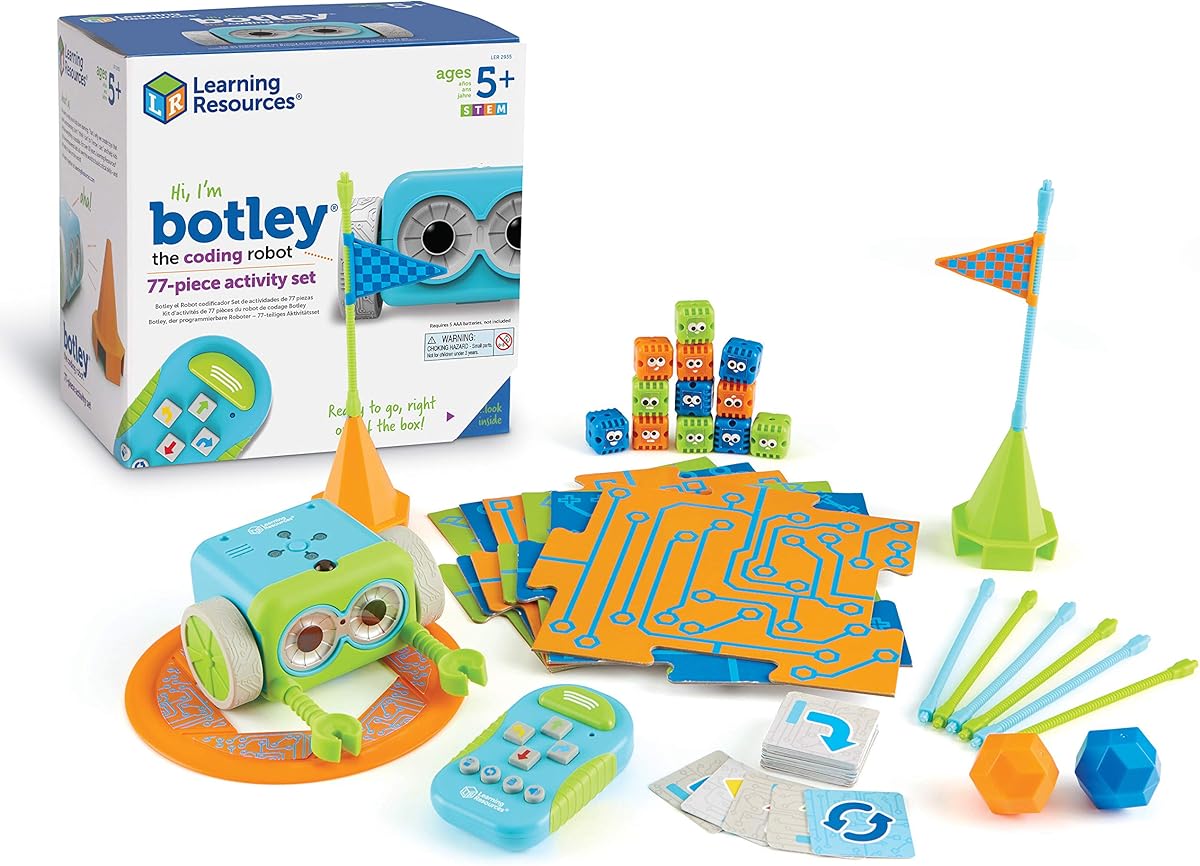
Learning Resources Botley is a highly-rated coding robot designed to foster early STEM skills through active screen-free play that appeals to kids aged five and up. Its strong user rating highlights reliability and engagement factors that make it a favorite in both home and classroom settings. The set provides an extensive collection of pieces that allow for creative building and complex coding challenges without needing any external devices.
We may earn a commission when you buy through this link, at no additional cost to you.
Botley features a remote programmer that sends commands to the robot teaching children how to sequence instructions and think logically about cause and effect. It can detect objects to avoid them which introduces concepts of sensors and conditional programming in a simple accessible way. The included activity cards and obstacle pieces help structure learning experiences that build confidence as children solve increasingly difficult navigation tasks.
While the need for batteries and a screwdriver for setup adds a small step before play the durability and design ensure it withstands frequent use. The lack of screen dependency is a major selling point for parents and educators who want to promote critical thinking without digital distractions. The looping command feature adds depth to the learning allowing children to repeat complex sequences without re-entering every single command.
This kit is ideal for parents and teachers looking for a robust coding toy that supports group play and individual exploration effectively. The comprehensive nature of the 77-piece set means it can be used in many different ways which keeps kids interested over time. We recommend this product for those seeking a reliable educational tool that introduces programming logic in a fun and accessible manner.
The multiple accessories and simple interface make this robot perfect for small groups to work together on shared coding challenges.
Object detection and looping commands introduce real programming concepts without confusing users with complex text or interfaces.
We may earn a commission when you buy through this link, at no additional cost to you.
The Ozobot Evo Entry Kit stands out by offering a hybrid learning approach that works both with and without screens to suit various educational needs. With an impressive rating, this robot is widely used in schools for its ability to support diverse learning styles from color-code tracing to block-based programming. The kit provides a comprehensive resource that can serve as a primary tool for STEM education over multiple years of schooling.
We may earn a commission when you buy through this link, at no additional cost to you.
Students can learn by drawing code on paper with special markers or by using online programming interfaces that offer structured lessons and challenges. The Evo robot reads these codes through optical sensors that translate visual patterns into actions like speed changes or turns. This flexibility allows teachers and parents to tailor the difficulty level to match the child's current understanding and learning goals effectively.
While the price is higher than some basic kits the value is justified by the extensive lesson library and the versatility of the robot. It is built to withstand classroom conditions and comes with a durable storage case that keeps markers and accessories organized and safe. The main trade-off is the dependency on markers which need to be handled carefully to ensure the robot reads the codes accurately.
This kit is ideal for educators and parents who want a long-term coding solution that grows with a child from kindergarten through elementary school. The ability to use both physical and digital tools makes it adaptable for home and classroom environments seamlessly. We recommend this product for those seeking a premium educational tool that offers a comprehensive curriculum and durable hardware for consistent use.
Supporting both physical color coding and digital programming ensures kids can learn regardless of screen availability or personal preference.
Access to 700 free lessons provides structured learning paths that teachers can integrate directly into science and math classes.
We may earn a commission when you buy through this link, at no additional cost to you.
Botley 2.0 builds on the success of its predecessor by adding new features like object sensing and more complex path coding for older children. With a solid rating, this robot continues to be a favorite for parents and teachers looking for screen-free coding toys that are engaging and educational. It offers a familiar interface that is easy to pick up while introducing slightly more advanced challenges to keep kids interested over time.
We may earn a commission when you buy through this link, at no additional cost to you.
The robot can now detect objects and react to them which allows for more interactive obstacle courses and problem-solving activities. It includes a remote programmer that lets kids create multi-step paths and refine their strategies to navigate complex mazes. Lights and sounds provide feedback that helps children understand when their code is successful which reinforces learning and encourages experimentation.
Compared to the original version, this model offers more depth in terms of coding complexity and physical accessories which enhances replayability. The design remains robust and user-friendly making it accessible for children aged five and up who are ready to expand their logical thinking. As with previous versions, batteries are not included which is a minor drawback for a kit of this size and capability.
This product is perfect for families who already enjoy Botley and want to deepen the experience with more advanced coding concepts. It serves as an excellent bridge between basic sequencing and more sophisticated logic puzzles that require planning and testing. We recommend this kit for anyone looking to upgrade their coding toy collection with a reliable and feature-rich option for home learning.
Multi-step coding paths and object reactions help kids tackle more complex problems than traditional simple directional coding toys.
Lights and sounds provide immediate confirmation of code execution helping children learn from mistakes quickly and effectively.
We may earn a commission when you buy through this link, at no additional cost to you.
The Wonder Workshop Dash Robot is a premium educational toy designed to provide an immediate and engaging STEM experience for children aged six and up. With a high user rating, it stands out for its ability to work right out of the box without needing assembly or complex setup. This robot has been adopted by tens of thousands of schools globally indicating its effectiveness as an educational tool for teaching coding concepts.
We may earn a commission when you buy through this link, at no additional cost to you.
Dash responds to voice commands and can sing, dance, or navigate obstacles through an app-based interface that supports various coding methods including Blockly. The five-hour battery life ensures that children can spend extended time playing and learning without frequent interruptions for charging. While it does not include a camera, the focus on movement and interaction keeps the experience focused on physical programming rather than digital surveillance.
The main trade-off is the higher price compared to simpler kits but the durability and quality of the hardware justify the cost for many families. It is designed to be robust enough for repeated use which makes it a great investment for schools or families with multiple children. The lack of a camera does not detract from its primary function but is a consideration for those expecting visual feedback.
This product is ideal for parents who want a high-quality robot that is ready to learn and play instantly without assembly frustration. It offers a premium experience with rich sound and motion capabilities that keep kids engaged for hours at a time. We recommend this robot for those seeking a proven educational tool that balances fun with serious learning potential for elementary-aged children.
Kids can start coding immediately upon opening the box which removes barriers to entry and maintains excitement from the very beginning.
Responding to voice commands adds a conversational layer to coding which helps kids understand human-machine interaction basics.
We may earn a commission when you buy through this link, at no additional cost to you.
TaleBot Pro is a highly-rated coding robot designed specifically for toddlers and preschoolers aged three to five who need an accessible introduction to technology. Its exceptional rating highlights how well it engages young minds through storytelling and interactive play rather than complex coding commands. This toy focuses on developing language and critical thinking skills through a simple interface that young children can understand and operate independently.
We may earn a commission when you buy through this link, at no additional cost to you.
The robot uses an interactive map and voice feedback to guide children through challenges and storytelling scenarios that encourage imagination. Kids can record their own voice commands and imaginative tales which makes the play highly personalized and engaging. This feature helps boost creativity and storytelling skills while simultaneously introducing basic concepts of sequencing and commands in a way that feels natural for toddlers.
The main limitation is that it is best suited for younger children who may outgrow it faster than more advanced robots. Some users note that additional activity boxes are recommended for a full experience which adds to the total investment. However, the ability to combine it with Lego blocks extends its play value and creativity potential which helps keep it relevant as the child grows.
This product is perfect for parents looking to introduce STEM concepts to very young children through playful and language-rich activities. It offers a unique approach to coding that prioritizes creativity and communication alongside logic which is valuable for early development. We recommend this robot for families seeking a gentle and engaging entry point into technology for preschool-aged children.
Recording voice and following story-based maps helps build language skills alongside logical thinking in a fun immersive way.
Simple commands and visual feedback teach logic basics without requiring reading skills making it accessible for pre-readers.
We may earn a commission when you buy through this link, at no additional cost to you.
Selecting the right coding toy depends on your child's age, interest level, and whether you prefer screen-free or app-based learning. This guide breaks down the key factors to consider so you can find a tool that will grow with them.
Coding toys vary significantly in complexity ranging from button-based toys for toddlers to Arduino kits for teens. Always check the recommended age range to ensure the instructions and programming concepts are not too difficult or too simple for your child's developmental stage.
Choosing a toy that matches their current abilities ensures they remain engaged without getting frustrated by technical hurdles that are too advanced.
Decide whether you want a robot that operates without a tablet or one that uses an app for programming. Screen-free options like physical cards or buttons are great for reducing screen time while app-based robots offer more visual feedback and structured lessons.
App-based robots provide more variety but require a device whereas screen-free robots focus purely on the mechanics of logic and sequencing.
Consider whether you want simple sequence coding or advanced features like loops and variables. Younger kids benefit from drag-and-drop blocks while older children might enjoy text-based languages like Python or JavaScript.
Look for toys that offer multiple levels of difficulty so the child can progress without needing to buy a new toy every year.
Robots that involve assembly should have sturdy parts that can withstand repeated building and testing. Metal components are generally more durable than plastic especially for children who are heavy-handed or enthusiastic with their toys.
A durable robot ensures that the investment lasts through school years and can potentially be passed down or resold later.
Check if the robot comes with lesson plans, apps, or online support to help guide the learning process. Good educational tools provide structured challenges that teach skills step by step rather than leaving children guessing what to do.
Robust learning resources help parents and teachers integrate the toy into a curriculum rather than just using it for random play.
Choose a robot that supports add-ons or is compatible with other systems like LEGO. Expandable kits allow children to modify their robot's functions which keeps the play fresh and encourages more advanced engineering experiments.
Expandability ensures the toy remains interesting long after the initial instructions are completed and basic coding is mastered.
Note whether the robot uses disposable or rechargeable batteries as this affects long-term ownership costs. Rechargeable options are more convenient for frequent play whereas disposable batteries might be simpler for occasional use.
Always check if batteries are included in the box so you don't have to buy them immediately after purchasing the robot.
Coding toys range from inexpensive entry kits to premium robotics systems so determine a comfortable price range before shopping. Often, the mid-range options offer the best balance of features and quality without breaking the bank.
Remember that some toys have hidden costs like apps or extra accessories that might add to the total price.
Always start by reading the instruction manual thoroughly before assembly to avoid missing critical steps. Proper assembly ensures the robot functions correctly and safely during play which is essential for maintaining its longevity.
Store the components in a dedicated container or box after each session to prevent losing small parts like cables or screws. Organizing parts helps maintain order and makes it easier to find specific pieces when setting up new challenges.
Keep the robot away from water and extreme temperatures to protect its internal electronics. Regularly check for loose screws or worn parts to ensure safe operation for your child during every play session.
Coding toys are available for almost every age group starting from toddlers as young as three years old. However, children aged five to seven are typically ready for more structured logic games that involve sequencing. It is best to choose a kit that matches their current cognitive skills to maintain engagement.
Not all coding robots require screens as many options use physical cards, buttons, or remote controls for programming. These screen-free models are excellent for teaching logic without digital distractions. However, many advanced robots do use apps to offer more detailed visual programming environments.
Yes, many coding robots like Botley and Dash are designed with classrooms and group activities in mind. They often come with enough accessories for multiple children to collaborate on building and coding challenges together.
Ten to fifteen minutes of focused coding play is usually enough for young children to grasp concepts without feeling overwhelmed. As they grow older and more interested, you can gradually increase the time they spend on more complex projects.
Coding toys are generally safe as they are designed to meet standard safety regulations for children's toys. Always supervise younger children during assembly and ensure batteries are handled properly to prevent choking hazards.
Beyond programming, coding robots teach critical thinking, problem-solving, and spatial awareness. They also encourage patience and resilience as children learn to troubleshoot errors when their code does not work as expected.
This guide highlights the diverse range of coding toys available today, from the affordable Learning Resources Robot Mouse to the advanced Wonder Workshop Dash. Each option offers unique benefits suited to different ages and learning styles ensuring there is a perfect fit for every child.
When choosing, prioritize toys that balance fun with educational value and offer room for your child to grow. Investing in a robot that grows with your child ensures that the lessons learned today prepare them for future challenges.
Always verify current product details before purchasing as features and availability can change over time. Use this resource as a reliable reference to make an informed decision that will bring hours of STEM-focused fun into your home.